

Microsoft’s move to bake agentic AI directly into Windows 11 — visible as taskbar agents, Copilot Actions, and a new Agent Workspace — is a decisive pivot from passive assistance toward autonomous, outcome‑oriented automation that can open apps, manipulate files, and complete multi‑step workflows on behalf of the user.
Microsoft’s recent previews and Ignite briefings introduce a set of platform primitives intended to make AI agents first‑class citizens of Windows 11: Agent Workspace, agent accounts, a system setting labeled Experimental agentic features, integration with the Model Context Protocol (MCP), and a hybrid compute model that leverages cloud reasoning plus local inference on Copilot+ PCs equipped with NPUs. These primitives are being surfaced initially to Windows Insiders and Copilot Labs as an opt‑in preview to gather telemetry and vet security and privacy controls before a broader rollout.
Microsoft frames the move as one that compresses productivity by turning complex, fragmentary workflows (copy/paste across apps, table extraction, batch photo edits) into single natural‑language instructions executed by an agent. The company’s stated security posture emphasizes opt‑in defaults, runtime isolation, cryptographically signed agents, and per‑operation consent — design choices intended to make agent actions visible, auditable, and revocable.
However, agentic automation reshapes the desktop threat model in material ways. Visibility and signing reduce, but do not eliminate, risk. The real test will be how the model holds up under adversarial conditions: compromised signers, sophisticated social engineering, and supply‑chain attacks. In addition, UI automation remains brittle and error‑prone, and continuous background agents create new privacy and retention considerations that must be explicitly managed. Until enterprises and auditors can validate the telemetry, policy controls, and revocation mechanics in production‑grade deployments, the prudent path for many organizations will be measured pilots rather than wholesale enablement.
At the same time, this evolution introduces a new category of operational and security risk. The value of agentic automation will hinge on Microsoft and its ecosystem delivering robust enterprise controls, transparent telemetry and retention rules, fast and reliable revocation of compromised agents, and clear hardware certification for Copilot+ experiences. Until those pieces are fully documented, tested, and available to security practitioners, the safest course for most users and organizations is cautious experimentation — pilot first, harden policy and monitoring, then scale.
Source: India News Network https://www.indianewsnetwork.com/en...-agents-windows-11-boost-efficiency-20251119/
 Background / Overview
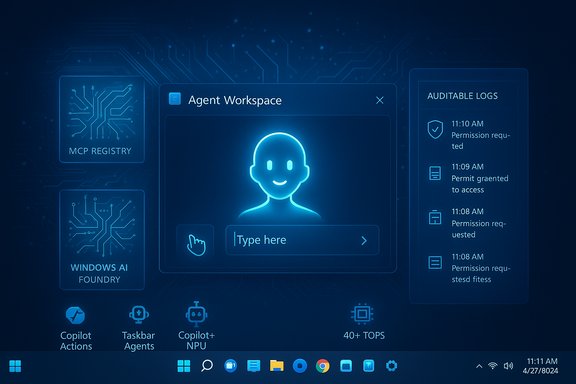
Microsoft’s recent previews and Ignite briefings introduce a set of platform primitives intended to make AI agents first‑class citizens of Windows 11: Agent Workspace, agent accounts, a system setting labeled Experimental agentic features, integration with the Model Context Protocol (MCP), and a hybrid compute model that leverages cloud reasoning plus local inference on Copilot+ PCs equipped with NPUs. These primitives are being surfaced initially to Windows Insiders and Copilot Labs as an opt‑in preview to gather telemetry and vet security and privacy controls before a broader rollout.Microsoft frames the move as one that compresses productivity by turning complex, fragmentary workflows (copy/paste across apps, table extraction, batch photo edits) into single natural‑language instructions executed by an agent. The company’s stated security posture emphasizes opt‑in defaults, runtime isolation, cryptographically signed agents, and per‑operation consent — design choices intended to make agent actions visible, auditable, and revocable.
What Microsoft announced (technical essentials)
Agent Workspace and agent accounts
- Agent Workspace: a contained, sandboxed desktop session where an AI agent executes UI automation (click, type, scroll), runs apps, and manipulates files in parallel with the human user. It’s designed to be lighter than a full virtual machine yet stronger than simple in‑process automation.
- Agent accounts: each agent runs under a dedicated standard (non‑administrator) Windows account so its actions are distinct in logs, access control lists (ACLs), and enterprise policy. This separation allows IT to apply familiar governance controls to agents as principals.
- Experimental agentic features toggle: the Agent runtime and account provisioning are gated behind a visible Settings path (reported in previews at Settings → System → AI components → Agent tools → Experimental agentic features). The toggle is off by default and typically requires admin consent to enable.
Copilot Actions, Taskbar Agents, and Ask Copilot
- Copilot Actions: the agentic feature that translates a natural‑language outcome into a sequence of UI interactions and tool calls, executes them in the Agent Workspace, and surfaces step‑by‑step progress so users can pause, stop, or take over. Actions are designed to be interruptible and auditable.
- Taskbar agents & Ask Copilot: agents appear on the taskbar as first‑class items with badges, progress indicators, and hover summaries. Ask Copilot expands the taskbar search into a conversational composer that can summon agents via an @ syntax. The intent is to make automation discoverable and monitorable.
Model Context Protocol (MCP) and Windows AI Foundry
- MCP support: Windows is adopting the Model Context Protocol as a standardized way for agents to discover and call tools, services, and connectors in a discoverable, auditable manner. This is aimed at reducing ad‑hoc integrations and making agent tooling more governable.
- Windows AI Foundry: a runtime and developer framework for hosting on‑device models and providing local registries for agent‑discoverable tools. Combined with MCP, it’s the plumbing intended to enable secure agent-to-tool communication without giving agents blanket system access.
Copilot+ PCs and the hardware gating
Microsoft’s hybrid model splits heavier reasoning tasks to the cloud while enabling latency‑sensitive and privacy‑sensitive inference locally on Copilot+ PCs equipped with Neural Processing Units (NPUs). Microsoft and independent reporting set a practical baseline for richer on‑device features in the neighborhood of 40+ TOPS (tera‑operations per second) of NPU throughput — a hardware gating that creates a two‑tier experience across the installed Windows base.How it works in practice (user flow)
- A user expresses an outcome to Copilot (typed or voice), e.g., “Extract tables from these invoices and create an Excel summary.”
- Copilot plans the multi‑step workflow and requests permission to access the necessary folders and connectors.
- If the user grants consent, Windows provisions a signed agent into an Agent Workspace running under an agent account.
- The agent executes its plan — interacting with desktop apps or MCP‑exposed tools — while showing progress in a floating UI and a taskbar icon.
- The user can monitor logs, pause, revoke permissions, or take control at any time; the agent leaves an auditable trace of actions.
Notable strengths and practical benefits
1. Productivity compression
Agents can significantly reduce repetitive, multi‑app chores into a single instruction — saving time and reducing context switching for users who routinely perform tasks like data extraction, batch edits, or report assembly. This is the core productivity promise of Windows 11 AI agents.2. Accessibility gains
Combining Copilot Voice, Copilot Vision, and agentic actions lowers barriers for users with mobility or dexterity challenges, enabling outcome‑oriented workflows via voice and screen‑aware automation. On‑device wake‑word spotting and local model support on Copilot+ hardware can make these experiences more private and responsive.3. Auditable agents and enterprise governance
Treating agents as distinct OS principals (agent accounts, signing, ACLs) plugs agent governance into existing enterprise controls (Intune/MDM, ACLs, SIEM logs). This is a pragmatic design that allows IT teams to extend familiar management frameworks to the new agent runtime.4. Hybrid privacy options
The hybrid architecture — small detectors and SLMs on device, heavier cloud reasoning when needed — combined with a hardware tier for on‑device inference, gives users and admins choices about where sensitive processing occurs. For privacy‑sensitive workloads, the Copilot+ on‑device path can keep more data local.Risks, unknowns, and realistic attack surfaces
1. Expanded attack surface
Allowing signed agents to run continuous background processes with file and app interaction increases the OS attack surface substantially. A compromised agent or signing key could be used to perform pernicious actions at scale. The presence of background agents with file access is a new class of threat that requires rigorous supply‑chain and runtime defenses.2. UI automation fragility
Agents that simulate human interactions (clicks, typing, scrolling) are inherently brittle when confronted with app UI changes, localization differences, or unexpected errors. That brittleness can cause incorrect actions (wrong files moved, incorrect form submissions) with tangible consequences. Microsoft’s visible step‑by‑step model reduces risk, but brittle automation remains a practical limitation.3. Persistent background agents and data retention
Agents that run continuously — scanning for changes, monitoring folders, or executing scheduled tasks — raise questions about what data is retained, for how long, and where logs are stored. Transparent audit trails are essential, but retention policies, telemetry, and default log destinations are still points to watch as the preview evolves.4. Consent complexity and social engineering
Per‑operation permission prompts are a protection, but users routinely click through dialogs. Sophisticated social engineering could trick a user into granting excessive permissions to a malicious agent that appears legitimate (especially if it carries a valid signature or looks integrated into the OS). Enterprises will need stronger policy enforcement to avoid a consent‑driven bypass of controls.5. Supply‑chain and signing risk
Microsoft’s model relies on cryptographic signing of agents and certificate revocation to limit rogue binaries. But signing alone is not a panacea: compromised developer keys, weak certificate practices, or delayed revocation windows can still be exploited. The runtime must integrate rapid, enforced revocation mechanisms and runtime attestation to be defensible at scale.6. Enterprise readiness and compliance gaps
Many enterprise features are “coming soon” or remain in private preview — full Intune hooks, DLP integrations, and SIEM pipelines for agent logs are not yet universally available. That gap makes broad enterprise deployment premature until these management and compliance controls are hardened and publicly documented.Practical guidance for users, power users, and IT administrators
For consumers and power users
- Keep the default: leave Experimental agentic features disabled until you understand the privacy implications and the specific agents you plan to run.
- Test in a safe environment: enable agent features first on a test PC or non‑production profile and exercise the agent workflows you plan to use.
- Limit folder access: grant agents access only to the specific folders they need rather than broad profile access. Prefer explicit folder selection over blanket permissions.
For IT administrators and security teams
- Evaluate in lab mode: stage agentic features in a lab or pilot group before company‑wide enablement.
- Enforce agent signing and revocation policies: only allow agents signed by trusted cert chains and automate revocation responses into your security operations playbooks.
- Integrate agent logs into SIEM: ensure agent actions are logged as agent‑account events and feed those logs into centralized monitoring and alerting.
- Tighten OAuth and connector governance: treat agent connectors (Gmail, OneDrive, etc. like any other third‑party integration and vet scopes and consent screens.
- Use MDM to restrict the experimental toggle: deploy policies that keep the experimental toggle off by default and control which users or groups can enable it.
What to watch next (verification checklist)
- Public enterprise controls: confirm availability of Intune/MDM policies, DLP integration, and centralized certificate revocation handling before enabling agents broadly.
- Agent signing and registry mechanics: how Microsoft will publish the curated MCP registry, signers’ trust anchors, and revocation lists.
- Retention and telemetry policies: explicit documentation about what agent activity is logged locally, what is sent to Microsoft telemetry, and how long that telemetry is retained.
- Copilot+ hardware certification: clear, verifiable NPU metrics and OEM claims for Copilot+ PCs that substantiate the 40+ TOPS guidance. Verify vendor test data rather than marketing claims.
Critical analysis — balanced assessment
Microsoft’s agentic Windows vision is bold and technically coherent: building agent isolation, per‑agent accounts, and an MCP registry into the OS is a pragmatic route to making agents manageable rather than leave them as ad‑hoc, app‑level automations. The combination of visible, interruptible execution and cryptographic signing addresses many of the immediate governance questions that arise when an AI starts to act autonomously on a desktop. These are important and well‑considered design choices that deserve credit.However, agentic automation reshapes the desktop threat model in material ways. Visibility and signing reduce, but do not eliminate, risk. The real test will be how the model holds up under adversarial conditions: compromised signers, sophisticated social engineering, and supply‑chain attacks. In addition, UI automation remains brittle and error‑prone, and continuous background agents create new privacy and retention considerations that must be explicitly managed. Until enterprises and auditors can validate the telemetry, policy controls, and revocation mechanics in production‑grade deployments, the prudent path for many organizations will be measured pilots rather than wholesale enablement.
Recommended roadmap for safe adoption
- Pilot in a controlled environment with a representative set of agent workflows (file extraction, batch edits, report generation).
- Validate logging and auditing: ensure agent account events and workspace actions are captured in your SIEM and produce understandable, actionable alerts.
- Lock down agent provisioning: require MDM policies that limit who can enable Experimental agentic features and which agents can be installed.
- Review signing and trust workflows: define a trust registry of allowed signers and automate certificate revocation handling.
- Map DLP policies to MCP connectors and agent tool calls so sensitive data does not leak through misconfigured connectors.
Conclusion
Windows 11’s introduction of AI agents — Copilot Actions, Agent Workspace, and the MCP ecosystem — is a consequential step in making the OS not just intelligent, but actionable. The design shows careful attention to pragmatic mitigations: opt‑in defaults, per‑agent accounts, runtime isolation, signed agents, and visible, interruptible execution. These elements align with a sensible security posture for a platform that now supports autonomous actors.At the same time, this evolution introduces a new category of operational and security risk. The value of agentic automation will hinge on Microsoft and its ecosystem delivering robust enterprise controls, transparent telemetry and retention rules, fast and reliable revocation of compromised agents, and clear hardware certification for Copilot+ experiences. Until those pieces are fully documented, tested, and available to security practitioners, the safest course for most users and organizations is cautious experimentation — pilot first, harden policy and monitoring, then scale.
Source: India News Network https://www.indianewsnetwork.com/en...-agents-windows-11-boost-efficiency-20251119/
