

Microsoft’s recent roadmap for Windows 11 is loud about AI, gaming, and new device experiences — but the OS still carries a cluster of persistent, user-facing problems that Microsoft must fix if it wants to keep desktops and gaming PCs from slipping toward alternate platforms. The conversation isn’t academic: PC users, reviewers, and enterprise admins are asking for practical fixes that restore control, transparency, and predictable performance. The PCMag UK piece that kicked off this wave of feedback neatly summarized five of those pain points and the community’s expectations — and those items still matter in the run-up to 2026 Windows updates. / Overview
Windows 11’s evolution since its 2021 debut split into two visible currents: a design-and-experience refresh (centered taskbar, rounded UI, Copilot integration) and an aggressive push to embed AI across the OS. Microsoft’s own messaging — “making every Windows 11 PC an AI PC” — signals that AI will be baked deeply into Windows features, from taskbar agents to offline on-device capabilities on Copilot+ machines. These strategic moves are real and deliberate, and Microsoft has published the new AI and Copilot surfaces as part of its Windows experience story.
At the same time, Microsoft is shipping a new console-like Xbox Full Screen Experience (FSE) for handheld Windows devices — first shown on ASUS’ ROG Xbox Ally and then broadened to other handhelds — specifically to reduce desktop overhead and make Windows handhelds behave more like dedicated gaming devices. The intent is clear: recapture handheld gaming that has gravitated to SteamOS and the Steam Deck.
Those forward moves are noteworthy, but they overlay long-standing grievances: intrusive upsells and Start menu promotions, confusing Copilot rollout and data-handling questions, heavy RAM usage, poor defaults for browser/search choices, and Windows’ struggle to match SteamOS on handheld gaming performance. Below I break each issue down, verify the facts where possible, and explain what Microsoft must do — and why it matters.
At the same time, history matters: the Windows Recall rollout (a feature to chronicle on-screen activity for later retrieval) created privacy backlash because early versions captured lots of screenshots, raised concerns about sensitive data, and initially seemed to lack clear opt-in and robust local protections. Microsoft paused and reworked Recall after public pushback; subsequent previews emphasized opt-in behavior and local-only storage in secure enclaves, but skepticism remains.
Microsoft’s Xbox Full Screen Experience is an attempt to close that gap by making Windows boot into a lean, controller-first launcher and trimming nonessential services during gaming sessions. The feature is rolling out to handhelds following previews on Ally devices and Insider builds. But proving parity with SteamOS requires more than a shell — it requires aggressive runtime and driver tuning, cooperation with OEMs, and testable, repeatable power profiles.
If Microsoft wants Windows 11 to be a platform people love in 2026 and beyond, do these five things:
Stop the noise. Let users decide. Make performance measurable. Do those three things and Windows 11 will feel like the OS people were promised — not an advertising billboard that occasionally surprises them with features they didn’t ask for.
Source: PCMag UK 5 Things Microsoft Still Needs to Fix in Windows 11
Windows 11’s evolution since its 2021 debut split into two visible currents: a design-and-experience refresh (centered taskbar, rounded UI, Copilot integration) and an aggressive push to embed AI across the OS. Microsoft’s own messaging — “making every Windows 11 PC an AI PC” — signals that AI will be baked deeply into Windows features, from taskbar agents to offline on-device capabilities on Copilot+ machines. These strategic moves are real and deliberate, and Microsoft has published the new AI and Copilot surfaces as part of its Windows experience story.
At the same time, Microsoft is shipping a new console-like Xbox Full Screen Experience (FSE) for handheld Windows devices — first shown on ASUS’ ROG Xbox Ally and then broadened to other handhelds — specifically to reduce desktop overhead and make Windows handhelds behave more like dedicated gaming devices. The intent is clear: recapture handheld gaming that has gravitated to SteamOS and the Steam Deck.
Those forward moves are noteworthy, but they overlay long-standing grievances: intrusive upsells and Start menu promotions, confusing Copilot rollout and data-handling questions, heavy RAM usage, poor defaults for browser/search choices, and Windows’ struggle to match SteamOS on handheld gaming performance. Below I break each issue down, verify the facts where possible, and explain what Microsoft must do — and why it matters.
 1. AI in Windows 11: optional, auditable, and trustworthy
What’s happening now
Microsoft is integrating Copilot and agentic AI experiences into the taskbar and core search surfaces, and it plans to surface agents users can invoke directly from the taskbar. That’s a deliberate product direction: make the OS a place where agents live and run. Microsoft describes these features as part of turning Windows into a more proactive, assistant-driven operating system.At the same time, history matters: the Windows Recall rollout (a feature to chronicle on-screen activity for later retrieval) created privacy backlash because early versions captured lots of screenshots, raised concerns about sensitive data, and initially seemed to lack clear opt-in and robust local protections. Microsoft paused and reworked Recall after public pushback; subsequent previews emphasized opt-in behavior and local-only storage in secure enclaves, but skepticism remains.
Why users are uneasy
- Many users don’t trust the product defaults. When a feature touches screen content, keystrokes, or context, people expect explicit, granular control over what is captured and whether anything leaves the device. Early missteps with Recall amplified that distrust.
- Microsoft’s Copilot positioning has shifted repeatedly (app formats, UI placements, product names), which makes it hard for users to understand where data flows and what the opt-out options are. Transparency and simple controls are missing in perception if not in mechanics.
What Microsoft should do — and how it helps trust
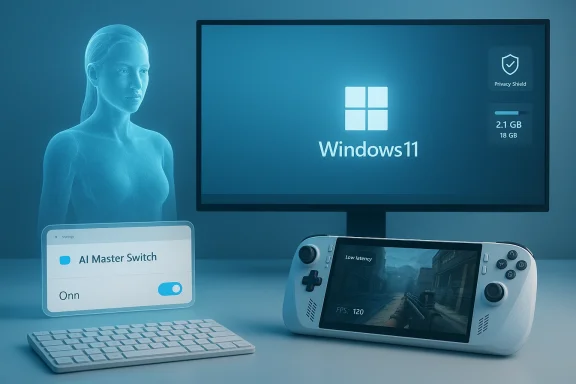
- Introduce a single “AI master switch” in Settings that defaults AI features to off and lets users enable only the agents they explicitly want. This should be discoverable and manageable via Group Policy/MDM for enterprise admins.
- Provide auditable local logs and privacy-first defaults: show exactly what was processed, when, and whether anything left the device. If cloud processing occurs, label it clearly and show the data path.
- Per-feature opt-in and fine-grained exclusions (e.g., bank sites, screen locker, password entry fields) enforced at the OS level rather than scattered across individual apps.
- Independent security and privacy audits and short plain-language summaries of what the audits found. Public, concrete audit outcomes rebuild credibility faster than opaque reassurances.
2. More efficient RAM usage: not a nice-to-have anymore
The problem
Modern Windows plus modern applications consume more RAM than many users expect. Browser tabs, background services, cloud sync clients, and resident AI agents all push memory pressure on typical machines. As DRAM and high-bandwidth memory components increasingly compete with AI data-center demand, memory costs and supply dynamics have shifted industry-wide. Trend reports and supply-chain trackers show that AI-driven server demand increased pressure on DRAM and HBM supply — and that has pricing and allocation consequences down the stack.Why this matters to end users
- Memory pressure causes swapping, stutters, and worse battery life on mobile devices. For users who keep machines for multiple years, the software’s memory appetite directly affects device longevity.
- On handheld gaming PCs, small improvements in how the OS uses RAM or suspends background services have measurable effects on frame rates and thermal stability.
What Microsoft can—and should—do
- Workload-aware memory policies: Windows already has good power-savings profiles on laptops; replicate that model for memory. Introduce an Adaptive Memory Mode where the OS prioritizes foreground gaming or creative workloads and trims background user-mode services aggressively.
- Lightweight session posture: for gaming or low-RAM devices, offer a “minimal runtime” option that limits resident services, disables low-priority background telemetry, and reduces prefetching. This should be a one-click setting in Settings > System > Performance.
- Improve memory reclamation and compression heuristics: invest in targeted improvements to the memory manager to keep commonly used pages in compressed RAM rather than swapping to disk. Microsoft has options here, but it must make this a visible, supported feature rather than a black-box tuning exercise.
- Expose memory cost of features: show users which system features and agents consume the most RAM and let them toggle them off with one click.
3. Respect browser and search choices everywhere
The reality
Windows still redirects some embedded OS links and Start menu searches to Microsoft Edge and Bing even when users select a different default browser or search engine. That behavior has driven the ecosystem of third-party utilities (EdgeDeflector, MSEdgeRedirect) and lots of community frustration. Microsoft has historically made it difficult to fully override these routes, prompting media guides and long forum threads on workarounds.Why this is a problem
- It undermines the core concept of default apps and user preferences. When the OS silently routes some clicks to Microsoft’s services, users lose trust.
- Workarounds are fragile: Microsoft can and has changed plumbing that third-party tools rely on, leaving users scrambling to restore the experience they expect.
What needs to change
- Respect the default system browser and search engine across all OS surfaces — Start menu search, Widgets, Settings links, and notifications. If Microsoft wants to promote Edge and Bing, do it with a visible, opt-in recommendation rather than invisibly rerouting user actions.
- Expose a single, discoverable control: Settings → Apps → Defaults → Respect system defaults (or similar) that ensures every place a web link might open honors the default.
- If legal frameworks require special handling (e.g., region-specific restrictions), make those exceptions explicit and user-facing.
4. Far fewer ads — and a single kill switch for promotional nudges
The problem
Windows 11 increasingly surfaces product recommendations in the Start menu, Settings, Lock screen (Spotlight), and other places. Although many of these can be disabled, they’re scattered across multiple toggles, so achieving an “ad-free” system often requires a long settings tour or registry edits. That friction feeds resentment: users pay for Windows and expect a respectful experience.Why it matters
- Advertising inside a paid OS undermines perceived product value and drives a persistent sense that Windows is selling to rather than serving the user.
- Fragmented controls cause churn: users reinstall or avoid updates rather than hunt down the right combination of toggles.
Straightforward fixes Microsoft can ship
- Introduce an “OS Promotions” master toggle in Settings → Privacy & Security that disables all Microsoft-promoted content across the OS (Start recommendations, Settings suggestions, personalized offers, and Spotlight promotions). That toggle should be honored persistently across updates.
- Enterprise ad-free SKU: provide an explicit ad-free SKU or an image option for enterprise/OEMs that ships with promotional content disabled.
- Stop full‑screen and deceptive promotional UI patterns: promotions shouldn’t look or behave like system warnings or hijack essential flows.
5. A real SteamOS competitor — or a Windows mode that prioritizes gaming
The situation
Valve’s SteamOS (and the Steam Deck) forced Microsoft to confront a hard truth: a lean, gaming-first Linux stack often beats full-featured Windows on thermally constrained handheld hardware. Multiple independent tests of identical hardware (for example, Lenovo’s Legion Go S and other handheld comparisons) have shown SteamOS outperforming Windows 11 in frame rates and battery life. Valve’s work on Proton, Mesa drivers, and a streamlined runtime gives it an edge that Windows’ general-purpose design struggles to match in this niche.Microsoft’s Xbox Full Screen Experience is an attempt to close that gap by making Windows boot into a lean, controller-first launcher and trimming nonessential services during gaming sessions. The feature is rolling out to handhelds following previews on Ally devices and Insider builds. But proving parity with SteamOS requires more than a shell — it requires aggressive runtime and driver tuning, cooperation with OEMs, and testable, repeatable power profiles.
What Microsoft must deliver (and quickly)
- A dedicated “Gaming Mode” OS posture that is more than a UI: it must minimize background activity, secure deterministic timer behavior for low-latency input, and provide tuned power governors for APUs used in handhelds. The Xbox FSE is a good start; make it configurable, testable, and available across OEMs.
- First-class driver and runtime partnership with AMD/NVIDIA/Intel to ensure Windows drivers provide the same low-overhead shader paths and suspend/resume stability Valve achieves with Mesa.
- An official “Gaming SKU” or lightweight Windows image for handhelds that OEMs can ship (or that Windows offers as a selectable installation option), similar to how mobile OSes provide stripped-down experiences for low-power devices.
- A measurable performance & battery benchmark program: publish the metrics Microsoft will target (e.g., frames per watt or median suspend/resume time) and measure builds against them in public test suites.
Verifying the load‑bearing claims (what I checked)
- Windows 10 end-of-support: Microsoft confirms Windows 10 reached end-of-support on October 14, 2025. This affects upgrade urgency and enterprise planning.
- Microsoft’s “AI PC” messaging and taskbar agent plans: Microsoft’s Windows Experience Blog and Ignite materials outline the intent to integrate Copilot and agents into the taskbar and to position Windows as the home for AI on PCs.
- Xbox Full Screen Experience and ROG Ally: Microsoft and ASUS have promoted a handheld-first Xbox FSE; press coverage and OEM documentation document the rollout to ROG Ally devices and a broader enablement for other handhelds.
- SteamOS vs Windows handheld performance: independent testing and reporting (Ars Technica, PCGamesN, Windows Central, Phoronix) show SteamOS often delivering battery life on identical handheld hardware, thanks to a lean runtime and driver stack.
- Recall controversy and Microsoft’s response: reputable outlets reported the early backlash to Recall and Microsoft’s rework actions; Microsoft also published privacy-oriented changes in later previews.
- Default browser/search friction and third‑party workarounds: multiple how‑to and investigative pieces document that Windows has historically redirected certain UI flows to Edge/Bing and that community tools exist to restore behavior.
- OS ads and Start menu promotions: guides and reviews show how recommendations surface in Start and Settings and demonstrate how to disable them; users and admins have asked for a centralized control.
- DRAM and memory market pressures from AI data centers: market trackers and industry analysis indicate rising demand for HBM/DRAM tied to AI server expansion; these supply dynamics put upward pressure on component prices and allocation.
Practical mitigations for users and IT right now
While Microsoft improves the product, here are practical steps you should take today.- To regain browser/search control: set your preferred default in Settings → Apps → Default apps; consider using community tools like MSEdgeRedirect only if you understand the trade-offs and accept they may break with future updates.
- To reduce promotional content: Settings → Personalization → Start → turn off “Show recommendations”; Settings → Privacy & Security → Recommendations & offers → disable personalized offers and tips. These toggles reduce most in-OS promotions.
- To limit Recall/Copilot surfaces: use the Copilot and Privacy settings to opt out of features that capture screen content; where possible, enable local-only modes and block network access for features you don’t want sending data to the cloud.
- For gaming handhelds: test a SteamOS image where feasible if you prioritize battery life and peak gaming performance on handheld hardware; evaluate whether Microsoft’s FSE or Windows handheld updates sufficiently close the gap for your use case. Independent benchmarks show SteamOS often outperforms Windows in thermally constrained scenarios.
The trade-offs Microsoft faces — and why it matters
Microsoft is balancing competing priorities: monetize and promote services, push AI to the mainstream, defend the gaming ecosystem, and maintain enterprise-grade manageability. Each choice has trade-offs:- Pushing AI by default may accelerate modern feature adoption, but it risks alienating privacy-conscious power users and enterprises if opt‑outs or transparency are poorly implemented.
- Aggressive in-OS promotions and nudges can grow subscriptions (short-term revenue) but damage long-term platform trust (long-term retention).
- Tight hardware and feature integration (Copilot+ PCs, NPUs, HBM prioritization) drives innovation but creates supply and cost pressures that ripple to consumers and OEMs. Market reports on memory supply and pricing substantiate those pressures.
Conclusion — what to expect and what to demand
Windows 11’s roadmap is ambitious and, in places, correct: AI will change how people interact with their computers, and Microsoft must lead in delivering agentic capabilities that are useful. But innovation without control is friction: users are already telling Microsoft with their feedback, forum posts, and alternative platform choices that choice, clarity, and performance matter more than additional bells and whistles.If Microsoft wants Windows 11 to be a platform people love in 2026 and beyond, do these five things:
- Make AI optional by default; provide a single, auditable AI master control.
- Invest in measurable memory-efficiency improvements and an adaptive memory mode for low‑RAM and handheld devices.
- Respect default browser and search engine selections everywhere in the OS.
- Introduce a centralized ad‑free toggle and stop pushing persistent promotional content into system-critical surfaces.
- Deliver a real, optimized gaming posture (or lightweight gaming SKU) that competes with SteamOS on handhelds.
Stop the noise. Let users decide. Make performance measurable. Do those three things and Windows 11 will feel like the OS people were promised — not an advertising billboard that occasionally surprises them with features they didn’t ask for.
Source: PCMag UK 5 Things Microsoft Still Needs to Fix in Windows 11
