

Microsoft added a Windows 11 policy in the April 2026 update that lets administrators remove the Microsoft Copilot app, while power users can still turn to third-party scripts such as RemoveWindowsAI to strip broader AI components from the operating system. The important part is not that Copilot can now be made to disappear from more places. It is that Microsoft has tacitly admitted the AI assistant needs an off-ramp as much as it needs an entry point. For Windows users and IT departments, the Copilot fight has moved from “Is AI useful?” to “Who gets to decide when it is present?”
For much of the Windows 11 AI era, Copilot has felt less like an optional assistant and more like a product strategy with a keyboard shortcut. It appeared in the taskbar, in system experiences, in apps, in Microsoft 365 surfaces, and, for some users, in places where the operating system previously did not try to complete their thoughts. The irritation was not always about artificial intelligence itself. It was about defaultness.
That distinction matters. Plenty of Windows users will happily use AI tools when they are opening a browser tab, debugging PowerShell, drafting an email, or summarizing a document. What they tend to resent is the feeling that the operating system has become a promotional surface for whatever Microsoft wants to normalize next.
The new Group Policy option changes that conversation, but only partially. “Remove Microsoft Copilot app” is the kind of administrative switch Windows should have had before Copilot became a fixture in the shell. It gives IT departments a supported path to remove the app rather than playing whack-a-mole with shortcuts, provisioned packages, registry edits, and user complaints.
Still, this is not Microsoft abandoning Copilot. It is Microsoft narrowing the blast radius of its rollout. The company is keeping the AI strategy, but it is learning that Windows users expect control to be surfaced in the same official machinery that deployed the feature in the first place.
That is a very different proposition from telling users to right-click an icon and uninstall whatever happens to be visible today. Group Policy is durable. It fits enterprise deployment models. It can be audited, documented, exported, and, in larger environments, pushed through management tooling rather than performed by hand on individual PCs.
The catch is that this policy is narrower than the emotional debate around Copilot. It targets the Microsoft Copilot app, not every AI-adjacent feature Microsoft has threaded into Windows and its bundled applications. It is an official way to remove one major manifestation of Copilot, not a theological reversal of the AI-first Windows roadmap.
There are also eligibility wrinkles. Reports around the April 2026 update indicate the policy may not appear for every Windows 11 user, depending on edition, installed Copilot components, and prior app state. That makes the feature feel less like a universal consumer control and more like an administrative accommodation aimed at managed fleets.
That framing is important because it reveals Microsoft’s likely priority. The company is not primarily trying to soothe every annoyed home user who dislikes AI branding. It is trying to keep Windows acceptable to the organizations that need predictable controls before they can approve a platform strategy.
For IT administrators, that difference is not pedantic. A disabled feature can still exist on disk, appear in inventories, re-emerge after servicing, or confuse help desk scripts. A removed app is easier to explain, even if Windows may still contain other AI plumbing below the surface.
This is where Microsoft’s Copilot story has become messy. The brand “Copilot” now covers multiple things: a consumer chatbot, Microsoft 365 Copilot, Windows shell integrations, browser integrations, app-level writing tools, and AI-powered features that may not use the Copilot name at all. Removing one Copilot app does not necessarily remove the concept from the system.
The result is a layered control problem. One policy can remove the app. Another can disable an experience. Separate Microsoft 365 admin controls may govern office productivity surfaces. Browser policies may govern Edge. Windows feature updates can then change the ground underneath all of it.
For enthusiasts, that feels like bloat. For sysadmins, it feels like scope creep.
This is not unusual in Windows culture. Every major Windows era has produced debloaters, privacy scripts, service tweakers, telemetry blockers, and “make it mine again” utilities. Windows enthusiasts have always drawn a line between an operating system as shipped and an operating system as tolerated.
But AI makes that impulse sharper. With ordinary bundled apps, the perceived offense is wasted space or clutter. With AI features, the perceived offense often includes privacy, data handling, unwanted cloud dependencies, and the creeping suspicion that local workflows are being redesigned around engagement metrics rather than user intent.
A script can be useful, but it also shifts risk from Microsoft to the user. Running a remote PowerShell command from the internet is not a trivial act, even when the code is open source and hosted publicly. Users should read the script, understand what it changes, and ideally test it on a non-critical machine before trusting it on a work system.
That warning is not a defense of Microsoft’s rollout. It is a reminder that a community workaround is not the same thing as a supported platform control. The reason scripts like this gain traction is precisely because official controls often lag behind user frustration.
That is why tools that advertise removal of Copilot and Recall together have found an audience. Users may not distinguish between every component in Microsoft’s AI architecture, but they understand the category. If it is part of the new AI layer, and if it was not explicitly requested, some users want it gone.
Microsoft has tried to respond by emphasizing security boundaries, opt-in behavior, enterprise controls, and hardware requirements. Those things matter. But the company is still paying for the original sin of presenting AI as an inevitable platform direction before fully earning trust in the controls around it.
For organizations, the calculus is less emotional but just as serious. AI features can affect compliance reviews, data governance, endpoint baselines, user training, and incident response assumptions. A security team does not merely ask whether a feature is clever. It asks whether the feature changes the data exposure model.
That is where supported removal policies become more than a convenience. They become part of the evidence an administrator can show to auditors, privacy officers, and skeptical department heads.
Consumers and enterprises experience this tension differently. A home user sees a new button and wonders why the PC keeps changing. An IT admin sees the same button and wonders how many tickets it will generate, which policy controls it, whether it can be removed from a base image, and whether next month’s cumulative update will bring it back.
That is the hidden cost of feature enthusiasm. Every new surface area has to be documented, secured, governed, localized, trained, supported, disabled, and sometimes defended in front of people who never asked for it. Microsoft’s ability to ship quickly is not the same as a customer’s ability to absorb change.
The April 2026 Copilot removal policy is therefore best read as a pressure valve. It lets Microsoft continue promoting AI to users who want it while giving managed environments a formal way to say no, or at least not yet. That is a healthier model than pretending one default suits everyone.
But it also raises an uncomfortable question for Microsoft. If the company needs official policies to remove AI experiences shortly after pushing them aggressively, perhaps the rollout cadence is outpacing user consent.
That divide has existed for years, but Copilot makes it harder to justify. The user who bought a consumer Windows 11 PC is just as entitled to say, “I do not want this assistant integrated into my operating system,” as the administrator managing 5,000 laptops. Control should not be treated as a premium management feature.
Microsoft may argue that consumer simplicity requires fewer switches. There is some truth to that. A Settings app filled with enterprise-grade toggles would confuse many users. But the answer is not to hide meaningful consent behind Windows edition boundaries.
A simple consumer control could exist: remove Copilot from this PC, disable Copilot entry points, and prevent reinstall unless I ask for it. That would not satisfy every debloater, but it would address the mainstream complaint. It would also communicate confidence. Products users can decline tend to feel less coercive.
Instead, the current arrangement encourages the worst kind of Windows advice: a mixture of legitimate policy changes, registry spelunking, GitHub scripts, and forum folklore. That is fine for enthusiasts. It is not a serious consent model for hundreds of millions of PCs.
This is where users should watch the language carefully. Microsoft can reduce “Copilot” surfaces while increasing AI-powered experiences. It can rename features as writing tools, image tools, agents, actions, or contextual assistance. The brand may become less loud even as the architecture becomes more pervasive.
That is not inherently bad. Some of the best AI features will probably be the ones that do not announce themselves as AI at all. A better search box, a smarter accessibility tool, a more useful troubleshooting assistant, or a local summarization feature can improve Windows without feeling like an advertisement.
The problem is trust. When users believe a company has overreached, even good features arrive under suspicion. A writing tool in Notepad becomes another incursion. A taskbar assistant becomes another land grab. A helpful local model becomes another reason to dig through privacy settings.
Microsoft can recover from that, but not through branding alone. It has to make refusal ordinary. The operating system needs to treat “no” as a first-class configuration, not an obstacle to be worked around.
That matters for Intune, configuration baselines, education environments, regulated industries, and any organization trying to standardize Windows 11 before broader Copilot adoption. Admins need to know not just whether Copilot can be removed today, but whether that removal can survive provisioning, user sign-in, servicing, and future updates.
The practical question is lifecycle. Does the policy remove Copilot for existing users, new users, or both? Does it prevent reinstallation? How does it interact with Microsoft 365 Copilot? What happens when Windows receives a feature enablement package? How does it behave on shared PCs, virtual desktops, and cloud-managed endpoints?
Those are the questions that separate a news headline from operational reality. A single local test on one PC can show that a policy exists. It cannot prove how the control behaves across a messy fleet with multiple Windows builds, app provisioning states, and update rings.
That is why administrators should treat the new policy as a welcome addition, not a completed project. Test it. Document it. Build detection logic around it. Assume Microsoft’s AI surface area will keep changing.
Neither path is irrational. A corporate admin should usually prefer the supported route, because supportability is part of the job. A privacy-focused enthusiast with a full backup and a high tolerance for repair installs may reasonably choose the more aggressive route. The mistake is pretending they are equivalent.
The Group Policy path is also reversible in a way enterprises understand. Change the policy, redeploy the app if needed, and continue managing the device. A broad removal script may touch packages, tasks, services, registry keys, and permissions that are harder to reconstruct later.
That does not mean scripts are reckless by definition. Many are careful, documented, and maintained by people who understand Windows internals. But the user running them must understand the bargain. You are substituting community maintenance for vendor support.
The deeper point is that Microsoft created the conditions for this bargain. When the official system does not provide a satisfying “remove it all” answer, the community will build one. Windows has always been hackable enough to allow that, and Microsoft has always benefited from that culture until it becomes inconvenient.
That is why the new removal policy may be more important than many Copilot features themselves. A controllable feature can be piloted. An uncontrollable feature becomes a blocker. Admins are far more likely to tolerate aggressive innovation when they know they can freeze, remove, or defer it.
Windows 11 adoption has already forced organizations through hardware eligibility, application compatibility, user training, and security baseline work. Adding AI governance on top of that is not a small ask. Every Copilot surface has to fit into a broader endpoint strategy.
There is also a political dimension inside organizations. Some executives want AI everywhere. Some legal and compliance teams want it nowhere until policies mature. Some users love it. Others view it as surveillance, distraction, or clutter. The endpoint team gets stuck translating all of that into settings.
A real off switch does not end the debate. It makes the debate governable.
For WindowsForum readers, the sensible approach depends less on ideology than on risk tolerance and edition. If you manage machines for other people, prefer the Microsoft-supported policy route first. If you are modifying your own PC, understand that the more complete the removal, the more responsibility you assume for testing and recovery.
The less generous reading is that Microsoft still sees Windows as a distribution channel first and a user-controlled operating system second. Copilot’s placement, branding, and persistence have often felt optimized for adoption metrics rather than user agency. The new removal policy helps, but it does not erase that memory.
The next test will not be whether Microsoft can invent more AI features for Windows. It clearly can. The test will be whether each feature arrives with a clear purpose, a visible control, a documented management path, and a durable way to say no.
If Microsoft wants Copilot to become a trusted part of Windows rather than the next thing enthusiasts rip out after setup, it has to make restraint part of the product. The future of AI on Windows will not be decided only by model quality or clever integrations; it will be decided by whether users believe the PC still belongs to them.
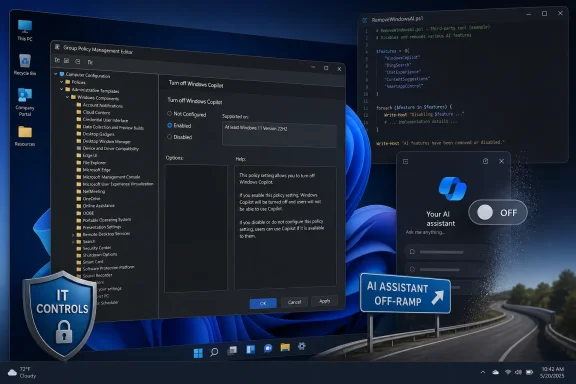 Microsoft Finally Discovers the Value of an Exit Door
For much of the Windows 11 AI era, Copilot has felt less like an optional assistant and more like a product strategy with a keyboard shortcut. It appeared in the taskbar, in system experiences, in apps, in Microsoft 365 surfaces, and, for some users, in places where the operating system previously did not try to complete their thoughts. The irritation was not always about artificial intelligence itself. It was about defaultness.That distinction matters. Plenty of Windows users will happily use AI tools when they are opening a browser tab, debugging PowerShell, drafting an email, or summarizing a document. What they tend to resent is the feeling that the operating system has become a promotional surface for whatever Microsoft wants to normalize next.
The new Group Policy option changes that conversation, but only partially. “Remove Microsoft Copilot app” is the kind of administrative switch Windows should have had before Copilot became a fixture in the shell. It gives IT departments a supported path to remove the app rather than playing whack-a-mole with shortcuts, provisioned packages, registry edits, and user complaints.
Still, this is not Microsoft abandoning Copilot. It is Microsoft narrowing the blast radius of its rollout. The company is keeping the AI strategy, but it is learning that Windows users expect control to be surfaced in the same official machinery that deployed the feature in the first place.
The New Group Policy Is a Concession, Not a Surrender
The cleanest removal path now runs through Group Policy on Windows 11 Pro, Enterprise, Education, and similar managed editions. The route is familiar: open the Local Group Policy Editor, go to User Configuration, then Administrative Templates, then Windows Components, then Windows AI, and enable the policy to remove the Microsoft Copilot app. Once applied, Windows removes the app for the affected user scope.That is a very different proposition from telling users to right-click an icon and uninstall whatever happens to be visible today. Group Policy is durable. It fits enterprise deployment models. It can be audited, documented, exported, and, in larger environments, pushed through management tooling rather than performed by hand on individual PCs.
The catch is that this policy is narrower than the emotional debate around Copilot. It targets the Microsoft Copilot app, not every AI-adjacent feature Microsoft has threaded into Windows and its bundled applications. It is an official way to remove one major manifestation of Copilot, not a theological reversal of the AI-first Windows roadmap.
There are also eligibility wrinkles. Reports around the April 2026 update indicate the policy may not appear for every Windows 11 user, depending on edition, installed Copilot components, and prior app state. That makes the feature feel less like a universal consumer control and more like an administrative accommodation aimed at managed fleets.
That framing is important because it reveals Microsoft’s likely priority. The company is not primarily trying to soothe every annoyed home user who dislikes AI branding. It is trying to keep Windows acceptable to the organizations that need predictable controls before they can approve a platform strategy.
Turning Off Copilot Is Not the Same as Removing It
Windows already had a separate “Turn off Windows Copilot” policy under Windows Components and Windows Copilot. That older control is still relevant, but it solves a different problem. Disabling access to Copilot is not the same as removing the app package or eliminating every entry point.For IT administrators, that difference is not pedantic. A disabled feature can still exist on disk, appear in inventories, re-emerge after servicing, or confuse help desk scripts. A removed app is easier to explain, even if Windows may still contain other AI plumbing below the surface.
This is where Microsoft’s Copilot story has become messy. The brand “Copilot” now covers multiple things: a consumer chatbot, Microsoft 365 Copilot, Windows shell integrations, browser integrations, app-level writing tools, and AI-powered features that may not use the Copilot name at all. Removing one Copilot app does not necessarily remove the concept from the system.
The result is a layered control problem. One policy can remove the app. Another can disable an experience. Separate Microsoft 365 admin controls may govern office productivity surfaces. Browser policies may govern Edge. Windows feature updates can then change the ground underneath all of it.
For enthusiasts, that feels like bloat. For sysadmins, it feels like scope creep.
The Third-Party Script Exists Because the Official Controls Arrived Late
RemoveWindowsAI, the GitHub-hosted PowerShell project mentioned in the Lifehacker piece, exists because a certain class of Windows user does not want to disable Copilot politely. They want to remove Copilot, Recall-related components, AI packages, registry policy hooks, scheduled tasks, and whatever else appears to participate in Windows’ AI stack. It is a more aggressive answer to a broader complaint.This is not unusual in Windows culture. Every major Windows era has produced debloaters, privacy scripts, service tweakers, telemetry blockers, and “make it mine again” utilities. Windows enthusiasts have always drawn a line between an operating system as shipped and an operating system as tolerated.
But AI makes that impulse sharper. With ordinary bundled apps, the perceived offense is wasted space or clutter. With AI features, the perceived offense often includes privacy, data handling, unwanted cloud dependencies, and the creeping suspicion that local workflows are being redesigned around engagement metrics rather than user intent.
A script can be useful, but it also shifts risk from Microsoft to the user. Running a remote PowerShell command from the internet is not a trivial act, even when the code is open source and hosted publicly. Users should read the script, understand what it changes, and ideally test it on a non-critical machine before trusting it on a work system.
That warning is not a defense of Microsoft’s rollout. It is a reminder that a community workaround is not the same thing as a supported platform control. The reason scripts like this gain traction is precisely because official controls often lag behind user frustration.
Recall Turned AI Removal Into a Security Conversation
Copilot might be annoying, but Recall made Windows AI feel consequential. The idea of a feature that captures snapshots of user activity, even with local processing and later security revisions, changed the emotional temperature around Microsoft’s AI push. It moved the debate from “I do not want a chatbot button” to “I need to know what the operating system is recording, indexing, and retaining.”That is why tools that advertise removal of Copilot and Recall together have found an audience. Users may not distinguish between every component in Microsoft’s AI architecture, but they understand the category. If it is part of the new AI layer, and if it was not explicitly requested, some users want it gone.
Microsoft has tried to respond by emphasizing security boundaries, opt-in behavior, enterprise controls, and hardware requirements. Those things matter. But the company is still paying for the original sin of presenting AI as an inevitable platform direction before fully earning trust in the controls around it.
For organizations, the calculus is less emotional but just as serious. AI features can affect compliance reviews, data governance, endpoint baselines, user training, and incident response assumptions. A security team does not merely ask whether a feature is clever. It asks whether the feature changes the data exposure model.
That is where supported removal policies become more than a convenience. They become part of the evidence an administrator can show to auditors, privacy officers, and skeptical department heads.
Windows Is Becoming a Negotiation Between Product Strategy and Fleet Reality
Microsoft wants Windows to be an AI operating system. That much is obvious from Copilot branding, Copilot+ PCs, AI features in inbox apps, and the company’s broader Microsoft 365 direction. The question is whether Windows can become that without treating the installed base as a captive test population.Consumers and enterprises experience this tension differently. A home user sees a new button and wonders why the PC keeps changing. An IT admin sees the same button and wonders how many tickets it will generate, which policy controls it, whether it can be removed from a base image, and whether next month’s cumulative update will bring it back.
That is the hidden cost of feature enthusiasm. Every new surface area has to be documented, secured, governed, localized, trained, supported, disabled, and sometimes defended in front of people who never asked for it. Microsoft’s ability to ship quickly is not the same as a customer’s ability to absorb change.
The April 2026 Copilot removal policy is therefore best read as a pressure valve. It lets Microsoft continue promoting AI to users who want it while giving managed environments a formal way to say no, or at least not yet. That is a healthier model than pretending one default suits everyone.
But it also raises an uncomfortable question for Microsoft. If the company needs official policies to remove AI experiences shortly after pushing them aggressively, perhaps the rollout cadence is outpacing user consent.
The Home User Still Gets the Messier Deal
The most frustrating part of this story is that the cleanest fix is aimed at the people least likely to need a tutorial. Windows 11 Pro and enterprise users can reach for Group Policy. Many home users cannot, at least not through the same supported interface. They are left with Settings toggles, app uninstall options where available, registry edits, or third-party scripts.That divide has existed for years, but Copilot makes it harder to justify. The user who bought a consumer Windows 11 PC is just as entitled to say, “I do not want this assistant integrated into my operating system,” as the administrator managing 5,000 laptops. Control should not be treated as a premium management feature.
Microsoft may argue that consumer simplicity requires fewer switches. There is some truth to that. A Settings app filled with enterprise-grade toggles would confuse many users. But the answer is not to hide meaningful consent behind Windows edition boundaries.
A simple consumer control could exist: remove Copilot from this PC, disable Copilot entry points, and prevent reinstall unless I ask for it. That would not satisfy every debloater, but it would address the mainstream complaint. It would also communicate confidence. Products users can decline tend to feel less coercive.
Instead, the current arrangement encourages the worst kind of Windows advice: a mixture of legitimate policy changes, registry spelunking, GitHub scripts, and forum folklore. That is fine for enthusiasts. It is not a serious consent model for hundreds of millions of PCs.
Microsoft’s Branding Retreat Does Not Mean the AI Layer Is Retreating
Microsoft has reportedly pulled back some unnecessary Copilot branding and entry points in Windows apps such as Notepad and Snipping Tool. That sounds like a retreat, but it is more accurately a design correction. Removing a Copilot logo from an app does not necessarily remove the underlying AI capability or the strategy behind it.This is where users should watch the language carefully. Microsoft can reduce “Copilot” surfaces while increasing AI-powered experiences. It can rename features as writing tools, image tools, agents, actions, or contextual assistance. The brand may become less loud even as the architecture becomes more pervasive.
That is not inherently bad. Some of the best AI features will probably be the ones that do not announce themselves as AI at all. A better search box, a smarter accessibility tool, a more useful troubleshooting assistant, or a local summarization feature can improve Windows without feeling like an advertisement.
The problem is trust. When users believe a company has overreached, even good features arrive under suspicion. A writing tool in Notepad becomes another incursion. A taskbar assistant becomes another land grab. A helpful local model becomes another reason to dig through privacy settings.
Microsoft can recover from that, but not through branding alone. It has to make refusal ordinary. The operating system needs to treat “no” as a first-class configuration, not an obstacle to be worked around.
The Registry and Policy CSP Matter More Than the Button
Behind the Group Policy interface is the machinery that matters to administrators: policy-backed configuration. Microsoft’s Windows AI policy area and related management hooks mean this is not merely a local UI trick. It can be integrated into modern device management and deployment workflows.That matters for Intune, configuration baselines, education environments, regulated industries, and any organization trying to standardize Windows 11 before broader Copilot adoption. Admins need to know not just whether Copilot can be removed today, but whether that removal can survive provisioning, user sign-in, servicing, and future updates.
The practical question is lifecycle. Does the policy remove Copilot for existing users, new users, or both? Does it prevent reinstallation? How does it interact with Microsoft 365 Copilot? What happens when Windows receives a feature enablement package? How does it behave on shared PCs, virtual desktops, and cloud-managed endpoints?
Those are the questions that separate a news headline from operational reality. A single local test on one PC can show that a policy exists. It cannot prove how the control behaves across a messy fleet with multiple Windows builds, app provisioning states, and update rings.
That is why administrators should treat the new policy as a welcome addition, not a completed project. Test it. Document it. Build detection logic around it. Assume Microsoft’s AI surface area will keep changing.
The Real Choice Is Between Supported Minimalism and Unsupported Purity
The two removal paths now represent two different philosophies. Group Policy offers supported minimalism: remove or disable the official Copilot app experience in a way Microsoft recognizes. RemoveWindowsAI offers unsupported purity: strip out as much AI-related infrastructure as possible, accepting that future updates or dependencies may behave unpredictably.Neither path is irrational. A corporate admin should usually prefer the supported route, because supportability is part of the job. A privacy-focused enthusiast with a full backup and a high tolerance for repair installs may reasonably choose the more aggressive route. The mistake is pretending they are equivalent.
The Group Policy path is also reversible in a way enterprises understand. Change the policy, redeploy the app if needed, and continue managing the device. A broad removal script may touch packages, tasks, services, registry keys, and permissions that are harder to reconstruct later.
That does not mean scripts are reckless by definition. Many are careful, documented, and maintained by people who understand Windows internals. But the user running them must understand the bargain. You are substituting community maintenance for vendor support.
The deeper point is that Microsoft created the conditions for this bargain. When the official system does not provide a satisfying “remove it all” answer, the community will build one. Windows has always been hackable enough to allow that, and Microsoft has always benefited from that culture until it becomes inconvenient.
IT Departments Will Measure Copilot by Tickets, Not Demos
Microsoft’s AI demos are designed around possibility. IT departments measure reality in support load. If Copilot causes confusion, generates policy exceptions, exposes unclear data flows, or reappears after updates, it becomes a problem regardless of how impressive the demo looked.That is why the new removal policy may be more important than many Copilot features themselves. A controllable feature can be piloted. An uncontrollable feature becomes a blocker. Admins are far more likely to tolerate aggressive innovation when they know they can freeze, remove, or defer it.
Windows 11 adoption has already forced organizations through hardware eligibility, application compatibility, user training, and security baseline work. Adding AI governance on top of that is not a small ask. Every Copilot surface has to fit into a broader endpoint strategy.
There is also a political dimension inside organizations. Some executives want AI everywhere. Some legal and compliance teams want it nowhere until policies mature. Some users love it. Others view it as surveillance, distraction, or clutter. The endpoint team gets stuck translating all of that into settings.
A real off switch does not end the debate. It makes the debate governable.
The Copilot Removal Playbook Is Finally Concrete
The practical state of play is now clearer than it was a year ago, even if it is still not as simple as many users want. Microsoft has created a supported administrative removal path, older disablement policies remain relevant, and community scripts continue to offer a more sweeping but riskier option for users who want to remove AI components beyond the Copilot app.For WindowsForum readers, the sensible approach depends less on ideology than on risk tolerance and edition. If you manage machines for other people, prefer the Microsoft-supported policy route first. If you are modifying your own PC, understand that the more complete the removal, the more responsibility you assume for testing and recovery.
- The April 2026 Windows 11 update introduced a Group Policy path for removing the Microsoft Copilot app through the Windows AI administrative template area.
- The older Windows Copilot policy can disable Copilot access, but disabling a feature is not the same as removing the app package.
- The official policy is most useful on Windows 11 Pro, Enterprise, Education, and managed environments where Group Policy or policy-based management is already part of normal administration.
- RemoveWindowsAI and similar scripts go further by targeting multiple AI-related components, but they should be treated as unsupported system modifications rather than routine settings changes.
- Home users still have the least elegant experience, because Microsoft has not provided a simple universal consumer switch that removes Copilot and prevents it from returning.
Microsoft Can Keep Copilot, but It Has to Stop Acting Surprised When Users Remove It
The most generous reading is that Microsoft is learning. It pushed Copilot hard, watched users and administrators recoil at the lack of boundaries, and is now adding the management controls that should have accompanied the rollout. That is progress, but it is reactive progress.The less generous reading is that Microsoft still sees Windows as a distribution channel first and a user-controlled operating system second. Copilot’s placement, branding, and persistence have often felt optimized for adoption metrics rather than user agency. The new removal policy helps, but it does not erase that memory.
The next test will not be whether Microsoft can invent more AI features for Windows. It clearly can. The test will be whether each feature arrives with a clear purpose, a visible control, a documented management path, and a durable way to say no.
If Microsoft wants Copilot to become a trusted part of Windows rather than the next thing enthusiasts rip out after setup, it has to make restraint part of the product. The future of AI on Windows will not be decided only by model quality or clever integrations; it will be decided by whether users believe the PC still belongs to them.
References
- Primary source: Lifehacker
Published: 2026-05-27T18:10:07.871623
Two Ways to Completely Remove Microsoft Copilot From Windows 11 | Lifehacker
Microsoft doesn't let you completely disable or remove Copilot if you don't want to use AI features on your PC. These methods can help.lifehacker.com - Related coverage: techradar.com
- Related coverage: windowscentral.com
Microsoft confirms plans to integrate Copilot with the Taskbar on Windows 11 this summer: Ask Copilot expected to debut "mid-2026" | Windows Central
First announced last year, a new document has confirmed that Microsoft's upcoming "Ask Copilot" feature for Windows 11's Taskbar is arriving mid-2026.www.windowscentral.com - Related coverage: windowslatest.com
Windows 11 now lets you remove Microsoft Copilot app with Group Policy or Registry, as it tries to win back users
Microsoft wants to win back users, and it's making it easier for you to remove Copilot on Windows 11 using Group Policy. www.windowslatest.com
- Official source: learn.microsoft.com
Updated Windows and Microsoft 365 Copilot Chat experience | Microsoft Learn
Learn about changes to the Copilot in Windows experience for commercial environments and how to configure it for your organization.learn.microsoft.com - Related coverage: techtimes.com
Microsoft Allows Copilot Uninstalls As Part of Windows 11 Clean-up—Here's How
Microsoft is now allowing Copilot to be uninstalled on Windows 11 by users as part of its clean-up plans for the OS.www.techtimes.com
- Related coverage: tomshardware.com
This GitHub script claims to wipe all of Windows 11's AI features in seconds — "RemoveWindowsAI" can disable every single AI feature in the OS, from Copilot to Recall and more | Tom's Hardware
And you can disable what's left manually.www.tomshardware.com - Related coverage: windowsforum.com
Windows 11 Policy Lets Admins Remove Microsoft Copilot App (28-Day Rule) | Windows Forum
Microsoft has added a Windows 11 policy called “Remove Microsoft Copilot app” that lets administrators uninstall the consumer Copilot app through Group...windowsforum.com - Related coverage: windowsreport.com

Microsoft Finally Lets IT Admins Remove Copilot From Windows 11
Microsoft now lets IT admins uninstall Copilot on Windows 11 enterprise devices using a new policy introduced in April 2026.
windowsreport.com
- Related coverage: digitaltrends.com
Microsoft will let you uninstall Copilot app as Windows 11 clean-up moves ahead - Digital Trends
Microsoft’s latest Windows 11 update introduces new ways to permanently remove Copilot using Group Policy, Registry changes, and traditional uninstall methods.www.digitaltrends.com - Related coverage: tech2geek.net
How to Remove Every AI Feature From Windows 11 With RemoveWindowsAI - Tech2Geek
Microsoft is pushing artificial intelligence deeper into Windows 11 with every major update. From Copilot in the taskbar and Recall recording your activity,www.tech2geek.net - Related coverage: vendorcompliance.surf.nl
Manual advice on disabling Copilot applications in Microsoft products
PDF documentvendorcompliance.surf.nl
- Official source: adoption.microsoft.com
