
If a Windows 11 PC restarts two or three times while installing the April 2026 update or later cumulative updates, Microsoft says the likely cause is a Secure Boot certificate refresh being applied during Windows Update, not a failing motherboard, broken SSD, or botched installation. That matters because this is not merely another “Windows update is weird” story. It is the visible edge of a once-in-a-platform-lifetime maintenance job: replacing trust anchors that have sat inside the PC boot chain since the Windows 8 era. The extra reboot is annoying, but the real story is that Microsoft is trying to renovate the foundation of Secure Boot without making hundreds of millions of machines fall through the floor.
The normal Windows update ritual has trained users to expect a predictable inconvenience. Download, install, restart, stare at a percentage counter, return to the desktop, grumble briefly, move on. When that pattern changes and a PC restarts again — and then possibly again — the obvious assumption is that something has gone wrong.
In this case, the surprise is partly Microsoft’s fault and partly the consequence of PC architecture itself. Secure Boot is not just a Windows feature that lives neatly inside the operating system. It is a handshake between Windows, UEFI firmware, bootloaders, certificate databases, revocation lists, OEM decisions, and, in many cases, hardware that has been in service for years.
That is why an ordinary-looking monthly update can suddenly behave more like a firmware event. Microsoft is using Windows Update to distribute updated Secure Boot certificates, but the machine has to cross a boundary between the operating system and the pre-OS boot environment. That boundary is exactly where users have the least visibility and the most anxiety.
The important distinction is this: a couple of additional restarts during this process can be expected behavior. A continuous boot loop, BitLocker recovery loop, red Secure Boot warning, or failed update is not the same thing. Microsoft’s challenge is that, to the average user, all of those experiences begin with the same ominous signal: the PC rebooted when they did not expect it to.
The catch is that Secure Boot relies on certificates, and certificates are not eternal. Many Windows devices still depend on Secure Boot certificates originally issued in 2011. Those certificates begin expiring in June 2026, which turns what once looked like a distant lifecycle detail into an immediate operational problem.
This does not mean every unpatched PC will suddenly become a brick on a single June morning. Microsoft’s own guidance has been more measured than that. Systems may continue to boot and receive ordinary Windows updates, but they may not be able to receive future protections for early boot components if the Secure Boot certificate chain is not refreshed.
That nuance is crucial. The issue is not that Windows 11 becomes unusable the instant an old certificate ages out. The issue is that the boot trust ecosystem becomes stale at precisely the layer where stale trust is most dangerous. Bootkits, vulnerable boot managers, compromised pre-OS components, and revocation failures are not everyday consumer concerns, but they are exactly the kinds of problems Secure Boot was designed to contain.
Microsoft is therefore attempting a mass rotation of trust anchors across a deeply fragmented hardware base. On paper, that sounds like routine cryptographic hygiene. In practice, it is one of the least glamorous and most consequential maintenance projects in the Windows ecosystem.
That is why this rollout is staggered. Microsoft is not simply shoving the new certificates onto every eligible machine at once. The company has described a controlled deployment based on confidence signals, with broader coverage as more device types demonstrate that the update can be applied safely.
That kind of throttling is not bureaucratic caution; it is survival. A bad browser update can be fixed with another browser update. A bad boot-chain update can strand users outside the operating system, trigger BitLocker recovery, or force support desks into firmware recovery procedures. At enterprise scale, that is the difference between “patch Tuesday noise” and “fleet incident.”
The extra restart is the user-facing artifact of this caution. In some cases, the system needs to restart once for the Windows update and once more after the Secure Boot certificate update is applied. Users may see two or more reboots even though they are installing what appears to be a regular cumulative update rather than a feature release.
The irony is that Microsoft’s safest path still looks suspicious. A carefully staged trust update, applied only where telemetry suggests a reasonable chance of success, can still present itself to the user as a machine that cannot make up its mind about whether it has finished updating.
This is the sort of feature that sounds minor until you consider the alternative. Without a visible status indicator, users would be left parsing Event Viewer entries, registry values, firmware screens, OEM advisories, and scattered support documents. That is fine for a sysadmin with a test bench and a maintenance window; it is absurd for a home user who just wants to know whether their laptop is safe to keep using.
A green status is the desired outcome, but it should not be read lazily. The meaningful signal is not merely that Secure Boot exists or is enabled. The meaningful signal is that the required updated Secure Boot certificates have been installed successfully.
Yellow is Microsoft’s way of saying the process is pending and should be handled automatically. That will be the best answer for many consumer PCs: stay current, reboot when asked, and avoid forcing changes that the rollout has deliberately not applied yet. Red is the warning that deserves attention, because it suggests the certificate update could not be completed or that action is required.
This is where Microsoft is walking a difficult line. If it hides the status, users and admins accuse it of obscuring an important security dependency. If it exposes the status, millions of users may stare at colored icons tied to firmware behavior they cannot directly fix. The badge is useful, but it is also a reminder that Windows security is still entangled with the slowest-moving layer of the PC stack.
The more interesting and potentially troublesome population is older hardware. A PC can meet Windows 11’s requirements and still carry firmware assumptions from an earlier phase of the Secure Boot ecosystem. It may need an OEM BIOS or UEFI update before the certificate refresh can be applied cleanly. If that firmware update exists and is delivered through Windows Update or the vendor’s utility, the user may never think about it again.
If it does not exist, Microsoft’s ability to help narrows. Windows can stage and request changes, but firmware ultimately owns the Secure Boot databases. If an OEM has stopped maintaining a model, or if a motherboard vendor is slow to publish updates, the user may find themselves in the familiar no-man’s-land between Microsoft’s security roadmap and the manufacturer’s support lifecycle.
That is uncomfortable because Windows 11 was already sold as a more security-forward operating system, with Secure Boot and TPM requirements forming part of its identity. Now some users may discover that passing the Windows 11 hardware bar in 2021 or 2022 does not guarantee a frictionless Secure Boot certificate transition in 2026.
This is not necessarily evidence of planned obsolescence. Certificates expire, firmware ages, and security models evolve. But it does expose a structural problem in the PC market: the operating system vendor gets blamed for trust-chain failures that may require OEM firmware work, while OEMs often treat firmware maintenance as a short-tail obligation tied to sales cycles rather than security lifecycles.
The first practical issue is inventory. Organizations need to know which devices still depend on 2011 Secure Boot certificates, which have received the 2023 replacements, which require firmware updates, and which are unknown because telemetry is missing or reporting is delayed. Microsoft’s enterprise tooling can help, but only if diagnostic data, management policies, and reporting pipelines are configured correctly.
The second issue is piloting. Secure Boot certificate updates should be tested across representative hardware, not just the newest corporate laptop image. A credible pilot includes multiple OEMs, older models, BitLocker-enabled systems, docking-heavy users, remote users, and devices with different firmware revisions. The goal is not merely to prove that the update succeeds; it is to learn which failures look like security warnings, recovery prompts, or boot interruptions.
The third issue is communications. Users who see repeated restarts without warning file tickets, interrupt updates, hold down power buttons, or assume malware is involved. A short advisory explaining that some Windows 11 devices may restart more than once during Secure Boot certificate servicing could prevent a great deal of avoidable noise.
Most importantly, IT teams should not confuse “automatic rollout” with “not my problem.” Microsoft can deliver the update path, but organizations own the operational risk of their device fleets. The closer June 2026 gets, the less attractive it becomes to discover that a forgotten hardware class needs a BIOS update that procurement never budgeted time to validate.
That is a strength until the boot environment changes in a way the system was not expecting. Then the same protection that blocks tampering can present a recovery screen to a legitimate user. Microsoft has separately acknowledged BitLocker recovery prompts in certain configurations after recent Windows updates, which is why admins should treat Secure Boot servicing and BitLocker posture as related operational concerns.
For consumers, the lesson is simple: know where your BitLocker recovery key is before major update work, especially if you use device encryption. On many Microsoft-account-connected systems, the key may be backed up online. In managed environments, it may live in Entra ID, Active Directory, or another escrow system.
For IT departments, the lesson is sharper. A Secure Boot transition that is technically successful can still become a support event if BitLocker recovery keys are missing, stale, inaccessible to the help desk, or unknown to remote users. Boot security is not just cryptography; it is also process design.
The company has improved Windows update reliability over the years, but the emotional memory remains. A restart loop looks like a restart loop until proven otherwise. A second reboot during installation may be a carefully orchestrated Secure Boot certificate step, but it feels a lot like the beginning of a broken patch story.
This is why communication matters as much as engineering. Microsoft’s Message Center note is useful for admins and journalists, but the average user does not read release health dashboards before clicking “Restart now.” If Windows knows an extra restart may happen because a Secure Boot certificate update is being applied, Windows should say so in plain language at the moment the user is most likely to worry.
There is precedent for this. Windows already tells users when feature updates take longer, when encryption is active, when security actions are recommended, and when restart scheduling matters. Secure Boot certificate servicing deserves the same treatment. A simple message — “Your device may restart more than once while Windows updates boot security certificates” — would turn mystery into inconvenience.
Instead, many users will learn the explanation afterward from news articles, forum threads, and anxious searches. That is backward. A security platform that depends on user patience should not make normal maintenance look like failure.
Secure Boot sits below that consumer product segmentation. Home users, Pro users, enterprise users, and server admins all depend on the boot trust chain in different ways. The relevant divide is not whether a user paid for domain join or Group Policy; it is whether the device’s firmware, certificate state, update channel, and management posture are ready for the 2026 transition.
For enthusiasts, the practical work may involve checking Windows Security, updating motherboard firmware, making sure Secure Boot is actually enabled, and resisting the urge to apply random registry fixes from forum posts without understanding the implications. For sysadmins, it means reports, rings, pilots, vendor coordination, and recovery planning. For OEMs, it means publishing firmware updates for machines that customers reasonably expect to remain secure.
The Pro upsell also risks shrinking the story into consumer shopping advice when it is really about platform trust. Buying Windows 11 Pro does not magically update abandoned firmware. Conversely, a well-maintained Windows 11 Home laptop may glide through the transition with nothing more dramatic than an extra reboot and a green badge.
The real premium feature here is not a Windows edition. It is a support ecosystem that keeps firmware, boot certificates, recovery processes, and update telemetry aligned long after the hardware leaves the factory.
There are a few grounded takeaways from this messy but necessary transition:
Source: PCWorld Windows 11 restarts several times after a recent update? Don't panic
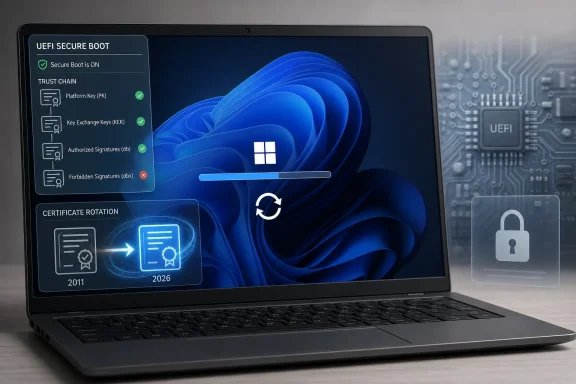 The Weird Reboot Is the Symptom, Not the Scandal
The normal Windows update ritual has trained users to expect a predictable inconvenience. Download, install, restart, stare at a percentage counter, return to the desktop, grumble briefly, move on. When that pattern changes and a PC restarts again — and then possibly again — the obvious assumption is that something has gone wrong.In this case, the surprise is partly Microsoft’s fault and partly the consequence of PC architecture itself. Secure Boot is not just a Windows feature that lives neatly inside the operating system. It is a handshake between Windows, UEFI firmware, bootloaders, certificate databases, revocation lists, OEM decisions, and, in many cases, hardware that has been in service for years.
That is why an ordinary-looking monthly update can suddenly behave more like a firmware event. Microsoft is using Windows Update to distribute updated Secure Boot certificates, but the machine has to cross a boundary between the operating system and the pre-OS boot environment. That boundary is exactly where users have the least visibility and the most anxiety.
The important distinction is this: a couple of additional restarts during this process can be expected behavior. A continuous boot loop, BitLocker recovery loop, red Secure Boot warning, or failed update is not the same thing. Microsoft’s challenge is that, to the average user, all of those experiences begin with the same ominous signal: the PC rebooted when they did not expect it to.
Secure Boot’s 2011 Trust Model Has Finally Reached Its Expiration Date
Secure Boot arrived in the Windows PC world as part of the broader UEFI transition. Its job is straightforward in concept: before Windows starts, the firmware checks whether early boot components are signed by trusted authorities. If the signatures are valid, the boot process continues; if not, the system can block potentially malicious code before it gains control.The catch is that Secure Boot relies on certificates, and certificates are not eternal. Many Windows devices still depend on Secure Boot certificates originally issued in 2011. Those certificates begin expiring in June 2026, which turns what once looked like a distant lifecycle detail into an immediate operational problem.
This does not mean every unpatched PC will suddenly become a brick on a single June morning. Microsoft’s own guidance has been more measured than that. Systems may continue to boot and receive ordinary Windows updates, but they may not be able to receive future protections for early boot components if the Secure Boot certificate chain is not refreshed.
That nuance is crucial. The issue is not that Windows 11 becomes unusable the instant an old certificate ages out. The issue is that the boot trust ecosystem becomes stale at precisely the layer where stale trust is most dangerous. Bootkits, vulnerable boot managers, compromised pre-OS components, and revocation failures are not everyday consumer concerns, but they are exactly the kinds of problems Secure Boot was designed to contain.
Microsoft is therefore attempting a mass rotation of trust anchors across a deeply fragmented hardware base. On paper, that sounds like routine cryptographic hygiene. In practice, it is one of the least glamorous and most consequential maintenance projects in the Windows ecosystem.
Microsoft Is Trying to Patch the Firmware World Through Windows Update
The PC industry’s great strength is also its great maintenance burden. Windows runs on machines from Dell, HP, Lenovo, ASUS, Acer, Microsoft, boutique builders, motherboard vendors, mini-PC vendors, and countless combinations of firmware versions, TPMs, storage controllers, GPUs, and option ROMs. Secure Boot has to work before Windows is fully in control, which means Microsoft cannot solve every problem from Redmond alone.That is why this rollout is staggered. Microsoft is not simply shoving the new certificates onto every eligible machine at once. The company has described a controlled deployment based on confidence signals, with broader coverage as more device types demonstrate that the update can be applied safely.
That kind of throttling is not bureaucratic caution; it is survival. A bad browser update can be fixed with another browser update. A bad boot-chain update can strand users outside the operating system, trigger BitLocker recovery, or force support desks into firmware recovery procedures. At enterprise scale, that is the difference between “patch Tuesday noise” and “fleet incident.”
The extra restart is the user-facing artifact of this caution. In some cases, the system needs to restart once for the Windows update and once more after the Secure Boot certificate update is applied. Users may see two or more reboots even though they are installing what appears to be a regular cumulative update rather than a feature release.
The irony is that Microsoft’s safest path still looks suspicious. A carefully staged trust update, applied only where telemetry suggests a reasonable chance of success, can still present itself to the user as a machine that cannot make up its mind about whether it has finished updating.
The Green Badge Is Microsoft’s Attempt to Translate Firmware Into Human Language
Microsoft has added Secure Boot certificate status information to the Windows Security app for Windows 11 Home and Pro users. The path is simple enough: open Windows Security, go to Device security, and look at the Secure Boot area. There, users may see a green, yellow, or red indication of certificate status.This is the sort of feature that sounds minor until you consider the alternative. Without a visible status indicator, users would be left parsing Event Viewer entries, registry values, firmware screens, OEM advisories, and scattered support documents. That is fine for a sysadmin with a test bench and a maintenance window; it is absurd for a home user who just wants to know whether their laptop is safe to keep using.
A green status is the desired outcome, but it should not be read lazily. The meaningful signal is not merely that Secure Boot exists or is enabled. The meaningful signal is that the required updated Secure Boot certificates have been installed successfully.
Yellow is Microsoft’s way of saying the process is pending and should be handled automatically. That will be the best answer for many consumer PCs: stay current, reboot when asked, and avoid forcing changes that the rollout has deliberately not applied yet. Red is the warning that deserves attention, because it suggests the certificate update could not be completed or that action is required.
This is where Microsoft is walking a difficult line. If it hides the status, users and admins accuse it of obscuring an important security dependency. If it exposes the status, millions of users may stare at colored icons tied to firmware behavior they cannot directly fix. The badge is useful, but it is also a reminder that Windows security is still entangled with the slowest-moving layer of the PC stack.
Older PCs Are Where the Smooth Rollout Meets the Real World
For newer Windows 11 machines, especially systems manufactured in 2024 or later, the transition should be relatively uneventful. Many of those devices were designed, shipped, or updated with the 2023 Secure Boot certificate world already in view. They are the easy part.The more interesting and potentially troublesome population is older hardware. A PC can meet Windows 11’s requirements and still carry firmware assumptions from an earlier phase of the Secure Boot ecosystem. It may need an OEM BIOS or UEFI update before the certificate refresh can be applied cleanly. If that firmware update exists and is delivered through Windows Update or the vendor’s utility, the user may never think about it again.
If it does not exist, Microsoft’s ability to help narrows. Windows can stage and request changes, but firmware ultimately owns the Secure Boot databases. If an OEM has stopped maintaining a model, or if a motherboard vendor is slow to publish updates, the user may find themselves in the familiar no-man’s-land between Microsoft’s security roadmap and the manufacturer’s support lifecycle.
That is uncomfortable because Windows 11 was already sold as a more security-forward operating system, with Secure Boot and TPM requirements forming part of its identity. Now some users may discover that passing the Windows 11 hardware bar in 2021 or 2022 does not guarantee a frictionless Secure Boot certificate transition in 2026.
This is not necessarily evidence of planned obsolescence. Certificates expire, firmware ages, and security models evolve. But it does expose a structural problem in the PC market: the operating system vendor gets blamed for trust-chain failures that may require OEM firmware work, while OEMs often treat firmware maintenance as a short-tail obligation tied to sales cycles rather than security lifecycles.
IT Departments Should Treat the Extra Restart as a Change-Control Signal
For home users, the advice is mostly calm down, let the process finish, and check Windows Security afterward. For enterprise IT, the correct reaction is more disciplined. An additional reboot during a monthly update may be normal, but it still affects deployment rings, maintenance windows, user communications, help desk scripts, and BitLocker recovery readiness.The first practical issue is inventory. Organizations need to know which devices still depend on 2011 Secure Boot certificates, which have received the 2023 replacements, which require firmware updates, and which are unknown because telemetry is missing or reporting is delayed. Microsoft’s enterprise tooling can help, but only if diagnostic data, management policies, and reporting pipelines are configured correctly.
The second issue is piloting. Secure Boot certificate updates should be tested across representative hardware, not just the newest corporate laptop image. A credible pilot includes multiple OEMs, older models, BitLocker-enabled systems, docking-heavy users, remote users, and devices with different firmware revisions. The goal is not merely to prove that the update succeeds; it is to learn which failures look like security warnings, recovery prompts, or boot interruptions.
The third issue is communications. Users who see repeated restarts without warning file tickets, interrupt updates, hold down power buttons, or assume malware is involved. A short advisory explaining that some Windows 11 devices may restart more than once during Secure Boot certificate servicing could prevent a great deal of avoidable noise.
Most importantly, IT teams should not confuse “automatic rollout” with “not my problem.” Microsoft can deliver the update path, but organizations own the operational risk of their device fleets. The closer June 2026 gets, the less attractive it becomes to discover that a forgotten hardware class needs a BIOS update that procurement never budgeted time to validate.
BitLocker Makes the Boot Chain Personal
Secure Boot certificate work intersects awkwardly with BitLocker because both features care deeply about early boot integrity. BitLocker does not merely encrypt a drive and walk away. It can bind access to measurements of the boot environment, using TPM-backed validation to decide whether the machine looks trustworthy enough to release keys automatically.That is a strength until the boot environment changes in a way the system was not expecting. Then the same protection that blocks tampering can present a recovery screen to a legitimate user. Microsoft has separately acknowledged BitLocker recovery prompts in certain configurations after recent Windows updates, which is why admins should treat Secure Boot servicing and BitLocker posture as related operational concerns.
For consumers, the lesson is simple: know where your BitLocker recovery key is before major update work, especially if you use device encryption. On many Microsoft-account-connected systems, the key may be backed up online. In managed environments, it may live in Entra ID, Active Directory, or another escrow system.
For IT departments, the lesson is sharper. A Secure Boot transition that is technically successful can still become a support event if BitLocker recovery keys are missing, stale, inaccessible to the help desk, or unknown to remote users. Boot security is not just cryptography; it is also process design.
The Panic Is Understandable Because Windows Update Has Spent Years Training Users Badly
Microsoft has a credibility problem whenever it says, in effect, “This strange update behavior is normal.” That is not because this specific explanation is weak. It is because Windows users have lived through enough update failures, driver regressions, printer disasters, forced restarts, gaming performance surprises, and opaque error codes to treat reassurance as something that must be earned.The company has improved Windows update reliability over the years, but the emotional memory remains. A restart loop looks like a restart loop until proven otherwise. A second reboot during installation may be a carefully orchestrated Secure Boot certificate step, but it feels a lot like the beginning of a broken patch story.
This is why communication matters as much as engineering. Microsoft’s Message Center note is useful for admins and journalists, but the average user does not read release health dashboards before clicking “Restart now.” If Windows knows an extra restart may happen because a Secure Boot certificate update is being applied, Windows should say so in plain language at the moment the user is most likely to worry.
There is precedent for this. Windows already tells users when feature updates take longer, when encryption is active, when security actions are recommended, and when restart scheduling matters. Secure Boot certificate servicing deserves the same treatment. A simple message — “Your device may restart more than once while Windows updates boot security certificates” — would turn mystery into inconvenience.
Instead, many users will learn the explanation afterward from news articles, forum threads, and anxious searches. That is backward. A security platform that depends on user patience should not make normal maintenance look like failure.
The Windows 11 Pro Upsell Is a Distraction From the Real Lesson
The PCWorld article that surfaced this issue ends, as many commerce-supported tech articles do, with a nudge toward Windows 11 Pro. There is nothing inherently wrong with explaining SKU differences, and Pro does offer features Home lacks. But the Secure Boot certificate story is not really a Home-versus-Pro story.Secure Boot sits below that consumer product segmentation. Home users, Pro users, enterprise users, and server admins all depend on the boot trust chain in different ways. The relevant divide is not whether a user paid for domain join or Group Policy; it is whether the device’s firmware, certificate state, update channel, and management posture are ready for the 2026 transition.
For enthusiasts, the practical work may involve checking Windows Security, updating motherboard firmware, making sure Secure Boot is actually enabled, and resisting the urge to apply random registry fixes from forum posts without understanding the implications. For sysadmins, it means reports, rings, pilots, vendor coordination, and recovery planning. For OEMs, it means publishing firmware updates for machines that customers reasonably expect to remain secure.
The Pro upsell also risks shrinking the story into consumer shopping advice when it is really about platform trust. Buying Windows 11 Pro does not magically update abandoned firmware. Conversely, a well-maintained Windows 11 Home laptop may glide through the transition with nothing more dramatic than an extra reboot and a green badge.
The real premium feature here is not a Windows edition. It is a support ecosystem that keeps firmware, boot certificates, recovery processes, and update telemetry aligned long after the hardware leaves the factory.
The June Deadline Turns a Reboot Annoyance Into a Trust Test
The most concrete thing users can do after an unusual multi-restart update is check the Secure Boot certificate status in Windows Security. If the system reports that the required certificates were installed successfully, the extra reboot has done its job. If Windows shows a pending state, patience may be appropriate. If it shows action required, the next stop is firmware updates from the device maker, not panic-clicking through random fixes.There are a few grounded takeaways from this messy but necessary transition:
- A Windows 11 PC that restarts more than once during the April 2026 update or later updates may be completing a Secure Boot certificate refresh rather than failing.
- The certificate rotation is happening because many Windows devices still rely on Secure Boot certificates issued in 2011 that begin expiring in June 2026.
- A green Secure Boot certificate status in Windows Security is the clearest consumer-facing sign that the required update has succeeded.
- Older devices may need OEM firmware updates before the Secure Boot certificate refresh can complete reliably.
- Enterprise IT should validate this update across hardware models and BitLocker configurations instead of assuming automatic delivery eliminates deployment risk.
- Users should distinguish between a few expected restarts and true failure symptoms such as repeated boot loops, red security warnings, or BitLocker recovery prompts that cannot be resolved.
Source: PCWorld Windows 11 restarts several times after a recent update? Don't panic
