

Microsoft’s April 2026 Windows non-security update adds a dynamic policy-based app removal list for managed Windows 11 Enterprise and Education devices running version 24H2 or 25H2, letting administrators remove preinstalled MSIX and APPX apps by Package Family Name. This is not another de-bloating trick passed around in PowerShell snippets; it is Microsoft turning a long-standing imaging workaround into a supported management surface. The change matters because the Windows desktop has become both a productivity environment and a merchandising surface, and enterprise IT has spent years trying to separate those roles. With this policy, Microsoft is finally admitting that “default” should not mean “permanent.”
For years, the enterprise answer to unwanted Windows apps has been a mixture of image customization, provisioning-package surgery, PowerShell removal scripts, Autopilot timing games, and post-enrollment cleanup. Some of that worked. Much of it worked until the next feature update, Store update, user profile creation event, or app provisioning change brought the same icons and packages back from the dead.
The new dynamic removal list in the
The feature applies to Windows 11 version 25H2 and, importantly, has now been extended back to Windows 11 version 24H2. That backport is not a minor footnote. Many organizations standardize on a Windows release for stability and app compatibility, and 24H2 is still the current operational baseline in plenty of managed environments. Requiring a feature-version jump just to remove consumer-facing inbox apps would have made the policy more interesting than useful.
Microsoft’s framing is straightforward: fewer unwanted apps, simpler provisioning, and a more tailored desktop. The more interesting interpretation is that Windows management is continuing its slow migration away from golden-image thinking and toward declarative state. IT tells Windows what should not be there, and Windows enforces that decision at provisioning or at the next user sign-in.
The dynamic list changes the bargain. Administrators can now add any preinstalled MSIX or APPX app by referencing its Package Family Name, or PFN. That is the identifier Windows actually uses to understand Store-packaged apps, and it is more precise than display names that may vary by language, branding, or Store evolution.
The practical workflow is simple enough. An administrator can run a PowerShell query such as
The MDM path is more awkward, at least for now. The policy lives at
This is where the policy feels half-modern and half-transitional. The concept is clean. The implementation still has the smell of ADMX-backed policy plumbing exposed through MDM. Intune’s Settings Catalog does not yet include the dynamic list option, so administrators who want the capability immediately must use custom OMA-URI configuration and pay close attention to schema compatibility.
That is an odd little operational wart. It does not invalidate the feature, but it is a reminder that Windows management often arrives first as a working mechanism and only later as a polished admin experience. The policy is here; the Intune front end is still catching up.
The rollout guidance also reflects that reality. Microsoft warns that devices may support different CSP versions during the transition. If a device receives a policy that does not match its supported schema, the policy may fail to parse and will not be applied.
That means the correct deployment model is not “edit the existing policy and hope.” It is version-aware targeting. Keep the old policy for older devices, create a separate policy containing the dynamic list for updated Windows 11 24H2 and 25H2 devices, and use assignment filters, update rings, or OS-version targeting to keep incompatible machines away from the new payload.
This is the kind of detail that separates a successful Intune rollout from a week of mysteriously noncompliant endpoints. The policy is declarative, but the fleet is not magically homogeneous.
A managed Windows device is not just a PC with fewer icons. It is an endpoint that should enter service in a predictable state, remain in that state as users sign in, and resist drift caused by app updates, user behavior, and OS servicing. The new policy fits that model because removed apps stay blocked from reinstallation while the policy remains active.
That last clause is critical. Traditional uninstall scripts are a moment in time. Policy is posture. If an app is merely removed during enrollment, it may return through Store behavior, user installation, provisioning remnants, or an OS repair path. If policy says the app should not exist, Windows has an ongoing instruction to keep it away.
The timing also matters. Microsoft says the change takes effect at provisioning or on the next user sign-in. That aligns with the real lifecycle of Windows Store apps, which are often provisioned for the system and materialized into user profiles as people log in. Removing an app only for the current user has never been enough in multi-user, shared-device, lab, frontline, classroom, and kiosk scenarios.
The policy therefore helps in places where Windows’ consumer defaults have historically been most irritating: education labs where students should not find Xbox components, call centers where the Start menu should be narrow and task-specific, regulated environments where app availability must be intentional, and frontline devices where every unnecessary tile is a support ticket waiting to happen.
MSIX and APPX packaging blurred the mental line between “app” and “component.” Some things look like apps but are closely tied to system experiences, servicing expectations, protocol handlers, or accessibility surfaces. Letting administrators rip those out through a broadly available policy would create a support nightmare, especially when the damage appeared months later during a feature update or security fix.
That distinction is also important for the public debate around Windows “bloat.” Enterprise IT does not need Windows to become a build-your-own operating system kit. It needs Microsoft to provide supported controls for nonessential, user-facing packaged apps. This policy moves in that direction without pretending every packaged component is optional.
There is still judgment involved. Removing Notepad, Calculator, Photos, Terminal, or Quick Assist may be desirable in some narrowly controlled environments and counterproductive in others. The fact that something can be removed by policy does not make removal wise. Administrators should treat the dynamic list as a governance tool, not a contest to see how bare the Start menu can become.
The policy also removes associated on-disk app data. That is not a mere technicality. If an organization targets an app that users have been using locally, the removal can delete data tied to that app. Microsoft’s guidance to notify users in advance is not legal boilerplate; it is operational survival advice.
That future Intune integration is what will move the feature from “useful for confident endpoint engineers” to “normal enterprise control.” Custom OMA-URI policies are powerful, but they are unforgiving. A malformed payload, an encoding mistake, or a schema mismatch can quietly turn a clean policy idea into a failed deployment.
The dynamic list’s OMA-URI payload also includes a small but important formatting challenge: multiple apps must be separated as separate entries using the expected encoded line-break format. That is manageable for administrators comfortable with SyncML and ADMX-backed CSP behavior, but it is not the kind of thing most organizations want to hand-edit forever.
A Settings Catalog implementation should make the policy easier to audit, easier to delegate, and easier to combine with Intune assignment filters. It should also reduce the temptation to wrap app removal in Win32 packages or remediation scripts simply because the GUI path is more familiar than a custom policy payload.
Until that arrives, the early adopters will be organizations with mature endpoint engineering practices. They will test on ringed devices, validate registry output, confirm package removal behavior for existing and new users, and document which PFNs are approved for removal. Everyone else should probably pilot, not stampede.
Enterprises rarely move at consumer cadence. Even when a new Windows release is available, broad deployment depends on application validation, security baselines, VPN compatibility, driver readiness, help desk training, and change windows that were negotiated long before a new management feature appeared. A control that only works on the next release is often a control that cannot be used for another year.
By bringing the updated app removal policy to 24H2, Microsoft gives organizations a way to improve the managed desktop without tying that improvement to a feature upgrade project. That is exactly how enterprise Windows improvements should land. Management capabilities should meet the installed base where it is, especially when the installed base is already on a supported modern release.
There is still a servicing requirement. Devices need at least the April 2026 Windows non-security update to receive the improvements, while Windows Insider Dev and Beta channel builds reportedly had the feature from the March 13, 2026 builds. In other words, “24H2 support” does not mean any 24H2 build sitting in the fleet. It means updated 24H2 Enterprise and Education devices.
That distinction will matter in environments where update rings are staggered or preview non-security updates are handled cautiously. The feature may exist on paper before it exists everywhere in production. IT should inventory build readiness before assigning the new policy broadly.
But it would be too cynical to stop there. The important shift is not that Microsoft lets administrators remove Bing News or Alarms. The shift is that Microsoft is encoding app absence as a managed device state. That is the same philosophical direction as modern policy management, security baselines, desired configuration, and cloud-native endpoint administration.
There is also a licensing signal. The policy is available only on Enterprise and Education editions. Home and Pro remain unsupported. That makes sense from a product segmentation standpoint, but it also reinforces a familiar Windows reality: the cleanest administrative controls are reserved for customers paying for managed computing at scale.
For small businesses running Windows 11 Pro, that will sting. They may have many of the same complaints about default apps and desktop clutter, but not the edition rights to use this particular control. Microsoft’s answer is effectively that policy-enforced app removal is an enterprise management capability, not a general Windows preference.
That distinction may be commercially rational, but it does not make the underlying problem exclusive to enterprises. If Microsoft wants Windows 11 to feel less noisy across the board, it still needs to reduce the amount of consumer-oriented material that appears by default, not merely provide better tools for its largest customers to remove it.
A good removal list should start with business intent. Is the device a shared classroom machine? A frontline task device? A developer workstation? A regulated back-office endpoint? A general productivity laptop? Each profile has a different tolerance for bundled apps, and a package that is noise in one scenario may be useful in another.
For example, removing Xbox-related components from a corporate laptop estate is a relatively easy call for many organizations. Removing Photos or Notepad is more complicated. Removing Quick Assist might reduce an unwanted remote-help surface in one environment while making support harder in another. Removing Terminal may make sense on tightly restricted devices but would be absurd on engineering workstations.
The dynamic list makes the policy more powerful, and power increases the need for change control. PFNs should be documented. Test rings should include both new provisioning and existing-user sign-in scenarios. Help desk scripts should be updated so support staff know whether a missing app is a fault or an intended state.
Most importantly, administrators should remember that app removal is not the same thing as security hardening. It can reduce attack surface in some cases and simplify the user environment, but it is not a substitute for application control, least privilege, Defender policy, browser management, patch compliance, or data protection. It is a desktop hygiene tool with real operational benefits, not a magic shield.
Source: Microsoft - Message Center Dynamically remove apps from managed Windows 11 devices - Windows IT Pro Blog
 Microsoft Finally Gives IT a Supported Way to Say No
For years, the enterprise answer to unwanted Windows apps has been a mixture of image customization, provisioning-package surgery, PowerShell removal scripts, Autopilot timing games, and post-enrollment cleanup. Some of that worked. Much of it worked until the next feature update, Store update, user profile creation event, or app provisioning change brought the same icons and packages back from the dead.The new dynamic removal list in the
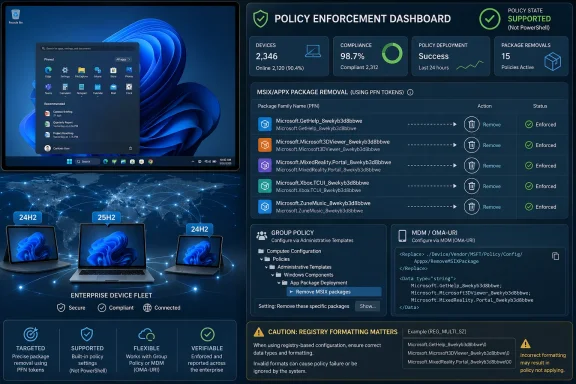
RemoveDefaultMicrosoftStorePackages policy changes the center of gravity. Instead of asking administrators to chase inbox apps one deployment script at a time, Microsoft is putting app removal where it belongs: in policy. That means Group Policy for traditional domain-joined estates, and the Policy CSP path for MDM-managed devices.The feature applies to Windows 11 version 25H2 and, importantly, has now been extended back to Windows 11 version 24H2. That backport is not a minor footnote. Many organizations standardize on a Windows release for stability and app compatibility, and 24H2 is still the current operational baseline in plenty of managed environments. Requiring a feature-version jump just to remove consumer-facing inbox apps would have made the policy more interesting than useful.
Microsoft’s framing is straightforward: fewer unwanted apps, simpler provisioning, and a more tailored desktop. The more interesting interpretation is that Windows management is continuing its slow migration away from golden-image thinking and toward declarative state. IT tells Windows what should not be there, and Windows enforces that decision at provisioning or at the next user sign-in.
The Dynamic List Is the Real Breakthrough
The earlier version of this policy was useful but constrained. Administrators could choose from a predefined list of Microsoft Store packages, toggling removal for apps such as Clipchamp, Feedback Hub, Solitaire, Weather, Xbox components, Teams, Outlook for Windows, Calculator, Camera, Notepad, Paint, Photos, Quick Assist, Sound Recorder, Sticky Notes, Terminal, and others. That was already cleaner than brittle cleanup scripts, but it was still Microsoft deciding which apps deserved to be removable.The dynamic list changes the bargain. Administrators can now add any preinstalled MSIX or APPX app by referencing its Package Family Name, or PFN. That is the identifier Windows actually uses to understand Store-packaged apps, and it is more precise than display names that may vary by language, branding, or Store evolution.
The practical workflow is simple enough. An administrator can run a PowerShell query such as
Get-AppxPackage *Notepad* | Select-Object PackageFamilyName, copy the resulting PFN, and place it into the policy’s additional package family names field. In Group Policy, that means navigating to Computer Configuration, Administrative Templates, Windows Components, App Package Deployment, and then configuring “Remove default Microsoft Store packages from the system.”The MDM path is more awkward, at least for now. The policy lives at
./Device/Vendor/MSFT/Policy/Config/ApplicationManagement/RemoveDefaultMicrosoftStorePackages, and custom OMA-URI deployment requires an XML-style payload. The static app list is represented by data id entries set to true or false, while the dynamic removal list accepts PFNs. Apps marked true are removed; apps marked false remain.This is where the policy feels half-modern and half-transitional. The concept is clean. The implementation still has the smell of ADMX-backed policy plumbing exposed through MDM. Intune’s Settings Catalog does not yet include the dynamic list option, so administrators who want the capability immediately must use custom OMA-URI configuration and pay close attention to schema compatibility.
The Registry Caveat Shows the Feature Is Still Fresh
Microsoft’s most telling warning is not about PowerShell or package names. It is the requirement that, when using custom OMA-URI, administrators must open the dynamic list entry in the registry once on each targeted device to ensure the correct item format. The relevant path sits underHKEY_LOCAL_MACHINE\SOFTWARE\Policies\Microsoft\Windows\Appx\RemoveDefaultMicrosoftStorePackages.That is an odd little operational wart. It does not invalidate the feature, but it is a reminder that Windows management often arrives first as a working mechanism and only later as a polished admin experience. The policy is here; the Intune front end is still catching up.
The rollout guidance also reflects that reality. Microsoft warns that devices may support different CSP versions during the transition. If a device receives a policy that does not match its supported schema, the policy may fail to parse and will not be applied.
That means the correct deployment model is not “edit the existing policy and hope.” It is version-aware targeting. Keep the old policy for older devices, create a separate policy containing the dynamic list for updated Windows 11 24H2 and 25H2 devices, and use assignment filters, update rings, or OS-version targeting to keep incompatible machines away from the new payload.
This is the kind of detail that separates a successful Intune rollout from a week of mysteriously noncompliant endpoints. The policy is declarative, but the fleet is not magically homogeneous.
This Is About Provisioning, Not Cosmetic Cleanup
The obvious use case is removing visible clutter: games, consumer news apps, entertainment surfaces, duplicate communication tools, or apps that have no role on a locked-down enterprise desktop. But the deeper value is provisioning consistency.A managed Windows device is not just a PC with fewer icons. It is an endpoint that should enter service in a predictable state, remain in that state as users sign in, and resist drift caused by app updates, user behavior, and OS servicing. The new policy fits that model because removed apps stay blocked from reinstallation while the policy remains active.
That last clause is critical. Traditional uninstall scripts are a moment in time. Policy is posture. If an app is merely removed during enrollment, it may return through Store behavior, user installation, provisioning remnants, or an OS repair path. If policy says the app should not exist, Windows has an ongoing instruction to keep it away.
The timing also matters. Microsoft says the change takes effect at provisioning or on the next user sign-in. That aligns with the real lifecycle of Windows Store apps, which are often provisioned for the system and materialized into user profiles as people log in. Removing an app only for the current user has never been enough in multi-user, shared-device, lab, frontline, classroom, and kiosk scenarios.
The policy therefore helps in places where Windows’ consumer defaults have historically been most irritating: education labs where students should not find Xbox components, call centers where the Start menu should be narrow and task-specific, regulated environments where app availability must be intentional, and frontline devices where every unnecessary tile is a support ticket waiting to happen.
Microsoft Is Drawing a Line Around System Components
There is a boundary, and Microsoft is explicit about it: the dynamic list cannot be used to remove system components. That will disappoint administrators who want one universal lever for stripping Windows down to a minimal shell, but it is the right boundary for a supported feature.MSIX and APPX packaging blurred the mental line between “app” and “component.” Some things look like apps but are closely tied to system experiences, servicing expectations, protocol handlers, or accessibility surfaces. Letting administrators rip those out through a broadly available policy would create a support nightmare, especially when the damage appeared months later during a feature update or security fix.
That distinction is also important for the public debate around Windows “bloat.” Enterprise IT does not need Windows to become a build-your-own operating system kit. It needs Microsoft to provide supported controls for nonessential, user-facing packaged apps. This policy moves in that direction without pretending every packaged component is optional.
There is still judgment involved. Removing Notepad, Calculator, Photos, Terminal, or Quick Assist may be desirable in some narrowly controlled environments and counterproductive in others. The fact that something can be removed by policy does not make removal wise. Administrators should treat the dynamic list as a governance tool, not a contest to see how bare the Start menu can become.
The policy also removes associated on-disk app data. That is not a mere technicality. If an organization targets an app that users have been using locally, the removal can delete data tied to that app. Microsoft’s guidance to notify users in advance is not legal boilerplate; it is operational survival advice.
Intune Is the Missing Front Door
The most glaring limitation is that the Intune Settings Catalog entry does not yet expose the dynamic removal list. Microsoft says additional Intune capabilities are coming in the following months, and once generally available, administrators should be able to find the setting by searching for “Remove Default Microsoft Store packages” in the settings picker.That future Intune integration is what will move the feature from “useful for confident endpoint engineers” to “normal enterprise control.” Custom OMA-URI policies are powerful, but they are unforgiving. A malformed payload, an encoding mistake, or a schema mismatch can quietly turn a clean policy idea into a failed deployment.
The dynamic list’s OMA-URI payload also includes a small but important formatting challenge: multiple apps must be separated as separate entries using the expected encoded line-break format. That is manageable for administrators comfortable with SyncML and ADMX-backed CSP behavior, but it is not the kind of thing most organizations want to hand-edit forever.
A Settings Catalog implementation should make the policy easier to audit, easier to delegate, and easier to combine with Intune assignment filters. It should also reduce the temptation to wrap app removal in Win32 packages or remediation scripts simply because the GUI path is more familiar than a custom policy payload.
Until that arrives, the early adopters will be organizations with mature endpoint engineering practices. They will test on ringed devices, validate registry output, confirm package removal behavior for existing and new users, and document which PFNs are approved for removal. Everyone else should probably pilot, not stampede.
The 24H2 Extension Is a Bigger Deal Than It Looks
Microsoft originally positioned policy-based removal around Windows 11 version 25H2 and later, but the updated feature now supports Windows 11 version 24H2 Enterprise and Education as well. That extension substantially increases the policy’s relevance.Enterprises rarely move at consumer cadence. Even when a new Windows release is available, broad deployment depends on application validation, security baselines, VPN compatibility, driver readiness, help desk training, and change windows that were negotiated long before a new management feature appeared. A control that only works on the next release is often a control that cannot be used for another year.
By bringing the updated app removal policy to 24H2, Microsoft gives organizations a way to improve the managed desktop without tying that improvement to a feature upgrade project. That is exactly how enterprise Windows improvements should land. Management capabilities should meet the installed base where it is, especially when the installed base is already on a supported modern release.
There is still a servicing requirement. Devices need at least the April 2026 Windows non-security update to receive the improvements, while Windows Insider Dev and Beta channel builds reportedly had the feature from the March 13, 2026 builds. In other words, “24H2 support” does not mean any 24H2 build sitting in the fleet. It means updated 24H2 Enterprise and Education devices.
That distinction will matter in environments where update rings are staggered or preview non-security updates are handled cautiously. The feature may exist on paper before it exists everywhere in production. IT should inventory build readiness before assigning the new policy broadly.
This Is Microsoft Cleaning Up Its Own Mess, But That Still Counts
It is tempting to treat this as a concession: Microsoft shipped too many default apps, customers complained, and now Microsoft is giving administrators a broom. There is truth in that. Windows 11’s inbox experience has often felt mismatched with enterprise expectations, especially as Microsoft has used the shell, Start menu, Store apps, and bundled experiences to introduce consumer services.But it would be too cynical to stop there. The important shift is not that Microsoft lets administrators remove Bing News or Alarms. The shift is that Microsoft is encoding app absence as a managed device state. That is the same philosophical direction as modern policy management, security baselines, desired configuration, and cloud-native endpoint administration.
There is also a licensing signal. The policy is available only on Enterprise and Education editions. Home and Pro remain unsupported. That makes sense from a product segmentation standpoint, but it also reinforces a familiar Windows reality: the cleanest administrative controls are reserved for customers paying for managed computing at scale.
For small businesses running Windows 11 Pro, that will sting. They may have many of the same complaints about default apps and desktop clutter, but not the edition rights to use this particular control. Microsoft’s answer is effectively that policy-enforced app removal is an enterprise management capability, not a general Windows preference.
That distinction may be commercially rational, but it does not make the underlying problem exclusive to enterprises. If Microsoft wants Windows 11 to feel less noisy across the board, it still needs to reduce the amount of consumer-oriented material that appears by default, not merely provide better tools for its largest customers to remove it.
The Best Use Is Restraint, Not Maximum Removal
The organizations that get the most value from this policy will not be the ones that delete the longest list of packages. They will be the ones that define a standard desktop experience and use the policy to enforce it consistently.A good removal list should start with business intent. Is the device a shared classroom machine? A frontline task device? A developer workstation? A regulated back-office endpoint? A general productivity laptop? Each profile has a different tolerance for bundled apps, and a package that is noise in one scenario may be useful in another.
For example, removing Xbox-related components from a corporate laptop estate is a relatively easy call for many organizations. Removing Photos or Notepad is more complicated. Removing Quick Assist might reduce an unwanted remote-help surface in one environment while making support harder in another. Removing Terminal may make sense on tightly restricted devices but would be absurd on engineering workstations.
The dynamic list makes the policy more powerful, and power increases the need for change control. PFNs should be documented. Test rings should include both new provisioning and existing-user sign-in scenarios. Help desk scripts should be updated so support staff know whether a missing app is a fault or an intended state.
Most importantly, administrators should remember that app removal is not the same thing as security hardening. It can reduce attack surface in some cases and simplify the user environment, but it is not a substitute for application control, least privilege, Defender policy, browser management, patch compliance, or data protection. It is a desktop hygiene tool with real operational benefits, not a magic shield.
The New Clean Desktop Has Rules Attached
This policy is practical, but it is not fire-and-forget. The organizations that treat it as part of a managed lifecycle will benefit; the ones that treat it as a quick de-bloat switch will create avoidable surprises.- The dynamic removal list works by Package Family Name, so administrators need accurate PFNs rather than friendly app names.
- The updated capability requires Windows 11 version 24H2 or later on Enterprise or Education editions, with the April 2026 non-security update or newer servicing baseline.
- Group Policy can expose the dynamic list today, while Intune currently requires a custom OMA-URI until Microsoft adds the setting to the Settings Catalog.
- Removed apps remain blocked from reinstallation while the policy is active, which makes this a continuing configuration state rather than a one-time uninstall.
- Removing an app can also remove associated local app data, so user communication and pilot testing are necessary before broad rollout.
- Older devices should keep receiving the older compatible policy until they support the updated CSP schema.
Source: Microsoft - Message Center Dynamically remove apps from managed Windows 11 devices - Windows IT Pro Blog
