

Microsoft is making one of the most consequential changes to Windows 11 in years, and it is doing so through a series of small but meaningful update-experience tweaks rather than a flashy redesign. The company’s April 24 rollout gives users more control over when updates happen, including the ability to skip setup-time updates and repeatedly extend update pauses without hitting a fixed ceiling. It also reflects a broader shift in Microsoft’s messaging: updates are still mandatory in spirit, but the company now wants them to feel predictable instead of disruptive.
For years, Windows users have complained that updates arrive at the worst possible moments. Sometimes the frustration has been about installation time; sometimes it has been about reboot prompts that seem to ignore what the user is doing; and sometimes it has been about the perception that Windows Update is a system the user manages only in name. Microsoft’s latest changes are a direct answer to that long-running tension, and the company is framing them as the result of user feedback collected across thousands of verbatims.
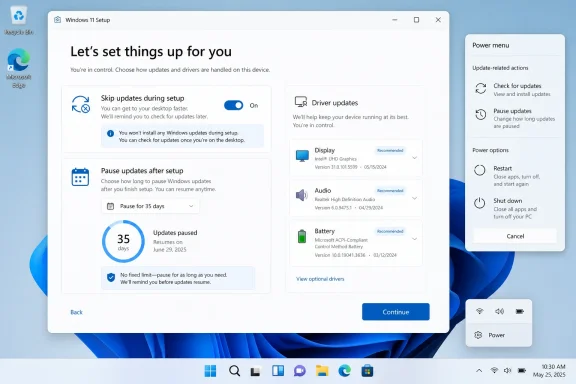
The headline change is straightforward: Windows 11 now lets users skip updates during device setup, so they can reach the desktop faster and take updates later if they choose. Microsoft says this option was added earlier in 2026 and is now part of the broader update-control push. That may sound minor, but it matters because the out-of-box experience has long been one of the most annoying choke points for both consumers and IT pros, especially on fresh installs or slower networks.
The second big change is even more significant from a control standpoint. Windows Update pause controls now allow users to re-pause for up to 35 days at a time, with no limit on how many times the pause can be reset. In practical terms, that means Microsoft has removed the artificial sense of a hard stop and replaced it with a rolling pause model. The company still expects devices to stay current, but the user now has far more say in when that happens.
At the same time, Microsoft is simplifying the Windows Insider program. That effort is separate from the consumer-facing update controls, but it points in the same direction: fewer surprises, clearer channel definitions, and more predictable build behavior for testers. On April 24, Microsoft began transitioning Dev to Experimental and Beta to a new Beta experience, with release notes moving into the Windows Insider Program Documentation Hub. This is a quality-of-life change for power users, but it also reveals where Microsoft wants the entire Windows ecosystem to go: fewer mismatched expectations and a cleaner path from preview to retail.
What makes this moment different is that Microsoft appears to be balancing two competing imperatives more explicitly than before. On one side is the company’s Secure Future Initiative, which pushes for devices to get security updates quickly and consistently. On the other side is the user reality that not every patch should land right now, and not every reboot should be forced at the least convenient moment. The new Windows Update design is Microsoft trying to solve that conflict without abandoning its security posture.
There is also a business reason behind the shift. Microsoft has spent the last several years turning Windows into a service with a more visible cadence of change, but service models only work when users trust the delivery mechanism. If updates are associated with friction, annoyance, or broken workflows, the service model becomes a liability. Giving users more timing control is a way to preserve the update pipeline while reducing the emotional cost of participating in it.
It also suggests that Microsoft has learned something from the way users respond to control surfaces. When users feel they are being forced into a narrow path, they often postpone updates more aggressively than they otherwise would. Paradoxically, giving them more choice can improve compliance because it reduces resistance. In other words, more control may lead to better update adoption, not worse. That is an inference, but it is a plausible one given the direction Microsoft is taking.
The new controls attack the timing problem directly. That is important because timing is what users remember most. They do not usually remember the specific KB number that triggered a reboot; they remember that the machine rebooted during a meeting, a deadline, or a travel day. Microsoft is trying to make those moments rarer, or at least more avoidable.
This matters because OOBE is one of the few moments when users have almost no patience for delay. If someone has just installed a new PC, they want to use it. They do not want setup to turn into a patching session. By allowing users to land on the desktop first, Microsoft is acknowledging that the psychological finish line of setup is as important as the technical completion of setup.
That said, the new flexibility is not a blanket promise. Microsoft notes that the skip option is not applicable to commercial devices where OOBE is managed, and it may not apply in select cases where updates are required for the device to function. That carveout is important because it shows the company is preserving enterprise control and protecting the minimum update baseline where required.
There is also a subtle trust issue here. Users are more likely to believe that Windows is under their control when the first thing they do is make a real choice about updates. That choice can make the rest of the OS feel less paternalistic. It is a small interface change with a disproportionately large symbolic effect.
That does not mean security updates have become optional in any absolute sense. It means the operating system is now giving the user the ability to defer them far more flexibly. The difference is subtle but important. A system that lets you pause at your own pace feels much less coercive than one that pauses only until an arbitrary deadline.
This is where Microsoft is walking a fine line. Too much flexibility risks users staying unpatched for too long. Too little flexibility drives users to ignore update prompts, delay installs, or resent the operating system. Microsoft’s new model tries to preserve the option to stay current while acknowledging that users need room to plan around travel, conferences, exams, or busy weeks.
From a user-experience perspective, this is one of the better update changes Microsoft has introduced in years. It addresses a real-world use case without requiring the user to become a settings expert. The interface does the planning work, and the policy now follows the user’s schedule more closely.
This is a classic tension in operating-system design. The more graceful you make the deferral mechanism, the more likely it is that people will defer. But a clumsy mechanism encourages worse behavior, such as disabling update behavior in more extreme ways or relying on inconsistent habits. Microsoft seems to be betting that a controlled pause model is better than user workarounds. That bet is reasonable.
That may seem cosmetic, but it solves a very old irritation. Many users have experienced the moment when they intended to shut down quickly, only to discover that Windows treated the action as an opportunity to update. The result was a hidden delay that turned a simple exit into a maintenance event. Removing that ambiguity is a meaningful usability win.
Microsoft also says the system will try to restore previously opened applications faster after a restart. That matters because the company is not only trying to make restarts less annoying; it is trying to make them feel less destructive. If apps return quickly, users may be more willing to accept a reboot when it is genuinely needed.
This is also a good example of Microsoft reducing surprise. Surprise is almost always bad in maintenance flows. Users will tolerate a lot if the behavior is clear in advance. They tolerate much less when the operating system appears to be making decisions on their behalf.
This is a small but important information-design improvement. If the operating system wants users to make better decisions about installing updates, it has to give them better information. A generic driver label is not enough. Clearer titles make it easier to spot risky updates, identify important hardware fixes, and avoid installing something blindly.
Microsoft says this change was driven by feedback after it simplified update titles late in 2025. That is useful context because it shows the company is iterating on a larger update-communication redesign, not just adding random tweaks. Better metadata is one of the quietest ways to improve trust.
This is especially helpful for troubleshooting because it reduces guesswork. A user who sees a battery or display driver update can immediately understand where to look if something behaves differently afterward. That kind of clarity saves time and lowers the odds of unnecessary suspicion about Windows itself.
Microsoft is also shifting release notes into the Windows Insider Program Documentation Hub. That change is less dramatic than a feature toggle, but it is the kind of structural improvement that makes a program easier to navigate. It brings better organization, clearer channel separation, and improved deep linking, which matters when testers are trying to understand what changed and where.
This is important because the Insider program is where Microsoft tests the habits it eventually wants to normalize in retail Windows. If preview users have a better experience tracking changes, channel definitions, and build notes, then the company can validate a cleaner model before applying it to the broader base. In other words, the Insider reshuffle may be a preview of how Microsoft wants Windows servicing to feel more generally.
That matters because the quality of preview testing depends on the quality of the preview experience. If testers cannot easily tell where they are in the pipeline, their feedback becomes noisier. Cleaner channels should produce better bug reports and clearer expectations about stability.
The new Windows 11 changes are notable because they move one step further toward user agency. Setup no longer has to stall on updates. Pauses can be renewed. Shutdown and restart are no longer morally attached to patch installation. Even update labels are becoming more descriptive. Together, these are the building blocks of a more mature servicing philosophy.
This is not a revolution, and it should not be mistaken for one. Microsoft is still firmly committed to regular patching, automatic delivery, and security enforcement where needed. But the company is conceding that how updates are delivered matters almost as much as what they contain. That is the real shift.
The harder question is whether users will use the new controls responsibly. That will depend on whether Microsoft communicates the trade-offs clearly enough and whether the OS makes the right path feel obvious. The best outcome is not that everyone pauses updates forever; it is that people feel informed enough to choose the right time to install them.
What to watch next:
Source: Gizchina.com Microsoft Overhauls Windows 11 Update Mechanism for Greater User Control
 Overview
For years, Windows users have complained that updates arrive at the worst possible moments. Sometimes the frustration has been about installation time; sometimes it has been about reboot prompts that seem to ignore what the user is doing; and sometimes it has been about the perception that Windows Update is a system the user manages only in name. Microsoft’s latest changes are a direct answer to that long-running tension, and the company is framing them as the result of user feedback collected across thousands of verbatims.The headline change is straightforward: Windows 11 now lets users skip updates during device setup, so they can reach the desktop faster and take updates later if they choose. Microsoft says this option was added earlier in 2026 and is now part of the broader update-control push. That may sound minor, but it matters because the out-of-box experience has long been one of the most annoying choke points for both consumers and IT pros, especially on fresh installs or slower networks.
The second big change is even more significant from a control standpoint. Windows Update pause controls now allow users to re-pause for up to 35 days at a time, with no limit on how many times the pause can be reset. In practical terms, that means Microsoft has removed the artificial sense of a hard stop and replaced it with a rolling pause model. The company still expects devices to stay current, but the user now has far more say in when that happens.
At the same time, Microsoft is simplifying the Windows Insider program. That effort is separate from the consumer-facing update controls, but it points in the same direction: fewer surprises, clearer channel definitions, and more predictable build behavior for testers. On April 24, Microsoft began transitioning Dev to Experimental and Beta to a new Beta experience, with release notes moving into the Windows Insider Program Documentation Hub. This is a quality-of-life change for power users, but it also reveals where Microsoft wants the entire Windows ecosystem to go: fewer mismatched expectations and a cleaner path from preview to retail.
Why Microsoft Is Changing Update Behavior Now
Microsoft did not suddenly discover that users dislike forced restarts. The pressure has been building for years, and Windows 11 has inherited a lot of that frustration from prior versions of Windows. In a world where people increasingly use their PCs for work, school, and creator workflows, an unexpected reboot is more than a nuisance. It is a workflow interruption, and sometimes a loss of state if an app or browser session does not recover cleanly.What makes this moment different is that Microsoft appears to be balancing two competing imperatives more explicitly than before. On one side is the company’s Secure Future Initiative, which pushes for devices to get security updates quickly and consistently. On the other side is the user reality that not every patch should land right now, and not every reboot should be forced at the least convenient moment. The new Windows Update design is Microsoft trying to solve that conflict without abandoning its security posture.
There is also a business reason behind the shift. Microsoft has spent the last several years turning Windows into a service with a more visible cadence of change, but service models only work when users trust the delivery mechanism. If updates are associated with friction, annoyance, or broken workflows, the service model becomes a liability. Giving users more timing control is a way to preserve the update pipeline while reducing the emotional cost of participating in it.
A response to longstanding friction
The most important part of the rollout is not the feature count; it is the tone. Microsoft is explicitly acknowledging that untimely updates and not enough control are recurring complaints. That admission matters because it shows the company is treating update UX as a product problem, not just a policy problem. In Windows terms, that is an important philosophical change.It also suggests that Microsoft has learned something from the way users respond to control surfaces. When users feel they are being forced into a narrow path, they often postpone updates more aggressively than they otherwise would. Paradoxically, giving them more choice can improve compliance because it reduces resistance. In other words, more control may lead to better update adoption, not worse. That is an inference, but it is a plausible one given the direction Microsoft is taking.
Why timing matters as much as content
Microsoft has spent years improving update reliability, and it has made clear that it wants to reduce the number of reboots users see each month by coordinating driver,.NET, firmware, and quality updates. That strategy only works if the update experience feels coherent. If the user is still surprised by when and how updates happen, then even technically better servicing will still feel broken.The new controls attack the timing problem directly. That is important because timing is what users remember most. They do not usually remember the specific KB number that triggered a reboot; they remember that the machine rebooted during a meeting, a deadline, or a travel day. Microsoft is trying to make those moments rarer, or at least more avoidable.
- The goal is not to eliminate updates.
- The goal is to reduce interruption.
- The goal is to make update timing feel intentional.
- The goal is to lower the emotional cost of staying current.
What Changes in Setup and OOBE
The most immediately visible improvement affects the out-of-box experience. During Windows 11 setup, users can now skip updates rather than being forced to wait for them before getting to the desktop. That is a simple change on paper, but in practice it could save a lot of time on freshly built PCs, machines on poor networks, or systems being provisioned for quick evaluation.This matters because OOBE is one of the few moments when users have almost no patience for delay. If someone has just installed a new PC, they want to use it. They do not want setup to turn into a patching session. By allowing users to land on the desktop first, Microsoft is acknowledging that the psychological finish line of setup is as important as the technical completion of setup.
That said, the new flexibility is not a blanket promise. Microsoft notes that the skip option is not applicable to commercial devices where OOBE is managed, and it may not apply in select cases where updates are required for the device to function. That carveout is important because it shows the company is preserving enterprise control and protecting the minimum update baseline where required.
OOBE and first-impression engineering
Microsoft has long treated setup as a first-impression battleground. Every extra minute before the desktop appears is a minute in which the user’s enthusiasm decays. By cutting setup-time friction, the company is not only improving convenience; it is protecting the perceived speed of Windows 11 itself.There is also a subtle trust issue here. Users are more likely to believe that Windows is under their control when the first thing they do is make a real choice about updates. That choice can make the rest of the OS feel less paternalistic. It is a small interface change with a disproportionately large symbolic effect.
What this means for new PCs
For consumer PCs, this should make first boot feel much less like a chore. For enthusiasts and system builders, it reduces the frustration of setting up multiple machines in a row. For IT departments, the impact is more complicated because managed commercial environments often require different deployment rules. In those cases, the change may be less about end-user freedom and more about reducing setup bottlenecks where policy allows.- Faster access to the desktop.
- Less setup-time waiting on weak connections.
- Better experience on freshly imaged systems.
- More flexibility for enthusiasts and home users.
How the New Pause Model Works
The second major change is the update pause model. Microsoft is now letting users pause updates for a selected date up to 35 days and then extend that pause as many times as needed. The practical effect is that there is no longer a hard behavioral cap that forces a return to updates on Microsoft’s preferred schedule.That does not mean security updates have become optional in any absolute sense. It means the operating system is now giving the user the ability to defer them far more flexibly. The difference is subtle but important. A system that lets you pause at your own pace feels much less coercive than one that pauses only until an arbitrary deadline.
This is where Microsoft is walking a fine line. Too much flexibility risks users staying unpatched for too long. Too little flexibility drives users to ignore update prompts, delay installs, or resent the operating system. Microsoft’s new model tries to preserve the option to stay current while acknowledging that users need room to plan around travel, conferences, exams, or busy weeks.
A better fit for real-world schedules
A fixed pause window only works when life is regular. In reality, many people do not want their PCs changing behavior right before a presentation, a trip, or a deadline. The new pause controls are a better match for that reality because they recognize that update timing is not just a technical matter; it is a calendar matter.From a user-experience perspective, this is one of the better update changes Microsoft has introduced in years. It addresses a real-world use case without requiring the user to become a settings expert. The interface does the planning work, and the policy now follows the user’s schedule more closely.
The security trade-off
The obvious downside is that users who take advantage of unlimited re-pausing may leave systems exposed longer than Microsoft would like. That is why the company continues to emphasize that Windows is grounded in secure by design and secure by default principles. The message is clear: control is being expanded, but the security expectation has not disappeared.This is a classic tension in operating-system design. The more graceful you make the deferral mechanism, the more likely it is that people will defer. But a clumsy mechanism encourages worse behavior, such as disabling update behavior in more extreme ways or relying on inconsistent habits. Microsoft seems to be betting that a controlled pause model is better than user workarounds. That bet is reasonable.
- Users gain flexibility without needing third-party tools.
- The system becomes easier to live with during busy periods.
- Security policy remains visible and central.
- The risk of very long deferrals still exists.
The Power Menu Becomes More Predictable
Another useful change is the separation of standard power actions from update actions. In practice, this means Restart and Shut down remain clearly available even when updates are pending, instead of being conflated with update-install behavior. Microsoft says this makes the power menu more predictable and ensures the system does exactly what the user asks it to do.That may seem cosmetic, but it solves a very old irritation. Many users have experienced the moment when they intended to shut down quickly, only to discover that Windows treated the action as an opportunity to update. The result was a hidden delay that turned a simple exit into a maintenance event. Removing that ambiguity is a meaningful usability win.
Microsoft also says the system will try to restore previously opened applications faster after a restart. That matters because the company is not only trying to make restarts less annoying; it is trying to make them feel less destructive. If apps return quickly, users may be more willing to accept a reboot when it is genuinely needed.
Why clearer power choices matter
Power menus are one of those interface areas that most users barely notice until they fail them. When the choices become ambiguous, trust erodes quickly. A clean distinction between “do the power action” and “install the update” is a small but important principle of good system design.This is also a good example of Microsoft reducing surprise. Surprise is almost always bad in maintenance flows. Users will tolerate a lot if the behavior is clear in advance. They tolerate much less when the operating system appears to be making decisions on their behalf.
Consumer and enterprise implications
For consumers, this should reduce annoying interruptions at the end of a session. For enterprise environments, the effect is more nuanced because administrators may still prefer policy-driven restart behavior. Still, even in managed fleets, a clearer power menu can reduce confusion for end users who are not deeply involved in device management.- Less accidental update behavior.
- More predictable shutdowns.
- Better user confidence in what the OS will do next.
- Faster post-restart recovery for open applications.
More Information About Driver Updates
Microsoft is also adding more clarity around driver updates by including the device class in the title. That means users should be able to tell whether an update applies to display, audio, battery, extension, HDC, or another device category. In the real world, this solves a persistent problem: too many driver update titles have looked nearly identical, which makes it hard to tell what will actually change.This is a small but important information-design improvement. If the operating system wants users to make better decisions about installing updates, it has to give them better information. A generic driver label is not enough. Clearer titles make it easier to spot risky updates, identify important hardware fixes, and avoid installing something blindly.
Microsoft says this change was driven by feedback after it simplified update titles late in 2025. That is useful context because it shows the company is iterating on a larger update-communication redesign, not just adding random tweaks. Better metadata is one of the quietest ways to improve trust.
Why update clarity matters to power users
Power users, device builders, and IT admins often rely on update names as a first pass for triage. If a driver title is too vague, they may postpone it or investigate separately. By adding device class information, Microsoft is making the Windows Update page more diagnostic and less opaque.This is especially helpful for troubleshooting because it reduces guesswork. A user who sees a battery or display driver update can immediately understand where to look if something behaves differently afterward. That kind of clarity saves time and lowers the odds of unnecessary suspicion about Windows itself.
A modest feature with outsized value
The value of this change is less about excitement and more about friction reduction. Users generally do not want more notifications; they want better notifications. Better titles are part of that promise. They turn Windows Update from a mysterious queue into a somewhat legible maintenance dashboard.- Easier to identify what a driver update affects.
- Less confusion between similar update titles.
- Faster triage for IT and support teams.
- Better transparency for informed installation decisions.
What Microsoft Is Doing in Windows Insider
The Insider changes are not the main story, but they are part of the same update philosophy. Microsoft is moving from the old Dev and Beta setup to a newer Experimental and Beta model, with Dev users transitioning to Experimental and the Beta experience being realigned to better reflect what is coming to retail in the following weeks. That should make preview builds easier to reason about and reduce the disconnect between what insiders read about and what they actually see on their machines.Microsoft is also shifting release notes into the Windows Insider Program Documentation Hub. That change is less dramatic than a feature toggle, but it is the kind of structural improvement that makes a program easier to navigate. It brings better organization, clearer channel separation, and improved deep linking, which matters when testers are trying to understand what changed and where.
This is important because the Insider program is where Microsoft tests the habits it eventually wants to normalize in retail Windows. If preview users have a better experience tracking changes, channel definitions, and build notes, then the company can validate a cleaner model before applying it to the broader base. In other words, the Insider reshuffle may be a preview of how Microsoft wants Windows servicing to feel more generally.
Why the channel changes matter
Insider channels have sometimes been confusing even for experienced Windows watchers. Too many builds, too many labels, and too many overlapping expectations can make preview participation feel like archaeology. By simplifying the structure, Microsoft is trying to reduce confusion and preserve the utility of feedback.That matters because the quality of preview testing depends on the quality of the preview experience. If testers cannot easily tell where they are in the pipeline, their feedback becomes noisier. Cleaner channels should produce better bug reports and clearer expectations about stability.
The broader message to testers
The messaging is consistent: Microsoft wants preview participants to experience fewer surprises and more predictability. That does not mean the Insider program will become boring. It means the changes should be easier to track and interpret, which ultimately makes the feedback loop more useful.- Better channel definitions.
- Easier-to-find release notes.
- More predictable build transitions.
- A clearer path from preview to retail behavior.
Strengths and Opportunities
Microsoft’s update changes are strongest where they solve real user pain without dismantling the security model. The company is not promising a world without updates; it is promising a world where updates are less invasive, more understandable, and more under user control. That is a pragmatic and politically smarter approach to Windows servicing.- Less interruption during setup should make new PCs feel faster and less frustrating.
- Flexible pause controls give users real scheduling power without resorting to hacks.
- Clearer power actions should reduce accidental update-triggered delays.
- Improved driver titles make it easier to understand what is being installed.
- Better Insider structure should improve testing quality and feedback clarity.
- Security-first framing helps Microsoft defend the changes as user-friendly, not lax.
- Reduced reboot chaos could gradually improve trust in Windows Update overall.
Risks and Concerns
The biggest risk is obvious: more control can also mean more delay. If users repeatedly extend pauses, they may stay unpatched longer than is prudent, especially on consumer devices that are not centrally managed. Microsoft is clearly aware of this tension, but it cannot fully control how people behave once the controls are in their hands.- Longer deferrals may increase exposure to security threats.
- Feature fragmentation could widen if users skip too many updates.
- Enterprise exceptions may complicate how the change is perceived across device types.
- User misunderstanding could lead some people to think updates are optional in a broader sense than they really are.
- Incomplete rollout timing may make the experience inconsistent across Insider and retail builds.
- Reliability issues in individual updates could still overshadow UX improvements if patch quality slips.
- Too much flexibility could increase support complexity for less technical users.
How This Compares With the Old Windows Model
For much of Windows history, updates were treated as a necessary but often blunt mechanism. They happened because they had to happen, not because they fit into the user’s day. Over time, Microsoft has softened that model, but it has often done so in incremental ways that still left users feeling like the OS was managing them rather than serving them.The new Windows 11 changes are notable because they move one step further toward user agency. Setup no longer has to stall on updates. Pauses can be renewed. Shutdown and restart are no longer morally attached to patch installation. Even update labels are becoming more descriptive. Together, these are the building blocks of a more mature servicing philosophy.
This is not a revolution, and it should not be mistaken for one. Microsoft is still firmly committed to regular patching, automatic delivery, and security enforcement where needed. But the company is conceding that how updates are delivered matters almost as much as what they contain. That is the real shift.
Historical context in practical terms
Windows users have lived through eras of disruptive restart prompts, opaque driver updates, and setup flows that felt unnecessarily slow. The current changes do not erase that history, but they do address the part of it that users experience most directly. Microsoft seems to be moving from a compliance-first mindset to a consent-first UX layer, while still maintaining backend control.Why rivals should pay attention
Competing desktop ecosystems have long used user trust as a selling point, especially on update timing and perceived control. Microsoft’s changes narrow that gap a little. If Windows becomes less surprise-driven, one of the more common criticisms from would-be switchers loses some force. That will not reverse platform inertia, but it can improve sentiment at the margins.- More consent-driven update flow.
- Less friction during first boot.
- A calmer restart model.
- Better visibility into driver payloads.
Looking Ahead
The most likely next step is not another dramatic policy shift, but more refinement. Microsoft will probably keep tuning the update surface, the Insider structure, and the cadence of coordinated servicing so that the process feels increasingly unified. If the company can reduce the sense that Windows Update is a series of interruptions, it will have done something more valuable than adding a feature: it will have improved trust.The harder question is whether users will use the new controls responsibly. That will depend on whether Microsoft communicates the trade-offs clearly enough and whether the OS makes the right path feel obvious. The best outcome is not that everyone pauses updates forever; it is that people feel informed enough to choose the right time to install them.
What to watch next:
- Whether the pause-extension model reaches broad retail availability beyond Insider-facing language.
- Whether Microsoft adds more transparency around security impact when updates are deferred.
- Whether commercial management tools gain matching controls or remain more restrictive.
- Whether update reliability improves enough to make the new flexibility feel safer.
- Whether the Insider channel simplification becomes a template for other Windows servicing surfaces.
Source: Gizchina.com Microsoft Overhauls Windows 11 Update Mechanism for Greater User Control
