

The latest Windows 11 April update is doing something quietly important: it now tells you whether your PC has received Microsoft’s newer Secure Boot 2023 certificates. That matters because the older certificates issued in 2011 begin expiring in June 2026, and Microsoft has been working to move consumer and business devices onto the new trust chain before that deadline hits. For most people, this will be a reassuring green check; for some PCs, it may surface a yellow caution or even a red warning that needs attention. In practical terms, Microsoft is turning a previously invisible boot-security project into something ordinary users can finally see and understand.
The Secure Boot certificate refresh is one of those Windows security transitions that has been years in the making, yet most users will only notice it when the interface changes. Secure Boot itself is not new; it is part of the UEFI firmware trust model and has been a foundation requirement for Windows 11 hardware certification since launch. Microsoft has now confirmed that the Secure Boot certificates originally issued in 2011 begin expiring in June 2026, and that a new set of 2023 certificates is being rolled out to preserve boot integrity and future protection.
That expiration matters because the boot chain is the earliest stage of trust on a Windows PC. If the system cannot verify boot components, defenders lose leverage before the operating system is even fully awake. Microsoft’s guidance is blunt: devices that miss the certificate transition will still boot and keep receiving ordinary Windows updates, but they will gradually lose the ability to receive new protections for the early boot environment. That includes updates for Windows Boot Manager, Secure Boot databases, and revocation lists that are used to blunt boot-level attacks.
This is why the change is bigger than a simple settings tweak. For years, Secure Boot status in Windows Security mainly told users whether Secure Boot was on or off, which was useful but incomplete. The new system adds certificate state, so Microsoft can distinguish between a device that is merely enabled and a device that is also fully updated. That distinction is critical because “on” does not necessarily mean “current,” and that subtlety has been a blind spot for consumers and small businesses alike.
Microsoft began warning administrators well before the deadline. The company’s IT guidance says the current Secure Boot certificates will begin expiring starting in June 2026, and that devices must move to the 2023 certificates before then or risk falling out of security compliance. Microsoft also says most devices will be updated automatically, though some systems will require OEM firmware updates to complete the transition. That caveat is what makes the new Windows Security visibility so useful: it reduces guesswork.
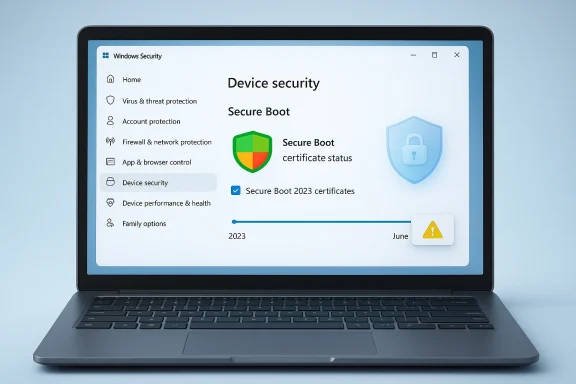
The April 2026 cumulative update, KB5083769, is where the new user-facing status starts showing up in Windows Security for Windows 11 version 24H2 and 25H2. Microsoft’s release notes say the update may display Secure Boot certificate status in the Windows Security app under Device security > Secure Boot, and that the enhancement is part of a broader set of monthly improvements. The app can now surface a green, yellow, or red state depending on how current the device is.
That change also reflects how Windows security is evolving. Modern Windows increasingly blends OS-level security, cloud-managed policy, firmware controls, and UI-based guidance into a single experience. The Windows Security app is no longer just a dashboard; it is becoming a control plane for risk communication. The new Secure Boot state is part of that pattern, much like the recent ability to adjust Smart App Control without reinstalling Windows. The April update is not just patching vulnerabilities; it is reshaping how Windows explains its own defenses.
For consumers, the promise is simple: a green badge should mean “you’re good,” while yellow and red should prompt action before trouble arrives. Microsoft’s support article says a green check means Secure Boot is on and all required certificate updates have been applied, while yellow indicates an actionable issue such as a hardware or firmware limitation, and red signals a vulnerability that cannot be serviced on the current boot configuration. In other words, Microsoft is translating a back-end certificate migration into plain language.
For enterprises, the picture is more complicated. Microsoft says these badge changes and notifications are disabled by default on managed devices to reduce noise, though administrators can enable them if they want the visibility. That makes sense: businesses need control, policy consistency, and fewer surprise alerts. But it also means the same feature can behave very differently depending on whether the PC is consumer-managed or domain-managed.
The timing is also notable. Microsoft is rolling this out months before the June 2026 expiration window, which suggests the company wants the ecosystem to self-correct gradually rather than face a last-minute scramble. That is the right strategy, because boot trust is not something users should discover after a problem happens. Better to expose the status early, while firmware updates are still practical and OEM support channels are still available.
The practical advantage is that users do not need to infer security status from vague system behavior. A PC can appear stable, boot normally, and install everyday updates while still lacking the latest boot protections. Microsoft’s updated wording makes the difference visible inside the same app most people already use for antivirus and device health. That is a smart move, because security that people cannot see is security they are unlikely to verify.
The key risk is not that the machine suddenly stops booting on June 2026. Microsoft explicitly says devices will continue to start and operate normally if they miss the transition. The deeper risk is that the machine will no longer be able to receive future protections for the boot chain. That means new revocations, updates to boot managers, and mitigations for newly discovered vulnerabilities may no longer arrive.
The update path is especially important because certificate delivery may depend on firmware behavior. Microsoft notes that most devices receive the new certificates automatically through Windows Update, but some systems may need additional OEM firmware updates. That means the OS layer is only part of the story; the platform firmware still matters, which is why some users may see a warning even after installing the latest cumulative update.
This is where the consumer experience gets tricky. A Windows update can carry the right certificate payload, but the device still needs firmware support to apply it correctly. On Surface hardware, Microsoft has already documented that firmware updates have been used to deliver the updated UEFI certificate chain. On other OEM systems, support quality will vary. That difference is exactly why a friendly status screen is more valuable than buried logs.
Microsoft’s support materials make clear that if the 2011 certificates expire without being replaced, the device won’t instantly fail, but it will stop receiving new Secure Boot protections. Over time, that means the system becomes progressively less protected as new threats emerge. That “gradual erosion” model is easy to overlook, but it is often how security failures happen in the real world.
The update is especially relevant to BitLocker and other startup trust features. Microsoft warns that scenarios relying on Secure Boot trust, such as BitLocker hardening and boot-level code integrity, may be affected if updated trust entries are missing. That makes the certificate transition a downstream issue for far more than just the Secure Boot toggle itself.
If the badge is yellow, the user may need to check with the PC maker. That does not mean the computer is broken; it means the firmware path may need help from the OEM. This is where many consumer support experiences become messy, because firmware updates are less familiar than OS patches and often vary by model. Microsoft’s new badge system at least tells users when they should not assume everything is fine.
Consumers should treat this like a health indicator, not a panic light. Green means move on. Yellow means investigate when convenient but do not ignore it. Red means the device needs attention sooner rather than later, especially if it was upgraded from an older Windows install or has unusual firmware constraints. That simple triage is a welcome improvement.
That makes the new Windows Security status feel less like a cosmetic upgrade and more like an audit. It gives users a clearer picture of how secure their setup really is, not just how secure it looks in the abstract. And for home PCs that have lived through multiple years of updates, that level of clarity is overdue.
The enterprise risk is not merely theoretical. Microsoft warns that devices that do not update before the expiration window may lose the ability to receive boot-chain security updates and could face compatibility issues with newer operating systems, firmware, hardware, or Secure Boot-dependent software. For organizations that rely on standardized images and long refresh cycles, that is a real planning constraint.
That is why the registry option to enable the experience matters. It gives IT a path to expose Secure Boot status where it helps, without forcing it universally. The flexibility is good design, though it also shifts responsibility to administrators to decide whether user-visible alerts or centralized reporting are the better fit.
The other thing to watch is whether Microsoft expands the model beyond Secure Boot. If Windows Security can clearly communicate certificate state, firmware readiness, and actionability for one important subsystem, it may eventually do the same for other hidden components. That would be a meaningful step toward a more understandable Windows security posture, especially for ordinary users who do not live in PowerShell or BIOS setup screens.
Source: Windows Latest Windows 11 April update now reveals if Secure Boot 2023 certificate is applied to your PC
 Background
The Secure Boot certificate refresh is one of those Windows security transitions that has been years in the making, yet most users will only notice it when the interface changes. Secure Boot itself is not new; it is part of the UEFI firmware trust model and has been a foundation requirement for Windows 11 hardware certification since launch. Microsoft has now confirmed that the Secure Boot certificates originally issued in 2011 begin expiring in June 2026, and that a new set of 2023 certificates is being rolled out to preserve boot integrity and future protection.That expiration matters because the boot chain is the earliest stage of trust on a Windows PC. If the system cannot verify boot components, defenders lose leverage before the operating system is even fully awake. Microsoft’s guidance is blunt: devices that miss the certificate transition will still boot and keep receiving ordinary Windows updates, but they will gradually lose the ability to receive new protections for the early boot environment. That includes updates for Windows Boot Manager, Secure Boot databases, and revocation lists that are used to blunt boot-level attacks.
This is why the change is bigger than a simple settings tweak. For years, Secure Boot status in Windows Security mainly told users whether Secure Boot was on or off, which was useful but incomplete. The new system adds certificate state, so Microsoft can distinguish between a device that is merely enabled and a device that is also fully updated. That distinction is critical because “on” does not necessarily mean “current,” and that subtlety has been a blind spot for consumers and small businesses alike.
Microsoft began warning administrators well before the deadline. The company’s IT guidance says the current Secure Boot certificates will begin expiring starting in June 2026, and that devices must move to the 2023 certificates before then or risk falling out of security compliance. Microsoft also says most devices will be updated automatically, though some systems will require OEM firmware updates to complete the transition. That caveat is what makes the new Windows Security visibility so useful: it reduces guesswork.
The April 2026 cumulative update, KB5083769, is where the new user-facing status starts showing up in Windows Security for Windows 11 version 24H2 and 25H2. Microsoft’s release notes say the update may display Secure Boot certificate status in the Windows Security app under Device security > Secure Boot, and that the enhancement is part of a broader set of monthly improvements. The app can now surface a green, yellow, or red state depending on how current the device is.
Overview
At a high level, Microsoft is trying to solve a classic security problem: the most important parts of protection are often the least visible to normal users. Secure Boot certificate updates happen automatically in the background on most PCs, but when something goes wrong, users often have no clue whether their machine is fully protected or simply functioning by luck. By adding explicit status messaging, Microsoft is making a complex firmware trust transition legible without forcing people into PowerShell or Event Viewer.That change also reflects how Windows security is evolving. Modern Windows increasingly blends OS-level security, cloud-managed policy, firmware controls, and UI-based guidance into a single experience. The Windows Security app is no longer just a dashboard; it is becoming a control plane for risk communication. The new Secure Boot state is part of that pattern, much like the recent ability to adjust Smart App Control without reinstalling Windows. The April update is not just patching vulnerabilities; it is reshaping how Windows explains its own defenses.
For consumers, the promise is simple: a green badge should mean “you’re good,” while yellow and red should prompt action before trouble arrives. Microsoft’s support article says a green check means Secure Boot is on and all required certificate updates have been applied, while yellow indicates an actionable issue such as a hardware or firmware limitation, and red signals a vulnerability that cannot be serviced on the current boot configuration. In other words, Microsoft is translating a back-end certificate migration into plain language.
For enterprises, the picture is more complicated. Microsoft says these badge changes and notifications are disabled by default on managed devices to reduce noise, though administrators can enable them if they want the visibility. That makes sense: businesses need control, policy consistency, and fewer surprise alerts. But it also means the same feature can behave very differently depending on whether the PC is consumer-managed or domain-managed.
The timing is also notable. Microsoft is rolling this out months before the June 2026 expiration window, which suggests the company wants the ecosystem to self-correct gradually rather than face a last-minute scramble. That is the right strategy, because boot trust is not something users should discover after a problem happens. Better to expose the status early, while firmware updates are still practical and OEM support channels are still available.
What Secure Boot Certificate Status Actually Means
Secure Boot certificate status is not the same thing as a simple on/off switch. The feature historically told you whether Secure Boot was enabled in firmware, but it did not tell you whether the underlying certificate trust chain was up to date. That gap mattered because a machine could appear secure while still carrying an aging trust foundation that would become problematic as certificates aged out.On, but not necessarily current
The new status model splits the experience into feature state and certificate state. If Secure Boot is on and the 2023 certificates are in place, the user gets a clear green indication. If Secure Boot is on but the trust chain is older, Windows Security can now warn the user that an update is recommended or that an older boot trust configuration remains in use. That is a subtle but important distinction because modern security failures often come from stale components, not obviously broken ones.The practical advantage is that users do not need to infer security status from vague system behavior. A PC can appear stable, boot normally, and install everyday updates while still lacking the latest boot protections. Microsoft’s updated wording makes the difference visible inside the same app most people already use for antivirus and device health. That is a smart move, because security that people cannot see is security they are unlikely to verify.
Why the certificates expire
The expiration issue exists because Microsoft’s original Secure Boot certificates date back to the Windows 8 and Windows Server 2012 era. Those older certificates are now reaching the end of their lifecycle, and Microsoft is shifting to 2023 certificate material so boot components can continue to be signed and validated. This is not a panic event; it is lifecycle management. But it does become urgent if devices miss the migration window.The key risk is not that the machine suddenly stops booting on June 2026. Microsoft explicitly says devices will continue to start and operate normally if they miss the transition. The deeper risk is that the machine will no longer be able to receive future protections for the boot chain. That means new revocations, updates to boot managers, and mitigations for newly discovered vulnerabilities may no longer arrive.
What the new badges mean
Microsoft’s badge system is designed to be straightforward. Green means no action is needed. Yellow means there is a recommendation, often tied to firmware compatibility or the need to contact the manufacturer. Red means immediate attention is required because a security vulnerability exists that the current boot configuration cannot service. That hierarchy is useful because it gives non-technical users a sense of severity without burying them in jargon.- Green: Secure Boot is on and certificate updates are applied.
- Yellow: A recommendation exists, often involving firmware or OEM follow-up.
- Red: Immediate action is needed because the current configuration cannot be fully serviced.
How Microsoft Is Delivering the Change
The rollout is not just a one-time switch flipped in the UI. Microsoft says the new Secure Boot status appears in Windows Security starting in April 2026 and is being delivered through monthly updates and service updates. The company’s release notes for KB5083769 explicitly call out the new display in Windows Security, while the dedicated support article says the enhancements are gradually rolling out.Rollout mechanics
That gradual delivery matters because not all devices will show the same thing at the same time. Microsoft says the status experience is still rolling out, which means some PCs may receive the update earlier than others even if they are on the same version. For users, that can look inconsistent, but it is normal for feature rollouts on Windows. It also helps Microsoft avoid flooding support channels if a hardware edge case causes trouble.The update path is especially important because certificate delivery may depend on firmware behavior. Microsoft notes that most devices receive the new certificates automatically through Windows Update, but some systems may need additional OEM firmware updates. That means the OS layer is only part of the story; the platform firmware still matters, which is why some users may see a warning even after installing the latest cumulative update.
Why some devices won’t update cleanly
Not every motherboard and firmware stack is equally cooperative. Microsoft says a yellow badge can indicate a hardware or firmware limitation that prevents the automated certificate update, and in those cases the advice is to contact the device manufacturer. That is a polite way of saying the problem may be outside Windows itself. If the firmware refuses to accept the newer certificate chain, Windows can detect the issue but may not be able to fix it alone.This is where the consumer experience gets tricky. A Windows update can carry the right certificate payload, but the device still needs firmware support to apply it correctly. On Surface hardware, Microsoft has already documented that firmware updates have been used to deliver the updated UEFI certificate chain. On other OEM systems, support quality will vary. That difference is exactly why a friendly status screen is more valuable than buried logs.
Enterprise control is different
Microsoft says the enhanced badge and notification behavior is disabled by default on enterprise-managed Windows 10 and Windows 11 client devices, as well as Windows Server. Administrators can enable it by changing registry settings, but the default behavior reflects a deliberate tradeoff: enterprises generally prefer centralized compliance tracking over user-facing alerts. That design choice is reasonable, though it also means managed devices may not surface urgency in the same way consumer PCs do.- Consumer devices get the most visible experience.
- Managed devices prioritize quieter workflows.
- Firmware compatibility still determines whether the update succeeds.
- OEM support may be required for stubborn hardware.
Why This Matters for Security
The urgency here comes from the fact that Secure Boot is not just a nice-to-have checkbox. It is part of the chain that helps block bootkits, unauthorized bootloader tampering, and other early-startup threats that traditional antivirus may never see. If attackers can subvert the earliest trust layers, they can persist in ways that are much harder to detect and remove.Boot-level threats are harder to clean up
Boot-level malware is dangerous because it lives beneath the operating system’s normal visibility. Once a malicious component starts before Windows, it can undermine system integrity, interfere with security tools, and survive OS-level remediation. That is why certificate-based trust transitions matter so much: they are not cosmetic, they are about maintaining the legitimacy of the boot path itself.Microsoft’s support materials make clear that if the 2011 certificates expire without being replaced, the device won’t instantly fail, but it will stop receiving new Secure Boot protections. Over time, that means the system becomes progressively less protected as new threats emerge. That “gradual erosion” model is easy to overlook, but it is often how security failures happen in the real world.
The update is about futureproofing, not just compliance
There is also a compliance angle. Microsoft says devices that remain on the old trust chain can fall out of security compliance. In enterprise environments, that matters because compliance frameworks increasingly expect timely patching and firmware hygiene, not just operating system patch levels. A machine that is technically usable can still be unacceptable from a governance standpoint.The update is especially relevant to BitLocker and other startup trust features. Microsoft warns that scenarios relying on Secure Boot trust, such as BitLocker hardening and boot-level code integrity, may be affected if updated trust entries are missing. That makes the certificate transition a downstream issue for far more than just the Secure Boot toggle itself.
Not all risk is dramatic
One reason this story can sound scarier than it is: many users will never notice a problem. Microsoft says most devices will continue to work normally even if they miss the update for a while, and everyday app use, networking, and browsing remain unchanged. That is true, but it should not be misread as “nothing to see here.” The issue is not immediate breakage; it is reduced resilience. That distinction matters.- Devices may still boot normally.
- Ordinary Windows usage may look unchanged.
- The hidden risk is reduced boot-chain protection.
- Future boot-related fixes may not apply cleanly.
Consumer Impact
For home users, the biggest win is simplicity. A person who opens Windows Security should be able to see whether their PC is fully updated without learning about UEFI databases, certificate authorities, or boot trust chains. Microsoft is effectively translating a technical backend migration into a consumer-readable health signal. That is exactly how security should behave in a mature operating system.What the average user should do
In the majority of cases, users do not need to manually fix anything. Microsoft says the certificate update is delivered automatically through Windows Update to consumer PCs, and if the Secure Boot badge is green, no action is needed. The practical advice is basic but important: stay connected, keep Windows updated, and let the servicing stack do its job.If the badge is yellow, the user may need to check with the PC maker. That does not mean the computer is broken; it means the firmware path may need help from the OEM. This is where many consumer support experiences become messy, because firmware updates are less familiar than OS patches and often vary by model. Microsoft’s new badge system at least tells users when they should not assume everything is fine.
Why green is not just a color
The green badge is meaningful because it communicates both Secure Boot enabled and certificate updates applied. Microsoft even warns that a green checkmark alone does not confirm the certificates are current unless the status text explicitly says that all required certificate updates have been applied. That nuance matters because simple visual cues can be misleading if users do not read the accompanying text.Consumers should treat this like a health indicator, not a panic light. Green means move on. Yellow means investigate when convenient but do not ignore it. Red means the device needs attention sooner rather than later, especially if it was upgraded from an older Windows install or has unusual firmware constraints. That simple triage is a welcome improvement.
Upgraded PCs may be the most interesting edge case
The most likely consumer edge case is the PC that was upgraded from Windows 10 rather than freshly installed with Windows 11. Microsoft notes that Secure Boot is a mandatory Windows 11 requirement, but people who bypassed the requirement during upgrade may see red alerts if Secure Boot is not enabled or if the newer certificates are missing. In other words, the platform may expose the consequences of past shortcut decisions.That makes the new Windows Security status feel less like a cosmetic upgrade and more like an audit. It gives users a clearer picture of how secure their setup really is, not just how secure it looks in the abstract. And for home PCs that have lived through multiple years of updates, that level of clarity is overdue.
Enterprise Impact
The enterprise story is more about control, fleet hygiene, and reducing hidden variance. Microsoft’s support guidance says the Secure Boot badge and notifications are disabled by default on managed devices, which reflects the reality that IT departments already have monitoring tools, compliance baselines, and firmware deployment workflows. Still, the underlying certificate transition matters a lot more in enterprises than it does in casual home use.Compliance and fleet visibility
From a fleet-management perspective, Secure Boot certificate migration is the kind of issue that can hide in plain sight. A machine may remain online and productive while silently drifting out of compliance with the newest boot protections. That is why Microsoft has published detailed IT guidance and inventory methods alongside the consumer-facing Windows Security changes.The enterprise risk is not merely theoretical. Microsoft warns that devices that do not update before the expiration window may lose the ability to receive boot-chain security updates and could face compatibility issues with newer operating systems, firmware, hardware, or Secure Boot-dependent software. For organizations that rely on standardized images and long refresh cycles, that is a real planning constraint.
Why admins may prefer quieter defaults
It makes sense that Microsoft kept the default experience quieter on managed devices. Enterprises often do not want every end user getting badge notifications about firmware trust status, especially if the organization already has compliance dashboards and patch management systems. The risk, however, is that a disabled default can also hide useful signals from smaller IT teams that do not have deep telemetry.That is why the registry option to enable the experience matters. It gives IT a path to expose Secure Boot status where it helps, without forcing it universally. The flexibility is good design, though it also shifts responsibility to administrators to decide whether user-visible alerts or centralized reporting are the better fit.
The bigger administrative lesson
The broader lesson is that firmware security can no longer be treated as a one-time provisioning task. Like drivers, BIOS settings, and TPM configuration, Secure Boot trust is now part of ongoing operational maintenance. The 2026 certificate transition is a reminder that Windows security is increasingly a lifecycle discipline rather than a checkbox. That is a good thing, even if it adds work.- IT teams should confirm devices are receiving the new certificates.
- Firmware support may be required for some hardware.
- Managed-device notifications are off by default.
- Compliance tools may need adjustment for boot-trust auditing.
Strengths and Opportunities
Microsoft deserves credit for making a complicated security migration easier to see. The new Secure Boot status in Windows Security reduces reliance on command-line checks, helps users distinguish between enabled and fully updated devices, and gives the company a cleaner way to nudge people before the June 2026 deadline arrives. It also fits the broader Windows trend of surfacing security state in plain language rather than hiding it behind admin tools.- Better transparency for consumers and SMB users.
- Earlier warning before the certificate deadline becomes urgent.
- Clearer triage with green, yellow, and red states.
- Reduced support friction for users who would otherwise dig through logs.
- Improved security posture by pushing certificate hygiene into the UI.
- Useful fallback guidance when firmware or OEM limitations block updates.
- Stronger messaging around the difference between Secure Boot enabled and Secure Boot fully updated.
Risks and Concerns
The biggest concern is uneven rollout. Microsoft says the feature is still being gradually deployed, so some devices will show the new Secure Boot status before others. That can create confusion, especially if two similar PCs on the same network show different security messages because one has received the UI update and the other has not. The other concern is that users may overreact to a yellow or red badge without understanding that the system may still function normally for some time.- Rollout inconsistency may confuse users and support staff.
- Firmware limitations could prevent some PCs from fully updating.
- Older hardware may never receive a clean fix.
- Badge anxiety could lead some users to panic unnecessarily.
- Managed-device defaults may hide useful warnings from some organizations.
- UI simplicity could obscure the technical difference between “on” and “fully protected.”
- OEM dependency means Microsoft cannot solve every case alone.
Looking Ahead
The next phase will be less about announcing the feature and more about watching how widely it works in the real world. The central question is whether Microsoft’s automatic delivery model can reach the vast majority of devices before the June 2026 expiration window without creating a wave of firmware support cases. If it can, this will be remembered as a quiet but effective security transition. If it cannot, the badge system may become the first visible sign of a larger compatibility problem.The other thing to watch is whether Microsoft expands the model beyond Secure Boot. If Windows Security can clearly communicate certificate state, firmware readiness, and actionability for one important subsystem, it may eventually do the same for other hidden components. That would be a meaningful step toward a more understandable Windows security posture, especially for ordinary users who do not live in PowerShell or BIOS setup screens.
- Rollout coverage across different OEMs and motherboard generations.
- How many PCs show yellow or red once the feature is broadly visible.
- Whether firmware updates from OEMs keep pace with Microsoft’s OS-side rollout.
- Enterprise adoption of the registry-based notification controls.
- User comprehension of the difference between enabled Secure Boot and updated Secure Boot.
Source: Windows Latest Windows 11 April update now reveals if Secure Boot 2023 certificate is applied to your PC
