

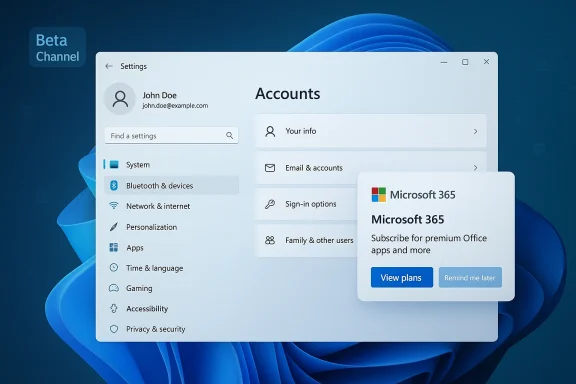
Microsoft has started seeding Windows 11 Insider Preview Build 26220.7859 to Beta Channel testers — a service-focused flight that mixes reliability fixes with a small but notable user-facing test: a Microsoft 365 subscription prompt appearing inside Settings for some devices.
Windows Insider Preview builds arrive in multiple channels — Dev, Beta, and Release Preview — and the Beta Channel is where Microsoft balances early access with greater stability for broader testing. Beta builds typically receive fewer experimental features than Dev, but they play an outsized role in smoothing the path to general releases by catching regressions and polishing user-facing behaviors before public rollout.
Build 26220.7859 is characterized primarily as a maintenance and quality update rather than a major feature update. Microsoft’s approach with Beta Channel flights like this is deliberate: fix what’s fragile, stabilize the platform across a broad set of configurations, and quietly exercise UI/telemetry hooks the company may later use more widely.
Key reliability areas targeted in recent Beta/Dev branch flights include:
Why this matters:
To check:
Arguments in favor:
For Windows power users and testers, this build is worth installing if you want to help shape the work Microsoft is doing to stabilize key subsystems. For enterprises and users who prize an untroubled daily experience, the conservative strategy remains: test in controlled rings and wait for these changes to surface in production servicing updates.
Conclusion: Build 26220.7859 is not a headline feature drop, but it is a carefully targeted update that matters to everyday reliability — and its side experiment with a Microsoft 365 prompt is worth watching closely as Insiders provide feedback.
Source: thewincentral.com Windows 11 Build 26220.7859 Hits Beta Channel With Fixes
 Background
Windows Insider Preview builds arrive in multiple channels — Dev, Beta, and Release Preview — and the Beta Channel is where Microsoft balances early access with greater stability for broader testing. Beta builds typically receive fewer experimental features than Dev, but they play an outsized role in smoothing the path to general releases by catching regressions and polishing user-facing behaviors before public rollout.Build 26220.7859 is characterized primarily as a maintenance and quality update rather than a major feature update. Microsoft’s approach with Beta Channel flights like this is deliberate: fix what’s fragile, stabilize the platform across a broad set of configurations, and quietly exercise UI/telemetry hooks the company may later use more widely.
What’s in Build 26220.7859 — Quick Summary
- A range of stability and reliability fixes aimed at explorer.exe, input and display subsystems, and background services.
- UI and app polish that addresses visual inconsistencies and small behavior regressions reported by insiders.
- Core security and performance updates delivered as under-the-hood component improvements.
- A test of a Microsoft 365 subscription prompt in Settings for a subset of Microsoft 365 Family subscribers — a small ad/marketing style element that some testers will see.
Why these maintenance builds matter
Even when they look small, servicing and quality flights like 26220.7859 are important because:- They reduce user-visible instability. Many enterprise and power users are affected by sporadic explorer.exe crashes, context-menu bugs, or Taskbar inconsistencies; small targeted fixes can meaningfully reduce support tickets.
- They allow Microsoft to validate telemetry and rollback behavior across millions of hardware profiles before shipping broader updates.
- They test UI treatments and messaging (for example, subscription prompts inside Settings) that may later be enabled more widely — giving Microsoft data on discoverability, acceptance, and user reaction before a general release.
Deep dive: Notable fixes and behavior changes
System reliability and stability
Beta builds typically bundle a set of fixes that address common crash paths and responsiveness issues. Insiders who installed recent quality flights have reported mitigations for explorer.exe crashes, system responsiveness improvements in common tasks, and reduced background process instability. These changes are part of ongoing maintenance to harden the OS across widely varying configurations — from older drivers to new silicon.Key reliability areas targeted in recent Beta/Dev branch flights include:
- Explorer and Shell crash loops
- Taskbar and Quick Settings rendering problems
- Issues with the touch/keyboard input stack and IMEs
- Boot and resume-related race conditions that could produce blue screens
App and UI polish
This build continues the pattern of addressing small but highly noticeable UI bugs: misaligned context menus, emoji/kaomoji/emoji-panel glitches, unexpected keyboard behavior (including touch keyboard borders and predictive text), and clip/scale issues in dialogs after DPI changes. Microsoft has historically prioritized these refinements for Beta Channel flights because they affect day-to-day usability for many testers.Security and performance enhancements
Although Beta Channel release notes emphasize quality over new security features, cumulative updates in Insider builds often contain:- Patches to background services to reduce crashes and privilege escalations
- Reliability fixes to system components that impact performance (for example, networking stack improvements, memory leak mitigations)
- Preparatory changes to telemetry and update subsystems that help Microsoft deliver safer updates to large numbers of devices
The Microsoft 365 prompt in Settings — what’s happening
A notable and somewhat controversial element in this flight is the appearance of a Microsoft 365 subscription prompt inside Settings > Accounts for some Microsoft 365 Family subscribers. The prompt is being tested with a subset of Beta Channel devices and is not a universal change in this build — Microsoft is clearly measuring reach and reaction.Why this matters:
- It signals Microsoft continuing to experiment with in-OS promotional placement (a trend that has appeared in previous builds and update channels).
- For administrators and privacy-conscious users, any promotional UI in Settings raises questions about discoverability controls, MDM suppression, and what telemetry Microsoft collects about interactions with such prompts.
- From a product perspective, the test lets Microsoft study the balance between helpful subscription reminders and perceived marketing intrusion.
How to tell if you have the build and who can install it
Build 26220.7859 is available through Windows Update for Windows Insiders enrolled in the Beta Channel. It is an optional flight for testers — you will not receive it if you are not in the Beta Channel.To check:
- Open Settings > Windows Update.
- Choose Check for updates.
- If your device is in the Beta Channel and Microsoft has made the flight available for your device, the build should appear with KB5077223-style servicing labeling.
Installation checklist — a practical preflight for testers
Before you install any Insider build, follow this checklist to reduce the chance of a disruptive experience:- Back up critical files (OneDrive sync is convenient, but consider a local backup or disk image for full recovery).
- Create a System Restore point or a full system image if you depend on the device for production work.
- Confirm adequate free disk space and a reliable power source (plug in laptops).
- Unplug non-essential external peripherals that historically cause driver or installation issues.
- Update major device drivers (GPU, storage controller) to latest vendor-signed drivers when possible.
- Read the build’s known issues list on Flight Hub or Insiders announcements to confirm no showstopper bugs affect your workflow.
- Join the Insider Program and select Beta Channel if you haven’t already.
- Open Settings > Windows Update > Check for updates.
- Choose the optional Beta Channel build and download.
- Reboot once the install completes and confirm your primary apps launch normally.
Troubleshooting common update problems
If the build fails to install or you see update loops:- Try toggling flight settings: sometimes changing between Beta and Release Preview, then back, clears stale state.
- Reset Windows Update components with the built-in Windows Update troubleshooting tool.
- Temporarily disable non-Microsoft antivirus or third-party update guards during the flight (re-enable after).
- If the build leaves your device in an unstable state and you need immediate rollback, use Windows Recovery to return to the previous build within the allowed rollback window.
Enterprise and IT admin considerations
While Beta Channel flights are primarily aimed at testers and enthusiasts, enterprises should be aware of the following:- MDM and Group Policy controls: Administrators can manage access to Insider builds via Microsoft Endpoint Manager and Group Policy. If you want to prevent exposure to promotional UI elements or preview features, confirm your policies explicitly block Insider enrollment on managed devices.
- Staged rollout risk: Even when Beta builds are stable, they can contain regressions that affect imaging, deployment, or specialized business apps. Test in a controlled lab environment before rolling anything out at scale.
- Telemetry and privacy posture: Features like in-Settings subscription prompts may surface prompts tied to user accounts. Confirm that diagnostics and telemetry levels in your environment are configured to meet your compliance posture.
- Update servicing path: Some fixes developed in the active development branch may migrate into servicing updates for released Windows versions, but this is neither guaranteed nor immediate. Plan patching and validation accordingly.
The user-experience debate: helpful prompt or unwelcome marketing?
The Microsoft 365 prompt in Settings exposes a deeper debate about where product guidance crosses into marketing inside a core OS experience.Arguments in favor:
- For some users, timely in-OS reminders about expiring subscriptions or family-sharing benefits are helpful and reduce friction when managing services.
- Testing prompts in Beta Channel permits Microsoft to refine messaging, placement, and opt-out flows before any wider rollout.
- Notifications tied to account status can surface legitimately useful account management actions (billing, benefit changes, license sharing).
- Users expect Settings to be a neutral systems management surface; promotional messages can feel intrusive, especially when they resemble ads.
- For managed devices, such prompts can confuse users or create support churn when employees encounter offers unrelated to corporate provisioning.
- The integration of promotional prompts raises questions about telemetry: what signals are captured when prompts are shown and how are interactions used for targeting?
What to watch next (and how Insiders can help)
Insiders should monitor the following signals as they test Build 26220.7859:- User telemetry on stability improvements for explorer.exe and other shell components.
- Reports of the Microsoft 365 prompt — how often it appears, which account types see it, and whether opt-out flows are present.
- Regressions in core productivity workflows: Search, File Explorer, Quick Settings, Taskbar, and IME behavior.
- Any new known issues Microsoft adds to Flight Hub or Feedback Hub following this flight.
- Reproduce and file concise Feedback Hub reports with steps, reproduction frequency, and system logs.
- Use the Insider channels to confirm whether a behavior is limited to a single hardware profile or is more broad.
- Capture screenshots and short video captures of UI problems and unexpected prompts — these materially help engineers triage UX issues.
Risk assessment — what could go wrong
Even a maintenance flight has risks. Consider the following potential hazards and severity:- Small probability of regression into explorer.exe crash loops or boot hangs on certain driver combinations (moderate to high impact for affected devices).
- Compatibility issues with specialized or older third-party security software after component updates (moderate impact).
- User confusion and support calls from unexpected promotional prompts in Settings, especially on managed devices (low to moderate impact but high support cost).
- Rare installation loops or update failures that require manual intervention (low probability but high impact for single devices).
Recommendation: who should install and who should wait
- Install if: You are an active Windows Insider in the Beta Channel, enjoy testing stability fixes, and can tolerate an occasional regression. Testers with spare hardware or VMs are ideal.
- Wait if: You depend on a machine for mission-critical work, manage a fleet of corporate devices, or are using hardware with known compatibility complexities (e.g., niche peripherals, older drivers).
- Admins: Keep production devices off Insider channels. Use a controlled validation ring to test any Beta Channel changes before wider organizational rollout.
Final analysis — incremental but meaningful
Build 26220.7859 is an archetypal Beta Channel flight: low on fanfare, high on incremental polish. The value of such flights is easy to understate; they reduce the noise of crashes and small glitches that otherwise erode user trust over time. The inclusion of a Microsoft 365 prompt inside Settings is the most headline-worthy element in this release and speaks to Microsoft’s broader experimentation with in-OS messaging — a feature likely to spark friction unless handled with careful opt‑out mechanics and enterprise-aware controls.For Windows power users and testers, this build is worth installing if you want to help shape the work Microsoft is doing to stabilize key subsystems. For enterprises and users who prize an untroubled daily experience, the conservative strategy remains: test in controlled rings and wait for these changes to surface in production servicing updates.
Practical closing checklist
- If you install, back up first and be ready to provide detailed Feedback Hub reports for any regressions.
- Capture whether the Microsoft 365 prompt appears on your device; document the exact Settings path and copy the text of the prompt if you can.
- For admins, confirm MDM/Group Policy controls prevent Insider enrollment on corporate devices and test the opt-out/upstream suppression behavior in a lab.
Conclusion: Build 26220.7859 is not a headline feature drop, but it is a carefully targeted update that matters to everyday reliability — and its side experiment with a Microsoft 365 prompt is worth watching closely as Insiders provide feedback.
Source: thewincentral.com Windows 11 Build 26220.7859 Hits Beta Channel With Fixes
