

Microsoft is gradually restoring a dockable Copilot sidebar in Windows 11, letting the AI app snap to the left or right edge of the desktop and resize other windows around it, while administrators gain newer policy paths to remove or block the consumer Copilot app. The move is less a simple design reversal than a window into Microsoft’s larger problem: Copilot is important enough for Redmond to keep pushing, but not trusted enough by users to sit quietly in the operating system. Windows 11 is becoming the proving ground for whether AI belongs as a desktop surface, an app, a shortcut, or something users disable before lunch.
The most striking thing about Copilot’s return to the sidebar is not the sidebar itself. Windows users have lived with side panels for decades, from task panes in Office to widgets, notification centers, browser sidebars, and the old Cortana panel. The striking thing is that Microsoft has circled back to a form factor it had already moved away from.
The earliest Windows Copilot pitch was built around the idea of a persistent assistant living beside the desktop. It was supposed to feel close enough to the operating system to help with settings, apps, and context, but separate enough to avoid rewriting Windows around a chatbot. That vision was then softened into a more conventional app model, one that made Copilot feel less like a native shell feature and more like another web-powered Microsoft experience with a Windows icon.
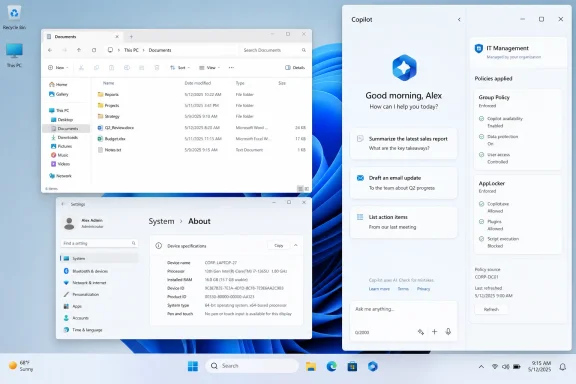
Now the pendulum is swinging back. The updated Copilot app reportedly includes a dock option that places it as a sidebar on either edge of the screen. When docked, Windows resizes other open apps instead of simply floating Copilot above them, which makes the assistant feel more like part of the workspace than a transient overlay.
That distinction matters. A floating window is something users can ignore, minimize, or bury. A docked sidebar asks for a reserved strip of the desktop, effectively claiming that Copilot deserves spatial priority alongside the apps where work actually happens.
The sidebar tries to split the difference. It is visually integrated enough to be discoverable, but architecturally modest enough that Microsoft can still call it an app experience. That gives the company room to iterate without admitting that the Windows shell itself is being redesigned around AI.
This is classic modern Microsoft product strategy. The company rarely introduces a major behavioral shift as a single immovable feature anymore. Instead, it experiments through app updates, staged rollouts, A/B testing, Insider channels, cloud-side toggles, and policy templates that arrive after users and admins complain loudly enough.
The result is a platform that can evolve quickly, but also one that feels unstable in small, irritating ways. A Copilot button appears in one app, disappears from another, changes behavior on the keyboard, reappears as a dockable panel, and then receives an administrative removal path. For enthusiasts, this looks like indecision. For IT departments, it looks like another moving target.
That logic has some merit. Most users do not read release notes. They do not hunt through menus looking for new generative AI features. If a feature is invisible, it may as well not exist, particularly in enterprise software where habits are deeply entrenched and workers have little incentive to experiment.
But discoverability becomes a euphemism when it consumes too much of the workspace. A docked sidebar is not merely discoverable; it is architectural. It changes how windows are arranged and how the desktop feels. That may be useful for users who actively want Copilot nearby, but it is a heavier claim than a taskbar icon or a Start menu entry.
Microsoft is walking a narrow line. The company wants Copilot to be present enough to change behavior, but not so present that users interpret it as another forced service layered on top of Windows. The sidebar is more polite than a modal pop-up and more useful than a static icon, but it still carries the same strategic pressure: Microsoft wants Copilot to be seen.
That is why even optional AI features are often received with suspicion. A feature can be technically removable and still feel imposed if it appears after an update, occupies a prominent part of the interface, or requires policy work to suppress at scale. Windows enthusiasts are especially sensitive to this because they notice the difference between a user choosing a tool and an operating system marketing one.
The sidebar’s resizing behavior is a good example. On paper, it is considerate: instead of covering apps, Windows moves them aside. In practice, it asserts that Copilot is important enough to alter the layout of everything else. Some users will appreciate that. Others will see it as the desktop making room for a product they never asked for.
This is where Microsoft’s consumer and enterprise audiences diverge. Consumers may judge Copilot by convenience or annoyance. Enterprises judge it by control, compliance, support burden, and whether a surprise interface change generates help desk tickets. The same sidebar can be a productivity feature in one environment and an unauthorized workflow disruption in another.
That distinction is essential for administrators. A consumer Copilot app on a corporate device is not the same thing as Microsoft 365 Copilot Chat governed by Entra identity, tenant controls, retention policies, and enterprise data commitments. If Microsoft blurs those lines visually, admins have to unblur them operationally.
The reported registry and Group Policy controls for removing the Copilot app are therefore more than a concession to critics. They are an acknowledgment that AI integration has to be governable. In managed Windows environments, “just ignore it” is not a deployment strategy.
Microsoft’s documentation has also emphasized AppLocker and PowerShell removal paths for the consumer Copilot app, while warning that older “turn off Windows Copilot” style controls belong to a legacy experience. That is exactly the kind of nuance that matters in real IT operations. A policy that disabled yesterday’s sidebar may not disable today’s app, and a setting that hides an entry point may not prevent installation or launch.
For users, that creates confusion. For administrators, it creates policy sprawl. A user may ask to remove Copilot, but the answer depends on whether they mean a Windows app, a taskbar pin, an Office feature, an Edge sidebar, a keyboard shortcut, a context menu item, or a cloud service available through the browser.
The dockable sidebar adds another surface to this taxonomy. It may be implemented as part of the Copilot app, but visually it recalls the older Copilot-in-Windows pane. That resemblance is exactly why the change feels like a return, even if the underlying product architecture has shifted.
Microsoft’s challenge is that normal people do not care about those distinctions until something goes wrong. They care that an AI panel appeared, that it moved their windows, that it may use cloud services, and that they want to know how to disable it. The company can explain the architecture, but it cannot make branding complexity disappear by documentation alone.
Microsoft has since adjusted how the Copilot key behaves, including support for remapping in managed scenarios and a lightweight prompt model for some commercial users. That flexibility is welcome, but the symbolism remains. Hardware made Copilot harder to treat as an optional app.
The sidebar now gives that key somewhere more obvious to lead. A user presses a key, a prompt or app appears, and the assistant can occupy a durable part of the workspace. From Microsoft’s perspective, this is coherence. From a skeptical user’s perspective, it is a funnel.
The truth is probably both. Microsoft is trying to make Copilot feel less like a website in a wrapper and more like a companion layer for Windows. But every step toward that vision makes the opt-out story more important, because the deeper a feature sits in the daily workflow, the less acceptable it is for Microsoft to treat removal as an afterthought.
That is the lesson Microsoft should take from the floating Copilot button controversy in Office apps. Visibility can drive engagement, but engagement is not the same as satisfaction. If users click a button to figure out how to remove it, the metric goes up while trust goes down.
Windows amplifies this problem because it is the foundation under everything else. An annoying button in one app is a product design issue. An annoying assistant in the desktop environment feels like a platform decision. The threshold for intrusion is lower because the operating system is supposed to be neutral ground.
The docked sidebar is, at least, more orderly than a floating button that gets in the way of content. It has boundaries. It can be placed on the left or right. It does not need to hover over cells, documents, or screenshots. But it still participates in the same broader question: when does helpful proximity become product pressure?
This is how large platform companies retreat now. They rarely declare a feature misjudged and move on. They reposition it, rename it, fold it into a different app, move it behind a toggle, or describe the shift as a refinement based on feedback. The product survives, but its interface changes shape.
The return of the sidebar fits that pattern. Microsoft appears to be testing where Copilot belongs after learning that scattering buttons everywhere creates fatigue. A single dockable companion may be easier to justify than a dozen small AI affordances sprinkled through the shell and bundled apps.
If that is the direction, it is arguably healthier. Windows does not need a Copilot logo in every corner to become more AI-capable. It needs a coherent invocation model, predictable controls, and a clear separation between local operating system behavior and cloud AI assistance.
For power users, a persistent assistant could become another productivity pane, like a terminal, chat client, documentation viewer, or notes app. For support scenarios, it might help users follow instructions while keeping the affected app in view. For accessibility and voice workflows, a stable side surface may be better than a disappearing pop-up.
But that usefulness depends on restraint. The sidebar should be easy to summon, easy to dismiss, easy to keep dismissed, and honest about what context it can see. It should not reappear after updates, reinterpret user choices, or bury controls in policy layers that only administrators understand.
In other words, Microsoft should let the feature be boring. Boring is underrated in operating systems. A boring Copilot sidebar that behaves predictably would do more for adoption than a dozen aggressive prompts trying to manufacture curiosity.
Microsoft has tried to draw lines around enterprise data protection for work and school scenarios, particularly within Microsoft 365 Copilot Chat. But the Windows desktop is messy territory. Users do not experience their PC as a compliance diagram; they experience it as a single surface where files, browser tabs, chats, screenshots, and line-of-business apps live side by side.
A docked assistant invites contextual use. That is the point. But contextual use also invites policy concerns: what can be pasted, what can be summarized, what leaves the device, and which tenant rules apply. Even when the technical answers are sound, admins need interfaces and policies that make those answers enforceable.
The consumer Copilot app therefore needs to be treated differently from enterprise-governed Copilot experiences. Microsoft knows this, and its management guidance increasingly reflects it. The remaining challenge is making Windows itself reflect it just as clearly, so users and admins are not left guessing which Copilot they are dealing with.
Microsoft’s ambition is obvious. It wants Windows to be the best place to use its AI services, and it wants Copilot to become a habitual layer across work and personal computing. That is strategically rational, especially when Microsoft is investing so heavily in AI infrastructure and competing against browsers, mobile platforms, and standalone AI apps for user attention.
But Windows has a different social contract than a web app. People buy PCs to run their software, manage their files, play games, administer systems, build things, and get work done. They may welcome AI help, but they resent the feeling that the operating system has become a billboard for the vendor’s current strategic priority.
That tension will define Copilot’s next year on Windows more than model quality alone. A smarter assistant helps, but trust is won through behavior. If Copilot respects user intent, enterprise policy, and interface calm, it has a chance to become part of the Windows routine. If it keeps arriving as a surprise, users will keep treating it like clutter.
 Microsoft Reopens the Door It Recently Closed
The most striking thing about Copilot’s return to the sidebar is not the sidebar itself. Windows users have lived with side panels for decades, from task panes in Office to widgets, notification centers, browser sidebars, and the old Cortana panel. The striking thing is that Microsoft has circled back to a form factor it had already moved away from.The earliest Windows Copilot pitch was built around the idea of a persistent assistant living beside the desktop. It was supposed to feel close enough to the operating system to help with settings, apps, and context, but separate enough to avoid rewriting Windows around a chatbot. That vision was then softened into a more conventional app model, one that made Copilot feel less like a native shell feature and more like another web-powered Microsoft experience with a Windows icon.
Now the pendulum is swinging back. The updated Copilot app reportedly includes a dock option that places it as a sidebar on either edge of the screen. When docked, Windows resizes other open apps instead of simply floating Copilot above them, which makes the assistant feel more like part of the workspace than a transient overlay.
That distinction matters. A floating window is something users can ignore, minimize, or bury. A docked sidebar asks for a reserved strip of the desktop, effectively claiming that Copilot deserves spatial priority alongside the apps where work actually happens.
The Sidebar Is Microsoft’s Compromise Between App and Operating System
Microsoft’s difficulty with Copilot in Windows has always been conceptual. If Copilot is just an app, it competes with every other app and must justify why it deserves attention. If it is part of Windows, Microsoft has to answer harder questions about privacy, enterprise control, offline behavior, system permissions, and why an operating system should nudge users toward a cloud AI service.The sidebar tries to split the difference. It is visually integrated enough to be discoverable, but architecturally modest enough that Microsoft can still call it an app experience. That gives the company room to iterate without admitting that the Windows shell itself is being redesigned around AI.
This is classic modern Microsoft product strategy. The company rarely introduces a major behavioral shift as a single immovable feature anymore. Instead, it experiments through app updates, staged rollouts, A/B testing, Insider channels, cloud-side toggles, and policy templates that arrive after users and admins complain loudly enough.
The result is a platform that can evolve quickly, but also one that feels unstable in small, irritating ways. A Copilot button appears in one app, disappears from another, changes behavior on the keyboard, reappears as a dockable panel, and then receives an administrative removal path. For enthusiasts, this looks like indecision. For IT departments, it looks like another moving target.
Discoverability Has Become the New Default Setting
The logic behind the sidebar is easy to understand if you accept Microsoft’s internal premise: users will not adopt AI tools they cannot see. Copilot’s problem is not only capability, but surface area. Microsoft has spent the past two years putting Copilot entry points in Windows, Edge, Microsoft 365, keyboards, search boxes, context menus, and app ribbons because the company believes AI assistance must be one click away to become habitual.That logic has some merit. Most users do not read release notes. They do not hunt through menus looking for new generative AI features. If a feature is invisible, it may as well not exist, particularly in enterprise software where habits are deeply entrenched and workers have little incentive to experiment.
But discoverability becomes a euphemism when it consumes too much of the workspace. A docked sidebar is not merely discoverable; it is architectural. It changes how windows are arranged and how the desktop feels. That may be useful for users who actively want Copilot nearby, but it is a heavier claim than a taskbar icon or a Start menu entry.
Microsoft is walking a narrow line. The company wants Copilot to be present enough to change behavior, but not so present that users interpret it as another forced service layered on top of Windows. The sidebar is more polite than a modal pop-up and more useful than a static icon, but it still carries the same strategic pressure: Microsoft wants Copilot to be seen.
Windows Users Remember Every Forced Experiment
Part of the backlash around Copilot is not really about Copilot. It is about muscle memory. Windows users have seen Microsoft test the edges of user tolerance with browser defaults, account prompts, OneDrive setup flows, Start menu recommendations, Teams integrations, widgets, ads for services, and shifting control panels. Copilot arrives in that historical context, not in a vacuum.That is why even optional AI features are often received with suspicion. A feature can be technically removable and still feel imposed if it appears after an update, occupies a prominent part of the interface, or requires policy work to suppress at scale. Windows enthusiasts are especially sensitive to this because they notice the difference between a user choosing a tool and an operating system marketing one.
The sidebar’s resizing behavior is a good example. On paper, it is considerate: instead of covering apps, Windows moves them aside. In practice, it asserts that Copilot is important enough to alter the layout of everything else. Some users will appreciate that. Others will see it as the desktop making room for a product they never asked for.
This is where Microsoft’s consumer and enterprise audiences diverge. Consumers may judge Copilot by convenience or annoyance. Enterprises judge it by control, compliance, support burden, and whether a surprise interface change generates help desk tickets. The same sidebar can be a productivity feature in one environment and an unauthorized workflow disruption in another.
The Removal Policies Are the Real Enterprise Story
The more consequential part of the current Copilot story may not be the dock at all. It is the expanding set of ways to remove, block, or govern the consumer Copilot app. According to Microsoft’s own management guidance, the company now distinguishes between the consumer Microsoft Copilot app and Microsoft 365 Copilot experiences tied to work or school accounts, enterprise data protection, and Microsoft 365 policy controls.That distinction is essential for administrators. A consumer Copilot app on a corporate device is not the same thing as Microsoft 365 Copilot Chat governed by Entra identity, tenant controls, retention policies, and enterprise data commitments. If Microsoft blurs those lines visually, admins have to unblur them operationally.
The reported registry and Group Policy controls for removing the Copilot app are therefore more than a concession to critics. They are an acknowledgment that AI integration has to be governable. In managed Windows environments, “just ignore it” is not a deployment strategy.
Microsoft’s documentation has also emphasized AppLocker and PowerShell removal paths for the consumer Copilot app, while warning that older “turn off Windows Copilot” style controls belong to a legacy experience. That is exactly the kind of nuance that matters in real IT operations. A policy that disabled yesterday’s sidebar may not disable today’s app, and a setting that hides an entry point may not prevent installation or launch.
The Consumer Copilot and Work Copilot Split Still Feels Messy
Microsoft has a branding problem of its own making. “Copilot” now refers to a family of experiences rather than a single product. There is the consumer Copilot app, Microsoft 365 Copilot Chat, paid Microsoft 365 Copilot grounded in work data, Copilot in Edge, Copilot keys on keyboards, app-specific Copilot buttons, and AI features inside Windows apps that may or may not carry the Copilot name.For users, that creates confusion. For administrators, it creates policy sprawl. A user may ask to remove Copilot, but the answer depends on whether they mean a Windows app, a taskbar pin, an Office feature, an Edge sidebar, a keyboard shortcut, a context menu item, or a cloud service available through the browser.
The dockable sidebar adds another surface to this taxonomy. It may be implemented as part of the Copilot app, but visually it recalls the older Copilot-in-Windows pane. That resemblance is exactly why the change feels like a return, even if the underlying product architecture has shifted.
Microsoft’s challenge is that normal people do not care about those distinctions until something goes wrong. They care that an AI panel appeared, that it moved their windows, that it may use cloud services, and that they want to know how to disable it. The company can explain the architecture, but it cannot make branding complexity disappear by documentation alone.
The Copilot Key Made the Desktop Political
The dedicated Copilot key on newer Windows PCs raised the stakes for all of this. A keyboard key is not a subtle integration point. It is a physical endorsement, a statement that invoking Microsoft’s AI assistant belongs beside Ctrl, Alt, and the Windows key in the hierarchy of common computing actions.Microsoft has since adjusted how the Copilot key behaves, including support for remapping in managed scenarios and a lightweight prompt model for some commercial users. That flexibility is welcome, but the symbolism remains. Hardware made Copilot harder to treat as an optional app.
The sidebar now gives that key somewhere more obvious to lead. A user presses a key, a prompt or app appears, and the assistant can occupy a durable part of the workspace. From Microsoft’s perspective, this is coherence. From a skeptical user’s perspective, it is a funnel.
The truth is probably both. Microsoft is trying to make Copilot feel less like a website in a wrapper and more like a companion layer for Windows. But every step toward that vision makes the opt-out story more important, because the deeper a feature sits in the daily workflow, the less acceptable it is for Microsoft to treat removal as an afterthought.
The Office Button Backlash Foreshadowed the Windows Problem
Recent complaints about Copilot buttons in Microsoft 365 apps show why the Windows sidebar will be judged harshly. Users do not merely object to AI existing. They object when AI controls occupy prime interface real estate, interrupt selection behavior, or appear in workflows where they are not obviously useful.That is the lesson Microsoft should take from the floating Copilot button controversy in Office apps. Visibility can drive engagement, but engagement is not the same as satisfaction. If users click a button to figure out how to remove it, the metric goes up while trust goes down.
Windows amplifies this problem because it is the foundation under everything else. An annoying button in one app is a product design issue. An annoying assistant in the desktop environment feels like a platform decision. The threshold for intrusion is lower because the operating system is supposed to be neutral ground.
The docked sidebar is, at least, more orderly than a floating button that gets in the way of content. It has boundaries. It can be placed on the left or right. It does not need to hover over cells, documents, or screenshots. But it still participates in the same broader question: when does helpful proximity become product pressure?
Microsoft Is Learning to Retreat Without Saying Retreat
One of the more interesting developments around Copilot in Windows is Microsoft’s willingness to prune some entry points while strengthening others. Reports this year have described Microsoft removing or scaling back certain Copilot-branded hooks in Windows apps, even as it continues to invest heavily in Copilot as a systemwide concept. That is not abandonment. It is consolidation.This is how large platform companies retreat now. They rarely declare a feature misjudged and move on. They reposition it, rename it, fold it into a different app, move it behind a toggle, or describe the shift as a refinement based on feedback. The product survives, but its interface changes shape.
The return of the sidebar fits that pattern. Microsoft appears to be testing where Copilot belongs after learning that scattering buttons everywhere creates fatigue. A single dockable companion may be easier to justify than a dozen small AI affordances sprinkled through the shell and bundled apps.
If that is the direction, it is arguably healthier. Windows does not need a Copilot logo in every corner to become more AI-capable. It needs a coherent invocation model, predictable controls, and a clear separation between local operating system behavior and cloud AI assistance.
The Sidebar Could Be Useful If Microsoft Lets It Be Boring
There is a version of the Copilot sidebar that makes sense. A docked assistant can be genuinely useful for comparing documents, summarizing web research, drafting text while another app remains visible, or walking through settings without forcing a full context switch. The right-edge panel is a familiar pattern because it works for reference material and secondary tools.For power users, a persistent assistant could become another productivity pane, like a terminal, chat client, documentation viewer, or notes app. For support scenarios, it might help users follow instructions while keeping the affected app in view. For accessibility and voice workflows, a stable side surface may be better than a disappearing pop-up.
But that usefulness depends on restraint. The sidebar should be easy to summon, easy to dismiss, easy to keep dismissed, and honest about what context it can see. It should not reappear after updates, reinterpret user choices, or bury controls in policy layers that only administrators understand.
In other words, Microsoft should let the feature be boring. Boring is underrated in operating systems. A boring Copilot sidebar that behaves predictably would do more for adoption than a dozen aggressive prompts trying to manufacture curiosity.
Security Teams Will Ask Different Questions Than Product Managers
For security-minded readers, the central issue is not whether the sidebar is convenient. It is what data moves through it, under which identity, with what retention, and how reliably the experience can be governed. That is especially true in mixed environments where personal Microsoft accounts, Entra accounts, Microsoft 365 services, and browser sessions can coexist on the same device.Microsoft has tried to draw lines around enterprise data protection for work and school scenarios, particularly within Microsoft 365 Copilot Chat. But the Windows desktop is messy territory. Users do not experience their PC as a compliance diagram; they experience it as a single surface where files, browser tabs, chats, screenshots, and line-of-business apps live side by side.
A docked assistant invites contextual use. That is the point. But contextual use also invites policy concerns: what can be pasted, what can be summarized, what leaves the device, and which tenant rules apply. Even when the technical answers are sound, admins need interfaces and policies that make those answers enforceable.
The consumer Copilot app therefore needs to be treated differently from enterprise-governed Copilot experiences. Microsoft knows this, and its management guidance increasingly reflects it. The remaining challenge is making Windows itself reflect it just as clearly, so users and admins are not left guessing which Copilot they are dealing with.
Windows 11 Is Becoming an AI Negotiation, Not an AI Destination
The deeper story is that Windows 11 is no longer simply receiving AI features. It is negotiating the terms under which AI is allowed to inhabit the desktop. Every Copilot experiment is a proposal; every backlash, policy update, and UI retreat is a counterproposal.Microsoft’s ambition is obvious. It wants Windows to be the best place to use its AI services, and it wants Copilot to become a habitual layer across work and personal computing. That is strategically rational, especially when Microsoft is investing so heavily in AI infrastructure and competing against browsers, mobile platforms, and standalone AI apps for user attention.
But Windows has a different social contract than a web app. People buy PCs to run their software, manage their files, play games, administer systems, build things, and get work done. They may welcome AI help, but they resent the feeling that the operating system has become a billboard for the vendor’s current strategic priority.
That tension will define Copilot’s next year on Windows more than model quality alone. A smarter assistant helps, but trust is won through behavior. If Copilot respects user intent, enterprise policy, and interface calm, it has a chance to become part of the Windows routine. If it keeps arriving as a surprise, users will keep treating it like clutter.
The Sidebar’s Return Says More Than Microsoft Intended
The practical details are simple enough, but the implications are not. Microsoft is giving Copilot a more visible desktop posture again, while also making clearer that removal and governance matter. That combination tells us where the company thinks the fight is now.- The docked Copilot sidebar is Microsoft’s latest attempt to make the assistant visible without fully rebuilding the Windows shell around it.
- The ability to place the sidebar on either side and resize other apps makes Copilot feel more integrated than a normal floating app.
- The removal and policy options matter because enterprises need to distinguish the consumer Copilot app from Microsoft 365 Copilot experiences governed by work accounts.
- Older Copilot controls may not map cleanly to newer Copilot experiences, so administrators should verify which app, policy, and entry point they are actually managing.
- The biggest risk for Microsoft is not that users dislike AI, but that they interpret every new Copilot surface as another forced Windows promotion.
- The best version of this feature is one that stays optional, predictable, and quiet until the user explicitly asks for it.
References
- Primary source: TechPowerUp
Published: Mon, 25 May 2026 07:41:26 GMT
Microsoft Copilot Returns as a Sidebar in Windows 11 | TechPowerUp
Microsoft is still experimenting with how to integrate its Copilot AI into the Windows 11 operating system, and the company seems determined to make its AI companion a primary feature on the desktop. According to a change that is gradually rolling out, Copilot now appears as a sidebar...www.techpowerup.com - Related coverage: windowscentral.com
"Atrocious implementation": Microsoft's unremovable Copilot button is driving Excel users crazy with forced AI in spreadsheets | Windows Central
Excel users want Microsoft to let them hide the new, unremovable floating Copilot button, which gets in the way of data.www.windowscentral.com - Official source: learn.microsoft.com
Updated Windows and Microsoft 365 Copilot Chat experience | Microsoft Learn
Learn about changes to the Copilot in Windows experience for commercial environments and how to configure it for your organization.learn.microsoft.com - Related coverage: digitaltrends.com
Microsoft will let users disable the floating Copilot button in the Office app - Digital Trends
Microsoft is rolling out an Office update in the last week of May 2026 that lets users move the floating Copilot button out of their documents and back to the ribbon.www.digitaltrends.com - Related coverage: windowslatest.com
How I disabled 13 AI features in Windows 11 safely, no third-party apps needed
Learn how to remove Copilot from Windows 11, including Edge, Search, Photos, Notepad, File Explorer, Paint, and other built-in AI features. www.windowslatest.com
- Related coverage: windowsforum.com
Hide or Remove Windows Copilot in Windows 11 (2026 Guide) | Windows Forum
Microsoft’s Copilot has moved from optional experiment to a pervasive part of the Windows 11 experience, and in 2026 the ways to hide, block, or remove it...windowsforum.com
- Related coverage: pcworld.com
How to remove 'Ask Copilot' from Windows 11's context menu | PCWorld
Windows now shows the "Ask Copilot" entry when right-clicking on files such as DOCX, TXT, PDF or PNG. Here's how to remove it via the registry.www.pcworld.com - Related coverage: tomsguide.com
Microsoft is hiding Windows 11's 'eyes' — here's how to find Copilot Vision (and fully delete it) | Tom's Guide
Microsoft’s new AI can "see" your screen to fix errors and summarize docs. Here's how to master Copilot Vision or disable it entirely to protect your privacy.www.tomsguide.com - Related coverage: wintips.org
How to Effectively Remove or Disable Microsoft Copilot on Windows 11.
In this guide, you'll learn how to hide or completely remove Microsoft Copilot on Windows 11. As Microsoft has integrated AI into Windows 11 through Copilot,www.wintips.org - Related coverage: windowsreport.com
Microsoft Finally Lets IT Admins Remove Copilot From Windows 11
Microsoft now lets IT admins uninstall Copilot on Windows 11 enterprise devices using a new policy introduced in April 2026. windowsreport.com
- Related coverage: techradar.com
Microsoft's planned new AI trick for Edge will 'automatically open the Copilot side pane' with Outlook email links — and I can feel the hate already | TechRadar
New feature is on the roadmap for May 2026www.techradar.com - Related coverage: tomshardware.com
Admins finally get the power to uninstall Microsoft Copilot on Windows 11 Pro, Enterprise, and EDU versions — devices must meet specific conditions to allow the removal of the AI app | Tom's Hardware
One less bloatware on Windows 11.www.tomshardware.com
