

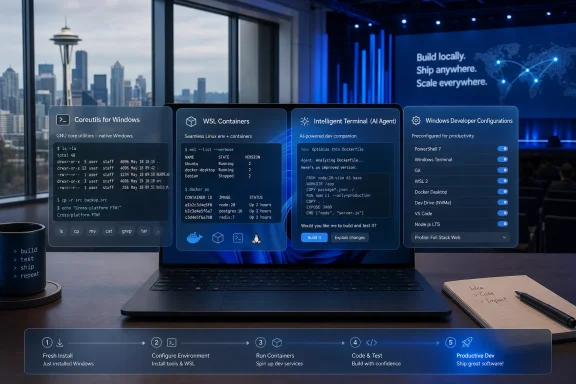
Microsoft used Build 2026 in Seattle this week to introduce four Windows 11 developer tools—Coreutils for Windows, WSL Containers, Intelligent Terminal, and Windows Developer Configurations—that make the operating system look less like a Windows-only workstation and more like a native host for cross-platform software work. The announcements were not the keynote fireworks. They were smaller, duller, and more revealing. Microsoft is not merely trying to make Windows friendlier to developers; it is trying to remove the daily reasons developers leave Windows in the first place.
For years, Microsoft’s message to developers was that Windows could accommodate their preferred workflows. WSL brought Linux into Windows. Windows Terminal modernized the command line. PowerShell became cross-platform. Visual Studio Code turned into Microsoft’s most successful developer product precisely because it did not insist that developers live entirely inside Microsoft’s older ecosystem.
The Build 2026 announcements push that strategy into a new phase. Instead of saying Windows can coexist with Linux tooling, Microsoft is now taking pieces of that tooling and making them feel native. Coreutils, Linux containers, automated dev setup, and AI-assisted terminal workflows are not lifestyle features. They are the boring infrastructure of daily engineering work.
That matters because developer loyalty is rarely won by slogans. It is won by shaving seconds off repetitive tasks, reducing the number of mental translations between systems, and making a fresh machine useful before lunch. Microsoft’s bet is that the next Windows developer workstation will not be defined by whether it feels traditionally “Windows-like,” but by whether it can host the messy, hybrid, cloud-oriented toolchains that modern software actually requires.
There is a defensive edge to the strategy. macOS became the default laptop platform for many developers because it paired a polished desktop with Unix familiarity. Linux won servers, containers, and cloud-native development. Windows, despite its enormous installed base, often felt like the place where developers had to install a compatibility layer before real work could begin. Build 2026 is Microsoft saying: the compatibility layer is becoming the platform.
The Windows command line has always carried historical baggage. Command Prompt remains familiar to generations of administrators, PowerShell is powerful but opinionated, and Git Bash, Cygwin, MSYS2, and other ports have long filled gaps for users who wanted Unix-like utilities. The result was not a lack of options, but a lack of consistency. Every developer machine could become its own small archeological site of shells, paths, aliases, and half-compatible tools.
Coreutils attacks that problem from the other direction. It does not ask developers to love a new Microsoft abstraction. It gives them commands they already use elsewhere and makes them available as part of a Microsoft-backed Windows story. That is a subtle but important shift in posture.
The deeper implication is about muscle memory. A developer moving between a Linux production server, a container shell, a cloud VM, and a Windows laptop should not have to pause to remember whether the local machine wants
There will still be compatibility traps. Coreutils for Windows is not the same thing as turning Windows into GNU/Linux, and filesystem semantics, path conventions, permissions, line endings, and shell behavior remain real boundaries. But Microsoft does not need perfect equivalence to change the experience. It only needs to make common cases boring.
That is why this announcement says more about Windows’ future than its modest surface suggests. Microsoft is treating command-line familiarity as a first-class feature of the OS. For a company that once defined Windows partly in opposition to Unix, that is a remarkable admission: developers do not want platform purity at the prompt. They want commands that work.
That does not mean Docker Desktop disappears. Docker is more than a command-line syntax; it is an ecosystem, a workflow, a set of integrations, and for many organizations, a familiar support model. But Microsoft is clearly targeting the baseline use case: build an image, run a container, bind a port, test locally, and move on. If Windows can do that without an additional desktop product, the center of gravity changes.
The technical framing matters. Microsoft is describing a native container path that uses a dedicated, optimized Hyper-V utility VM rather than piggybacking on a developer’s ordinary WSL distribution. That separation is sensible. Containers should not depend on whatever state a user’s Ubuntu or Debian install happens to be in, and enterprises will care about isolation, management, and policy boundaries.
The command-line resemblance to Docker is not accidental. If
The enterprise story may be even more important than the developer story. Third-party container desktops have become a management headache in many organizations, especially when licensing, update cadence, security controls, and virtualization requirements collide. A built-in Windows capability that can be governed through familiar management channels gives IT departments a cleaner answer. It also gives Microsoft more leverage over the developer workstation stack.
Still, built-in does not automatically mean better. The success of WSL Containers will depend on compatibility, performance, image support, networking behavior, volume handling, security defaults, and whether common tools treat it as a real peer to existing runtimes. Developers are unforgiving when their local container environment works differently from CI or production. Microsoft can win the default only if the default is boringly reliable.
That separation is politically and practically smart. Windows Terminal is one of Microsoft’s best modern Windows apps precisely because it is fast, flexible, and relatively unpolluted by corporate ambition. Stuffing AI directly into the mainline terminal would have invited predictable backlash from developers who do not want their shell to become another Copilot surface. By making Intelligent Terminal a separate application, Microsoft gets an experiment without turning the existing terminal into a referendum on AI.
The idea itself is not absurd. Developers already copy command errors into search engines, paste stack traces into chatbots, ask assistants to explain shell output, and use terminal agents to edit files or run commands. The question is not whether AI belongs near the terminal. It already lives there informally. The question is whether Microsoft can make that interaction useful, inspectable, and safe enough to justify being part of the Windows developer workflow.
The danger is authority. A terminal is not a document editor. It is a control surface for files, credentials, build systems, package managers, cloud resources, and production-adjacent tooling. An AI agent that suggests a fix is one thing; an agent that chains commands together in a half-understood environment is another. The history of developer tooling is full of conveniences that became liabilities because they collapsed too many steps into a single prompt.
That is why Intelligent Terminal’s real test will not be whether it can summarize an error. It will be whether it can show its work, ask before destructive actions, respect project boundaries, and integrate with the permission model of the surrounding system. If Microsoft wants developers to trust an agent in the shell, it has to design for skepticism rather than wonder.
Even with those caveats, this is the kind of AI integration that makes sense. It appears where developers already think, fail, retry, and debug. It does not require inventing a new ritual. It tries to compress the loop between error and next action. In an industry drowning in AI demos, that modesty is a virtue.
This is not a new category of problem. Linux users have dotfiles, shell scripts, Ansible playbooks, Nix configurations, and countless personal bootstrap repositories. macOS developers have Homebrew bundles and setup scripts. Windows has had enterprise deployment tools for decades, but the personal and team-level developer bootstrap story has often felt fragmented.
WinGet configurations are Microsoft’s attempt to make that process less artisanal. Instead of documenting a page of manual steps, a team can encode a workstation baseline. Instead of asking a new hire to discover which checkboxes matter, the setup can express those choices directly. Instead of turning every device replacement into a half-day of institutional memory retrieval, the machine can converge toward a known state.
The benefit is not only speed. It is reproducibility. A development team with consistent tool versions, shell behavior, WSL availability, Git integration, and file visibility settings has fewer “works on my machine” mysteries. That phrase will never disappear, but it becomes less defensible when the machine was built from a shared configuration rather than a human’s imperfect memory.
There is also a Windows credibility issue here. Developers have long judged platforms by how quickly they can go from sealed laptop to productive environment. A modern OS cannot treat setup as a scavenger hunt. By wrapping more of that process in WinGet, Microsoft is signaling that developer readiness is part of the operating system’s job, not an afterthought left to blog posts and tribal scripts.
The risk is that configuration systems become either too simple to matter or too complex for ordinary teams to maintain. Microsoft will need strong documentation, predictable behavior, and clear failure modes. A bootstrap tool that fails halfway through with opaque package errors simply moves the frustration from the browser to the terminal. But the strategic direction is right: Windows needs a first-day story as polished as its eleventh-day story.
Coreutils reduces command friction. WSL Containers reduces runtime friction. Intelligent Terminal reduces debugging and task-switching friction. Developer Configurations reduce setup friction. Together, they form a coherent product argument: Windows should be the place where heterogeneous development workflows meet, not the exception case that needs special handling.
That is also why these tools are more important than some flashier Build announcements. AI models, agent frameworks, and specialized developer hardware may dominate headlines, but operating systems win daily through accumulated convenience. A developer does not choose a platform once; they re-choose it every time a build works, a container starts, a command behaves, or a fresh machine becomes usable without drama.
Microsoft has learned this lesson the hard way. The old Windows developer pitch often revolved around the richness of Microsoft’s own stack. The new pitch is broader and more pragmatic: bring your Linux habits, your cloud assumptions, your container workflows, your terminal agents, and your setup scripts. Windows will try to meet them where they are.
There is a commercial logic beneath the openness. A developer who stays on Windows is more likely to use Microsoft’s AI tools, Microsoft’s package manager, Microsoft’s terminal, Microsoft’s Store-distributed apps, Microsoft’s GitHub ecosystem, and Microsoft’s cloud-adjacent services. The platform becomes stickier not by walling developers in, but by making the exits less necessary.
That is a very 2026 version of platform control. The walls are lower, but the floor is more comfortable.
Coreutils sounds harmless until scripts begin depending on it. WSL Containers sounds liberating until teams start running local services that bind ports, mount directories, and pull images from public registries. Intelligent Terminal sounds helpful until an AI agent recommends a command that changes project files or interacts with secrets. Developer Configurations sound efficient until multiple teams create competing baselines.
This is not an argument against the tools. It is an argument for treating them as real infrastructure. The worst outcome would be for organizations to dismiss them as developer toys while they quietly become part of production-adjacent workflows. Shadow IT is not limited to SaaS apps; it also happens through local runtimes, package managers, and automation files.
The policy angle in WSL Containers is especially important. If Microsoft can expose meaningful controls through existing enterprise management systems, it gives administrators a better option than blanket prohibition. Developers will run containers whether the organization has a clean policy or not. A native, governable container runtime is preferable to a patchwork of privileged local installations.
AI in the terminal will require the hardest conversations. Enterprises will need to know what context is sent to which model, how prompts and outputs are logged, whether code or secrets can leak through agent interactions, and what authority the agent has on the local system. The terminal is a high-trust environment; adding AI changes the risk model even when the user remains in the loop.
Microsoft’s challenge is to avoid repeating the pattern of shipping developer convenience first and administrative clarity later. The audience for these tools includes enthusiasts and individual developers, but the decisive market is managed Windows fleets. If IT departments cannot see and control the new workflow, they will slow it down.
That framing explains why these announcements sit comfortably beside Microsoft’s broader AI hardware and agent stories. Local AI models need developer machines that can run experiments close to the code. Agentic development needs terminals and sandboxes where tasks can execute under supervision. Cloud-native apps need local containers that behave predictably. New Windows hardware needs a software setup experience that makes the machine feel purposeful immediately.
The workstation is becoming a staging ground for distributed intelligence. Some work runs locally, some in containers, some in WSL, some in cloud services, some through agents, and some through traditional editors and shells. Microsoft wants Windows to orchestrate that sprawl.
The company’s advantage is integration. It controls Windows, develops WSL, owns GitHub, ships VS Code, manages WinGet, operates Azure, and has pushed Copilot into nearly every developer-facing surface it can justify. No rival can assemble that exact stack. The question is whether Microsoft can integrate it without making it feel coercive.
Developers have a finely tuned sense for platform capture. They will accept Microsoft-provided tooling when it saves time and uses open-enough conventions. They will resist it when it feels like a subscription funnel, a telemetry grab, or a proprietary detour from standard workflows. Coreutils and WSL Containers succeed only if they feel like Windows implementations of familiar patterns, not Microsoft-branded replacements for the outside world.
That distinction will define the next phase of Windows development. The more Microsoft embraces existing workflows, the more credible Windows becomes. The more it tries to redirect those workflows into Microsoft-only lanes, the more developers will remember that Linux and macOS are still there.
The old Windows-versus-Linux argument no longer explains what is happening. Microsoft is building a Windows that absorbs enough Linux-shaped workflow to keep developers local, while layering AI and management controls on top of it. If Build 2026 is a preview of where the OS is headed, the future of Windows is not a return to platform purity; it is a more capable, more hybrid, and more contested desktop where the best feature is that developers have fewer reasons to leave.
 Microsoft’s Developer Pitch Has Moved From Persuasion to Absorption
For years, Microsoft’s message to developers was that Windows could accommodate their preferred workflows. WSL brought Linux into Windows. Windows Terminal modernized the command line. PowerShell became cross-platform. Visual Studio Code turned into Microsoft’s most successful developer product precisely because it did not insist that developers live entirely inside Microsoft’s older ecosystem.The Build 2026 announcements push that strategy into a new phase. Instead of saying Windows can coexist with Linux tooling, Microsoft is now taking pieces of that tooling and making them feel native. Coreutils, Linux containers, automated dev setup, and AI-assisted terminal workflows are not lifestyle features. They are the boring infrastructure of daily engineering work.
That matters because developer loyalty is rarely won by slogans. It is won by shaving seconds off repetitive tasks, reducing the number of mental translations between systems, and making a fresh machine useful before lunch. Microsoft’s bet is that the next Windows developer workstation will not be defined by whether it feels traditionally “Windows-like,” but by whether it can host the messy, hybrid, cloud-oriented toolchains that modern software actually requires.
There is a defensive edge to the strategy. macOS became the default laptop platform for many developers because it paired a polished desktop with Unix familiarity. Linux won servers, containers, and cloud-native development. Windows, despite its enormous installed base, often felt like the place where developers had to install a compatibility layer before real work could begin. Build 2026 is Microsoft saying: the compatibility layer is becoming the platform.
Coreutils for Windows Turns a Thousand Tiny Paper Cuts Into a Platform Problem
Coreutils for Windows is the least glamorous announcement and arguably the most symbolically important. Microsoft is making Linux-style command-line utilities available natively on Windows, based on the open-source uutils project, with installation through Windows Package Manager. Commands such asls, cp, touch, mkdir, and pwd are mundane, but mundane is the point.The Windows command line has always carried historical baggage. Command Prompt remains familiar to generations of administrators, PowerShell is powerful but opinionated, and Git Bash, Cygwin, MSYS2, and other ports have long filled gaps for users who wanted Unix-like utilities. The result was not a lack of options, but a lack of consistency. Every developer machine could become its own small archeological site of shells, paths, aliases, and half-compatible tools.
Coreutils attacks that problem from the other direction. It does not ask developers to love a new Microsoft abstraction. It gives them commands they already use elsewhere and makes them available as part of a Microsoft-backed Windows story. That is a subtle but important shift in posture.
The deeper implication is about muscle memory. A developer moving between a Linux production server, a container shell, a cloud VM, and a Windows laptop should not have to pause to remember whether the local machine wants
dir or ls, whether a script assumes GNU-ish behavior, or whether a teammate’s setup includes the same third-party package. The productivity loss from these interruptions is small in isolation and enormous in aggregate.There will still be compatibility traps. Coreutils for Windows is not the same thing as turning Windows into GNU/Linux, and filesystem semantics, path conventions, permissions, line endings, and shell behavior remain real boundaries. But Microsoft does not need perfect equivalence to change the experience. It only needs to make common cases boring.
That is why this announcement says more about Windows’ future than its modest surface suggests. Microsoft is treating command-line familiarity as a first-class feature of the OS. For a company that once defined Windows partly in opposition to Unix, that is a remarkable admission: developers do not want platform purity at the prompt. They want commands that work.
WSL Containers Makes the Docker Question More Complicated
WSL Containers is the most consequential of the four announcements because it moves Windows closer to owning a workflow that has historically depended on third-party tools. Today, many developers who run Linux containers on Windows use Docker Desktop, Podman, Rancher Desktop, or another container environment layered over WSL or virtualization. Microsoft’s new WSL container runtime, exposed throughwslc.exe and supporting APIs, is designed to make Linux containers run out of the box on Windows.That does not mean Docker Desktop disappears. Docker is more than a command-line syntax; it is an ecosystem, a workflow, a set of integrations, and for many organizations, a familiar support model. But Microsoft is clearly targeting the baseline use case: build an image, run a container, bind a port, test locally, and move on. If Windows can do that without an additional desktop product, the center of gravity changes.
The technical framing matters. Microsoft is describing a native container path that uses a dedicated, optimized Hyper-V utility VM rather than piggybacking on a developer’s ordinary WSL distribution. That separation is sensible. Containers should not depend on whatever state a user’s Ubuntu or Debian install happens to be in, and enterprises will care about isolation, management, and policy boundaries.
The command-line resemblance to Docker is not accidental. If
wslc run behaves enough like docker run, Microsoft lowers the adoption barrier dramatically. Developers do not need a new mental model; they need a Windows-native implementation that fits the one they already have.The enterprise story may be even more important than the developer story. Third-party container desktops have become a management headache in many organizations, especially when licensing, update cadence, security controls, and virtualization requirements collide. A built-in Windows capability that can be governed through familiar management channels gives IT departments a cleaner answer. It also gives Microsoft more leverage over the developer workstation stack.
Still, built-in does not automatically mean better. The success of WSL Containers will depend on compatibility, performance, image support, networking behavior, volume handling, security defaults, and whether common tools treat it as a real peer to existing runtimes. Developers are unforgiving when their local container environment works differently from CI or production. Microsoft can win the default only if the default is boringly reliable.
Intelligent Terminal Is Microsoft’s AI Strategy With Its Shoes On
Build 2026 was heavy with AI language, as every major developer conference now is. But Intelligent Terminal stands out because it addresses a specific workflow rather than gesturing at a grand transformation. Microsoft has forked Windows Terminal into a separate experimental app that integrates AI agents into the terminal experience, including support for GitHub Copilot-style assistance.That separation is politically and practically smart. Windows Terminal is one of Microsoft’s best modern Windows apps precisely because it is fast, flexible, and relatively unpolluted by corporate ambition. Stuffing AI directly into the mainline terminal would have invited predictable backlash from developers who do not want their shell to become another Copilot surface. By making Intelligent Terminal a separate application, Microsoft gets an experiment without turning the existing terminal into a referendum on AI.
The idea itself is not absurd. Developers already copy command errors into search engines, paste stack traces into chatbots, ask assistants to explain shell output, and use terminal agents to edit files or run commands. The question is not whether AI belongs near the terminal. It already lives there informally. The question is whether Microsoft can make that interaction useful, inspectable, and safe enough to justify being part of the Windows developer workflow.
The danger is authority. A terminal is not a document editor. It is a control surface for files, credentials, build systems, package managers, cloud resources, and production-adjacent tooling. An AI agent that suggests a fix is one thing; an agent that chains commands together in a half-understood environment is another. The history of developer tooling is full of conveniences that became liabilities because they collapsed too many steps into a single prompt.
That is why Intelligent Terminal’s real test will not be whether it can summarize an error. It will be whether it can show its work, ask before destructive actions, respect project boundaries, and integrate with the permission model of the surrounding system. If Microsoft wants developers to trust an agent in the shell, it has to design for skepticism rather than wonder.
Even with those caveats, this is the kind of AI integration that makes sense. It appears where developers already think, fail, retry, and debug. It does not require inventing a new ritual. It tries to compress the loop between error and next action. In an industry drowning in AI demos, that modesty is a virtue.
Windows Developer Configurations Attacks the First Day Nobody Enjoys
Windows Developer Configurations may be the least dramatic announcement, but anyone who has set up a new development machine understands the appeal. The feature uses a WinGet configuration file to install common tools, apply preferred settings, and prepare a system for development with a single command. Microsoft’s example configuration includes pieces such as Visual Studio Code, PowerShell 7, WSL, Git, GitHub tools, Python, and developer-oriented Windows settings.This is not a new category of problem. Linux users have dotfiles, shell scripts, Ansible playbooks, Nix configurations, and countless personal bootstrap repositories. macOS developers have Homebrew bundles and setup scripts. Windows has had enterprise deployment tools for decades, but the personal and team-level developer bootstrap story has often felt fragmented.
WinGet configurations are Microsoft’s attempt to make that process less artisanal. Instead of documenting a page of manual steps, a team can encode a workstation baseline. Instead of asking a new hire to discover which checkboxes matter, the setup can express those choices directly. Instead of turning every device replacement into a half-day of institutional memory retrieval, the machine can converge toward a known state.
The benefit is not only speed. It is reproducibility. A development team with consistent tool versions, shell behavior, WSL availability, Git integration, and file visibility settings has fewer “works on my machine” mysteries. That phrase will never disappear, but it becomes less defensible when the machine was built from a shared configuration rather than a human’s imperfect memory.
There is also a Windows credibility issue here. Developers have long judged platforms by how quickly they can go from sealed laptop to productive environment. A modern OS cannot treat setup as a scavenger hunt. By wrapping more of that process in WinGet, Microsoft is signaling that developer readiness is part of the operating system’s job, not an afterthought left to blog posts and tribal scripts.
The risk is that configuration systems become either too simple to matter or too complex for ordinary teams to maintain. Microsoft will need strong documentation, predictable behavior, and clear failure modes. A bootstrap tool that fails halfway through with opaque package errors simply moves the frustration from the browser to the terminal. But the strategic direction is right: Windows needs a first-day story as polished as its eleventh-day story.
The Common Thread Is Not Linux Love, but Friction Removal
It is tempting to describe these announcements as Microsoft embracing Linux. That is partly true, but too sentimental. Microsoft is not doing this because it has developed a philosophical affection for Unix commands or container culture. It is doing it because modern development is cross-platform by default, and Windows loses relevance every time a developer has to route around it.Coreutils reduces command friction. WSL Containers reduces runtime friction. Intelligent Terminal reduces debugging and task-switching friction. Developer Configurations reduce setup friction. Together, they form a coherent product argument: Windows should be the place where heterogeneous development workflows meet, not the exception case that needs special handling.
That is also why these tools are more important than some flashier Build announcements. AI models, agent frameworks, and specialized developer hardware may dominate headlines, but operating systems win daily through accumulated convenience. A developer does not choose a platform once; they re-choose it every time a build works, a container starts, a command behaves, or a fresh machine becomes usable without drama.
Microsoft has learned this lesson the hard way. The old Windows developer pitch often revolved around the richness of Microsoft’s own stack. The new pitch is broader and more pragmatic: bring your Linux habits, your cloud assumptions, your container workflows, your terminal agents, and your setup scripts. Windows will try to meet them where they are.
There is a commercial logic beneath the openness. A developer who stays on Windows is more likely to use Microsoft’s AI tools, Microsoft’s package manager, Microsoft’s terminal, Microsoft’s Store-distributed apps, Microsoft’s GitHub ecosystem, and Microsoft’s cloud-adjacent services. The platform becomes stickier not by walling developers in, but by making the exits less necessary.
That is a very 2026 version of platform control. The walls are lower, but the floor is more comfortable.
Administrators Will See Both Relief and New Attack Surface
For sysadmins and IT pros, these announcements are not automatically good news. More developer capability on Windows means fewer unmanaged workarounds, but it also means more powerful local tooling that needs to be inventoried, patched, governed, and understood. Every convenience feature eventually becomes an operational question.Coreutils sounds harmless until scripts begin depending on it. WSL Containers sounds liberating until teams start running local services that bind ports, mount directories, and pull images from public registries. Intelligent Terminal sounds helpful until an AI agent recommends a command that changes project files or interacts with secrets. Developer Configurations sound efficient until multiple teams create competing baselines.
This is not an argument against the tools. It is an argument for treating them as real infrastructure. The worst outcome would be for organizations to dismiss them as developer toys while they quietly become part of production-adjacent workflows. Shadow IT is not limited to SaaS apps; it also happens through local runtimes, package managers, and automation files.
The policy angle in WSL Containers is especially important. If Microsoft can expose meaningful controls through existing enterprise management systems, it gives administrators a better option than blanket prohibition. Developers will run containers whether the organization has a clean policy or not. A native, governable container runtime is preferable to a patchwork of privileged local installations.
AI in the terminal will require the hardest conversations. Enterprises will need to know what context is sent to which model, how prompts and outputs are logged, whether code or secrets can leak through agent interactions, and what authority the agent has on the local system. The terminal is a high-trust environment; adding AI changes the risk model even when the user remains in the loop.
Microsoft’s challenge is to avoid repeating the pattern of shipping developer convenience first and administrative clarity later. The audience for these tools includes enthusiasts and individual developers, but the decisive market is managed Windows fleets. If IT departments cannot see and control the new workflow, they will slow it down.
The Windows Desktop Is Becoming a Developer Appliance
The phrase “developer-friendly Windows” used to mean that Windows had enough tools to keep developers from fleeing. Build 2026 suggests a more ambitious target: Windows as a developer appliance, preloaded or quickly configured with the shells, runtimes, containers, AI assistants, package definitions, and hardware acceleration needed for modern work.That framing explains why these announcements sit comfortably beside Microsoft’s broader AI hardware and agent stories. Local AI models need developer machines that can run experiments close to the code. Agentic development needs terminals and sandboxes where tasks can execute under supervision. Cloud-native apps need local containers that behave predictably. New Windows hardware needs a software setup experience that makes the machine feel purposeful immediately.
The workstation is becoming a staging ground for distributed intelligence. Some work runs locally, some in containers, some in WSL, some in cloud services, some through agents, and some through traditional editors and shells. Microsoft wants Windows to orchestrate that sprawl.
The company’s advantage is integration. It controls Windows, develops WSL, owns GitHub, ships VS Code, manages WinGet, operates Azure, and has pushed Copilot into nearly every developer-facing surface it can justify. No rival can assemble that exact stack. The question is whether Microsoft can integrate it without making it feel coercive.
Developers have a finely tuned sense for platform capture. They will accept Microsoft-provided tooling when it saves time and uses open-enough conventions. They will resist it when it feels like a subscription funnel, a telemetry grab, or a proprietary detour from standard workflows. Coreutils and WSL Containers succeed only if they feel like Windows implementations of familiar patterns, not Microsoft-branded replacements for the outside world.
That distinction will define the next phase of Windows development. The more Microsoft embraces existing workflows, the more credible Windows becomes. The more it tries to redirect those workflows into Microsoft-only lanes, the more developers will remember that Linux and macOS are still there.
The Small Tools Tell the Bigger Truth About Build 2026
The most concrete lesson from these announcements is that Microsoft’s Windows strategy is shifting at the seams. The company is still talking about AI agents and local models, but the operating system work underneath is about removing old annoyances that made those ambitions harder to take seriously.- Coreutils for Windows makes familiar Unix-style commands part of the supported Windows developer story rather than a third-party afterthought.
- WSL Containers could reduce dependence on separate container desktop products for common Linux container workflows on Windows.
- Intelligent Terminal is a safer AI experiment because Microsoft kept it separate from the main Windows Terminal experience.
- Windows Developer Configurations give teams a more reproducible path from clean install to usable development workstation.
- The common product direction is clear: Microsoft wants Windows 11 to be the default place where Linux tooling, containers, AI agents, and managed enterprise policy coexist.
The old Windows-versus-Linux argument no longer explains what is happening. Microsoft is building a Windows that absorbs enough Linux-shaped workflow to keep developers local, while layering AI and management controls on top of it. If Build 2026 is a preview of where the OS is headed, the future of Windows is not a return to platform purity; it is a more capable, more hybrid, and more contested desktop where the best feature is that developers have fewer reasons to leave.
References
- Primary source: Windows Central
Published: Sat, 06 Jun 2026 14:15:26 GMT
I break down 4 new Windows 11 tools from Build 2026 that genuinely stood out and show where the OS is heading | Windows Central
Microsoft unveiled a lot of AI projects at Build 2026, but these four Windows 11 tools caught my attention the most.www.windowscentral.com - Related coverage: tomsguide.com
Biggest Microsoft Build 2026 announcements — agentic AI, RTX Spark Dev Box, GitHub Copilot app, new MAI models, and more | Tom's Guide
All the big news from Microsoft's AI-focused eventwww.tomsguide.com - Related coverage: techradar.com
50 Microsoft tools you can use for free just in time for Build 2026 | TechRadar
Free tools from across the Microsoft ecosystemwww.techradar.com - Official source: blogs.windows.com
Build 2026: Furthering Windows as the trusted platform for development
Build is one of our favorite moments each year - a chance to connect with the global developer community and share what we’ve been building. Over the past year, we have connected with many developers pushing the boundaries of what’s possible onblogs.windows.com - Official source: learn.microsoft.com
Visão geral do Coreutils for Windows | Microsoft Learn
Um conjunto de utilitários principais no estilo UNIX para Windows que permite aos desenvolvedores executar os mesmos comandos e scripts que eles já usam no Linux, macOS e WSL.learn.microsoft.com - Related coverage: techtimes.com
Microsoft Intelligent Terminal Ships at Build 2026: AI Agent Fork Leaves Mainline Terminal Alone
Microsoft Intelligent Terminal arrived at Build 2026 as a separate, opt-in fork of Windows Terminal with native AI agent support via Agent Client Protocol. The MIT-licensed app passes shell contextwww.techtimes.com
- Official source: blogs.microsoft.com
Microsoft Build 2026: Be yourself at work - The Official Microsoft Blog
Platforms shift when developers build. We explore, choose tools, dream, create. This platform shift comes with more information than ever, ready at your fingertips. This shift, it’s about building fast AND THEN: it’s about building, operating, optimizing and observing. Securing your...blogs.microsoft.com - Official source: news.microsoft.com
- Related coverage: software.kaminata.net
Microsoft разширява инструментариума за разработчици с Coreutils за Windows, Intelligent Terminal и Linux контейнери в WSL - Софтуер и IT Новини
Microsoft представи Coreutils за Windows, новия AI терминал Intelligent Terminal и проект за Linux контейнери в WSL, насочени към по‑тясна интеграция между Windows и Unix екосистемата.software.kaminata.net
- Related coverage: byteiota.com
- Related coverage: winbuzzer.com
Microsoft Tests AI Agents in New Intelligent Terminal Fork
Microsoft´s new Intelligent Terminal adds a docked AI agent pane for failed shell commands, giving developers a separate Windows Terminal fork to test fixes. winbuzzer.com
- Official source: microsoft.github.io


