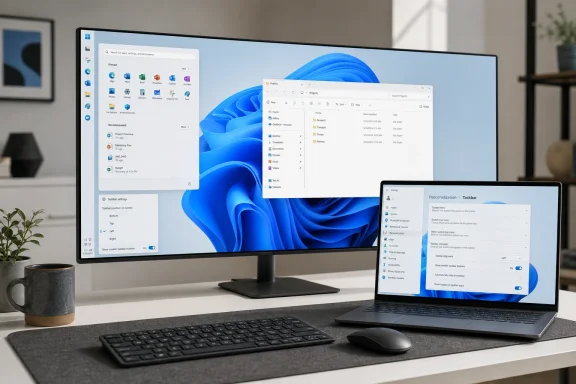
Microsoft released Windows 11 Build 26300.8493 to the Experimental channel on May 15, 2026, restoring official taskbar placement options, adding a smaller taskbar mode, expanding Fluid Dictation to Spanish and French, and polishing several Windows shell behaviors. The build is not a general-availability release, and Microsoft has not promised when these features will reach mainstream Windows 11 users. But the direction is hard to miss: after years of defending Windows 11’s simplified shell, Microsoft is now rebuilding the flexibility it removed.
That makes Build 26300.8493 feel less like a routine Insider drop and more like an admission wrapped in release notes. The movable taskbar is the headline, but the deeper story is that Microsoft’s Windows 11 design reset is being renegotiated in public, one missing option at a time.
When Windows 11 launched in 2021, the centered taskbar was supposed to be the face of a cleaner, calmer desktop. It was also a line in the sand. The taskbar could no longer be moved to the top or sides of the display, and long-standing customization habits were pushed aside in favor of a more controlled visual system.
That decision never stopped being contentious. For casual users, it may have been a small annoyance. For power users, ultrawide monitor owners, accessibility-minded users, and IT pros supporting opinionated fleets, it became a symbol of Windows 11’s most frustrating tendency: simplifying the interface by removing working choices.
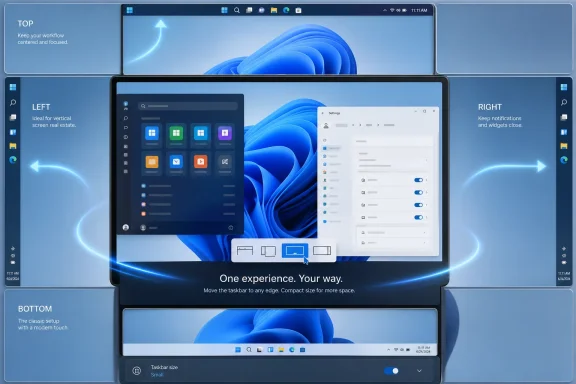
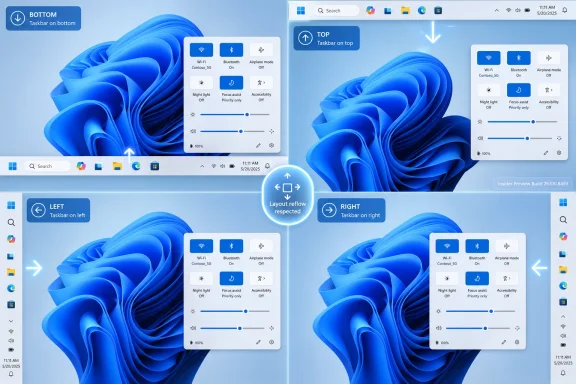
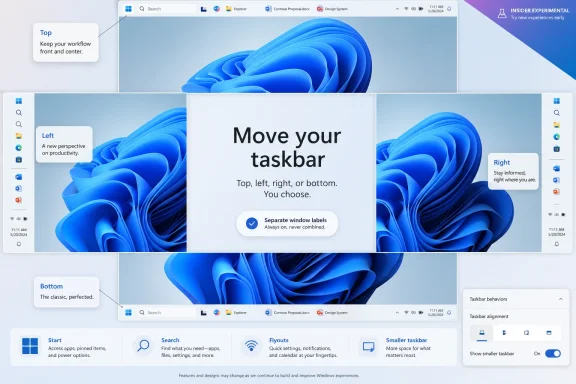
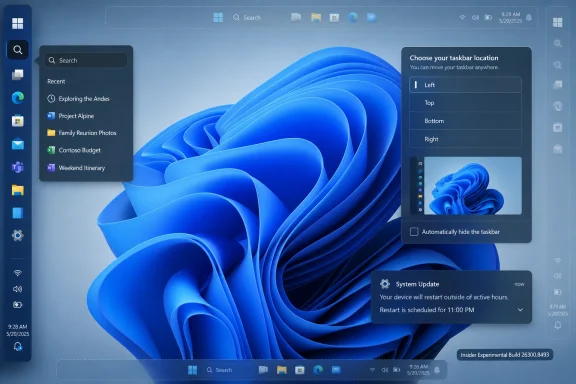
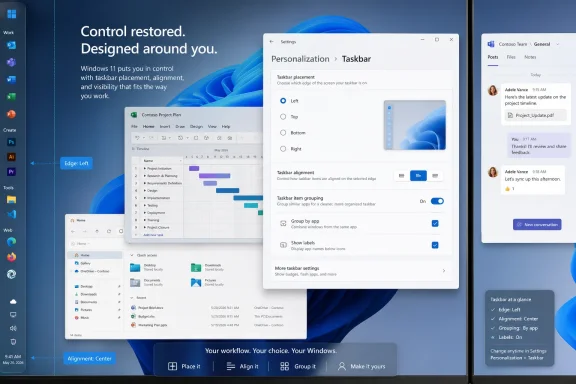
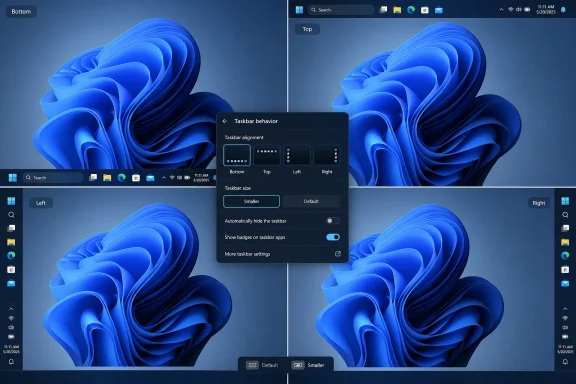
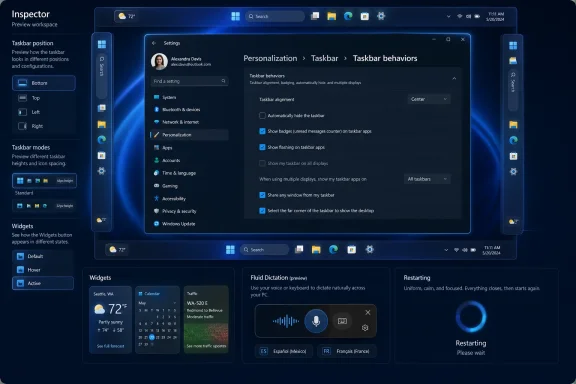
Build 26300.8493 changes that equation. Insiders in the Experimental channel can now move the taskbar to the bottom, top, left, or right edge of the screen through Settings, under Personalization, Taskbar, and Taskbar behaviors. That is not a registry hack, a third-party shell patch, or a half-hidden workaround. It is Microsoft putting the option back into the product.
The restoration matters because the taskbar is not just decoration. It is the operating system’s main launch surface, status strip, notification edge, and window-switching tool. Moving it is not vanity customization; it changes how users allocate screen space and muscle memory across monitors, aspect ratios, and workflows.
Windows 11’s original taskbar broke that compact. Microsoft had reasons, including a rewritten shell, new animations, touch targets, and a desire to make Windows feel more modern. But to many users, the explanation sounded like a design team mistaking consistency for usefulness.
The problem was not that Windows 11 looked different. Operating systems need to evolve, and Windows 10’s taskbar was hardly sacred code. The problem was that Windows 11 asked users to accept fewer options in exchange for an experience that was not obviously better for everyone.
That is why the movable taskbar’s return lands with unusual force. It is not merely a preference toggle. It is Microsoft acknowledging that the old Windows bargain still matters: the default can be curated, but the user should not be trapped inside it.
Microsoft’s implementation is therefore still incomplete. Tooltips, flyouts, and animations are designed to originate from the taskbar’s current position, which is essential if the feature is to feel native rather than bolted on. Most existing customization options, including never combining icons and the new small taskbar mode, are expected to work across placements.
But several pieces are not there yet. Touch gestures, the Search box, and Ask Copilot are still under development for alternate taskbar positions. Auto-hide and touch-optimized taskbar modes are also not supported when the taskbar is moved away from the bottom.
Those limitations are not trivial. A left- or right-mounted taskbar that breaks key shell behaviors would quickly become another Insider curiosity rather than a serious option. The important distinction is that Microsoft is exposing the work before it is complete, which is a more honest approach than pretending the desktop only has one correct edge.
This is the kind of setting Windows 11 should have had from the beginning. Modern displays are larger and denser than ever, but that does not mean every user wants a thick taskbar consuming vertical space. On smaller laptops, remote desktops, virtual machines, and productivity setups where every row of pixels counts, the standard Windows 11 taskbar can feel unnecessarily chunky.
The smaller mode also exposes a subtle truth about Windows design. “Accessible by default” does not have to mean “fixed for everyone.” A larger default target may be sensible, but a smaller option is equally sensible for users who know what they want.
Microsoft says the default taskbar appearance remains unchanged for users who do not enable the setting. That is the correct compromise. Keep the out-of-box experience comfortable, but let experienced users reclaim density without hunting through unsupported tweaks.
Red badges imply urgency. They borrow the visual language of errors, alerts, and unread messages. Applying that treatment to non-critical widget updates made the Windows 11 taskbar feel more anxious than helpful.
Microsoft is also testing a quieter widget experience for users with low engagement, including automatically turning off taskbar badging. That is a small but important shift from “push the feature until users notice it” toward “back off when users clearly do not care.”
This is especially relevant because Widgets has long occupied an awkward place in Windows 11. It is useful to some users, ignored by many, and disliked by others who see it as another surface for Microsoft content funnels. Reducing noise will not transform Widgets overnight, but it may make the feature feel less like a door-to-door salesman living on the taskbar.
That is how desktop search should behave. If a user types the name of an installed application or a local file, the operating system should assume local intent before reaching for the web. Windows Search has too often felt like a Bing-shaped window grafted onto the Start menu rather than a fast index of the machine in front of the user.
The distinction matters in enterprise environments. Admins and users do not want web suggestions to crowd out local resources, internal tools, or installed apps. Even when web search is useful, it should not behave as if the PC is merely a thin client for online results.
This change does not settle every complaint about Windows Search, but it aligns with the broader theme of the build. Microsoft is trimming the excess around the shell and restoring some respect for user intent.
The phrase on-device is doing real work here. Dictation is personal, often sensitive, and frequently used in contexts where latency and privacy matter. Running correction locally helps Microsoft position AI-assisted input as a Windows capability rather than just another cloud service.
Adding Spanish and French broadens the feature beyond its initial English-centric usefulness. That is important because accessibility and productivity features are only as universal as their language support. A dictation tool that works well in one language can be impressive; one that works across major languages becomes infrastructure.
There is also a strategic point. Microsoft has spent the last several years talking about AI in Windows largely through Copilot. Fluid Dictation is a more grounded example of what AI can do in an operating system: reduce friction in a common task without forcing the user into a chatbot session.
On paper, that is minor. In practice, these are the moments when users are least patient and most likely to assume something has gone wrong. A consistent animation and clear status text can make Windows feel less mysterious during the times when it is unavailable.
This is not about beauty. It is about perceived reliability. A machine that displays coherent progress states is easier to trust than one that jumps between mismatched animations and ambiguous waiting screens.
For IT departments, the psychological effect matters too. Users file fewer “my computer is stuck” tickets when the system communicates what it is doing. A better spinner will not fix update failures, but it can reduce the uncertainty that surrounds them.
That phrasing should interest administrators. Logon performance is one of those areas where Windows reputation is built or destroyed in offices, schools, and managed environments. Users may forgive a missing visual flourish, but they notice every morning when a machine takes too long to become usable.
The build also improves reliability when switching between multiple desktops, addresses notification consistency for the Simple Service Discovery Protocol, and improves stability for the
There are also fixes for PCs not staying asleep after updates and for cases where the Properties window did not open correctly for the Recycle Bin and some other scenarios. The refreshed Run dialog now allows navigation through history with the arrow keys on first launch, another tiny repair to a feature power users still rely on every day.
That is the right priority. Windows 11 does not lack ambition. It has Copilot surfaces, new settings pages, redesigned inbox apps, AI features, and a steady stream of visual refreshes. What it has often lacked is patience for the small frictions that make experienced users feel disregarded.
The taskbar is the perfect example because it sits at the intersection of design ambition and technical debt. Microsoft could ship a centered, simplified taskbar quickly enough for Windows 11’s launch, but the missing behaviors lingered for years. Restoring them now means paying down a debt incurred by the original redesign.
That debt is not merely emotional. Every missing option creates a workaround ecosystem. Users install third-party tools, edit the registry, delay upgrades, or stick with Windows 10 longer than Microsoft would prefer. A platform loses authority when its most loyal users feel they must fight it to restore basic habits.
Restoring the movable taskbar will not magically solve TPM requirements, fleet refresh costs, app compatibility testing, or user retraining. But it removes one symbolic objection that has been repeated since Windows 11’s launch: “Why did Microsoft take away something Windows already did?”
Symbolic objections matter in migrations. Users rarely reject an operating system solely because of one missing toggle, but they remember the missing toggle as proof of a broader attitude. Bring enough of those controls back, and the upgrade conversation becomes less adversarial.
For Microsoft, this is the pragmatic play. If the company wants Windows 11 adoption to feel inevitable rather than grudging, it needs to make the operating system feel less like a narrowed version of Windows 10 and more like a modernized version of Windows that still respects its heritage.
But the channel also changes the politics of Windows development. Once users see a restored feature working in preview, the pressure shifts. Microsoft can no longer argue abstractly that the feature does not fit Windows 11; it must explain why it is not ready, not wanted, or not worth shipping.
That dynamic can be healthy. Insider builds are at their best when they are not just marketing previews but live negotiations between Microsoft’s product assumptions and user reality. Build 26300.8493 is exactly that kind of negotiation.
The risk is expectation management. Windows users have seen preview features appear, disappear, change scope, or take far longer than expected to reach stable builds. Microsoft has not announced a broad release date for the movable taskbar, and no one should plan a production rollout around Experimental channel behavior.
In some organizations, taskbar freedom is harmless or even beneficial. Developers, analysts, support staff, and multi-monitor users may have strong preferences that improve their productivity. In locked-down environments, however, admins may want a consistent layout to reduce support friction.
The same applies to Widgets badging, Search result ordering, and AI-assisted dictation. Each of these touches user experience, data expectations, or support documentation. IT teams need to know which settings can be configured, disabled, documented, or left to users.
The Experimental channel does not answer those deployment questions yet. But it gives admins an early signal: Microsoft is revisiting shell defaults, and some of those changes may eventually affect training materials, standard images, and user support scripts.
Not every old feature deserves to come back. Windows has carried plenty of cruft, and some legacy options made the platform harder to maintain. But the taskbar’s position was never obscure legacy machinery. It was a basic spatial preference in a desktop operating system.
The smaller taskbar option reinforces the point. Density is not an outdated idea just because touch-friendly spacing became the default. A good operating system can serve both the user tapping a screen and the user driving a 32-inch monitor with a mouse and keyboard.
If Microsoft can apply that lesson consistently, Windows 11 will improve faster than it would through feature launches alone. The OS does not need more novelty at every turn. It needs fewer moments where users ask why yesterday’s obvious thing became today’s impossible thing.
Source: gHacks Windows 11 Build 26300.8493 Brings Movable Taskbar, Smaller Taskbar Mode, and Fluid Dictation to More Languages - gHacks Tech News
That makes Build 26300.8493 feel less like a routine Insider drop and more like an admission wrapped in release notes. The movable taskbar is the headline, but the deeper story is that Microsoft’s Windows 11 design reset is being renegotiated in public, one missing option at a time.
 Microsoft Finally Blinks on the Taskbar
When Windows 11 launched in 2021, the centered taskbar was supposed to be the face of a cleaner, calmer desktop. It was also a line in the sand. The taskbar could no longer be moved to the top or sides of the display, and long-standing customization habits were pushed aside in favor of a more controlled visual system.That decision never stopped being contentious. For casual users, it may have been a small annoyance. For power users, ultrawide monitor owners, accessibility-minded users, and IT pros supporting opinionated fleets, it became a symbol of Windows 11’s most frustrating tendency: simplifying the interface by removing working choices.
Build 26300.8493 changes that equation. Insiders in the Experimental channel can now move the taskbar to the bottom, top, left, or right edge of the screen through Settings, under Personalization, Taskbar, and Taskbar behaviors. That is not a registry hack, a third-party shell patch, or a half-hidden workaround. It is Microsoft putting the option back into the product.
The restoration matters because the taskbar is not just decoration. It is the operating system’s main launch surface, status strip, notification edge, and window-switching tool. Moving it is not vanity customization; it changes how users allocate screen space and muscle memory across monitors, aspect ratios, and workflows.
The Old Windows Deal Was Choice, Not Beauty
Windows has never won loyalty by being the most visually coherent desktop in the room. It won by being adaptable. For decades, users could drag, resize, pin, unpin, reorder, and bend the shell into whatever shape their job or habits required.Windows 11’s original taskbar broke that compact. Microsoft had reasons, including a rewritten shell, new animations, touch targets, and a desire to make Windows feel more modern. But to many users, the explanation sounded like a design team mistaking consistency for usefulness.
The problem was not that Windows 11 looked different. Operating systems need to evolve, and Windows 10’s taskbar was hardly sacred code. The problem was that Windows 11 asked users to accept fewer options in exchange for an experience that was not obviously better for everyone.
That is why the movable taskbar’s return lands with unusual force. It is not merely a preference toggle. It is Microsoft acknowledging that the old Windows bargain still matters: the default can be curated, but the user should not be trapped inside it.
Experimental Means Real, But Not Finished
The Experimental channel is exactly where a change like this belongs. A movable taskbar touches the Start menu, system tray, notifications, search, widgets, flyouts, touch behavior, animations, and multi-monitor logic. It is deceptively simple at the UI level and deeply invasive underneath.Microsoft’s implementation is therefore still incomplete. Tooltips, flyouts, and animations are designed to originate from the taskbar’s current position, which is essential if the feature is to feel native rather than bolted on. Most existing customization options, including never combining icons and the new small taskbar mode, are expected to work across placements.
But several pieces are not there yet. Touch gestures, the Search box, and Ask Copilot are still under development for alternate taskbar positions. Auto-hide and touch-optimized taskbar modes are also not supported when the taskbar is moved away from the bottom.
Those limitations are not trivial. A left- or right-mounted taskbar that breaks key shell behaviors would quickly become another Insider curiosity rather than a serious option. The important distinction is that Microsoft is exposing the work before it is complete, which is a more honest approach than pretending the desktop only has one correct edge.
The Smaller Taskbar Is the Other Half of the Apology
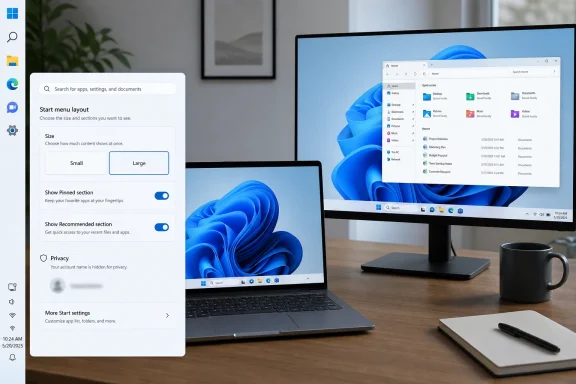
The second major taskbar change is smaller taskbar buttons, available from the same Taskbar behaviors area in Settings. When enabled, the option reduces both icon size and the overall taskbar height. Start, Search, and the system tray scale together so the bar remains aligned rather than looking like a compressed afterthought.This is the kind of setting Windows 11 should have had from the beginning. Modern displays are larger and denser than ever, but that does not mean every user wants a thick taskbar consuming vertical space. On smaller laptops, remote desktops, virtual machines, and productivity setups where every row of pixels counts, the standard Windows 11 taskbar can feel unnecessarily chunky.
The smaller mode also exposes a subtle truth about Windows design. “Accessible by default” does not have to mean “fixed for everyone.” A larger default target may be sensible, but a smaller option is equally sensible for users who know what they want.
Microsoft says the default taskbar appearance remains unchanged for users who do not enable the setting. That is the correct compromise. Keep the out-of-box experience comfortable, but let experienced users reclaim density without hunting through unsupported tweaks.
Widgets Become Less Desperate for Attention
Build 26300.8493 also adjusts Widgets behavior in a way that reveals Microsoft’s evolving understanding of attention on the desktop. Widget badging now follows the Windows accent color instead of always appearing red. That sounds cosmetic, but it changes the emotional weight of the signal.Red badges imply urgency. They borrow the visual language of errors, alerts, and unread messages. Applying that treatment to non-critical widget updates made the Windows 11 taskbar feel more anxious than helpful.
Microsoft is also testing a quieter widget experience for users with low engagement, including automatically turning off taskbar badging. That is a small but important shift from “push the feature until users notice it” toward “back off when users clearly do not care.”
This is especially relevant because Widgets has long occupied an awkward place in Windows 11. It is useful to some users, ignored by many, and disliked by others who see it as another surface for Microsoft content funnels. Reducing noise will not transform Widgets overnight, but it may make the feature feel less like a door-to-door salesman living on the taskbar.
Search Starts Remembering It Is on a PC
The Search change in this build is similarly modest but directionally important. Microsoft is testing reordered Search Box results so files and apps appear before web suggestions when the query better matches local content.That is how desktop search should behave. If a user types the name of an installed application or a local file, the operating system should assume local intent before reaching for the web. Windows Search has too often felt like a Bing-shaped window grafted onto the Start menu rather than a fast index of the machine in front of the user.
The distinction matters in enterprise environments. Admins and users do not want web suggestions to crowd out local resources, internal tools, or installed apps. Even when web search is useful, it should not behave as if the PC is merely a thin client for online results.
This change does not settle every complaint about Windows Search, but it aligns with the broader theme of the build. Microsoft is trimming the excess around the shell and restoring some respect for user intent.
Fluid Dictation Moves From Feature Demo to Platform Habit
Fluid Dictation’s expansion to Spanish and French is easy to overlook beside the taskbar news, but it may matter more over time. The feature uses small on-device language models to clean up grammar, punctuation, and filler words while users dictate through voice access or Voice typing with Win + H.The phrase on-device is doing real work here. Dictation is personal, often sensitive, and frequently used in contexts where latency and privacy matter. Running correction locally helps Microsoft position AI-assisted input as a Windows capability rather than just another cloud service.
Adding Spanish and French broadens the feature beyond its initial English-centric usefulness. That is important because accessibility and productivity features are only as universal as their language support. A dictation tool that works well in one language can be impressive; one that works across major languages becomes infrastructure.
There is also a strategic point. Microsoft has spent the last several years talking about AI in Windows largely through Copilot. Fluid Dictation is a more grounded example of what AI can do in an operating system: reduce friction in a common task without forcing the user into a chatbot session.
The Spinner Redesign Is Tiny, Which Is Why It Matters
The new system spinners are the sort of visual change that invites jokes. Microsoft has replaced older loading visuals with uniform solid donut spinners across Boot, Logon, Restart, Shutdown, and Update screens, paired with status text such as “Restarting,” “Working on updates,” and “Welcome.”On paper, that is minor. In practice, these are the moments when users are least patient and most likely to assume something has gone wrong. A consistent animation and clear status text can make Windows feel less mysterious during the times when it is unavailable.
This is not about beauty. It is about perceived reliability. A machine that displays coherent progress states is easier to trust than one that jumps between mismatched animations and ambiguous waiting screens.
For IT departments, the psychological effect matters too. Users file fewer “my computer is stuck” tickets when the system communicates what it is doing. A better spinner will not fix update failures, but it can reduce the uncertainty that surrounds them.
Reliability Fixes Show the Boring Work Behind the Flashy Toggle
Beyond the visible shell changes, Build 26300.8493 includes reliability and performance work that may prove more important for daily use. Microsoft says this build contains the first in a series of logon performance optimizations planned over the next few months.That phrasing should interest administrators. Logon performance is one of those areas where Windows reputation is built or destroyed in offices, schools, and managed environments. Users may forgive a missing visual flourish, but they notice every morning when a machine takes too long to become usable.
The build also improves reliability when switching between multiple desktops, addresses notification consistency for the Simple Service Discovery Protocol, and improves stability for the
dism /online /cleanup-image /restorehealth command. Those are not consumer-facing headline features, but they touch the maintenance and multitasking workflows of people who spend serious time in Windows.There are also fixes for PCs not staying asleep after updates and for cases where the Properties window did not open correctly for the Recycle Bin and some other scenarios. The refreshed Run dialog now allows navigation through history with the arrow keys on first launch, another tiny repair to a feature power users still rely on every day.
The K2 Subtext Is That Windows 11 Has Technical Debt in the Shell
The gHacks report frames these changes as part of Microsoft’s Windows K2 initiative, described as an effort to address long-standing complaints about Windows 11. Whether Microsoft uses that label publicly in every context or not, the pattern is visible: the company is revisiting old pain points rather than merely adding new services on top.That is the right priority. Windows 11 does not lack ambition. It has Copilot surfaces, new settings pages, redesigned inbox apps, AI features, and a steady stream of visual refreshes. What it has often lacked is patience for the small frictions that make experienced users feel disregarded.
The taskbar is the perfect example because it sits at the intersection of design ambition and technical debt. Microsoft could ship a centered, simplified taskbar quickly enough for Windows 11’s launch, but the missing behaviors lingered for years. Restoring them now means paying down a debt incurred by the original redesign.
That debt is not merely emotional. Every missing option creates a workaround ecosystem. Users install third-party tools, edit the registry, delay upgrades, or stick with Windows 10 longer than Microsoft would prefer. A platform loses authority when its most loyal users feel they must fight it to restore basic habits.
The Timing Is Awkward for Windows 10 Holdouts
This build arrives at a strategically charged moment. Windows 10’s mainstream support deadline has pushed many users and organizations toward decisions they would rather postpone. For some, Windows 11’s hardware requirements were the primary obstacle. For others, the shell regressions were part of the resistance.Restoring the movable taskbar will not magically solve TPM requirements, fleet refresh costs, app compatibility testing, or user retraining. But it removes one symbolic objection that has been repeated since Windows 11’s launch: “Why did Microsoft take away something Windows already did?”
Symbolic objections matter in migrations. Users rarely reject an operating system solely because of one missing toggle, but they remember the missing toggle as proof of a broader attitude. Bring enough of those controls back, and the upgrade conversation becomes less adversarial.
For Microsoft, this is the pragmatic play. If the company wants Windows 11 adoption to feel inevitable rather than grudging, it needs to make the operating system feel less like a narrowed version of Windows 10 and more like a modernized version of Windows that still respects its heritage.
The Experimental Channel Is Becoming Microsoft’s Negotiating Table
The new Experimental channel gives Microsoft a place to test bigger swings without implying that every change is on a fast path to general release. That is useful for features like movable taskbar placement, where the company needs broad hardware and workflow feedback before declaring victory.But the channel also changes the politics of Windows development. Once users see a restored feature working in preview, the pressure shifts. Microsoft can no longer argue abstractly that the feature does not fit Windows 11; it must explain why it is not ready, not wanted, or not worth shipping.
That dynamic can be healthy. Insider builds are at their best when they are not just marketing previews but live negotiations between Microsoft’s product assumptions and user reality. Build 26300.8493 is exactly that kind of negotiation.
The risk is expectation management. Windows users have seen preview features appear, disappear, change scope, or take far longer than expected to reach stable builds. Microsoft has not announced a broad release date for the movable taskbar, and no one should plan a production rollout around Experimental channel behavior.
IT Pros Should Watch the Policy Surface, Not Just the Screenshot
For administrators, the big question is not whether a top-mounted taskbar looks nice. It is whether Microsoft will expose these behaviors cleanly for managed environments. A personalization option is one thing; a policy-controllable setting is another.In some organizations, taskbar freedom is harmless or even beneficial. Developers, analysts, support staff, and multi-monitor users may have strong preferences that improve their productivity. In locked-down environments, however, admins may want a consistent layout to reduce support friction.
The same applies to Widgets badging, Search result ordering, and AI-assisted dictation. Each of these touches user experience, data expectations, or support documentation. IT teams need to know which settings can be configured, disabled, documented, or left to users.
The Experimental channel does not answer those deployment questions yet. But it gives admins an early signal: Microsoft is revisiting shell defaults, and some of those changes may eventually affect training materials, standard images, and user support scripts.
The Real Win Is Not Nostalgia
It is tempting to frame the movable taskbar as a nostalgic return to Windows 10. That is only partly right. The better framing is that Microsoft is learning where modernization requires subtraction and where subtraction simply creates resentment.Not every old feature deserves to come back. Windows has carried plenty of cruft, and some legacy options made the platform harder to maintain. But the taskbar’s position was never obscure legacy machinery. It was a basic spatial preference in a desktop operating system.
The smaller taskbar option reinforces the point. Density is not an outdated idea just because touch-friendly spacing became the default. A good operating system can serve both the user tapping a screen and the user driving a 32-inch monitor with a mouse and keyboard.
If Microsoft can apply that lesson consistently, Windows 11 will improve faster than it would through feature launches alone. The OS does not need more novelty at every turn. It needs fewer moments where users ask why yesterday’s obvious thing became today’s impossible thing.
The Build That Turns a Complaint Into a Roadmap
Build 26300.8493 is still a preview build, and its most visible feature is unfinished. That should temper expectations, but it should not obscure the broader shift. Microsoft is taking one of Windows 11’s longest-running complaints and turning it into active engineering work.- Windows 11 Build 26300.8493 restores official testing for taskbar placement on the bottom, top, left, and right edges of the screen.
- The new smaller taskbar mode reduces both icon size and taskbar height while keeping Start, Search, and the system tray aligned.
- Alternate taskbar positions still lack some features, including touch gestures, the Search box, Ask Copilot, auto-hide, and touch-optimized modes.
- Widgets are becoming less aggressive, with accent-colored badging and a quieter experience for users who rarely engage with the feature.
- Fluid Dictation now supports Spanish and French for Insiders, extending on-device AI-assisted voice input beyond English.
- Microsoft has not announced when these changes will reach broader Windows 11 releases, so production users should treat the build as a signal rather than a schedule.
Source: gHacks Windows 11 Build 26300.8493 Brings Movable Taskbar, Smaller Taskbar Mode, and Fluid Dictation to More Languages - gHacks Tech News