

Microsoft began testing movable and smaller Windows 11 taskbars on May 15, 2026, in Insider Experimental Preview Build 26300.8493, restoring the ability to place the taskbar on the top, left, right, or bottom of the screen. The change is small only if you have never watched a power user lose a decade of muscle memory overnight. Five years after Windows 11 shipped with a rebuilt, restricted taskbar, Microsoft is conceding that polish without choice was never going to satisfy the people who live in Windows all day.
The Windows taskbar is not decoration. It is the operating system’s front counter, traffic controller, and memory aid, all compressed into a strip of pixels that users touch hundreds of times a day. When Microsoft removed long-standing placement options in Windows 11, it did not merely simplify a preference panel; it broke workflows that had hardened over years of use.
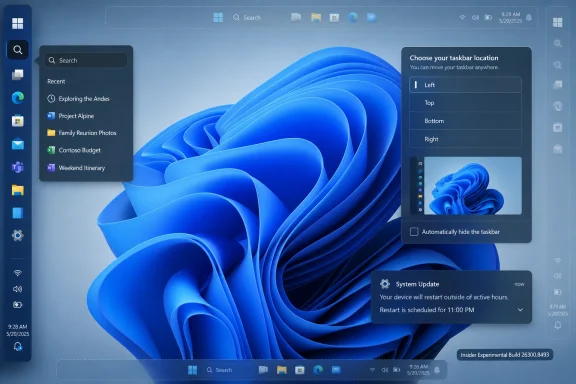
That is why this Insider build matters more than the usual preview-channel tinkering. Users can now move the taskbar to any edge of the display, and Windows will adapt core interface elements around that position. Start, Search, system tray flyouts, tooltips, and animations are designed to originate from the relocated taskbar rather than pretending the bottom edge is still the center of gravity.
Microsoft is also preserving different behavior by position. A vertical taskbar can use top-aligned or centered icons, while a horizontal taskbar can use left-aligned or centered icons. Labels and grouping settings can vary depending on where the bar sits, which means the change is not just a cosmetic resurrection of a Windows 10 checkbox.
That distinction is important. A taskbar that can technically be dragged to the side but behaves like a bottom taskbar wearing a costume would have been another half-return. Microsoft appears to understand that users who want a left or right taskbar often want a different information density, not merely a rotated shelf.
The taskbar became the most visible symbol of that tension. Windows 10 allowed placement on multiple edges, smaller buttons, ungrouped labels, and a set of behaviors that had accumulated through years of enterprise and enthusiast feedback. Windows 11 launched without several of those options, and users quickly discovered that the new taskbar was not simply a visual refresh but a substantial rewrite with missing capabilities.
Microsoft has spent the years since slowly restoring pieces of the old bargain. Task Manager returned to the taskbar context menu. Ungrouping and labels came back. Smaller taskbar buttons began reappearing in limited form. Now, with movable placement and reduced taskbar height in testing, the company is addressing one of the most emotionally durable complaints about Windows 11.
The lesson is not that every legacy feature must live forever. The lesson is that Windows is used in too many physical setups, job roles, accessibility contexts, and personal routines for Microsoft to treat “one clean default” as a substitute for agency. Customization is not nostalgia when it determines whether a workstation feels usable.
A left or right taskbar can be a practical answer to that geometry. Code editors, browser pages, terminals, admin consoles, and document windows all benefit from a few extra rows. On a 16:9 laptop display, the bottom taskbar consumes scarce height; on an ultrawide monitor, the side edge is often the cheaper real estate.
Microsoft’s own framing leans into that point. The company says a side taskbar can help developers see more code and that a top taskbar may better suit accessibility or ergonomics for some users. That is unusually direct acknowledgement that desktop layout is not a matter of taste alone.
There is also a cognitive argument. A vertical taskbar with labels and “never combine” behavior can function more like a live work queue than a row of icons. Users managing many windows across browsers, terminals, chat clients, remote desktops, and Office apps often want names, not just glyphs.
That matters because Windows 11’s default taskbar was designed with larger touch targets and a more relaxed visual rhythm. The result looked cleaner, but on small screens it also felt expensive. A few millimeters may not sound like much until they are taken from a 13-inch laptop panel that already has a browser toolbar, web app header, ribbon, status bar, or remote desktop frame competing for space.
The new setting lives under Taskbar behaviors and can be set so smaller buttons are always used. Microsoft says no restart or sign-out is required, which suggests the company wants this to feel like a normal user preference rather than an unsupported registry-era tweak.
This is the right direction because density is not inherently bad. Windows has to serve touchscreen convertibles and multi-monitor engineering workstations, kiosk machines and tiny travel laptops, accessibility users and keyboard-first power users. A single roomy default can be humane; a single roomy mandate is not.
This is Microsoft walking back another Windows 11 assumption: that Start should be a curated surface as much as a launcher. The Recommended area has been a source of friction since launch because it blurred utility, recency, suggestion, and promotion in a space many users still think of as theirs. A Start menu is not a news feed, a storefront, or a corporate messaging surface by default in the minds of many Windows users; it is where you go to open things.
The more interesting change is the separation of file recommendations in Start from recent files and jump lists elsewhere. Until now, disabling certain recommendation behavior could have wider consequences than users expected. Microsoft is moving toward finer controls, which is exactly what a mature OS should do when privacy, productivity, and convenience collide.
The company is also renaming Recommended to Recent, a small wording change with larger implications. “Recommended” implies judgment by Microsoft’s systems; “Recent” implies a factual list of things the user did. That shift does not solve every complaint, but it acknowledges that users are more comfortable with their own activity history than with an opaque suggestion engine occupying prime Start menu real estate.
There are also explicit gaps. Auto-hide does not yet work in alternate taskbar positions. The tablet-optimized taskbar is not supported there either. Touch gestures, the full Search box, Ask Copilot behavior, drag-and-drop refinements, and per-monitor taskbar positioning are still incomplete or under evaluation.
Those caveats are not minor for certain users. Auto-hide is central to some compact-screen workflows. Multi-monitor taskbar placement is a big deal for IT pros and anyone with asymmetrical monitor layouts. Touch behavior matters because Windows 11 is still expected to span traditional desktops, laptops, tablets, and convertibles without making each mode feel bolted on.
Still, the preview is meaningful because it moves the debate from whether Microsoft should restore the capability to how well Microsoft can execute it. For four years, users were left to argue against a missing door. Now the door exists in preview, even if the hinges still squeak.
The timing is difficult to ignore. Windows 10 reached its end of free consumer support in October 2025, with extended and specialized support paths continuing in some cases. Microsoft wants the remaining Windows 10 population to move, but many of those users have spent years hearing that Windows 11 removed things they depended on. Restoring visible options helps reduce the psychological cost of migration.
Admins will want policy clarity, not just screenshots. If movable taskbars and Start menu toggles reach general availability, organizations will need to know how these settings interact with provisioning, profile migration, default layouts, roaming preferences, and existing Start/taskbar management policies. A feature that delights one group can become a help desk nuisance if it lands without predictable controls.
There is also a training dimension. A movable taskbar in a consumer setting is freedom; in a managed setting, it can be a variable. Microsoft’s challenge is to deliver user choice without making support documentation explode into “if your taskbar is on the top, left, right, or bottom” branches for every basic action.
This is where Windows 11’s trust problem has often lived. Users may tolerate recommendations in a content app, but the Start menu carries a different expectation. It is part of the shell, and the shell is where the user should feel in command rather than nudged.
Microsoft’s argument is that recently installed apps and Store discovery help users and developers. That may be true in some cases. But the Start menu is such valuable territory precisely because users have to pass through it, and that makes restraint more important, not less.
If Microsoft wants the new controls to be received as a genuine quality effort, it should make the quiet configuration easy, durable, and obvious. The power move here is not hiding promotions behind another toggle hunt. It is admitting that some users want Start to be a launcher and nothing more.
The charitable view is that Windows 11’s taskbar had to be rebuilt before it could evolve. The less charitable view is that Microsoft underestimated how much power was hidden in the old mess. Both can be true.
Legacy Windows features often look ugly from the outside because they carry compromises from different eras. But those compromises frequently encode real user needs. The old taskbar was not beloved because every part of it was elegant; it was beloved because it bent.
Now Microsoft is trying to make the new shell bend without breaking the visual and technical assumptions of Windows 11. That is harder than flipping on an old Windows 10 code path. It also means users should judge the public release not by whether the checkbox exists, but by whether the restored behavior feels native, reliable, and complete.
That puts Insiders in a useful but awkward role. They are not merely testing new features; they are validating whether Microsoft’s new shell architecture can carry Windows’ old promise of configurability. Feedback on animation glitches, flyout placement, multi-monitor behavior, and touch problems will matter because the feature’s credibility depends on details.
The preview also suggests Microsoft is becoming more explicit about unfinished work. Rather than pretending the alternate taskbar positions are complete, the company is spelling out unsupported areas such as auto-hide and tablet mode. That transparency is welcome, though users burned by years of “coming soon” language will reasonably wait for shipping builds before celebrating.
For WindowsForum readers, the practical advice is simple: do not put an Experimental build on a production machine just to get a left taskbar. Test it in a VM, spare system, or Insider device if you are curious. The feature is promising, but the channel name is not decorative.
That matters because Windows is entering a more complicated era. Microsoft is pushing Copilot, cloud-connected services, AI-assisted workflows, new silicon requirements, and a steady stream of interface changes. If the company wants users to accept that pace, it must show that foundational desktop habits are not disposable.
The restored taskbar options are a signal that Microsoft understands the difference between innovation and churn. Users are more willing to try new things when the basics remain under their control. Conversely, every removed option turns the next feature pitch into a negotiation over trust.
This is why the return of a movable taskbar resonates beyond the people who actually use one. It tells Windows users that enough persistent feedback can still move the platform. In an operating system increasingly shaped by telemetry, services, and ecosystem strategy, that is not a trivial message.
Here is what matters most for users and administrators watching this build:
 Microsoft Finally Admits the Taskbar Is Infrastructure
The Windows taskbar is not decoration. It is the operating system’s front counter, traffic controller, and memory aid, all compressed into a strip of pixels that users touch hundreds of times a day. When Microsoft removed long-standing placement options in Windows 11, it did not merely simplify a preference panel; it broke workflows that had hardened over years of use.That is why this Insider build matters more than the usual preview-channel tinkering. Users can now move the taskbar to any edge of the display, and Windows will adapt core interface elements around that position. Start, Search, system tray flyouts, tooltips, and animations are designed to originate from the relocated taskbar rather than pretending the bottom edge is still the center of gravity.
Microsoft is also preserving different behavior by position. A vertical taskbar can use top-aligned or centered icons, while a horizontal taskbar can use left-aligned or centered icons. Labels and grouping settings can vary depending on where the bar sits, which means the change is not just a cosmetic resurrection of a Windows 10 checkbox.
That distinction is important. A taskbar that can technically be dragged to the side but behaves like a bottom taskbar wearing a costume would have been another half-return. Microsoft appears to understand that users who want a left or right taskbar often want a different information density, not merely a rotated shelf.
Windows 11’s Original Sin Was Removing Choice in the Name of Calm
Windows 11 arrived in 2021 with a message of visual coherence. Rounded corners, centered icons, simplified menus, and a more spacious taskbar were meant to make Windows feel modern, less cluttered, and more approachable. For casual users, that strategy had obvious appeal; for many veterans, it felt like a desktop OS had been redesigned around a screenshot.The taskbar became the most visible symbol of that tension. Windows 10 allowed placement on multiple edges, smaller buttons, ungrouped labels, and a set of behaviors that had accumulated through years of enterprise and enthusiast feedback. Windows 11 launched without several of those options, and users quickly discovered that the new taskbar was not simply a visual refresh but a substantial rewrite with missing capabilities.
Microsoft has spent the years since slowly restoring pieces of the old bargain. Task Manager returned to the taskbar context menu. Ungrouping and labels came back. Smaller taskbar buttons began reappearing in limited form. Now, with movable placement and reduced taskbar height in testing, the company is addressing one of the most emotionally durable complaints about Windows 11.
The lesson is not that every legacy feature must live forever. The lesson is that Windows is used in too many physical setups, job roles, accessibility contexts, and personal routines for Microsoft to treat “one clean default” as a substitute for agency. Customization is not nostalgia when it determines whether a workstation feels usable.
The Side Taskbar Makes More Sense in 2026 Than It Did in 2016
The return of vertical taskbars is not merely a victory for people who dislike change. It fits the hardware reality of modern PCs better than the old bottom-only default. Laptops remain vertically constrained, ultrawide monitors are common on desks, and developers, writers, spreadsheet users, and sysadmins often prize vertical document space more than horizontal space.A left or right taskbar can be a practical answer to that geometry. Code editors, browser pages, terminals, admin consoles, and document windows all benefit from a few extra rows. On a 16:9 laptop display, the bottom taskbar consumes scarce height; on an ultrawide monitor, the side edge is often the cheaper real estate.
Microsoft’s own framing leans into that point. The company says a side taskbar can help developers see more code and that a top taskbar may better suit accessibility or ergonomics for some users. That is unusually direct acknowledgement that desktop layout is not a matter of taste alone.
There is also a cognitive argument. A vertical taskbar with labels and “never combine” behavior can function more like a live work queue than a row of icons. Users managing many windows across browsers, terminals, chat clients, remote desktops, and Office apps often want names, not just glyphs.
The Smaller Taskbar Is a Quiet Reversal of Windows 11’s Spaciousness
The other major taskbar change is less symbolic but just as practical. Microsoft is testing a smaller taskbar mode that reduces both icon size and taskbar height, freeing additional room for apps. Unlike earlier small-button behavior in Windows 11, this version is meant to shrink the bar itself, not merely the icons floating inside it.That matters because Windows 11’s default taskbar was designed with larger touch targets and a more relaxed visual rhythm. The result looked cleaner, but on small screens it also felt expensive. A few millimeters may not sound like much until they are taken from a 13-inch laptop panel that already has a browser toolbar, web app header, ribbon, status bar, or remote desktop frame competing for space.
The new setting lives under Taskbar behaviors and can be set so smaller buttons are always used. Microsoft says no restart or sign-out is required, which suggests the company wants this to feel like a normal user preference rather than an unsupported registry-era tweak.
This is the right direction because density is not inherently bad. Windows has to serve touchscreen convertibles and multi-monitor engineering workstations, kiosk machines and tiny travel laptops, accessibility users and keyboard-first power users. A single roomy default can be humane; a single roomy mandate is not.
Start Menu Control Is the Other Half of the Confession
The Start menu changes being tested alongside the taskbar work are not incidental. Microsoft is adding section-level controls so users can show or hide Pinned, Recommended, and All apps areas independently. It is also adding size choices, allowing users to select a smaller or larger Start menu rather than relying only on automatic scaling.This is Microsoft walking back another Windows 11 assumption: that Start should be a curated surface as much as a launcher. The Recommended area has been a source of friction since launch because it blurred utility, recency, suggestion, and promotion in a space many users still think of as theirs. A Start menu is not a news feed, a storefront, or a corporate messaging surface by default in the minds of many Windows users; it is where you go to open things.
The more interesting change is the separation of file recommendations in Start from recent files and jump lists elsewhere. Until now, disabling certain recommendation behavior could have wider consequences than users expected. Microsoft is moving toward finer controls, which is exactly what a mature OS should do when privacy, productivity, and convenience collide.
The company is also renaming Recommended to Recent, a small wording change with larger implications. “Recommended” implies judgment by Microsoft’s systems; “Recent” implies a factual list of things the user did. That shift does not solve every complaint, but it acknowledges that users are more comfortable with their own activity history than with an opaque suggestion engine occupying prime Start menu real estate.
Experimental Channel Means Patience, Not Victory
The catch is that this is still Insider software. Build 26300.8493 is in the Experimental channel, which replaced the old Dev-channel framing as Microsoft reshuffles Windows Insider testing. Features in this channel can roll out gradually, change shape, disappear, or arrive in public builds much later than enthusiasts expect.There are also explicit gaps. Auto-hide does not yet work in alternate taskbar positions. The tablet-optimized taskbar is not supported there either. Touch gestures, the full Search box, Ask Copilot behavior, drag-and-drop refinements, and per-monitor taskbar positioning are still incomplete or under evaluation.
Those caveats are not minor for certain users. Auto-hide is central to some compact-screen workflows. Multi-monitor taskbar placement is a big deal for IT pros and anyone with asymmetrical monitor layouts. Touch behavior matters because Windows 11 is still expected to span traditional desktops, laptops, tablets, and convertibles without making each mode feel bolted on.
Still, the preview is meaningful because it moves the debate from whether Microsoft should restore the capability to how well Microsoft can execute it. For four years, users were left to argue against a missing door. Now the door exists in preview, even if the hinges still squeak.
The Enterprise Angle Is Less Sentimental and More Operational
For enterprise administrators, this is not primarily about personal preference. The Windows desktop is a managed environment where small interface shifts can produce support tickets, training friction, accessibility issues, and resistance to migration. Windows 11’s missing taskbar options became one more reason some organizations delayed or softened upgrade pushes from Windows 10.The timing is difficult to ignore. Windows 10 reached its end of free consumer support in October 2025, with extended and specialized support paths continuing in some cases. Microsoft wants the remaining Windows 10 population to move, but many of those users have spent years hearing that Windows 11 removed things they depended on. Restoring visible options helps reduce the psychological cost of migration.
Admins will want policy clarity, not just screenshots. If movable taskbars and Start menu toggles reach general availability, organizations will need to know how these settings interact with provisioning, profile migration, default layouts, roaming preferences, and existing Start/taskbar management policies. A feature that delights one group can become a help desk nuisance if it lands without predictable controls.
There is also a training dimension. A movable taskbar in a consumer setting is freedom; in a managed setting, it can be a variable. Microsoft’s challenge is to deliver user choice without making support documentation explode into “if your taskbar is on the top, left, right, or bottom” branches for every basic action.
Microsoft Store Recommendations Remain the Trust Test
The Start menu changes show progress, but they also reveal the line Microsoft keeps trying to walk. The company says users will be able to hide Microsoft Store recommendations while keeping recent files and jump lists available. That is the right separation, because few things irritate experienced users more than having useful local history tied to promotional surfaces.This is where Windows 11’s trust problem has often lived. Users may tolerate recommendations in a content app, but the Start menu carries a different expectation. It is part of the shell, and the shell is where the user should feel in command rather than nudged.
Microsoft’s argument is that recently installed apps and Store discovery help users and developers. That may be true in some cases. But the Start menu is such valuable territory precisely because users have to pass through it, and that makes restraint more important, not less.
If Microsoft wants the new controls to be received as a genuine quality effort, it should make the quiet configuration easy, durable, and obvious. The power move here is not hiding promotions behind another toggle hunt. It is admitting that some users want Start to be a launcher and nothing more.
A Better Windows 11 Is Being Built Backward
The strangest thing about this news is how much of it sounds like a product finally catching up to its predecessor. That is not an uncommon pattern in software redesigns. A company rebuilds a component to modernize it, ships a cleaner but less capable version, then spends years reintroducing the old capabilities through a new architecture.The charitable view is that Windows 11’s taskbar had to be rebuilt before it could evolve. The less charitable view is that Microsoft underestimated how much power was hidden in the old mess. Both can be true.
Legacy Windows features often look ugly from the outside because they carry compromises from different eras. But those compromises frequently encode real user needs. The old taskbar was not beloved because every part of it was elegant; it was beloved because it bent.
Now Microsoft is trying to make the new shell bend without breaking the visual and technical assumptions of Windows 11. That is harder than flipping on an old Windows 10 code path. It also means users should judge the public release not by whether the checkbox exists, but by whether the restored behavior feels native, reliable, and complete.
The Insider Program Becomes a Repair Shop
Microsoft’s Insider Program has often been marketed as a place to preview the future. In this case, it is just as much a repair shop for decisions made in the past. The Experimental channel is where Microsoft can test whether old affordances can be reintroduced without dragging back the exact complexity the Windows 11 redesign tried to escape.That puts Insiders in a useful but awkward role. They are not merely testing new features; they are validating whether Microsoft’s new shell architecture can carry Windows’ old promise of configurability. Feedback on animation glitches, flyout placement, multi-monitor behavior, and touch problems will matter because the feature’s credibility depends on details.
The preview also suggests Microsoft is becoming more explicit about unfinished work. Rather than pretending the alternate taskbar positions are complete, the company is spelling out unsupported areas such as auto-hide and tablet mode. That transparency is welcome, though users burned by years of “coming soon” language will reasonably wait for shipping builds before celebrating.
For WindowsForum readers, the practical advice is simple: do not put an Experimental build on a production machine just to get a left taskbar. Test it in a VM, spare system, or Insider device if you are curious. The feature is promising, but the channel name is not decorative.
The Real Win Is Not the Left Taskbar, It Is the Change in Posture
The most encouraging part of this update is not any single setting. It is the posture. Microsoft is treating Start and taskbar complaints as quality issues, not as noisy resistance from users who refuse to appreciate modern design.That matters because Windows is entering a more complicated era. Microsoft is pushing Copilot, cloud-connected services, AI-assisted workflows, new silicon requirements, and a steady stream of interface changes. If the company wants users to accept that pace, it must show that foundational desktop habits are not disposable.
The restored taskbar options are a signal that Microsoft understands the difference between innovation and churn. Users are more willing to try new things when the basics remain under their control. Conversely, every removed option turns the next feature pitch into a negotiation over trust.
This is why the return of a movable taskbar resonates beyond the people who actually use one. It tells Windows users that enough persistent feedback can still move the platform. In an operating system increasingly shaped by telemetry, services, and ecosystem strategy, that is not a trivial message.
The New Build Gives Windows Holdouts Fewer Excuses, but Not None
The concrete story is straightforward: Microsoft is restoring taskbar placement, shrinking the taskbar, and giving Start more granular controls in preview. The broader story is that Windows 11 is still negotiating with the Windows 10 user base it once expected to simply move along.Here is what matters most for users and administrators watching this build:
- Windows 11 Insider Experimental Preview Build 26300.8493 lets testers place the taskbar on the bottom, top, left, or right edge of the screen.
- Alternate taskbar positions currently have limitations, including missing auto-hide support, incomplete touch gestures, and no full Search box outside the bottom position.
- The smaller taskbar mode reduces both icon size and taskbar height, which should help compact laptops and users who want more vertical workspace.
- Start menu changes will let users independently hide or show major sections such as Pinned, Recommended or Recent, and All apps.
- Microsoft is separating Start file recommendations from File Explorer recent files and jump lists, which should reduce the privacy-versus-convenience tradeoff.
- These features are still preview features, so production users should wait for broader rollout before treating them as guaranteed Windows 11 behavior.
References
- Primary source: Latest news from Azerbaijan
Published: Tue, 19 May 2026 05:12:26 GMT

Windows 11 finally restores one of users’ most requested features | News.az
The latest Windows Insider Preview build introduces major taskbar improvements, including the ability to dock the taskbar to any edge of the screen &m...news.az
- Related coverage: arstechnica.com
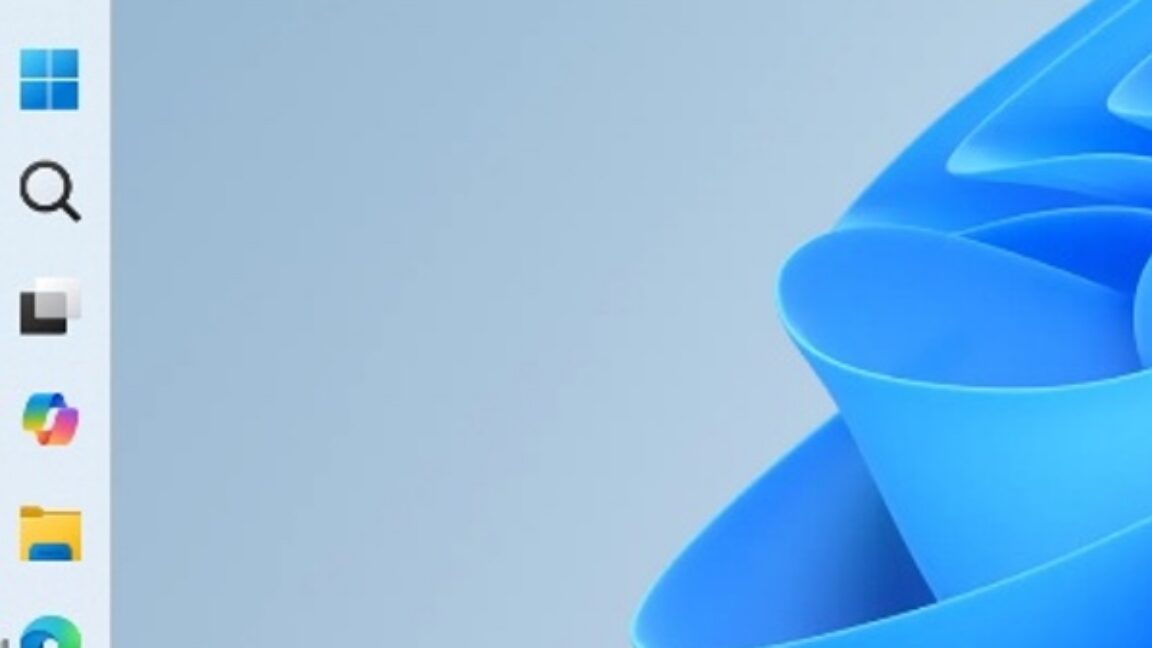
Five years later, Windows 11 brings back much-missed taskbar options (and more)
Microsoft is also testing a smaller taskbar and more customizable Start menu. arstechnica.com
- Related coverage: windowscentral.com

The movable taskbar is finally back in Windows 11 — and yes, you can try it right now
Windows 11 Build 26300.8493 introduces the ability to move the Taskbar and resize icons, reversing a major launch-day limitation. www.windowscentral.com
- Official source: blogs.windows.com

Improving Windows quality: Making Taskbar and Start more personal
In our commitment to Windows quality, we outlined our plans to deliver improvements in performance, reliability, and craft. We are also committed to blogs.windows.com
- Related coverage: bleepingcomputer.com
Microsoft testing adjustable taskbar, Start menu in Windows 11
Microsoft has finally brought back the resizable taskbar and Start menu to Windows 11 in the latest preview version rolling out to Insiders in the Experimental channel.www.bleepingcomputer.com
- Related coverage: windowslatest.com
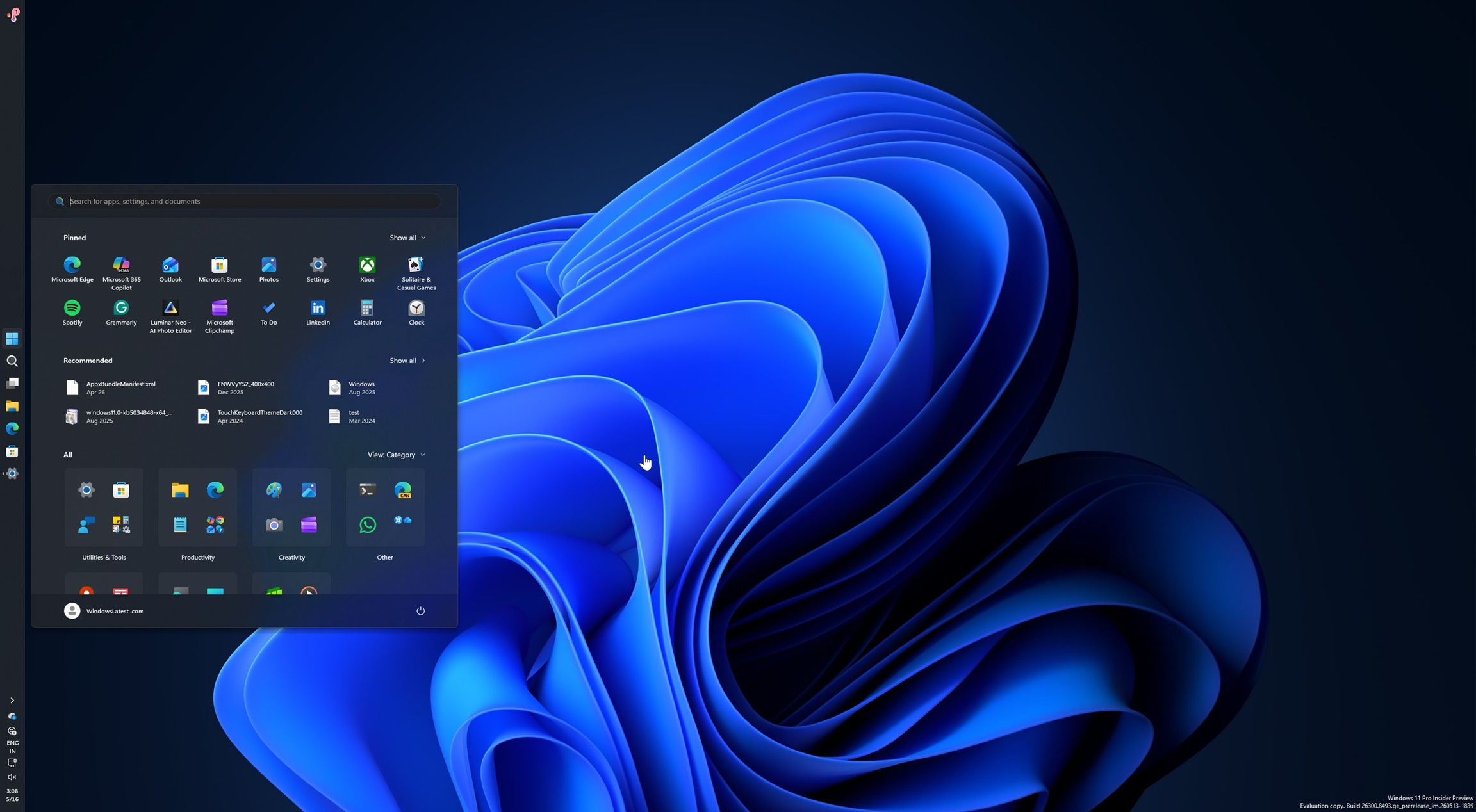
Microsoft rolls out Windows 11's movable and smaller taskbar 5 years after killing it (hands on experience)
Microsoft is finally rolling out two of the most requested features in Windows 11: the ability to move the taskbar and make it smaller. www.windowslatest.com
- Official source: learn.microsoft.com

Experimental Preview Build 26300.8493 - Windows Insider Program
Release notes for Experimental Preview Build 26300.8493learn.microsoft.com - Related coverage: abit.ee
Windows 11 Will Finally Let You Move the Taskbar and Resize the Start Menu
Microsoft is testing taskbar repositioning and Start menu resizing in Windows 11, currently available in the Windows Insider Experimental channel.abit.ee
- Related coverage: tech.yahoo.com
Windows 11 Is Finally Testing a Movable, Shrinkable Taskbar
While Windows 10 allowed users to drag the taskbar from edge to edge, moving it in Windows 11 requires a trip to Settings.tech.yahoo.com
- Related coverage: dataconomy.com

Windows 11 update adds major Start menu customization options
Microsoft is testing updates for Windows 11 that will enhance customization options for the Start menu and taskbar, with rollouts dataconomy.com
- Related coverage: techrepublic.com

Windows 11 Start Menu, Taskbar Are Getting More Customization
Microsoft is testing Windows 11 taskbar and Start menu updates, including movable taskbar positions, cleaner Start controls, and compact layout options.www.techrepublic.com
- Related coverage: tomshardware.com
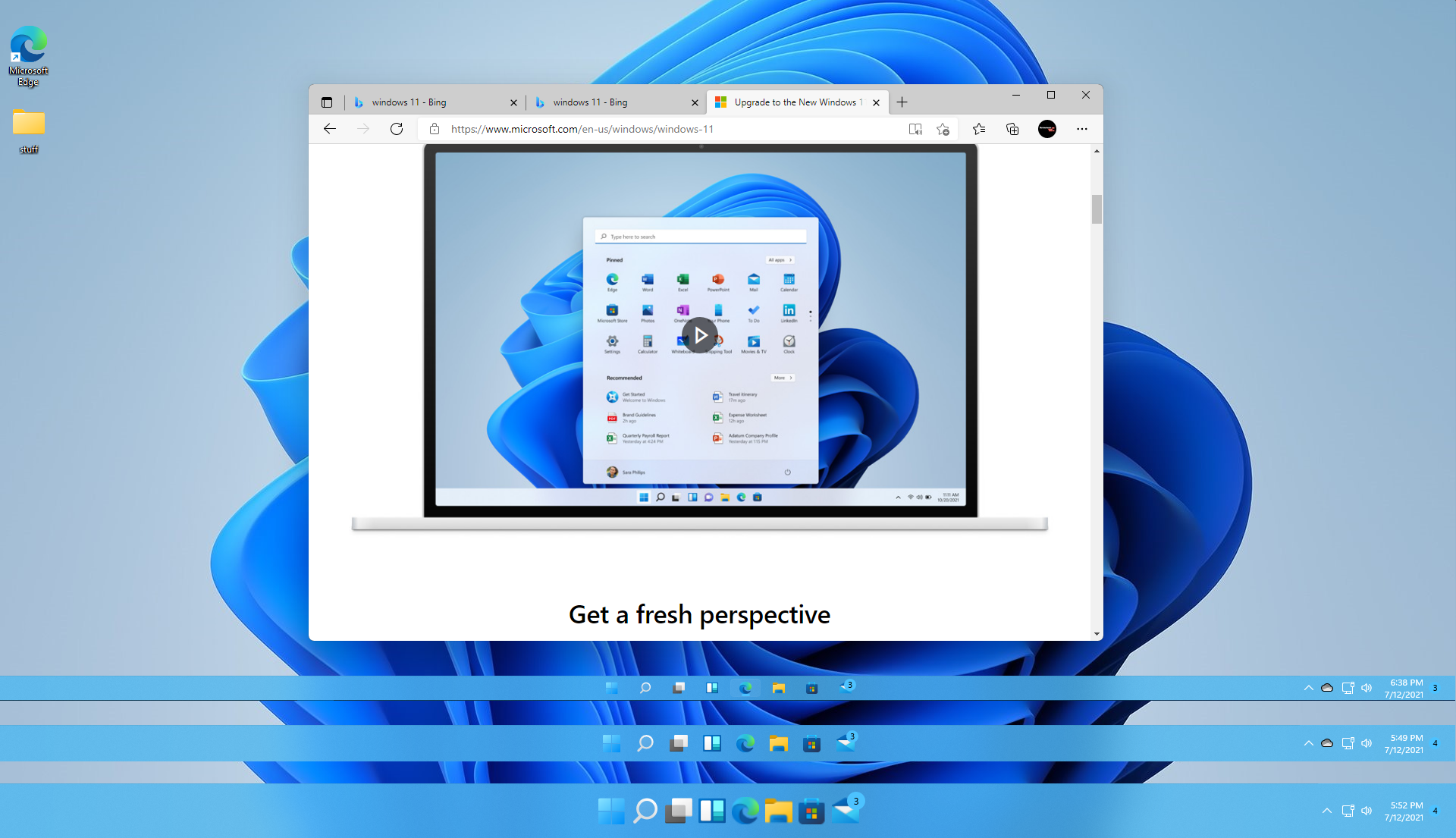
How to Change the Taskbar Size in Windows 11
You can get small, medium or large taskbar and icons.www.tomshardware.com
- Related coverage: techradar.com
- Related coverage: pcgamer.com
