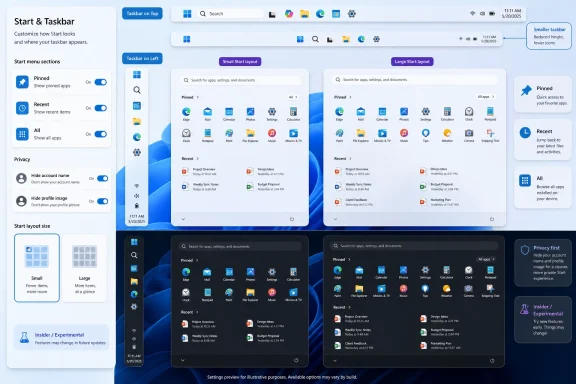
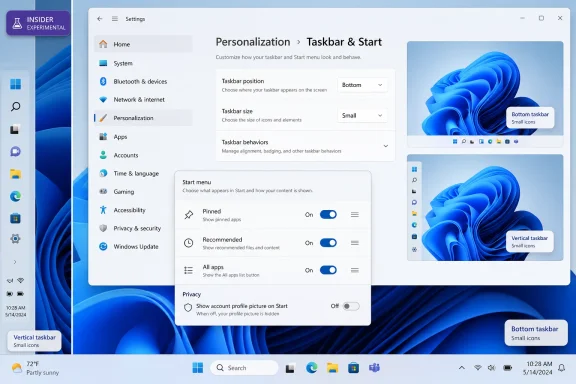
Microsoft began testing new Windows 11 personalization controls on May 15, 2026, giving Windows Insiders in the Experimental channel options to resize the Start menu, hide major Start sections, adjust file recommendations, obscure account identity in Start, and move the taskbar to any screen edge. The news sounds small because the controls themselves are small. But in Windows 11, small controls have become proxies for a larger argument about who gets to decide how the desktop behaves. Microsoft is not merely adding toggles; it is backing away, cautiously, from one of Windows 11’s most unpopular design bets.
Windows 11 arrived with a cleaner visual language and a more opinionated shell. The centered taskbar, simplified Start menu, rounded corners, and stripped-down customization surface were meant to make Windows feel modern rather than inherited. The problem was that Windows is not just a consumer appliance; it is a workplace, a cockpit, a lab bench, a gaming rig, a kiosk, and a personal archive.
That tension has defined the operating system since 2021. Microsoft wanted Windows 11 to feel calmer and more coherent, but many users experienced that coherence as subtraction. The taskbar could not be moved without unsupported workarounds. The Start menu was less dense and less flexible. Familiar muscle memory was traded for a layout that treated uniformity as a feature.
The latest Insider test is important because it reverses that direction without quite admitting the original trade was wrong. Users can choose a Small or Large Start menu. They can show or hide Pinned, Recommended, and All sections. They can control file recommendations in Start separately from other Windows surfaces. They can hide the name and profile picture that appear in Start, a modest but meaningful concession to people who share screens or stream from their PCs.
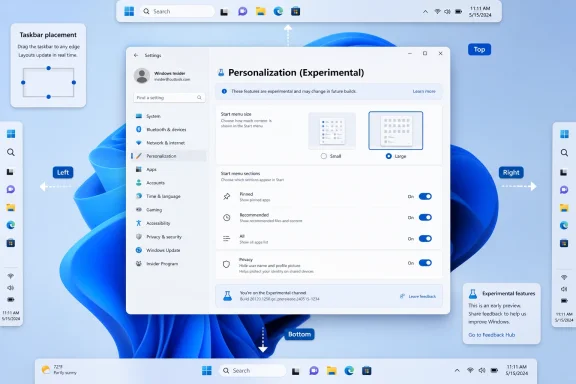
Most visibly, the taskbar can be placed at the top, bottom, left, or right edge of the display. That may sound like a nostalgic checkbox for old-school users, but it is more than that. It is Microsoft acknowledging that the Windows desktop is used across too many screen sizes, workflows, and ergonomic setups for a single bottom-edge taskbar to satisfy everyone.
That balance has often felt wrong in Windows 11. The Recommended area has been controversial from the beginning because it consumes prominent space in a menu many people still think of as theirs. Even when the recommendations are useful, the section competes with pinned apps and imposes Microsoft’s idea of helpfulness on a surface users historically customized for speed.
The new section-level toggles are therefore more significant than another size option. A Start menu that can show only pinned apps is a very different object from one that insists on recommendations. It turns Start back toward a user-controlled launcher rather than a blended feed of files, apps, and suggestions.
Microsoft is also separating file recommendations in Start from recommendations elsewhere. That distinction matters for administrators and privacy-conscious users because “turn off recommendations” has too often behaved like a blunt system-wide preference. A user may want recent files in File Explorer but not during a presentation, a livestream, or a classroom demo. Context matters, and Windows has not always respected that.
The privacy toggle for hiding the user’s name and profile picture is similarly practical. It will not transform Windows security, but it recognizes a modern reality: desktops are broadcast now. People share screens in Teams calls, record tutorials, stream games, and troubleshoot publicly. In those settings, even low-grade identity exposure is unnecessary friction.
But Start menu size is a workflow issue before it is a beauty contest. A bigger Start menu may make sense on a desktop monitor where users want more pinned items visible at once. A smaller menu may make sense on compact notebooks, ultrawide setups, or systems where Start is treated as a quick launcher rather than a dashboard.
The detail that the chosen size should remain consistent across displays “whenever possible” is also telling. Multi-monitor Windows behavior has always been a nest of edge cases: different resolutions, scaling levels, docking stations, remote sessions, rotated displays, and mixed laptop-desktop arrangements. Microsoft appears to be trying to prevent Start from feeling like a different product every time a user plugs into a new screen.
That consistency is the kind of thing users rarely praise when it works but immediately notice when it fails. If a Start menu expands unexpectedly on one monitor and compresses on another, the problem is not visual inconsistency alone. It is the sense that Windows keeps second-guessing the user.
This is where the test intersects with a broader quality push. Microsoft has spent the last year signaling that it wants to fix everyday irritants in Windows 11, not only add AI features or cloud hooks. The Start menu is a natural target because it is both highly visible and unusually personal. When it feels wrong, the whole OS feels wrong.
Windows 11 broke that assumption. The taskbar was pinned to the bottom in the supported interface, and Microsoft’s initial posture was that the new shell did not need to preserve every old arrangement. That was technically defensible and culturally tone-deaf.
The return of edge positioning is therefore not just a customization win. It is an admission that Windows cannot be designed only for the median user. The median user does not define the platform; the platform is defined by the range of workflows it can support without making people fight it.
There is also a practical screen-space argument. Laptop displays remain vertically constrained. Ultrawide monitors have made horizontal space more abundant than vertical space for many users. Developers, writers, spreadsheet users, and administrators often value every extra row they can get. A left or right taskbar can be the difference between a cramped workspace and one that feels properly arranged.
Microsoft’s implementation details will matter. A movable taskbar is easy to describe and hard to perfect. Flyouts, animations, system tray behavior, search, widgets, touch targets, notification placement, drag-and-drop, multi-monitor behavior, and accessibility all need to hold together. If edge positioning returns in a half-polished state, Microsoft will have reopened an old feature only to remind users why shell work is unforgiving.
That gives Microsoft room to maneuver. If the movable taskbar causes too many layout problems, if Start section toggles produce confusing states, or if the Small and Large menu options break down across scaling combinations, the company can revise or delay them. Insiders know, or should know, that this is the bargain.
But Experimental also changes the politics of Windows feedback. By giving users earlier access to feature flags and shell changes, Microsoft can claim it is listening before a decision hardens into a public release. That is healthier than hiding changes until they appear in production, where every unwanted behavior feels imposed.
The risk is that Experimental becomes a pressure valve rather than a pipeline. Users may see long-requested options appear in preview builds and assume victory, only to watch them stall or mutate before general availability. Microsoft will need to be clear about which changes are exploratory and which are on a credible path to release.
For WindowsForum readers, that distinction matters. Enthusiasts can test these features because they enjoy living near the edge. Administrators cannot plan around them until Microsoft documents policy controls, deployment timing, and support boundaries. A feature in Experimental is evidence of direction, not a deployment plan.
A better version of simplicity is progressive disclosure. Let the default experience stay clean, but allow users who know what they want to configure it. Hide complexity from people who do not need it; do not erase it for people who do.
The new Start and taskbar controls point in that direction. A casual user may never open these settings. A power user can reshape the shell. A presenter can hide identity information. A multi-monitor user can keep the Start menu predictable. A left-taskbar loyalist can stop relying on hacks.
This is the Windows compromise at its best. The platform does not need every preference exposed on first boot, but it does need enough depth to respect the diversity of its user base. Windows became dominant in part because it could bend. When it stops bending, users notice.
There is a lesson here for Microsoft’s broader product strategy. The company has spent years trying to make Windows a more controlled, service-driven environment. That has benefits for security, manageability, and visual consistency. But the desktop remains a personal and professional tool, not just a distribution surface for Microsoft services.
Start and taskbar changes have operational consequences. A redesigned Start layout can alter user onboarding. A movable taskbar can complicate support calls if the help desk assumes the taskbar is always at the bottom. Hidden Recommended sections may affect employees who rely on recently opened documents. Conversely, disabling file recommendations in Start may be desirable in regulated environments.
Microsoft already provides some Start and taskbar management capabilities for organizations, but every new consumer-facing toggle raises the question of policy parity. If users can configure these behaviors individually, administrators will want a way to define defaults, restrict choices where necessary, and document expected behavior across device fleets.
There is also the question of profile and display consistency. In modern workplaces, users move between docks, conference rooms, remote desktops, virtualized apps, and multiple monitor setups. A Start menu size preference that behaves well on a single laptop may produce support noise when that laptop is docked to two displays with different scaling.
None of this argues against the changes. It argues for treating them as serious shell changes rather than cosmetic personalization. In Windows, the line between preference and platform behavior is thin.
That tension will not disappear because Microsoft added toggles. If anything, toggles make the conflict more explicit. The default experience still communicates Microsoft’s preference, while the settings page gives users a way to disagree.
The central question is whether Windows should assume that surfacing recent and suggested content is helpful. In a world of local files, OneDrive, Teams documents, web apps, cloud search, and AI summaries, Microsoft has a reasonable argument that the launcher should not be dumb. A modern Start menu can be more than a grid of icons.
But users have an equally reasonable counterargument: not every surface needs to become predictive. Sometimes a launcher should launch. Sometimes the best productivity feature is the absence of surprise.
The new section toggles are the correct compromise because they shift the decision back to the user. Microsoft can keep building a richer Start experience for people who want it, while allowing others to strip the menu down to essentials. That is not fragmentation. That is respect for context.
Good platform design requires judgment. Not every old feature deserves eternal support. Some behaviors are costly to maintain, poorly used, or inconsistent with accessibility and security goals. Microsoft cannot simply freeze Windows in amber because a subset of users dislikes change.
Yet Windows 11 sometimes behaved as if a cleaner default justified a thinner product. The company underestimated the symbolic importance of choice in Windows. A bottom-only taskbar was not just a placement decision; it was a message that the new shell knew better than the user.
The new test sends a different message. It says Microsoft is willing to revisit assumptions, even ones embedded deeply in the Windows 11 identity. It also suggests the company understands that quality is not only crash rates and performance counters. Quality is the daily sensation of not being obstructed by your tools.
That is a valuable shift. Windows users are forgiving of complexity when it serves them. They are much less forgiving of simplicity that feels like a locked door.
At the same time, Microsoft has been pouring attention into AI experiences, Copilot integration, cloud identity, and subscription-adjacent services. That has created a perception problem. Many users see Microsoft finding room for new prompts and connected features while basic desktop complaints linger.
Start and taskbar improvements are a way to rebalance that story. They are not glamorous. They will not headline a developer conference the way AI agents do. But they address the kind of friction that determines whether users describe an OS as polished or annoying.
There is an old product truth here: users often judge platforms by the things vendors consider too small to matter. The taskbar’s location, the height of icons, the amount of whitespace in Start, and the visibility of a profile photo may not sound strategic. But they are touched dozens of times a day.
If Microsoft wants users to trust it with more ambitious changes, it has to show that it can handle the mundane ones. The desktop is where credibility is earned.
Microsoft also has to resist the temptation to treat these controls as decorative. If users turn off Recommended and All, Start should not nag them back toward Microsoft’s preferred layout. If users choose Small, the menu should not unpredictably expand because Windows thinks a display can handle more. If users hide profile identity, Windows should not reintroduce it in a nearby flyout.
The company’s language around consistency “whenever possible” is careful, and understandably so. Some edge cases will be unavoidable. But users will distinguish between understandable constraints and arbitrary behavior. The latter is what has damaged trust in Windows customization over the years.
Feedback will be noisy. Some Insiders will want even more control, including drag-resizable Start menus, deeper layout editing, and more granular taskbar sizing. Others will complain that Microsoft is reintroducing complexity. The company’s challenge is to separate durable workflow needs from nostalgia alone.
That does not mean nostalgia is irrelevant. Muscle memory is a productivity feature. When millions of people spend years using a system in a certain way, preserving the option to keep using it that way has value. The smartest version of Windows 11 is not Windows 10 with rounded corners; it is Windows 11 with enough humility to learn from Windows 10.
Source: Engadget Microsoft lets Insiders choose their Windows 11 Start menu size - Engadget
 Microsoft Reopens a Door It Spent Years Holding Shut
Windows 11 arrived with a cleaner visual language and a more opinionated shell. The centered taskbar, simplified Start menu, rounded corners, and stripped-down customization surface were meant to make Windows feel modern rather than inherited. The problem was that Windows is not just a consumer appliance; it is a workplace, a cockpit, a lab bench, a gaming rig, a kiosk, and a personal archive.That tension has defined the operating system since 2021. Microsoft wanted Windows 11 to feel calmer and more coherent, but many users experienced that coherence as subtraction. The taskbar could not be moved without unsupported workarounds. The Start menu was less dense and less flexible. Familiar muscle memory was traded for a layout that treated uniformity as a feature.
The latest Insider test is important because it reverses that direction without quite admitting the original trade was wrong. Users can choose a Small or Large Start menu. They can show or hide Pinned, Recommended, and All sections. They can control file recommendations in Start separately from other Windows surfaces. They can hide the name and profile picture that appear in Start, a modest but meaningful concession to people who share screens or stream from their PCs.
Most visibly, the taskbar can be placed at the top, bottom, left, or right edge of the display. That may sound like a nostalgic checkbox for old-school users, but it is more than that. It is Microsoft acknowledging that the Windows desktop is used across too many screen sizes, workflows, and ergonomic setups for a single bottom-edge taskbar to satisfy everyone.
The Start Menu Became a Symbol Because It Is Where Windows Introduces Itself
The Start menu carries emotional weight because it is not just an app launcher. It is the place Windows uses to introduce the user to the machine. It is also where Microsoft has repeatedly tried to balance user intent, system suggestions, cloud files, app promotion, search, and account identity.That balance has often felt wrong in Windows 11. The Recommended area has been controversial from the beginning because it consumes prominent space in a menu many people still think of as theirs. Even when the recommendations are useful, the section competes with pinned apps and imposes Microsoft’s idea of helpfulness on a surface users historically customized for speed.
The new section-level toggles are therefore more significant than another size option. A Start menu that can show only pinned apps is a very different object from one that insists on recommendations. It turns Start back toward a user-controlled launcher rather than a blended feed of files, apps, and suggestions.
Microsoft is also separating file recommendations in Start from recommendations elsewhere. That distinction matters for administrators and privacy-conscious users because “turn off recommendations” has too often behaved like a blunt system-wide preference. A user may want recent files in File Explorer but not during a presentation, a livestream, or a classroom demo. Context matters, and Windows has not always respected that.
The privacy toggle for hiding the user’s name and profile picture is similarly practical. It will not transform Windows security, but it recognizes a modern reality: desktops are broadcast now. People share screens in Teams calls, record tutorials, stream games, and troubleshoot publicly. In those settings, even low-grade identity exposure is unnecessary friction.
Size Is Not Just Aesthetic; It Is Workflow
The Small and Large Start menu options will likely be judged first as visual preferences. That is understandable. Windows users have spent years arguing about whether Windows 11 wastes space, especially on laptops and smaller displays.But Start menu size is a workflow issue before it is a beauty contest. A bigger Start menu may make sense on a desktop monitor where users want more pinned items visible at once. A smaller menu may make sense on compact notebooks, ultrawide setups, or systems where Start is treated as a quick launcher rather than a dashboard.
The detail that the chosen size should remain consistent across displays “whenever possible” is also telling. Multi-monitor Windows behavior has always been a nest of edge cases: different resolutions, scaling levels, docking stations, remote sessions, rotated displays, and mixed laptop-desktop arrangements. Microsoft appears to be trying to prevent Start from feeling like a different product every time a user plugs into a new screen.
That consistency is the kind of thing users rarely praise when it works but immediately notice when it fails. If a Start menu expands unexpectedly on one monitor and compresses on another, the problem is not visual inconsistency alone. It is the sense that Windows keeps second-guessing the user.
This is where the test intersects with a broader quality push. Microsoft has spent the last year signaling that it wants to fix everyday irritants in Windows 11, not only add AI features or cloud hooks. The Start menu is a natural target because it is both highly visible and unusually personal. When it feels wrong, the whole OS feels wrong.
The Taskbar’s Return to the Edges Is a Bigger Concession Than It Looks
Moving the taskbar was one of those legacy Windows features that many people did not use, but the people who did use it often depended on it. Left-side taskbars were popular with users who wanted to maximize vertical space on widescreen monitors. Top taskbars were muscle memory for others. Some power users built entire desktop habits around a non-bottom taskbar.Windows 11 broke that assumption. The taskbar was pinned to the bottom in the supported interface, and Microsoft’s initial posture was that the new shell did not need to preserve every old arrangement. That was technically defensible and culturally tone-deaf.
The return of edge positioning is therefore not just a customization win. It is an admission that Windows cannot be designed only for the median user. The median user does not define the platform; the platform is defined by the range of workflows it can support without making people fight it.
There is also a practical screen-space argument. Laptop displays remain vertically constrained. Ultrawide monitors have made horizontal space more abundant than vertical space for many users. Developers, writers, spreadsheet users, and administrators often value every extra row they can get. A left or right taskbar can be the difference between a cramped workspace and one that feels properly arranged.
Microsoft’s implementation details will matter. A movable taskbar is easy to describe and hard to perfect. Flyouts, animations, system tray behavior, search, widgets, touch targets, notification placement, drag-and-drop, multi-monitor behavior, and accessibility all need to hold together. If edge positioning returns in a half-polished state, Microsoft will have reopened an old feature only to remind users why shell work is unforgiving.
The Experimental Channel Is Both Promise and Escape Hatch
The features are rolling out through the Windows Insider Experimental channel, which is crucial context. Experimental is not a promise that the feature will ship unchanged, or ship at all. It is Microsoft’s proving ground for ideas that need telemetry, feedback, and real-world abuse before they move closer to mainstream Windows.That gives Microsoft room to maneuver. If the movable taskbar causes too many layout problems, if Start section toggles produce confusing states, or if the Small and Large menu options break down across scaling combinations, the company can revise or delay them. Insiders know, or should know, that this is the bargain.
But Experimental also changes the politics of Windows feedback. By giving users earlier access to feature flags and shell changes, Microsoft can claim it is listening before a decision hardens into a public release. That is healthier than hiding changes until they appear in production, where every unwanted behavior feels imposed.
The risk is that Experimental becomes a pressure valve rather than a pipeline. Users may see long-requested options appear in preview builds and assume victory, only to watch them stall or mutate before general availability. Microsoft will need to be clear about which changes are exploratory and which are on a credible path to release.
For WindowsForum readers, that distinction matters. Enthusiasts can test these features because they enjoy living near the edge. Administrators cannot plan around them until Microsoft documents policy controls, deployment timing, and support boundaries. A feature in Experimental is evidence of direction, not a deployment plan.
Microsoft Is Learning That “Simple” and “Locked Down” Are Not Synonyms
The Windows 11 design philosophy often conflated simplicity with fewer choices. In some places, that worked. The operating system did look cleaner than Windows 10, and some legacy clutter deserved retirement. But removing options is not the only way to simplify a product.A better version of simplicity is progressive disclosure. Let the default experience stay clean, but allow users who know what they want to configure it. Hide complexity from people who do not need it; do not erase it for people who do.
The new Start and taskbar controls point in that direction. A casual user may never open these settings. A power user can reshape the shell. A presenter can hide identity information. A multi-monitor user can keep the Start menu predictable. A left-taskbar loyalist can stop relying on hacks.
This is the Windows compromise at its best. The platform does not need every preference exposed on first boot, but it does need enough depth to respect the diversity of its user base. Windows became dominant in part because it could bend. When it stops bending, users notice.
There is a lesson here for Microsoft’s broader product strategy. The company has spent years trying to make Windows a more controlled, service-driven environment. That has benefits for security, manageability, and visual consistency. But the desktop remains a personal and professional tool, not just a distribution surface for Microsoft services.
Enterprise IT Will Ask Different Questions Than Enthusiasts
Enthusiasts will focus on whether the new Start menu feels better and whether the taskbar finally behaves like it used to. Enterprise administrators will ask a more prosaic set of questions. Can these settings be managed? Can they be locked down? Can they roam? Will they break training materials, screenshots, help desk scripts, or kiosk configurations?Start and taskbar changes have operational consequences. A redesigned Start layout can alter user onboarding. A movable taskbar can complicate support calls if the help desk assumes the taskbar is always at the bottom. Hidden Recommended sections may affect employees who rely on recently opened documents. Conversely, disabling file recommendations in Start may be desirable in regulated environments.
Microsoft already provides some Start and taskbar management capabilities for organizations, but every new consumer-facing toggle raises the question of policy parity. If users can configure these behaviors individually, administrators will want a way to define defaults, restrict choices where necessary, and document expected behavior across device fleets.
There is also the question of profile and display consistency. In modern workplaces, users move between docks, conference rooms, remote desktops, virtualized apps, and multiple monitor setups. A Start menu size preference that behaves well on a single laptop may produce support noise when that laptop is docked to two displays with different scaling.
None of this argues against the changes. It argues for treating them as serious shell changes rather than cosmetic personalization. In Windows, the line between preference and platform behavior is thin.
The Recommended Section Is Still the Fight Microsoft Has Not Fully Settled
The ability to hide Recommended is welcome, but it does not end the debate about what belongs in Start. Microsoft’s instinct is to make Start smarter, more contextual, and more connected to the rest of the system. Many users’ instinct is to make Start quieter.That tension will not disappear because Microsoft added toggles. If anything, toggles make the conflict more explicit. The default experience still communicates Microsoft’s preference, while the settings page gives users a way to disagree.
The central question is whether Windows should assume that surfacing recent and suggested content is helpful. In a world of local files, OneDrive, Teams documents, web apps, cloud search, and AI summaries, Microsoft has a reasonable argument that the launcher should not be dumb. A modern Start menu can be more than a grid of icons.
But users have an equally reasonable counterargument: not every surface needs to become predictive. Sometimes a launcher should launch. Sometimes the best productivity feature is the absence of surprise.
The new section toggles are the correct compromise because they shift the decision back to the user. Microsoft can keep building a richer Start experience for people who want it, while allowing others to strip the menu down to essentials. That is not fragmentation. That is respect for context.
Windows 11’s Original Sin Was Not Change; It Was Certainty
It is easy to frame these Insider features as Microsoft restoring things it should never have removed. That is partly true, especially for the taskbar. But the deeper problem with early Windows 11 was not that Microsoft changed the interface. The problem was the confidence with which it narrowed the interface.Good platform design requires judgment. Not every old feature deserves eternal support. Some behaviors are costly to maintain, poorly used, or inconsistent with accessibility and security goals. Microsoft cannot simply freeze Windows in amber because a subset of users dislikes change.
Yet Windows 11 sometimes behaved as if a cleaner default justified a thinner product. The company underestimated the symbolic importance of choice in Windows. A bottom-only taskbar was not just a placement decision; it was a message that the new shell knew better than the user.
The new test sends a different message. It says Microsoft is willing to revisit assumptions, even ones embedded deeply in the Windows 11 identity. It also suggests the company understands that quality is not only crash rates and performance counters. Quality is the daily sensation of not being obstructed by your tools.
That is a valuable shift. Windows users are forgiving of complexity when it serves them. They are much less forgiving of simplicity that feels like a locked door.
The Timing Is Not Accidental
The timing of these changes matters because Windows is in a transition period. Windows 10’s mainstream end-of-support milestone has already pushed many reluctant users toward Windows 11, and the remaining holdouts are precisely the people most likely to notice missing customization. Microsoft needs Windows 11 to feel less like a forced migration and more like a maturing platform.At the same time, Microsoft has been pouring attention into AI experiences, Copilot integration, cloud identity, and subscription-adjacent services. That has created a perception problem. Many users see Microsoft finding room for new prompts and connected features while basic desktop complaints linger.
Start and taskbar improvements are a way to rebalance that story. They are not glamorous. They will not headline a developer conference the way AI agents do. But they address the kind of friction that determines whether users describe an OS as polished or annoying.
There is an old product truth here: users often judge platforms by the things vendors consider too small to matter. The taskbar’s location, the height of icons, the amount of whitespace in Start, and the visibility of a profile photo may not sound strategic. But they are touched dozens of times a day.
If Microsoft wants users to trust it with more ambitious changes, it has to show that it can handle the mundane ones. The desktop is where credibility is earned.
The Real Test Begins After the Toggle Appears
Shipping the toggle is only the first step. The real test is whether these settings survive contact with the messiness of Windows hardware and user behavior. A movable taskbar must work across touch devices, tablets, convertibles, remote sessions, multi-monitor arrays, and accessibility configurations. A resizable Start menu must behave sanely across scaling percentages and resolutions.Microsoft also has to resist the temptation to treat these controls as decorative. If users turn off Recommended and All, Start should not nag them back toward Microsoft’s preferred layout. If users choose Small, the menu should not unpredictably expand because Windows thinks a display can handle more. If users hide profile identity, Windows should not reintroduce it in a nearby flyout.
The company’s language around consistency “whenever possible” is careful, and understandably so. Some edge cases will be unavoidable. But users will distinguish between understandable constraints and arbitrary behavior. The latter is what has damaged trust in Windows customization over the years.
Feedback will be noisy. Some Insiders will want even more control, including drag-resizable Start menus, deeper layout editing, and more granular taskbar sizing. Others will complain that Microsoft is reintroducing complexity. The company’s challenge is to separate durable workflow needs from nostalgia alone.
That does not mean nostalgia is irrelevant. Muscle memory is a productivity feature. When millions of people spend years using a system in a certain way, preserving the option to keep using it that way has value. The smartest version of Windows 11 is not Windows 10 with rounded corners; it is Windows 11 with enough humility to learn from Windows 10.
The Small Toggle That Carries a Large Message
This Insider release is best understood as a correction of course, not a revolution. The feature set is concrete, but the message is broader: Microsoft is making room again for the user’s hand on the steering wheel.- Windows Insiders in the Experimental channel are getting early access to Start menu size options, with Small and Large layouts intended to remain consistent across displays.
- Microsoft is testing section-level Start controls that can hide Pinned, Recommended, or All, allowing a much simpler launcher-style menu.
- File recommendations in Start are becoming separately controllable, which matters for privacy, presentations, and users who want recommendations elsewhere but not in the Start menu.
- The Start menu privacy option to hide the user’s name and profile image reflects how often Windows desktops now appear in shared screens, streams, and recordings.
- The taskbar’s return to top, bottom, left, and right placement is the most symbolic change because it restores a long-standing Windows customization habit removed in Windows 11.
- None of these features should be treated as guaranteed for production until they move beyond the Experimental channel and Microsoft clarifies rollout behavior and management options.
Source: Engadget Microsoft lets Insiders choose their Windows 11 Start menu size - Engadget