

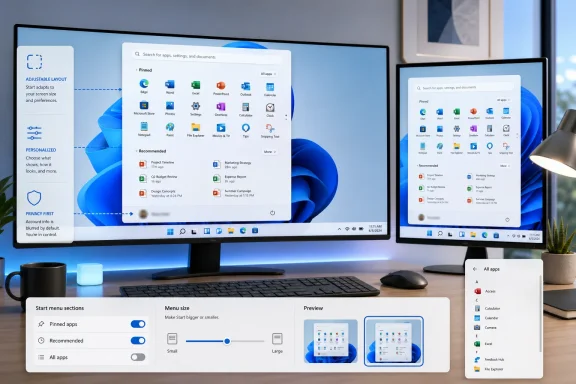
Microsoft is testing a substantially more customizable Windows 11 Start menu in Insider preview builds in June 2026, letting users hide Pinned, Recommended/Recent, and All apps sections, choose menu size, and conceal account identity details from the Start surface. That sounds like a small Settings-page story. It is not. It is Microsoft quietly admitting that the Windows 11 Start menu was too rigid for the job it was asked to do.
The Start menu has always carried more weight than its square footage suggests. It is the first UI many users touch after signing in, the place where Windows tells you what kind of operating system it thinks it is, and the feature most likely to spark disproportionate outrage when Microsoft decides it knows better than the person sitting at the keyboard.
Windows 11’s original Start menu made a bet on calmness: centered icons, simplified pins, a Recommendations area, and a clean break from Windows 10’s Live Tiles. The problem was not that the design was ugly. The problem was that Microsoft treated the layout as a finished opinion rather than a negotiable workspace.
Now the company is moving in the opposite direction. In preview, users can effectively dismantle the Start menu section by section. Pinned apps can stay or go. The Recommended feed can be removed or narrowed to certain content types. The All apps section can be hidden. The menu itself can be small or large, independent of what Windows automatically thinks is suitable for the display.
That is not just customization. It is a retreat from a philosophy.
For some users, that worked. For many IT pros and power users, it felt like Microsoft had removed the malleability of Windows 10 without replacing it with a better organizing principle. The Recommended area became the symbol of the problem because it was neither fully personal nor fully useful. It showed recent files, suggested apps, and other items that could be helpful in theory but often felt like clutter in practice.
The new preview options directly target that pain point. Users can decide whether the recommendation area shows suggested apps, recent files, recently installed apps, or none of the above. That matters because it changes the character of Start from a semi-managed feed into a launch surface again.
There is a subtle privacy angle here, too. A Start menu that surfaces recent files is convenient at a desk and risky on a projector. Microsoft’s addition of an option to hide the user account name and profile image is modest, but it acknowledges a basic reality of modern work: the PC is constantly being shared, mirrored, captured, streamed, and screen-recorded.
The old Start menu assumed the person opening it was the only audience. The new settings assume there may be spectators.
If you want a Start menu that is just pinned apps, you can now build one. If you want an app list without the recommendation layer, that is possible too. If you want a near-empty Start menu because you rely on search, PowerToys Run, taskbar pins, or another launcher, Windows is no longer quite so offended by that preference.
That may sound like a niche win for obsessives, but it is exactly the kind of niche win that Windows has historically depended on. Windows is not beloved because it offers one ideal workflow. It survives because it tolerates many imperfect ones.
The Start menu’s new flexibility also undercuts the ecosystem of hacks, registry edits, third-party Start replacements, and shell modifications that flourished around Windows 11’s limitations. Tools like Start11 did not become popular because everyone wanted nostalgia for Windows 7. They became popular because Microsoft left obvious gaps in the first-party experience.
Microsoft does not need to clone every third-party launcher. But it does need to stop creating demand for them through preventable stubbornness.
The old automatic approach carried the usual Microsoft logic: most users will never change this, so the system should pick. But Windows runs on tiny tablets, handheld gaming PCs, ultrawides, docked laptops, classroom machines, conference-room PCs, and multi-monitor developer rigs. The idea that one adaptive rule can satisfy all those contexts is optimistic at best.
A large Start menu on a large monitor can look reasonable. It can also look absurd if the user only wants a compact launcher. A small Start menu on a 32-inch display may look wrong to a designer and perfect to someone who wants minimal interruption.
That is the entire point. Start is not a poster. It is a tool.
The limitation is that resizing remains indirect. According to early hands-on testing, users choose from Settings rather than dragging the menu edge as they would with an ordinary window. That is better than nothing, but it still feels like Microsoft is negotiating with customization rather than embracing it.
The new controls do not eliminate that tension, but they reduce it. A user who wants recent files but not app suggestions can make that distinction. A user who wants no recommendations can reclaim the space. A user who works in a sensitive environment can reduce the odds that Start reveals something awkward during a meeting.
For administrators, this matters less as a single-user nicety than as a sign of where Microsoft may be heading. Enterprises have long cared about Start layout control because the default experience affects onboarding, support calls, kiosk-like deployments, and user satisfaction. A Start menu that can be stripped down is easier to explain, easier to standardize, and easier to defend.
The open question is how much of this flexibility will be manageable at scale when the feature moves beyond Insider builds. Windows already supports Start layout customization through enterprise configuration channels, but consumer-facing toggles and admin policy are not the same thing. IT departments will want predictable controls, not another setting that users can change locally unless policy says otherwise.
Microsoft has learned this lesson repeatedly: customization without management becomes drift. Management without customization becomes resentment.
That preserves Microsoft’s hierarchy even as it relaxes the menu’s contents. It is a halfway concession: you may decide what appears, but not where it belongs. For many users, that will be fine. For anyone who wants All apps first, pins at the bottom, or a more launcher-like arrangement, the design still has a ceiling.
This is where Microsoft’s design culture often shows. The company is increasingly willing to expose switches, but less willing to make core surfaces truly composable. Windows 11 has become more personal in increments, not leaps. The danger is that users experience the change as a permissions slip rather than empowerment.
There is also a philosophical inconsistency here. If Microsoft is comfortable letting someone disable every major Start section, why not let them reorder the remaining ones? If the user can create a Start menu that is almost empty, surely placing All apps above Pinned is not the line that must never be crossed.
The preview still suggests a design team trying to protect the silhouette of Windows 11. That instinct is understandable. It is also the instinct that caused the problem.
That is not a silly edge case. Plenty of Windows users no longer browse Start in the traditional way. They press the Windows key and type. They use Search. They pin everything important to the taskbar. They use launcher utilities. They live in File Explorer, Terminal, Visual Studio Code, browsers, or remote sessions.
If Start becomes optional as a content surface, the Windows key becomes more interesting. Should it open Search instead? Should it launch an app launcher? Should it open the All apps view directly? Should enterprises be able to define its behavior for specific device roles?
Microsoft has not gone that far. But once the company concedes that Start’s internal sections are optional, it invites a larger question about whether Start itself is still the operating system’s central command surface or merely one launcher among several.
That is a profound change from the Windows 95 mental model, even if it arrives disguised as a few Settings toggles.
The Start menu work fits into a broader attempt to show that Microsoft is listening to the boring complaints, not just shipping the flashy ones. That matters because the boring complaints are the ones that determine whether people enjoy using a PC every day.
No one should confuse this with a revolution. A customizable Start menu will not fix Windows Update anxiety, driver instability, Recall skepticism, Copilot fatigue, or the long tail of Control Panel-era cruft. But it does address a highly visible frustration in a way users can immediately understand.
There is reputational value in letting people remove something they dislike. It says: we may still have a default opinion, but we are no longer making you live inside it.
For Windows, that is more than a UX tweak. It is a trust repair mechanism.
Still, the direction looks clear. Microsoft has publicly framed Start and taskbar personalization as part of its Windows quality push, and the feature set is far enough along for hands-on testing. This is not a speculative mock-up. It is a working preview.
The timing is notable. Windows 11 is no longer a young operating system. It launched in 2021, and by 2026 many of the original design choices have had years to either prove themselves or annoy people. The Start menu’s rigidity belongs in the second category.
That lag is frustrating, but it is also revealing. Microsoft tends to defend controversial shell changes until the evidence becomes too loud to ignore. The new Start menu controls suggest that the evidence finally won.
For administrators, the immediate value depends on how Microsoft exposes the controls beyond preview. If the toggles are policy-manageable, they could simplify standardized deployments. If they remain mostly user-level preferences, they will still reduce friction but offer less fleet-level certainty.
For privacy-conscious users, the ability to hide identity details and reduce surfaced activity is a small but welcome improvement. It does not turn Start into a hardened privacy boundary. It does make the default UI less casually revealing.
For third-party customization tools, the change is both validation and competition. Microsoft is not matching their depth, but it is absorbing some of the most obvious demand. That may narrow the audience for shell replacement utilities while leaving advanced users plenty of reasons to keep them installed.
 Microsoft Finally Lets Start Stop Being a Billboard
The Start menu has always carried more weight than its square footage suggests. It is the first UI many users touch after signing in, the place where Windows tells you what kind of operating system it thinks it is, and the feature most likely to spark disproportionate outrage when Microsoft decides it knows better than the person sitting at the keyboard.Windows 11’s original Start menu made a bet on calmness: centered icons, simplified pins, a Recommendations area, and a clean break from Windows 10’s Live Tiles. The problem was not that the design was ugly. The problem was that Microsoft treated the layout as a finished opinion rather than a negotiable workspace.
Now the company is moving in the opposite direction. In preview, users can effectively dismantle the Start menu section by section. Pinned apps can stay or go. The Recommended feed can be removed or narrowed to certain content types. The All apps section can be hidden. The menu itself can be small or large, independent of what Windows automatically thinks is suitable for the display.
That is not just customization. It is a retreat from a philosophy.
The Windows 11 Start Menu Was Built for Microsoft’s Priorities
When Windows 11 arrived, Start felt less like an evolved launcher and more like a curated portal. The old tile wall was gone, but its replacement was not exactly sparse. Pinned apps took pride of place, Recommended claimed persistent real estate underneath, and All apps was pushed behind a separate interaction.For some users, that worked. For many IT pros and power users, it felt like Microsoft had removed the malleability of Windows 10 without replacing it with a better organizing principle. The Recommended area became the symbol of the problem because it was neither fully personal nor fully useful. It showed recent files, suggested apps, and other items that could be helpful in theory but often felt like clutter in practice.
The new preview options directly target that pain point. Users can decide whether the recommendation area shows suggested apps, recent files, recently installed apps, or none of the above. That matters because it changes the character of Start from a semi-managed feed into a launch surface again.
There is a subtle privacy angle here, too. A Start menu that surfaces recent files is convenient at a desk and risky on a projector. Microsoft’s addition of an option to hide the user account name and profile image is modest, but it acknowledges a basic reality of modern work: the PC is constantly being shared, mirrored, captured, streamed, and screen-recorded.
The old Start menu assumed the person opening it was the only audience. The new settings assume there may be spectators.
The Most Important Toggle Is the One That Removes Microsoft’s Assumptions
The headline feature is not the large/small menu selector, even though that will be the most immediately visible change. The important shift is that entire Start sections can be switched off. That gives users something Windows 11 has resisted since launch: the ability to say, “No, I do not want this part of the experience.”If you want a Start menu that is just pinned apps, you can now build one. If you want an app list without the recommendation layer, that is possible too. If you want a near-empty Start menu because you rely on search, PowerToys Run, taskbar pins, or another launcher, Windows is no longer quite so offended by that preference.
That may sound like a niche win for obsessives, but it is exactly the kind of niche win that Windows has historically depended on. Windows is not beloved because it offers one ideal workflow. It survives because it tolerates many imperfect ones.
The Start menu’s new flexibility also undercuts the ecosystem of hacks, registry edits, third-party Start replacements, and shell modifications that flourished around Windows 11’s limitations. Tools like Start11 did not become popular because everyone wanted nostalgia for Windows 7. They became popular because Microsoft left obvious gaps in the first-party experience.
Microsoft does not need to clone every third-party launcher. But it does need to stop creating demand for them through preventable stubbornness.
A Small Menu on a Big Monitor Is a Bigger Deal Than It Sounds
The new size control is the most straightforward quality-of-life improvement. Windows can still choose a Start menu size automatically based on screen characteristics, but users can override it with small or large options. That is exactly the kind of ordinary preference Windows should have exposed from the beginning.The old automatic approach carried the usual Microsoft logic: most users will never change this, so the system should pick. But Windows runs on tiny tablets, handheld gaming PCs, ultrawides, docked laptops, classroom machines, conference-room PCs, and multi-monitor developer rigs. The idea that one adaptive rule can satisfy all those contexts is optimistic at best.
A large Start menu on a large monitor can look reasonable. It can also look absurd if the user only wants a compact launcher. A small Start menu on a 32-inch display may look wrong to a designer and perfect to someone who wants minimal interruption.
That is the entire point. Start is not a poster. It is a tool.
The limitation is that resizing remains indirect. According to early hands-on testing, users choose from Settings rather than dragging the menu edge as they would with an ordinary window. That is better than nothing, but it still feels like Microsoft is negotiating with customization rather than embracing it.
Recommended Becomes the Battlefield Over Trust
The Recommended section has always been controversial because it sits at the intersection of convenience, telemetry, promotion, and privacy. Microsoft can describe it as a productivity feature, and sometimes it is. Users can describe it as unwanted surface area, and often they are right.The new controls do not eliminate that tension, but they reduce it. A user who wants recent files but not app suggestions can make that distinction. A user who wants no recommendations can reclaim the space. A user who works in a sensitive environment can reduce the odds that Start reveals something awkward during a meeting.
For administrators, this matters less as a single-user nicety than as a sign of where Microsoft may be heading. Enterprises have long cared about Start layout control because the default experience affects onboarding, support calls, kiosk-like deployments, and user satisfaction. A Start menu that can be stripped down is easier to explain, easier to standardize, and easier to defend.
The open question is how much of this flexibility will be manageable at scale when the feature moves beyond Insider builds. Windows already supports Start layout customization through enterprise configuration channels, but consumer-facing toggles and admin policy are not the same thing. IT departments will want predictable controls, not another setting that users can change locally unless policy says otherwise.
Microsoft has learned this lesson repeatedly: customization without management becomes drift. Management without customization becomes resentment.
The Missing Feature Is Still Arrangement
The biggest omission is section ordering. In the current preview design, Pinned remains above Recommended/Recent, which remains above All apps, unless sections are hidden. Users can remove pieces, but they cannot rearrange the stack.That preserves Microsoft’s hierarchy even as it relaxes the menu’s contents. It is a halfway concession: you may decide what appears, but not where it belongs. For many users, that will be fine. For anyone who wants All apps first, pins at the bottom, or a more launcher-like arrangement, the design still has a ceiling.
This is where Microsoft’s design culture often shows. The company is increasingly willing to expose switches, but less willing to make core surfaces truly composable. Windows 11 has become more personal in increments, not leaps. The danger is that users experience the change as a permissions slip rather than empowerment.
There is also a philosophical inconsistency here. If Microsoft is comfortable letting someone disable every major Start section, why not let them reorder the remaining ones? If the user can create a Start menu that is almost empty, surely placing All apps above Pinned is not the line that must never be crossed.
The preview still suggests a design team trying to protect the silhouette of Windows 11. That instinct is understandable. It is also the instinct that caused the problem.
The Start Button Is Now the Awkward Part of the Story
One of the stranger implications of the new controls is that users can approach something close to a disabled Start menu while the Start button itself remains central to the taskbar experience. If Start contains little or nothing, what should the Start button do?That is not a silly edge case. Plenty of Windows users no longer browse Start in the traditional way. They press the Windows key and type. They use Search. They pin everything important to the taskbar. They use launcher utilities. They live in File Explorer, Terminal, Visual Studio Code, browsers, or remote sessions.
If Start becomes optional as a content surface, the Windows key becomes more interesting. Should it open Search instead? Should it launch an app launcher? Should it open the All apps view directly? Should enterprises be able to define its behavior for specific device roles?
Microsoft has not gone that far. But once the company concedes that Start’s internal sections are optional, it invites a larger question about whether Start itself is still the operating system’s central command surface or merely one launcher among several.
That is a profound change from the Windows 95 mental model, even if it arrives disguised as a few Settings toggles.
This Is Also a Windows Quality Story
Microsoft’s recent messaging around Windows has leaned heavily on quality, responsiveness, and trust. That is not accidental. Windows 11 has accumulated a familiar pile of complaints: performance regressions in odd places, inconsistent UI modernization, unwanted recommendations, taskbar limitations, Settings migrations that feel unfinished, and AI features that sometimes appear more strategically urgent than user-requested.The Start menu work fits into a broader attempt to show that Microsoft is listening to the boring complaints, not just shipping the flashy ones. That matters because the boring complaints are the ones that determine whether people enjoy using a PC every day.
No one should confuse this with a revolution. A customizable Start menu will not fix Windows Update anxiety, driver instability, Recall skepticism, Copilot fatigue, or the long tail of Control Panel-era cruft. But it does address a highly visible frustration in a way users can immediately understand.
There is reputational value in letting people remove something they dislike. It says: we may still have a default opinion, but we are no longer making you live inside it.
For Windows, that is more than a UX tweak. It is a trust repair mechanism.
Insiders Get the Levers Before Everyone Else Gets the Default
For now, these changes live in preview through the Windows Insider Program, including Experimental and Beta-channel work referenced in recent reporting. That means normal caution applies. Insider features can change, disappear, ship in pieces, or arrive later than expected. Anyone testing them on production hardware is volunteering to be part of Microsoft’s debugging apparatus.Still, the direction looks clear. Microsoft has publicly framed Start and taskbar personalization as part of its Windows quality push, and the feature set is far enough along for hands-on testing. This is not a speculative mock-up. It is a working preview.
The timing is notable. Windows 11 is no longer a young operating system. It launched in 2021, and by 2026 many of the original design choices have had years to either prove themselves or annoy people. The Start menu’s rigidity belongs in the second category.
That lag is frustrating, but it is also revealing. Microsoft tends to defend controversial shell changes until the evidence becomes too loud to ignore. The new Start menu controls suggest that the evidence finally won.
The Practical Win Is Less Clutter and Fewer Workarounds
For everyday users, the benefit is obvious: fewer unwanted sections and a Start menu that better matches actual habits. Someone who never uses recommendations can reclaim space. Someone who likes recent files but not suggested apps can split the difference. Someone who wants a smaller footprint can force one.For administrators, the immediate value depends on how Microsoft exposes the controls beyond preview. If the toggles are policy-manageable, they could simplify standardized deployments. If they remain mostly user-level preferences, they will still reduce friction but offer less fleet-level certainty.
For privacy-conscious users, the ability to hide identity details and reduce surfaced activity is a small but welcome improvement. It does not turn Start into a hardened privacy boundary. It does make the default UI less casually revealing.
For third-party customization tools, the change is both validation and competition. Microsoft is not matching their depth, but it is absorbing some of the most obvious demand. That may narrow the audience for shell replacement utilities while leaving advanced users plenty of reasons to keep them installed.
The New Start Menu Admits the Old One Overreached
The concrete story is that Windows 11 users are getting more Start menu controls. The larger story is that Microsoft is backing away from a one-size-fits-most shell design that never fit as many people as Redmond hoped.- Users can hide the Pinned, Recommended/Recent, and All apps sections rather than merely working around them.
- The Recommended area is becoming more configurable, including finer control over whether recent files, suggested apps, and recently installed apps appear.
- The Start menu can be set to small or large instead of relying entirely on Windows’ automatic sizing decision.
- The account name and profile image can be hidden, which is useful for presentations, screen sharing, and shared environments.
- Section order still appears fixed, so Microsoft is allowing subtraction before it allows full rearrangement.
- The feature remains in preview, so timing and exact behavior may change before broad release.
References
- Primary source: Windows Central
Published: Thu, 11 Jun 2026 11:31:35 GMT
I tried Windows 11's new customizable Start menu: I'm shocked at how much control Microsoft is finally giving us | Windows Central
Windows 11 is getting a new customizable Start menu, and I've gone hands-on to see just how configurable it is.www.windowscentral.com - Official source: learn.microsoft.com
Customize the Windows 11 Start menu | Microsoft Learn
How to pin OEM apps in the Windows 11 start menulearn.microsoft.com - Official source: microsoft.com
Start Menu | Microsoft Windows
Get the most out of your Windows 11 experience with the Start menu. With the Start menu, you can save time, and find it faster with enhanced search. Find apps, settings, recommended files, and more.www.microsoft.com
- Related coverage: notebookcheck.net
Windows 11 Insider Build 26300.8553 finally lets you customize the Start menu - Notebookcheck News
Windows 11 Insider Preview Build 26300.8553 brings a modular Start menu with Small, Large, and Automatic size presets and new privacy tools to the Experimental channel. www.notebookcheck.net
- Related coverage: notebookcheck.org
Windows 11 Insider Build 26300.8553 permite por fin personalizar el menú Inicio - NotebookCheck.org News
Windows 11 Insider Preview Build 26300.8553 trae un menú Inicio modular con preajustes de tamaño Pequeño, Grande y Automático y nuevas herramientas de privacidad al canal Experimental. www.notebookcheck.org
- Related coverage: windowslatest.com
Microsoft is bringing 10 new features to Windows 11's taskbar and Start menu
Microsoft is finally delivering a movable Windows 11 taskbar, a resizable Start menu, and native WinUI performance upgrades to fix Start menu. www.windowslatest.com
- Official source: cus.prod.support.services.microsoft.com
- Related coverage: dataconomy.com
Windows 11 update adds major Start menu customization options
Microsoft is testing updates for Windows 11 that will enhance customization options for the Start menu and taskbar, with rolloutsdataconomy.com - Official source: blogs.windows.com
Improving Windows quality: Making Taskbar and Start more personal
In our commitment to Windows quality, we outlined our plans to deliver improvements in performance, reliability, and craft. We are also committed toblogs.windows.com - Related coverage: techradar.com
Windows 11 is finally getting the Start menu changes we all wanted — and a surprise bonus | TechRadar
The new Start menu looks excellent, and Microsoft is tackling issues with rusty old parts of the Windows 11 interfacewww.techradar.com - Related coverage: tomsguide.com
Microsoft reportedly redesigning Start Menu in Windows 11 after actually listening to user complaints | Tom's Guide
Microsoft is reportedly working on yet another redesign of the Start Menu in Windows.www.tomsguide.com - Related coverage: scscc.club
- Related coverage: fullcirclecomputing.com
What's New in Windows 11 Quick Reference
Handy What's New in Windows 11 with commonly used shortcuts, tips and tricks. Free for personal and professional training.www.fullcirclecomputing.com
