

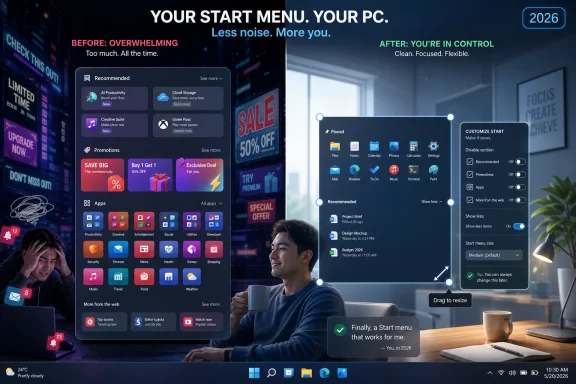
Microsoft is reportedly preparing more Windows 11 Start menu customization in 2026, including options to resize the menu and disable entire sections such as Recommended, after years of complaints from users who felt the interface had become too crowded. The timing is awkward. Windows 10 is already past its October 14, 2025 end-of-support date, which means the users most likely to care about a cleaner Windows 11 are no longer being courted so much as herded. The coming changes look welcome, but they also underline the central failure of Windows 11: Microsoft spent years making the Start menu serve the company’s agenda before remembering that it first had to serve the user.
The Start menu has always carried more emotional weight than its size suggests. It is not just an app launcher; it is the front door of Windows, the place where a user decides whether the machine feels like theirs. When that front door becomes a carousel of recommendations, documents, promotions, account nudges, and companion features, the irritation is not cosmetic. It is architectural.
That is why the latest reporting around Microsoft’s plans matters. According to Windows Central, Microsoft is preparing more advanced Start menu customization options that would let users toggle off major areas of the menu and choose a smaller layout. The Daily Express framed the change in consumer terms: Windows 11 may finally become less overwhelming for people who moved on from unsupported Windows 10 and found themselves staring at a Start menu that seemed to want to be everything except simple.
The most hated part of the Windows 11 Start menu has long been the Recommended section. Microsoft has tweaked what appears there, added and removed settings around it, and offered enterprise policy controls in some configurations, but ordinary users have repeatedly run into the same problem: turning off the content did not always reclaim the space. A blank recommendation zone is not minimalism. It is a reserved seat for a feature the user already rejected.
If Microsoft now lets users remove entire Start menu sections, the company is correcting a design decision that should never have survived the first year of Windows 11. A launcher should not need a campaign to become configurable. It should assume that the person sitting at the keyboard knows better than Redmond what deserves pride of place.
That trade has not always landed. Windows 11 arrived in October 2021 with a cleaner visual language, stricter hardware requirements, a centered taskbar, and a simplified Start menu that removed many of the customization habits Windows users had built over decades. The company argued, implicitly and sometimes explicitly, that simplification would make Windows feel more coherent. The problem was that many of the removed options were not clutter. They were muscle memory.
The taskbar became a flashpoint because it could no longer be moved in the old familiar ways. Context menus hid useful commands behind an extra click. Default app handling became more laborious. The Start menu, meanwhile, offered a narrower idea of what “personal” meant: pinned apps, recent files, cloud-adjacent suggestions, and a layout that looked tidy in a marketing screenshot but rigid in daily use.
For a certain class of Windows user, that rigidity was the betrayal. Windows has never been beloved because it is elegant. It has been tolerated, defended, and mastered because it is adaptable. The operating system’s great bargain was that you could bend it to fit a home office, a trading desk, a school lab, a CAD workstation, a gaming rig, a domain-joined enterprise fleet, or a relative’s bargain laptop. Windows 11 often felt like it wanted to standardize that variety out of existence.
That makes 2026 a strange moment for Microsoft to rediscover humility. The company is not making these changes during a leisurely adoption window, when Windows 10 users could compare experiences and decide whether Windows 11 had matured enough. It is making them after the most powerful lever in desktop computing has already been pulled: security support.
For users who resisted Windows 11 because they disliked the interface, the answer from Microsoft was effectively patience. Wait for the new operating system to improve. Wait for the missing taskbar features to return. Wait for Start to become less opinionated. Wait for performance to feel better. Wait for the company to notice the feedback that had been obvious since the earliest Windows 11 previews.
Now, as those changes reportedly arrive, the question is not whether they are useful. They are. The question is whether they arrive early enough to rebuild trust, or merely late enough to reduce friction for people who no longer have a supported alternative.
That distinction matters. A concession offered while users still have freedom feels responsive. A concession offered after the exits close feels like damage control.
Many users do not want their recent documents displayed every time they open Start. Others use Start primarily as an app launcher and see recommendations as a waste of valuable space. Some operate shared machines, presentation laptops, lab computers, or managed endpoints where exposing recent activity is undesirable. Power users who rely on search and pinned tools often see the section as ornamental at best and intrusive at worst.
The deeper problem is that Microsoft treated the Start menu as a place where algorithmic helpfulness could substitute for user arrangement. That is a fashionable mistake across modern software. Designers love adaptive surfaces because they promise to reduce effort. Users often dislike them because they move, reveal, infer, and promote things without being asked.
In Windows, predictability is a feature. The Start menu became famous not because it was beautiful, but because users could develop a spatial relationship with it. The more it tries to behave like a feed, the less it behaves like a tool.
This is why the ability to disable whole sections matters more than its modest UI footprint suggests. It restores the idea that Start can be declarative: these are my apps, these are my folders, this is the layout I want, and nothing else gets a vote.
That is a meaningful shift. For years, Windows 11 criticism was too easy to dismiss as nostalgia. Some of it was. Every Windows release has a group of users who want the previous version back until the next version gives them a new target. But Windows 11’s complaints had unusual staying power because they were so specific. Users were not merely saying “change is bad.” They were saying “let me move the taskbar,” “let me shrink this menu,” “stop showing recommendations,” “stop forcing web-connected experiences into local workflows,” and “stop treating my PC like an advertising surface.”
When a company starts restoring options one by one, it is quietly conceding that the original minimalism went too far. The return of customization is not just a feature update. It is a design retreat.
There is nothing wrong with retreating from a bad position. In fact, the best software organizations do it constantly. The problem for Microsoft is that Windows users have been here before. The company pushes a new shell philosophy, removes or buries familiar controls, waits through the backlash, and then gradually reintroduces some of what people asked for in the first place. Windows 8 did this at spectacular scale. Windows 11 did it more politely, but the pattern is recognizable.
Enterprise Windows has always depended on a separation between what Microsoft might want to promote and what an organization is prepared to support. A consumer PC can tolerate a certain amount of experimentation. A hospital workstation, classroom machine, call-center desktop, or regulated office cannot treat the Start menu as a discovery feed. The fewer surprises, the better.
That is why policy controls around Start are important, but policy controls alone are not enough. If a setting exists only for enterprise editions, only through management tooling, or only after a specific cumulative update, then Microsoft has solved the problem for administrators while leaving ordinary users with a lesser version of control. Windows 11’s reputation problem was never confined to enterprise imaging teams. It was felt by anyone who opened Start and wondered why the operating system seemed reluctant to get out of the way.
There is also a support dimension. When users dislike a default, they search for workarounds. Some install third-party shell tools. Some run registry scripts copied from forums. Some toggle experimental flags or use utilities that hook into Explorer. That ecosystem exists because Windows is flexible, but it also exists because Microsoft left demand unmet. Every unsupported workaround becomes another variable for help desks and another possible failure point after a cumulative update.
If Microsoft offers clean, supported switches for Start sections and sizing, it reduces the incentive to modify the shell by force. That is good for everyone. But it also proves that the demand was never exotic. It was mainstream enough that the platform owner should have served it directly.
That matters because Windows 10 was not merely old. For many users, it was good enough in the exact ways Windows 11 was not. Its Start menu was familiar. Its taskbar was more flexible. Its interface had rough edges, but those edges were documented by years of habit. It did not feel as eager to reorganize the relationship between local computing and Microsoft services.
Of course, Windows 10 had its own sins. It normalized telemetry debates, update disruptions, advertising-like prompts, and a long drift toward Microsoft-account-centric experiences. Nostalgia can sand down those realities. But as an operating system people had already tamed, Windows 10 possessed the one advantage Windows 11 struggled to earn: it felt settled.
Windows 11’s stricter hardware requirements compounded the frustration. Users with capable older PCs could find themselves blocked from a supported upgrade path, even if the machine performed perfectly well for everyday work. That made Microsoft’s message harder to swallow. The company was not just asking users to accept a redesigned operating system. It was asking many of them to accept that a functioning PC had aged out of the official future.
In that environment, Start menu customization may seem small. But small daily irritations become symbols when users already feel coerced. Every unwanted recommendation tile, every immovable interface choice, every extra click becomes evidence for a larger complaint: Microsoft had the leverage to force the migration, but not the discipline to make the destination feel ready.
Recent reporting suggests Microsoft has also been testing performance-oriented changes intended to make Windows 11 feel snappier, including work that could help app launches and common shell actions respond faster. That is arguably more important than any individual Start menu toggle. Users forgive fewer design sins when the machine feels sluggish.
Windows 11 has always had a perception problem here. On modern hardware, it can run well. On many supported PCs, it is perfectly usable. But perception is shaped by the moments when the shell hesitates: opening Start, invoking search, launching Settings, waiting for Explorer, or watching a context menu populate. Those pauses turn a premium operating system into a negotiation.
Microsoft’s challenge is that Windows now runs on an enormous spread of devices, from high-end Copilot+ PCs to business laptops that spend years in fleets. The company can optimize for new silicon, but it cannot afford to make the shell feel like it was designed only for machines sold this quarter. The Start menu is the wrong place to showcase ambition if the basics are not instantaneous.
A smaller, more configurable Start menu will help. A faster Start menu will help more. But the real test is whether Microsoft can make Windows 11 feel less like a collection of web-connected panels and more like an operating system with a local, immediate center of gravity.
When users already feel that the Start menu is too busy, every additional prompt or connected feature arrives with a trust deficit. Microsoft may see intelligent surfaces. Users may see yet another place where the operating system is trying to steer attention.
This is especially sensitive because the PC remains the most personal of mainstream computing devices. Phones are heavily mediated by app stores and cloud accounts. Smart TVs are practically billboards with HDMI ports. But the Windows PC still carries an older promise: install what you want, arrange it how you want, work locally when you want, and do not ask permission from the vendor for every preference.
AI features challenge that promise when they appear without enough user control. Even users who like Copilot may not want it woven into every corner of the shell. Even users who appreciate recommendations may not want their launcher dominated by them. The issue is not whether Microsoft should innovate. It is whether innovation arrives as an option or a default that must be fought.
In that light, Start menu customization is part of a broader consent problem. Microsoft needs to prove that the Windows desktop is still a user-controlled environment, not merely the distribution layer for the company’s latest strategic priority.
That ecosystem is both a compliment and an indictment. It is a compliment because Windows remains open enough for developers to reshape the experience. It is an indictment because many of those developers are restoring basic affordances rather than inventing exotic enhancements. When the most exciting third-party feature is “make Windows behave like Windows again,” something has gone wrong upstream.
Microsoft does not need to copy every third-party tweak. Some shell modifications are niche, fragile, or inconsistent with the platform’s direction. But the company should pay attention to categories of demand. If users repeatedly install tools to resize the Start menu, move the taskbar, remove recommendations, restore classic context menus, or simplify File Explorer, those are not random preferences. They are product research conducted in public.
There is a danger, though, that Microsoft interprets these changes as the finish line. Give users a few toggles, reduce the outrage, and move on. That would miss the lesson. The lesson is not merely that the Start menu needed more settings. It is that Windows design should begin with reversibility, locality, and user agency as defaults.
The best version of Windows 11 would not require users to wait five years for Microsoft to rediscover that principle.
The issue is not whether Windows 11 has value. It does. The issue is whether Microsoft has balanced that value against the accumulated irritation of defaults that feel self-serving. A technically superior operating system can still lose goodwill if it treats user preference as a nuisance.
The Start menu overhaul, if it arrives as reported, is a chance to show a different posture. Microsoft should not bury the new controls three levels deep or reserve the best behavior for managed enterprise builds. It should make the choice obvious: show Recommended or remove it; use a larger menu or a smaller one; keep the All apps view prominent or simplify the launcher; let Start be a launchpad, not a feed.
Just as important, Microsoft should avoid filling reclaimed space with the next strategic insert. Users have seen this movie before. Remove one annoyance, add another. Rename ads as suggestions. Rename suggestions as recommendations. Rename recommendations as intelligent assistance. At some point, the label no longer matters. The user knows when the interface is working for someone else.
But there is another answer: it is too late for these changes to define Windows 11’s first impression. That first impression has already hardened for many people. Windows 11 became the operating system that arrived with stricter requirements, fewer familiar shell options, more Microsoft-account pressure, more recommendations, more AI branding, and a sense that user control had become secondary to product strategy.
The coming improvements can still matter because operating systems are lived in, not merely reviewed. A feature that reduces daily friction is valuable even if it arrives late. For someone opening Start dozens of times a day, reclaiming wasted space is not symbolic. It is practical relief.
Yet Microsoft should not confuse relief with enthusiasm. Users who are grateful to remove something they never wanted are not the same as users delighted by innovation. The company is repairing trust it spent years draining.
Source: Daily Express Windows 11 set for long awaited improvements, but is it too late?
 Microsoft Finally Admits the Start Menu Became a Billboard
The Start menu has always carried more emotional weight than its size suggests. It is not just an app launcher; it is the front door of Windows, the place where a user decides whether the machine feels like theirs. When that front door becomes a carousel of recommendations, documents, promotions, account nudges, and companion features, the irritation is not cosmetic. It is architectural.That is why the latest reporting around Microsoft’s plans matters. According to Windows Central, Microsoft is preparing more advanced Start menu customization options that would let users toggle off major areas of the menu and choose a smaller layout. The Daily Express framed the change in consumer terms: Windows 11 may finally become less overwhelming for people who moved on from unsupported Windows 10 and found themselves staring at a Start menu that seemed to want to be everything except simple.
The most hated part of the Windows 11 Start menu has long been the Recommended section. Microsoft has tweaked what appears there, added and removed settings around it, and offered enterprise policy controls in some configurations, but ordinary users have repeatedly run into the same problem: turning off the content did not always reclaim the space. A blank recommendation zone is not minimalism. It is a reserved seat for a feature the user already rejected.
If Microsoft now lets users remove entire Start menu sections, the company is correcting a design decision that should never have survived the first year of Windows 11. A launcher should not need a campaign to become configurable. It should assume that the person sitting at the keyboard knows better than Redmond what deserves pride of place.
Windows 11’s Problem Was Never Just the Start Menu
It is tempting to treat this as a small interface story: Microsoft changes a menu, users cheer, everyone moves on. But the Start menu is only the visible symptom of a larger Windows 11 tension. Microsoft has spent much of this release cycle asking users to accept less local control in exchange for a supposedly more modern, cloud-connected, AI-assisted desktop.That trade has not always landed. Windows 11 arrived in October 2021 with a cleaner visual language, stricter hardware requirements, a centered taskbar, and a simplified Start menu that removed many of the customization habits Windows users had built over decades. The company argued, implicitly and sometimes explicitly, that simplification would make Windows feel more coherent. The problem was that many of the removed options were not clutter. They were muscle memory.
The taskbar became a flashpoint because it could no longer be moved in the old familiar ways. Context menus hid useful commands behind an extra click. Default app handling became more laborious. The Start menu, meanwhile, offered a narrower idea of what “personal” meant: pinned apps, recent files, cloud-adjacent suggestions, and a layout that looked tidy in a marketing screenshot but rigid in daily use.
For a certain class of Windows user, that rigidity was the betrayal. Windows has never been beloved because it is elegant. It has been tolerated, defended, and mastered because it is adaptable. The operating system’s great bargain was that you could bend it to fit a home office, a trading desk, a school lab, a CAD workstation, a gaming rig, a domain-joined enterprise fleet, or a relative’s bargain laptop. Windows 11 often felt like it wanted to standardize that variety out of existence.
The Calendar Has Made Microsoft’s Fixes Feel Less Generous
The most brutal fact in this story is the date. Windows 10 support ended on October 14, 2025 for mainstream consumer and business editions, pushing millions of users toward a decision Microsoft had spent years preparing them for. Upgrade to Windows 11 if the hardware qualifies, pay for extended security updates where available, move to a new PC, or accept the risk of running an unsupported operating system.That makes 2026 a strange moment for Microsoft to rediscover humility. The company is not making these changes during a leisurely adoption window, when Windows 10 users could compare experiences and decide whether Windows 11 had matured enough. It is making them after the most powerful lever in desktop computing has already been pulled: security support.
For users who resisted Windows 11 because they disliked the interface, the answer from Microsoft was effectively patience. Wait for the new operating system to improve. Wait for the missing taskbar features to return. Wait for Start to become less opinionated. Wait for performance to feel better. Wait for the company to notice the feedback that had been obvious since the earliest Windows 11 previews.
Now, as those changes reportedly arrive, the question is not whether they are useful. They are. The question is whether they arrive early enough to rebuild trust, or merely late enough to reduce friction for people who no longer have a supported alternative.
That distinction matters. A concession offered while users still have freedom feels responsive. A concession offered after the exits close feels like damage control.
The Recommended Section Became a Symbol of Misplaced Priorities
The Recommended section is such a perfect Windows 11 controversy because it sounds harmless. Who could object to quick access to recently opened files or newly installed apps? In theory, recommendation is convenience. In practice, it became the place where Microsoft’s assumptions collided with user intent.Many users do not want their recent documents displayed every time they open Start. Others use Start primarily as an app launcher and see recommendations as a waste of valuable space. Some operate shared machines, presentation laptops, lab computers, or managed endpoints where exposing recent activity is undesirable. Power users who rely on search and pinned tools often see the section as ornamental at best and intrusive at worst.
The deeper problem is that Microsoft treated the Start menu as a place where algorithmic helpfulness could substitute for user arrangement. That is a fashionable mistake across modern software. Designers love adaptive surfaces because they promise to reduce effort. Users often dislike them because they move, reveal, infer, and promote things without being asked.
In Windows, predictability is a feature. The Start menu became famous not because it was beautiful, but because users could develop a spatial relationship with it. The more it tries to behave like a feed, the less it behaves like a tool.
This is why the ability to disable whole sections matters more than its modest UI footprint suggests. It restores the idea that Start can be declarative: these are my apps, these are my folders, this is the layout I want, and nothing else gets a vote.
Microsoft’s Bigger 2026 Reset Is an Admission by Installment
The Start menu changes appear to be part of a broader Windows 11 course correction. Recent reporting has pointed to work on Start performance, taskbar customization, reduced friction around setup updates, fewer unwanted Copilot intrusions, and a renewed emphasis on listening to Windows Insiders. Microsoft has reportedly been tracking these commitments under a broader internal push to improve Windows 11’s reputation.That is a meaningful shift. For years, Windows 11 criticism was too easy to dismiss as nostalgia. Some of it was. Every Windows release has a group of users who want the previous version back until the next version gives them a new target. But Windows 11’s complaints had unusual staying power because they were so specific. Users were not merely saying “change is bad.” They were saying “let me move the taskbar,” “let me shrink this menu,” “stop showing recommendations,” “stop forcing web-connected experiences into local workflows,” and “stop treating my PC like an advertising surface.”
When a company starts restoring options one by one, it is quietly conceding that the original minimalism went too far. The return of customization is not just a feature update. It is a design retreat.
There is nothing wrong with retreating from a bad position. In fact, the best software organizations do it constantly. The problem for Microsoft is that Windows users have been here before. The company pushes a new shell philosophy, removes or buries familiar controls, waits through the backlash, and then gradually reintroduces some of what people asked for in the first place. Windows 8 did this at spectacular scale. Windows 11 did it more politely, but the pattern is recognizable.
The Enterprise View Is Less About Taste Than Control
For home users, the Start menu fight is about annoyance. For IT departments, it is about standardization, privacy, support load, and policy. A messy Start menu is not just ugly when multiplied across an organization. It becomes another surface that admins must document, suppress, explain, or defend.Enterprise Windows has always depended on a separation between what Microsoft might want to promote and what an organization is prepared to support. A consumer PC can tolerate a certain amount of experimentation. A hospital workstation, classroom machine, call-center desktop, or regulated office cannot treat the Start menu as a discovery feed. The fewer surprises, the better.
That is why policy controls around Start are important, but policy controls alone are not enough. If a setting exists only for enterprise editions, only through management tooling, or only after a specific cumulative update, then Microsoft has solved the problem for administrators while leaving ordinary users with a lesser version of control. Windows 11’s reputation problem was never confined to enterprise imaging teams. It was felt by anyone who opened Start and wondered why the operating system seemed reluctant to get out of the way.
There is also a support dimension. When users dislike a default, they search for workarounds. Some install third-party shell tools. Some run registry scripts copied from forums. Some toggle experimental flags or use utilities that hook into Explorer. That ecosystem exists because Windows is flexible, but it also exists because Microsoft left demand unmet. Every unsupported workaround becomes another variable for help desks and another possible failure point after a cumulative update.
If Microsoft offers clean, supported switches for Start sections and sizing, it reduces the incentive to modify the shell by force. That is good for everyone. But it also proves that the demand was never exotic. It was mainstream enough that the platform owner should have served it directly.
The Windows 10 Shadow Still Hangs Over Every Windows 11 Improvement
Windows 10’s end of support changed the emotional context of every Windows 11 update. Before October 2025, users could treat Windows 11 as a choice, even if Microsoft’s upgrade prompts were persistent. After that date, the choice became entangled with security risk, hardware eligibility, and purchasing pressure.That matters because Windows 10 was not merely old. For many users, it was good enough in the exact ways Windows 11 was not. Its Start menu was familiar. Its taskbar was more flexible. Its interface had rough edges, but those edges were documented by years of habit. It did not feel as eager to reorganize the relationship between local computing and Microsoft services.
Of course, Windows 10 had its own sins. It normalized telemetry debates, update disruptions, advertising-like prompts, and a long drift toward Microsoft-account-centric experiences. Nostalgia can sand down those realities. But as an operating system people had already tamed, Windows 10 possessed the one advantage Windows 11 struggled to earn: it felt settled.
Windows 11’s stricter hardware requirements compounded the frustration. Users with capable older PCs could find themselves blocked from a supported upgrade path, even if the machine performed perfectly well for everyday work. That made Microsoft’s message harder to swallow. The company was not just asking users to accept a redesigned operating system. It was asking many of them to accept that a functioning PC had aged out of the official future.
In that environment, Start menu customization may seem small. But small daily irritations become symbols when users already feel coerced. Every unwanted recommendation tile, every immovable interface choice, every extra click becomes evidence for a larger complaint: Microsoft had the leverage to force the migration, but not the discipline to make the destination feel ready.
Performance May Matter More Than Polish
The Start menu’s layout is only one half of the problem. The other is performance. A menu that appears instantly and responds predictably can survive some design flaws. A menu that stutters, delays search, or loads dynamic content slowly feels broken even when the pixels are attractive.Recent reporting suggests Microsoft has also been testing performance-oriented changes intended to make Windows 11 feel snappier, including work that could help app launches and common shell actions respond faster. That is arguably more important than any individual Start menu toggle. Users forgive fewer design sins when the machine feels sluggish.
Windows 11 has always had a perception problem here. On modern hardware, it can run well. On many supported PCs, it is perfectly usable. But perception is shaped by the moments when the shell hesitates: opening Start, invoking search, launching Settings, waiting for Explorer, or watching a context menu populate. Those pauses turn a premium operating system into a negotiation.
Microsoft’s challenge is that Windows now runs on an enormous spread of devices, from high-end Copilot+ PCs to business laptops that spend years in fleets. The company can optimize for new silicon, but it cannot afford to make the shell feel like it was designed only for machines sold this quarter. The Start menu is the wrong place to showcase ambition if the basics are not instantaneous.
A smaller, more configurable Start menu will help. A faster Start menu will help more. But the real test is whether Microsoft can make Windows 11 feel less like a collection of web-connected panels and more like an operating system with a local, immediate center of gravity.
The AI Push Made the Customization Backlash Sharper
The Windows 11 Start menu debate cannot be separated from Microsoft’s wider AI strategy. Over the past several years, Microsoft has moved aggressively to put Copilot branding and AI-adjacent features across Windows, Edge, Office, search, and the broader Microsoft 365 ecosystem. Some of that work is genuinely useful. Some of it has felt like a company mistaking distribution for desire.When users already feel that the Start menu is too busy, every additional prompt or connected feature arrives with a trust deficit. Microsoft may see intelligent surfaces. Users may see yet another place where the operating system is trying to steer attention.
This is especially sensitive because the PC remains the most personal of mainstream computing devices. Phones are heavily mediated by app stores and cloud accounts. Smart TVs are practically billboards with HDMI ports. But the Windows PC still carries an older promise: install what you want, arrange it how you want, work locally when you want, and do not ask permission from the vendor for every preference.
AI features challenge that promise when they appear without enough user control. Even users who like Copilot may not want it woven into every corner of the shell. Even users who appreciate recommendations may not want their launcher dominated by them. The issue is not whether Microsoft should innovate. It is whether innovation arrives as an option or a default that must be fought.
In that light, Start menu customization is part of a broader consent problem. Microsoft needs to prove that the Windows desktop is still a user-controlled environment, not merely the distribution layer for the company’s latest strategic priority.
Third-Party Tools Filled the Gap Microsoft Left Open
The popularity of Start menu replacements and shell customization utilities is one of the clearest market signals Microsoft received. Tools like Start11, ExplorerPatcher, Windhawk mods, and alternative file managers did not thrive because users enjoy complicating their systems. They thrived because Windows 11 removed or restricted things that a meaningful portion of the audience still valued.That ecosystem is both a compliment and an indictment. It is a compliment because Windows remains open enough for developers to reshape the experience. It is an indictment because many of those developers are restoring basic affordances rather than inventing exotic enhancements. When the most exciting third-party feature is “make Windows behave like Windows again,” something has gone wrong upstream.
Microsoft does not need to copy every third-party tweak. Some shell modifications are niche, fragile, or inconsistent with the platform’s direction. But the company should pay attention to categories of demand. If users repeatedly install tools to resize the Start menu, move the taskbar, remove recommendations, restore classic context menus, or simplify File Explorer, those are not random preferences. They are product research conducted in public.
There is a danger, though, that Microsoft interprets these changes as the finish line. Give users a few toggles, reduce the outrage, and move on. That would miss the lesson. The lesson is not merely that the Start menu needed more settings. It is that Windows design should begin with reversibility, locality, and user agency as defaults.
The best version of Windows 11 would not require users to wait five years for Microsoft to rediscover that principle.
Microsoft Can Still Win Back the Desktop, but Not With Half-Measures
It would be unfair to pretend Windows 11 has not improved. The operating system today is more capable than it was at launch, and Microsoft has spent the last several years sanding down some of the rougher transitions. The new Settings app is broader. Snap layouts remain genuinely useful. Security improvements, hardware-backed protections, and modern app frameworks all matter, even if they do not produce viral screenshots.The issue is not whether Windows 11 has value. It does. The issue is whether Microsoft has balanced that value against the accumulated irritation of defaults that feel self-serving. A technically superior operating system can still lose goodwill if it treats user preference as a nuisance.
The Start menu overhaul, if it arrives as reported, is a chance to show a different posture. Microsoft should not bury the new controls three levels deep or reserve the best behavior for managed enterprise builds. It should make the choice obvious: show Recommended or remove it; use a larger menu or a smaller one; keep the All apps view prominent or simplify the launcher; let Start be a launchpad, not a feed.
Just as important, Microsoft should avoid filling reclaimed space with the next strategic insert. Users have seen this movie before. Remove one annoyance, add another. Rename ads as suggestions. Rename suggestions as recommendations. Rename recommendations as intelligent assistance. At some point, the label no longer matters. The user knows when the interface is working for someone else.
The Real Test Is Whether Windows 11 Learns to Stay Out of the Way
There is a version of this story where the answer to “is it too late?” is no. Windows has a long memory, but also a forgiving user base when Microsoft eventually does the practical thing. If Start becomes faster, smaller, cleaner, and genuinely configurable, many users will simply set it up once and stop thinking about it. That is what a good Start menu should achieve.But there is another answer: it is too late for these changes to define Windows 11’s first impression. That first impression has already hardened for many people. Windows 11 became the operating system that arrived with stricter requirements, fewer familiar shell options, more Microsoft-account pressure, more recommendations, more AI branding, and a sense that user control had become secondary to product strategy.
The coming improvements can still matter because operating systems are lived in, not merely reviewed. A feature that reduces daily friction is valuable even if it arrives late. For someone opening Start dozens of times a day, reclaiming wasted space is not symbolic. It is practical relief.
Yet Microsoft should not confuse relief with enthusiasm. Users who are grateful to remove something they never wanted are not the same as users delighted by innovation. The company is repairing trust it spent years draining.
The Windows 11 Start Menu Has Become Microsoft’s Smallest Big Test
The most concrete lesson from this episode is that Windows 11’s future depends less on spectacular new features than on whether Microsoft can make everyday surfaces feel owned by the user again.- Microsoft is reportedly preparing Start menu options that would let users resize the menu and disable entire sections rather than merely hide their contents.
- The Recommended section became a flashpoint because it occupied prime launcher space while often offering little value to users who wanted a simple app-first menu.
- Windows 10’s October 14, 2025 end of support makes these Windows 11 improvements feel overdue rather than generous.
- Enterprise administrators benefit from policy controls, but ordinary users also need visible, supported settings instead of registry hacks and shell mods.
- Performance improvements may prove just as important as layout changes because Start is judged by how instantly it responds.
- Microsoft’s broader AI and services push will face less resistance if Windows gives users clearer ways to say no.
Source: Daily Express Windows 11 set for long awaited improvements, but is it too late?
