

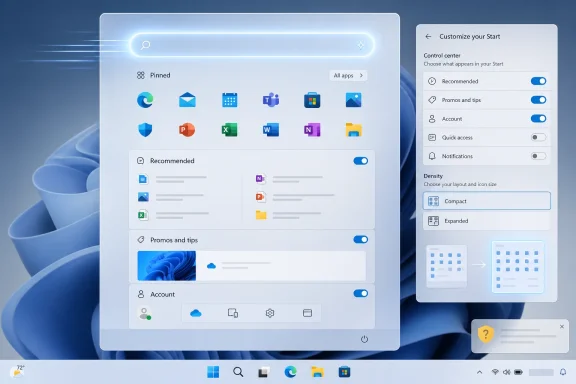
Microsoft is reportedly preparing another Windows 11 Start menu overhaul in 2026, with new settings that would let users disable major sections, choose smaller or larger layouts manually, and reduce the clutter that has made Start feel less like a launcher than a promotional dashboard. The move is welcome, but it also exposes the deeper problem: Microsoft has spent years treating Windows’ most important navigation surface as a place to experiment on users rather than serve them. The question is not whether the Start menu can be improved. It is whether the company has already trained too many people to distrust its improvements.
The Start menu is not just another Windows feature. It is the front door to the operating system, the place where casual users launch apps, power users search for tools, and administrators explain to everyone else where things live. When that surface feels slower, noisier, or less predictable than it should, the whole OS inherits the irritation.
That is why the latest reporting about Microsoft’s planned Start menu customization matters. The company is said to be working on options that would let users turn off whole Start sections and choose between compact and larger layouts rather than letting Windows decide based on screen size. In practical terms, that means the much-disliked Recommended area could become less of a permanent fixture and more of an optional pane.
This sounds modest, almost embarrassingly so. A desktop operating system in 2026 should not need applause for letting users remove a panel they do not want. But Windows 11 has made small concessions feel large because it launched with a Start menu that subtracted long-standing flexibility while adding new forms of Microsoft-controlled content.
The reported changes also fit a broader pattern. Microsoft has been trying to make Windows 11 feel more responsive and more coherent after years of complaints about performance, advertising, Copilot intrusions, and settings scattered across old and new interfaces. Start is the symbolic battlefield because it is where those grievances converge.
The bigger issue was not merely that Recommended existed. It was that it could not be cleanly removed in the way many people expected. Users could reduce what appeared there, disable certain recent-item toggles, or rely on policy controls in managed environments, but the space itself became a reminder that Microsoft’s priorities and the user’s priorities were not always aligned.
That distinction matters. A feature can be bad and still be forgiven if the user can turn it off. A feature becomes resented when it occupies the interface by default and then resists removal. Windows 11 has repeatedly drifted into the second category.
Recommended also blurred the line between helpful and promotional. Even when it showed legitimate recent files, the surrounding Windows experience increasingly included Store suggestions, Microsoft account nudges, Edge prompts, OneDrive messaging, Copilot invitations, and widget content that felt less like operating-system plumbing than a cross-sell surface. In that environment, users stopped giving Microsoft the benefit of the doubt.
But visual restraint is not the same as product restraint. Beneath the softer shell, Microsoft removed or weakened workflows that many Windows users had built into muscle memory. The taskbar lost flexibility. Context menus gained an extra click. Start lost live tiles without fully replacing them with something equally useful. The result was a desktop that looked calmer while often feeling more constrained.
That is the paradox Microsoft is still trying to unwind. Windows 11 was sold as cleaner, but it frequently behaved as if simplification meant hiding options rather than improving them. Users who had spent decades customizing Windows were told, implicitly, that Microsoft now knew best.
For Apple, that bargain is part of the brand. For Windows, it is a category error. Windows has always won by being the operating system that bends — sometimes messily, sometimes inconsistently, but usually in the user’s direction. When Windows starts acting like an appliance while still carrying the complexity of a general-purpose PC platform, nobody is satisfied.
Microsoft’s internal logic is understandable. Windows is no longer just a boxed OS. It is a distribution layer for Microsoft 365, OneDrive, Game Pass, Edge, Bing, Copilot, the Store, and enterprise identity services. The Start menu is the highest-traffic real estate on the PC, so every product team has an incentive to be there.
But the user’s logic is simpler. They clicked Start because they wanted to start something. Every extra tile, feed, suggestion, animation, or upsell increases the chance that Windows feels like it is interrupting a task rather than enabling it.
This is where Microsoft’s current course correction becomes important. If the company gives users real control over what appears in Start, it is not just cleaning up a menu. It is conceding that Windows’ most valuable interface space cannot be treated as an internal marketing commons.
This matters because Windows 11 runs across a huge range of hardware, including aging machines that barely cleared the system requirements and newer PCs burdened by OEM utilities, security agents, cloud sync tools, and background update services. A Start menu that behaves well on a premium Copilot+ PC may still feel sluggish on a mainstream laptop bought three years ago. Windows is judged at the low and middle of the market as much as at the top.
Performance also changes the politics of customization. If disabling sections makes Start faster, then customization is not merely cosmetic. It becomes a way to reduce complexity, cut UI overhead, and restore immediacy to one of the OS’s most frequently invoked components.
That is the lesson Microsoft should take seriously. The best Windows features often serve both camps: casual users get a sane default, while power users and administrators get knobs that actually matter. A Start menu that can be made smaller, quieter, and faster is not a niche request. It is a return to form.
For users who felt forced across the bridge, Start menu clutter is not an isolated gripe. It becomes evidence in a larger case that the upgrade was done on Microsoft’s schedule and for Microsoft’s benefit. That is not entirely fair — Windows 11 includes security improvements, hardware-based protections, and years of platform work that matter to enterprises — but user perception is often shaped by the first five seconds after login.
This is why “is it too late?” is the right question. Microsoft can still improve Windows 11, and it clearly is improving parts of it. But some users made their judgment during the years when the OS felt more interested in nudging them toward Microsoft services than respecting their existing workflows.
Enterprise IT will be more pragmatic. If Start menu changes reduce help desk tickets, simplify standard images, and make policy management easier, administrators will welcome them. But even in business environments, trust compounds slowly and evaporates quickly. Every surprise UI change becomes another reason to delay feature updates, lock down settings, or treat Windows innovation as something to be managed around rather than embraced.
There is a good version of AI in Windows. Search that actually understands local files, settings that can be changed through natural language, accessibility tools that summarize or describe content, and automation that saves administrators repetitive work could all justify deeper system integration. But the bad version is painfully easy to imagine because users already see hints of it: another button, another panel, another cloud dependency, another feature that appears before the opt-out does.
That is why Start menu customization is a test of more than Start. If Microsoft’s answer to user frustration is genuine control, it can rebuild confidence. If the answer is merely rearranging the furniture while continuing to reserve prime space for Microsoft-driven recommendations, the reaction will be harsher the next time.
AI raises the stakes because it expands the number of surfaces that want to be “helpful.” A desktop can survive one overactive panel. It cannot survive every app, menu, and search box trying to anticipate intent while quietly promoting a service subscription.
That difference matters to users who spend eight hours a day in front of a machine. Windows has historically tolerated more clutter because it also offered more flexibility, more hardware choice, more legacy compatibility, and more room for customization. When Microsoft reduces flexibility while increasing prompts and feeds, it weakens the classic Windows bargain.
The Mac does not need to be objectively better for Windows users to drift toward it. It only needs to feel calmer. A slightly older MacBook with fewer interruptions can be more appealing than a faster Windows laptop that keeps asking the user to notice things they did not request.
Microsoft should find that alarming. Windows does not have to lose the enterprise desktop overnight to suffer damage. It only has to become the platform that enthusiasts recommend with caveats and professionals tolerate because procurement already bought it.
Third-party shell tools have always existed, of course. Windows users like tinkering. But the demand around Windows 11 was unusually pointed because it often sought to restore basic affordances rather than create exotic new workflows. People were not merely asking for novelty. They were asking for control they used to have.
For Microsoft, this should be a useful diagnostic. If a large portion of your most committed users installs tools to undo your interface decisions, the issue is not that they hate change. It is that your change broke their sense of ownership.
The reported Start menu changes look like Microsoft absorbing some of that lesson. But the company should resist the temptation to frame this as a generous new personalization feature. It is a repair job.
Microsoft already provides ways to configure aspects of Start through provisioning, policy, and management tooling, but Windows 11’s evolving layouts have complicated the mental model. IT departments do not want to rediscover after every feature update which sections can be pinned, hidden, collapsed, or merely starved of content. They want stable controls and predictable defaults.
This is where a consumer-facing setting and an enterprise-grade policy need to meet. If Microsoft lets a home user toggle off Recommended with one click, administrators should be able to enforce the same outcome cleanly across managed devices. If users can choose compact layouts, IT should be able to standardize them where appropriate.
The real enterprise risk is not that Start looks different. It is that Microsoft keeps treating UI surfaces as dynamic engagement channels while IT treats them as part of the work environment. Those two philosophies are in tension, and the Start menu is where employees notice.
A better Start menu would treat pinned apps as sacred, search as dependable, recent files as optional, and promotional surfaces as outside the launcher’s core mission. It would avoid surprise layout changes. It would let users choose density, size, and sections without registry hacks, unsupported tools, or edition-specific caveats.
This is not a plea for Windows 7 cosplay. Modern Windows should support cloud files, AI actions, app discovery, and cross-device continuity. But those features should earn their place through obvious utility, not default occupancy.
The design principle is simple: the OS should not compete with the task. The more Windows tries to show users what Microsoft thinks they might want, the more it risks obscuring what they already came to do.
The reported changes point in the right direction because they move control back to the person at the keyboard. They also suggest Microsoft understands that Start’s current sprawl is not merely an aesthetic complaint but a performance and usability problem. Still, the company’s challenge is bigger than one menu.
Source: Daily Express Windows 11 set for long awaited improvements, but is it too late? | Express.co.uk
 Microsoft Finally Notices the Front Door Is Jammed
The Start menu is not just another Windows feature. It is the front door to the operating system, the place where casual users launch apps, power users search for tools, and administrators explain to everyone else where things live. When that surface feels slower, noisier, or less predictable than it should, the whole OS inherits the irritation.That is why the latest reporting about Microsoft’s planned Start menu customization matters. The company is said to be working on options that would let users turn off whole Start sections and choose between compact and larger layouts rather than letting Windows decide based on screen size. In practical terms, that means the much-disliked Recommended area could become less of a permanent fixture and more of an optional pane.
This sounds modest, almost embarrassingly so. A desktop operating system in 2026 should not need applause for letting users remove a panel they do not want. But Windows 11 has made small concessions feel large because it launched with a Start menu that subtracted long-standing flexibility while adding new forms of Microsoft-controlled content.
The reported changes also fit a broader pattern. Microsoft has been trying to make Windows 11 feel more responsive and more coherent after years of complaints about performance, advertising, Copilot intrusions, and settings scattered across old and new interfaces. Start is the symbolic battlefield because it is where those grievances converge.
The Recommended Feed Became a Trust Problem
The Recommended section was always a strange compromise. Microsoft framed it as convenience: recent documents, newly installed apps, useful suggestions, and a way back into work. But for many users it felt like a waste of premium space, especially on desktops where the Start menu is supposed to be a fast launch pad rather than a behavioral mirror.The bigger issue was not merely that Recommended existed. It was that it could not be cleanly removed in the way many people expected. Users could reduce what appeared there, disable certain recent-item toggles, or rely on policy controls in managed environments, but the space itself became a reminder that Microsoft’s priorities and the user’s priorities were not always aligned.
That distinction matters. A feature can be bad and still be forgiven if the user can turn it off. A feature becomes resented when it occupies the interface by default and then resists removal. Windows 11 has repeatedly drifted into the second category.
Recommended also blurred the line between helpful and promotional. Even when it showed legitimate recent files, the surrounding Windows experience increasingly included Store suggestions, Microsoft account nudges, Edge prompts, OneDrive messaging, Copilot invitations, and widget content that felt less like operating-system plumbing than a cross-sell surface. In that environment, users stopped giving Microsoft the benefit of the doubt.
Windows 11’s Design Problem Was Never Just Aesthetics
Windows 11’s initial pitch leaned heavily on calmness. Rounded corners, centered icons, softened animations, and cleaner system sounds were meant to signal a more modern desktop. For a while, that worked. Compared with the increasingly patched-together look of late Windows 10, Windows 11 did feel like a visual reset.But visual restraint is not the same as product restraint. Beneath the softer shell, Microsoft removed or weakened workflows that many Windows users had built into muscle memory. The taskbar lost flexibility. Context menus gained an extra click. Start lost live tiles without fully replacing them with something equally useful. The result was a desktop that looked calmer while often feeling more constrained.
That is the paradox Microsoft is still trying to unwind. Windows 11 was sold as cleaner, but it frequently behaved as if simplification meant hiding options rather than improving them. Users who had spent decades customizing Windows were told, implicitly, that Microsoft now knew best.
For Apple, that bargain is part of the brand. For Windows, it is a category error. Windows has always won by being the operating system that bends — sometimes messily, sometimes inconsistently, but usually in the user’s direction. When Windows starts acting like an appliance while still carrying the complexity of a general-purpose PC platform, nobody is satisfied.
The Start Menu Became a Screen for Microsoft’s Ambitions
The modern Start menu carries more corporate ambition than any launcher should. It is expected to surface apps, files, recommendations, account integrations, cloud documents, Store content, web results, search, power controls, and increasingly AI-assisted actions. Each of those may be defensible in isolation. Together, they create a menu that has forgotten the virtue of being boring.Microsoft’s internal logic is understandable. Windows is no longer just a boxed OS. It is a distribution layer for Microsoft 365, OneDrive, Game Pass, Edge, Bing, Copilot, the Store, and enterprise identity services. The Start menu is the highest-traffic real estate on the PC, so every product team has an incentive to be there.
But the user’s logic is simpler. They clicked Start because they wanted to start something. Every extra tile, feed, suggestion, animation, or upsell increases the chance that Windows feels like it is interrupting a task rather than enabling it.
This is where Microsoft’s current course correction becomes important. If the company gives users real control over what appears in Start, it is not just cleaning up a menu. It is conceding that Windows’ most valuable interface space cannot be treated as an internal marketing commons.
Performance Is the Excuse, but Control Is the Story
The most interesting part of the latest reporting is the suggestion that performance may be a driving factor. If the Start menu has become heavy enough that Microsoft is worried about load times on some PCs, the design debate becomes harder to dismiss as nostalgia. A slow Start menu is not a matter of taste. It is a functional regression.This matters because Windows 11 runs across a huge range of hardware, including aging machines that barely cleared the system requirements and newer PCs burdened by OEM utilities, security agents, cloud sync tools, and background update services. A Start menu that behaves well on a premium Copilot+ PC may still feel sluggish on a mainstream laptop bought three years ago. Windows is judged at the low and middle of the market as much as at the top.
Performance also changes the politics of customization. If disabling sections makes Start faster, then customization is not merely cosmetic. It becomes a way to reduce complexity, cut UI overhead, and restore immediacy to one of the OS’s most frequently invoked components.
That is the lesson Microsoft should take seriously. The best Windows features often serve both camps: casual users get a sane default, while power users and administrators get knobs that actually matter. A Start menu that can be made smaller, quieter, and faster is not a niche request. It is a return to form.
The Windows 10 Deadline Makes This More Than Cosmetic
The timing is awkward for Microsoft. Windows 10’s mainstream support deadline has already pushed many users and organizations into uncomfortable decisions, with some moving to Windows 11, some paying for extended security updates, and some replacing hardware that still felt serviceable. In that context, every Windows 11 annoyance carries extra weight.For users who felt forced across the bridge, Start menu clutter is not an isolated gripe. It becomes evidence in a larger case that the upgrade was done on Microsoft’s schedule and for Microsoft’s benefit. That is not entirely fair — Windows 11 includes security improvements, hardware-based protections, and years of platform work that matter to enterprises — but user perception is often shaped by the first five seconds after login.
This is why “is it too late?” is the right question. Microsoft can still improve Windows 11, and it clearly is improving parts of it. But some users made their judgment during the years when the OS felt more interested in nudging them toward Microsoft services than respecting their existing workflows.
Enterprise IT will be more pragmatic. If Start menu changes reduce help desk tickets, simplify standard images, and make policy management easier, administrators will welcome them. But even in business environments, trust compounds slowly and evaporates quickly. Every surprise UI change becomes another reason to delay feature updates, lock down settings, or treat Windows innovation as something to be managed around rather than embraced.
Copilot Turned Annoyance Into a Strategy Question
The Start menu backlash cannot be separated from Copilot. Microsoft’s AI push has placed assistants, buttons, prompts, and contextual actions across Windows and Microsoft 365 at a speed that often feels faster than the company’s ability to explain why users should want them. For enthusiasts, that has made Windows 11 feel less like a finished desktop and more like a distribution vehicle for whatever Microsoft wants to normalize next.There is a good version of AI in Windows. Search that actually understands local files, settings that can be changed through natural language, accessibility tools that summarize or describe content, and automation that saves administrators repetitive work could all justify deeper system integration. But the bad version is painfully easy to imagine because users already see hints of it: another button, another panel, another cloud dependency, another feature that appears before the opt-out does.
That is why Start menu customization is a test of more than Start. If Microsoft’s answer to user frustration is genuine control, it can rebuild confidence. If the answer is merely rearranging the furniture while continuing to reserve prime space for Microsoft-driven recommendations, the reaction will be harsher the next time.
AI raises the stakes because it expands the number of surfaces that want to be “helpful.” A desktop can survive one overactive panel. It cannot survive every app, menu, and search box trying to anticipate intent while quietly promoting a service subscription.
Apple’s Quiet Desktop Is Microsoft’s Loud Warning
The comparison with macOS is imperfect but revealing. Apple is hardly allergic to services, subscriptions, or ecosystem lock-in. It promotes iCloud, Apple Music, Apple TV+, and other paid offerings across its platforms. But the Mac desktop generally feels less eager to monetize the moment-to-moment act of opening an app or finding a file.That difference matters to users who spend eight hours a day in front of a machine. Windows has historically tolerated more clutter because it also offered more flexibility, more hardware choice, more legacy compatibility, and more room for customization. When Microsoft reduces flexibility while increasing prompts and feeds, it weakens the classic Windows bargain.
The Mac does not need to be objectively better for Windows users to drift toward it. It only needs to feel calmer. A slightly older MacBook with fewer interruptions can be more appealing than a faster Windows laptop that keeps asking the user to notice things they did not request.
Microsoft should find that alarming. Windows does not have to lose the enterprise desktop overnight to suffer damage. It only has to become the platform that enthusiasts recommend with caveats and professionals tolerate because procurement already bought it.
The Third-Party Start Menu Market Was a Symptom
One of the clearest signs that Microsoft misread its audience is the persistence of third-party Start menu tools. Utilities that restore older layouts, remove Recommended, alter the taskbar, or bring back Windows 10-like behavior have remained popular throughout the Windows 11 era. That is not just customization culture. It is a market response to missing product judgment.Third-party shell tools have always existed, of course. Windows users like tinkering. But the demand around Windows 11 was unusually pointed because it often sought to restore basic affordances rather than create exotic new workflows. People were not merely asking for novelty. They were asking for control they used to have.
For Microsoft, this should be a useful diagnostic. If a large portion of your most committed users installs tools to undo your interface decisions, the issue is not that they hate change. It is that your change broke their sense of ownership.
The reported Start menu changes look like Microsoft absorbing some of that lesson. But the company should resist the temptation to frame this as a generous new personalization feature. It is a repair job.
Administrators Need Policy, Not Personality
For sysadmins, the Start menu debate is less emotional and more operational. A clean Start layout can reduce confusion for frontline workers, kiosk devices, shared machines, classrooms, and tightly managed corporate fleets. A noisy Start layout does the opposite, especially when it surfaces consumer-oriented content or changes behavior across updates.Microsoft already provides ways to configure aspects of Start through provisioning, policy, and management tooling, but Windows 11’s evolving layouts have complicated the mental model. IT departments do not want to rediscover after every feature update which sections can be pinned, hidden, collapsed, or merely starved of content. They want stable controls and predictable defaults.
This is where a consumer-facing setting and an enterprise-grade policy need to meet. If Microsoft lets a home user toggle off Recommended with one click, administrators should be able to enforce the same outcome cleanly across managed devices. If users can choose compact layouts, IT should be able to standardize them where appropriate.
The real enterprise risk is not that Start looks different. It is that Microsoft keeps treating UI surfaces as dynamic engagement channels while IT treats them as part of the work environment. Those two philosophies are in tension, and the Start menu is where employees notice.
Microsoft’s Best Fix Is to Stop Competing With the User
There is an obvious way forward. Microsoft should make the default Start menu useful, sparse, and fast, then let users add complexity if they want it. That would reverse the current feel, where the menu often appears designed to include Microsoft’s priorities first and let users subtract the excess later.A better Start menu would treat pinned apps as sacred, search as dependable, recent files as optional, and promotional surfaces as outside the launcher’s core mission. It would avoid surprise layout changes. It would let users choose density, size, and sections without registry hacks, unsupported tools, or edition-specific caveats.
This is not a plea for Windows 7 cosplay. Modern Windows should support cloud files, AI actions, app discovery, and cross-device continuity. But those features should earn their place through obvious utility, not default occupancy.
The design principle is simple: the OS should not compete with the task. The more Windows tries to show users what Microsoft thinks they might want, the more it risks obscuring what they already came to do.
The Small Menu Microsoft Should Have Shipped Years Ago
The most concrete lesson from this episode is that users are not asking for a revolution. They want Start to open quickly, show the things they chose, stop wasting space, and stay out of the way. That is a low bar, which makes the long delay harder to defend.The reported changes point in the right direction because they move control back to the person at the keyboard. They also suggest Microsoft understands that Start’s current sprawl is not merely an aesthetic complaint but a performance and usability problem. Still, the company’s challenge is bigger than one menu.
- Microsoft is reportedly preparing Start menu controls that would let Windows 11 users disable entire sections and choose compact or larger layouts manually.
- The Recommended section became unpopular not only because of what it showed, but because users could not remove the space as cleanly as they expected.
- Performance concerns make Start customization more important, because a lighter menu can also be a faster and more predictable menu.
- The changes arrive after years of Windows 11 criticism over reduced customization, promotional surfaces, Copilot placement, and forced workflow changes.
- Enterprise administrators will judge the overhaul by whether Microsoft provides stable policy controls, not by whether the consumer UI looks slightly cleaner.
- The larger test is whether Microsoft can make Windows feel user-directed again while continuing its push into AI and cloud-connected services.
Source: Daily Express Windows 11 set for long awaited improvements, but is it too late? | Express.co.uk
