

Microsoft is quietly preparing one of the most important course corrections in Windows 11’s shell story: a more flexible Start menu that finally behaves like users have been asking for since launch. The broad thrust is simple, but the implications are not. Microsoft appears to be working toward a Start experience that can be resized, reorganized, and stripped of entire sections, while also trimming the clutter that has made the menu feel more opinionated than personal. That matters because Start is not just a launcher; it is the front door to the Windows desktop, and the company is now treating it like a productivity surface rather than a curated billboard. ows 11 launched with a clean, modern look, but it also made a deliberate tradeoff: visual simplicity in exchange for flexibility. The centered Start menu, the reduced taskbar options, and the more constrained shell choices gave the operating system a polished identity, yet they also removed habits that long-time Windows users had built into their daily workflow. In practice, many users experienced the redesign less as an upgrade and more as a reset.
That tension has ne Microsoft has spent the years since launch trying to balance two competing instincts: simplify the desktop for mainstream users while preserving enough control for power users, enterprise administrators, and anyone who depends on muscle memory. The problem is that the desktop is not a phone screen. It is a deeply personal work surface, and when Microsoft takes away configuration options, people notice immediately.
The Start menu became the clearest symbo. Windows 11’s Recommended section, in particular, felt like a mismatch for users who wanted speed and predictability rather than content curation. Instead of being a neutral launcher, Start often looked like a compromise between app access, recent files, and Microsoft’s own desire to surface suggestions. That may sound subtle, but on a menu people open dozens of times per day, subtle friction becomes very visible.
Microsoft’s own response has evolved slowly, which is tellingrs rarely reverse themselves quickly, because every reversal can be read as an admission that the original design missed the mark. But Windows 11 has now accumulated enough criticism that the company seems willing to make some of those reversals anyway. That is why the current reports are important: they suggest a broader rethink, not just another cosmetic tweak.
There is also a timing factor that matters. Windows 10’s end-of-support timeline haation a more urgent conversation, especially for businesses. If Microsoft wants users and IT departments to accept the newer platform, it cannot simply ask them to tolerate a less flexible desktop. It has to make Windows 11 feel like a better place to work, not merely the next mandatory version.
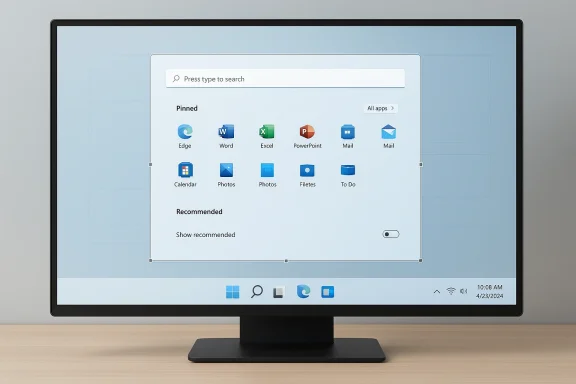
The most immediate headline is customization. According tong, Microsoft is working on a Start menu that can be resized and that allows users to turn off entire sections, including the Recommended area. That is a meaningful shift because it moves Start away from a one-size-fits-all layout and toward something users can shape around their own habits.
A Start menu becomes much more useful when it stops trying to predict every use case. Microsoft’s move suggests it has finally accepted that recommluable when they are actually wanted. For users who primarily want pinned apps and a fast way to reach installed software, the ability to suppress other content will feel like a return to sanity.
This also helps explain why the change resonates so strongly with Windows enthusiasts. A resizable menu is not a novelty; it is a sign that Microsoft is willing to let the user define the surface, not just consume it. Thatsat at the heart of the Windows brand, even when the company has occasionally forgotten it.
The criticism becomes even sharper for power users. If someone launches apps dozens of times a day, every extra click or unnecessary visual layer becomes a tax. In that environment, a “smart” menu that surfaces the wrong things is not smart at all; it is friction dressed up as convenieneans faster scanning.
That matters because Start is also a management surface. IT departments want predictable behavior across fleets, and every unnecessary element creates documentation, troubleshooting, and onboarding overhead. If Microsoft gets the controls right, this redesign could be one of those rare changes that helps home users and corporate admins at the same time.
That retreat matters because the modern Windows audience is fragmented. Casual users want simplicity, but long-time desktop users want control. Creators want room for workflow customization, while businesses want stability. Microsoft is trying to restore flexibility without making the interface chaotic, and that is a much harder job than simply adding features.
This is why a scrollable, less segmented Start menu It reduces the mental switching between sections and makes app access feel more continuous. In plain language: the menu should stop asking users to learn Microsoft’s model and start adapting to theirs.
Linux desktops and third-party shell tools are part of the same story. When users turn to utilities like Staer, they are not chasing novelty. They are trying to recover behaviors that used to be native. Every time Microsoft restores a lost option, it undercuts the argument for those workarounds and reasserts Windows’ own platform authority.
The flip side is that enterprises do not want surprise variability. Microsoft will need to ensure policy controls remain strong enough to keep fleets consistent. A customizable Start menu is useful only if admins can still decide how much of that cnd users.
It also shows Microsoft is willing to revisit its own assumptions. The company once seemed determined to reduce desktop variability in the name of simplicity. Now it appears to be learning that simple and rigid are not the same thing. A desktop can be visually clean and still allow meaningful personalization.
This also explains why the response to the reported changes has been so strong. tract. It is grounded in the daily reality of Windows use, where even a small improvement in menu behavior can save time across hundreds of interactions. The gains are modest per click, but substantial over weeks and months.
More broadly, Microsoft seems to be acknowledging a lesson that desktop users have repeated for years: polish is not the same as control. The Start menu can be modern, scrollable, and visually consistent without being restrictive. That is the line Microsoft needs to hold if it wants Windows 11 to feel like a platform built for real work rather than one designed to demonstrate a design system.
Source: Windows Central Microsoft is working on major customization upgrades for the Start menu on Windows 11
Source: Neowin Microsoft is once again reworking Windows 11's Start menu
That tension has ne Microsoft has spent the years since launch trying to balance two competing instincts: simplify the desktop for mainstream users while preserving enough control for power users, enterprise administrators, and anyone who depends on muscle memory. The problem is that the desktop is not a phone screen. It is a deeply personal work surface, and when Microsoft takes away configuration options, people notice immediately.
The Start menu became the clearest symbo. Windows 11’s Recommended section, in particular, felt like a mismatch for users who wanted speed and predictability rather than content curation. Instead of being a neutral launcher, Start often looked like a compromise between app access, recent files, and Microsoft’s own desire to surface suggestions. That may sound subtle, but on a menu people open dozens of times per day, subtle friction becomes very visible.
Microsoft’s own response has evolved slowly, which is tellingrs rarely reverse themselves quickly, because every reversal can be read as an admission that the original design missed the mark. But Windows 11 has now accumulated enough criticism that the company seems willing to make some of those reversals anyway. That is why the current reports are important: they suggest a broader rethink, not just another cosmetic tweak.
There is also a timing factor that matters. Windows 10’s end-of-support timeline haation a more urgent conversation, especially for businesses. If Microsoft wants users and IT departments to accept the newer platform, it cannot simply ask them to tolerate a less flexible desktop. It has to make Windows 11 feel like a better place to work, not merely the next mandatory version.
 What Microsoft Is Reportedly Changing
The most immediate headline is customization. According tong, Microsoft is working on a Start menu that can be resized and that allows users to turn off entire sections, including the Recommended area. That is a meaningful shift because it moves Start away from a one-size-fits-all layout and toward something users can shape around their own habits.A more modular Start experience
The new direction appears to be less about inventing a wholly new interface and more abououndaries inside the existing one. The current Start menu already leans toward a scrollable, combined view in the latest redesign work, but the next step is even more important: letting people remove parts they do not want. In desktop terms, that is not a minor polish pass. It is a recognition that space is policy.A Start menu becomes much more useful when it stops trying to predict every use case. Microsoft’s move suggests it has finally accepted that recommluable when they are actually wanted. For users who primarily want pinned apps and a fast way to reach installed software, the ability to suppress other content will feel like a return to sanity.
- Users will likely gain finer control over layout density.
- Recommended content appears to be becoming optional rather than mandatory.
- A more compact or expanded me different screen sizes.
- The redesign aligns with the broader Windows 11 push toward scrollable interfaces.
- Power users stand to benefit most from fewer forced elements.
Why resizing matters
Resizing sounds almost too simple to matter, but that is exactly why it matters. A larger Start menu can expose more apps and content at once, while a smaller one reduces distraction and preserves desktop space. Microsoft is essentially acknowledging that the same layout should not be forced on a 13-inch laptop, a 4K desktop monitor, and a multi-display workstation.This also helps explain why the change resonates so strongly with Windows enthusiasts. A resizable menu is not a novelty; it is a sign that Microsoft is willing to let the user define the surface, not just consume it. Thatsat at the heart of the Windows brand, even when the company has occasionally forgotten it.
Why Start Became the Pressure Point
Start is emotionally loaded because it is where Windows feels most like Windows. Users hit it first after signing in, and they judge the entire platform by how efficiently it gets them to their apps,k. If the menu feels cluttered, sluggish, or preachy, that irritation compounds every single day.The cost of over-curation
One of the biggest complaints about Windows 11’s Start menu has been that it sometimes feels like it exists to serve Microsoft’s curation goals rather than the user’s task list. That is a dangerous perception for any desktop operating y for one that still markets itself as the default productivity platform. People do not want their launcher to behave like a feed. They want it to behave like a tool.The criticism becomes even sharper for power users. If someone launches apps dozens of times a day, every extra click or unnecessary visual layer becomes a tax. In that environment, a “smart” menu that surfaces the wrong things is not smart at all; it is friction dressed up as convenieneans faster scanning.
- Fewer suggestions can reduce cognitive noise.
- More predictable layouts improve muscle memory.
- A simpler launcher benefits both novice and expert users.
- Optional sections are more acceptable than enforced ones.
Consumer and enterprise expectations diverge
C about visual cleanliness and ease of use, but enterprise customers care about consistency, supportability, and training costs. For them, a Start menu that can be standardized is often more valuable than one that tries to be clever. The more Microsoft makes the menu configurable, the easier it becomes to satisfy both groups without forcing one experience on everyone.That matters because Start is also a management surface. IT departments want predictable behavior across fleets, and every unnecessary element creates documentation, troubleshooting, and onboarding overhead. If Microsoft gets the controls right, this redesign could be one of those rare changes that helps home users and corporate admins at the same time.
Shift
What makes this development notable is not just the feature list, but the philosophy behind it. The latest reporting suggests Microsoft is moving away from the idea that Windows 11 should steer people toward a single “ideal” layout and toward the idea that the shell should adapt to different work styles. That is a big change in tone.From opinstable design
Windows 11 launched with a very opinionated desktop. The menu was centered, the taskbar was fixed, and the shell was designed to look uniform and tidy. That looked good in demos, but many users felt the operating system was making decisions on their behalf. The current Start menu work signals a partial retreat from that mindset.That retreat matters because the modern Windows audience is fragmented. Casual users want simplicity, but long-time desktop users want control. Creators want room for workflow customization, while businesses want stability. Microsoft is trying to restore flexibility without making the interface chaotic, and that is a much harder job than simply adding features.
Muscle memory is real
A lot of criticism around Windows 11 has been de to change, but that framing misses something important: interface habits are not trivial preferences. They are part of how people move through their workday. When a familiar surface changes too much, the result is slower interaction, more mistakes, and a lingering sense that the machine is fighting the user.This is why a scrollable, less segmented Start menu It reduces the mental switching between sections and makes app access feel more continuous. In plain language: the menu should stop asking users to learn Microsoft’s model and start adapting to theirs.
Competitive Implications
This is not just a Windows story. When Microsoft changes the Windows shell, every major desktop platform gets a signal. The company still defines expectations for mainstreven minor shell decisions can influence how rivals frame their own strengths.Why rivals should care
If Microsoft restores some of the flexibility it removed in Windows 11, it narrows one of the easiest criticisms competitors can make. Apple has long sold macOS as polishile ChromeOS has leaned on simplicity and cloud-first ease. Microsoft’s challenge has been that Windows sometimes felt neither simple nor flexible enough. A better Start menu helps close that gap.Linux desktops and third-party shell tools are part of the same story. When users turn to utilities like Staer, they are not chasing novelty. They are trying to recover behaviors that used to be native. Every time Microsoft restores a lost option, it undercuts the argument for those workarounds and reasserts Windows’ own platform authority.
- Better native customization can reduce demand for third-party shell hacks.
- Improved workflow flexibility strengthens Windows’ desktop identity.
- Competitors lose a simple talki rigidity.
- Power users may be less motivated to experiment with alternative environments.
- Microsoft can frame Windows 11 as mature rather than merely modern.
The enterprise angle
Enterprise IT teams are especially sensitive to shell changes because they affect support tickets, documentation, and user adoption. If Microsoft can make Start more configurable without making it more confusing, it may improve the case for broader Windows 11 rollout in managed environments. That is a serious strategic win.The flip side is that enterprises do not want surprise variability. Microsoft will need to ensure policy controls remain strong enough to keep fleets consistent. A customizable Start menu is useful only if admins can still decide how much of that cnd users.
How This Fits the Broader Windows 11 Roadmap
The Start menu changes are part of a larger pattern. Microsoft has been re-examining several of the shell decisions that made Windows 11 feel rigid at launch, and Start is simply the most visible of those pressure points. The company seems to be leaning into the idea that fewer obstacles and more user choice can improve the whole desktop experience.Beyond cosmetic polish
This matters because Windows 11 has often been criticized for looking busy without feeling better. The new Start menu work, by contrast, points to practical gains: fewer clicks, less clutter, and a clearer relationship betlist. That is the sort of improvement users actually notice in daily use.It also shows Microsoft is willing to revisit its own assumptions. The company once seemed determined to reduce desktop variability in the name of simplicity. Now it appears to be learning that simple and rigid are not the same thing. A desktop can be visually clean and still allow meaningful personalization.
The role ofrosoft’s preview channels have become the place where these shell decisions are tested, criticized, and refined. That is useful because layout changes are the kind of thing that look harmless until they hit different monitor setups, scaling settings, and user workflows. Start menu changes in particular need real-world feedback before they become existence of these previews also tells us something about Microsoft’s confidence. It is not simply shipping a surprise redesign from nowhere. It is testing a correction, which suggests the company knows it is touching a sensitive part of the OS and wants to avoid repeating old mistakes.
What Users Actuallhe Start menu debate is that most users do not want radical innovation. They want faster access, less clutter, and more predictable behavior. In other words, they want the launcher to get out of the way. Microsoft’s new customization work seems to move in exactly that direction.
Practical value over novelty
For many people, the best Start menu is the one they barely have to think about. They o, and move on. That is why features like optional Recommended content and better layout control matter more than flashy new design language. They reduce friction in the one place where friction is most annoying.This also explains why the response to the reported changes has been so strong. tract. It is grounded in the daily reality of Windows use, where even a small improvement in menu behavior can save time across hundreds of interactions. The gains are modest per click, but substantial over weeks and months.
A numbered look at the user wish list
- Let users resize the Start menu.
- Make Recommended optie.
- Improve app discovery without adding clutter.
- Keep the layout predictable across devices.
- Preserve strong enterprise control policies.
- Avoid turning the menu into another content feed.
Strengths and Opportunities
Microsoft’s current direction is promising because it addresses the exact interface decisions that generated the most n. If the company executes well, it could repair trust without sacrificing the cleaner visual identity that Windows 11 brought to the table. The opportunity is not just to add options, but to make the desktop feel respectful again.- Restores user control in a highly visible part of the OS.
- Reduces dependence on unsupporteools.
- Improves workflow speed for power users and professionals.
- Makes Windows 11 feel more adaptable across screen sizes.
- Strengthens Microsoft’s credibility with skeptical enthusiasts.
- Helps enterprises standardize a more predictable launcher experience.
- Gives Microsoft a chance to show it is listening to feedback.
Risks and Concerns
The biggest danger is that Microsoft ships the right idea in the wrong form. Windows users have seen this before: a feature arrives late, works partially, or is constrained by edge cases that make it less useful than the community hoped. If that happens again, the goodwill could evaporate quickly.- Resize controls could end up feeling limited or inconsistent.
- Recommended content might still be too prominent by default.
- Enterprise policy support could lag behind consumer flexibility.
- Different builds may receive different shell behavior.
- New layout options might introduce UI bugs on unusual displays.
- Microsoft could overcomplicate the settings surface.
- Users may remain skeptical until the changes are broadly shipped.
Looking Ahead
The next few preview cycles will tell the real story. If Microsoft exposes genuine layout control, lets users suppress unwanted sections cleanly, and keeps the interface fast, then this will look like one of the most meaningful usability fixes Windows 11 has received since launch. If not, it will join the long list of promising shell ideas that never quite escaped the lab.More broadly, Microsoft seems to be acknowledging a lesson that desktop users have repeated for years: polish is not the same as control. The Start menu can be modern, scrollable, and visually consistent without being restrictive. That is the line Microsoft needs to hold if it wants Windows 11 to feel like a platform built for real work rather than one designed to demonstrate a design system.
- Watch for whether Recommended can be fully disabled.
- Watch for meaningful size controls, not just cosmetic tweaks.
- Watch how the redesign behaves across different screen types.
- Watch for enterprise policy support in managed environments.
- Watch whether Microsoft keeps improving shell responsiveness alongside layout changes.
Source: Windows Central Microsoft is working on major customization upgrades for the Start menu on Windows 11
Source: Neowin Microsoft is once again reworking Windows 11's Start menu
