

Microsoft has released Windows 11 Insider Preview Build 28120.2546 to the Experimental (26H1) channel, following the unusually broad collection of Insider updates issued on July 20. Microsoft describes the new flight as a small package of general improvements and fixes, but that modest framing understates several practical changes: administrators gain stronger smart-card removal enforcement in Microsoft Entra-authenticated cloud sessions, Narrator adds plug-and-play support for HID braille displays, Voice Access expands into three additional language variants, and Settings receives accessibility, controller-navigation, reliability, and sound refinements. This is not a headline feature release, but it is a revealing example of how Microsoft is using the Experimental channel to validate security, accessibility, and platform behavior before those improvements move into more widely deployed Windows branches.
Windows 11 Insider Preview Build 28120.2546 became available on Tuesday, July 21, 2026, specifically for PCs enrolled in the Experimental channel and configured to follow the Windows 11 version 26H1 development line. It arrives one day after Microsoft released builds across Beta, Experimental, and Release Preview, including separate updates for mainstream Windows branches and the specialized 26H1 platform.
The build contains no redesign of the Start menu, major Copilot expansion, new window-management system, or other attention-grabbing consumer feature. Instead, Microsoft has concentrated on a handful of targeted improvements that affect remote-session security, assistive technology, voice control, Settings navigation, graphics-settings stability, and Windows sound design.
Microsoft began restructuring that model during 2026. The revised program places greater emphasis on Beta and Experimental experiences, while also separating branches according to the underlying Windows platform version and intended hardware generation.
However, the presence of “26H1” beside the channel name can create another misunderstanding. Windows 11 26H1 is not the conventional annual feature update that every eligible Windows 11 PC should expect to receive through Windows Update.
It is not offered as an in-place feature update for the general population of existing Windows 11 PCs. Microsoft continues to recommend versions 24H2 and 25H2 for broad enterprise deployment, while mainstream feature development follows the established second-half annual release cadence.
That produced an unusual arrangement in which 26H1 can receive many familiar Windows improvements while remaining a targeted platform branch. A feature appearing in an Experimental 26H1 build therefore does not prove that it is exclusive to 26H1, nor does it guarantee that existing 24H2 or 25H2 PCs will receive the 26H1 operating system.
The Experimental (26H1) channel gives Microsoft a place to test those changes against the specialized core before they reach the 26H1 Beta branch or serviced retail devices. It also lets the company identify platform-specific regressions that may not appear on the mainstream Windows codebase.
Administrators can configure these remote sessions to disconnect automatically when a redirected smart card is removed. The update closes a behavioral gap between traditional Windows smart-card scenarios and cloud-hosted desktops using modern identity infrastructure.
The session host does not physically contain the card. Windows, the remote desktop client, and the host must coordinate authentication and removal events across the connection.
This arrangement is useful in government, healthcare, defense, financial services, and other regulated environments. It also creates an important security question: what should happen to the remote session when the user removes the credential that helped establish or authorize access?
An automatic disconnect helps preserve the session without necessarily signing the user out and terminating applications. The remote desktop remains active on the host, but the local device loses its interactive connection and must satisfy the required authentication process before reconnecting.
For administrators, this creates a cleaner relationship between possession of the smart card and continued access to the cloud desktop.
A disciplined pilot should verify the following sequence:
Bluetooth models can be paired through Settings in the same general way as other wireless accessories. Microsoft identifies compatible examples including the Orbit Reader 20, Orbit Slate 340, Freedom Scientific Focus 40, and APH Mantis Q40.
HID provides a standardized communication framework. When both Windows and the display support the relevant HID implementation, the operating system can identify and use the device with less vendor-specific software between them.
This model offers several benefits:
Making braille available from the first setup screen supports greater independence when choosing regional settings, configuring a keyboard, connecting to a network, reviewing privacy controls, and completing account setup. Accessibility that begins only after the desktop appears leaves a critical portion of device ownership dependent on another person.
Microsoft will still need extensive feedback across display models, firmware versions, USB controllers, Bluetooth stacks, and multilingual braille scenarios. Experimental-channel testing is appropriate because an apparently small compatibility defect can prevent a user from interacting with the computer at all.
Voice Access allows users to control Windows, open applications, navigate interfaces, select controls, and enter text through spoken commands. Although it can be convenient for hands-free computing, its largest value lies in accessibility for people who cannot use a conventional keyboard or pointing device comfortably.
Windows also needs consistent behavior when an interface contains untranslated text, mixed languages, brand names, or English technical terminology. Korean introduces additional challenges involving character composition and the relationship between spoken input, Hangul text entry, and commands embedded in ordinary dictation.
A user holding a gamepad should not need to reach for a touchscreen, trackpad, or mouse simply to inspect or manage a Bluetooth connection. Input consistency becomes especially important when the controller itself, a headset, or another wireless accessory is part of the troubleshooting process.
A controller-friendly operating system requires predictable directional focus, visible selection states, sensible button mappings, and a reliable escape path from nested dialogs. Quick Settings is one of the most important surfaces to address because it contains frequently used controls for wireless networking, Bluetooth, audio, power, and display behavior.
A crash here is not merely cosmetic. It can prevent users from correcting application GPU assignments, investigating performance problems, or adjusting behavior after a driver update.
The fix also illustrates why small Insider builds remain necessary between feature-heavy flights. A new capability can attract attention, but restoring a broken management surface often delivers more immediate value to affected testers.
The concept is to make the auditory environment align with the visual one rather than treating system sounds as static assets. Dark mode is commonly used in low-light rooms and during evening work, where sharp or aggressive alerts can feel more disruptive.
That role makes sound design an accessibility and productivity issue as well as an aesthetic one. Sounds that are too similar can become ambiguous, while sounds that are too loud, frequent, or bright can encourage users to mute the operating system entirely.
The Experimental channel gives Microsoft an opportunity to tune these details through telemetry and subjective feedback. The ideal result is not simply quieter audio, but a coherent set of cues that remains recognizable across speakers, headphones, docks, and different volume levels.
A build containing several focused improvements can be easier to diagnose than a release that changes dozens of unrelated subsystems simultaneously. If a regression appears after installation, Microsoft and testers have a narrower set of likely causes.
That flexibility has operational advantages:
Microsoft’s challenge is to make Experimental meaningfully adventurous while preserving enough reliability that technically capable users remain willing to test it. Build 28120.2546’s limited scope appears consistent with that balancing act.
For eligible testers, however, the build contains meaningful improvements even without a marquee feature. Accessibility users gain the most, while handheld-PC owners and users affected by the Graphics Settings crash may also see immediate benefits.
Where possible, test new assistive-technology builds on a secondary system or ensure that another accessible recovery method is available. The same principle applies to handheld PCs whose recovery tools may be harder to operate without touch or controller support.
The key is to separate feature evaluation from operating-system deployment strategy. Microsoft still recommends mainstream Windows 11 releases for broad enterprise rollouts rather than adopting 26H1 across existing fleets.
Testing should include:
Procurement teams should not assume that every refreshable braille display supports the required HID standard. They should verify hardware compatibility, firmware requirements, Bluetooth behavior, and support during recovery or pre-login environments before changing device standards.
Narrator’s HID implementation deserves especially close attention. Microsoft needs feedback across a much wider range of braille displays than the small set of named examples, including wireless reliability, firmware differences, sleep-and-resume behavior, and support during recovery.
For accessibility problems, reports should also identify whether the failure occurs before sign-in, during setup, after resume, over USB, over Bluetooth, or only inside a particular application. For remote smart-card problems, authentication method, client version, redirection policy, and session-host configuration are equally important.
Build 28120.2546 will not transform the appearance of Windows 11, and many Experimental-channel users may barely notice it. Yet its most important changes address situations where Windows must behave correctly at the boundary between a person and a machine: preserving remote-session security when a physical credential disappears, enabling a deaf-blind user to configure a PC independently, understanding spoken commands in more languages, and allowing a controller-driven device to navigate essential settings. If Microsoft can carry these focused improvements into stable Windows releases without introducing new compatibility gaps, this modest Insider flight will have accomplished more than its short changelog initially suggests.
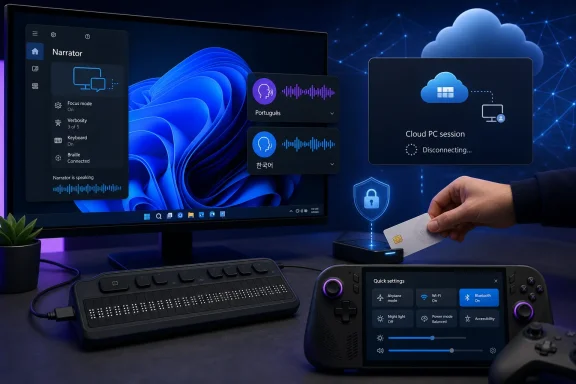 Overview
Windows 11 Insider Preview Build 28120.2546 became available on Tuesday, July 21, 2026, specifically for PCs enrolled in the Experimental channel and configured to follow the Windows 11 version 26H1 development line. It arrives one day after Microsoft released builds across Beta, Experimental, and Release Preview, including separate updates for mainstream Windows branches and the specialized 26H1 platform.The build contains no redesign of the Start menu, major Copilot expansion, new window-management system, or other attention-grabbing consumer feature. Instead, Microsoft has concentrated on a handful of targeted improvements that affect remote-session security, assistive technology, voice control, Settings navigation, graphics-settings stability, and Windows sound design.
What Build 28120.2546 includes
The principal changes are:- Azure Virtual Desktop and Windows 365 administrators can configure Microsoft Entra-authenticated sessions to disconnect automatically when a redirected smart card is removed.
- Narrator can connect immediately to compatible HID-standard braille displays without requiring a separate vendor driver or lengthy setup process.
- Supported HID braille displays can work over USB during the Windows out-of-box experience, improving independent setup for deaf-blind users.
- Voice Access adds Portuguese for Portugal, Portuguese for Brazil, and Korean for South Korea.
- The Bluetooth Quick Settings page can be navigated with gamepad input.
- Microsoft has fixed a problem that could cause the Graphics page in Settings to crash for some Insiders.
- System sounds have been refined for use with Windows dark mode.
Background
Windows Insider builds were historically organized around familiar Canary, Dev, Beta, and Release Preview channels. Those labels attempted to communicate a progression from highly experimental platform code toward builds much closer to public deployment, although overlapping build series and staggered feature rollouts often made the real relationship more complicated.Microsoft began restructuring that model during 2026. The revised program places greater emphasis on Beta and Experimental experiences, while also separating branches according to the underlying Windows platform version and intended hardware generation.
From Canary to Experimental
Some systems previously running 28000-series Canary builds moved into the Experimental (26H1) experience. Microsoft subsequently established a clearer split in June 2026:- The 28000-series branch became the foundation for Beta testing on Windows 11 26H1.
- The 28100-series branch became the corresponding Experimental track.
- Separate 26200- and 26300-series branches continued serving Windows versions based on the mainstream annual Windows codebase.
- Higher-numbered builds remained available for future-platform testing involving code further removed from shipping Windows releases.
Why the channel labels still require care
“Experimental” describes Microsoft’s testing policy more accurately than the old Dev label in some respects. Features in this channel may appear earlier, may be enabled through flags, may change substantially, and may never ship in the same form.However, the presence of “26H1” beside the channel name can create another misunderstanding. Windows 11 26H1 is not the conventional annual feature update that every eligible Windows 11 PC should expect to receive through Windows Update.
Understanding Windows 11 26H1
Windows 11 version 26H1 was created as a hardware-optimized Windows release for selected next-generation silicon, beginning with devices built around Qualcomm’s Snapdragon X2 Series platforms. Microsoft released the specialized version on February 10, 2026, as a preinstalled operating system for supported new hardware.It is not offered as an in-place feature update for the general population of existing Windows 11 PCs. Microsoft continues to recommend versions 24H2 and 25H2 for broad enterprise deployment, while mainstream feature development follows the established second-half annual release cadence.
A platform release rather than a universal upgrade
The easiest way to understand 26H1 is to separate Windows platform enablement from visible Windows features. Microsoft needed a newer Windows core to support specific silicon schedules and low-level capabilities, but it did not want to redefine the normal update path for hundreds of millions of existing devices.That produced an unusual arrangement in which 26H1 can receive many familiar Windows improvements while remaining a targeted platform branch. A feature appearing in an Experimental 26H1 build therefore does not prove that it is exclusive to 26H1, nor does it guarantee that existing 24H2 or 25H2 PCs will receive the 26H1 operating system.
Why Microsoft is testing features on this branch
Users who buy 26H1 hardware still need accessibility upgrades, management policies, security fixes, Settings improvements, and the evolving Windows interface. Microsoft cannot freeze the branch simply because its original purpose was silicon enablement.The Experimental (26H1) channel gives Microsoft a place to test those changes against the specialized core before they reach the 26H1 Beta branch or serviced retail devices. It also lets the company identify platform-specific regressions that may not appear on the mainstream Windows codebase.
Smart-Card Removal Policy Reaches Entra Sessions
The most important enterprise change in Build 28120.2546 extends smart-card removal policy enforcement to Azure Virtual Desktop and Windows 365 sessions authenticated through Microsoft Entra ID using the Remote Desktop Services Entra authentication path.Administrators can configure these remote sessions to disconnect automatically when a redirected smart card is removed. The update closes a behavioral gap between traditional Windows smart-card scenarios and cloud-hosted desktops using modern identity infrastructure.
How redirected smart cards work
In a remote desktop deployment, the physical smart card and reader usually remain connected to the user’s local endpoint. Remote Desktop Protocol redirection makes the card available inside the hosted Windows session, allowing an application or authentication component in the remote environment to interact with the local credential.The session host does not physically contain the card. Windows, the remote desktop client, and the host must coordinate authentication and removal events across the connection.
This arrangement is useful in government, healthcare, defense, financial services, and other regulated environments. It also creates an important security question: what should happen to the remote session when the user removes the credential that helped establish or authorize access?
Why automatic disconnection matters
Without removal enforcement, a user might authenticate with a smart card, remove it, and leave the remote desktop session available on an unattended endpoint. Screen locking, session timeouts, conditional-access controls, and endpoint policies can reduce that risk, but none is an exact substitute for reacting to physical credential removal.An automatic disconnect helps preserve the session without necessarily signing the user out and terminating applications. The remote desktop remains active on the host, but the local device loses its interactive connection and must satisfy the required authentication process before reconnecting.
For administrators, this creates a cleaner relationship between possession of the smart card and continued access to the cloud desktop.
Security is stronger only when policy is tested
The feature should not be enabled across a production fleet without validation. Smart-card redirection depends on the endpoint platform, remote desktop client, reader hardware, card middleware, session-host configuration, and authentication method.A disciplined pilot should verify the following sequence:
- Confirm that the smart card appears and functions correctly inside an Entra-authenticated test session.
- Enable the removal policy for a limited group of Azure Virtual Desktop or Windows 365 users.
- Remove the card while applications and documents are open.
- Verify that the session disconnects rather than remaining interactively accessible.
- Reinsert the card and test the full reconnection and reauthentication path.
- Review session, identity, and endpoint logs for unexpected errors.
- Test card-reader failures and accidental USB disconnections so support teams understand the user experience.
Narrator Gains Plug-and-Play HID Braille Support
The most consequential user-facing improvement is Narrator’s expanded support for refreshable braille displays that implement the Human Interface Device standard. Compatible displays can now connect directly to Windows over USB and begin working with Narrator without requiring a separate setup package.Bluetooth models can be paired through Settings in the same general way as other wireless accessories. Microsoft identifies compatible examples including the Orbit Reader 20, Orbit Slate 340, Freedom Scientific Focus 40, and APH Mantis Q40.
Why the HID standard changes the experience
Braille-display support has traditionally involved a combination of screen-reader software, manufacturer drivers, device-specific utilities, and compatibility tables. That fragmented model increases setup complexity and creates another maintenance dependency whenever Windows, the screen reader, or the assistive device changes.HID provides a standardized communication framework. When both Windows and the display support the relevant HID implementation, the operating system can identify and use the device with less vendor-specific software between them.
This model offers several benefits:
- Users face fewer driver-installation steps before they can begin reading.
- Organizations can prepare accessible PCs with fewer device-specific software images.
- Support technicians have a more consistent troubleshooting baseline.
- Device manufacturers can target an open interface rather than relying entirely on proprietary integration.
- Windows updates are less likely to be blocked by an outdated third-party driver package.
Braille support during initial setup
Compatible USB HID braille displays can now work during the Windows out-of-box experience. This is particularly important for users who are both deaf and blind, because audio prompts from Narrator may not provide a usable fallback.Making braille available from the first setup screen supports greater independence when choosing regional settings, configuring a keyboard, connecting to a network, reviewing privacy controls, and completing account setup. Accessibility that begins only after the desktop appears leaves a critical portion of device ownership dependent on another person.
Configuration remains available in Settings
Users can adjust braille input and output behavior under the Narrator accessibility settings. This keeps the simplified connection process from eliminating customization for different reading preferences and workflows.Microsoft will still need extensive feedback across display models, firmware versions, USB controllers, Bluetooth stacks, and multilingual braille scenarios. Experimental-channel testing is appropriate because an apparently small compatibility defect can prevent a user from interacting with the computer at all.
Voice Access Expands Its Language Coverage
Voice Access in Build 28120.2546 adds support for Portuguese as used in Portugal, Portuguese as used in Brazil, and Korean as used in South Korea. The distinction between the two Portuguese variants is important because pronunciation, vocabulary, command interpretation, and expected phrasing differ significantly across regions.Voice Access allows users to control Windows, open applications, navigate interfaces, select controls, and enter text through spoken commands. Although it can be convenient for hands-free computing, its largest value lies in accessibility for people who cannot use a conventional keyboard or pointing device comfortably.
Language support is more than translation
A voice-control system cannot become region-ready by translating a list of English commands. It must reliably recognize accents, speech patterns, application names, punctuation conventions, and the ways users naturally describe interface actions.Windows also needs consistent behavior when an interface contains untranslated text, mixed languages, brand names, or English technical terminology. Korean introduces additional challenges involving character composition and the relationship between spoken input, Hangul text entry, and commands embedded in ordinary dictation.
The practical testing priorities
Insiders using the new languages should focus on repeatable, task-oriented feedback rather than only testing isolated phrases. Useful scenarios include:- Opening and switching between several desktop applications.
- Navigating Settings without touching a mouse.
- Dictating text containing punctuation, numbers, and mixed-language terminology.
- Correcting recognition errors entirely by voice.
- Operating applications with custom controls or incomplete accessibility labels.
- Using Voice Access in noisy rooms and with different microphone configurations.
Settings and Controller Navigation Improvements
Build 28120.2546 makes the Bluetooth Quick Settings page navigable using gamepad input. This is a relatively narrow change, but it supports Microsoft’s broader effort to make Windows practical on handheld gaming PCs, living-room systems, and controller-first devices.A user holding a gamepad should not need to reach for a touchscreen, trackpad, or mouse simply to inspect or manage a Bluetooth connection. Input consistency becomes especially important when the controller itself, a headset, or another wireless accessory is part of the troubleshooting process.
A small step toward controller-complete Windows
Windows still contains many interfaces designed around a mouse pointer and keyboard focus. Individual controller-navigation fixes therefore matter less as isolated novelties than as pieces of a larger usability project.A controller-friendly operating system requires predictable directional focus, visible selection states, sensible button mappings, and a reliable escape path from nested dialogs. Quick Settings is one of the most important surfaces to address because it contains frequently used controls for wireless networking, Bluetooth, audio, power, and display behavior.
Graphics Settings crash fixed
Microsoft also fixed a problem that caused the Graphics page in Settings to crash for some Insiders after recent updates. That page is increasingly important on systems with integrated and discrete graphics, energy-saving policies, per-application GPU preferences, variable refresh features, and hardware-accelerated graphics options.A crash here is not merely cosmetic. It can prevent users from correcting application GPU assignments, investigating performance problems, or adjusting behavior after a driver update.
The fix also illustrates why small Insider builds remain necessary between feature-heavy flights. A new capability can attract attention, but restoring a broken management surface often delivers more immediate value to affected testers.
Dark-Mode Sound Refinements
Microsoft says it has improved system sounds when Windows is running in dark mode. Windows 11 has already experimented with adapting its soundscape to the selected visual theme, generally using softer or more restrained treatment for dark-mode events.The concept is to make the auditory environment align with the visual one rather than treating system sounds as static assets. Dark mode is commonly used in low-light rooms and during evening work, where sharp or aggressive alerts can feel more disruptive.
Sound is part of interface design
A system sound communicates status without requiring the user to look at the screen. It can confirm an action, indicate a warning, announce a notification, or signal that Windows needs attention.That role makes sound design an accessibility and productivity issue as well as an aesthetic one. Sounds that are too similar can become ambiguous, while sounds that are too loud, frequent, or bright can encourage users to mute the operating system entirely.
The Experimental channel gives Microsoft an opportunity to tune these details through telemetry and subjective feedback. The ideal result is not simply quieter audio, but a coherent set of cues that remains recognizable across speakers, headphones, docks, and different volume levels.
What the Build Says About Microsoft’s Insider Strategy
Build 28120.2546 reinforces Microsoft’s move away from treating every Insider flight as a miniature feature launch. The company has publicly emphasized Windows quality, stronger validation, improved feedback signals, and more deliberate placement of experimental changes.A build containing several focused improvements can be easier to diagnose than a release that changes dozens of unrelated subsystems simultaneously. If a regression appears after installation, Microsoft and testers have a narrower set of likely causes.
Feature flags complicate the build number
The build number is no longer a complete description of what a tester has installed. Two PCs running Build 28120.2546 may receive different feature states because Microsoft can activate changes gradually or expose them through Experimental-channel flags.That flexibility has operational advantages:
- Microsoft can compare multiple implementations without maintaining entirely separate builds.
- A defective feature can be disabled remotely while unrelated fixes remain installed.
- Rollouts can pause when reliability signals deteriorate.
- Testers can opt into selected experiments without accepting every available prototype.
winver.Experimental does not mean disposable
The new name should not be interpreted as permission for Microsoft to neglect stability. Insiders often run preview builds on real hardware with real applications, and poor build quality can reduce participation precisely when Microsoft needs broad compatibility data.Microsoft’s challenge is to make Experimental meaningfully adventurous while preserving enough reliability that technically capable users remain willing to test it. Build 28120.2546’s limited scope appears consistent with that balancing act.
Consumer Impact
Most consumers should not seek out this build. Windows 11 26H1 is tied to selected hardware platforms, and the Experimental channel remains intended for people prepared to encounter unfinished behavior, collect diagnostic information, and report reproducible problems.For eligible testers, however, the build contains meaningful improvements even without a marquee feature. Accessibility users gain the most, while handheld-PC owners and users affected by the Graphics Settings crash may also see immediate benefits.
Who is most likely to notice the update
The changes will be most visible to:- Narrator users with supported refreshable braille hardware.
- Deaf-blind users testing independent Windows setup over USB.
- Portuguese- and Korean-speaking users who rely on Voice Access.
- Handheld gaming-PC owners navigating Bluetooth controls with a gamepad.
- Insiders who previously encountered crashes on the Graphics Settings page.
- Users sensitive to the character and intensity of Windows system sounds.
Installation remains a testing decision
Before installing, eligible Insiders should create a current backup, confirm that recovery options work, and avoid relying on the device for an irreplaceable workflow. Accessibility users should be especially cautious about updating their only available PC because a regression in Narrator, Bluetooth, USB, or braille-device recognition could have a disproportionate impact.Where possible, test new assistive-technology builds on a secondary system or ensure that another accessible recovery method is available. The same principle applies to handheld PCs whose recovery tools may be harder to operate without touch or controller support.
Enterprise Impact
Enterprises have a stronger reason to examine Build 28120.2546, but primarily in controlled labs. The smart-card policy change has direct relevance to cloud desktop security, while the Narrator and Voice Access improvements can influence accessibility planning and procurement.The key is to separate feature evaluation from operating-system deployment strategy. Microsoft still recommends mainstream Windows 11 releases for broad enterprise rollouts rather than adopting 26H1 across existing fleets.
Security teams should validate the smart-card workflow
Organizations using Azure Virtual Desktop or Windows 365 with Microsoft Entra authentication should inventory where redirected smart cards remain part of the access model. They should then determine whether automatic disconnection aligns with regulatory obligations, internal security policy, and user workflow.Testing should include:
- Different smart-card readers and credential types.
- Windows App and other approved remote desktop clients.
- Local PCs connected directly and through docks.
- Network interruption followed by session reconnection.
- Card removal during long-running applications.
- Shared workstations and shift-change scenarios.
- Help-desk recovery procedures when a reader fails.
Accessibility teams gain a simpler deployment model
Native HID braille support could reduce packaging and support work for compatible devices. Enterprises may eventually need fewer manufacturer-specific drivers in deployment images, which can reduce maintenance and improve the experience on newly provisioned PCs.Procurement teams should not assume that every refreshable braille display supports the required HID standard. They should verify hardware compatibility, firmware requirements, Bluetooth behavior, and support during recovery or pre-login environments before changing device standards.
Strengths and Opportunities
Build 28120.2546 demonstrates that a small Insider release can create value across several specialized but important areas.- The smart-card removal policy strengthens the link between physical credential possession and continued cloud-desktop access.
- HID braille support reduces dependency on proprietary drivers and makes compatible assistive hardware easier to deploy.
- Braille availability during initial setup advances independent PC configuration for deaf-blind users.
- Additional Voice Access languages broaden Windows accessibility beyond English-centric testing.
- Gamepad navigation improves Windows on handheld and controller-first devices.
- The Graphics Settings fix addresses a practical regression instead of waiting for a larger feature release.
- A restrained changelog makes it easier to isolate faults and evaluate individual changes.
- Feature flags give Microsoft a way to test selectively without tying every experiment permanently to the build.
Risks and Concerns
The build also exposes continuing complications in Microsoft’s Windows development model.- The number of simultaneous channels, versions, build families, and feature states remains difficult to explain.
- Users may mistake Windows 11 26H1 for the next general-purpose upgrade and install an unsuitable preview branch.
- Controlled rollouts can make troubleshooting inconsistent even when two systems report the same build number.
- Smart-card disconnection policies may amplify hardware faults involving readers, docks, cables, or USB power management.
- HID braille support may vary across device firmware, connection methods, and setup environments.
- Voice Access language availability does not guarantee equal recognition quality across accents and regional speech patterns.
- Controller navigation in one Settings surface highlights how much of Windows still assumes mouse or touch input.
- Experimental builds can disrupt accessibility tools on which users depend for complete access to the PC.
What to Watch Next
The immediate question is how quickly these changes move from the Experimental (26H1) channel into Beta, mainstream Experimental branches, and serviced retail Windows releases. Because many of the features are not inherently tied to Snapdragon X2 hardware, broader distribution would be logical after Microsoft completes platform-specific validation.Narrator’s HID implementation deserves especially close attention. Microsoft needs feedback across a much wider range of braille displays than the small set of named examples, including wireless reliability, firmware differences, sleep-and-resume behavior, and support during recovery.
The likely progression
WindowsForum members should watch for the following developments:- Microsoft may expand HID braille compatibility and publish a more comprehensive supported-device list.
- Voice Access may add further regional languages while refining command accuracy in the newly supported variants.
- Smart-card removal enforcement may appear in other Windows branches after enterprise testing.
- Gamepad navigation may spread to additional Quick Settings and full Settings pages.
- The revised dark-mode sound treatment may change in response to Insider feedback before reaching retail Windows.
- The Graphics Settings fix may be backported quickly if the crash affects more stable channels.
- Microsoft may further clarify how 26H1 devices transition to a future common Windows platform.
Feedback quality will determine the outcome
Testers can improve the usefulness of their reports by recording the exact build, Windows version, Insider experience, enabled feature flags, device model, processor, architecture, peripheral firmware, and reproduction steps. A report that merely says Bluetooth navigation or Narrator “does not work” offers little diagnostic value.For accessibility problems, reports should also identify whether the failure occurs before sign-in, during setup, after resume, over USB, over Bluetooth, or only inside a particular application. For remote smart-card problems, authentication method, client version, redirection policy, and session-host configuration are equally important.
Build 28120.2546 will not transform the appearance of Windows 11, and many Experimental-channel users may barely notice it. Yet its most important changes address situations where Windows must behave correctly at the boundary between a person and a machine: preserving remote-session security when a physical credential disappears, enabling a deaf-blind user to configure a PC independently, understanding spoken commands in more languages, and allowing a controller-driven device to navigate essential settings. If Microsoft can carry these focused improvements into stable Windows releases without introducing new compatibility gaps, this modest Insider flight will have accomplished more than its short changelog initially suggests.
References
- Primary source: thurrott.com
Published: 2026-07-21T21:27:05+00:00
Loading…
www.thurrott.com - Official source: blogs.windows.com
Announcing new builds for 20 July 2026
Hello Windows Insiders, Today we are releasing new Windows 11 Insider Preview Builds across Beta, Experimental and Release Preview. See your channel release notes here: Beta:blogs.windows.com - Official source: learn.microsoft.com
Windows 11 Insider Experimental (26H1) Versión preliminar 28120.2387 - Windows Insider Program | Microsoft Learn
Notas de la versión de Windows 11 Insider Experimental (26H1) Versión preliminar 28120.2387learn.microsoft.com - Related coverage: neowin.net
Loading…
www.neowin.net - Official source: download.microsoft.com