

Microsoft’s newest Canary‑channel flight for Windows 11, build 28020.1619, delivers a substantial set of continuity and accessibility updates—most notably an expanded Cross‑Device Resume experience that finally begins to feel like a practical, Android‑to‑PC “handoff,” alongside meaningful improvements to Narrator, Voice Typing, Voice Access, and Windows Hello sign‑in security. The release broadens who and what can resume across devices, introduces finer user control for screen‑reading and dictation tools, and brings peripheral biometric support to Windows Hello’s most secure mode—all rolled out gradually to Insiders as Microsoft continues a staged deployment strategy.
Microsoft’s continuity ambitions for Windows have been long and iterative: from Project Rome and Continue on PC to Phone Link and the Windows Subsystem for Android, the company has repeatedly revisited cross‑device workflows. The modern Cross‑Device Resume effort reappeared in May 2025 as a OneDrive‑centric convenience in a non‑security preview (KB5058499), then expanded through Insider testing over the subsequent months. Build 28020.1619 codifies the next step in that evolution by widening supported apps, OEMs, and scenarios. ([theverge.rge.com/news/671454/microsoft-windows-11-handoff-feature-cross-device-resume)
This Canary build is a targeted feature flight, meaning many of the features will be server‑gated and toggled per account or device. Expect staged rollouts and limited availability at first; Microsoft is explicitly continuing a controlled feature rollout approach rather than flipping a universal switch. Independent reporting and community threads tracking Insider progress confirm the phased nature of the deployment.
Why this matters: Many screen readers attempt to be comprehensive by default, but information overload can reduce usability. Giving users the ability to prune or reorder announcements respects diverse navigation styleows for power users.
Practical tip: Users who speak deliberately or who use assistive technologies that introduce latency should lengthen the wait interval. Fast talkers can shorten it for snappier operation.
Community threads and Insider posts reflect positive early feedback: simplified onboarding reduces the support load and increases successful first‑use rates.
Why this matters:
Separately, some Insiders will encounter a refreshed SCOOBE (Second‑Chance Out‑Of‑Box Experience) screen that consolidates recommended settings into a single, more intuitive review step. Microsoft asks for Feedback Hub reports when this appears, indicating the company is still iterating on micro‑interactions and the balance between recommended defaults and user control. Expect refinements based on Insider feedback.
That said, several critical factors will determine whether these features matter for the mainstream:
Conclusion: Windows 11 Canary build 28020.1619 stitches together useful continuity and accessibility improvements that shift the product closer to a usable Android‑to‑PC handoff story while addressing assistive technology workflows and biometric security for desktops. The feature set is promising; the rollout strategy and integration depth will determine whether it becomes a routine part of daily Windows productivity or merely a developer‑led preview that trickles out to a few flagship scenarios. Insiders should try the features, file feedback, and watch for broader partner and enterprise support over the coming months.
Source: Neowin Windows 11 bulid 28020.1619 brings cross-device resume, accessibility improvements, and more
 Background
Microsoft’s continuity ambitions for Windows have been long and iterative: from Project Rome and Continue on PC to Phone Link and the Windows Subsystem for Android, the company has repeatedly revisited cross‑device workflows. The modern Cross‑Device Resume effort reappeared in May 2025 as a OneDrive‑centric convenience in a non‑security preview (KB5058499), then expanded through Insider testing over the subsequent months. Build 28020.1619 codifies the next step in that evolution by widening supported apps, OEMs, and scenarios. ([theverge.rge.com/news/671454/microsoft-windows-11-handoff-feature-cross-device-resume)This Canary build is a targeted feature flight, meaning many of the features will be server‑gated and toggled per account or device. Expect staged rollouts and limited availability at first; Microsoft is explicitly continuing a controlled feature rollout approach rather than flipping a universal switch. Independent reporting and community threads tracking Insider progress confirm the phased nature of the deployment.
What’s new in build 28020.1619 — high level
- Expanded Cross‑Device Resume: broader Android app and OEM support (Spotify, Copilot‑opened Microsoft 365 files, select browsers such as vivo Browser) with native app preference and browser fallback. Offline‑only phone files are not supported.
- Narrator personalization: choice over which UI control details are read and in what order, reducing verbosity for screen‑reader users.
- Windows Hello Enhanced Sign‑in Security (ESS): peripheral fingerprint readers that meet match‑on‑sensor and vendor certificate requirements can now use ESS. This expands ESS beyond built‑in biometrics to USB or other external fingerprint devices.
- Voice Typing: new “Wait time before acting” setting to tune latency between detected speech and command execution, improving accuracy across speaking styles.
- Voice Access: streamlined initial setup that ensures the correct speech model download and microphone selection—aimed at simplifying first‑time configuration.
- Settings Agent language expansion: additional locale support including German, Portuguese, Spanish (es‑mx), Korean, Japanese, Hindi, Italian, and Simplified Chinese.
- Second‑Chance OOBE (SCOOBE) refresh: a redesigned screen for recommended settings presented to some Insiders to gather feedback.
Deep dive: Cross‑Device Resume — what changed, how it works, and build expands
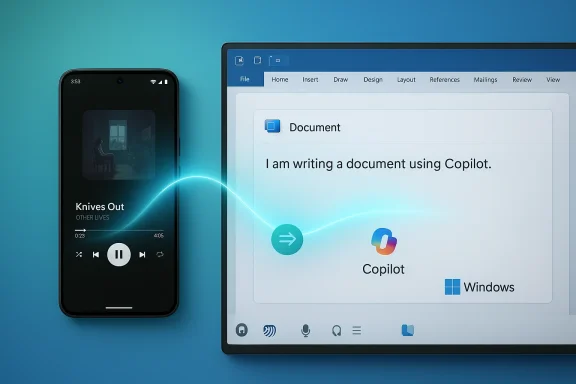
Cross‑Device Resume is no longer just a OneDrive trick. Build 28020.1619 demonstrates that Microsoft is moving to an app‑driven model where eligible Android apps and OEM browsers can publish “resumeable” activity to the paired Windows device. Practical scenarios called out by Microsoft include:- Resuming Spotify playback you started on an Android phone and continuing it on a Windows PC (Spotify desktop app preferred; fallback options exist).
- Continuing Microsoft 365 documents (Word, Excel, PowerPoint) that were opened in the Microsoft Copilot mobile app—files open in the native desktop app on the PC if present, or fall back to the browser otherwise. Offline‑only phone files are excluded.
- Restoring browsing sessions from supported Android browsers (Microsoft specifically calls out vivo Browser for Vivo phones) and opening the corresponding content on the PC.
How it presents on the PC
Insiders have described the user surface as a subtle taskbar badge or notification—think of a small visual cue that an item is available to resume. Clicking that prompt opens or installs the appropriate desktop app and resumes the activity in context. The design attempts to keep the interaction low friction and familiar for users who have used macOS Handoff or similar continuity systems. Community tracking confirms this UI pattern in Insider builds and previews.Device, app, and account gating
Microsoft is clear: availability will vary by phone make/model, OEM browser, app integration, and account. The company is using server‑side gating and targeted rollouts, so even Insiders in the appropriate ring may not see the experience immediately. This approach helps Microsoft test at scale and control the user experience, but it also means the feature’s reach will expand unevenly across users and regions.Security and privacy considerations
- The feature prefers native apps on the PC and falls back to web links when desktop apps are absent; offline files stored only on the phone are explicitly not supported, which reduces a class of privacy concerns involving local‑only content—but also limits usefulness in offline workflows.
- The resume flow involves cross‑device signaling; Microsoft’s rollout notes and earlier KB item imply backend coordination via cloud services and the user’s Microsoft account. That means data related to recently opened items is tracked server‑side for resume eligibility, which raises legitimate privacy questions about metadata collection and retention windows. Users debating adoption should consider the privacy settings of their Microsoft account and linked phone applications.
- Enterprise administrators should note that cross‑device continuity may be subject to organizational policy and MDM configurations and may need governance in environments with strict data controls. Community reporting and enterprise‑facing previews suggest Intune or group policy might be the levers Microsoft uses for management where needed.
Accessibility: Narrator, Voice Typing, Voice Access — meaningful polish
Accessibility is a major theme in this flight. Rather than only shipping feature checkboxes, Microsoft is adding configurability and setup improvements that address real‑world usage patterns for people who rely on these features.Narrator personalization
Narrator gets personalize what Narrator announces options. Users can now select which UI control details are announced and reorder them to match navigation habits inside apps. This reduces distracting or redundant verbosity, a frequent complaint among screen‑reader users who navigate dense interfaces. The change is system‑wide and meant to be applied across an app’s elements to create a smoother reading flow.Why this matters: Many screen readers attempt to be comprehensive by default, but information overload can reduce usability. Giving users the ability to prune or reorder announcements respects diverse navigation styleows for power users.
Voice Typing: ‘Wait time before acting’
Voice Typing’s new “Wait time before acting” setting lets users define the delay between spoken commands and execution. The rationale is simple: people speak at different paces and with variable latencies; a fixed, short timeout can misinterpret slower speakers and a long timeout can make quick dictation feel sluggish. Allowing a configurable wait time improves accuracy and user confidence. Microsoft notes the rollout is for all desktop types (not only Copilot+ PCs), broadening the impact.Practical tip: Users who speak deliberately or who use assistive technologies that introduce latency should lengthen the wait interval. Fast talkers can shorten it for snappier operation.
Voice Access: streamlined setup
Voice Access’s redesigned setup flow reduces friction by helping the OS download the correct speech model and letting users pick the preferred microphone during onboarding. For new users—particularly those installing for the first time on a device—this reduces the guesswork involved with speech model compatibility and microphone routing. The result should be fewer first‑time failures and quicker acceptance of voice control in productivity workflows.Community threads and Insider posts reflect positive early feedback: simplified onboarding reduces the support load and increases successful first‑use rates.
Windows Hello ESS: peripheral fingerprint readers join the party
One of the more consequential security expansions in this build is that Windows Hello Enhanced Sign‑in Security (ESS) now supports peripheral fingerprint sensors—not just built‑in biometrics. Desktop users and organizations deploying external fingerprint readers (USB or peripheral devices) can leverage ESS provided the reader meets “match‑on‑sensor” and vendor certificate requirements.Why this matters:
- Broader device coverage: Many enterprise desktops and high‑end workstations lack integrated biometric sensors; peripheral support opens ESS to a much wider hardware base.
- Security posture: ESS is Microsoft’s stronger sign‑in option for storing and using biometric templates in a secure, attested environment. Extending ESS to certified peripheral readers elevates the overall security posture for desktops and Copilot+ PCs that lack built‑in sensors.
- Deployment caveats: Peripheral ESS requires compatible hardware and vendor certificates; not every fingerprint reader will qualify. IT teams must verify device compliance before recommending ESS to end users.
Settings Agent language expansion and SCOOBE refresh
Microsoft is incrementally broadening the Settings Agent locale support beyond English and French to include German, Portuguese, Spanish (multiple locales), Korean, Japanese, Hindi, Italian, and Simplified Chinese. This is important for non‑English Insiders who interact with guided settings features and Agents inside Settings. Localization reduces friction for configuration, troubleshooting, and feature discovery.Separately, some Insiders will encounter a refreshed SCOOBE (Second‑Chance Out‑Of‑Box Experience) screen that consolidates recommended settings into a single, more intuitive review step. Microsoft asks for Feedback Hub reports when this appears, indicating the company is still iterating on micro‑interactions and the balance between recommended defaults and user control. Expect refinements based on Insider feedback.
Small but helpful additions
Build 28020.1619 also includes several modest product improvements that cumulatively improve day‑to‑day usability:- Paint update (example: freeform rotate for shapes, text, and selections) reflects Microsoft’s ongoing small‑feature cadence to keep cl
- Various telemetry, localization, and under‑the‑hood changes that don’t translate to a single headline but are important for stability and international reach. Community trackers and forum threads catalog these incremental quality‑of‑life fixes across Insider rings.
Risks, limitations, and unanswered questions
- Controlled rollout means inconsistent availability. Many Insiders will not see the same experiences immediately, which complicates testing and reporting. Microsoft’s server‑gated delivery model reduces risk to mass users but also makes it harder for testers to reproduce issues.
- Privacy and telemetry tradeoffs. Cross‑Device Resume relies on server coordination and metadata about recent activity. While Microsoft has deliberately excluded offline‑only phone files from resume capabilities, the broader data collection and retention policies for resume metadata are not fully transparent in the release notes—users and administrators should examine account privacy settings and MDM controls. Flagged as an area requiring closer disclosure and administrative controls.
- Hardware compatibility for ESS. The security benefits of supporting peripheral fingerprint readers hinge on vendor adoption of match‑on‑sensor and certificate provisioning. Organizations may face procurement or firmware compatibility work before this becomes a drop‑in upgrade for Windows Hello ESS.
- App developer adoption. For Cross‑Device Resume to become genuinely useful beyond flagship scenarios, third‑party apps will need to implement the continuity hooks or integrate with Microsoft’s continuity SDKs. Early examples (Spotify, vivo Browser) are encouraging, but broader developer uptake is not guaranteed. Microsoft’s controlled rollout and developer SDK timelines will determine the feature’s long‑term utility. Community observers note that prior initiatives (Project Rome) saw limited adoption, which is a cautionary precedent.
- Localization edge cases. Expanding Settings Agent languages is valuable, but real‑world localization can surface bugs and translation issues. Insiders in newly supported locales should test flows thoroughly and file feedback when wording or behavior is unclear.
What this means for everyday users and IT professionals
For typical Windows users who link an Android phone:- Expect fewer friction points when moving from phone to PC for media and cloud‑backed documents—if you have a compatible phone, OEM browser, or app partner already integrated.
- For now, Cross‑Device Resume is most useful in a cloud‑connected workflow (Copilot‑opened files, Spotify, browser sessions). Users working with local, offline files on a phone should not expect resume to work.
- The new Narrator controls and Voice Typing configurability are meaningful usability wins. They reduce the long‑standing problem of “too much speech” and mismatched timing for voice actions. Organizations that support employees using assistive tech should pilot these features to update documentation and training.
- Evaluate peripheral fingerprint hardware if you plan to adopt Windows Hello ESS at scale; verify vendor certificates and match‑on‑sensor support.
- Reexamine privacy governance around device linking and continuity features; ensure Intune/GPOs reflect organizational posture on cross‑device data sharing. Forum reporting indicates that enterprise policy controls are a likely focus for Microsoft in later stages.
How to try these features safely today (for Insiders)
- Join the Canary Channel and ensure your device is on build 28020.1619 (KB 5077230) or later. Keep in mind Canary is experimental; expect instability.
- Link an Android phone using Microsoft’s Phone Link / Link to Windows flow and ensure Copilot mobile, Spotify, or supported OEM browsers are installed and signed in with the same account.
- Check Settings > Accounts > Sign‑in options for Windows Hello ESS options if you have a supported peripheral fingerprint reader; follow enrollment prompts.
- For Narrator, open Accessibility > Narrator and explore the new announcement personalization settings to reduce verbosity.
- In Voice Typing, experiment with the new Wait time before acting slider to match your speaking cadence.
- Provide Feedback Hub reports for any issues, especially if you encounter inconsistent resume prompts or ESS enrollment failures; Microsoft is actively soliciting Insider feedback for these flows.
Final analysis: a consequential step, but adoption will be the true test
Build 28020.1619 is an important technical and product milestone for Windows 11’s device continuity and accessibility story. The Cross‑Device Resume expansion finally starts to deliver on the long‑promised “pick up where you left off” workflow that Apple users have had for years, and Microsoft’s inclusion of peripheral ESS and deeper accessibility controls shows an attention to real user needs beyond headline features.That said, several critical factors will determine whether these features matter for the mainstream:
- Rollout mechanics (server gating) and uneven OEM/app support may keep the experience fragmented for months.
- Developer adoption is essential; without more apps exposing resumeable activity, the feature risks remaining a showcase for a few scenarios rather than a ubiquitous productivity benefit.
- Enterprise governance and privacy transparency will shape organizational acceptance—IT teams need clear policy controls and disclosure on what metadata is collected and how it is stored.
- Hardware vendor cooperation for peripheral ESS is nontrivial; the security promise is only useful if device manufacturers implement certificate‑based, match‑on‑sensor solutions at scale.
Conclusion: Windows 11 Canary build 28020.1619 stitches together useful continuity and accessibility improvements that shift the product closer to a usable Android‑to‑PC handoff story while addressing assistive technology workflows and biometric security for desktops. The feature set is promising; the rollout strategy and integration depth will determine whether it becomes a routine part of daily Windows productivity or merely a developer‑led preview that trickles out to a few flagship scenarios. Insiders should try the features, file feedback, and watch for broader partner and enterprise support over the coming months.
Source: Neowin Windows 11 bulid 28020.1619 brings cross-device resume, accessibility improvements, and more
