

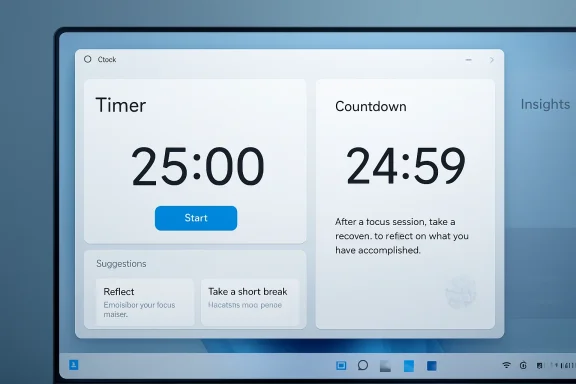
Microsoft is testing a redesigned Windows 11 Clock app that turns Focus sessions into a richer productivity workspace, with task management, reflection prompts, possible NPU-backed AI features, and an unfinished Insights dashboard spotted in an early build on April 29, 2026. The important part is not that Microsoft may have found yet another place to stamp “AI” on Windows. It is that one of the operating system’s most humble utilities is being recruited into the company’s larger campaign to make Windows feel less like a launcher for apps and more like a context-aware assistant. That ambition is useful, risky, and very Microsoft: the Clock app may become smarter, but it also becomes harder to trust as “just a clock.”
The Windows Clock app used to be the sort of software nobody argued about. It told time, rang alarms, ran timers, and eventually grew a Focus sessions feature that paired a countdown with Microsoft To Do and Spotify. It was not glamorous, but it had the virtue of being legible: pick a task, start a session, try not to wander off.
The reported redesign changes that bargain. According to hands-on testing by Windows Latest, the new Focus experience gives tasks far more space, adds session customization, introduces a “Reflection” prompt after each session, and contains references to AI-assisted task breakdowns. Developer Gustave Monce reportedly found code paths suggesting NPU-powered features, although the version being tested appears to be early, incomplete, and not guaranteed to ship unchanged.
That caveat matters. Microsoft’s prerelease Windows ecosystem is full of half-built interfaces, dormant feature flags, placeholder pages, and experiments that never reach mainstream users. But the direction is still revealing. Microsoft is no longer treating AI as something that lives only in Copilot, Edge, Office, or search. It is trying to dissolve AI into the small rituals of desktop life.
That is why the Clock app matters more than its name suggests. A timer is one of the few software tools that can touch your work habits without demanding your files, messages, or browser history. If Microsoft can make that timer useful without making it creepy, it gets a low-friction beachhead for ambient productivity AI. If it overreaches, it turns a trusted utility into another example of Windows doing too much.
That simplicity was the point. The feature did not try to understand your work, infer your habits, or judge your day. It offered structure, and then it got out of the way. For many users, especially those who already live inside Microsoft To Do, that was enough.
But Focus sessions also showed the limits of Microsoft’s first pass. The task integration was useful but not especially deep. The interface treated the timer as the star and the work itself as a supporting prop. If you had a messy project rather than a clean task, Windows did not help much; it merely counted down while you did the mental decomposition yourself.
The redesign appears to flip that emphasis. The task pane reportedly occupies roughly half the vertical screen, with sorting by title, creation date, and due date. Each task can expose steps, due dates, files, and notes, making the Focus screen look less like a clock and more like a lightweight command center.
That is a sensible evolution. A focus timer is only as useful as the intention attached to it. If the task is vague — “finish proposal,” “prepare migration,” “launch campaign” — the timer becomes theater. You can sit there for 45 minutes and still avoid the first concrete action.
Breaking work into next actions is one of the oldest productivity problems in computing. A task manager stores the noun phrase: “upgrade lab machines,” “write documentation,” “prepare Q2 report.” The hard part is turning that phrase into a sequence of verbs. Inventory devices. Check compatibility. Draft outline. Review dependencies. Schedule rollout. Send the email nobody wants to send.
Large language models are good at this kind of decomposition because the output does not need to be magical. It needs to be plausible, editable, and quick. If the model suggests five steps and two are wrong, the feature may still have saved time by getting the user past the blank-page moment.
That is very different from asking AI to control the PC, rewrite your documents, or summarize sensitive meetings. Suggested task steps are low-stakes by comparison. They are also easy to reject. The user remains in charge of the plan, while the machine supplies a first draft of momentum.
The question is whether Microsoft can keep the feature in that narrow lane. The company’s recent Windows AI push has often blurred the line between helpful context and unwanted intrusion. Users who open a clock do not expect a productivity therapist. They expect timekeeping. A good AI step-suggestion feature would feel like autocomplete for intent, not like a sermon about personal optimization.
If the Clock app can use an NPU to suggest steps or generate insights without sending sensitive productivity data to the cloud, that would be a meaningful design choice. Work habits are personal. A user’s task list can reveal projects, deadlines, health routines, family obligations, job searches, financial stress, or performance concerns. Keeping analysis local would not eliminate every concern, but it would make the feature easier to defend.
The problem is that “NPU-powered” has become both a technical claim and a marketing smell. It often implies efficiency, privacy, and modernity without proving any of them. The early build reportedly includes an NPU page that may be only for debugging. That is not a product promise.
Microsoft will need to be explicit if this ships. Users should know whether task text is processed locally, whether any data is sent to Microsoft services, whether insights sync across devices, and whether administrators can disable the feature. A focus app has no business becoming a shadow telemetry diary.
Enterprise IT will care about that distinction more than consumers. In managed environments, even seemingly harmless AI features can create policy headaches. If a built-in Windows app starts analyzing tasks, attaching files, or producing behavioral insights, administrators will ask where the data lives and who can turn it off.
This is where the Clock app crosses from timekeeping into quantified self territory. A timer records duration. A reflection records state. Over days or weeks, those states can become patterns: mornings are better than afternoons, short sessions beat long ones, certain tasks correlate with distraction, Wednesdays are a crater.
That could be genuinely useful. People with ADHD, burnout, executive dysfunction, or simply chaotic workloads often benefit from externalized reflection. The value is not that the computer “knows” you. The value is that it helps you notice patterns you were too busy to see.
But this also invites the oldest trap in productivity software: confusing measurement with improvement. Asking users to rate focus after every session may encourage self-awareness, or it may become another micro-burden in a day already full of prompts. The difference will come down to restraint. Reflection should be optional, skippable, and quiet.
The promised Insights dashboard is still reportedly a coming-soon placeholder. That is probably wise. The feature will live or die by whether its conclusions are modest and actionable. “You tend to complete writing tasks faster in 25-minute sessions” is useful. “Your productivity score declined this week” is dystopian nonsense.
Still, the symbolism is brutal. Users have spent years watching simple Windows components become heavier, more web-like, more update-dependent, and more eager to phone home. A Clock app that consumes significantly more memory because it wants to be a productivity hub will trigger exactly the wrong reflex in a skeptical audience.
The Clock app is not Visual Studio. It is not Teams. It is not a browser with 70 tabs and three video calls open. It is a utility, and utilities are judged by a harsher standard. They should launch fast, behave predictably, and disappear into the background.
That is why the WebView2 concern raised in the reporting resonates. WebView2 is not inherently bad; it can help Microsoft ship consistent app experiences across Windows. But for users, it has become shorthand for “why does this simple thing feel like a webpage in disguise?” When the task is literally counting down minutes, tolerance for overhead is low.
Microsoft’s challenge is to make the new Clock app feel native even if the implementation is hybrid. The user does not care which framework won the internal architecture debate. The user cares whether the timer starts instantly, the mini window stays responsive, alarms still exist, and the app does not behave like a productivity website wearing a Windows costume.
There is a hierarchy of trust in operating system utilities. Users can forgive a flashy new feature failing. They are less forgiving when the basic old feature disappears, moves, or becomes slower. A clock app that gets AI before it gets alarms is an easy punchline because it captures a broader anxiety about Microsoft’s priorities.
To be fair, there is no evidence that Microsoft intends to ship a Clock app without those functions. Early builds are often carved down to the component under active work. But perception matters, especially in the Windows community, where every redesign arrives with the baggage of Control Panel migrations, Settings churn, Start menu experiments, and feature regressions.
If Microsoft wants users to take the redesign seriously, it must preserve the old contract. Alarms should be obvious. Timers should be obvious. Stopwatch and world clock should not feel like legacy leftovers. Focus can become smarter without making the rest of the app feel like collateral damage.
That is the broader lesson for Windows AI. Users do not object only to intelligence; they object to intelligence that arrives while basics remain unresolved. A clever task breakdown feature will not earn goodwill if the app is slower, heavier, or less reliable than the version it replaces.
There is a strategic logic here. Users do not always want to open a general-purpose assistant and explain what they are doing. In many cases, the app already has the context. Paint knows the image. Notepad knows the text. Clock knows the session, the task, and maybe the user’s reflection history. Narrow AI inside the right surface can be more useful than a universal chatbot waiting for instructions.
But the pattern also fragments accountability. When AI lives everywhere, users must learn privacy, controls, and failure modes everywhere. One toggle in Copilot settings may not govern the AI behavior of every inbox, editor, search box, and utility. For administrators, that becomes a policy maze. For consumers, it becomes fatigue.
The Clock app is a good test case because the stakes are modest but intimate. The data is not necessarily corporate secrets or family photos, but it is behavioral. It captures what users intended to do, when they tried to do it, how well they felt they concentrated, and potentially what steps an AI thought they should take next.
That makes consent more important than spectacle. Microsoft should not bury these controls in a generic AI settings blob. A focus tool should explain itself in plain language: what it analyzes, where it runs, what is saved, what can be deleted, and what can be disabled.
In that version, the AI is not the product. The session is the product. AI is a small lever inside a workflow that already makes sense.
That distinction is crucial. The least convincing AI features ask users to change their habits around the model. The best ones remove friction from habits users already have. If someone already starts Focus sessions, already uses Microsoft To Do, and already struggles to break down tasks, suggested steps are a natural extension. If someone only wants an alarm, they should never have to meet the productivity brain at all.
The same goes for Insights. The dashboard should not try to become a manager, therapist, or performance review engine. It should be closer to a mirror: “Here is what you recorded; here are patterns that may help.” Anything more grandiose will feel invasive.
Microsoft also needs to resist the temptation to make the feature depend on the newest hardware in ways that feel arbitrary. If NPU acceleration enables private, efficient local processing, say so. If older PCs can use a simpler version, offer it. If the feature is exclusive to Copilot+ machines, Microsoft should be honest about whether that is a technical necessity or a product segmentation choice.
The company has often struggled with small-app credibility. Built-in apps get redesigned, renamed, webified, deprecated, revived, and repackaged. Some become genuinely better. Others become slower or more confusing. The Clock app has a chance to land on the right side of that ledger because the use case is coherent.
The danger is that Microsoft markets the wrong thing. “AI Clock” is absurd on its face. “Focus sessions can now help you turn vague tasks into doable steps and reflect on what actually worked” is much stronger. The former sounds like an executive mandate. The latter sounds like a product feature.
That distinction matters because Windows users are not rejecting productivity help. They are rejecting the sense that every surface of the operating system is being drafted into an AI strategy whether it benefits the user or not. A more capable Clock app could be welcome. A Clock app that behaves like a Copilot billboard will not be.
The reported Clock redesign is a small story with a large shadow: Windows is becoming an operating system where even the timer may know what you meant to do, how well you did it, and what you should try next. If Microsoft ships this carefully, it could make Focus sessions one of the few everyday AI features that actually improves a workflow; if it ships it carelessly, the backlash will not be about clocks at all, but about an operating system that keeps mistaking intimacy for innovation.
Source: Gadget Review Microsoft's Windows 11 Clock App Gets an AI Brain Transplant
 Microsoft Finds a Strange New Front in the AI Desktop War
The Windows Clock app used to be the sort of software nobody argued about. It told time, rang alarms, ran timers, and eventually grew a Focus sessions feature that paired a countdown with Microsoft To Do and Spotify. It was not glamorous, but it had the virtue of being legible: pick a task, start a session, try not to wander off.The reported redesign changes that bargain. According to hands-on testing by Windows Latest, the new Focus experience gives tasks far more space, adds session customization, introduces a “Reflection” prompt after each session, and contains references to AI-assisted task breakdowns. Developer Gustave Monce reportedly found code paths suggesting NPU-powered features, although the version being tested appears to be early, incomplete, and not guaranteed to ship unchanged.
That caveat matters. Microsoft’s prerelease Windows ecosystem is full of half-built interfaces, dormant feature flags, placeholder pages, and experiments that never reach mainstream users. But the direction is still revealing. Microsoft is no longer treating AI as something that lives only in Copilot, Edge, Office, or search. It is trying to dissolve AI into the small rituals of desktop life.
That is why the Clock app matters more than its name suggests. A timer is one of the few software tools that can touch your work habits without demanding your files, messages, or browser history. If Microsoft can make that timer useful without making it creepy, it gets a low-friction beachhead for ambient productivity AI. If it overreaches, it turns a trusted utility into another example of Windows doing too much.
The Old Focus Sessions Were a Timer With Good Intentions
Focus sessions arrived early in the Windows 11 era as part of Microsoft’s attempt to make the operating system feel calmer and more personal. The idea was simple: pick a block of time, mute distractions, optionally tie the session to a Microsoft To Do task, and let the Clock app keep you honest. It was productivity software reduced to the minimum viable ritual.That simplicity was the point. The feature did not try to understand your work, infer your habits, or judge your day. It offered structure, and then it got out of the way. For many users, especially those who already live inside Microsoft To Do, that was enough.
But Focus sessions also showed the limits of Microsoft’s first pass. The task integration was useful but not especially deep. The interface treated the timer as the star and the work itself as a supporting prop. If you had a messy project rather than a clean task, Windows did not help much; it merely counted down while you did the mental decomposition yourself.
The redesign appears to flip that emphasis. The task pane reportedly occupies roughly half the vertical screen, with sorting by title, creation date, and due date. Each task can expose steps, due dates, files, and notes, making the Focus screen look less like a clock and more like a lightweight command center.
That is a sensible evolution. A focus timer is only as useful as the intention attached to it. If the task is vague — “finish proposal,” “prepare migration,” “launch campaign” — the timer becomes theater. You can sit there for 45 minutes and still avoid the first concrete action.
The AI Feature That Actually Makes Sense Is the Boring One
The reported AI feature is not a chatbot sitting inside the Clock app, at least based on the early descriptions. It is the ability to suggest task steps. That sounds small, but it is exactly the sort of constrained use case where AI can be genuinely helpful.Breaking work into next actions is one of the oldest productivity problems in computing. A task manager stores the noun phrase: “upgrade lab machines,” “write documentation,” “prepare Q2 report.” The hard part is turning that phrase into a sequence of verbs. Inventory devices. Check compatibility. Draft outline. Review dependencies. Schedule rollout. Send the email nobody wants to send.
Large language models are good at this kind of decomposition because the output does not need to be magical. It needs to be plausible, editable, and quick. If the model suggests five steps and two are wrong, the feature may still have saved time by getting the user past the blank-page moment.
That is very different from asking AI to control the PC, rewrite your documents, or summarize sensitive meetings. Suggested task steps are low-stakes by comparison. They are also easy to reject. The user remains in charge of the plan, while the machine supplies a first draft of momentum.
The question is whether Microsoft can keep the feature in that narrow lane. The company’s recent Windows AI push has often blurred the line between helpful context and unwanted intrusion. Users who open a clock do not expect a productivity therapist. They expect timekeeping. A good AI step-suggestion feature would feel like autocomplete for intent, not like a sermon about personal optimization.
NPUs Give Microsoft a Hardware Story, but Not a Free Pass
The NPU angle is politically important inside Windows. Since the arrival of Copilot+ PCs, Microsoft has needed visible everyday reasons for users to care about neural processing units. Camera effects and local AI demos help, but they do not necessarily change ordinary desktop habits. A focus tool that performs local inference could be a quieter and more relatable example.If the Clock app can use an NPU to suggest steps or generate insights without sending sensitive productivity data to the cloud, that would be a meaningful design choice. Work habits are personal. A user’s task list can reveal projects, deadlines, health routines, family obligations, job searches, financial stress, or performance concerns. Keeping analysis local would not eliminate every concern, but it would make the feature easier to defend.
The problem is that “NPU-powered” has become both a technical claim and a marketing smell. It often implies efficiency, privacy, and modernity without proving any of them. The early build reportedly includes an NPU page that may be only for debugging. That is not a product promise.
Microsoft will need to be explicit if this ships. Users should know whether task text is processed locally, whether any data is sent to Microsoft services, whether insights sync across devices, and whether administrators can disable the feature. A focus app has no business becoming a shadow telemetry diary.
Enterprise IT will care about that distinction more than consumers. In managed environments, even seemingly harmless AI features can create policy headaches. If a built-in Windows app starts analyzing tasks, attaching files, or producing behavioral insights, administrators will ask where the data lives and who can turn it off.
Reflection Turns Productivity Into a Data Set
The most interesting reported addition may not be AI at all. It is Reflection, the post-session prompt that asks users to rate how the session went, with options ranging from “Deep focus” to “Distracted.” On paper, this is harmless self-reporting. In practice, it is the foundation for a productivity data model.This is where the Clock app crosses from timekeeping into quantified self territory. A timer records duration. A reflection records state. Over days or weeks, those states can become patterns: mornings are better than afternoons, short sessions beat long ones, certain tasks correlate with distraction, Wednesdays are a crater.
That could be genuinely useful. People with ADHD, burnout, executive dysfunction, or simply chaotic workloads often benefit from externalized reflection. The value is not that the computer “knows” you. The value is that it helps you notice patterns you were too busy to see.
But this also invites the oldest trap in productivity software: confusing measurement with improvement. Asking users to rate focus after every session may encourage self-awareness, or it may become another micro-burden in a day already full of prompts. The difference will come down to restraint. Reflection should be optional, skippable, and quiet.
The promised Insights dashboard is still reportedly a coming-soon placeholder. That is probably wise. The feature will live or die by whether its conclusions are modest and actionable. “You tend to complete writing tasks faster in 25-minute sessions” is useful. “Your productivity score declined this week” is dystopian nonsense.
The Resource Usage Problem Is a Warning Shot
One of the more mundane details in the early report may be the most revealing: RAM usage reportedly nearly doubles during sessions compared with the existing Clock app. Because this is an unfinished build, that number should not be treated as a final indictment. Early software is often wasteful. Debug code, unoptimized assets, and half-wired frameworks can make prerelease apps look worse than they will be.Still, the symbolism is brutal. Users have spent years watching simple Windows components become heavier, more web-like, more update-dependent, and more eager to phone home. A Clock app that consumes significantly more memory because it wants to be a productivity hub will trigger exactly the wrong reflex in a skeptical audience.
The Clock app is not Visual Studio. It is not Teams. It is not a browser with 70 tabs and three video calls open. It is a utility, and utilities are judged by a harsher standard. They should launch fast, behave predictably, and disappear into the background.
That is why the WebView2 concern raised in the reporting resonates. WebView2 is not inherently bad; it can help Microsoft ship consistent app experiences across Windows. But for users, it has become shorthand for “why does this simple thing feel like a webpage in disguise?” When the task is literally counting down minutes, tolerance for overhead is low.
Microsoft’s challenge is to make the new Clock app feel native even if the implementation is hybrid. The user does not care which framework won the internal architecture debate. The user cares whether the timer starts instantly, the mini window stays responsive, alarms still exist, and the app does not behave like a productivity website wearing a Windows costume.
The Missing Alarms Are Funny Until They Are Not
The early test version reportedly lacks core Clock features such as alarms, timer, stopwatch, and world clock. That is understandable in a development build focused on the new Focus experience. It is also the kind of detail that will write its own jokes if Microsoft mishandles the rollout.There is a hierarchy of trust in operating system utilities. Users can forgive a flashy new feature failing. They are less forgiving when the basic old feature disappears, moves, or becomes slower. A clock app that gets AI before it gets alarms is an easy punchline because it captures a broader anxiety about Microsoft’s priorities.
To be fair, there is no evidence that Microsoft intends to ship a Clock app without those functions. Early builds are often carved down to the component under active work. But perception matters, especially in the Windows community, where every redesign arrives with the baggage of Control Panel migrations, Settings churn, Start menu experiments, and feature regressions.
If Microsoft wants users to take the redesign seriously, it must preserve the old contract. Alarms should be obvious. Timers should be obvious. Stopwatch and world clock should not feel like legacy leftovers. Focus can become smarter without making the rest of the app feel like collateral damage.
That is the broader lesson for Windows AI. Users do not object only to intelligence; they object to intelligence that arrives while basics remain unresolved. A clever task breakdown feature will not earn goodwill if the app is slower, heavier, or less reliable than the version it replaces.
This Is Copilot by Osmosis
The Clock redesign fits a pattern that has become clearer over the past two years. Microsoft is not merely adding Copilot to Windows as a single assistant. It is distributing AI-adjacent capabilities into individual surfaces: search, Settings, Paint, Photos, Notepad, File Explorer, Edge, and now potentially Clock. This is Copilot by osmosis.There is a strategic logic here. Users do not always want to open a general-purpose assistant and explain what they are doing. In many cases, the app already has the context. Paint knows the image. Notepad knows the text. Clock knows the session, the task, and maybe the user’s reflection history. Narrow AI inside the right surface can be more useful than a universal chatbot waiting for instructions.
But the pattern also fragments accountability. When AI lives everywhere, users must learn privacy, controls, and failure modes everywhere. One toggle in Copilot settings may not govern the AI behavior of every inbox, editor, search box, and utility. For administrators, that becomes a policy maze. For consumers, it becomes fatigue.
The Clock app is a good test case because the stakes are modest but intimate. The data is not necessarily corporate secrets or family photos, but it is behavioral. It captures what users intended to do, when they tried to do it, how well they felt they concentrated, and potentially what steps an AI thought they should take next.
That makes consent more important than spectacle. Microsoft should not bury these controls in a generic AI settings blob. A focus tool should explain itself in plain language: what it analyzes, where it runs, what is saved, what can be deleted, and what can be disabled.
The Best Version of This Feature Is Almost Invisible
There is a version of the redesigned Clock app that could be excellent. It would open quickly, preserve every existing clock function, make Focus sessions more task-centric, and offer AI suggestions only when the user asks for them. It would keep Reflection optional and use Insights to surface patterns without moralizing.In that version, the AI is not the product. The session is the product. AI is a small lever inside a workflow that already makes sense.
That distinction is crucial. The least convincing AI features ask users to change their habits around the model. The best ones remove friction from habits users already have. If someone already starts Focus sessions, already uses Microsoft To Do, and already struggles to break down tasks, suggested steps are a natural extension. If someone only wants an alarm, they should never have to meet the productivity brain at all.
The same goes for Insights. The dashboard should not try to become a manager, therapist, or performance review engine. It should be closer to a mirror: “Here is what you recorded; here are patterns that may help.” Anything more grandiose will feel invasive.
Microsoft also needs to resist the temptation to make the feature depend on the newest hardware in ways that feel arbitrary. If NPU acceleration enables private, efficient local processing, say so. If older PCs can use a simpler version, offer it. If the feature is exclusive to Copilot+ machines, Microsoft should be honest about whether that is a technical necessity or a product segmentation choice.
The Windows Community Will Judge the Craft, Not the Pitch
Windows enthusiasts have heard enough AI pitches. They will judge this redesign by the old-fashioned measures: speed, reliability, memory use, clarity, and control. That may sound conservative, but it is exactly the audience Microsoft needs to win back if it wants Windows AI to feel like progress rather than garnish.The company has often struggled with small-app credibility. Built-in apps get redesigned, renamed, webified, deprecated, revived, and repackaged. Some become genuinely better. Others become slower or more confusing. The Clock app has a chance to land on the right side of that ledger because the use case is coherent.
The danger is that Microsoft markets the wrong thing. “AI Clock” is absurd on its face. “Focus sessions can now help you turn vague tasks into doable steps and reflect on what actually worked” is much stronger. The former sounds like an executive mandate. The latter sounds like a product feature.
That distinction matters because Windows users are not rejecting productivity help. They are rejecting the sense that every surface of the operating system is being drafted into an AI strategy whether it benefits the user or not. A more capable Clock app could be welcome. A Clock app that behaves like a Copilot billboard will not be.
Where Administrators Should Draw the Line
The early build is not a deployment event, but IT teams should still pay attention because small Windows apps increasingly carry policy implications. The Clock app is moving from a passive utility toward an active productivity surface, and that shift changes what questions administrators need to ask.- Microsoft should provide clear controls for disabling AI task suggestions, Reflection, and Insights in managed environments.
- The app should disclose whether task text, files, notes, and reflection data are processed locally or sent to cloud services.
- Existing Clock functions such as alarms, timers, stopwatch, and world clock should remain fast, visible, and independent of the new Focus interface.
- NPU-backed features should be explained in terms of user benefit, not used as a vague badge for modern hardware.
- The redesigned app should meet a higher performance standard than ordinary productivity software because it is replacing a basic system utility.
- Users should be able to use Focus sessions without turning their attention habits into a long-term data profile.
The reported Clock redesign is a small story with a large shadow: Windows is becoming an operating system where even the timer may know what you meant to do, how well you did it, and what you should try next. If Microsoft ships this carefully, it could make Focus sessions one of the few everyday AI features that actually improves a workflow; if it ships it carelessly, the backlash will not be about clocks at all, but about an operating system that keeps mistaking intimacy for innovation.
Source: Gadget Review Microsoft's Windows 11 Clock App Gets an AI Brain Transplant
