

Windows 11 Cloud Rebuild should not become a help-desk recovery dependency until each hardware model has passed a WinRE preflight on a sacrificial device. WindowsForum users describe the Insider Experimental preview as a Windows Recovery Environment path that reinstalls Windows from Windows Update without requiring USB installation media, but its availability, network behavior, and hardware support still require local validation.
Treat Cloud Rebuild as failed or unqualified for a hardware configuration unless every item passes.
Do not convert the right-hand column into claims about Microsoft support. These are controls WindowsForum recommends for operating a recovery service safely.
WindowsForum’s user reports agree on the feature’s basic purpose: an Insider Experimental recovery option that downloads Windows and required components through Windows Update. The supplied Microsoft release-note excerpt identifies Experimental build 26300.8772, while the supplied Insider blog excerpt lists 26300.8782. Those Microsoft excerpts—not forum observation—are the authority for their respective build numbers. Administrators should check the release notes attached to the build actually installed rather than assuming the option exists everywhere.
A usable recovery configuration needs:
Include at least one non-production example of each materially different configuration:
A failed captive-portal, enterprise Wi-Fi, certificate-based Wi-Fi, or guest-network test establishes only that the tested workflow failed. WindowsForum recommends providing validated Ethernet or fallback media when the normal recovery network cannot be qualified.
Repeat relevant testing after significant firmware, network-adapter, dock, storage, or network-policy changes.
Use the organization’s established Windows 11 compatibility and firmware procedures:
A currently working OEM-installed driver also does not prove that recovery can obtain or use the necessary driver. The reliable qualification result is a completed rebuild on the representative model.
Cloud Rebuild can provide a useful Windows Update-based recovery path when a PC will not boot, but production readiness should be decided by the preflight: functioning WinRE, validated recovery networking, compatible hardware, usable recovery-time drivers, a completed sacrificial rebuild, successful post-OOBE checks, and tested fallback media.
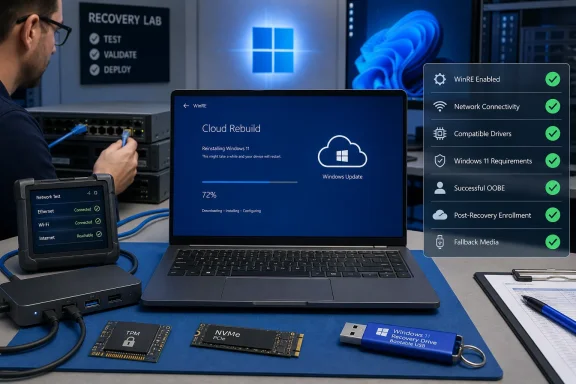 Cloud Rebuild Preflight: Pass/Fail Checklist
Treat Cloud Rebuild as failed or unqualified for a hardware configuration unless every item passes.- [ ] WinRE enabled:
reagentc /inforeportsWindows RE status: Enabled. - [ ] Recovery networking validated: The device can reach Windows Update from Cloud Rebuild using the exact adapter and network intended for recovery.
- [ ] Drivers available: Required network and storage devices work during the recovery process.
- [ ] Windows 11 requirements checked: The device satisfies Windows 11 requirements, including an enabled TPM where required.
- [ ] Destructive run completed: An approved sacrificial device completes the reinstall and reaches Windows out-of-box experience.
- [ ] Post-OOBE checks completed: Enrollment, policy, applications, updates, and critical hardware work after recovery.
- [ ] Fallback media tested: A Recovery Drive, Windows installation medium, or manufacturer recovery medium boots and can recover the model.
What Microsoft Documents vs. What Your Lab Must Validate
| Area | Supplied Microsoft information | WindowsForum-recommended validation |
|---|---|---|
| Recovery mechanism | Cloud Rebuild operates through WinRE and reinstalls Windows using Windows Update | Complete a destructive rebuild on each representative hardware configuration |
| Network error | Error 0x800704C6 indicates no network connection | Test the actual Ethernet adapter, dock, Wi-Fi network, firewall path, and recovery location |
| Compatibility error | Error 0xc1900200 can indicate unmet Windows 11 requirements, TPM not enabled, or a required driver missing from Windows Update | Record firmware state and isolate whether the failure is hardware-, TPM-, network-, or driver-related |
| Drivers | Required drivers may need to come from Windows Update | Confirm through a completed rebuild that network and storage hardware work on each model |
| Completion target | Windows is reinstalled and proceeds to OOBE | Validate enrollment, policy, applications, identity, updates, and peripherals after OOBE |
| Alternative recovery | Cloud Rebuild removes the need for USB media in a successful supported workflow | Keep tested bootable media because the preview may be unavailable or may fail |
| Network edge cases | The supplied guidance addresses network connectivity but does not establish every enterprise authentication scenario | Treat docks, captive portals, certificate-based Wi-Fi, proxies, and restricted networks as lab-specific tests |
Why WinRE Is the Critical Dependency
Cloud Rebuild performs the reinstall from WinRE rather than relying on the installed Windows environment, a custom organizational image, or local installation media. That makes it potentially useful when Windows will not boot, but it also means that normal in-OS connectivity and drivers do not prove the recovery environment will work.WindowsForum’s user reports agree on the feature’s basic purpose: an Insider Experimental recovery option that downloads Windows and required components through Windows Update. The supplied Microsoft release-note excerpt identifies Experimental build 26300.8772, while the supplied Insider blog excerpt lists 26300.8782. Those Microsoft excerpts—not forum observation—are the authority for their respective build numbers. Administrators should check the release notes attached to the build actually installed rather than assuming the option exists everywhere.
A usable recovery configuration needs:
- An enabled and functional WinRE installation
- A network path that works during Cloud Rebuild
- Compatible Windows 11 hardware
- Required network and storage support during recovery
- Approval for a full operating-system reinstall
- An independent fallback if Cloud Rebuild is absent or cannot finish
Build a Representative Qualification Set
This matrix is a WindowsForum-recommended control, not a documented Cloud Rebuild requirement. Do not approve a fleet after testing one convenient laptop.Include at least one non-production example of each materially different configuration:
- PC manufacturer and model
- Network adapter family
- Storage-controller configuration
- Firmware and TPM configuration
- Wireless-only design
- Help-desk dock or USB Ethernet adapter
- Managed and unmanaged provisioning path
- BitLocker-protected configuration used by the organization
- Asset model and firmware configuration
- Windows edition and language before recovery
- Installed Insider build
- Result of
reagentc /info - Recovery connection and adapter used
- TPM and Windows 11 compatibility state
- Displayed error codes
- Whether the device reaches OOBE
- Provisioning and post-OOBE results
- Fallback-media boot and recovery result
Verify WinRE Before Testing Recovery
Run this check from a working installation while remediation is still possible.- Sign in with an administrator account.
- Open Windows Terminal, Command Prompt, or PowerShell as administrator.
- Run:
reagentc /info- Confirm that the output includes:
Windows RE status: Enabled- Record the Windows RE location shown by the command.
- If WinRE is disabled or its configuration is missing, stop the qualification test and repair the recovery configuration first.
Enter WinRE and Check Feature Availability
The supplied evidence establishes that Cloud Rebuild is WinRE-based, but it does not document one universal click path for every preview build. Menu labels and entry methods may change.- Use a non-production device and connect it to power.
- Enter WinRE using an entry method supported by the installed Windows build.
- Open the recovery troubleshooting options.
- Look for Cloud rebuild.
- If it is absent, record the installed build and mark the feature unavailable for that configuration.
- If it is present, follow the displayed prompts and note the network hardware and connection used.
- Do not assume that the workflow can be exited safely at a particular stage. Read each warning before continuing and use only an approved sacrificial device if the next action could authorize reinstallation.
- Record any error code and the stage at which it appears.
| Test condition | What to verify | Pass condition |
|---|---|---|
| Built-in Ethernet | Recovery recognizes the adapter and reaches Windows Update | Cloud Rebuild proceeds beyond connectivity checks |
| Dock or USB Ethernet | Adapter works before normal Windows starts | Rebuild proceeds using the tested adapter |
| Personal Wi-Fi | The on-screen workflow can connect, if offered | Rebuild proceeds without a network error |
| Wireless-only PC | Recovery works without an external adapter | The approved test reaches the download or preparation stage |
| Restricted network | Required Windows Update endpoints are reachable | No network-access failure blocks recovery |
| Captive-portal or managed network | Authentication can be completed in the displayed workflow | Mark unqualified if required authentication cannot be performed |
Repeat relevant testing after significant firmware, network-adapter, dock, storage, or network-policy changes.
Check Windows 11 Requirements, TPM, and Drivers
Cloud Rebuild error0xc1900200 can indicate that the PC does not meet Windows 11 requirements, TPM is not enabled, or a required driver is missing from Windows Update. It is not proof of one specific cause.Use the organization’s established Windows 11 compatibility and firmware procedures:
- Confirm that the model is approved for Windows 11.
- Check whether the required TPM is enabled in firmware.
- Record the device’s current TPM and firmware state.
- If a firmware change is necessary, first ensure that BitLocker recovery keys and rollback procedures are available.
- Retry only after the compatibility issue has been addressed.
- If the error remains, investigate whether required network or storage support is unavailable during recovery.
tpm.msc message as a universal Cloud Rebuild pass criterion. TPM is one possible factor in 0xc1900200; a device can still fail because of another Windows 11 requirement or a missing Windows Update driver.A currently working OEM-installed driver also does not prove that recovery can obtain or use the necessary driver. The reliable qualification result is a completed rebuild on the representative model.
Perform the Destructive Qualification Run
WindowsForum users consistently report that Cloud Rebuild is a full Windows reinstall that proceeds to OOBE. The supplied information does not establish a detailed guarantee for every partition, account, application, setting, local file, or synchronized item. Assume anything not independently backed up may become unavailable.- Use an approved sacrificial device containing no unique data.
- Confirm that recovery keys, credentials, asset records, and tested fallback media are available.
- Connect the PC to reliable power.
- Enter WinRE through a supported method.
- Open the troubleshooting options and select Cloud rebuild if present.
- Use the exact network path being qualified.
- Read the displayed reinstall and data-loss warnings.
- Continue only when the device is authorized for a complete reinstall.
- Keep the device connected to power and follow the on-screen instructions.
- Do not interrupt download or installation unless the workflow explicitly directs you to do so.
- Follow any restart prompts presented by the device.
- Confirm that the PC reaches Windows out-of-box experience.
- Device enrollment completes
- Required policies return
- Assigned applications reinstall
- Identity and multifactor-authentication workflows operate
- Backup or synchronization services reconnect
- Line-of-business applications redeploy
- Network, storage, audio, graphics, and docking hardware function
- Windows Update completes without unresolved device errors
Troubleshoot Known Failure Codes
Error 0x800704C6
This code indicates that the PC has no network connection.- Record the error and the connection method in use.
- Follow the on-screen option for returning to or retrying the recovery workflow.
- Verify the physical Ethernet connection or use another previously validated network path.
- If the interface offers Wi-Fi controls, connect using the prompts displayed by that build.
- Retry Cloud Rebuild.
- If validated Ethernet also fails, mark that hardware and network combination unqualified until the WinRE networking or access issue is resolved.
Error 0xc1900200
- Confirm that the device meets Windows 11 hardware requirements.
- Verify that the required TPM is enabled.
- Record the firmware and TPM state.
- Retry Cloud Rebuild after correcting any identified compatibility problem.
- If the error remains, investigate whether required network or storage drivers are unavailable through Windows Update.
- Preserve the displayed error and device details for escalation through the organization’s normal Microsoft or hardware-vendor support channel.
Preserve Evidence and Use the Fallback
The supplied information does not establish that Command Prompt, particular log paths, or external-drive copying are available in every Cloud Rebuild failure state. Use only evidence-collection methods already validated for the installed build.- Photograph or record the complete error screen.
- Note the device model, firmware state, build, adapter, connection type, error code, and failure stage.
- Preserve available recovery or setup logs after booting another supported environment, if your documented process permits it.
- Submit feedback through Feedback Hub when the device can access it.
- If Cloud Rebuild cannot complete, use the previously tested Recovery Drive, Windows installation medium, or manufacturer recovery method.
Frequently Asked Questions
Can Cloud Rebuild be tested without reinstalling Windows?
You may be able to confirm that the option appears and observe initial prompts, but the supplied evidence does not guarantee a safe stopping point before reinstallation is approved. Use a sacrificial device. Full qualification requires completing installation, reaching OOBE, and validating the organization’s reprovisioning process.Does working Wi-Fi in Windows prove it will work in WinRE?
No. The installed operating system and WinRE are separate environments. Test the adapter, network, and authentication method used by the recovery workflow.Will Cloud Rebuild restore local files and desktop applications?
Do not rely on Cloud Rebuild as a file or application restoration service. It performs a full operating-system reinstall. Back up required data independently and validate application deployment, synchronization, identity, and recovery services after OOBE.Can the help desk start Cloud Rebuild remotely?
The supplied information establishes an Insider Experimental WinRE recovery feature, but it does not establish remote initiation through enterprise endpoint management. Base help-desk procedures only on initiation methods verified in your environment, including any required physical access.Cloud Rebuild can provide a useful Windows Update-based recovery path when a PC will not boot, but production readiness should be decided by the preflight: functioning WinRE, validated recovery networking, compatible hardware, usable recovery-time drivers, a completed sacrificial rebuild, successful post-OOBE checks, and tested fallback media.
References
- Primary source: learn.microsoft.com
Cloud rebuild (Preview) | Microsoft Learn
IT Pro documentation for the Cloud rebuild feature in Windows 11learn.microsoft.com - Independent coverage: windowscentral.com
Microsoft rolls out 6 helpful new Windows 11 Insider features for early July, including one built to protect your PC from disaster | Windows Central
Microsoft's latest Insider builds in early July introduce Cloud rebuild, big Search improvements, Taskbar customization, and more changes.www.windowscentral.com - Independent coverage: blogs.windows.com
Announcing new builds for July 6 2026
Hello Windows Insiders, We have new releases today with builds across Beta and Experimental. New builds this week Today we are releasing new Windows 11 Insider Preview Builds. As a reminder, all Insiders can find the relblogs.windows.com - Independent coverage: reddit.com

Reddit - Please wait for verification
www.reddit.com
- Primary source: WindowsForum
Windows 11 Cloud Rebuild in WinRE: Cloud Reinstall After Boot Failure | Windows Forum
A hidden Windows 11 recovery option called Cloud Rebuild has appeared in recent Experimental 25H2 builds, according to Windows enthusiast XenoPanther and...windowsforum.com