

Microsoft is testing a new Windows 11 Copilot app update in late May 2026 that restores a docked sidebar mode, letting the assistant pin to the left or right edge of the desktop while other open windows resize around it. The move is not a full product reversal yet, because the feature is rolling out gradually and has not been confirmed for stable availability. But as a signal, it is hard to miss: after two years of trying to decide whether Copilot belongs inside Windows, beside Windows, or merely on top of Windows, Microsoft is edging back toward the place it started.
The first Windows Copilot experience made a clear bet. It lived as a side panel, visually attached to the desktop and treated less like an app than a system companion. That approach was inelegant in places, but it made conceptual sense: if Copilot was supposed to be part of Windows, it needed to behave like part of Windows.
Microsoft later retreated from that model. Copilot became a floating app, then a web-flavored app, then something closer to a conventional window. Each pivot lowered the temperature around forced AI integration but also made Copilot feel less essential. A floating chatbot is easier to ignore than a system sidebar, and that was both the point and the problem.
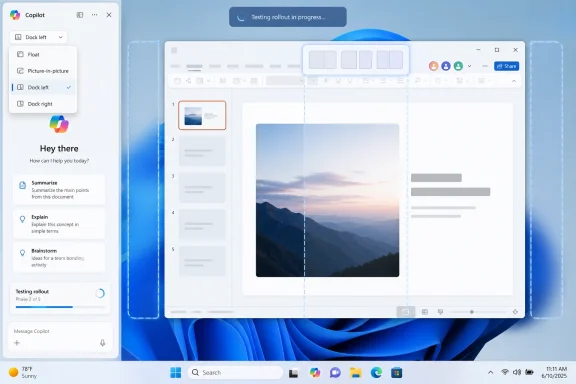
The new test tries to split the difference. Copilot still opens as a floating window by default, but a title-bar menu now offers layout choices including floating mode, picture-in-picture mode, and docking to either side of the desktop. Once docked, Copilot claims its strip of screen real estate and Windows resizes other apps around it.
That behavior matters because it is not just cosmetic. A window that floats over your work is an interruption. A pane that causes the workspace to reflow is a claim of permanence.
A docked sidebar is therefore more than a UI option. It revives the original Windows Copilot promise that the assistant can sit beside your apps as a persistent context layer. The desktop becomes a stage with Copilot always available at the edge, not a place where Copilot must be summoned like any other app.
For some users, that is exactly what an assistant should be. Developers might use it as a scratchpad beside Visual Studio Code. Office users might keep it open while drafting. Students might ask it to summarize a PDF while notes sit in another window. On ultrawide monitors, a docked AI pane could be genuinely useful.
On laptops, the calculus changes. A persistent sidebar on a 13-inch or 14-inch screen is not a convenience; it is a tax. Microsoft appears to understand that by leaving floating mode as the default, but defaults have a way of changing once telemetry tells a product team what it wants to hear.
In less than two years, Windows users have seen Copilot as a taskbar-launched side panel, a standalone app, a web-backed experience, a more native-looking app, an Edge-based wrapper, and now a dockable companion that resembles the original panel. Windows Latest counts the current experiment as the sixth distinct Copilot UI approach in that period. That is not iteration so much as product whiplash.
The churn reflects a deeper contradiction. Microsoft insists Copilot is central to the future of Windows, yet it has struggled to make Copilot feel central without making it feel intrusive. The company keeps oscillating between system integration and user retreat, between “this is the future of computing” and “don’t worry, it is just an app.”
That uncertainty creates real consequences. Consumers learn to wait before building habits around a feature. IT departments learn to delay policy decisions until the dust settles. Developers learn that Microsoft’s AI surface area may change faster than their documentation, training material, or internal support playbooks can keep up.
Microsoft has spent years testing the patience of users by placing Edge in update flows, search results, default-app prompts, widgets, and system experiences. Even when a specific Edge dependency is technically defensible, the surrounding history makes users skeptical. A bundled browser runtime inside an AI assistant is the sort of implementation detail that becomes a trust issue because Windows users have seen this movie before.
The docking feature may or may not depend on that bundled Edge instance. Microsoft has not publicly explained the connection. But the lack of explanation leaves room for the usual interpretation: Windows is again carrying extra Microsoft infrastructure to support a Microsoft service that Microsoft wants more people to use.
That perception is especially dangerous for Copilot because AI features already ask users to accept new forms of mediation. The assistant is not merely rendering a web page; it may summarize, infer, transform, and, in some modes, observe context. If Microsoft wants that layer to be trusted, the packaging needs to feel boringly transparent. Right now, it does not.
That pullback was easy to read as humility. Perhaps Microsoft had noticed that users do not want every text box, screenshot, and image viewer to become a prompt surface. Perhaps Copilot would become more deliberate, less omnipresent, and easier to summon only when wanted.
The docked sidebar complicates that reading. Instead of many little Copilot buttons, Microsoft may be testing one big Copilot place. That could be a healthier model, but it still preserves the larger ambition: Copilot as a standing presence in the Windows workspace.
In fairness, consolidation is not the same as retreat. Removing Copilot buttons from utility apps while improving the main Copilot app could be a coherent strategy. The better version of this plan is simple: stop sprinkling AI into every corner, build one capable assistant, and let users decide when it deserves screen space.
Snap Layouts succeeded because they improved an old Windows behavior without turning it into a product campaign. They gave users a faster way to arrange work. They did not ask users to adopt a brand identity or accept a new computing philosophy.
Copilot docking is different. It is not merely another window layout; it is a privileged arrangement for one Microsoft-controlled assistant. If it behaves predictably, respects screen size, and works cleanly with existing snapped apps, most users may not care. If it breaks layouts, steals width unexpectedly, or fails to remember user preferences, it will reinforce the idea that AI features get special treatment at the expense of the desktop.
The best implementation would make Copilot feel like a good citizen of Windows windowing. The worst would make it feel like a pane that has diplomatic immunity.
There is nothing inherently wrong with an assistant that can see what the user asks it to see. In fact, screen-aware AI could be one of the few desktop AI features that feels genuinely new rather than bolted on. Troubleshooting a settings page, explaining a spreadsheet, comparing two documents, or helping a user understand an error dialog are all plausible use cases.
But the permission model becomes everything. Users need clear signals about when the assistant can see screen content, what content is being processed, whether data is retained, and whether organizational policies can reliably block or limit that behavior. A docked interface could make Copilot Vision feel natural, but it could also make it feel ambient in a way that alarms security-conscious users.
For enterprises, “AI can see my screen” is not a feature description. It is a governance meeting.
Windows fleets depend on predictability. If Copilot changes form every few months, policies, user training, help-desk scripts, and compliance reviews all need to chase a moving target. It is one thing to manage an optional app. It is another to manage an AI-branded system companion whose UI, packaging, and integration points keep shifting.
The Edge-based packaging adds another wrinkle. Enterprises already manage Edge, WebView components, Microsoft 365 Copilot, Windows Copilot policies, and browser access controls. A Copilot app that ships with its own private Edge copy may be technically isolated, but administrators will still want to know how it updates, how it is inventoried, how it is blocked, and what attack surface it represents.
Microsoft has policy tools for many of these concerns, and Windows management has become more cloud-centered and granular over time. But the enterprise frustration is not only whether a toggle exists. It is whether the product strategy stabilizes long enough for the toggle to mean the same thing next quarter.
This is the kind of Windows work that does not produce flashy demos. It is also the kind that matters most. Boot trust, certificate revocation, firmware readiness, and update compliance are the unglamorous foundations that keep Windows fleets defensible.
The juxtaposition is telling. On one side, Microsoft is still refining where an AI assistant should sit on the desktop. On the other, administrators are trying to ensure that devices keep receiving the Secure Boot trust updates they need. One problem is about product identity; the other is about platform maintenance.
That does not mean Microsoft should stop building Copilot. It does mean the company’s Windows message has to serve two audiences at once. Enthusiasts may argue about the sidebar. IT pros are asking whether their machines will boot securely and remain manageable after certificate rollover.
Users tolerate the taskbar because it is useful every day. They tolerate system trays because background utilities need a place to live. They tolerate snapped windows because the user chooses the arrangement. Copilot, by contrast, is still trying to prove that it is useful enough to deserve permanence.
That proof cannot come from placement alone. Putting Copilot on the edge of the screen does not make it central to work. It only makes it visible. The assistant has to be fast, contextually competent, respectful of privacy, and predictable across updates.
Microsoft’s repeated UI pivots suggest that the company has been trying to solve adoption through surface area. If users do not use Copilot in the taskbar, make it a sidebar. If the sidebar feels too heavy, make it an app. If the app feels forgettable, dock it. The missing piece is not a perfect rectangle; it is a settled answer to why the user should keep Copilot open.
The better version is quieter and harder to build. Copilot would appear when it can reduce friction, disappear when it cannot, and respect the difference between consumer curiosity and enterprise risk. It would integrate deeply where context matters and stay out of legacy utilities where the AI value is thin.
The docked sidebar could fit that better version. A user-controlled, persistent pane is cleaner than a dozen scattered buttons. It gives Copilot a home, and it lets users decide whether that home deserves space on their desktop.
But Microsoft’s recent history means it does not get the benefit of the doubt automatically. Windows users have learned to watch not only what a feature does today, but where Microsoft might push it tomorrow.
Both can be true. Windows is mature enough that every new persistent surface has to justify itself, and AI is new enough that Microsoft is still discovering where it belongs. The docked Copilot sidebar may become a useful compromise, or it may become another short-lived experiment in a long line of Windows AI redesigns. What matters now is whether Microsoft can stop treating placement as strategy and start proving, in the daily routines of users and administrators, that Copilot deserves the space it wants to occupy.
 Microsoft Rediscovers the Edge of the Screen
The first Windows Copilot experience made a clear bet. It lived as a side panel, visually attached to the desktop and treated less like an app than a system companion. That approach was inelegant in places, but it made conceptual sense: if Copilot was supposed to be part of Windows, it needed to behave like part of Windows.Microsoft later retreated from that model. Copilot became a floating app, then a web-flavored app, then something closer to a conventional window. Each pivot lowered the temperature around forced AI integration but also made Copilot feel less essential. A floating chatbot is easier to ignore than a system sidebar, and that was both the point and the problem.
The new test tries to split the difference. Copilot still opens as a floating window by default, but a title-bar menu now offers layout choices including floating mode, picture-in-picture mode, and docking to either side of the desktop. Once docked, Copilot claims its strip of screen real estate and Windows resizes other apps around it.
That behavior matters because it is not just cosmetic. A window that floats over your work is an interruption. A pane that causes the workspace to reflow is a claim of permanence.
The Sidebar Was Never Just a Layout
Microsoft’s Copilot problem has always been partly architectural and partly political. The company wants AI to feel native to Windows, but every attempt to make it native has triggered a familiar suspicion among users: that Windows is being turned into distribution infrastructure for Microsoft’s next business priority.A docked sidebar is therefore more than a UI option. It revives the original Windows Copilot promise that the assistant can sit beside your apps as a persistent context layer. The desktop becomes a stage with Copilot always available at the edge, not a place where Copilot must be summoned like any other app.
For some users, that is exactly what an assistant should be. Developers might use it as a scratchpad beside Visual Studio Code. Office users might keep it open while drafting. Students might ask it to summarize a PDF while notes sit in another window. On ultrawide monitors, a docked AI pane could be genuinely useful.
On laptops, the calculus changes. A persistent sidebar on a 13-inch or 14-inch screen is not a convenience; it is a tax. Microsoft appears to understand that by leaving floating mode as the default, but defaults have a way of changing once telemetry tells a product team what it wants to hear.
Six Copilots Later, the Strategy Still Looks Unsettled
The awkwardness is not that Microsoft is testing a sidebar again. Product teams should test, discard, and revisit ideas. The awkwardness is that Copilot on Windows has already moved through enough identities that the redesign itself has become the story.In less than two years, Windows users have seen Copilot as a taskbar-launched side panel, a standalone app, a web-backed experience, a more native-looking app, an Edge-based wrapper, and now a dockable companion that resembles the original panel. Windows Latest counts the current experiment as the sixth distinct Copilot UI approach in that period. That is not iteration so much as product whiplash.
The churn reflects a deeper contradiction. Microsoft insists Copilot is central to the future of Windows, yet it has struggled to make Copilot feel central without making it feel intrusive. The company keeps oscillating between system integration and user retreat, between “this is the future of computing” and “don’t worry, it is just an app.”
That uncertainty creates real consequences. Consumers learn to wait before building habits around a feature. IT departments learn to delay policy decisions until the dust settles. Developers learn that Microsoft’s AI surface area may change faster than their documentation, training material, or internal support playbooks can keep up.
The Edge Wrapper Raises Old Windows Suspicions
One of the stranger details in the current Copilot story is that the Windows app is reportedly an Edge-based wrapper bundled with a private copy of Microsoft Edge. That does not automatically make the app suspicious or bloated; Chromium and WebView-style shells are common ways to ship fast-moving services on desktop platforms. But on Windows, Edge is never just Edge.Microsoft has spent years testing the patience of users by placing Edge in update flows, search results, default-app prompts, widgets, and system experiences. Even when a specific Edge dependency is technically defensible, the surrounding history makes users skeptical. A bundled browser runtime inside an AI assistant is the sort of implementation detail that becomes a trust issue because Windows users have seen this movie before.
The docking feature may or may not depend on that bundled Edge instance. Microsoft has not publicly explained the connection. But the lack of explanation leaves room for the usual interpretation: Windows is again carrying extra Microsoft infrastructure to support a Microsoft service that Microsoft wants more people to use.
That perception is especially dangerous for Copilot because AI features already ask users to accept new forms of mediation. The assistant is not merely rendering a web page; it may summarize, infer, transform, and, in some modes, observe context. If Microsoft wants that layer to be trusted, the packaging needs to feel boringly transparent. Right now, it does not.
The Pullback and the Push Forward Are Happening at the Same Time
The sidebar test lands at a peculiar moment because Microsoft has also been reducing Copilot’s visible footprint in parts of Windows 11. Since March, the company has reportedly removed or renamed Copilot-facing buttons in apps including Notepad, Snipping Tool, and Photos. The trend suggested a company learning that scattering AI buttons across small utilities can make Windows feel more cluttered than intelligent.That pullback was easy to read as humility. Perhaps Microsoft had noticed that users do not want every text box, screenshot, and image viewer to become a prompt surface. Perhaps Copilot would become more deliberate, less omnipresent, and easier to summon only when wanted.
The docked sidebar complicates that reading. Instead of many little Copilot buttons, Microsoft may be testing one big Copilot place. That could be a healthier model, but it still preserves the larger ambition: Copilot as a standing presence in the Windows workspace.
In fairness, consolidation is not the same as retreat. Removing Copilot buttons from utility apps while improving the main Copilot app could be a coherent strategy. The better version of this plan is simple: stop sprinkling AI into every corner, build one capable assistant, and let users decide when it deserves screen space.
Snap Layouts Already Had a Job
The new docking behavior visually resembles Snap Layouts, but it reportedly operates separately from Windows’ native snapping system. That distinction will matter to power users, because Windows already has a window-management language. When Microsoft creates a parallel one for Copilot, it risks making Copilot feel exempt from the rules that apply to everything else.Snap Layouts succeeded because they improved an old Windows behavior without turning it into a product campaign. They gave users a faster way to arrange work. They did not ask users to adopt a brand identity or accept a new computing philosophy.
Copilot docking is different. It is not merely another window layout; it is a privileged arrangement for one Microsoft-controlled assistant. If it behaves predictably, respects screen size, and works cleanly with existing snapped apps, most users may not care. If it breaks layouts, steals width unexpectedly, or fails to remember user preferences, it will reinforce the idea that AI features get special treatment at the expense of the desktop.
The best implementation would make Copilot feel like a good citizen of Windows windowing. The worst would make it feel like a pane that has diplomatic immunity.
Copilot Vision Is the Unanswered Question
The most important unresolved question is whether docking will intersect with Copilot Vision, Microsoft’s feature direction that lets the assistant see what is on the user’s screen in supported contexts. A docked Copilot that sits beside apps is one thing. A docked Copilot that can observe the screen is another.There is nothing inherently wrong with an assistant that can see what the user asks it to see. In fact, screen-aware AI could be one of the few desktop AI features that feels genuinely new rather than bolted on. Troubleshooting a settings page, explaining a spreadsheet, comparing two documents, or helping a user understand an error dialog are all plausible use cases.
But the permission model becomes everything. Users need clear signals about when the assistant can see screen content, what content is being processed, whether data is retained, and whether organizational policies can reliably block or limit that behavior. A docked interface could make Copilot Vision feel natural, but it could also make it feel ambient in a way that alarms security-conscious users.
For enterprises, “AI can see my screen” is not a feature description. It is a governance meeting.
The Admin Problem Is Bigger Than the Consumer Annoyance
For home users, the Copilot sidebar debate is mostly about preference. Some will like it, some will disable it, and some will never notice. For administrators, the issue is operational control.Windows fleets depend on predictability. If Copilot changes form every few months, policies, user training, help-desk scripts, and compliance reviews all need to chase a moving target. It is one thing to manage an optional app. It is another to manage an AI-branded system companion whose UI, packaging, and integration points keep shifting.
The Edge-based packaging adds another wrinkle. Enterprises already manage Edge, WebView components, Microsoft 365 Copilot, Windows Copilot policies, and browser access controls. A Copilot app that ships with its own private Edge copy may be technically isolated, but administrators will still want to know how it updates, how it is inventoried, how it is blocked, and what attack surface it represents.
Microsoft has policy tools for many of these concerns, and Windows management has become more cloud-centered and granular over time. But the enterprise frustration is not only whether a toggle exists. It is whether the product strategy stabilizes long enough for the toggle to mean the same thing next quarter.
The Secure Boot Deadline Makes the AI Churn Look Smaller
While Copilot gets the headlines, the more consequential Windows deadline is approaching underneath it. Secure Boot certificates originally issued in 2011 begin expiring in June 2026, with June 24 identified as the first major date in the timeline. Microsoft has been urging organizations to update devices so they can move to newer certificate chains and avoid a degraded security posture.This is the kind of Windows work that does not produce flashy demos. It is also the kind that matters most. Boot trust, certificate revocation, firmware readiness, and update compliance are the unglamorous foundations that keep Windows fleets defensible.
The juxtaposition is telling. On one side, Microsoft is still refining where an AI assistant should sit on the desktop. On the other, administrators are trying to ensure that devices keep receiving the Secure Boot trust updates they need. One problem is about product identity; the other is about platform maintenance.
That does not mean Microsoft should stop building Copilot. It does mean the company’s Windows message has to serve two audiences at once. Enthusiasts may argue about the sidebar. IT pros are asking whether their machines will boot securely and remain manageable after certificate rollover.
Microsoft’s Real Challenge Is Earning the Right to Be Persistent
A persistent desktop companion is not a bad idea. The history of computing is full of persistent aids: docks, taskbars, sidebars, launchers, notification centers, widgets, and command palettes. The issue is that persistence must be earned.Users tolerate the taskbar because it is useful every day. They tolerate system trays because background utilities need a place to live. They tolerate snapped windows because the user chooses the arrangement. Copilot, by contrast, is still trying to prove that it is useful enough to deserve permanence.
That proof cannot come from placement alone. Putting Copilot on the edge of the screen does not make it central to work. It only makes it visible. The assistant has to be fast, contextually competent, respectful of privacy, and predictable across updates.
Microsoft’s repeated UI pivots suggest that the company has been trying to solve adoption through surface area. If users do not use Copilot in the taskbar, make it a sidebar. If the sidebar feels too heavy, make it an app. If the app feels forgettable, dock it. The missing piece is not a perfect rectangle; it is a settled answer to why the user should keep Copilot open.
The Windows Desktop Cannot Become a Billboard
The worst version of Windows AI would turn the desktop into a promotional surface. Every app would advertise assistance. Every blank space would become an upsell. Every workflow would contain a reminder that Microsoft would prefer the user to ask Copilot.The better version is quieter and harder to build. Copilot would appear when it can reduce friction, disappear when it cannot, and respect the difference between consumer curiosity and enterprise risk. It would integrate deeply where context matters and stay out of legacy utilities where the AI value is thin.
The docked sidebar could fit that better version. A user-controlled, persistent pane is cleaner than a dozen scattered buttons. It gives Copilot a home, and it lets users decide whether that home deserves space on their desktop.
But Microsoft’s recent history means it does not get the benefit of the doubt automatically. Windows users have learned to watch not only what a feature does today, but where Microsoft might push it tomorrow.
The Sidebar Test Says More Than Microsoft Probably Intended
The concrete facts are modest, but the implications are larger.- Microsoft is testing a Copilot app update for Windows 11 that can dock the assistant to the left or right edge of the desktop.
- The docked mode resizes the remaining workspace instead of merely floating above open apps.
- The feature is separate from ordinary Snap Layouts, even though it resembles snapping visually.
- The rollout is gradual, and Microsoft has not confirmed whether this mode will ship broadly.
- The test follows several Copilot UI reversals, making Windows’ AI strategy look unsettled rather than merely iterative.
- The change arrives as administrators also face the more urgent June 2026 Secure Boot certificate transition.
Both can be true. Windows is mature enough that every new persistent surface has to justify itself, and AI is new enough that Microsoft is still discovering where it belongs. The docked Copilot sidebar may become a useful compromise, or it may become another short-lived experiment in a long line of Windows AI redesigns. What matters now is whether Microsoft can stop treating placement as strategy and start proving, in the daily routines of users and administrators, that Copilot deserves the space it wants to occupy.
References
- Primary source: Notebookcheck
Published: Tue, 26 May 2026 07:03:00 GMT
Loading…
www.notebookcheck.net - Related coverage: windowscentral.com
Microsoft admits its "infuriating" floating AI button was a mistake
Microsoft admits the floating Copilot button was a mistake and will allow you to hide it in Word, Excel, and PowerPoint soon. www.windowscentral.com
- Official source: support.microsoft.com
Loading…
support.microsoft.com - Related coverage: windowslatest.com

Microsoft's new Copilot turns into a Windows 11 sidebar that pushes your apps aside to make room
Microsoft is testing a docked Copilot sidebar in Windows 11 that pins the AI to the right edge of your screen, pushing the desktop aside. www.windowslatest.com
- Related coverage: digitaltrends.com

Copilot is getting a sidebar treatment for Windows 11, just like Gemini in Chrome
Copilot is getting a dockable sidebar in Windows 11 that works similarly to Gemini in Chrome, an approach that Microsoft already tried and scrapped. www.digitaltrends.com
- Related coverage: hartware.de

- Related coverage: techradar.com
Loading…
www.techradar.com - Related coverage: notebookcheck.se
Loading…
www.notebookcheck.se - Related coverage: windowsnews.ai
Windows 11 Copilot Tests Docked Sidebar That Resizes Apps Left or Right
Microsoft tests a docked Copilot sidebar in Windows 11 that resizes apps left or right. The AI assistant becomes a persistent panel, improving multitasking...windowsnews.ai
- Official source: learn.microsoft.com
Loading…
learn.microsoft.com - Related coverage: windowsforum.com
Loading…
windowsforum.com - Related coverage: tomsguide.com
Loading…
www.tomsguide.com - Official source: news.microsoft.com
Loading…
news.microsoft.com - Official source: microsoft.com

Prepare your servers for Secure Boot certificate updates | Microsoft Windows Server Blog
The original Secure Boot certificates introduced in 2011 are approaching the end of their planned lifecycle, with expirations beginning in late June 2026. www.microsoft.com
- Official source: techcommunity.microsoft.com
Loading…
techcommunity.microsoft.com - Related coverage: tomshardware.com
Microsoft is refreshing Secure Boot certificates to plug security holes before they happen — if you bought a PC last year, you should be set
Be sure to keep Windows 11 systems updated to get refreshed security certificates.www.tomshardware.com
- Related coverage: pcgamer.com
Loading…
www.pcgamer.com - Related coverage: cisco.com
Loading…
www.cisco.com
