

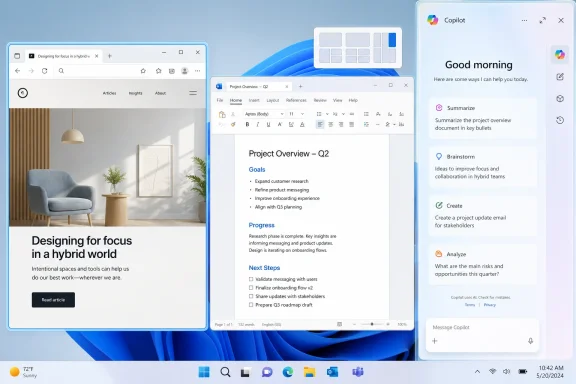
Microsoft is rolling out new Copilot docking options for Windows 11 in late May 2026, letting the AI assistant pin itself to the left or right side of the desktop and resize open apps around it. The feature is optional for now, but its symbolism is not. After weeks of reporting that Microsoft wanted to reduce AI clutter in Windows, Copilot is again being treated less like an app and more like a piece of the operating system’s furniture.
The awkward part is not that Microsoft added another windowing option. Windows has always been an operating system of overlapping panes, snapped layouts, sidebars, flyouts, panels, and taskbar experiments that come and go as Redmond changes its mind. The problem is that Copilot’s new docked mode arrives immediately after Microsoft began signaling that it had heard the complaints about AI sprawl.
That makes this less a story about a sidebar than a story about trust. Users were told, directly and indirectly, that the company understood Windows 11 had become too noisy: too many prompts, too many assistant buttons, too many “helpful” surfaces appearing in places where people simply wanted Notepad, Paint, Snipping Tool, File Explorer, or Office to behave predictably. Then Copilot reappears in a form that literally shifts other apps aside.
The move also revives one of the original objections to Copilot in Windows. The first built-in Windows Copilot experience was not just another app you launched when needed; it was a sidebar that occupied a privileged edge of the desktop. Microsoft later moved toward a more conventional app model, which made Copilot easier to mentally categorize as software rather than infrastructure. Docking it back into the desktop undoes some of that separation.
There is a charitable interpretation. Microsoft may simply be giving users more layout choices, and a docked assistant can be genuinely useful on ultrawide monitors, multi-display setups, and workflows where chat, search, and summarization sit beside a browser or document editor. But Windows is not judged only by what power users can configure. It is judged by what ordinary users are made to notice.
But user perception rarely respects architectural distinctions. If a thing pins to the edge of the desktop, forces other windows to make room, and behaves like a persistent assistant surface, it will be experienced as part of Windows. That is why the distinction between “app” and “system feature” matters less than Microsoft sometimes seems to think.
For years, Microsoft has used Windows as the most valuable distribution channel it owns. Internet Explorer, Edge, OneDrive, Teams, Widgets, Microsoft account nudges, Bing search, and now Copilot have all benefited from the same strategic reality: the desktop is where attention begins. When Microsoft wants a product to become habitual, Windows is the fastest path to habit.
The new docking option continues that tradition. It says Copilot is not merely something you install or ignore. It is something the desktop is prepared to accommodate.
That accommodation is the heart of the backlash. Users do not object only to the existence of AI. Many object to the presumption that AI deserves default proximity to every task. A docked assistant that resizes the workspace communicates priority, even if Microsoft calls it optional.
But Windows users have been trained to distrust that framing. Optional features have a habit of becoming promoted features, and promoted features have a habit of becoming defaults. Even when they do not, they add to the cognitive burden of an operating system that already asks users to decline, dismiss, hide, uninstall, disable, or group-policy their way back to calm.
This is especially true for administrators. In a managed environment, the question is not whether an individual user can avoid a feature today. The question is whether IT can explain, control, audit, suppress, and support the behavior across fleets of PCs with different update rings, editions, policies, hardware, and regional settings.
For home users, the annoyance is simpler. If a PC owner bought a laptop to run browsers, games, schoolwork, tax software, or creative tools, Copilot’s prominence can feel like an advertisement embedded into the workspace. It may be useful. It may also be unwanted. Windows increasingly struggles to distinguish those two states.
The old Microsoft answer was discoverability. Users cannot benefit from a feature they never find. The new Windows problem is that discoverability has become indistinguishable from insistence.
That was a sensible course correction. Windows 11’s biggest wounds have not all come from missing features or technical defects. Many came from a tone problem. Microsoft often behaved as though it knew what users should want better than users did, then appeared surprised when those users resented being steered.
The Copilot rollback narrative fit neatly into that humility arc. Remove AI where it does not clearly help. Reduce unnecessary assistant buttons. Stop placing Copilot into small utilities where the utility’s value is precisely that it is small, fast, and focused. Treat AI as a capability, not a compulsory design language.
The docked sidebar complicates that story. It does not prove Microsoft abandoned K2, and it does not mean every rollback was cosmetic. But it does show the tension inside the company’s Windows strategy: one team is trying to make the operating system quieter, while another imperative keeps making Copilot louder.
That conflict is not accidental. Microsoft has bet heavily on AI across consumer software, enterprise productivity, developer tooling, cloud services, and PC hardware. Windows cannot be exempt from that campaign. The question is whether it can participate without becoming the campaign.
The old contract of Windows apps was simple. You opened programs, placed them where you wanted, and closed them when you were done. Operating system components sat at the edges: Start, taskbar, notification area, Action Center, system tray, settings flyouts. The user’s work occupied the middle.
AI assistants blur that model. They are not exactly apps, because they are meant to accompany many tasks. They are not exactly system controls, because they rely on cloud services, accounts, models, subscriptions, and rapidly changing product behavior. They are not exactly search, chat, automation, help, or accessibility tools, though they borrow from all of them.
Microsoft’s challenge is that Copilot wants to be ambient, but users often want software to be bounded. Docking is an ambient gesture. It says the assistant should be alongside the work, not merely summoned into it. That is powerful when wanted and intrusive when not.
This is why the sidebar debate matters more than its pixels. The design is a negotiation over whether AI is a tool in the toolbox or a standing participant in every computing session.
Windows 11 has tested that bargain. Hardware requirements excluded capable PCs. The redesigned taskbar initially removed long-standing options. Start menu recommendations blurred the line between productivity and promotion. Microsoft account nudges became harder to avoid. Edge and Bing surfaces appeared where many users expected neutral system behavior.
Copilot sits on top of those accumulated grievances. A user annoyed by one AI button might shrug. A user annoyed by years of defaults, dark patterns, telemetry anxiety, account pressure, and promotional tiles will see that same button as one more exhibit in a much larger case.
This is why Microsoft’s “but it is optional” defense lands poorly. Optionality is meaningful only when the user believes the vendor respects the option. If the path to a quieter Windows requires registry edits, Group Policy, enterprise licensing, PowerShell, third-party debloat tools, or constant vigilance after feature updates, then optionality becomes a technicality.
The docked sidebar is not the worst thing Microsoft has done to Windows. It is simply a very visible reminder that the company’s incentives are not always aligned with the user’s desire for a calm desktop.
A docked panel can be especially awkward in regulated environments. Users may not know what data should or should not be pasted into an assistant. They may not understand the difference between a work account experience and a personal Microsoft account experience. They may assume that because something appears in Windows, it has been approved by IT.
That assumption creates risk. Administrators then need policy clarity: Can Copilot be removed? Can it be hidden? Can docking be disabled separately from the app? Does the setting roam? Does it differ between Windows editions? Does an update reintroduce the surface? Does the Copilot key summon the same experience? These are not philosophical objections. They are deployment questions.
Microsoft has become better at providing management controls for some of its AI features, particularly on the enterprise side. But the Windows consumer and prosumer surface remains noisy enough that many administrators will treat every new Copilot affordance as another thing to test before broad deployment.
That is the hidden cost of AI enthusiasm. Every new entry point creates work for someone who did not ask for it.
The later promise to offer more remapping options was a concession to reality. Some users rely on right Ctrl or context-menu behavior. Some workflows are built around decades of keyboard habits. Accessibility, remote desktop work, development tools, and specialized software all suffer when a platform owner treats input conventions as marketing surfaces.
The Copilot sidebar produces the same reaction through layout rather than hardware. It asks the desktop to make room. The key asked the keyboard to make room. In both cases, Microsoft’s AI strategy is spatial: claim a place where attention already flows.
That spatial strategy is why people react so strongly. Software features can be ignored. Spatial claims must be navigated.
The problem is that visibility is not proof of usefulness. Putting an assistant beside every task does not make it valuable in every task. It can just as easily make the assistant feel needy, like a product still trying to justify its budget.
Windows users have seen this before. Widgets promised glanceable information but often became a feed surface. Search promised local discovery but too often pushed web results. Edge integration promised continuity but frequently looked like browser promotion. Microsoft’s product instincts are sometimes strongest when building useful infrastructure, and weakest when deciding how aggressively to surface it.
The right question is not whether Copilot should be in Windows. It is whether Copilot appears at the moment of need, in the shape best suited to that need, with user consent that persists across updates. A docked sidebar may satisfy that standard for some users. It will violate it for others.
That is why Microsoft needs restraint more than another layout mode.
Real desktops are less elegant. People work on 13-inch laptop screens, remote sessions, legacy apps, virtual desktops, multi-window research piles, full-screen IDEs, games, spreadsheets, accessibility tools, and line-of-business applications designed in another decade. Screen real estate is not abstract. It is contested territory.
When Copilot pushes apps aside, Microsoft is making a bet that the assistant deserves the space more than whatever was already there. Even if that bet is user-triggered, the design language carries a hierarchy. The assistant is not merely another rectangle. It is a rectangle with the power to reorganize the rest.
That may be acceptable if Copilot becomes indispensable. But indispensability cannot be declared through UI. It has to be earned through reliability, speed, privacy clarity, and a consistent sense that the tool is helping rather than hovering.
Microsoft’s current problem is that its AI surfaces often arrive before that trust has been earned.
There are practical reasons for that. AI products change quickly. Models, interfaces, safety layers, authentication flows, and feature sets evolve faster than the Windows shell. A web-based Copilot lets Microsoft update the assistant without waiting for full operating system releases.
But Windows users are sensitive to web wrappers, especially when they consume more memory, feel less integrated, or behave inconsistently beside native apps. A docked web-based assistant can therefore feel like the worst of both worlds: privileged enough to reshape the desktop, but not native enough to feel like a disciplined system component.
This is a broader Windows tension. Microsoft wants the operating system to be a modern service layer tied to cloud intelligence. Many users still want it to be a fast, local, stable environment that launches their software and gets out of the way. Copilot is where those visions collide most visibly.
The company can bridge that gap, but not through placement alone. It needs the AI experience to feel technically excellent, administratively controllable, and respectful of local context.
The objection is not necessarily to AI. It is to presumption.
Users object when AI appears in places where it was not requested. They object when removal is unclear. They object when a feature feels like a service funnel. They object when an operating system designed for general-purpose computing starts behaving as though one vendor’s assistant is a first-class citizen and everything else is a tenant.
That distinction matters because it points to a solution. Microsoft does not need to abandon Copilot in Windows. It needs to make Copilot feel invited. That means clear controls, durable choices, quiet defaults, transparent account boundaries, and no sense that every update is another attempt to re-win attention that users already withheld.
A docked sidebar could be part of that future if it is genuinely user-owned. It becomes a problem when it looks like the old visibility campaign returning through a side door.
Microsoft’s difference is Windows’ installed base and enterprise centrality. A Windows design choice affects schools, governments, hospitals, factories, small businesses, gamers, developers, home offices, and industrial workflows. The same Copilot icon means different things in each setting.
That breadth makes restraint more important, not less. Consumer platforms can move fast and absorb backlash as churn. Windows has to carry decades of expectations. It is both a modern product and a compatibility promise.
If Microsoft treats Windows primarily as an AI distribution mechanism, it risks weakening the neutrality that made Windows valuable. If it treats AI as an optional capability inside a user-controlled platform, it has a better chance of making Copilot useful without making Windows feel captured by it.
The docked sidebar is a small feature. But in platform politics, small features can reveal large assumptions.
Still, Windows history teaches that defaults, affordances, and placement matter. The first version of a feature often tells us less than the direction of travel. Copilot’s direction of travel still points toward greater ambient presence, even as Microsoft says it is trimming unnecessary AI from places where it does not belong.
That contradiction will define the next phase of Windows 11. Microsoft wants credit for listening, but it also wants the desktop to prepare for an AI-first future. Users want improvements, but they also want proof that “AI-first” does not mean “user-second.”
The practical outcome will depend on implementation. If docking is discoverable but not nagging, persistent but not defaulted, controllable by policy, and removable where unwanted, the controversy may fade. If it becomes another promoted surface that reappears after updates or resists clean removal, it will reinforce every suspicion Windows users already have.
Microsoft has enough goodwill problems with Windows that it should not spend trust casually.
 Microsoft’s AI Retreat Now Has an Asterisk
The awkward part is not that Microsoft added another windowing option. Windows has always been an operating system of overlapping panes, snapped layouts, sidebars, flyouts, panels, and taskbar experiments that come and go as Redmond changes its mind. The problem is that Copilot’s new docked mode arrives immediately after Microsoft began signaling that it had heard the complaints about AI sprawl.That makes this less a story about a sidebar than a story about trust. Users were told, directly and indirectly, that the company understood Windows 11 had become too noisy: too many prompts, too many assistant buttons, too many “helpful” surfaces appearing in places where people simply wanted Notepad, Paint, Snipping Tool, File Explorer, or Office to behave predictably. Then Copilot reappears in a form that literally shifts other apps aside.
The move also revives one of the original objections to Copilot in Windows. The first built-in Windows Copilot experience was not just another app you launched when needed; it was a sidebar that occupied a privileged edge of the desktop. Microsoft later moved toward a more conventional app model, which made Copilot easier to mentally categorize as software rather than infrastructure. Docking it back into the desktop undoes some of that separation.
There is a charitable interpretation. Microsoft may simply be giving users more layout choices, and a docked assistant can be genuinely useful on ultrawide monitors, multi-display setups, and workflows where chat, search, and summarization sit beside a browser or document editor. But Windows is not judged only by what power users can configure. It is judged by what ordinary users are made to notice.
The Sidebar Is a Product Strategy Wearing a Window Frame
A docked Copilot panel is not technically the same thing as the old shell-integrated Copilot sidebar. The current implementation appears to sit closer to the modern Copilot app experience, with window controls and a menu for layout choices. It can float, dock left, dock right, or remain in a more familiar app-style window.But user perception rarely respects architectural distinctions. If a thing pins to the edge of the desktop, forces other windows to make room, and behaves like a persistent assistant surface, it will be experienced as part of Windows. That is why the distinction between “app” and “system feature” matters less than Microsoft sometimes seems to think.
For years, Microsoft has used Windows as the most valuable distribution channel it owns. Internet Explorer, Edge, OneDrive, Teams, Widgets, Microsoft account nudges, Bing search, and now Copilot have all benefited from the same strategic reality: the desktop is where attention begins. When Microsoft wants a product to become habitual, Windows is the fastest path to habit.
The new docking option continues that tradition. It says Copilot is not merely something you install or ignore. It is something the desktop is prepared to accommodate.
That accommodation is the heart of the backlash. Users do not object only to the existence of AI. Many object to the presumption that AI deserves default proximity to every task. A docked assistant that resizes the workspace communicates priority, even if Microsoft calls it optional.
Optional Features Still Change the Temperature of Windows
Microsoft’s defenders have an obvious point: no one is being forced to dock Copilot. The floating quick view remains the primary experience for many users, and the new docking modes appear to be part of a gradual rollout rather than a universal mandate. In strict product terms, more placement options can be framed as user choice.But Windows users have been trained to distrust that framing. Optional features have a habit of becoming promoted features, and promoted features have a habit of becoming defaults. Even when they do not, they add to the cognitive burden of an operating system that already asks users to decline, dismiss, hide, uninstall, disable, or group-policy their way back to calm.
This is especially true for administrators. In a managed environment, the question is not whether an individual user can avoid a feature today. The question is whether IT can explain, control, audit, suppress, and support the behavior across fleets of PCs with different update rings, editions, policies, hardware, and regional settings.
For home users, the annoyance is simpler. If a PC owner bought a laptop to run browsers, games, schoolwork, tax software, or creative tools, Copilot’s prominence can feel like an advertisement embedded into the workspace. It may be useful. It may also be unwanted. Windows increasingly struggles to distinguish those two states.
The old Microsoft answer was discoverability. Users cannot benefit from a feature they never find. The new Windows problem is that discoverability has become indistinguishable from insistence.
Windows K2 Was Supposed to Be the Humility Moment
The broader backdrop is Microsoft’s reported Windows K2 effort, a behind-the-scenes push to address user frustration with Windows 11’s performance, reliability, bloat, and overbearing AI visibility. Reporting around K2 has described a company trying to regain trust by improving the parts of Windows people touch every day: File Explorer responsiveness, update control, taskbar flexibility, widgets, and the proliferation of Copilot entry points.That was a sensible course correction. Windows 11’s biggest wounds have not all come from missing features or technical defects. Many came from a tone problem. Microsoft often behaved as though it knew what users should want better than users did, then appeared surprised when those users resented being steered.
The Copilot rollback narrative fit neatly into that humility arc. Remove AI where it does not clearly help. Reduce unnecessary assistant buttons. Stop placing Copilot into small utilities where the utility’s value is precisely that it is small, fast, and focused. Treat AI as a capability, not a compulsory design language.
The docked sidebar complicates that story. It does not prove Microsoft abandoned K2, and it does not mean every rollback was cosmetic. But it does show the tension inside the company’s Windows strategy: one team is trying to make the operating system quieter, while another imperative keeps making Copilot louder.
That conflict is not accidental. Microsoft has bet heavily on AI across consumer software, enterprise productivity, developer tooling, cloud services, and PC hardware. Windows cannot be exempt from that campaign. The question is whether it can participate without becoming the campaign.
The Copilot App Keeps Changing Because Microsoft Has Not Settled the Contract
Copilot on Windows has had an unusually restless design life. It has been a sidebar, a taskbar presence, a web-powered assistant, a more app-like surface, a keyboard key, and now a dockable panel with echoes of its earlier self. That churn suggests Microsoft is still searching for the right social contract between AI and the desktop.The old contract of Windows apps was simple. You opened programs, placed them where you wanted, and closed them when you were done. Operating system components sat at the edges: Start, taskbar, notification area, Action Center, system tray, settings flyouts. The user’s work occupied the middle.
AI assistants blur that model. They are not exactly apps, because they are meant to accompany many tasks. They are not exactly system controls, because they rely on cloud services, accounts, models, subscriptions, and rapidly changing product behavior. They are not exactly search, chat, automation, help, or accessibility tools, though they borrow from all of them.
Microsoft’s challenge is that Copilot wants to be ambient, but users often want software to be bounded. Docking is an ambient gesture. It says the assistant should be alongside the work, not merely summoned into it. That is powerful when wanted and intrusive when not.
This is why the sidebar debate matters more than its pixels. The design is a negotiation over whether AI is a tool in the toolbox or a standing participant in every computing session.
The Old Windows Bargain Is Under Strain
Windows earned its dominance in part by being a general-purpose platform. It was messy, backwards-compatible, endlessly configurable, occasionally maddening, and valuable precisely because it ran what users needed. The operating system could be opinionated, but it usually left room for escape.Windows 11 has tested that bargain. Hardware requirements excluded capable PCs. The redesigned taskbar initially removed long-standing options. Start menu recommendations blurred the line between productivity and promotion. Microsoft account nudges became harder to avoid. Edge and Bing surfaces appeared where many users expected neutral system behavior.
Copilot sits on top of those accumulated grievances. A user annoyed by one AI button might shrug. A user annoyed by years of defaults, dark patterns, telemetry anxiety, account pressure, and promotional tiles will see that same button as one more exhibit in a much larger case.
This is why Microsoft’s “but it is optional” defense lands poorly. Optionality is meaningful only when the user believes the vendor respects the option. If the path to a quieter Windows requires registry edits, Group Policy, enterprise licensing, PowerShell, third-party debloat tools, or constant vigilance after feature updates, then optionality becomes a technicality.
The docked sidebar is not the worst thing Microsoft has done to Windows. It is simply a very visible reminder that the company’s incentives are not always aligned with the user’s desire for a calm desktop.
Enterprise IT Will Read This as Another Control Surface to Police
For enterprises, Copilot’s visibility is not just a taste issue. It is a governance issue. An AI assistant that sits beside work raises questions about data handling, licensing, tenant boundaries, compliance, user training, support tickets, and whether consumer-facing Copilot behavior differs from managed Microsoft 365 Copilot deployments.A docked panel can be especially awkward in regulated environments. Users may not know what data should or should not be pasted into an assistant. They may not understand the difference between a work account experience and a personal Microsoft account experience. They may assume that because something appears in Windows, it has been approved by IT.
That assumption creates risk. Administrators then need policy clarity: Can Copilot be removed? Can it be hidden? Can docking be disabled separately from the app? Does the setting roam? Does it differ between Windows editions? Does an update reintroduce the surface? Does the Copilot key summon the same experience? These are not philosophical objections. They are deployment questions.
Microsoft has become better at providing management controls for some of its AI features, particularly on the enterprise side. But the Windows consumer and prosumer surface remains noisy enough that many administrators will treat every new Copilot affordance as another thing to test before broad deployment.
That is the hidden cost of AI enthusiasm. Every new entry point creates work for someone who did not ask for it.
The Copilot Key Was the Hardware Version of the Same Argument
The controversy over the dedicated Copilot key on newer PCs belongs in the same story. Microsoft and its hardware partners introduced a physical key for invoking the assistant, displacing long-standing keyboard real estate on some devices. For Microsoft, this was a clear signal that the AI PC era had arrived. For many users, it was a reminder that the company was willing to change muscle memory to promote a service.The later promise to offer more remapping options was a concession to reality. Some users rely on right Ctrl or context-menu behavior. Some workflows are built around decades of keyboard habits. Accessibility, remote desktop work, development tools, and specialized software all suffer when a platform owner treats input conventions as marketing surfaces.
The Copilot sidebar produces the same reaction through layout rather than hardware. It asks the desktop to make room. The key asked the keyboard to make room. In both cases, Microsoft’s AI strategy is spatial: claim a place where attention already flows.
That spatial strategy is why people react so strongly. Software features can be ignored. Spatial claims must be navigated.
AI Visibility Is Not the Same as AI Value
Microsoft’s strongest argument for Copilot is that many users will not understand its value until it is close at hand. The company believes assistants can summarize, draft, explain, search, automate, troubleshoot, and bridge gaps between applications. If that vision works, Copilot could become a meaningful productivity layer rather than a novelty chatbot.The problem is that visibility is not proof of usefulness. Putting an assistant beside every task does not make it valuable in every task. It can just as easily make the assistant feel needy, like a product still trying to justify its budget.
Windows users have seen this before. Widgets promised glanceable information but often became a feed surface. Search promised local discovery but too often pushed web results. Edge integration promised continuity but frequently looked like browser promotion. Microsoft’s product instincts are sometimes strongest when building useful infrastructure, and weakest when deciding how aggressively to surface it.
The right question is not whether Copilot should be in Windows. It is whether Copilot appears at the moment of need, in the shape best suited to that need, with user consent that persists across updates. A docked sidebar may satisfy that standard for some users. It will violate it for others.
That is why Microsoft needs restraint more than another layout mode.
The Return of the Sidebar Shows Microsoft Is Still Designing for the Demo
A docked AI sidebar demos beautifully. Put a document on one side, Copilot on the other, ask for a summary, rewrite a paragraph, compare a webpage, generate a checklist, and the future of computing looks obvious. The assistant is present, contextual, and visually integrated into the workspace.Real desktops are less elegant. People work on 13-inch laptop screens, remote sessions, legacy apps, virtual desktops, multi-window research piles, full-screen IDEs, games, spreadsheets, accessibility tools, and line-of-business applications designed in another decade. Screen real estate is not abstract. It is contested territory.
When Copilot pushes apps aside, Microsoft is making a bet that the assistant deserves the space more than whatever was already there. Even if that bet is user-triggered, the design language carries a hierarchy. The assistant is not merely another rectangle. It is a rectangle with the power to reorganize the rest.
That may be acceptable if Copilot becomes indispensable. But indispensability cannot be declared through UI. It has to be earned through reliability, speed, privacy clarity, and a consistent sense that the tool is helping rather than hovering.
Microsoft’s current problem is that its AI surfaces often arrive before that trust has been earned.
The Web Wrapper Question Keeps Haunting Native Windows
Another irritant is the perception that Copilot on Windows is increasingly a web experience wearing native clothes. Reports have described the modern Copilot app as Edge-based or web-powered, which aligns with Microsoft’s broader strategy of delivering fast-changing AI features through web technologies rather than slow-moving native Windows components.There are practical reasons for that. AI products change quickly. Models, interfaces, safety layers, authentication flows, and feature sets evolve faster than the Windows shell. A web-based Copilot lets Microsoft update the assistant without waiting for full operating system releases.
But Windows users are sensitive to web wrappers, especially when they consume more memory, feel less integrated, or behave inconsistently beside native apps. A docked web-based assistant can therefore feel like the worst of both worlds: privileged enough to reshape the desktop, but not native enough to feel like a disciplined system component.
This is a broader Windows tension. Microsoft wants the operating system to be a modern service layer tied to cloud intelligence. Many users still want it to be a fast, local, stable environment that launches their software and gets out of the way. Copilot is where those visions collide most visibly.
The company can bridge that gap, but not through placement alone. It needs the AI experience to feel technically excellent, administratively controllable, and respectful of local context.
The Backlash Is Not Anti-AI So Much as Anti-Presumption
It is tempting to frame user anger as reflexive anti-AI sentiment. That is too easy. Many Windows enthusiasts use AI tools daily. Developers use code assistants. Writers use summarizers. Administrators use scripts and chat-based troubleshooting. Students, researchers, and office workers experiment with these systems because they can be genuinely useful.The objection is not necessarily to AI. It is to presumption.
Users object when AI appears in places where it was not requested. They object when removal is unclear. They object when a feature feels like a service funnel. They object when an operating system designed for general-purpose computing starts behaving as though one vendor’s assistant is a first-class citizen and everything else is a tenant.
That distinction matters because it points to a solution. Microsoft does not need to abandon Copilot in Windows. It needs to make Copilot feel invited. That means clear controls, durable choices, quiet defaults, transparent account boundaries, and no sense that every update is another attempt to re-win attention that users already withheld.
A docked sidebar could be part of that future if it is genuinely user-owned. It becomes a problem when it looks like the old visibility campaign returning through a side door.
Microsoft’s Competitors Are Watching the Desktop Politics
Apple, Google, and Linux distributions face their own AI integration questions. Apple has leaned into system-level intelligence while emphasizing privacy and context. Google is weaving Gemini into Android, ChromeOS, Workspace, and search. Linux desktops, fragmented by nature, are less likely to impose one assistant globally, but distributions and desktop environments will not be immune to AI pressure forever.Microsoft’s difference is Windows’ installed base and enterprise centrality. A Windows design choice affects schools, governments, hospitals, factories, small businesses, gamers, developers, home offices, and industrial workflows. The same Copilot icon means different things in each setting.
That breadth makes restraint more important, not less. Consumer platforms can move fast and absorb backlash as churn. Windows has to carry decades of expectations. It is both a modern product and a compatibility promise.
If Microsoft treats Windows primarily as an AI distribution mechanism, it risks weakening the neutrality that made Windows valuable. If it treats AI as an optional capability inside a user-controlled platform, it has a better chance of making Copilot useful without making Windows feel captured by it.
The docked sidebar is a small feature. But in platform politics, small features can reveal large assumptions.
The Sidebar Is Small, but the Signal Is Loud
Microsoft’s latest Copilot move should not be exaggerated into a catastrophe. A docking menu is not Recall. It is not a forced cloud backup. It is not an unremovable system process with no policy controls. For many users, it may remain an ignored option tucked inside a title-bar menu.Still, Windows history teaches that defaults, affordances, and placement matter. The first version of a feature often tells us less than the direction of travel. Copilot’s direction of travel still points toward greater ambient presence, even as Microsoft says it is trimming unnecessary AI from places where it does not belong.
That contradiction will define the next phase of Windows 11. Microsoft wants credit for listening, but it also wants the desktop to prepare for an AI-first future. Users want improvements, but they also want proof that “AI-first” does not mean “user-second.”
The practical outcome will depend on implementation. If docking is discoverable but not nagging, persistent but not defaulted, controllable by policy, and removable where unwanted, the controversy may fade. If it becomes another promoted surface that reappears after updates or resists clean removal, it will reinforce every suspicion Windows users already have.
Microsoft has enough goodwill problems with Windows that it should not spend trust casually.
The Copilot Bargain Windows Users Will Actually Accept
The most concrete lessons from this episode are not complicated. They are the same lessons Microsoft keeps being forced to relearn every few years, usually after a wave of forum threads, admin complaints, and angry screenshots.- Copilot’s new docked mode lets the assistant pin to the left or right side of the Windows 11 desktop and resize other apps around it.
- The feature is still rolling out, and the floating Copilot view remains the less intrusive default experience for many users.
- The timing is politically awkward because Microsoft has recently signaled that it wants to reduce unnecessary Copilot visibility and Windows bloat.
- The backlash is less about a single sidebar than about whether Windows is becoming a delivery vehicle for Microsoft’s AI strategy.
- Enterprise administrators will care most about policy controls, account boundaries, uninstall behavior, and whether updates preserve user and IT choices.
- Microsoft can make Copilot acceptable only if the assistant is useful, quiet when unwanted, and genuinely optional across consumer and managed PCs.
References
- Primary source: TechRadar
Published: Tue, 26 May 2026 11:24:13 GMT
- Related coverage: windowscentral.com
- Related coverage: windowslatest.com

Microsoft's new Copilot turns into a Windows 11 sidebar that pushes your apps aside to make room
Microsoft is testing a docked Copilot sidebar in Windows 11 that pins the AI to the right edge of your screen, pushing the desktop aside. www.windowslatest.com
- Related coverage: techspot.com
- Related coverage: tweaktown.com

Microsoft's Copilot returns to ruin your Windows 11 experience, this time as a sidebar
One step forward, two steps back. After many updates that reduced Copilot's visibility, Microsoft is rolling out a new update that makes it a sidebar. www.tweaktown.com
- Related coverage: hartware.de
- Related coverage: arstechnica.com

Five years later, Windows 11 brings back much-missed taskbar options (and more)
Microsoft is also testing a smaller taskbar and more customizable Start menu. arstechnica.com
- Related coverage: techcrunch.com

Microsoft rolls back some of its Copilot AI bloat on Windows | TechCrunch
The company is reducing Copilot entry points on Windows, starting with Photos, Widgets, Notepad, and other apps. techcrunch.com
- Related coverage: windowsforum.com

Windows 11 May 2026 Test: Docked Copilot Sidebar Resizes Apps
Microsoft is testing a docked Copilot sidebar for Windows 11 in May 2026, according to Windows Latest, giving the assistant options to pin itself to the left or right edge of the desktop while open windows resize around it. The change is small in interface terms but large in operating-system... windowsforum.com
- Related coverage: pcworld.com

Microsoft's secret 'Windows K2' project aims to fix what users hate most
Windows K2 is a behind-the-scenes initiative to fix performance, reliability, and AI bloat in Windows 11 by 2027. www.pcworld.com
- Official source: blogs.windows.com
Copilot App on Windows: Opening web links alongside your conversations begins rolling out to Windows Insiders
Hello Windows Insiders, In today's update, we are introducing a new way to get things done in the Cop blogs.windows.com
- Related coverage: slashgear.com

Microsoft Is Already Pulling Back On Its Windows Copilot AI Push - SlashGear
A Windows 11 Insider build from April has removed Copilot branding from apps such as Notepad, although the AI features themselves are still present. www.slashgear.com
- Related coverage: tomsguide.com
- Related coverage: itpro.com
Microsoft is rolling back 'unnecessary' Copilot features on Windows
The move follows a recent rollback of planned Copilot features on the operating system www.itpro.com
- Official source: microsoft.com
