

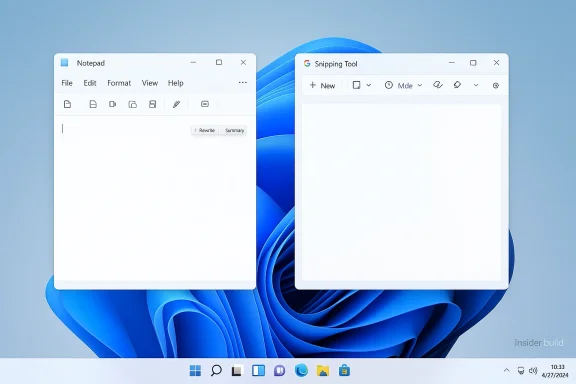
Microsoft is quietly rethinking how much Copilot should sit in users’ faces inside Windows 11, and that shift matters more than a cosmetic button swap. In newer Windows Insider builds, Microsoft has started removing the Copilot entry point from apps such as Notepad and Snipping Tool while keeping the underlying AI features in place, signaling a narrower, more selective strategy for the assistant. The move comes after months of criticism that Copilot was being pushed too aggressively across the operating system, plus fresh backlash over Microsoft’s own terms language describing Copilot as being for “entertainment purposes only.”
The easiest way to understand this change is to separate branding, entry points, and capability. Microsoft is not ripping AI out of Notepad or Windows 11; instead, it is reducing the number of places where users are invited to click a conspicuous Copilot badge. That distinction matters because it reveals a company trying to keep the AI features while softening the sense that Windows itself has become a giant AI showroom.
This is a notable pivot from the last two years of Windows messaging. Microsoft spent much of the Copilot era emphasizing presence, ubiquity, and discoverability, with AI hooks appearing in Notepad, Paint, Photos, Snipping Tool, Widgets, File Explorer, the taskbar, and even search-adjacent experiences. The strategy made sense from a product-awareness standpoint, but it also created the impression that Windows was being reorganized around AI before users had asked for that change.
Now the company appears to be conceding that more Copilot is not automatically better Copilot. Microsoft’s Windows leadership has already said it wants to be “more intentional” about where Copilot appears and is reducing “unnecessary Copilot entry points,” starting with apps like Snipping Tool, Photos, Widgets, and Notepad. That wording suggests a broader product cleanup rather than a one-off adjustment.
The timing is also revealing. Public sentiment around AI is maturing, and younger users in particular are becoming more skeptical even while continuing to use AI tools. Gallup’s latest Gen Z research, published this week, shows adoption has remained steady but enthusiasm has cooled, with more young users saying they are less excited and more wary of AI’s effects. Microsoft is unlikely to be making design decisions based on one survey, but the broader backdrop helps explain why it may want to dial back some of the visual noise.
That second vision accelerated sharply with the rise of Copilot branding across Microsoft’s software stack. Notepad gained AI-powered Write, Rewrite, and Summarize features; Paint added generative tools; Photos picked up AI editing hooks; and Snipping Tool was refreshed with “perfect screenshot” and text extraction work that sat alongside Copilot messaging. The problem was never that these capabilities existed. It was that Microsoft often paired useful tools with branding that made them feel unavoidable rather than optional.
There is also an important historical lesson here about platform design. When companies stuff too many new ideas into a core product all at once, the market often pushes back not against the ideas themselves but against the clutter. Windows users have repeatedly shown that they will accept change when it feels practical and earned, but they become resistant when a product starts to look like a promotional surface for the vendor’s latest strategy. That tension has hovered over Microsoft’s AI rollout from the beginning. The features can be useful; the framing can still be annoying.
Microsoft has already taken partial corrective steps before this newest retreat. In early 2025, it highlighted more deliberate AI integrations in Windows 11, including “Ask Copilot” style actions and other AI-driven shortcuts, but the messaging increasingly emphasized user flow, not just promotion. The current rollback feels like the next stage of that evolution: keep the value, reduce the spectacle.
That matters because Notepad is not a natural place for a branded AI assistant in the first place. Notepad works best when it behaves like a quick, low-friction canvas. By hiding the assistant branding while preserving the feature set, Microsoft is effectively acknowledging that users may want AI help without being reminded of AI every five seconds. That is a meaningful design concession.
That distinction helps explain why the company’s language has changed. Microsoft’s own recent public messaging emphasizes “useful and well-crafted” integrations rather than blanket placements. In other words, the bar is no longer “can we add Copilot here?” but “should Copilot be here at all?”
The practical takeaway for users is simple:
Microsoft now seems to understand that a screenshot tool does not need to behave like an AI launchpad. Likewise, a photo viewer does not need a Copilot badge to justify image enhancement or editing features. By removing the extra AI entry points while preserving the deeper tools, Microsoft can preserve utility without forcing the assistant’s identity into every corner of Windows.
For power users, the issue is not ideological. It is workflow cost. Every additional assistant prompt, every extra ribbon item, every branded shortcut is another decision point. If the feature is genuinely useful, it should be reachable when needed and quiet when not. Microsoft’s new direction suggests it may finally be accepting that principle.
Another reason is likely strategic realism. AI remains a major corporate priority, but Microsoft needs to distinguish between areas where AI genuinely improves work and areas where it simply advertises Microsoft’s AI ambitions. The former helps adoption. The latter risks backlash, especially when users feel they are being nudged into features they did not request.
This is especially risky in Windows, where the operating system must serve many different audiences at once. An enterprise admin may want controlled, policy-driven AI. A casual home user may just want a plain text editor. A student may want occasional help rewriting a paragraph but not a permanent assistant in the foreground. Microsoft has to build for all three without overcommitting to any one usage model.
The company’s revised posture suggests it is learning that not every feature needs to be front-and-center to be valuable. Sometimes the best AI is the one that quietly appears when asked for and disappears when the task is done. That is a more mature design philosophy than the one Windows users saw at the height of the Copilot push.
That controversy matters because it undermines Microsoft’s credibility when it says Copilot is serious, useful, and work-relevant. If one part of the company’s messaging sounds like a legal disclaimer and another part sounds like a productivity pitch, users are left to infer that Microsoft itself is not fully confident in the story it is telling. Mixed signals are poison for trust.
That tension likely accelerated the decision to dial back the most aggressive Windows placements. The company cannot simultaneously ask users to treat Copilot as an indispensable work tool and tolerate a public narrative that frames it as a novelty. If anything, the button removals suggest Microsoft is trying to make the branding more defensible by making it less omnipresent.
That is important because consumer trust in platform changes is often built on restraint. Most people will accept an optional feature if it arrives quietly and solves a real problem. They are far less forgiving when the feature feels shoved at them. Microsoft’s Copilot redesign appears to be an attempt to move from coercive discovery to voluntary usage.
The same logic applies to image and screenshot tools. Consumers usually open those apps to complete a narrow task. If AI appears as an enhancement instead of an interruption, it feels helpful. If it appears as a forced brand experience, it can feel like Microsoft is borrowing attention that should belong to the work itself.
At the same time, enterprises are the audience most likely to care about the product’s legal and governance posture. If Microsoft wants Copilot adoption in business environments, it has to keep the story coherent: the assistant must be useful, auditable, and policy-aligned, not merely present. Reducing casual consumer branding could make that story easier to tell.
That said, enterprises will still be cautious. A company can like the idea of Copilot in theory and still dislike the prospect of opaque AI behavior, account requirements, or shifts in the Windows UI that complicate training and support. The less Microsoft imposes the assistant by default, the easier it becomes for organizations to adopt it on their own schedule.
But the market is entering a more skeptical phase. Early enthusiasm for AI was built on novelty, yet the next phase will be judged on usefulness, trust, and design discipline. Microsoft’s Copilot rollback could therefore be read as a signal that the company recognizes a basic truth: ubiquity is not a strategy if users start tuning out the product.
That is a smart move, because Windows itself may not be the best billboard for every Copilot feature. Some functions belong in productivity apps, some in browser workflows, and some in hardware-specific experiences like Copilot+ PCs. A more selective strategy could help Microsoft avoid overexposing the brand in contexts where the value proposition is weak.
The change also creates room for a cleaner product narrative across Windows, Microsoft 365, and Edge. Instead of trying to make every Microsoft surface look like a chatbot demo, the company can tailor AI to the task and the audience. That kind of discipline could improve trust, adoption, and product clarity all at once.
There is also a branding risk. Copilot has been one of Microsoft’s major consumer AI labels, and too much retreat could make the product seem uncertain or reactive. The company needs to demonstrate that it is refining placement, not losing conviction. Confidence matters as much as restraint.
The bigger question is whether users reward restraint. Microsoft appears to be betting that a less aggressive Windows will create better long-term AI adoption than an always-on assistant presence. That seems plausible, especially as Gen Z and other user groups become more skeptical about AI hype even while continuing to use AI tools in daily life.
What to watch next:
Source: Notebookcheck Microsoft begins pulling back Copilot on Windows 11
 Overview
The easiest way to understand this change is to separate branding, entry points, and capability. Microsoft is not ripping AI out of Notepad or Windows 11; instead, it is reducing the number of places where users are invited to click a conspicuous Copilot badge. That distinction matters because it reveals a company trying to keep the AI features while softening the sense that Windows itself has become a giant AI showroom.This is a notable pivot from the last two years of Windows messaging. Microsoft spent much of the Copilot era emphasizing presence, ubiquity, and discoverability, with AI hooks appearing in Notepad, Paint, Photos, Snipping Tool, Widgets, File Explorer, the taskbar, and even search-adjacent experiences. The strategy made sense from a product-awareness standpoint, but it also created the impression that Windows was being reorganized around AI before users had asked for that change.
Now the company appears to be conceding that more Copilot is not automatically better Copilot. Microsoft’s Windows leadership has already said it wants to be “more intentional” about where Copilot appears and is reducing “unnecessary Copilot entry points,” starting with apps like Snipping Tool, Photos, Widgets, and Notepad. That wording suggests a broader product cleanup rather than a one-off adjustment.
The timing is also revealing. Public sentiment around AI is maturing, and younger users in particular are becoming more skeptical even while continuing to use AI tools. Gallup’s latest Gen Z research, published this week, shows adoption has remained steady but enthusiasm has cooled, with more young users saying they are less excited and more wary of AI’s effects. Microsoft is unlikely to be making design decisions based on one survey, but the broader backdrop helps explain why it may want to dial back some of the visual noise.
Background
Windows 11 has been in a long-running identity experiment. On one side is the traditional desktop operating system focused on productivity, stability, and familiar app workflows. On the other is Microsoft’s newer vision of Windows as an AI-forward platform where the assistant is woven into everyday tasks, from drafting text to editing photos and summarizing screenshots.That second vision accelerated sharply with the rise of Copilot branding across Microsoft’s software stack. Notepad gained AI-powered Write, Rewrite, and Summarize features; Paint added generative tools; Photos picked up AI editing hooks; and Snipping Tool was refreshed with “perfect screenshot” and text extraction work that sat alongside Copilot messaging. The problem was never that these capabilities existed. It was that Microsoft often paired useful tools with branding that made them feel unavoidable rather than optional.
There is also an important historical lesson here about platform design. When companies stuff too many new ideas into a core product all at once, the market often pushes back not against the ideas themselves but against the clutter. Windows users have repeatedly shown that they will accept change when it feels practical and earned, but they become resistant when a product starts to look like a promotional surface for the vendor’s latest strategy. That tension has hovered over Microsoft’s AI rollout from the beginning. The features can be useful; the framing can still be annoying.
Microsoft has already taken partial corrective steps before this newest retreat. In early 2025, it highlighted more deliberate AI integrations in Windows 11, including “Ask Copilot” style actions and other AI-driven shortcuts, but the messaging increasingly emphasized user flow, not just promotion. The current rollback feels like the next stage of that evolution: keep the value, reduce the spectacle.
What Changed in Notepad
The Notepad change is the clearest signal because it lands in one of Windows’ oldest and simplest apps. In newer Insider builds, the Copilot button is being removed from the toolbar, but the AI text features remain. Users can still draft, rewrite, and summarize text; they just no longer see Copilot presented as a loud, standalone destination every time they open the app.That matters because Notepad is not a natural place for a branded AI assistant in the first place. Notepad works best when it behaves like a quick, low-friction canvas. By hiding the assistant branding while preserving the feature set, Microsoft is effectively acknowledging that users may want AI help without being reminded of AI every five seconds. That is a meaningful design concession.
Brand reduction versus feature removal
This is not a subtraction of capability. It is a subtraction of ceremony. Microsoft wants the AI functions to remain available for people who know they want them, but it no longer seems convinced that the average Notepad user benefits from a giant Copilot funnel sitting in the toolbar.That distinction helps explain why the company’s language has changed. Microsoft’s own recent public messaging emphasizes “useful and well-crafted” integrations rather than blanket placements. In other words, the bar is no longer “can we add Copilot here?” but “should Copilot be here at all?”
The practical takeaway for users is simple:
- The AI tools are still there.
- The Copilot branding is less prominent.
- The app should feel a little less crowded.
- Microsoft is testing whether restraint is a better growth strategy than saturation.
Why Snipping Tool and Photos Matter Too
Notepad is important symbolically, but Snipping Tool and Photos may be even more instructive strategically. Those are utility apps where Microsoft had been trying to attach AI more aggressively, turning routine tasks like screenshots and image review into entry points for Copilot experiences. That made sense inside Redmond’s product narrative, but to many users it looked like a marketing overlay on top of basic workflow tools.Microsoft now seems to understand that a screenshot tool does not need to behave like an AI launchpad. Likewise, a photo viewer does not need a Copilot badge to justify image enhancement or editing features. By removing the extra AI entry points while preserving the deeper tools, Microsoft can preserve utility without forcing the assistant’s identity into every corner of Windows.
The UX problem Microsoft created
There is an old product-management rule at work here: if you add enough buttons, the interface starts to feel like it belongs to the platform vendor, not the user. That was the danger Microsoft ran into with Copilot. Even when the features were useful, the persistent branding made Windows feel more like a sales surface than a desktop operating system. That perception is hard to shake once it takes hold.For power users, the issue is not ideological. It is workflow cost. Every additional assistant prompt, every extra ribbon item, every branded shortcut is another decision point. If the feature is genuinely useful, it should be reachable when needed and quiet when not. Microsoft’s new direction suggests it may finally be accepting that principle.
Why Microsoft Is Pulling Back
One reason for the retreat is obvious: users complained. Windows enthusiasts have repeatedly signaled that they like tools, not clutter, and Copilot was starting to feel like clutter in places that did not justify it. Microsoft can ignore scattered grumbling for a while, but once the complaint becomes a pattern, the product has to adjust.Another reason is likely strategic realism. AI remains a major corporate priority, but Microsoft needs to distinguish between areas where AI genuinely improves work and areas where it simply advertises Microsoft’s AI ambitions. The former helps adoption. The latter risks backlash, especially when users feel they are being nudged into features they did not request.
The “too much Copilot” problem
Microsoft’s challenge is that Copilot has become both a product and a slogan. Once branding does that much work, it begins to get in the way of itself. If every app has a Copilot badge, the badge stops meaning anything. It becomes visual noise.This is especially risky in Windows, where the operating system must serve many different audiences at once. An enterprise admin may want controlled, policy-driven AI. A casual home user may just want a plain text editor. A student may want occasional help rewriting a paragraph but not a permanent assistant in the foreground. Microsoft has to build for all three without overcommitting to any one usage model.
The company’s revised posture suggests it is learning that not every feature needs to be front-and-center to be valuable. Sometimes the best AI is the one that quietly appears when asked for and disappears when the task is done. That is a more mature design philosophy than the one Windows users saw at the height of the Copilot push.
The Terms-of-Use Backlash
The Copilot rollback also lands in the middle of a separate public-relations headache: the resurfacing of terms language implying Copilot is for “entertainment purposes only.” Microsoft has reportedly said that wording was outdated and not representative of how the product is used today, but the damage was already done in the public conversation.That controversy matters because it undermines Microsoft’s credibility when it says Copilot is serious, useful, and work-relevant. If one part of the company’s messaging sounds like a legal disclaimer and another part sounds like a productivity pitch, users are left to infer that Microsoft itself is not fully confident in the story it is telling. Mixed signals are poison for trust.
Why the disclaimer matters
Users do not need to read legal prose to understand what a product culture is saying. If a company places AI everywhere but simultaneously warns that the AI is for entertainment only, the message becomes self-defeating. Microsoft has spent years trying to position Copilot as a serious productivity layer across Windows, Microsoft 365, and GitHub. The entertainment disclaimer pulls in the opposite direction.That tension likely accelerated the decision to dial back the most aggressive Windows placements. The company cannot simultaneously ask users to treat Copilot as an indispensable work tool and tolerate a public narrative that frames it as a novelty. If anything, the button removals suggest Microsoft is trying to make the branding more defensible by making it less omnipresent.
- The disclaimer controversy weakened the premium tone Microsoft wants around Copilot.
- The Windows UI push had already created fatigue among power users.
- Reducing visible entry points helps restore a sense of restraint.
- Microsoft can keep the AI features while softening legal and reputational friction.
Consumer Impact
For consumers, the immediate effect should be relief rather than loss. People who never wanted Copilot in Notepad, Photos, or Snipping Tool will likely experience Windows 11 as slightly less intrusive. The AI features still exist, but they are less likely to dominate the first impression of each app.That is important because consumer trust in platform changes is often built on restraint. Most people will accept an optional feature if it arrives quietly and solves a real problem. They are far less forgiving when the feature feels shoved at them. Microsoft’s Copilot redesign appears to be an attempt to move from coercive discovery to voluntary usage.
The psychology of optional AI
Optionality is not just a UX concept; it is a trust signal. When an assistant is available but not unavoidable, users are more willing to experiment with it on their own terms. This is especially true for everyday tools like Notepad, where users have a low tolerance for complexity and a high expectation of instant responsiveness.The same logic applies to image and screenshot tools. Consumers usually open those apps to complete a narrow task. If AI appears as an enhancement instead of an interruption, it feels helpful. If it appears as a forced brand experience, it can feel like Microsoft is borrowing attention that should belong to the work itself.
- Less cluttered app surfaces.
- Lower risk of accidental AI engagement.
- More room for users to ignore Copilot if they prefer.
- Better odds of AI being adopted because it is chosen, not imposed.
Enterprise Impact
Enterprise users will likely read this differently. Corporate IT departments care less about whether a button says Copilot and more about control, compliance, and predictable behavior. Microsoft’s softening of consumer-facing AI surfaces may actually help enterprises by making Windows feel less like a consumer AI showcase and more like a configurable platform.At the same time, enterprises are the audience most likely to care about the product’s legal and governance posture. If Microsoft wants Copilot adoption in business environments, it has to keep the story coherent: the assistant must be useful, auditable, and policy-aligned, not merely present. Reducing casual consumer branding could make that story easier to tell.
Admin control versus user enthusiasm
There is a subtle divide here between admin control and end-user enthusiasm. Administrators often want AI features available but not forced, and employees often want them hidden until needed. Microsoft’s current direction could satisfy both camps if it leads to cleaner defaults, clearer opt-in behavior, and fewer surprises in core apps.That said, enterprises will still be cautious. A company can like the idea of Copilot in theory and still dislike the prospect of opaque AI behavior, account requirements, or shifts in the Windows UI that complicate training and support. The less Microsoft imposes the assistant by default, the easier it becomes for organizations to adopt it on their own schedule.
- Fewer unwanted UI changes for managed environments.
- Better alignment with opt-in governance models.
- Potentially simpler support documentation.
- More predictable adoption paths for Microsoft 365 and Windows AI features.
Competitive Pressure and Market Signaling
Microsoft is not making this shift in a vacuum. The entire industry has been racing to bolt generative AI onto operating systems, browsers, and productivity suites. Google has pushed Gemini through its own ecosystem, while Microsoft has tried to make Copilot feel like the defining AI layer of the Windows era.But the market is entering a more skeptical phase. Early enthusiasm for AI was built on novelty, yet the next phase will be judged on usefulness, trust, and design discipline. Microsoft’s Copilot rollback could therefore be read as a signal that the company recognizes a basic truth: ubiquity is not a strategy if users start tuning out the product.
What rivals will notice
Competitors will notice that Microsoft is backing away from the most visible AI branding inside Windows while still pushing AI harder in other surfaces such as Microsoft 365 and Edge. That suggests the company is not abandoning AI; it is reallocating its attention to places where the assistant may feel more natural and monetizable.That is a smart move, because Windows itself may not be the best billboard for every Copilot feature. Some functions belong in productivity apps, some in browser workflows, and some in hardware-specific experiences like Copilot+ PCs. A more selective strategy could help Microsoft avoid overexposing the brand in contexts where the value proposition is weak.
- Microsoft is signaling maturity, not retreat.
- The company is separating practical AI from promotional AI.
- Rivals will likely follow if users reward calmer interfaces.
- AI saturation may give way to AI with restraint as the next design trend.
Strengths and Opportunities
Microsoft’s current approach has real upside if it is executed carefully. It preserves the investment the company has already made in AI features while reducing the chances of alienating users who simply want a normal Windows experience. More importantly, it opens the door to a better long-term message: Copilot should be useful on demand, not omnipresent by default.The change also creates room for a cleaner product narrative across Windows, Microsoft 365, and Edge. Instead of trying to make every Microsoft surface look like a chatbot demo, the company can tailor AI to the task and the audience. That kind of discipline could improve trust, adoption, and product clarity all at once.
- Restores a sense of calm to core Windows apps.
- Preserves AI functionality without forcing the Copilot brand.
- Reduces user fatigue from repeated assistant prompts.
- Improves the odds that AI feels helpful, not promotional.
- Gives Microsoft a stronger enterprise story about controlled adoption.
- Creates space for higher-quality AI placements in the right apps.
- Helps the company respond to public skepticism without abandoning its AI roadmap.
Risks and Concerns
The biggest risk is that Microsoft stops halfway. If the company strips away visible Copilot buttons but keeps pushing AI in less transparent ways, users may conclude that nothing has really changed. That would preserve the annoyance while removing only the obvious symptom, which is the worst of both worlds.There is also a branding risk. Copilot has been one of Microsoft’s major consumer AI labels, and too much retreat could make the product seem uncertain or reactive. The company needs to demonstrate that it is refining placement, not losing conviction. Confidence matters as much as restraint.
- Microsoft could confuse users if AI features remain but branding disappears unevenly.
- Over-correction might weaken Copilot’s visibility in competitive markets.
- Users may still distrust AI if legal disclaimers and product messaging clash.
- Fragmented AI experiences across apps could create support complexity.
- Enterprises may worry about inconsistent behavior between Insider and release builds.
- Consumers may see the change as an admission that the original push failed.
- The company could end up with less clarity, not more, if the transition is poorly explained.
Looking Ahead
The next few Windows Insider cycles will tell us whether this is a narrow branding cleanup or the start of a broader rethink. If Microsoft continues removing visible Copilot entry points from more apps while keeping the underlying tools intact, it will confirm that the company is embracing a quieter AI philosophy. If the buttons come back in different forms, then this may just be another temporary adjustment in Windows’ long Copilot experiment.The bigger question is whether users reward restraint. Microsoft appears to be betting that a less aggressive Windows will create better long-term AI adoption than an always-on assistant presence. That seems plausible, especially as Gen Z and other user groups become more skeptical about AI hype even while continuing to use AI tools in daily life.
What to watch next:
- Whether Photos, Widgets, and other apps follow Notepad and Snipping Tool.
- Whether Microsoft changes Copilot placement in Windows 11 settings or taskbar surfaces.
- Whether the company formalizes a clearer rule for when Copilot branding should appear.
- Whether enterprise-focused experiences become the main home for more advanced Copilot features.
- Whether Windows updates begin emphasizing performance and stability alongside AI restraint.
Source: Notebookcheck Microsoft begins pulling back Copilot on Windows 11
Last edited:
