

Microsoft’s recent rework of the Windows 11 processor pages has quietly altered how users can verify CPU compatibility — and for many Intel-based PCs the change makes it harder, not easier, to know whether a specific chip is officially supported.
Microsoft maintains a set of supported-processor pages that are intended primarily for OEMs and system builders, but which millions of end users consult when deciding whether an upgrade to Windows 11 is feasible. Historically those pages listed individual processor models; the recent Intel-focused update replaced many of those SKU-level entries with processor series and links to the chip vendor. That structural change is visible on Microsoft’s Windows 11 supported Intel processors pages, where the table now shows manufacturer, product family and a Series column instead of an exhaustive list of discrete SKUs. At the same time, Microsoft still provides SKU-level listings for AMD and some ARM/Qualcomm families, meaning the presentation now differs by vendor. That inconsistency — series for Intel, models for AMD/ARM — is at the heart of the confusion being felt by users and IT pros.
Practical fixes are straightforward: keep series-level guidance for OEMs, but add an obvious SKU-level verification path, highlight device exceptions and DCH/driver requirements, and point consumers to the PC Health Check and device support lists as the authoritative consumer tools. Until Microsoft provides that clarity, users should verify Windows 11 eligibility at the SKU-and-device level rather than relying on a series label alone.
Acknowledgement: community discussion and forum archives show the confusion isn’t hypothetical — users and help desks are already invested in resolving these ambiguous compatibility outcomes and are seeking clearer guidance from Microsoft and vendors.
Source: gHacks Technology News You may not find your processor anymore on Windows 11's supported list of CPUs - gHacks Tech News
 Background
Microsoft maintains a set of supported-processor pages that are intended primarily for OEMs and system builders, but which millions of end users consult when deciding whether an upgrade to Windows 11 is feasible. Historically those pages listed individual processor models; the recent Intel-focused update replaced many of those SKU-level entries with processor series and links to the chip vendor. That structural change is visible on Microsoft’s Windows 11 supported Intel processors pages, where the table now shows manufacturer, product family and a Series column instead of an exhaustive list of discrete SKUs. At the same time, Microsoft still provides SKU-level listings for AMD and some ARM/Qualcomm families, meaning the presentation now differs by vendor. That inconsistency — series for Intel, models for AMD/ARM — is at the heart of the confusion being felt by users and IT pros. What changed — the details
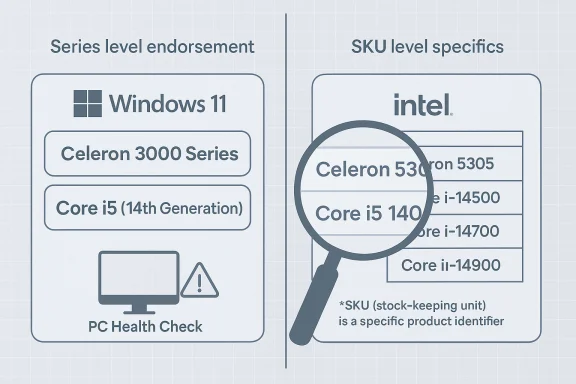
- Microsoft’s Intel page now lists families (for example, Celeron 3000 Series, Core i5 processors (14th Generation), etc. rather than enumerating each supported CPU model on that page. The page explicitly states it’s intended for OEMs and notes that the list may not reflect the very latest vendor offerings between updates.
- When Microsoft links a series to Intel, the link points to Intel’s product pages or ARK product-series listings. Intel’s product pages group CPU SKUs under series-level pages that list many variants spanning multiple microarchitectures and generations, often including older SKUs that do not meet Microsoft’s Windows 11 requirements. That makes the Microsoft→Intel path ambiguous for end users: the Intel listing shows many processors, but Microsoft’s series-level endorsement does not mean every SKU on Intel’s site is supported.
- Microsoft’s OEM-oriented note and editorial footnotes add nuance — for some older outliers Microsoft retains limited, device-specific support. For example, the Intel Core i7-7820HQ appears in Microsoft’s expanded compatibility discussions only as an exception for specific devices that shipped with modern DCH-style drivers (not as a broadly supported SKU). That nuance is buried in footnotes and device lists rather than being obvious on the series table.
Why the series-style list is a problem
The new presentation creates three predictable and avoidable issues:- False positives for users. Most consumers read “Celeron 3000 Series” and assume that if their processor’s model string contains “Celeron” and “3000” it’s supported. In practice, Intel’s series pages contain SKUs that differ widely in capabilities and age; some are missing required Windows 11 features (TPM/firmware quirks, driver model differences, or simply exclusions made by Microsoft). Displaying only the series level without clarifying the exceptions increases the likelihood of a customer assuming compatibility where none exists.
- Increased troubleshooting time. When a user attempts an upgrade and it fails because the specific SKU is unsupported, they must now chase footnotes, OEM driver requirements, or device-specific exemptions. Those steps often require contacting the OEM, hunting for DCH driver status, or checking Microsoft’s narrower device-support pages — all of which cost time and create frustration. Community threads reflect this friction and repeated requests for clarification from Microsoft and OEMs.
- Mixed messaging across vendors. Microsoft still lists AMD and many ARM processors at the SKU level while switching to series for Intel. That inconsistency leads to reasonable conclusions that Microsoft intends to be more permissive for AMD/ARM users while being vaguer for Intel users, even though no such policy distinction has been publicly justified. The mixed approach amplifies confusion rather than resolving it.
Real-world examples that illustrate the mess
1) Intel Celeron 3000 Series
Microsoft’s Intel table includes entries like Celeron 3000 Series and then links out to Intel’s own product pages. On Intel’s ARK, the Celeron 3000 Series page lists multiple SKUs spanning launch dates, TDPs and architectures — some modern, some older. A user who sees the Microsoft page and then lands on Intel’s series page may naturally conclude that every Celeron 3000 SKU is supported, but Intel’s ARK contains SKUs that lack required features or were never intended to be Windows 11 certified. This mismatch between Microsoft’s series-level endorsement and Intel’s comprehensive series catalog is exactly the ambiguity Ghacks and others have highlighted.2) Intel Core i7-7820HQ (Kaby Lake) — the odd outlier
The i7-7820HQ is a telling case. That chip is a seventh-generation Kaby Lake part that Microsoft has treated as a special-case exception: it’s supported only in select devices that shipped with modern DCH-style drivers (not generically supported across all systems using that CPU). Surface Studio 2 and the Dell Precision 5520 are commonly cited examples where Microsoft accepted the chip because those devices shipped with the required driver model and OEM support commitments. Users with the same CPU in other devices often encounter blocked upgrades, because the device as a whole — not only the CPU — must meet Microsoft’s device-support criteria. That nuance is not obvious if you only scan the series or processor table.3) Device vs. CPU — Microsoft’s OEM-focused wording
Microsoft’s processor tables emphasize they’re intended for OEM device selection and certification. That OEM orientation means the tables are not a simple “will this consumer PC run Windows 11?” guide; the supported list presumes modern device drivers, firmware readiness, and OEM commitments. Users who treat the Microsoft tables as a consumer-facing compatibility list are therefore likely to misunderstand their applicability — especially when the table uses series-level entries for Intel.How to verify compatibility — practical steps
Because the new Microsoft layout can mislead, here are concrete steps to verify whether a PC with an Intel chip will be accepted for Windows 11 under Microsoft’s official pathway.- Check the Microsoft pages first. Look at the Intel supported-processors page and note whether your CPU’s series is listed. If the series is present, don’t assume that equals universal support.
- Identify the exact CPU model name from System > About, or by running msinfo32 or the command-line tool “wmic cpu get name” to capture the full SKU string.
- Use Intel’s product pages (ARK) to identify the precise SKU on the Intel site and confirm whether that SKU appears on Microsoft’s SKU-level lists (if any). Remember: Intel’s ARK lists all SKUs for a series, including older or low-end variants that Microsoft may not endorse.
- Run Microsoft’s PC Health Check tool — it’s the most direct consumer utility Microsoft provides to confirm Windows 11 compatibility for a given machine. The tool checks CPU, TPM, Secure Boot and other platform requirements in one pass. If PC Health Check reports incompatible, investigate whether the reason is the CPU itself, TPM/firmware settings, or driver/firmware issues.
- If your CPU is a known exception (for example, i7-7820HQ), search Microsoft’s device-specific lists and OEM support pages to verify whether your device model is included and whether the OEM supplies DCH-compliant drivers; device-level certification, not merely the CPU model, often drives eligibility.
Risks for end users, IT departments and resellers
- Purchasing mistakes: Buyers of refurbished or Renewed PCs may be told their machine “runs Windows 11” because someone installed the OS via hacks or image installs — but without Microsoft/OEM certification those devices may never receive security updates. Marketplace investigations have previously flagged Renewed listings that claimed Windows 11 compatibility for machines that don’t meet Microsoft’s support criteria. End users who assume full support may instead end up on an unsupported build and exposed to security risk.
- Warranty and support confusion: If OEMs only commit to supporting Windows 11 on certain device SKUs, a customer who forces an upgrade onto an unsupported machine can face warranty disputes or refused diagnosis paths from the OEM. The processor series listing makes these boundaries fuzzier, increasing the likelihood of mismatched expectations.
- IT deployment headaches: Enterprise imaging and lifecycle planning rely on accurate support matrices. A series-level policy forces IT teams to dig deeper per SKU and per device model to confirm compatibility and driver availability — an extra operational cost.
- Time wasted on failed upgrades: Users who follow the Microsoft→Intel link chain expecting a definitive answer often spend hours investigating only to learn their exact SKU or device is excluded. That creates avoidable churn for help desks and community forums. Community archives show repeated threads where users report wasted time and frustration confirming compatibility.
What Microsoft could do (practical recommendations)
Microsoft’s likely motivation for the change is understandable: the full SKU lists are long, difficult for OEMs to maintain in perfect synchronization with vendor catalogs, and hard for casual readers to parse. But the execution creates new usability and trust problems. A few pragmatic fixes would reduce confusion while preserving the manageability Microsoft is after:- Dual presentation: Keep the high-level series overview for OEMs but include an expandable SKU-level list or a clearly linked Microsoft-managed SKU page for end users. The SKU list should explicitly indicate exceptions and device-specific allowances. This lets OEMs skim series and consumers find exact SKU answers without chasing external vendor catalogs.
- Clear labeling and “Who should use this” language: Make the OEM target audience explicit at the top of each Intel page and add a prominent “Consumer compatibility check” link that points to Microsoft’s PC Health Check and device-compatibility pages.
- Highlight device exceptions and driver model requirements: When a specific old-generation SKU is included as an exception (for example, the i7-7820HQ), show the device models that qualify and the driver/firmware requirements (DCH drivers, OEM driver availability) right next to the SKU.
- Maintain vendor-neutral SKU lists for cross-checking: Linking to vendor series pages is useful, but Microsoft should maintain its own SKU index (even if partial) that explicitly indicates which vendor-listed SKUs are covered by Microsoft’s endorsement.
Why vendors’ pages aren’t a substitute for Microsoft’s SKU list
Intel’s ARK and product pages are comprehensive vendor catalogs — they aim to document every SKU Intel ships or has shipped. Those pages are not intended to reflect operating-system certification status and therefore include SKUs spanning many generations and use-cases. Microsoft’s series endorsement with a link to Intel’s catalog blurs that separation: users land on Intel’s ARK and naturally assume Microsoft’s guidance applied equally across all ARK SKUs, which is not the case. The vendor pages are a useful reference but are insufficient on their own for Windows compatibility certainty.Short-term guidance for readers
- When in doubt, rely on Microsoft’s PC Health Check and the device-specific Supported Systems pages rather than assuming series-level wording implies per-SKU compatibility.
- If you plan to buy a used or refurbished PC and Windows 11 compatibility matters, ask the seller for the exact CPU SKU, verify it against Microsoft’s compatibility or device pages, and confirm the OEM offers modern DCH drivers and firmware updates. Marketplace checks continue to show that some Renewed listings misrepresent Windows 11 upgradeability.
- For system builders and IT teams, adopt a verification step in procurement: record the exact CPU SKU and device model, run the PC Health Check, and confirm driver availability from the OEM before approving mass deployment.
Strengths and likely rationale behind Microsoft’s change
It’s important to acknowledge why Microsoft may have adopted the series-level approach:- Simplicity for OEMs and fewer updates: Series-level descriptions reduce maintenance overhead: Microsoft doesn’t need to update the list every time a vendor introduces or withdraws individual SKUs. This is helpful for OEM-focused documentation where the primary audience is deciding what families of processors to include in future devices.
- Clarity for device designers: For manufacturers choosing parts at scale, knowing “this series is acceptable” simplifies BOM decisions and hardware roadmaps.
- Encouraging modern driver models: The emphasis on DCH, modern device drivers, and OEM readiness signals Microsoft’s intent to push for higher-quality driver stacks and firmware — a legitimate objective for platform stability and security.
Conclusion
Microsoft’s transition to series-level presentation for Intel on the Windows 11 supported-processor pages is a substantial change that trades SKU-level precision for a leaner, OEM-oriented format. In doing so it unintentionally raises the risk of apparent compatibility: users who see their processor family listed can easily assume their exact SKU is supported. The combination of Microsoft’s series-level wording and Intel’s comprehensive ARK product pages makes for a confusing end-to-end experience that creates extra work for buyers, system builders and support teams.Practical fixes are straightforward: keep series-level guidance for OEMs, but add an obvious SKU-level verification path, highlight device exceptions and DCH/driver requirements, and point consumers to the PC Health Check and device support lists as the authoritative consumer tools. Until Microsoft provides that clarity, users should verify Windows 11 eligibility at the SKU-and-device level rather than relying on a series label alone.
Acknowledgement: community discussion and forum archives show the confusion isn’t hypothetical — users and help desks are already invested in resolving these ambiguous compatibility outcomes and are seeking clearer guidance from Microsoft and vendors.
Source: gHacks Technology News You may not find your processor anymore on Windows 11's supported list of CPUs - gHacks Tech News
