

Microsoft’s latest update to the official Windows 11 processor documentation has left buyers, IT teams, and PC hobbyists scrambling for clarity: the company now lists Intel processors by series rather than enumerating individual CPU models, a change that makes the support status of specific chips ambiguous and increases the risk of mistaken compatibility assumptions.
Microsoft has long maintained public lists of processors that meet Windows 11’s minimum hardware requirements so users and OEMs could determine eligibility without guesswork. Those lists originally named individual CPU model numbers, allowing a direct match between a system’s reported processor and Microsoft’s official support list. That SKU-level approach was precise but required maintenance each time processor vendors refreshed product lines. In early 2025 Microsoft revised the presentation used for Intel processors: instead of a long set of SKUs, the Intel page now groups supported parts into series (for example, “Core i5 processors (14th Generation)” or “Intel Core 7000X Series”). Microsoft’s Learning pages frame this material as guidance for OEMs and explicitly warn the lists “represent the processor models which meet the minimum floor for the supported processor generations” and that subsequently released generations that meet the same principles will be considered supported even if not explicitly listed. The Intel Learn page includes an editor’s note documenting updates, including one on February 27, 2025. At the same time Microsoft continues to publish SKU-level supported-model lists for other vendors — notably AMD and Qualcomm — which still name individual processor models rather than grouping them into series. That inconsistency between vendors is central to the confusion now circulating in press and community channels.
This is a pivotal documentation moment: an administrative simplification intended to help OEM workflows has created a real usability problem for the broader Windows ecosystem. Until the documentation provides both the OEM-friendly series perspective and a searchable, consumer-facing SKU index, users should treat the Intel series table as a starting point — not the final word.
Source: Telegrafi Microsoft confused everyone: These processors support Windows 11
 Background
Microsoft has long maintained public lists of processors that meet Windows 11’s minimum hardware requirements so users and OEMs could determine eligibility without guesswork. Those lists originally named individual CPU model numbers, allowing a direct match between a system’s reported processor and Microsoft’s official support list. That SKU-level approach was precise but required maintenance each time processor vendors refreshed product lines. In early 2025 Microsoft revised the presentation used for Intel processors: instead of a long set of SKUs, the Intel page now groups supported parts into series (for example, “Core i5 processors (14th Generation)” or “Intel Core 7000X Series”). Microsoft’s Learning pages frame this material as guidance for OEMs and explicitly warn the lists “represent the processor models which meet the minimum floor for the supported processor generations” and that subsequently released generations that meet the same principles will be considered supported even if not explicitly listed. The Intel Learn page includes an editor’s note documenting updates, including one on February 27, 2025. At the same time Microsoft continues to publish SKU-level supported-model lists for other vendors — notably AMD and Qualcomm — which still name individual processor models rather than grouping them into series. That inconsistency between vendors is central to the confusion now circulating in press and community channels. What changed — the practical details
From SKUs to series: exactly what Microsoft changed
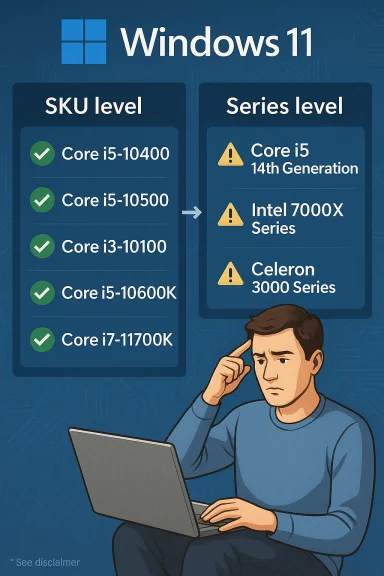
- Previously: Microsoft’s supported-processor pages listed discrete CPU part numbers (for example, “Intel Core i5-10400”) that were validated for Windows 11.
- Now (Intel): The Intel page uses a three-column table that shows the manufacturer, product family, and a Series column rather than enumerating every SKU. Examples in the Series column include Core i5 processors (14th Generation), Intel Core 7000X Series, and Celeron 3000 Series.
Which vendor pages still list models?
- AMD: Microsoft continues to list AMD processors at the model level for supported versions of Windows 11, naming specific parts (e.g., Athlon and Ryzen SKUs) rather than grouping by a generic series label.
- Qualcomm: Microsoft’s Qualcomm pages also enumerate specific supported models, such as Snapdragon 8cx Gen 3 and Microsoft SQ chips, with explicit model names and variant tags.
Why Microsoft likely made the change
Maintenance and OEM focus
The Learn pages make plain that these lists are intended primarily for OEMs and ODMs — manufacturers building new Windows 11 devices — rather than for end-consumers checking whether their decade-old laptop will receive an upgrade. Series-level grouping reduces the administrative burden of updating hundreds of SKU entries every time Intel refreshes product families. It also aligns Microsoft’s guidance with OEM certification workflows: OEMs need to know which series are acceptable for new devices, not necessarily which specific legacy SKU is supported on an older system.Avoiding repeated edits when vendors release generations
Microsoft’s editorial note states that “subsequently released and future generations of processors which meet the same principles will be considered as supported, even if not explicitly listed.” That phrasing lets Microsoft avoid updating the documentation every time a CPU vendor ships a new variant that meets baseline security and performance principles — a pragmatic choice for documentation management.Where the approach breaks down: ambiguity and practical risk
False positives and false negatives
The series-level listing creates two opposite hazards:- False positive: A consumer scans Microsoft’s Intel table, sees “Celeron 3000 Series” and assumes their specific Celeron model is supported — but many Celeron SKUs are old and lack required firmware/driver characteristics (for example, modern DCH drivers or TPM 2.0 support) and therefore aren’t eligible in practice. Independent reporting flagged the Celeron 3000 Series as an example where broad series labeling can mislead users.
- False negative: Conversely, some individual SKUs that Microsoft previously listed explicitly — such as isolated exceptions or device-specific supported parts like the Intel Core i7‑7820HQ in certain OEM devices — can appear to vanish from a series-level view and be missed by users who rely on a straight SKU match. Microsoft has historically made narrowly targeted exceptions (device- or SKU-specific) and those nuances can now be buried in footnotes or separate device support pages.
Confusing the consumer vs. the OEM
Microsoft’s Learn pages are explicit that the tables guide OEMs, not necessarily consumers or IT administrators performing retroactive upgrades. However, the website is public and easily discoverable; consumers naturally use it to check compatibility. That mismatch between intended audience and public visibility has led to high-volume confusion across forums and tech press. Editorial corrections and updates in February 2025 show Microsoft has already navigated versions that caused alarm and then modified the text — but the documentation format itself remains the friction point.Real-world consequences
- Increased support tickets and retail returns when shoppers buy machines that appear compatible but lack OEM-provided drivers or firmware settings required for Windows 11 certification.
- Uptick in users attempting unsupported upgrades or using unofficial install bypasses to run Windows 11 on hardware that is not considered fully supported.
- Frustration among enterprise IT teams that require explicit SKU lists for inventory and deployment planning; the series-level presentation complicates inventory validation workflows. Observers in the field and media outlets have documented these concerns.
Examples and case studies
The Celeron 3000 Series paradox
Microsoft’s Intel page groups a family like Celeron 3000 Series under the supported column. Intel’s own marketing pages for that series include dozens of SKUs spanning several microarchitectures and years. Independent reporting pointed out that while the series is listed, most Celeron 3000 SKUs predate Windows 11-era platform requirements, and only a handful actually meet Microsoft’s minimums in practice. This mismatch is a textbook example of how series-level grouping can create misleading conclusions.The i7-7820HQ exception illustrates buried nuance
The Intel Core i7‑7820HQ (a Kaby Lake part) has previously been treated as an exception in Microsoft’s compatibility notes — supported only in specific devices that shipped with modern DCH drivers. When Microsoft moves to series-level entries, those exceptions are still present but less visible, often tucked into a footnote or a separate OEM device list. That means users with that exact SKU may not find the exception unless they read analytical coverage or the full footnotes on Microsoft’s support pages.How to verify whether your PC is supported (step-by-step)
If you or your organization needs to determine Windows 11 eligibility for a machine, follow these pragmatic steps:- Check your CPU model exactly: Settings → System → About, or use msinfo32 / CPU-Z to get the precise SKU string.
- Run the Microsoft PC Health Check app for an immediate automated compatibility scan; it will flag missing items such as TPM 2.0 or Secure Boot. If PC Health Check reports a failure, note the specific reason.
- Confirm TPM 2.0 and Secure Boot are enabled in firmware (BIOS/UEFI). Many OEMs ship TPM disabled by default; enable it (PTT for Intel, fTPM for AMD) and verify the Specification Version is 2.0. Microsoft provides guidance on enabling TPM in UEFI and verifying with tpm.msc.
- Consult Microsoft’s supported-processor pages for your OS version — note whether the vendor page lists SKUs or series. For Intel, expect series-level guidance; for AMD/Qualcomm, expect model-level entries. Use the Learn pages to interpret OEM guidance, not as a consumer SKU guarantee.
- Check your OEM’s support site and driver pages to ensure modern DCH drivers and firmware updates exist for the specific system configuration. If OEM-provided modern drivers are missing, Microsoft’s documentation may still exclude support for that device even if the CPU family is listed.
- For enterprise rollouts: cross-reference inventory SKUs against the Microsoft lists and, where necessary, request device-level certification details from OEMs or perform pilot upgrades on representative hardware.
Recommendations: what Microsoft, OEMs and consumers should do
For Microsoft (short-term fixes)
- Reintroduce an optional SKU-level lookup or a searchable SKU database alongside the OEM-oriented series table to serve consumer and IT needs.
- Surface device-specific exceptions and footnotes more clearly and make them discoverable via a searchable index.
- Add explicit wording in the Intel page header explaining that a series link does not imply universal SKU eligibility and pointing consumers to the SKU lookup or PC Health Check app. Microsoft’s existing OEM-focused preamble is accurate but not sufficient for the broader audience that finds the page.
For OEMs
- Publish clear compatibility statements for each device model and the drivers/firmware prerequisites required for Windows 11 certification.
- Provide step-by-step guidance for enabling TPM and Secure Boot on shipped firmware and document any device-specific caveats.
For consumers and IT professionals
- Always confirm the exact CPU SKU and cross-check it with Microsoft’s SKU-level resources (where available) and OEM support pages.
- Use PC Health Check and verify TPM/Secure Boot state before attempting upgrades.
- When in doubt, perform a test upgrade on an identical system image before mass upgrades in an enterprise environment.
Broader context: Microsoft’s evolving Windows 11 compatibility posture
This documentation change is not the first time Microsoft has adjusted the Windows 11 compatibility lists. The company has, in the past, removed and reintroduced specific Intel and Xeon models as it refined policy and addressed exceptions. Those historical episodes demonstrate that Microsoft treats these lists as operational OEM guidance more than a consumer upgrade guarantee — but the lack of consistent public messaging has repeatedly triggered confusion. The balance Microsoft must strike is genuine: it needs to keep documentation maintainable and aligned with OEM certification practices while giving end users transparent, reliable guidance for upgrade decisions. That balance is achievable, but the current presentation — series for Intel versus models for AMD/Qualcomm — is a step backward for clarity.Key strengths and notable weaknesses of Microsoft’s approach
Strengths
- Operational simplicity: Series-level grouping reduces churn in documentation and avoids constant edits as vendors release new SKUs.
- OEM alignment: The approach better mirrors what OEMs care about when certifying new hardware for Windows 11.
- Forward-looking language: Microsoft’s note that subsequent generations meeting the same principles will be considered supported reduces the risk of lag in coverage for new, compliant CPUs.
Weaknesses and risks
- Consumer confusion: Public readers will naturally interpret the table as a consumer compatibility list; the presentation doesn’t make the OEM audience distinction obvious enough.
- Ambiguity around legacy SKUs: Series pages can link to Intel product pages that include older variants which do not meet Windows 11 requirements, leading to false-positive assumptions.
- Buried exceptions: SKU-specific exceptions and device-specific support may be difficult to discover when buried in editorial notes or separate device certification lists.
Final assessment and conservative guidance
Microsoft’s shift to series-level Intel listings on its Windows 11 supported processors pages is understandable from a documentation and OEM perspective but poorly calibrated for public consumption. The change reduces overhead for Microsoft and OEMs but increases the risk that consumers and IT teams will misinterpret the lists and make upgrade, purchasing, or rollout decisions on incomplete information. Independent reporting and community analysis have already documented real-world confusion and inconsistent interpretations. Until Microsoft provides a clearer, dual-path approach — one path for OEM certification (series-level) and another for SKU-level consumer lookup — the safest course for anyone planning to upgrade to or purchase a Windows 11 device is to:- Verify the exact CPU SKU,
- Run PC Health Check,
- Confirm TPM 2.0 and Secure Boot status,
- Check OEM driver and firmware support for the device model,
- Treat Microsoft’s series-level Intel entries as guidance for OEMs, not a definitive consumer compatibility guarantee.
This is a pivotal documentation moment: an administrative simplification intended to help OEM workflows has created a real usability problem for the broader Windows ecosystem. Until the documentation provides both the OEM-friendly series perspective and a searchable, consumer-facing SKU index, users should treat the Intel series table as a starting point — not the final word.
Source: Telegrafi Microsoft confused everyone: These processors support Windows 11
