

Microsoft’s December cumulative for Windows 11, rolled out as KB5072033, packs more than routine security fixes — it delivers a broad set of UI unifications, productivity refinements, virtualization consolidation, and targeted stability work that many AMD‑GPU users have been testing as a potential remedy for recent Radeon crashes and misclassification issues.
KB5072033 was published as the December 9, 2025 cumulative (Patch Tuesday) for Windows 11 servicing branches and advances consumer builds to the latest cumulative revisions. Microsoft describes the package as a combined servicing stack + LCU style rollup that folds non‑security preview items shipped earlier in the month into a mandatory security update; administrators can also obtain offline .msu installers for controlled deployment. The update’s consumer highlights are UI polish (notably broader dark‑mode coverage in File Explorer), a consolidated virtualization controls page in Settings, several drag/share and Copilot UX tweaks, and a set of graphics‑stack adjustments that community testers report help in a subset of AMD Radeon instability cases. Two important operational notes for IT and power users:
Practical impact:
The December cumulative is a reminder that modern OS servicing is increasingly cross‑stack: delivering better user experiences and fewer crashes often requires coordinated releases across Microsoft, silicon vendors, and OEM firmware — and disciplined testing on the part of IT teams and enthusiasts.
Source: Technetbook Windows 11 Update KB5072033 Brings Interface Unification and AMD GPU Stability Improvements
 Background / Overview
KB5072033 was published as the December 9, 2025 cumulative (Patch Tuesday) for Windows 11 servicing branches and advances consumer builds to the latest cumulative revisions. Microsoft describes the package as a combined servicing stack + LCU style rollup that folds non‑security preview items shipped earlier in the month into a mandatory security update; administrators can also obtain offline .msu installers for controlled deployment. The update’s consumer highlights are UI polish (notably broader dark‑mode coverage in File Explorer), a consolidated virtualization controls page in Settings, several drag/share and Copilot UX tweaks, and a set of graphics‑stack adjustments that community testers report help in a subset of AMD Radeon instability cases. Two important operational notes for IT and power users:- Microsoft is staging feature visibility with server‑side gating after the binary is installed, so not every device will show every feature immediately.
- Early consumer reports and Microsoft Q&A threads show some installation failures on particular hardware (error loops and install failures reported); manual offline install via the Update Catalog has been a common workaround while Microsoft investigates servicing behavior.
Visual and Interface Improvements: Interface Unification in Practice
File Explorer dark mode and the “white‑flash” regression
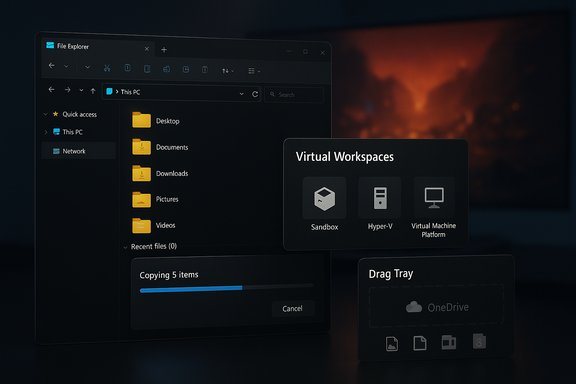
One of the most visible shifts in KB5072033 is deeper dark‑mode coverage across File Explorer. Historically, copy/move progress dialogs and several legacy confirmation modals used light palettes even when a user selected Dark mode; this created jarring tonal breaks in a dark workflow. The cumulative expands dark styling to:- Copy / move / progress dialogs (with new accent color states for status: blue = copying, orange = paused/waiting, red = failed).
- Delete and confirmation modals that previously defaulted to light palettes.
This consistency reduces visual friction for users who prefer low‑light themes.
Search and Start parity, Widgets and Copilot touches
The update includes a small but appreciated polish: the Search flyout is resized to match the height and visual rhythm of the Start menu to avoid a truncated or uneven appearance during frequent search workflows. Widgets receives layout tweaks (numeric notification badges, default dashboards) and Copilot integrations (for Copilot+ devices, taskbar thumbnail “Share with Copilot” actions). These changes are primarily cosmetic/UX but improve perceived coherence across common workflows.Drag Tray and Nearby sharing improvements
KB5072033 adds multi‑file support to the Drag Tray (Nearby sharing drag‑to‑top) and exposes a Settings toggle so users can disable the Drag Tray entirely. For workflows that involve quick sharing of multiple files or OneDrive content, the improved Drag Tray reduces friction; power users who disliked the previous single‑file limitation will find the change welcome.Gaming, AMD GPU Stability, and Display Improvements
What Microsoft changed in the graphics stack
The cumulative contains targeted fixes to the graphics and compatibility stack. Microsoft’s release notes describe corrections where some supported GPUs were being misclassified as “unsupported” by certain titles — a misflag that in some environments triggered driver removal messages, timeouts, or stuttering at app launch (especially on high‑resolution and high refresh devices). Optimizations were also applied to how the OS answers display‑mode queries, which can reduce micro‑stutters when launching fullscreen/borderless games on 4K and ultrawide displays.AMD‑specific stability: what the evidence shows
Community testing and independent reports converged around a practical outcome: many AMD Radeon users who experienced driver timeouts, “GPU hung” events, or games that incorrectly reported an unsupported GPU saw improved behavior when they paired KB5072033 with a recent AMD Adrenalin driver (community threads referenced driver versions in the 25.10–25.11 range). The improvement pattern looks like this:- The OS update corrected a misclassification/detection path that removed a trigger for some driver‑level crashes.
- In many cases the best results came from applying KB5072033 plus a recent vendor driver (or performing a clean driver reinstall using DDU followed by a driver‑only Adrenalin install).
- The fix described by Microsoft is narrowly worded: the KB explicitly calls out misflagging and detection issues rather than claiming a universal cure for all GPU‑timeout scenarios. That distinction matters: many reports showing reduced crashes were configuration‑dependent and not universal. Treat the cumulative as one part of a cross‑stack remediation (OS + driver + BIOS/firmware + power/tuning).
- Anecdotal reports singled out high‑end RDNA4 hardware (for example mentions of the RX 9070 XT in community threads) as platforms where users saw significant improvement, but these remain anecdotal and hardware/firmware dependent. Label such claims as community observations rather than guaranteed vendor‑level fixes.
Practical troubleshooting checklist for gamers
- Confirm OS build and driver versions (Settings → System → About; Adrenalin / Device Manager).
- If you see driver timeouts, try a clean driver uninstall using DDU, then install the latest recommended AMD driver (consider a “driver‑only” install, skipping Adrenalin UI if it has been problematic).
- Pair KB5072033 with the latest vendor driver rather than expecting either alone to solve every case. Keep rollback options ready (known‑good driver package and System Restore image).
- If crashes persist, collect minidumps and Event Viewer logs and open a joint support case with AMD and Microsoft; cross‑vendor troubleshooting is often required for OS/driver boundary issues.
Portable Gaming: FSE Mode Expanded to More Handhelds
KB5072033 expands the Full Screen Experience (FSE) optimization beyond manufacturer‑specific handsets like the ROG Ally to a broader set of portable Windows gaming consoles. FSE reduces background processes and concentrates system resources on the active console interface, improving battery life and frame stability on constrained systems. Microsoft indicates FSE will be tested on handheld platforms first, with a broader roll‑out to desktop PCs scheduled in future months (expect desktop availability in staged form around March 2026 as previously signaled). This aligns with Microsoft’s cross‑stack “best place to play” push for handheld and battery‑sensitive gaming.Practical impact:
- Handheld gamers who previously suffered from background task interference or inconsistent performance may see measurable improvements once FSE entitlements are enabled on their device.
- Desktop gamers should not expect immediate FSE parity; the desktop rollout is explicitly phased and hardware‑gated.
Advanced User Tools: Virtualization and Productivity Consolidation
Virtual Workspaces: a centralized control surface
KB5072033 introduces a Virtual Workspaces page in Settings → System → Advanced that centralizes the toggles and controls for virtualization features:- Windows Sandbox
- Hyper‑V / Hypervisor Platform
- Virtual Machine Platform
- Containers and related tooling
Productivity: Drag Tray multi‑file and OneDrive integration
The Drag Tray’s new ability to accept multiple files — including items directly from OneDrive — is a tangible productivity win. Users can now drag a batch of files to a messenger or app without stitching individual transfers, and OneDrive’s “Copy link” is exposed in the Share flow which simplifies cross‑app transfers for cloud‑first workflows. The update also tightens context menus, compacting frequently used actions for faster access.Deployment, Rollout Considerations, and Risks
Build strings and servicing stack caveats
Different publication snapshots and regional Microsoft pages showed slight variations in the reported build strings (e.g., some pages stated26200.7447 while others reported 26200.7462). Administrators should verify their exact target build using Win + R → winver after installing and consult the Windows release health dashboard for the authoritative, up‑to‑date listing for their servicing channel. When using offline .msu installers or image builds, follow Microsoft’s SSU+LCU ordering guidance to avoid servicing mismatches. Installation issues and mitigation
Since release, users have reported install failures and repeated reboots on certain systems. Microsoft Q&A and community posts indicate the following mitigations:- Use offline installers from the Microsoft Update Catalog for machines failing through Windows Update.
- For fleet management, pilot KB5072033 on a representative ring before broad deployment. Include a rollback plan and know how to restore previous drivers or uninstall a problematic optional preview.
Known regressions and ongoing watch items
- File Explorer white‑flash: fixed in the cumulative for users who installed the December preview, but still flagged for monitoring in early rollouts. Test visually sensitive setups.
- Partial effectiveness for AMD crashes: Microsoft’s fix addresses misflagging/detection paths; it helps many real‑world cases but is not a universal cure for all GPU timeouts — vendor drivers, firmware, and power settings still matter. Treat claims of a single patch “solving everything” as overbroad; label such claims anecdotal.
Security and Patch Metrics — Cross‑checking the totals
Public reporting around the December 2025 update cycle lists different CVE totals in adjacent stories (some outlets reported 36 patched issues attributed to KB5072033 previews, others cited 57 vulnerabilities across Microsoft’s broader December cycle). Microsoft’s official KB entry and release health pages are the authoritative source for which CVEs are addressed by which KB numbers; independent outlets aggregated totals for the entire Patch Tuesday slate which can include multiple product families and related releases. Administrators should rely on Microsoft’s security update pages and the Security Update Guide to map specific CVE IDs to the KB that addresses them. Because public aggregators sometimes mix totals for Windows platform updates and other Microsoft product fixes, any CVE count quoted outside Microsoft’s official guidance should be considered secondary until verified against Microsoft’s advisory data. When in doubt, consult the Windows release health dashboard and the Security Update Guide for precise mapping.Practical Recommendations for Different Audiences
Home users and gamers
- If you’re affected by AMD driver timeouts, test KB5072033 plus the latest vetted AMD driver on a spare machine or a short pilot session before rolling it into your main gaming rig. Keep DDU and a known‑good driver installer handy for rollbacks.
- Don’t assume an OS update alone will fix every crash — try a clean driver reinstall and check firmware/BIOS updates from your OEM.
Power users and developers
- Use the new Virtual Workspaces hub to simplify virtualization setup; validate that hardware virtualization is enabled in UEFI and test Sandbox and Hyper‑V toggles in a small pilot ring.
- If you rely on dark‑mode workflows, test File Explorer behavior in a controlled environment to confirm the white‑flash fix is applied for your OEM/driver/firmware combo.
IT administrators
- Pilot KB5072033 in a representative ring that includes AMD and NVIDIA devices, a mix of high refresh monitors, and any specialized hardware. Use the offline .msu for imaging or air‑gapped systems and follow the SSU + LCU ordering guidance to avoid servicing mismatches.
- Maintain a KIR/rollback playbook for known regressions and track Microsoft’s release health dashboard for follow‑on KIRs or emergency mitigations.
Critical Analysis: Strengths, Limitations, and Risks
Strengths
- KB5072033 packages several visible UX polishes that significantly improve visual coherence (notably File Explorer dark mode), which enhances day‑to‑day quality of life for users who prefer dark themes.
- The virtualization consolidation into a Virtual Workspaces hub addresses longstanding discoverability problems and should speed up dev/test onboarding on Windows 11.
- The targeted graphics‑stack adjustments are pragmatic: by addressing detection/misflagging paths in the OS, Microsoft reduces one common trigger for driver timeouts — and the best results come from coordinated OS+driver updates, which the ecosystem appears to be converging on.
Limitations and residual risks
- The graphics fixes are not one‑size‑fits‑all. Many of the GPU problems that users experienced are configuration sensitive and can hinge on firmware, power delivery, driver packaging, and even PSU health. Expect to continue to troubleshoot a subset of rigs even after applying the cumulative.
- Visual regressions (the Explorer white‑flash) and installation glitches reported by users show that folding preview bits into a mandatory monthly rollup can accelerate exposure to regressions if preview testing is incomplete or hardware diversity uncovers edge cases. Pilot testing remains essential.
- Public reporting on CVE totals and build strings can diverge; administrators must consult Microsoft’s release health and Security Update Guide for authoritative mappings instead of relying on aggregated third‑party tallies.
Conclusion
KB5072033 is a compact but consequential cumulative that continues Microsoft’s pattern of folding preview UI work and targeted fixes into the Patch Tuesday LCU. For end users the most tangible wins are visual consistency in File Explorer, multi‑file Drag Tray support, and a more discoverable virtualization hub. For gamers, the package represents meaningful progress: it removes a detection trigger that aggravated some AMD driver timeouts, but it does not replace careful cross‑stack troubleshooting — the OS fix helps many users, yet drivers, BIOS, and power/tuning still play large roles in the overall stability picture. Administrators and power users should pilot the update, keep rollback plans and offline installers at hand, and treat KB5072033 as one part of a multi‑component strategy for graphics stability and system reliability. Where claims appear anecdotal — for example, blanket statements that a single update cures every RX 9070 XT or RDNA4 regression — label them as such and validate on representative hardware before committing across a fleet.The December cumulative is a reminder that modern OS servicing is increasingly cross‑stack: delivering better user experiences and fewer crashes often requires coordinated releases across Microsoft, silicon vendors, and OEM firmware — and disciplined testing on the part of IT teams and enthusiasts.
Source: Technetbook Windows 11 Update KB5072033 Brings Interface Unification and AMD GPU Stability Improvements
