

A report published by Pakistan Today on July 12, 2026 says Windows 11 continuously collects certain diagnostic and usage information during normal operation, allows users to reduce some categories through privacy settings, but does not give ordinary users a single switch that completely stops the operating system’s built-in activity tracking. The underlying privacy concern is real, although describing the mechanism as one newly highlighted “feature” obscures the scale of the issue. What Windows 11 operates is a layered diagnostic architecture in which some collection is optional, some is treated as required, and some accompanies cloud-connected services independently of the main diagnostic-data toggle. The dispute is therefore not about whether Windows communicates with Microsoft—it does—but whether Microsoft has drawn a reasonable boundary between operating-system maintenance and user consent.
Pakistan Today’s report presents the issue as a recently highlighted Windows 11 feature that continuously tracks certain user activity and cannot be completely disabled. It says the information is collected to improve system performance, troubleshoot problems, and enhance the user experience, while privacy advocates argue that users should have more control over what leaves their devices.
That description captures the central conflict, but “feature” is a misleadingly narrow label. Microsoft’s own documentation describes diagnostic collection as an operating-system-wide system involving structured diagnostic events, logs, crash reports, configuration information, compatibility details, and, when optional collection is enabled, additional activity and usage information.
In other words, there is not necessarily one application, switch, or background task that can be neatly identified as the tracker. Windows diagnostics are woven through components responsible for updates, reliability monitoring, application compatibility, device health, crash analysis, and connected experiences.
That distinction matters because it changes the practical question. A user looking for the off switch for one intrusive feature may spend hours disabling unrelated settings, services, scheduled tasks, or network destinations without ever reaching a stable state in which Windows sends nothing. The operating system was not designed around that consumer expectation.
The report’s most important claim is therefore the least sensational one: some data collection settings can be adjusted, but the collection built into Windows cannot be completely switched off through the normal consumer privacy interface. Microsoft’s documentation broadly supports that distinction between optional collection, which users can decline, and a required baseline that Microsoft considers necessary for maintaining Windows.
What those controls do not offer is a universal “do not send any information to Microsoft” mode. The diagnostic setting primarily determines how much Windows diagnostic data is collected; it does not govern every network-connected feature, every Microsoft application, every third-party application, or every category of service data.
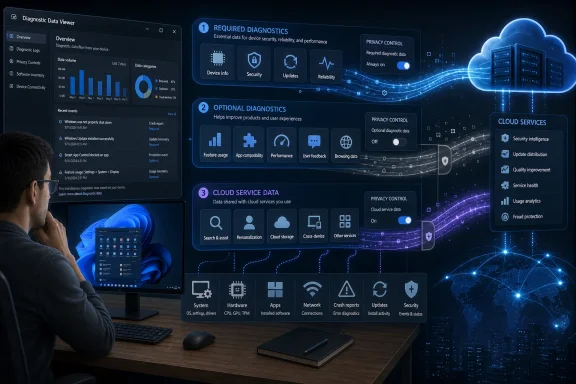
Microsoft’s public explanation separates the system into at least three meaningful layers. Required diagnostic data describes the device, configuration, health, compatibility, and basic performance of Windows. Optional diagnostic data can add more extensive usage, application-activity, browsing, logging, and error-reporting information. Required service data, meanwhile, can be transmitted when a user invokes a cloud-backed Windows experience, regardless of the selected diagnostic level.
This layered model is rational from a software-engineering perspective, but difficult to communicate honestly through toggles. A user sees “Send optional diagnostic data” switched off and may reasonably conclude that Windows is no longer sending usage information. Microsoft means something narrower: the machine has stopped sending the optional category, while required collection and service-dependent communication continue.
That is the gap into which privacy concerns grow. The interface emphasizes what can be disabled, while the architecture is defined by what Microsoft has decided must remain.
The documented collection is more structured. Depending on the selected settings, Windows may report facts about hardware, operating-system configuration, connected peripherals, drivers, installed applications, crashes, component health, application launches, response times, and how long particular software runs. Optional data can be more revealing because activity patterns, browser-related information, enhanced logs, and crash-memory contents can provide substantially more context than a simple machine inventory.
That does not make the privacy issue trivial. Metadata about which programs run, when they run, how long they remain active, what hardware is attached, and which failures occur can reveal patterns about a person or organization even when the files themselves are not intentionally collected.
Crash data presents a particularly uncomfortable example. To diagnose why an application failed, an operating system may need access to portions of memory associated with the failure. Those memory regions can reportedly contain fragments of material that happened to be open or processed when the crash occurred, which is why optional enhanced error reporting deserves more scrutiny than its innocuous label suggests.
The more accurate description is that Windows observes and reports selected technical events throughout normal use. It is not documented as a universal screen recorder or keylogger, but it is also not a passive operating system that communicates with Microsoft only when the user manually submits a support request.
That distinction should guide both criticism and remediation. Alarmist claims can drive users toward destructive “debloating” tools that disable security, updates, or application dependencies. Understated descriptions, meanwhile, prevent users from making an informed decision about the diagnostic footprint they are willing to accept.
A problem that appears only on one graphics driver, firmware combination, or storage configuration may never affect Microsoft’s internal test machines. Diagnostic events can show that a crash is concentrated on a specific class of device, that an update repeatedly fails at the same stage, or that a new component is consuming abnormal memory on systems with a particular configuration.
This is not merely corporate rhetoric. Modern operating-system maintenance depends heavily on aggregated field data. Without it, Microsoft would have less visibility into update failures, driver regressions, application hangs, battery problems, upgrade blockers, and security components that are not behaving as intended.
Microsoft’s documentation argues that diagnostic data gives users a collective voice by showing which features are used, which configurations are common, and where failures are causing the most disruption. From an engineering standpoint, telemetry allows a problem affecting thousands of otherwise unrelated PCs to become visible as one cluster rather than thousands of isolated support incidents.
The trouble is that operational usefulness does not settle the consent question. A system can produce genuine public benefits and still collect more information than an individual user wants to provide.
Microsoft’s argument is essentially that a minimum diagnostic baseline is part of the cost of operating a secure, continuously serviced Windows platform. Privacy advocates respond that the owner of the computer—not the platform vendor—should have the final authority to reject that bargain.
Both positions contain a defensible principle. Windows cannot be maintained at global scale without information about how Windows behaves in the field, but ownership becomes conditional when the device’s operator cannot fully determine what technical observations are transmitted from it.
The issue is that Microsoft defines which data is “required” and then exposes controls only around the remainder. Users are allowed to choose within Microsoft’s policy framework, but they are not given authority over the framework itself.
This is a subtle but consequential form of platform power. A toggle can create the appearance of consent even when the most important decision—whether a baseline exists—has already been made by the vendor.
Windows Central has separately argued that Windows 11’s privacy controls are too fragmented and need a clearer master control. That criticism reaches beyond diagnostic data: Windows privacy is distributed across diagnostics, application permissions, search, recommendations, advertising, location, account settings, browser controls, connected experiences, and individual Microsoft applications.
A user can make every visible privacy choice conservatively and still have Windows communicate with Microsoft. Some communication may be essential to a feature the user deliberately requested, such as cloud-backed security or synchronization. Some may support the operating system itself, while some may originate from separately installed Microsoft or third-party software with its own settings.
The result is an interface that makes privacy reduction possible but privacy comprehension difficult. Microsoft provides many controls, yet the number and separation of those controls make it hard for a user to understand the final outcome.
The absence of one complete off switch is therefore not just a missing option; it is a statement about who ultimately controls the platform.
In Windows 11, the main diagnostic controls are located under Settings, Privacy & security, and Diagnostics & feedback. Turning off optional diagnostic data should reduce the amount and sensitivity of information transmitted through the Windows diagnostic system, leaving the required baseline Microsoft says is needed for security, reliability, updates, and normal operation.
Users should also review settings related to personalized offers, recommendations, inking and typing improvement, and feedback requests. The exact labels visible on a PC can vary as Microsoft changes the presentation of Windows settings, but the general principle remains: diagnostic collection, personalization, and application access are related privacy issues, not one unified control.
Application permissions deserve separate attention. Camera, microphone, location, contacts, notifications, file access, and background activity are not identical to Windows diagnostic data. Restricting them will not shut down operating-system diagnostics, but it can prevent individual applications from collecting or accessing information they do not need.
The same separation applies to Microsoft Edge, Microsoft 365 applications, cloud-storage clients, security products, and third-party software. Reducing Windows diagnostics does not automatically change the privacy settings inside every installed application.
That complexity makes periodic review necessary. A carefully configured PC can acquire new applications, permissions, connected accounts, browser extensions, and cloud features over time, gradually expanding its data footprint without any single dramatic change.
The viewer is not a complete history of every Microsoft-related transmission from the machine. Microsoft explains that it displays Windows diagnostic data available while data viewing is enabled; it does not transform the main diagnostics page into a monitor for every connected service or installed application.
Enabling local diagnostic viewing can also require additional storage. Users auditing a machine should turn the viewing function off after they finish, rather than leaving extra local diagnostic history accumulating without a purpose.
Windows also offers a function to delete diagnostic data associated with the device. That can be useful as a cleanup measure, but deleting existing data is not the same as stopping future collection. Microsoft further notes that deleting device diagnostic data does not necessarily erase information associated through other channels, such as a Microsoft account or organizational management service.
The viewer and deletion controls are transparency mechanisms, not substitutes for an off switch. They let users inspect or remove portions of the process, but they do not transfer final authority over the required diagnostic baseline.
Still, administrators should use the viewer during privacy assessments. Policy documents describe what a product may collect; observed events show what a particular machine is actually reporting under a particular configuration.
Microsoft also documents a diagnostic-data-off policy for certain managed Windows editions. That appears, at first, to contradict the broad claim that Windows activity tracking cannot be completely disabled.
The contradiction is narrower than it looks. The policy applies only to Windows diagnostic data on eligible editions and does not necessarily stop required service data, separately installed applications, or every connection made by an enabled Windows feature. Microsoft explicitly distinguishes Windows diagnostic data from other forms of Windows data collection.
A corporate device can therefore be configured to send no Windows diagnostic events while still communicating with online services needed to deliver connected experiences. Likewise, a Microsoft productivity application or third-party endpoint agent may collect its own diagnostics under a separate privacy framework.
The organizational consequences are significant. An administrator cannot truthfully tell employees that “telemetry is off” merely because one diagnostic policy is set to its lowest value. The accurate statement must identify which Windows data category is disabled, which services remain active, which applications maintain independent collection, and which business systems depend on diagnostic reporting.
Administrators must also weigh privacy against supportability. Microsoft recommends retaining required diagnostic data where organizations depend on Windows Update because information about update failures helps Microsoft identify and fix deployment problems. Disabling that reporting may satisfy a strict data-minimization goal while reducing the organization’s visibility and Microsoft’s ability to diagnose failures across comparable systems.
There is no universal correct setting. A general office laptop, a regulated research workstation, a retail kiosk, an executive travel device, and an isolated industrial controller do not have the same risk model.
The defensible approach is to choose deliberately. Required diagnostics should not remain enabled merely because it is the default, and diagnostic data should not be disabled merely because “telemetry” sounds threatening. The organization should be able to explain the operational benefit, privacy cost, legal basis, and residual collection associated with its configuration.
The first problem is scope. Blocking a known diagnostic destination does not prove that every relevant event has stopped. Services and endpoints change, applications maintain separate communication paths, and some Windows components use shared infrastructure.
The second problem is collateral damage. Microsoft warns administrators not to block certain configuration and authentication destinations because they can be required to manage diagnostic settings or authenticate the device. Broad blocking can interfere with updates, security services, account functions, store operations, troubleshooting, and cloud-backed features.
The third problem is reversibility. A privacy script can change dozens of registry entries, services, scheduled tasks, firewall rules, and policies without explaining which changes are supported or how to restore the default state. Months later, a Windows update or application may fail for reasons that no longer appear connected to the original modification.
Third-party utilities also introduce a basic trust paradox. Installing an opaque executable with administrative rights to prevent Microsoft from collecting diagnostics may give an unknown developer far more access to the system than the Windows settings being restricted.
For most users, supported privacy controls are the safer starting point. Organizations needing stronger restrictions should use documented policy, network monitoring, controlled testing, and change management rather than downloading a one-click “telemetry killer.”
Privacy hardening that makes a machine unpatchable or unverifiable can exchange a limited data-collection risk for a much larger security risk.
Its wording, however, leaves important questions unanswered. It does not name the highlighted feature, distinguish required from optional diagnostics, separate diagnostic data from required service data, or explain that application permissions affect a different layer of collection.
That ambiguity matters because the recommended remedies solve different problems. Disabling optional diagnostics reduces Windows diagnostic reporting. Restricting microphone access limits which applications can use the microphone. Turning off a connected experience may prevent the service data required by that experience. None is a universal replacement for the others.
The report also frames the dispute as Microsoft versus privacy advocates without fully articulating the engineering dependency behind Microsoft’s position. Diagnostic data is not collected solely because a company wants more information; it is also part of how Microsoft detects failures across hardware combinations it cannot reproduce internally.
Conversely, Microsoft’s language tends to present required collection through its benefits: keeping products secure and updated, troubleshooting problems, and improving reliability. That explanation says less about the philosophical objection raised by the report—namely, that a computer owner cannot always reject participation.
The two accounts therefore talk past each other. Microsoft explains why the data is useful, while critics ask why usefulness should override a user’s final choice. Neither proposition disproves the other.
The first improvement would be a consolidated privacy dashboard. Rather than scattering controls across diagnostics, permissions, search, recommendations, browsers, accounts, and applications, Windows could show a unified summary of active data flows and their stated purposes.
The second would be more precise language. “Required” should explain required by whom and for what: required to boot the computer, required to receive updates, required for Microsoft to support the device, or required to use a specific cloud feature. Those are different claims.
The third would be a visible separation between local and cloud functionality. A user should be able to see whether disabling a data flow turns off only diagnostic reporting, disables a connected feature, reduces troubleshooting capability, or prevents a service from operating entirely.
The fourth would be an audit mode built into Windows itself. Microsoft’s Diagnostic Data Viewer is useful, but the ideal interface would summarize destination, category, frequency, purpose, retention model, and controlling setting without requiring users to interpret a stream of technical event records.
Finally, Microsoft could make the trade-off explicit during setup. Instead of presenting privacy as a sequence of reassuring toggles, Windows could state that required diagnostic information will continue to be sent, describe it in plain language, and explain why a full consumer opt-out is not offered.
That would not satisfy advocates who believe every transmission should be optional. It would, however, turn an opaque default into a legible contract.
 The “Feature” Is Really an Operating-System Policy
Pakistan Today’s report presents the issue as a recently highlighted Windows 11 feature that continuously tracks certain user activity and cannot be completely disabled. It says the information is collected to improve system performance, troubleshoot problems, and enhance the user experience, while privacy advocates argue that users should have more control over what leaves their devices.That description captures the central conflict, but “feature” is a misleadingly narrow label. Microsoft’s own documentation describes diagnostic collection as an operating-system-wide system involving structured diagnostic events, logs, crash reports, configuration information, compatibility details, and, when optional collection is enabled, additional activity and usage information.
In other words, there is not necessarily one application, switch, or background task that can be neatly identified as the tracker. Windows diagnostics are woven through components responsible for updates, reliability monitoring, application compatibility, device health, crash analysis, and connected experiences.
That distinction matters because it changes the practical question. A user looking for the off switch for one intrusive feature may spend hours disabling unrelated settings, services, scheduled tasks, or network destinations without ever reaching a stable state in which Windows sends nothing. The operating system was not designed around that consumer expectation.
The report’s most important claim is therefore the least sensational one: some data collection settings can be adjusted, but the collection built into Windows cannot be completely switched off through the normal consumer privacy interface. Microsoft’s documentation broadly supports that distinction between optional collection, which users can decline, and a required baseline that Microsoft considers necessary for maintaining Windows.
Microsoft Has Divided Privacy Into Layers, Not Yes-or-No Consent
Windows 11 presents privacy controls as a collection of choices. Users can turn off optional diagnostic data, review application permissions, restrict advertising-related personalization, adjust recommendations, manage location access, and disable certain input-improvement features.What those controls do not offer is a universal “do not send any information to Microsoft” mode. The diagnostic setting primarily determines how much Windows diagnostic data is collected; it does not govern every network-connected feature, every Microsoft application, every third-party application, or every category of service data.
Microsoft’s public explanation separates the system into at least three meaningful layers. Required diagnostic data describes the device, configuration, health, compatibility, and basic performance of Windows. Optional diagnostic data can add more extensive usage, application-activity, browsing, logging, and error-reporting information. Required service data, meanwhile, can be transmitted when a user invokes a cloud-backed Windows experience, regardless of the selected diagnostic level.
| Data layer | Typical contents | Normal user control | Microsoft’s stated purpose | Important limitation |
|---|---|---|---|---|
| Required diagnostic data | Device configuration, hardware characteristics, installed applications, compatibility, reliability and basic performance information | Can generally be reduced to this baseline, not disabled through ordinary consumer settings | Security, updates, reliability, troubleshooting and Windows improvement | Remains active when optional diagnostics are turned off |
| Optional diagnostic data | Additional device health, app activity, usage, enhanced error reporting and potentially browsing-related information | Can be disabled in Windows privacy settings | Deeper problem analysis and product improvement | Turning it off does not stop required diagnostics |
| Required service data | Information needed to provide a cloud-connected Windows experience | Usually controlled by whether the connected experience is used or enabled | Operating the requested online service | Governed separately from the main diagnostic-data choice |
That is the gap into which privacy concerns grow. The interface emphasizes what can be disabled, while the architecture is defined by what Microsoft has decided must remain.
“Activity Tracking” Does Not Mean Windows Is Recording Everything
The phrase “continuously tracks user activity” can sound like Windows is maintaining a complete diary of every keystroke, document, conversation, and screen. Neither the Pakistan Today report nor Microsoft’s published diagnostic descriptions establish such an all-encompassing form of surveillance.The documented collection is more structured. Depending on the selected settings, Windows may report facts about hardware, operating-system configuration, connected peripherals, drivers, installed applications, crashes, component health, application launches, response times, and how long particular software runs. Optional data can be more revealing because activity patterns, browser-related information, enhanced logs, and crash-memory contents can provide substantially more context than a simple machine inventory.
That does not make the privacy issue trivial. Metadata about which programs run, when they run, how long they remain active, what hardware is attached, and which failures occur can reveal patterns about a person or organization even when the files themselves are not intentionally collected.
Crash data presents a particularly uncomfortable example. To diagnose why an application failed, an operating system may need access to portions of memory associated with the failure. Those memory regions can reportedly contain fragments of material that happened to be open or processed when the crash occurred, which is why optional enhanced error reporting deserves more scrutiny than its innocuous label suggests.
The more accurate description is that Windows observes and reports selected technical events throughout normal use. It is not documented as a universal screen recorder or keylogger, but it is also not a passive operating system that communicates with Microsoft only when the user manually submits a support request.
That distinction should guide both criticism and remediation. Alarmist claims can drive users toward destructive “debloating” tools that disable security, updates, or application dependencies. Understated descriptions, meanwhile, prevent users from making an informed decision about the diagnostic footprint they are willing to accept.
Microsoft’s Engineering Argument Is Stronger Than Its Privacy Interface
Microsoft says Windows diagnostic data is used to improve security, reliability, and overall performance. Its technical case is straightforward: Windows runs across an enormous range of processors, firmware, drivers, peripherals, applications, security products, regional configurations, and enterprise policies, making failures difficult to reproduce in a laboratory.A problem that appears only on one graphics driver, firmware combination, or storage configuration may never affect Microsoft’s internal test machines. Diagnostic events can show that a crash is concentrated on a specific class of device, that an update repeatedly fails at the same stage, or that a new component is consuming abnormal memory on systems with a particular configuration.
This is not merely corporate rhetoric. Modern operating-system maintenance depends heavily on aggregated field data. Without it, Microsoft would have less visibility into update failures, driver regressions, application hangs, battery problems, upgrade blockers, and security components that are not behaving as intended.
Microsoft’s documentation argues that diagnostic data gives users a collective voice by showing which features are used, which configurations are common, and where failures are causing the most disruption. From an engineering standpoint, telemetry allows a problem affecting thousands of otherwise unrelated PCs to become visible as one cluster rather than thousands of isolated support incidents.
The trouble is that operational usefulness does not settle the consent question. A system can produce genuine public benefits and still collect more information than an individual user wants to provide.
Microsoft’s argument is essentially that a minimum diagnostic baseline is part of the cost of operating a secure, continuously serviced Windows platform. Privacy advocates respond that the owner of the computer—not the platform vendor—should have the final authority to reject that bargain.
Both positions contain a defensible principle. Windows cannot be maintained at global scale without information about how Windows behaves in the field, but ownership becomes conditional when the device’s operator cannot fully determine what technical observations are transmitted from it.
The Missing Off Switch Is a Question of Power
The central privacy problem is not that Windows has diagnostics. Nearly every modern operating system, browser, security product, cloud service, and managed business application collects some form of operational information.The issue is that Microsoft defines which data is “required” and then exposes controls only around the remainder. Users are allowed to choose within Microsoft’s policy framework, but they are not given authority over the framework itself.
This is a subtle but consequential form of platform power. A toggle can create the appearance of consent even when the most important decision—whether a baseline exists—has already been made by the vendor.
Windows Central has separately argued that Windows 11’s privacy controls are too fragmented and need a clearer master control. That criticism reaches beyond diagnostic data: Windows privacy is distributed across diagnostics, application permissions, search, recommendations, advertising, location, account settings, browser controls, connected experiences, and individual Microsoft applications.
A user can make every visible privacy choice conservatively and still have Windows communicate with Microsoft. Some communication may be essential to a feature the user deliberately requested, such as cloud-backed security or synchronization. Some may support the operating system itself, while some may originate from separately installed Microsoft or third-party software with its own settings.
The result is an interface that makes privacy reduction possible but privacy comprehension difficult. Microsoft provides many controls, yet the number and separation of those controls make it hard for a user to understand the final outcome.
The absence of one complete off switch is therefore not just a missing option; it is a statement about who ultimately controls the platform.
Turning Off Optional Diagnostics Is Still Worth Doing
The inability to eliminate every category of collection should not be mistaken for an inability to reduce it. Pakistan Today cites experts recommending that users disable optional diagnostic data and regularly review application permissions, both of which are sensible steps.In Windows 11, the main diagnostic controls are located under Settings, Privacy & security, and Diagnostics & feedback. Turning off optional diagnostic data should reduce the amount and sensitivity of information transmitted through the Windows diagnostic system, leaving the required baseline Microsoft says is needed for security, reliability, updates, and normal operation.
Users should also review settings related to personalized offers, recommendations, inking and typing improvement, and feedback requests. The exact labels visible on a PC can vary as Microsoft changes the presentation of Windows settings, but the general principle remains: diagnostic collection, personalization, and application access are related privacy issues, not one unified control.
Application permissions deserve separate attention. Camera, microphone, location, contacts, notifications, file access, and background activity are not identical to Windows diagnostic data. Restricting them will not shut down operating-system diagnostics, but it can prevent individual applications from collecting or accessing information they do not need.
The same separation applies to Microsoft Edge, Microsoft 365 applications, cloud-storage clients, security products, and third-party software. Reducing Windows diagnostics does not automatically change the privacy settings inside every installed application.
That complexity makes periodic review necessary. A carefully configured PC can acquire new applications, permissions, connected accounts, browser extensions, and cloud features over time, gradually expanding its data footprint without any single dramatic change.
Transparency Tools Help, but They Do Not Create Consent
Microsoft offers a Diagnostic Data Viewer that can show diagnostic events being sent by a Windows device. This is one of the more useful tools available to a technically curious user because it replaces broad language such as “device data” or “usage information” with actual event records and categories.The viewer is not a complete history of every Microsoft-related transmission from the machine. Microsoft explains that it displays Windows diagnostic data available while data viewing is enabled; it does not transform the main diagnostics page into a monitor for every connected service or installed application.
Enabling local diagnostic viewing can also require additional storage. Users auditing a machine should turn the viewing function off after they finish, rather than leaving extra local diagnostic history accumulating without a purpose.
Windows also offers a function to delete diagnostic data associated with the device. That can be useful as a cleanup measure, but deleting existing data is not the same as stopping future collection. Microsoft further notes that deleting device diagnostic data does not necessarily erase information associated through other channels, such as a Microsoft account or organizational management service.
The viewer and deletion controls are transparency mechanisms, not substitutes for an off switch. They let users inspect or remove portions of the process, but they do not transfer final authority over the required diagnostic baseline.
Still, administrators should use the viewer during privacy assessments. Policy documents describe what a product may collect; observed events show what a particular machine is actually reporting under a particular configuration.
Action checklist for admins
- Inventory the Windows editions, management state, privacy policies and connected Microsoft services used across the organization.
- Set Windows diagnostic data to the lowest level compatible with operational, security and support requirements.
- Disable optional diagnostic data unless the organization has documented a reason to enable it.
- Apply diagnostic policy consistently through Group Policy or mobile-device management rather than relying on users to configure each PC.
- Review policies that limit diagnostic logs and crash-dump collection, especially on systems handling sensitive material.
- Audit application permissions and the separate privacy controls used by browsers, productivity software, security tools and third-party applications.
- Use the Diagnostic Data Viewer on representative systems to validate what the approved configuration actually sends.
- Document who acts as the data controller, what data-processing terms apply, and how diagnostic deletion or access requests will be handled.
Enterprise Windows Offers More Control—and More Responsibility
Microsoft’s enterprise documentation exposes a more sophisticated policy model than the consumer Settings application. Administrators can use centralized policy to configure diagnostic levels, limit logs, constrain dump collection, and prevent users from raising the collection level on managed devices.Microsoft also documents a diagnostic-data-off policy for certain managed Windows editions. That appears, at first, to contradict the broad claim that Windows activity tracking cannot be completely disabled.
The contradiction is narrower than it looks. The policy applies only to Windows diagnostic data on eligible editions and does not necessarily stop required service data, separately installed applications, or every connection made by an enabled Windows feature. Microsoft explicitly distinguishes Windows diagnostic data from other forms of Windows data collection.
A corporate device can therefore be configured to send no Windows diagnostic events while still communicating with online services needed to deliver connected experiences. Likewise, a Microsoft productivity application or third-party endpoint agent may collect its own diagnostics under a separate privacy framework.
The organizational consequences are significant. An administrator cannot truthfully tell employees that “telemetry is off” merely because one diagnostic policy is set to its lowest value. The accurate statement must identify which Windows data category is disabled, which services remain active, which applications maintain independent collection, and which business systems depend on diagnostic reporting.
Administrators must also weigh privacy against supportability. Microsoft recommends retaining required diagnostic data where organizations depend on Windows Update because information about update failures helps Microsoft identify and fix deployment problems. Disabling that reporting may satisfy a strict data-minimization goal while reducing the organization’s visibility and Microsoft’s ability to diagnose failures across comparable systems.
There is no universal correct setting. A general office laptop, a regulated research workstation, a retail kiosk, an executive travel device, and an isolated industrial controller do not have the same risk model.
The defensible approach is to choose deliberately. Required diagnostics should not remain enabled merely because it is the default, and diagnostic data should not be disabled merely because “telemetry” sounds threatening. The organization should be able to explain the operational benefit, privacy cost, legal basis, and residual collection associated with its configuration.
Blocking Endpoints Is Not a Privacy Strategy
Users frustrated by Windows telemetry often turn to firewall rules, modified hosts files, registry scripts, service disabling, or third-party “privacy” utilities. These techniques can reduce traffic, but they can also create a machine whose condition is difficult to understand and harder to support.The first problem is scope. Blocking a known diagnostic destination does not prove that every relevant event has stopped. Services and endpoints change, applications maintain separate communication paths, and some Windows components use shared infrastructure.
The second problem is collateral damage. Microsoft warns administrators not to block certain configuration and authentication destinations because they can be required to manage diagnostic settings or authenticate the device. Broad blocking can interfere with updates, security services, account functions, store operations, troubleshooting, and cloud-backed features.
The third problem is reversibility. A privacy script can change dozens of registry entries, services, scheduled tasks, firewall rules, and policies without explaining which changes are supported or how to restore the default state. Months later, a Windows update or application may fail for reasons that no longer appear connected to the original modification.
Third-party utilities also introduce a basic trust paradox. Installing an opaque executable with administrative rights to prevent Microsoft from collecting diagnostics may give an unknown developer far more access to the system than the Windows settings being restricted.
For most users, supported privacy controls are the safer starting point. Organizations needing stronger restrictions should use documented policy, network monitoring, controlled testing, and change management rather than downloading a one-click “telemetry killer.”
Privacy hardening that makes a machine unpatchable or unverifiable can exchange a limited data-collection risk for a much larger security risk.
Pakistan Today’s Report Is Correct About the Stakes, but Too Vague About the Mechanism
The Pakistan Today story accurately identifies the renewed privacy concern: Windows 11 collects diagnostic and usage information, some controls can reduce it, and the ordinary user does not receive a complete opt-out from all built-in tracking.Its wording, however, leaves important questions unanswered. It does not name the highlighted feature, distinguish required from optional diagnostics, separate diagnostic data from required service data, or explain that application permissions affect a different layer of collection.
That ambiguity matters because the recommended remedies solve different problems. Disabling optional diagnostics reduces Windows diagnostic reporting. Restricting microphone access limits which applications can use the microphone. Turning off a connected experience may prevent the service data required by that experience. None is a universal replacement for the others.
The report also frames the dispute as Microsoft versus privacy advocates without fully articulating the engineering dependency behind Microsoft’s position. Diagnostic data is not collected solely because a company wants more information; it is also part of how Microsoft detects failures across hardware combinations it cannot reproduce internally.
Conversely, Microsoft’s language tends to present required collection through its benefits: keeping products secure and updated, troubleshooting problems, and improving reliability. That explanation says less about the philosophical objection raised by the report—namely, that a computer owner cannot always reject participation.
The two accounts therefore talk past each other. Microsoft explains why the data is useful, while critics ask why usefulness should override a user’s final choice. Neither proposition disproves the other.
Windows Needs a Privacy Contract Users Can Understand
A better Windows privacy model would not pretend that every online service can function without data. It would instead provide a clear inventory of what continues to operate at each privacy level and what breaks when collection is removed.The first improvement would be a consolidated privacy dashboard. Rather than scattering controls across diagnostics, permissions, search, recommendations, browsers, accounts, and applications, Windows could show a unified summary of active data flows and their stated purposes.
The second would be more precise language. “Required” should explain required by whom and for what: required to boot the computer, required to receive updates, required for Microsoft to support the device, or required to use a specific cloud feature. Those are different claims.
The third would be a visible separation between local and cloud functionality. A user should be able to see whether disabling a data flow turns off only diagnostic reporting, disables a connected feature, reduces troubleshooting capability, or prevents a service from operating entirely.
The fourth would be an audit mode built into Windows itself. Microsoft’s Diagnostic Data Viewer is useful, but the ideal interface would summarize destination, category, frequency, purpose, retention model, and controlling setting without requiring users to interpret a stream of technical event records.
Finally, Microsoft could make the trade-off explicit during setup. Instead of presenting privacy as a sequence of reassuring toggles, Windows could state that required diagnostic information will continue to be sent, describe it in plain language, and explain why a full consumer opt-out is not offered.
That would not satisfy advocates who believe every transmission should be optional. It would, however, turn an opaque default into a legible contract.
What Windows Owners Should Carry Forward
The immediate lesson is not that Windows 11 secretly records everything, nor that its privacy controls are meaningless. It is that Windows privacy is layered, and no single consumer toggle governs every kind of diagnostic, application, account, and connected-service data.- Windows 11 lets users disable optional diagnostic data but retains a required diagnostic baseline in ordinary configurations.
- Optional collection can include more detailed usage, application-activity, browsing-related and enhanced error information.
- Required service data is separate and may continue when cloud-connected Windows experiences are used.
- Application permissions should be reviewed, but they do not replace diagnostic-data controls.
- Enterprise policy can provide stronger restrictions on eligible editions, although it still does not govern every application or connected service.
- Diagnostic viewers and network audits provide evidence; unsupported blocking scripts provide uncertainty.
References
- Primary source: Pakistan Today
Published: 2026-07-11T19:51:08.702199
Windows 11 Tracks Activity, No Full Off Switch - Pakistan Today
Windows 11’s activity tracking raises privacy concerns as reports show it can’t be fully disabled. Review settings now—learn what to change.www.pakistantoday.com.pk - Official source: support.microsoft.com
Diagnostics, feedback, and privacy in Windows | Microsoft Support
Learn how Microsoft collects and uses different kinds of diagnostic information to help fix problems quickly and improve your Windows experience, and how to control the data you share.support.microsoft.com - Official source: learn.microsoft.com
Optional diagnostic data for Windows 11 and Windows 10 - Windows Privacy | Microsoft Learn
Use this article to learn about the types of optional diagnostic data that is collected.learn.microsoft.com - Official source: microsoft.com
cmspreview2.corp.microsoft.com_www.micr...d=b6ebf163-49a4-494d-b96b-925e7f71cd57
PDF documentwww.microsoft.com
- Related coverage: tomshardware.com
Arrest and extradition of Scattered Spider hacker shines light on how Windows telemetry GDIDs can identify and track users — Microsoft device identifier is just one digital fingerprint in a software world rife with them | Tom's Hardware
A harsh lesson on Windows telemetry, protecting online anonymity, and misinformation about defensive measures.www.tomshardware.com - Related coverage: rilegislature.gov
- Related coverage: windowscentral.com
14 defaults I think are worth changing: Windows 11 feels modern, but many out‑of‑box settings push services, tracking, and clutter. | Windows Central
Windows 11 ships ready for cloud and recommendations; this guide shows the 14 default settings to change for better privacy, performance, and clarity.www.windowscentral.com