

Microsoft has not made Windows 11 “free of AI”; instead, in March and April 2026 it began reducing some Copilot entry points, removing Copilot branding from parts of apps like Notepad and Snipping Tool, and giving administrators more ways to control the Copilot app. The distinction matters because the story is not Microsoft abandoning artificial intelligence. It is Microsoft learning, belatedly, that users can tell the difference between useful features and marketing residue glued onto the operating system.
The modernetdigital.cat framing captures a real shift but overstates the verdict. Copilot is not gone, Recall is not the same thing as Copilot, and Microsoft’s AI strategy remains central to Windows, Microsoft 365, Edge, Azure, and its hardware roadmap. What has changed is subtler and more interesting: Windows 11 is entering the phase where AI has to justify its place like any other platform feature.
For the last two years, Microsoft treated Copilot less like an app and more like a campaign. It appeared in the taskbar, in Edge, in Microsoft 365, in Windows settings, in new PC branding, and eventually on physical keyboards. The company’s message was unmistakable: AI was not a feature users might choose, but the new surface through which Windows would explain itself.
That made sense in Redmond’s boardroom. Microsoft had invested heavily in OpenAI, watched generative AI become the industry’s dominant growth story, and needed to show investors that Windows was not merely a legacy operating system with a fresh coat of Fluent Design. Copilot became the proof point.
But operating systems are not keynote slides. They are places where people file taxes, manage fleets of laptops, edit family photos, run line-of-business software, and troubleshoot printers at 11 p.m. A button that looks strategic to Microsoft can look like clutter to everyone else.
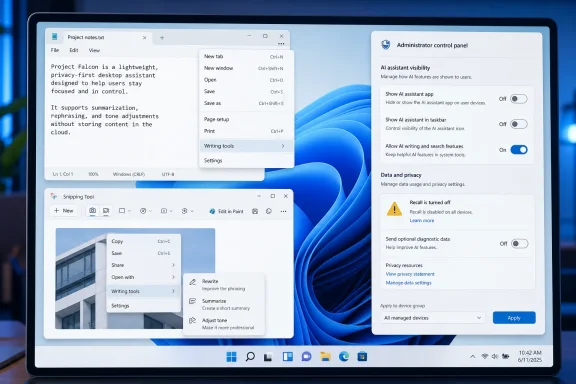
The recent pullback is best understood as an admission that Copilot’s visibility outran its usefulness. Removing a Copilot shortcut from a native app does not remove Microsoft’s AI stack. Renaming a menu from “Copilot” to “Writing tools” does not turn Windows into a pre-AI operating system. But it does suggest Microsoft has recognized that the Copilot label itself became part of the problem.
This is what happens when a brand becomes too broad to be useful. Copilot started as a promising metaphor: a helper, not a pilot; a second seat, not a replacement. Then Microsoft applied it to chatbots, coding assistants, enterprise search, Windows features, Office automation, security tooling, and PC hardware. By the time users saw yet another Copilot icon in a simple utility, the word no longer described a capability. It described Microsoft’s insistence.
There is a lesson here that predates AI. Windows users have historically tolerated complexity when it is tied to visible power. They have been less forgiving of features that arrive uninvited, consume resources, or complicate simple workflows. The difference between “advanced capability” and “bloat” is often whether the user asked for it.
That is why renaming matters, even if it feels cosmetic. “Writing tools” tells the user what the feature does. “Copilot” tells the user what Microsoft wants the feature to symbolize. The former belongs in an app menu. The latter belongs in a product strategy deck.
The backlash was immediate because Recall touched the deepest layer of trust in a personal computer. A feature that can index what you looked at, typed, opened, or received is not merely another productivity tool. It changes the mental model of the machine from a passive instrument to an observing system.
Microsoft eventually reworked Recall with stronger security controls, opt-in behavior, Windows Hello requirements, encryption, and more explicit user control. Those changes were necessary. They also proved the critics’ central point: the original rollout did not respect the sensitivity of what Microsoft was proposing.
Recall’s controversy bled into the larger Copilot debate even though the two are not identical. For many users, both became examples of the same pattern: Microsoft finding new ways to insert AI into Windows before proving that the tradeoff was worth it. Once that perception hardened, even harmless Copilot buttons began to look suspicious.
Administrators do not evaluate AI features the way keynote audiences do. They ask whether a tool respects policy, whether it can be disabled cleanly, whether it changes user behavior, and whether support teams will inherit confusion when Microsoft moves a setting, renames a feature, or adds a new cloud-connected surface. In that world, “AI everywhere” can sound like “risk everywhere.”
Microsoft has been moving toward more controls, including policy options for managing the Copilot app on Windows. That is the right direction, but it also underlines how premature some of the earlier integration felt. If enterprise administrators need tooling to remove or suppress something, the feature was never merely a convenience.
Windows has always had to serve two masters: the consumer who wants modern features and the organization that wants predictability. Copilot collided with both groups for different reasons. Home users saw intrusion. IT departments saw another governance object.
There are places where AI can be genuinely useful in an operating system. Search can become more forgiving. Accessibility tools can become more powerful. Photos, captions, translation, writing assistance, and troubleshooting can all benefit from local or cloud AI when the user clearly understands what is happening. The problem was never that Windows had AI. The problem was Windows behaving as if the presence of AI was self-justifying.
Microsoft’s best AI features will likely be the ones users barely think of as Copilot. A button that summarizes a document is less interesting than a workflow that saves five minutes without hijacking the interface. A local model that improves accessibility is more defensible than a branded assistant sitting in every corner of the shell.
That is the pivot Microsoft appears to be attempting. Not “no AI,” but less AI theater. Fewer icons. Fewer brand intrusions. More features that can survive being described in plain English.
That is why some users will not give Microsoft credit for removing a Copilot button while leaving the AI feature underneath. To them, this looks less like reform and more like camouflage. They suspect the company is not listening so much as changing labels.
That skepticism is not irrational. Microsoft’s commercial incentives still point toward deeper AI integration, especially as PC refresh cycles, Copilot+ hardware, and Microsoft 365 subscriptions become more tightly linked. Windows is both a product and a distribution channel. Copilot is valuable to Microsoft precisely because Windows gives it reach.
Still, user pressure has had an effect. Microsoft would not be reducing entry points, softening branding, or emphasizing control if the original strategy had landed cleanly. The company has learned that Windows users may accept AI, but they will punish overreach.
For WindowsForum readers, the practical read is straightforward:
Source: modernetdigital.cat Windows 11 is free of AI: Microsoft removes Copilot
The modernetdigital.cat framing captures a real shift but overstates the verdict. Copilot is not gone, Recall is not the same thing as Copilot, and Microsoft’s AI strategy remains central to Windows, Microsoft 365, Edge, Azure, and its hardware roadmap. What has changed is subtler and more interesting: Windows 11 is entering the phase where AI has to justify its place like any other platform feature.
 Microsoft Retreats From the Button, Not the Bet
For the last two years, Microsoft treated Copilot less like an app and more like a campaign. It appeared in the taskbar, in Edge, in Microsoft 365, in Windows settings, in new PC branding, and eventually on physical keyboards. The company’s message was unmistakable: AI was not a feature users might choose, but the new surface through which Windows would explain itself.That made sense in Redmond’s boardroom. Microsoft had invested heavily in OpenAI, watched generative AI become the industry’s dominant growth story, and needed to show investors that Windows was not merely a legacy operating system with a fresh coat of Fluent Design. Copilot became the proof point.
But operating systems are not keynote slides. They are places where people file taxes, manage fleets of laptops, edit family photos, run line-of-business software, and troubleshoot printers at 11 p.m. A button that looks strategic to Microsoft can look like clutter to everyone else.
The recent pullback is best understood as an admission that Copilot’s visibility outran its usefulness. Removing a Copilot shortcut from a native app does not remove Microsoft’s AI stack. Renaming a menu from “Copilot” to “Writing tools” does not turn Windows into a pre-AI operating system. But it does suggest Microsoft has recognized that the Copilot label itself became part of the problem.
The Copilot Brand Became Heavier Than the Features
The strange thing about Microsoft’s retreat is that some of the underlying AI functions remain. In Notepad, for example, the company has moved away from the Copilot label while keeping writing assistance. That is not a purge. It is a reclassification.This is what happens when a brand becomes too broad to be useful. Copilot started as a promising metaphor: a helper, not a pilot; a second seat, not a replacement. Then Microsoft applied it to chatbots, coding assistants, enterprise search, Windows features, Office automation, security tooling, and PC hardware. By the time users saw yet another Copilot icon in a simple utility, the word no longer described a capability. It described Microsoft’s insistence.
There is a lesson here that predates AI. Windows users have historically tolerated complexity when it is tied to visible power. They have been less forgiving of features that arrive uninvited, consume resources, or complicate simple workflows. The difference between “advanced capability” and “bloat” is often whether the user asked for it.
That is why renaming matters, even if it feels cosmetic. “Writing tools” tells the user what the feature does. “Copilot” tells the user what Microsoft wants the feature to symbolize. The former belongs in an app menu. The latter belongs in a product strategy deck.
Recall Turned AI Anxiety Into a Windows Problem
Recall was the moment Microsoft’s AI push stopped being an abstract annoyance and became a security debate. The feature, announced for Copilot+ PCs in 2024, was designed to create a searchable timeline of user activity by periodically capturing snapshots of the screen. Microsoft pitched it as memory for your PC. Critics saw a local database of sensitive moments waiting to become a liability.The backlash was immediate because Recall touched the deepest layer of trust in a personal computer. A feature that can index what you looked at, typed, opened, or received is not merely another productivity tool. It changes the mental model of the machine from a passive instrument to an observing system.
Microsoft eventually reworked Recall with stronger security controls, opt-in behavior, Windows Hello requirements, encryption, and more explicit user control. Those changes were necessary. They also proved the critics’ central point: the original rollout did not respect the sensitivity of what Microsoft was proposing.
Recall’s controversy bled into the larger Copilot debate even though the two are not identical. For many users, both became examples of the same pattern: Microsoft finding new ways to insert AI into Windows before proving that the tradeoff was worth it. Once that perception hardened, even harmless Copilot buttons began to look suspicious.
Enterprise IT Heard “Productivity” and Saw “Governance Burden”
Consumer irritation is only half the story. In managed environments, Copilot’s spread raised a different set of questions: who controls it, what data can it access, how is it audited, and whether it creates new compliance exposure. Those are not philosophical concerns. They are deployment blockers.Administrators do not evaluate AI features the way keynote audiences do. They ask whether a tool respects policy, whether it can be disabled cleanly, whether it changes user behavior, and whether support teams will inherit confusion when Microsoft moves a setting, renames a feature, or adds a new cloud-connected surface. In that world, “AI everywhere” can sound like “risk everywhere.”
Microsoft has been moving toward more controls, including policy options for managing the Copilot app on Windows. That is the right direction, but it also underlines how premature some of the earlier integration felt. If enterprise administrators need tooling to remove or suppress something, the feature was never merely a convenience.
Windows has always had to serve two masters: the consumer who wants modern features and the organization that wants predictability. Copilot collided with both groups for different reasons. Home users saw intrusion. IT departments saw another governance object.
The Real Pivot Is From AI Theater to AI Utility
The most generous reading of Microsoft’s latest moves is that the company is trying to separate AI that helps from AI that advertises itself. That is exactly the line Windows needs to draw.There are places where AI can be genuinely useful in an operating system. Search can become more forgiving. Accessibility tools can become more powerful. Photos, captions, translation, writing assistance, and troubleshooting can all benefit from local or cloud AI when the user clearly understands what is happening. The problem was never that Windows had AI. The problem was Windows behaving as if the presence of AI was self-justifying.
Microsoft’s best AI features will likely be the ones users barely think of as Copilot. A button that summarizes a document is less interesting than a workflow that saves five minutes without hijacking the interface. A local model that improves accessibility is more defensible than a branded assistant sitting in every corner of the shell.
That is the pivot Microsoft appears to be attempting. Not “no AI,” but less AI theater. Fewer icons. Fewer brand intrusions. More features that can survive being described in plain English.
Windows 11 Still Carries the Burden of Distrust
Microsoft’s problem is that it has spent years training Windows users to be skeptical. Forced account flows, Start menu promotions, Edge prompts, Teams bundling, default app friction, and telemetry debates all created a reservoir of distrust before Copilot arrived. AI did not create that problem. It inherited it.That is why some users will not give Microsoft credit for removing a Copilot button while leaving the AI feature underneath. To them, this looks less like reform and more like camouflage. They suspect the company is not listening so much as changing labels.
That skepticism is not irrational. Microsoft’s commercial incentives still point toward deeper AI integration, especially as PC refresh cycles, Copilot+ hardware, and Microsoft 365 subscriptions become more tightly linked. Windows is both a product and a distribution channel. Copilot is valuable to Microsoft precisely because Windows gives it reach.
Still, user pressure has had an effect. Microsoft would not be reducing entry points, softening branding, or emphasizing control if the original strategy had landed cleanly. The company has learned that Windows users may accept AI, but they will punish overreach.
The Headline Windows Users Should Actually Believe
The useful conclusion is not that Windows 11 is free of AI. It is that Microsoft has begun trimming the most conspicuous Copilot clutter while preserving its broader AI ambitions. That makes the current shift meaningful, but not revolutionary.For WindowsForum readers, the practical read is straightforward:
- Windows 11 is not becoming an AI-free operating system, and Microsoft’s long-term strategy still depends heavily on AI.
- Some Copilot-branded buttons and entry points are being removed or renamed, especially where Microsoft appears to believe they add more clutter than value.
- Some AI features remain under more descriptive labels, which means “Copilot is gone” can be a misleading shorthand.
- Recall remains the defining cautionary tale because it showed how quickly AI convenience becomes a privacy and security controversy.
- Administrators should keep watching policy controls, app removal options, and default behavior rather than relying on branding changes.
- Microsoft’s next challenge is not adding more AI to Windows, but proving that each AI feature earns its place.
Source: modernetdigital.cat Windows 11 is free of AI: Microsoft removes Copilot
