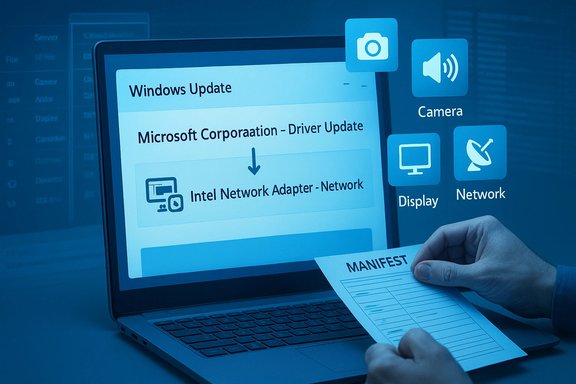
Windows 11’s update feed is quietly getting messier: users and admins are now seeing driver downloads labeled with unhelpful, generic titles such as “Microsoft Corporation – Driver Update [version]”, and while Microsoft says it’s working on a fix that will add device class information to driver titles, the roadmap is unclear and the change will require cooperation from OEMs and driver authors.
Windows Update is the single most visible mechanism by which Microsoft and hardware partners deliver drivers and firmware to billions of PCs. Historically, update titles displayed a dense but useful collection of metadata—dates, cumulative labels, platform architecture and, for drivers, information that helped administrators quickly understand what hardware was being targeted. In late 2025, Microsoft introduced a simplified naming scheme intended to make update titles easier to read, but the move provoked backlash from power users and IT pros and was partially reversed after community pressure. Microsoft states it will continue iterating on how titles appear in the Settings -> Windows Update UI. At the same time, the driver servicing ecosystem is changing: Microsoft has been migrating driver distribution and management toward cloud-based services and the Windows Update for Business deployment service, while WSUS driver synchronization was formally deprecated with an April 18, 2025 cutoff. The shift centralizes delivery and adds new enterprise controls, but it also increases reliance on metadata and cloud-side categorization to ensure drivers land on the correct devices.
Until that coordination is complete, users and IT pros will need to rely on Device Manager, the Microsoft Update Catalog, and careful approval workflows to bridge the gap. Microsoft’s stated intent to include device class names is a positive signal, but the absence of a timeline and the heavy dependencies on OEMs mean that the “generic driver name” problem will persist for some time. In the meantime, disciplined processes and use of the deployment service’s approval controls are the most reliable way to avoid surprises when driver updates land.
Source: Windows Latest Windows 11 driver updates names are generic, confusing, and unhelpful, but Microsoft might fix it
 Background
Windows Update is the single most visible mechanism by which Microsoft and hardware partners deliver drivers and firmware to billions of PCs. Historically, update titles displayed a dense but useful collection of metadata—dates, cumulative labels, platform architecture and, for drivers, information that helped administrators quickly understand what hardware was being targeted. In late 2025, Microsoft introduced a simplified naming scheme intended to make update titles easier to read, but the move provoked backlash from power users and IT pros and was partially reversed after community pressure. Microsoft states it will continue iterating on how titles appear in the Settings -> Windows Update UI. At the same time, the driver servicing ecosystem is changing: Microsoft has been migrating driver distribution and management toward cloud-based services and the Windows Update for Business deployment service, while WSUS driver synchronization was formally deprecated with an April 18, 2025 cutoff. The shift centralizes delivery and adds new enterprise controls, but it also increases reliance on metadata and cloud-side categorization to ensure drivers land on the correct devices. What’s happening now: generic driver titles in Windows Update
Users and site testers report seeing driver updates in the Windows Update list that are labeled only with the publisher and a version—or worse, an ambiguous label such as “Microsoft Corporation – Driver Update”. That label provides no explicit indication whether the update targets a camera, an audio processing component, a network adapter, a printer, or another device class. For everyday users this lack of detail is merely inconvenient; for administrators and power users it is a real operational problem. The Windows Latest report that highlighted this behaviour noted a real-world example: after installing a generic-sounding Microsoft driver update, the author found a new Voice Clarity audio processing object in Device Manager—an element of the Windows Studio Effects suite that Microsoft has been distributing for Copilot+ PCs and select devices. Voice Clarity improves voice quality by suppressing reverb and echo, but the point is that the update’s listing in Windows Update did not clearly indicate what had been updated until the author investigated Device Manager.Why this matters: practical and enterprise impacts
- Visibility and control loss for admins. IT teams rely on precise labels and metadata to approve, test, and deploy updates at scale. Generic labels make it difficult to perform impact analysis, to map updates to device inventories, or to create meaningful deployment policies in management consoles. Microsoft’s own enterprise driver tooling (Windows Update for Business, Intune driver policies) depends on accurate targeting and metadata.
- Troubleshooting and rollback complexity. When a driver or firmware update causes regressions—broken camera streams, audio corruption, or connectivity problems—admins and users need to identify and roll back the offending package. A generic Windows Update entry raises the bar for recovery: users may uninstall an update, but if the update’s identity is ambiguous, reapplication or selective blocking becomes fraught.
- Security and supply-chain concerns. Drivers are privileged code that run at kernel/driver levels. Knowing the device class and publisher metadata helps security teams assess risk and trace the provenance of a package. Generic naming erodes the contextual signals that feed change management and security baselines.
- User trust and transparency. Consumers often want to know whether a download changes things they care about: “Is this my webcam driver? My audio stack? My printer?” Generic labels remove that choice and trust layer, and can cause confusion when new features (for example, AI-based audio effects) appear suddenly after an update.
The technical anatomy: how Windows identifies device classes today
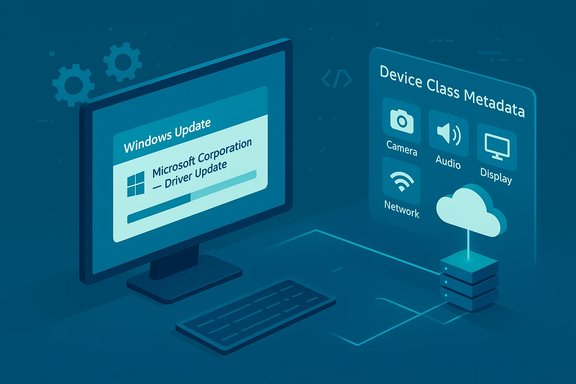
To evaluate the proposed fix, it helps to understand how Windows and driver packages already express device class information.- Driver packages include an INF file and metadata fields such as Class and ClassGuid in the INF’s Version section. These are the canonical identifiers Windows uses to group devices into device setup classes (for example, Camera, Audio, Display, Network). Microsoft documents a long list of system-defined device setup classes, each with a friendly name and a GUID that driver authors can use.
- The Device Setup Class concept is fundamental: when a driver is installed, the Class and ClassGuid in the INF determine the entry under Device Manager where the device will appear and how the system registers its capabilities. INF files can also add registry entries that define a friendly name for a class installer which helps UI surfaces display human-readable labels.
- Mechanically, Windows Update receives driver packages from publishers (OEMs and IHVs) and maps driver metadata into the update catalog. That metadata is what Microsoft and management tools use to surface names, publisher information, compatible hardware IDs, and targeting criteria. If that metadata is absent, incomplete, or normalized into a generic title server-side, the client’s display becomes less informative.
Microsoft’s response and the fix they’re planning
According to the reporting, a Microsoft representative working on WSUS and update metadata—identified as Aria—told Windows Latest that the company is “working on exactly what metadata we can get” and how OEMs can publish it, and that they plan to standardize titles to include device class names. Microsoft emphasized there is no ETA and that the effort requires partner participation. That statement signals intent but not a firm timeline. This fits a broader pattern at Microsoft: the company is centralizing driver delivery and management via cloud services and the Windows Update deployment service, and it is increasingly relying on server-side catalog decisions to shape what devices are offered. Microsoft’s shift away from WSUS synchronization (deprecated April 18, 2025) means that the balance of power — and the locus of metadata normalization — is now more server-side than on-premises. As a result, Microsoft must coordinate with OEMs and IHVs to get the right metadata into the catalog up front.Hurdles and why a fix will be slow
- Metadata is inconsistent across vendors. INF Class and ClassGuid are widely used, but vendors vary in how they populate friendly names, what properties they expose, and how they tag package metadata. Microsoft must design a standardized mapping and fallback logic to display friendly device class names reliably. This is non-trivial given the scale and diversity of hardware vendors.
- Server-side catalog normalization. Changing what Windows Update displays is a server-controlled change for many users; client updates alone won’t be sufficient. Microsoft needs to design a schema for title generation, update historical entries, and mitigate the risk of breaking existing automation that relies on current titles.
- Enterprise compatibility and tooling. Administrators and management tools (SCCM/ConfigMgr, Intune, third-party MDMs) may rely on existing metadata in scripts and dashboards. Any change must be backward-compatible or accompanied by migration guidance.
- Publisher adoption. OEMs and IHVs must publish richer, consistent metadata for their driver packages. Microsoft can shape tooling and requirements, but it cannot force third parties to update overnight.
- Edge cases such as composite updates. Some packages include multiple driver components or cross-device features (for example, a package that contains both camera and audio APO components). Mapping a single update to a single device class may require nuanced rules and developer cooperation.
Strengths in Microsoft’s approach
- Leverage of existing metadata. Microsoft isn’t proposing a new, proprietary identifier from scratch—driver packages already contain device class metadata (INF Class/ClassGuid). Using that existing schema reduces friction if vendors properly populate these fields.
- Cloud-centric catalog control. Centralizing title generation server-side gives Microsoft the ability to perform normalization, corrections, and rapid fixes without waiting for a Windows client patch. In theory, that speeds rollouts of improvements.
- Enterprise controls already in place. Windows Update for Business and the deployment service offer granular driver targeting and approval workflows; improving item titles will only augment those capabilities for IT operators.
Risks and remaining questions
- Partial fixes could be worse than none. If Microsoft displays a device class name but it’s sometimes wrong or ambiguous (e.g., “Audio/Camera”), users could be lulled into false confidence. Accurate mapping is essential; a half-baked UI change may increase confusion.
- Automation breakage and reporting drift. Many organizations have scripts and SIEM/CMDB workflows that parse update titles. Title changes can break parsing or reporting unless Microsoft provides a clear compatibility path and predictable schema.
- OEM non-compliance. If major OEMs do not publish consistent metadata, the update will be uneven: some updates will be properly labeled while many remain generic, undermining the project’s usefulness.
- Transparency vs. anti-tampering. Increasing metadata surface area improves transparency but also requires stricter vetting of metadata to prevent spoofing or misclassification. Microsoft will need robust validation steps for vendor-submitted metadata.
- End-user expectations. Consumers may expect feature-level granularity in update labels (for example, “Adds Voice Clarity APO”), but that level of detail may not be practical for every update and could clutter the UI. Microsoft must strike a balance between readability and actionable information.
How to survive the current mess: practical steps for power users and admins
While Microsoft and OEMs work through this, administrators and advanced users can adopt a few disciplined steps to avoid surprises.- Check Device Manager after suspicious updates. If an update displays as generic, open Device Manager and inspect the device entries (look for new APUs, APOs, or device properties). This is often the fastest way to map an update to hardware.
- Inspect the driver INF and signer. Use pnputil /enum-drivers and pnputil /export-driver to examine the package’s INF and the Class/ClassGuid declarations. The Class field tells you which setup class the driver belongs to.
- Use Microsoft Update Catalog for detail. The Microsoft Update Catalog lists driver packages and often includes publisher-supplied descriptions and hardware IDs you can map to device inventories.
- For enterprise: enforce staging and approval policies. Use Windows Update for Business deployment service or Intune driver approval workflows to vet driver packages before broad deployment. Microsoft provides deployment controls and reporting that help limit exposure.
- Maintain rollback procedures. Create system restore points and maintain driver backups (pnputil /export-driver) so you can revert if an update causes regressions.
- Document automation parsing. If you parse Windows Update titles in scripts, add resilience by mapping KBs, Publisher fields, and driver package IDs rather than parsing free-form titles.
What Microsoft should do (and what OEMs must deliver)
- Standardize a concise, machine-readable title schema. The server should generate titles from a deterministic template that includes at least: (1) Publisher, (2) Device Class (friendly name), (3) Hardware ID or family, and (4) version/K its KB or package ID for traceability.
- Offer a compatibility layer for parsing. Provide an API or machine-readable metadata endpoint (already available in commercial servicing services) to let management tools and scripts ingest structured metadata rather than scraping titles.
- Tighten vendor metadata requirements. Make it easier for OEMs to publish normalized metadata, with validation rules and helpful tooling to flag missing Class or ClassGuid entries.
- Phased rollout with enterprise preview. Give admins an opt-in preview channel where they can evaluate the new title schema and adapt workflows before server-side enforcement.
- Transparency and release notes. If a driver introduces a feature (for example, Windows Studio Effects or Voice Clarity enhancements), the driver catalog should include human-readable release notes that explain what was added and which device class is affected.
Conclusion
The problem at hand is deceptively simple to describe—Windows Update is showing vague driver titles—but it reveals deeper, structural challenges in modern Windows servicing. Microsoft is right to pursue cleaner, friendlier update titles, and the company is already moving critical driver management capabilities to cloud services. However, the fix that users want—clear device-class naming for driver updates—requires coordination: standardized metadata, consistent vendor behavior, and server-side catalog tooling that respects enterprise automation.Until that coordination is complete, users and IT pros will need to rely on Device Manager, the Microsoft Update Catalog, and careful approval workflows to bridge the gap. Microsoft’s stated intent to include device class names is a positive signal, but the absence of a timeline and the heavy dependencies on OEMs mean that the “generic driver name” problem will persist for some time. In the meantime, disciplined processes and use of the deployment service’s approval controls are the most reliable way to avoid surprises when driver updates land.
Source: Windows Latest Windows 11 driver updates names are generic, confusing, and unhelpful, but Microsoft might fix it