

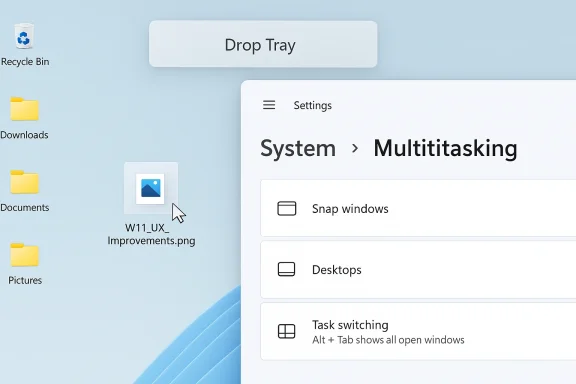
Microsoft has quietly done something Windows users have been asking for with unusual consistency: it took a small but intrusive file-sharing gesture and made it feel like part of the desktop again. The company’s latest Release Preview build renames Drag Tray to Drop Tray, shrinks the peek view, and moves the feature’s settings under Settings > System > Multitasking, a set of changes that makes the overlay easier to dismiss and far less likely to interfere when you are dragging files around the top of the screen. That sounds minor on paper, but in daily use it changes the feel of the feature from pushy to intentional, which is exactly the kind of refinement Windows 11 has needed in a few too many places.
The timing matters as much as the design. Microsoft is shipping the change in Windows 11 Builds 26100.8313 and 26200.8313 for the Release Preview Channel, which means this is close to public release and not just a random experiment buried in an early Insider flight. For a feature that many users ignored or actively disliked, that is a meaningful shift: Microsoft is no longer just adding a new way to share files, it is trying to make the new way unobtrusive enough that people might actually choose it.
Windows 11’s Drop Tray story is really a story about how Microsoft has been learning, repeatedly and sometimes painfully, that desktop users do not want novelty for its own sake. They want workflows that respect habit, preserve speed, and stay out of the way until they are needed. The original Drag Tray was a classic Microsoft idea in the modern era: useful in concept, touch-friendly in theory, and a little too eager in practice.
That eagerness was the problem. When you drag files in Windows, you are often not trying to share them at all. You may be moving them between folders, sorting desktop clutter, or doing something as ordinary as clearing a download into a project directory. If an overlay keeps appearing at the top edge of the screen, it stops feeling like a shortcut and starts feeling like an interruption. Microsoft’s own Windows 11 multitasking guidance shows how central the System > Multitasking area is to the shell’s interaction model, so relocating the setting there also makes the feature feel more like a core Windows behavior than a leftover sharing experiment.
This matters because Windows is not mobile. It shares some interaction ideas with touch-first operating systems, but the desktop still runs on muscle memory. Users expect file actions to be precise, repeatable, and quiet. They do not want a feature that behaves like a popup just because a file happened to cross the top of the display. That is why the new smaller peek view is the real fix, not the rename. It acknowledges that a sharing affordance should be discoverable without being aggressive.
Microsoft’s own Release Preview notes confirm that the change is part of a broader package of reliability fixes, which is also important. The company is not treating the Drop Tray as a standalone headline feature; it is folding it into a larger effort to smooth rough edges in Windows 11’s core experience. That is where the broader story lives: not in the branding tweak, but in the fact that Microsoft seems to be prioritizing friction reduction over feature inflation.
Another reason this update lands well is that it addresses a complaint that was easy to reproduce and hard to ignore. If you keep folders on your desktop, especially near the top edge, the old tray could feel like a browser toolbar that popped up at the worst possible moment. The new behavior still gives you the share UI when you actually push a file toward the top, but it now behaves with enough restraint that it no longer dominates unrelated drag-and-drop work. That is the difference between a useful addition and a feature people instinctively work around.
There is also a psychological benefit. Users tend to tolerate a feature more readily when its label sounds like a result rather than a demand. “Drag Tray” could feel like an instruction. “Drop Tray” feels like a destination.
In desktop UX, less visible can sometimes mean more usable. That feels counterintuitive until you remember that the best productivity features are often the ones you notice only when you need them.
The file-sharing tray itself was introduced as part of Microsoft’s broader push to make Windows feel more gesture-aware and touch-ready. That made sense on paper, especially in a market where many laptops are touch-capable and many users have grown accustomed to drag-based interactions from smartphones and tablets. But Windows is a more cluttered environment than a phone. It has overlapping windows, desktop icons, folders, contextual menus, and a whole history of users organizing their own working spaces in ways Microsoft cannot predict.
That complexity is why small UI experiments in Windows often face unusually strong feedback. The desktop is full of user-defined conventions, and a feature that works beautifully in one workflow can be annoying in another. A tray that appears when files are dragged to the top of the screen may be a great idea for someone who shares files constantly. For someone managing folders at the top of the desktop, it is another moving part in a space that already requires precision.
The latest Release Preview build suggests Microsoft understands that tension better than it did at the feature’s first appearance. The update moves the controls into System > Multitasking, indicating that the company sees this as a shell-level behavior rather than a niche sharing add-on. That is a telling shift. It puts the feature in the same neighborhood as Snap, Task View, and other desktop organization tools that govern how Windows behaves rather than what a single app does.
Historically, this fits a broader Windows pattern. Microsoft often introduces a feature in a bold form, watches how users react, and then gradually trims the rough edges until the experience becomes normal. Windows 11 has been full of these adjustments: taskbar tweaks, shell polish, Explorer reliability work, and gradual refinements to how the operating system handles the ordinary things users do dozens or hundreds of times a day. The Drop Tray update belongs to that lineage.
Microsoft’s official release notes also show that this update is part of a larger package of quality fixes rather than a single-purpose patch. That context matters because it suggests the company is no longer separating “innovation” from “usability” as sharply as it once did. Instead, it is trying to make the two reinforce each other, which is the only way Windows 11 is going to feel mature rather than merely modern.
That is why the smaller peek view is such an important correction. It keeps the feature discoverable while lowering the cost of accidental invocation, which is where the previous version fell down.
The smaller peek view is the most visible fix, and it probably does the most to reduce accidental activation. The removed label instructions matter too, because less text means less visual weight and less confusion when the overlay appears unexpectedly. Combined with the rename, the result is a tray that looks more like an optional helper and less like a forced detour.
Microsoft also changed where you manage the feature. The setting formerly associated with Nearby sharing now lives in Settings > System > Multitasking, which is a more logical home for a drag-and-drop UI element that lives in the shell rather than the network stack. That relocation is subtle, but it matters because settings architecture influences how users understand the feature. If a control is buried in the wrong category, users assume the feature belongs to the wrong mental model.
It also reinforces a more mature reading of the shell: a UI can appear when needed, but it should not dominate the task unless the user commits to it.
It also makes troubleshooting easier. If someone turns the feature off, they are more likely to look in a section that already contains layout and movement-related settings. That is good design, and it is good support logic.
That is especially true on modern laptops with high-resolution displays and tall aspect ratios. As screens get larger and user layouts become more personal, the upper part of the desktop often becomes storage territory for folders, shortcuts, and temporary project bins. If a tray keeps surfacing there, it competes with exactly the kinds of workflows people have built for themselves.
The updated Drop Tray also gives Microsoft a better chance to turn a feature people avoided into one they might use deliberately. The key is that the UI no longer feels eager. It has to be reached, not merely stumbled into. That kind of friction is not bad when the action it gates is optional and meaningful. It makes sharing feel like a choice instead of an interruption.
The Drop Tray fix works because it respects that habit. It preserves the gesture while removing the intrusion.
The Release Preview build that includes Drop Tray changes also includes other reliability work, which reinforces the idea that Microsoft is focused on the polish layer of the operating system, not just new functionality. That is important in a platform where Explorer, the taskbar, Settings, and drag-and-drop interactions still define the entire feel of the desktop.
Microsoft’s public messaging around Windows 11 has also emphasized phased rollout and gradual feature delivery. That means features may not appear for everyone at once, even if they are on the same build. The company has normalized controlled feature rollout as a way to reduce the risk of broad regressions, and the Drop Tray change fits that pattern neatly. In other words, Windows is becoming more like a continuously tuned platform than a once-a-year release product.
That has pros and cons. On the upside, Microsoft can react faster to complaints and patch pain points before they harden into reputational damage. On the downside, it means users have to tolerate a more fluid definition of “finished.” The Drop Tray update is a good example of why that trade-off can work: the feature was good in principle, but it needed iteration before it became truly useful.
That matters for enterprise admins, enthusiasts, and everyday users alike because it signals that the company believes the change is close to stable enough for broad exposure.
That difference matters more on home PCs than it might sound. Consumer desktops are often messier than enterprise-managed ones. They have downloads, game launchers, media folders, screenshots, and personal shortcuts scattered across them. A tray that assumes a cleaner workspace will always hit friction in the real world.
The settings relocation also helps casual users because it reduces the sense that the feature is hiding in a strange corner of the system. Multitasking is a better mental bucket for a file-gesture UI than Nearby sharing, which sounds like a networking function even when the feature is really about UI behavior. Microsoft has a tendency to group features by implementation rather than intent; here, it finally appears to be grouping by intent.
That is often the hallmark of a good operating-system change: the best part is not the feature itself, but the removal of friction around everything else.
On managed desktops, shell consistency matters because a small annoyance scales across thousands of users. If a top-edge overlay interferes with folder workflows or confuses employees about where a feature lives, help desks inherit the pain. Reducing that friction lowers support volume and improves perceived stability. That is the sort of thing IT actually notices.
There is also a broader administrative point. Moving the setting into System > Multitasking makes it easier to reason about in policy discussions and support documentation. The feature becomes part of the shell behavior set, not a side effect of some unrelated sharing infrastructure. That distinction is useful for training, imaging, and standardization.
The updated Drop Tray is one way to recover some of that credibility. It says Microsoft can still take feedback seriously and make a design less intrusive without ripping out the feature entirely. That is a much better answer than pretending the original version was already good enough.
It also reflects the broader market reality that desktop operating systems are under pressure from mobile-style expectations without actually becoming mobile products. Microsoft has to support touch, pen, mouse, keyboard, and legacy workflows all at once. The only way to do that successfully is to make new features adapt to old habits, not the other way around.
If Microsoft wants to keep that promise alive, it has to keep making corrections like this one.
That would be a meaningful outcome because Windows users rarely judge the OS by its biggest headlines. They judge it by whether their folders open cleanly, their layouts behave predictably, and their habits are respected. A smaller Drop Tray is not glamorous, but it is exactly the sort of quiet correction that can rebuild confidence.
Source: Windows Latest Microsoft just made Windows 11’s Drag Tray for sharing files less annoying, and it actually works now
The timing matters as much as the design. Microsoft is shipping the change in Windows 11 Builds 26100.8313 and 26200.8313 for the Release Preview Channel, which means this is close to public release and not just a random experiment buried in an early Insider flight. For a feature that many users ignored or actively disliked, that is a meaningful shift: Microsoft is no longer just adding a new way to share files, it is trying to make the new way unobtrusive enough that people might actually choose it.
 Overview
Windows 11’s Drop Tray story is really a story about how Microsoft has been learning, repeatedly and sometimes painfully, that desktop users do not want novelty for its own sake. They want workflows that respect habit, preserve speed, and stay out of the way until they are needed. The original Drag Tray was a classic Microsoft idea in the modern era: useful in concept, touch-friendly in theory, and a little too eager in practice.That eagerness was the problem. When you drag files in Windows, you are often not trying to share them at all. You may be moving them between folders, sorting desktop clutter, or doing something as ordinary as clearing a download into a project directory. If an overlay keeps appearing at the top edge of the screen, it stops feeling like a shortcut and starts feeling like an interruption. Microsoft’s own Windows 11 multitasking guidance shows how central the System > Multitasking area is to the shell’s interaction model, so relocating the setting there also makes the feature feel more like a core Windows behavior than a leftover sharing experiment.
This matters because Windows is not mobile. It shares some interaction ideas with touch-first operating systems, but the desktop still runs on muscle memory. Users expect file actions to be precise, repeatable, and quiet. They do not want a feature that behaves like a popup just because a file happened to cross the top of the display. That is why the new smaller peek view is the real fix, not the rename. It acknowledges that a sharing affordance should be discoverable without being aggressive.
Microsoft’s own Release Preview notes confirm that the change is part of a broader package of reliability fixes, which is also important. The company is not treating the Drop Tray as a standalone headline feature; it is folding it into a larger effort to smooth rough edges in Windows 11’s core experience. That is where the broader story lives: not in the branding tweak, but in the fact that Microsoft seems to be prioritizing friction reduction over feature inflation.
Another reason this update lands well is that it addresses a complaint that was easy to reproduce and hard to ignore. If you keep folders on your desktop, especially near the top edge, the old tray could feel like a browser toolbar that popped up at the worst possible moment. The new behavior still gives you the share UI when you actually push a file toward the top, but it now behaves with enough restraint that it no longer dominates unrelated drag-and-drop work. That is the difference between a useful addition and a feature people instinctively work around.
Why the rename matters
The rename from Drag Tray to Drop Tray is not just cosmetic. “Drag” describes the action you do to invoke it, while “drop” implies the endpoint, the intended destination, and the outcome of the gesture. That subtle shift makes the interface language cleaner and more consistent with the idea of transferring files rather than simply hauling them around.There is also a psychological benefit. Users tend to tolerate a feature more readily when its label sounds like a result rather than a demand. “Drag Tray” could feel like an instruction. “Drop Tray” feels like a destination.
- The new name is simpler and easier to remember.
- It better reflects the action of releasing a file.
- It softens the impression that Windows is forcing a sharing workflow.
- It aligns with the tray’s more subdued visual behavior.
Why the smaller peek view matters
The reduced peek view is the biggest practical improvement. Microsoft says the smaller tray should be less likely to open accidentally and easier to dismiss while working near the top edge of the screen, which is exactly the problem users were running into before. That is a good example of design restraint: the feature still exists, but it no longer acts like a magnet.In desktop UX, less visible can sometimes mean more usable. That feels counterintuitive until you remember that the best productivity features are often the ones you notice only when you need them.
Background
Microsoft has spent much of the Windows 11 era trying to rebalance two competing instincts: modernize the interface and preserve the feel of the classic Windows desktop. Sometimes that has meant bold visual changes. Sometimes it has meant restoring features people expected to remain untouched. And sometimes, as with the Drop Tray, it has meant revisiting an idea that was good enough to ship but not yet good enough to live with every day.The file-sharing tray itself was introduced as part of Microsoft’s broader push to make Windows feel more gesture-aware and touch-ready. That made sense on paper, especially in a market where many laptops are touch-capable and many users have grown accustomed to drag-based interactions from smartphones and tablets. But Windows is a more cluttered environment than a phone. It has overlapping windows, desktop icons, folders, contextual menus, and a whole history of users organizing their own working spaces in ways Microsoft cannot predict.
That complexity is why small UI experiments in Windows often face unusually strong feedback. The desktop is full of user-defined conventions, and a feature that works beautifully in one workflow can be annoying in another. A tray that appears when files are dragged to the top of the screen may be a great idea for someone who shares files constantly. For someone managing folders at the top of the desktop, it is another moving part in a space that already requires precision.
The latest Release Preview build suggests Microsoft understands that tension better than it did at the feature’s first appearance. The update moves the controls into System > Multitasking, indicating that the company sees this as a shell-level behavior rather than a niche sharing add-on. That is a telling shift. It puts the feature in the same neighborhood as Snap, Task View, and other desktop organization tools that govern how Windows behaves rather than what a single app does.
Historically, this fits a broader Windows pattern. Microsoft often introduces a feature in a bold form, watches how users react, and then gradually trims the rough edges until the experience becomes normal. Windows 11 has been full of these adjustments: taskbar tweaks, shell polish, Explorer reliability work, and gradual refinements to how the operating system handles the ordinary things users do dozens or hundreds of times a day. The Drop Tray update belongs to that lineage.
Microsoft’s official release notes also show that this update is part of a larger package of quality fixes rather than a single-purpose patch. That context matters because it suggests the company is no longer separating “innovation” from “usability” as sharply as it once did. Instead, it is trying to make the two reinforce each other, which is the only way Windows 11 is going to feel mature rather than merely modern.
The desktop still runs on habits
Windows users develop routines that are remarkably hard to change. They know where a folder lives, how a context menu behaves, and what happens when they drag a file just a little too far. That is not stubbornness; it is efficiency.- Desktop placement is often intentional, not random.
- File moves are frequently faster than formal share workflows.
- The top edge of the screen is already a crowded interaction zone.
- Any overlay there must justify its existence quickly.
The feature had a discoverability problem
The original tray also ran into a classic UI problem: features that appear only in specific gestures are easy to miss, but once discovered, they can become irritating if they are too prominent. Microsoft was trying to solve one problem and accidentally created another.That is why the smaller peek view is such an important correction. It keeps the feature discoverable while lowering the cost of accidental invocation, which is where the previous version fell down.
What Changed in the Update
The official change is straightforward. Microsoft renamed the feature, adjusted its presentation, and moved its settings location. But the effect is larger than the changelog suggests because each change addresses a different part of the same usability complaint.The smaller peek view is the most visible fix, and it probably does the most to reduce accidental activation. The removed label instructions matter too, because less text means less visual weight and less confusion when the overlay appears unexpectedly. Combined with the rename, the result is a tray that looks more like an optional helper and less like a forced detour.
Microsoft also changed where you manage the feature. The setting formerly associated with Nearby sharing now lives in Settings > System > Multitasking, which is a more logical home for a drag-and-drop UI element that lives in the shell rather than the network stack. That relocation is subtle, but it matters because settings architecture influences how users understand the feature. If a control is buried in the wrong category, users assume the feature belongs to the wrong mental model.
A cleaner fit inside Windows 11
The new Drop Tray now feels closer to the Windows 11 snap layout bar than to a pop-up share sheet. That resemblance is useful because the snap UI is already accepted as a contextual aid rather than a disruption.It also reinforces a more mature reading of the shell: a UI can appear when needed, but it should not dominate the task unless the user commits to it.
- Smaller peek view reduces accidental interruptions.
- Removed instructions lower visual noise.
- Settings relocation improves discoverability.
- The rename aligns the UI with its purpose.
Why the placement change is smart
Putting the control under Multitasking instead of Nearby sharing is more than housekeeping. It recognizes that the Drop Tray is part of how users manage workspace flow, not just how they transmit files. That distinction matters for both power users and casual users.It also makes troubleshooting easier. If someone turns the feature off, they are more likely to look in a section that already contains layout and movement-related settings. That is good design, and it is good support logic.
Why This Matters for Everyday Windows Use
The reason this update is newsworthy is that it touches a behavior many users encounter without consciously thinking about it. File moving is one of the most routine things people do on a PC, which means even a small annoyance can become a major source of irritation over time. A feature that interrupts file movement near the top of the screen effectively taxes normal desktop behavior.That is especially true on modern laptops with high-resolution displays and tall aspect ratios. As screens get larger and user layouts become more personal, the upper part of the desktop often becomes storage territory for folders, shortcuts, and temporary project bins. If a tray keeps surfacing there, it competes with exactly the kinds of workflows people have built for themselves.
The updated Drop Tray also gives Microsoft a better chance to turn a feature people avoided into one they might use deliberately. The key is that the UI no longer feels eager. It has to be reached, not merely stumbled into. That kind of friction is not bad when the action it gates is optional and meaningful. It makes sharing feel like a choice instead of an interruption.
Desktop muscle memory is real
A lot of Windows design debates ignore how much users rely on repetition. They do not want to relearn basic behaviors every few months. That is one reason why design changes in Windows 11 so often get judged harshly: the operating system is not just software, it is a habit machine.The Drop Tray fix works because it respects that habit. It preserves the gesture while removing the intrusion.
File sharing becomes more intentional
There is a broader behavioral effect here too. If the tray is subtle enough that users must intentionally bring a file to the top of the screen to invoke it, then the feature stops feeling accidental. That may sound like a small thing, but it is the difference between a UI element that gets ignored and one that feels optional but sensible.- Sharing feels more deliberate.
- Moving files becomes less error-prone.
- Desktop users regain top-edge space.
- The feature becomes easier to trust.
Microsoft’s Broader Windows 11 Cleanup
This update does not arrive in isolation. Microsoft has been steadily working through a long list of shell refinements, reliability fixes, and interface adjustments across Windows 11. That matters because users increasingly judge the OS not just by big launches but by whether everyday operations feel dependable.The Release Preview build that includes Drop Tray changes also includes other reliability work, which reinforces the idea that Microsoft is focused on the polish layer of the operating system, not just new functionality. That is important in a platform where Explorer, the taskbar, Settings, and drag-and-drop interactions still define the entire feel of the desktop.
Microsoft’s public messaging around Windows 11 has also emphasized phased rollout and gradual feature delivery. That means features may not appear for everyone at once, even if they are on the same build. The company has normalized controlled feature rollout as a way to reduce the risk of broad regressions, and the Drop Tray change fits that pattern neatly. In other words, Windows is becoming more like a continuously tuned platform than a once-a-year release product.
That has pros and cons. On the upside, Microsoft can react faster to complaints and patch pain points before they harden into reputational damage. On the downside, it means users have to tolerate a more fluid definition of “finished.” The Drop Tray update is a good example of why that trade-off can work: the feature was good in principle, but it needed iteration before it became truly useful.
Release Preview as a policy signal
Release Preview has become one of Microsoft’s most telling channels because it shows where the company thinks the product is headed next. When a feature lands there, it is no longer just an idea in the lab.That matters for enterprise admins, enthusiasts, and everyday users alike because it signals that the company believes the change is close to stable enough for broad exposure.
Reliability is now a feature
A lot of the Windows 11 story in 2026 has been about the same underlying theme: users care deeply about basic stability. They do not want their file manager to flash white, their shell to stutter, or their drag-and-drop interactions to become unpredictable. Microsoft seems to be treating those concerns as strategic rather than cosmetic, and that is the right call.- Shell polish affects perceived quality.
- Small UI fixes can have big daily impact.
- Release Preview is where trust gets rebuilt.
- Reliability now competes with flashy features for attention.
Consumer Impact
For consumers, the Drop Tray change is a usability win first and a feature change second. Most people do not think of file sharing as an intentional workflow choice; they think of it as something they do when necessary, and they want that necessary step to be quick. A UI that appears too easily becomes annoying, while one that appears only when invited feels like a helpful shortcut.That difference matters more on home PCs than it might sound. Consumer desktops are often messier than enterprise-managed ones. They have downloads, game launchers, media folders, screenshots, and personal shortcuts scattered across them. A tray that assumes a cleaner workspace will always hit friction in the real world.
The settings relocation also helps casual users because it reduces the sense that the feature is hiding in a strange corner of the system. Multitasking is a better mental bucket for a file-gesture UI than Nearby sharing, which sounds like a networking function even when the feature is really about UI behavior. Microsoft has a tendency to group features by implementation rather than intent; here, it finally appears to be grouping by intent.
Why home users may care more than they expect
A lot of home users will never manually enable a sharing tray. That does not mean they will not benefit from the fix. If the tray no longer interferes with moving files to the top of the desktop, then even people who never use it are better off.That is often the hallmark of a good operating-system change: the best part is not the feature itself, but the removal of friction around everything else.
Better fit for touch and mouse alike
The update also makes the feature more defensible on touch-capable laptops. If Microsoft wants to keep a gesture-based sharing aid in Windows 11, it needs to ensure it does not punish mouse users. The smaller tray is a fair compromise because it stays available without dominating the interaction.- Touch users still get a visible share affordance.
- Mouse users regain precise drag-and-drop control.
- Desktop workflows become less fragile.
- Optional features feel more optional.
Enterprise Impact
Enterprise users may care less about the Drop Tray as a feature and more about what it signals: Microsoft is willing to revisit shell behavior that causes friction across managed environments. That is important because file movement, folder organization, and workspace layout are common tasks in corporate settings too, even if they do not generate headlines.On managed desktops, shell consistency matters because a small annoyance scales across thousands of users. If a top-edge overlay interferes with folder workflows or confuses employees about where a feature lives, help desks inherit the pain. Reducing that friction lowers support volume and improves perceived stability. That is the sort of thing IT actually notices.
There is also a broader administrative point. Moving the setting into System > Multitasking makes it easier to reason about in policy discussions and support documentation. The feature becomes part of the shell behavior set, not a side effect of some unrelated sharing infrastructure. That distinction is useful for training, imaging, and standardization.
Standardization beats cleverness in the enterprise
The enterprise does not need clever UI surprises. It needs predictability. Microsoft’s correction here helps because it makes the feature easier to explain, easier to disable, and easier to ignore if a deployment team decides it is not appropriate for a given image.Why the rollout model matters to IT
The phased nature of Windows 11 feature delivery also matters here. If the change arrives gradually, administrators have time to validate how it behaves across different device classes and user profiles. That is a healthier model than a surprise shell change delivered everywhere at once.- Easier to document for help desks.
- Easier to suppress if policy requires it.
- Easier to validate in pilot rings.
- Less likely to create support noise.
Competitive Implications
Microsoft’s decision to refine the Drop Tray also has a competitive subtext. On the surface, this is about file sharing in Windows 11. Underneath, it is about how Windows compares to other desktop ecosystems in the way it treats user control. macOS has long been praised for polish, but Windows has always won points for flexibility. When Microsoft over-designs a workflow, it risks squandering that advantage.The updated Drop Tray is one way to recover some of that credibility. It says Microsoft can still take feedback seriously and make a design less intrusive without ripping out the feature entirely. That is a much better answer than pretending the original version was already good enough.
It also reflects the broader market reality that desktop operating systems are under pressure from mobile-style expectations without actually becoming mobile products. Microsoft has to support touch, pen, mouse, keyboard, and legacy workflows all at once. The only way to do that successfully is to make new features adapt to old habits, not the other way around.
Windows versus other platforms
Windows users are more likely than macOS users to object when an interface interrupts established behavior. That is not because they are less tolerant of change, but because Windows has always been the platform where customization and control are part of the contract.If Microsoft wants to keep that promise alive, it has to keep making corrections like this one.
The real competition is user inertia
The biggest competitor to any Windows feature is not another OS. It is habit. If a feature feels annoying, users will avoid it, disable it, or find a workaround. Microsoft’s move suggests it understands that a UI earns adoption by respecting that inertia rather than fighting it.- User trust depends on restraint.
- Default behavior matters more than marketing.
- Workflows beat features when they conflict.
- Good design can reduce workaround culture.
Strengths and Opportunities
Microsoft deserves credit for fixing the part of the experience that actually hurt. The original tray problem was not theoretical; it showed up where people were working, and it did so at the worst possible moment. By making the overlay smaller and less intrusive, Microsoft has created a better chance for the feature to be used on purpose instead of resented by default. That is the kind of small product decision that can have an outsized effect on how Windows 11 feels day to day.- The update directly addresses accidental interruptions.
- The smaller overlay better respects desktop workflows.
- The rename makes the feature easier to understand.
- The settings move improves coherence within Windows.
- The change supports both touch and mouse users.
- Microsoft is showing it can iterate on criticized ideas.
- The feature may now gain voluntary adoption instead of avoidance.
Risks and Concerns
The biggest concern is that Microsoft could still leave the feature in a half-in, half-out state if rollout or discoverability is uneven. A smaller tray is better, but if users cannot easily understand when it appears or how to control it, the improvement may not fully land. There is also the risk that some desktops or display layouts will expose edge cases the company has not fully eliminated, especially on systems with multiple monitors, unusual scaling, or crowded desktop setups.- Gradual rollout may confuse users comparing notes.
- Some users may miss the renamed settings location.
- Multi-monitor and scaling edge cases could linger.
- Hidden settings can still frustrate casual users.
- A subtle feature can become invisible to the point of irrelevance.
- Any regression in drag-and-drop behavior would be highly noticeable.
- Microsoft still has to prove the fix works consistently in real-world use.
Looking Ahead
The most interesting question now is not whether Microsoft can ship a less annoying file-sharing tray. It clearly can. The question is whether this is part of a broader shift in how the company thinks about Windows 11’s everyday experience. If Microsoft continues refining shell interactions with this level of restraint, then the operating system may finally start feeling less like a collection of modernized surfaces and more like a coherent desktop platform again.That would be a meaningful outcome because Windows users rarely judge the OS by its biggest headlines. They judge it by whether their folders open cleanly, their layouts behave predictably, and their habits are respected. A smaller Drop Tray is not glamorous, but it is exactly the sort of quiet correction that can rebuild confidence.
What to watch next
- Whether the Drop Tray reaches general availability in May as expected.
- Whether the feature lands broadly across both 24H2 and 25H2 systems.
- Whether Microsoft adds more guidance for the Multitasking settings location.
- Whether further shell refinements follow in the same Release Preview cycle.
- Whether user feedback pushes Microsoft toward even subtler interaction design.
Source: Windows Latest Microsoft just made Windows 11’s Drag Tray for sharing files less annoying, and it actually works now
