

Microsoft’s latest Windows 11 rethink is not a retreat from artificial intelligence so much as a retreat from AI everywhere, all at once. After months of pushing Copilot branding into familiar inbox apps, Microsoft has started stripping back some of the most visible prompts in tools such as Notepad and Snipping Tool, replacing loud assistant-style entry points with quieter, task-specific controls. The change is significant because it shows Microsoft responding to a very real user complaint: people may want useful automation, but they do not necessarily want every corner of Windows to feel like a Copilot advertisement. For Windows users, IT administrators, and PC makers, this is less a dramatic abandonment of AI than a course correction in how AI should live inside the operating system.
Microsoft has spent the past two years trying to turn Copilot into the connective tissue across Windows, Microsoft 365, Edge, Bing, Teams, and developer tools. That strategy made sense on paper: if AI assistance is useful in Word, Excel, PowerPoint, Outlook, and Teams, it could also be useful inside the operating system itself. Windows 11 became the most visible testing ground for that ambition.
The problem was not simply that Microsoft added AI features. The problem was where and how those features appeared. A Copilot button in a productivity suite can feel like a premium assistant; a Copilot button inside a simple screenshot utility or plain text editor can feel like clutter, upselling, or unnecessary interference.
Earlier this year, Microsoft said it would reduce unnecessary Copilot entry points across Windows and become more deliberate about where the assistant appears. That wording matters. It did not promise an AI-free Windows; it promised fewer low-value invitations to invoke Copilot in places where users had not asked for it.
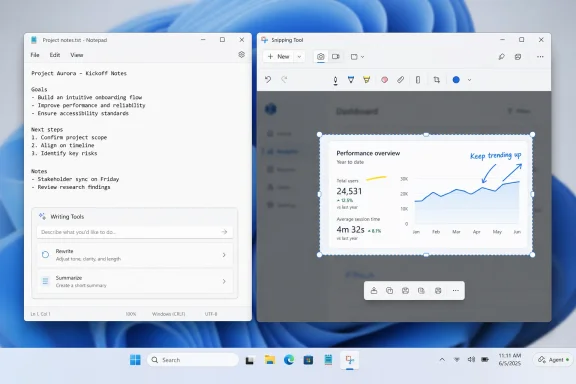
The first visible results are now appearing. In Notepad, the Copilot branding has reportedly been replaced by a more neutral Writing Tools label, while the underlying AI-powered writing features remain available. In Snipping Tool, the Copilot button has been removed from the mainstream app experience, marking a sharper cutback in one of Windows 11’s most commonly used utilities.
The new approach appears more task-first. Instead of asking users to think, “I should open Copilot,” Microsoft is nudging them toward specific actions such as rewriting text, summarizing notes, extracting information, or asking a contextual question. That is a subtler and probably more sustainable model.
This matters because good operating system design depends on trust. Users need to believe that a button in Notepad or Snipping Tool is there because it helps the task at hand, not because Microsoft wants to promote a brand. That distinction may sound cosmetic, but in Windows it is central to user confidence.
Key reasons for the shift include:
Microsoft has modernized Notepad in recent years with tabs, dark mode, autosave behavior, spellcheck-style improvements, Markdown-friendly features, and AI-powered writing functions. Some of those additions have been welcomed, while others have prompted the familiar question: why does a basic text editor need this?
The current change does not remove Notepad’s AI capabilities. Users can still access features such as generating text, rewriting content, adjusting tone, changing structure, and summarizing longer passages. The difference is that Microsoft is reportedly presenting these functions under Writing Tools rather than foregrounding the Copilot name.
For users who dislike AI, the distinction may not be enough. If the underlying feature still uses AI, some will see the change as a rebrand rather than a rollback. But for the average user, the reduction in visual noise may make Notepad feel less aggressively commercial.
A typical Notepad AI workflow now looks more like this:
That decision makes sense. Snipping Tool is a utility app with a narrow, high-frequency purpose: capture, annotate, record, copy, and share. The faster it performs those actions, the better it is.
Adding AI to screenshot workflows is not inherently pointless. Text extraction, object recognition, quick redaction, QR recognition, and visual search can all be useful. But a generic Copilot button is a blunt instrument for those jobs.
That is why Microsoft’s removal of visible Copilot branding from Snipping Tool is more than a cosmetic cleanup. It reflects a deeper UX lesson: small utilities should stay focused. The more a tool is used as muscle memory, the less tolerance users have for unexpected prompts.
Snipping Tool’s best AI opportunities are likely practical and narrow:
That brand sprawl creates a practical problem for users. When they see a Copilot button, they may not know whether clicking it will launch a free local function, require a Microsoft account, consume cloud resources, ask for a subscription, or send content to a model outside the device. Ambiguity is poison for trust.
By replacing Copilot labels with functional names such as Writing Tools, Microsoft reduces that ambiguity. Users do not need to understand the Copilot product hierarchy to know what a rewrite button does. The feature becomes self-explanatory.
Those two goals can conflict. If every AI feature is loudly branded, the product becomes visible but the workflow becomes noisier. If every AI feature is hidden under descriptive task names, the workflow improves but the Copilot brand becomes less prominent.
Microsoft now seems to be moving toward a blended model:
Consumers who dislike AI entirely will not see this as a victory. They will argue that removing a logo while keeping features alive is not the same as respecting user preference. That criticism is fair, especially when AI capabilities are tied to Microsoft account sign-in, subscription status, cloud processing, or hardware requirements.
But many users are not anti-AI; they are anti-intrusion. They may welcome a rewrite tool if it appears only when selected. They may appreciate screenshot text extraction if it works locally and does not interrupt capture workflows. They may even use Copilot if it is clearly optional.
Microsoft’s challenge is to make AI discoverable without making it unavoidable. If it succeeds, users will treat these features like spellcheck, search indexing, or clipboard history: optional background conveniences that feel normal over time. If it fails, Copilot risks becoming the new symbol of Windows bloat.
For consumers, the ideal Windows AI model should be:
For IT administrators, the worst AI feature is not necessarily the most powerful one. It is the feature that appears unexpectedly, behaves inconsistently, and creates support tickets because users do not know what data it can access. A Copilot button inside a default app can trigger exactly those concerns.
Microsoft has already been expanding administrative controls around built-in apps and Copilot behavior. That trend will need to continue, especially for regulated industries. Financial services, healthcare, legal, defense, government, and education customers will want clear policies for disabling, limiting, or configuring AI surfaces.
A Notepad rewrite function may be blocked in some environments. A local screenshot redaction tool might be welcomed. An AI agent that can act on files may require months of security review.
Enterprise priorities are likely to include:
The lesson from the market is clear: AI features win when they feel native. Users are more likely to accept smart rewrite, contextual search, or summarization if the feature appears where it makes sense and uses language that matches the task. They are less receptive when every app looks like it has been retrofitted with the same assistant button.
Microsoft moved early and loudly, which gave it attention and enterprise momentum. But early movers often overextend. The Notepad and Snipping Tool adjustment suggests Microsoft is now entering the refinement phase.
That makes subtlety more important. Apple can tie AI tightly to its hardware and design language. Google can place Gemini inside cloud-connected services built around search and advertising. Microsoft must integrate AI into a legacy-rich operating system where users have strong expectations about control.
Competitive pressure will push Microsoft to keep advancing AI anyway. The company cannot afford to make Windows feel stagnant while rivals market smarter devices. But it also cannot afford to make Windows feel like a rolling experiment imposed on users.
The next phase of competition will focus on:
This is why the current story should not be misread as Microsoft abandoning AI. The company is pruning low-value integrations while investing in higher-level agentic workflows. In strategic terms, it is moving from scattered AI buttons toward fewer but more capable AI surfaces.
That shift could be powerful if executed carefully. A well-designed agent could help users find files, summarize project folders, configure settings, troubleshoot errors, schedule tasks, and coordinate apps. A poorly designed one could become the most controversial Windows feature in years.
Microsoft will need to design agentic Windows around permission, visibility, and reversal. Users should know what an agent is about to do, why it is doing it, what data it used, and how to undo the result. Anything less will generate backlash.
A safe Windows agent model should include:
Copilot arrived inside that context. For enthusiasts, another branded Microsoft button in a built-in app was not just a feature; it was evidence of a pattern. That is why the reaction to AI in Notepad became louder than the actual feature might seem to justify.
Microsoft’s quality pledge for Windows 11 is therefore about more than performance and reliability. It is also about rebuilding confidence that Windows serves the user first. AI can only succeed in Windows if users believe they remain in control.
Microsoft should treat AI defaults as product ethics, not just UX decisions. A feature that processes user text should be transparent about whether it is local or cloud-based. A feature that requires sign-in should say so before the user invests effort. A feature that changes content should always show a preview.
Trust-building defaults include:
The Copilot rollback in select apps highlights that tension. Microsoft wants Windows to be intelligent, but users still want Windows to be predictable. The operating system cannot become a demo stage for every corporate priority.
This is especially important as Windows 10’s consumer support era has ended and more users move to Windows 11 or newer Windows devices. For reluctant upgraders, visible AI clutter can reinforce resistance. For new PC buyers, subtle AI tools may feel like a natural part of the experience.
That bargain should shape future Windows features. A taskbar agent must be more useful than distracting. File Explorer AI actions must save time without risking accidental data exposure. Notepad writing tools must remain lightweight and easy to disable.
Windows 11’s next identity phase will likely depend on four principles:
The most important test will be how Microsoft handles the next generation of taskbar agents and contextual AI actions. If those features arrive with clear permissions, visible boundaries, and obvious value, users may view them as the next evolution of Windows productivity. If they arrive as another wave of prompts, buttons, and vague branding, the Notepad and Snipping Tool retreat will look like a pause before the next backlash.
Watch these areas closely:
Microsoft’s decision to remove or soften Copilot entry points in apps like Notepad and Snipping Tool is a necessary correction, not a surrender. The company still believes AI will define the next era of Windows, but it is learning that intelligence must be woven into the platform with care, not stamped across it with a logo. If Microsoft can make AI feel practical, optional, and trustworthy, this moment may be remembered as the point where Windows 11’s AI strategy grew up. If it cannot, every future assistant button will arrive carrying the baggage of this backlash.
Source: GB News Microsoft starts to remove AI from some of its most popular Windows 11 apps in dramatic U-turn
 Overview
Microsoft has spent the past two years trying to turn Copilot into the connective tissue across Windows, Microsoft 365, Edge, Bing, Teams, and developer tools. That strategy made sense on paper: if AI assistance is useful in Word, Excel, PowerPoint, Outlook, and Teams, it could also be useful inside the operating system itself. Windows 11 became the most visible testing ground for that ambition.The problem was not simply that Microsoft added AI features. The problem was where and how those features appeared. A Copilot button in a productivity suite can feel like a premium assistant; a Copilot button inside a simple screenshot utility or plain text editor can feel like clutter, upselling, or unnecessary interference.
Earlier this year, Microsoft said it would reduce unnecessary Copilot entry points across Windows and become more deliberate about where the assistant appears. That wording matters. It did not promise an AI-free Windows; it promised fewer low-value invitations to invoke Copilot in places where users had not asked for it.
The first visible results are now appearing. In Notepad, the Copilot branding has reportedly been replaced by a more neutral Writing Tools label, while the underlying AI-powered writing features remain available. In Snipping Tool, the Copilot button has been removed from the mainstream app experience, marking a sharper cutback in one of Windows 11’s most commonly used utilities.
Why Microsoft Is Pulling Back the Copilot Branding
From assistant-first to task-first design
Microsoft’s original Copilot push was built around a simple idea: put the assistant where users already work. That principle helped Copilot spread quickly, but it also created a design problem. When every feature is branded as Copilot, the operating system starts to feel less like a set of tools and more like a funnel into one product.The new approach appears more task-first. Instead of asking users to think, “I should open Copilot,” Microsoft is nudging them toward specific actions such as rewriting text, summarizing notes, extracting information, or asking a contextual question. That is a subtler and probably more sustainable model.
This matters because good operating system design depends on trust. Users need to believe that a button in Notepad or Snipping Tool is there because it helps the task at hand, not because Microsoft wants to promote a brand. That distinction may sound cosmetic, but in Windows it is central to user confidence.
Key reasons for the shift include:
- User fatigue with repeated Copilot buttons across unrelated surfaces
- Interface clutter in apps that historically succeeded because they were simple
- Enterprise caution around AI features that may process user or business data
- Brand confusion between Windows Copilot, Microsoft 365 Copilot, Copilot Chat, and app-specific AI tools
- Performance and privacy concerns around always-visible AI entry points
- Competitive pressure to make AI feel integrated rather than bolted on
Notepad: The Symbolic Center of the Backlash
A small app with a big identity
Notepad is not just another Windows app. It is one of the most recognizable utilities in PC history, valued precisely because it is plain, fast, predictable, and free of unnecessary decoration. Any change to Notepad carries symbolic weight far beyond the app’s feature list.Microsoft has modernized Notepad in recent years with tabs, dark mode, autosave behavior, spellcheck-style improvements, Markdown-friendly features, and AI-powered writing functions. Some of those additions have been welcomed, while others have prompted the familiar question: why does a basic text editor need this?
The current change does not remove Notepad’s AI capabilities. Users can still access features such as generating text, rewriting content, adjusting tone, changing structure, and summarizing longer passages. The difference is that Microsoft is reportedly presenting these functions under Writing Tools rather than foregrounding the Copilot name.
Why the rename matters
The rename is not meaningless. Writing Tools describes the task; Copilot describes the product. That small linguistic shift can make the feature feel more like a native part of Notepad and less like an external assistant intruding into a minimalist app.For users who dislike AI, the distinction may not be enough. If the underlying feature still uses AI, some will see the change as a rebrand rather than a rollback. But for the average user, the reduction in visual noise may make Notepad feel less aggressively commercial.
A typical Notepad AI workflow now looks more like this:
- Open Notepad and write or paste text.
- Highlight the passage that needs work.
- Choose a writing function such as rewrite, summarize, or tone adjustment.
- Review the suggested output before accepting it.
- Disable the feature in settings if it is not wanted.
Snipping Tool: A Cleaner Break From Copilot
Why screenshots did not need a chatbot
The Snipping Tool case is more direct. Microsoft has reportedly removed the Copilot button from the production version of the app, meaning mainstream users with the latest Store-delivered version should no longer see that Copilot entry point. Unlike Notepad, where AI writing features remain under a different label, Snipping Tool appears to have received a more substantial cleanup.That decision makes sense. Snipping Tool is a utility app with a narrow, high-frequency purpose: capture, annotate, record, copy, and share. The faster it performs those actions, the better it is.
Adding AI to screenshot workflows is not inherently pointless. Text extraction, object recognition, quick redaction, QR recognition, and visual search can all be useful. But a generic Copilot button is a blunt instrument for those jobs.
Utility apps need precision
A screenshot tool should expose features that map directly to user intent. If someone captures a screen, they may want to crop it, copy text from it, blur sensitive information, or save it. They probably do not want a broad assistant prompt unless the assistant is tied to a very specific action.That is why Microsoft’s removal of visible Copilot branding from Snipping Tool is more than a cosmetic cleanup. It reflects a deeper UX lesson: small utilities should stay focused. The more a tool is used as muscle memory, the less tolerance users have for unexpected prompts.
Snipping Tool’s best AI opportunities are likely practical and narrow:
- Text extraction from screenshots and images
- Sensitive data detection for emails, keys, phone numbers, or account details
- Automatic cropping around windows, dialogs, or regions
- Quick redaction before sharing screenshots externally
- Object and color recognition for designers, support teams, and documentation writers
The Copilot Brand Problem
One name, too many expectations
Microsoft has used the Copilot name across a sprawling set of products. There is Copilot in Windows, Copilot in Microsoft 365, Copilot Chat, GitHub Copilot, Security Copilot, Copilot Studio, and more. Each serves a different audience, but the shared branding can blur the line between system feature, paid service, enterprise assistant, and general chatbot.That brand sprawl creates a practical problem for users. When they see a Copilot button, they may not know whether clicking it will launch a free local function, require a Microsoft account, consume cloud resources, ask for a subscription, or send content to a model outside the device. Ambiguity is poison for trust.
By replacing Copilot labels with functional names such as Writing Tools, Microsoft reduces that ambiguity. Users do not need to understand the Copilot product hierarchy to know what a rewrite button does. The feature becomes self-explanatory.
Branding versus behavior
The deeper issue is that Microsoft has been trying to make Copilot both a product and a design pattern. As a product, Copilot can be sold, marketed, subscribed to, administered, and compared with rivals. As a design pattern, it is supposed to disappear into workflows and make tasks easier.Those two goals can conflict. If every AI feature is loudly branded, the product becomes visible but the workflow becomes noisier. If every AI feature is hidden under descriptive task names, the workflow improves but the Copilot brand becomes less prominent.
Microsoft now seems to be moving toward a blended model:
- Copilot remains a branded assistant for broad conversational help.
- Writing Tools and similar labels handle narrow app-specific actions.
- Click to Do and AI actions provide contextual automation.
- Microsoft 365 Copilot remains the paid productivity centerpiece.
- Enterprise controls become more important for administrators.
Consumer Impact: Less Noise, Same Direction
What changes for everyday users
For most Windows 11 users, the immediate impact is modest but welcome. Notepad may look less like it is pushing a branded AI assistant, while Snipping Tool should feel cleaner and more familiar. The underlying direction of travel, however, has not changed: Microsoft still wants AI to become a core part of Windows.Consumers who dislike AI entirely will not see this as a victory. They will argue that removing a logo while keeping features alive is not the same as respecting user preference. That criticism is fair, especially when AI capabilities are tied to Microsoft account sign-in, subscription status, cloud processing, or hardware requirements.
But many users are not anti-AI; they are anti-intrusion. They may welcome a rewrite tool if it appears only when selected. They may appreciate screenshot text extraction if it works locally and does not interrupt capture workflows. They may even use Copilot if it is clearly optional.
The value of restraint
The consumer version of this story is about restraint. Windows is used by gamers, students, writers, developers, small business owners, parents, teachers, and retirees. A one-size-fits-all AI interface was always going to annoy a meaningful slice of that audience.Microsoft’s challenge is to make AI discoverable without making it unavoidable. If it succeeds, users will treat these features like spellcheck, search indexing, or clipboard history: optional background conveniences that feel normal over time. If it fails, Copilot risks becoming the new symbol of Windows bloat.
For consumers, the ideal Windows AI model should be:
- Optional by default, or at least easy to disable
- Clearly labeled in plain language
- Respectful of local files and private content
- Fast enough not to slow down simple apps
- Useful without constant account or subscription prompts
- Consistent across apps, rather than scattered under different rules
Enterprise Impact: Controls Matter More Than Branding
Why IT departments care
Enterprise customers evaluate Windows AI through a different lens. They care less about whether a button says Copilot and more about data boundaries, compliance, manageability, auditability, and user training. Still, the visible reduction of Copilot entry points can make Windows easier to standardize and support.For IT administrators, the worst AI feature is not necessarily the most powerful one. It is the feature that appears unexpectedly, behaves inconsistently, and creates support tickets because users do not know what data it can access. A Copilot button inside a default app can trigger exactly those concerns.
Microsoft has already been expanding administrative controls around built-in apps and Copilot behavior. That trend will need to continue, especially for regulated industries. Financial services, healthcare, legal, defense, government, and education customers will want clear policies for disabling, limiting, or configuring AI surfaces.
Enterprise adoption will be selective
Large organizations are not going to adopt every Windows AI feature at once. They will pilot specific use cases, measure productivity, assess risk, and then decide which features belong in standard images. That process favors narrow, well-documented tools over broad assistant branding.A Notepad rewrite function may be blocked in some environments. A local screenshot redaction tool might be welcomed. An AI agent that can act on files may require months of security review.
Enterprise priorities are likely to include:
- Group Policy and Intune controls for AI features
- Clear documentation of local versus cloud processing
- Tenant-level governance for Microsoft account and Entra ID scenarios
- Audit logs for agentic actions and sensitive file access
- Data loss prevention integration across Windows and Microsoft 365
- User education so employees understand what AI tools can and cannot do
The Competitive Landscape: Microsoft Learns From Rivals
Apple, Google, and the language of AI
Microsoft’s rebranding move also reflects competitive pressure. Apple has positioned many of its AI features as writing tools, summarization, notification intelligence, and image assistance rather than as constant chatbot prompts. Google is blending Gemini into Android, Chrome, Gmail, Docs, and Workspace, but it faces the same challenge of avoiding overload.The lesson from the market is clear: AI features win when they feel native. Users are more likely to accept smart rewrite, contextual search, or summarization if the feature appears where it makes sense and uses language that matches the task. They are less receptive when every app looks like it has been retrofitted with the same assistant button.
Microsoft moved early and loudly, which gave it attention and enterprise momentum. But early movers often overextend. The Notepad and Snipping Tool adjustment suggests Microsoft is now entering the refinement phase.
Windows has a harder job
Windows faces a unique challenge because it is not just a consumer OS and not just an enterprise platform. It must satisfy home users, power users, developers, gamers, schools, factories, kiosks, government agencies, and global corporations. A Copilot experience that delights one group may irritate another.That makes subtlety more important. Apple can tie AI tightly to its hardware and design language. Google can place Gemini inside cloud-connected services built around search and advertising. Microsoft must integrate AI into a legacy-rich operating system where users have strong expectations about control.
Competitive pressure will push Microsoft to keep advancing AI anyway. The company cannot afford to make Windows feel stagnant while rivals market smarter devices. But it also cannot afford to make Windows feel like a rolling experiment imposed on users.
The next phase of competition will focus on:
- On-device AI performance using NPUs in modern PCs
- Contextual actions that avoid launching full chat interfaces
- Privacy-preserving automation for local files and screenshots
- Cross-device workflows between phones, PCs, and cloud services
- Developer APIs that let apps call AI capabilities consistently
- Hardware differentiation for Copilot+ PCs and future Windows devices
AI Agents on the Taskbar: The Bigger Bet Continues
The pullback is not a pause
While Microsoft is reducing some Copilot entry points, it is still testing more ambitious AI agents for Windows. The idea is to place assistants closer to the taskbar and system shell, allowing users to ask questions, automate workflows, interact with files, and potentially complete actions across apps. That is a much bigger vision than a rewrite button in Notepad.This is why the current story should not be misread as Microsoft abandoning AI. The company is pruning low-value integrations while investing in higher-level agentic workflows. In strategic terms, it is moving from scattered AI buttons toward fewer but more capable AI surfaces.
That shift could be powerful if executed carefully. A well-designed agent could help users find files, summarize project folders, configure settings, troubleshoot errors, schedule tasks, and coordinate apps. A poorly designed one could become the most controversial Windows feature in years.
Agentic Windows needs guardrails
AI agents raise harder questions than writing tools. A rewrite feature suggests text; an agent may act. Once software can move files, change settings, send messages, or interact with business documents, trust and verification become non-negotiable.Microsoft will need to design agentic Windows around permission, visibility, and reversal. Users should know what an agent is about to do, why it is doing it, what data it used, and how to undo the result. Anything less will generate backlash.
A safe Windows agent model should include:
- Explicit permission prompts before sensitive actions
- Clear activity history showing what the agent accessed
- Undo support for file, settings, and workflow changes
- Scope controls for folders, apps, and accounts
- Local processing options where hardware allows
- Enterprise policy enforcement before agent rollout
The User Trust Problem Microsoft Must Solve
Windows users remember past overreach
Windows users have long memories. They remember forced upgrades, unwanted apps, Start menu advertising, Edge prompts, account pressure, telemetry debates, and update interruptions. Whether each criticism is fair in isolation matters less than the cumulative trust deficit.Copilot arrived inside that context. For enthusiasts, another branded Microsoft button in a built-in app was not just a feature; it was evidence of a pattern. That is why the reaction to AI in Notepad became louder than the actual feature might seem to justify.
Microsoft’s quality pledge for Windows 11 is therefore about more than performance and reliability. It is also about rebuilding confidence that Windows serves the user first. AI can only succeed in Windows if users believe they remain in control.
Trust is built through defaults
Settings pages, policy toggles, and documentation are important, but defaults shape perception. If AI features appear uninvited, users feel pushed. If they are clearly optional and easy to ignore, users may experiment on their own terms.Microsoft should treat AI defaults as product ethics, not just UX decisions. A feature that processes user text should be transparent about whether it is local or cloud-based. A feature that requires sign-in should say so before the user invests effort. A feature that changes content should always show a preview.
Trust-building defaults include:
- No surprise processing of private text or screenshots
- No dark-pattern prompts to enable AI services
- No subscription ambiguity inside basic inbox apps
- No mandatory assistant surfaces in minimalist utilities
- No unexplained account requirements for local-feeling tasks
- No hidden re-enablement after app or OS updates
What This Means for Windows 11’s Identity
A platform trying to modernize without alienating its base
Windows 11 has always had an identity challenge. It wants to look modern, feel secure, support hybrid work, showcase new hardware, and compete in the AI era. At the same time, it must preserve the speed and familiarity that make Windows indispensable to hundreds of millions of users.The Copilot rollback in select apps highlights that tension. Microsoft wants Windows to be intelligent, but users still want Windows to be predictable. The operating system cannot become a demo stage for every corporate priority.
This is especially important as Windows 10’s consumer support era has ended and more users move to Windows 11 or newer Windows devices. For reluctant upgraders, visible AI clutter can reinforce resistance. For new PC buyers, subtle AI tools may feel like a natural part of the experience.
The new Windows design bargain
The emerging bargain is straightforward: Microsoft can add intelligence if it preserves control. Users may accept AI in the OS if it is fast, private, optional, and clearly useful. They will resist it if it feels promotional, confusing, or unavoidable.That bargain should shape future Windows features. A taskbar agent must be more useful than distracting. File Explorer AI actions must save time without risking accidental data exposure. Notepad writing tools must remain lightweight and easy to disable.
Windows 11’s next identity phase will likely depend on four principles:
- Usefulness over branding
- Context over constant visibility
- Control over coercion
- Local-first experiences where possible
- Enterprise-grade governance
- Performance that does not punish older devices
Strengths and Opportunities
Microsoft’s recalibration gives it a chance to rebuild goodwill while keeping the best parts of its AI strategy intact. The company still has unmatched reach across Windows, Microsoft 365, Azure, developer tooling, and enterprise identity, but it now seems to recognize that AI integration must be more disciplined.- Cleaner interfaces in core apps can reduce user irritation and make Windows feel less cluttered.
- Task-specific labels such as Writing Tools are easier to understand than broad Copilot branding.
- Optional AI features can serve curious users without alienating those who prefer classic workflows.
- Enterprise policy controls can make Windows AI more acceptable in managed environments.
- On-device AI could reduce privacy concerns and make features faster on modern PCs.
- Focused utilities such as Snipping Tool can gain smart features without losing their core simplicity.
- Better brand discipline can help Microsoft distinguish Copilot as a full assistant from small app-level conveniences.
Risks and Concerns
The risk is that Microsoft treats this as a branding problem rather than a trust problem. If Copilot logos disappear but AI features remain poorly explained, difficult to disable, or inconsistent across apps, skeptical users will see the change as cosmetic.- Rebranding may look evasive if Microsoft removes the Copilot name while keeping the same behavior.
- Privacy questions remain when users do not know whether text or screenshots are processed locally or in the cloud.
- Subscription confusion can frustrate users if basic-looking app features require accounts or paid services.
- Enterprise admins may block broadly if AI controls are fragmented across apps and policies.
- Performance issues could harm older PCs if AI features increase background load or app complexity.
- Agentic features could overreach if Windows assistants act without clear permission and audit trails.
- User backlash may intensify if future updates quietly reintroduce AI prompts in new places.
Looking Ahead
Microsoft’s next moves will show whether this is a serious product correction or a temporary reduction in visual noise. The company has signaled that it wants AI in Windows to be more intentional, which is the right goal. The hard part is proving that intention through defaults, documentation, admin controls, and restraint.The most important test will be how Microsoft handles the next generation of taskbar agents and contextual AI actions. If those features arrive with clear permissions, visible boundaries, and obvious value, users may view them as the next evolution of Windows productivity. If they arrive as another wave of prompts, buttons, and vague branding, the Notepad and Snipping Tool retreat will look like a pause before the next backlash.
Watch these areas closely:
- Whether Notepad’s Writing Tools expand without restoring intrusive Copilot branding
- Whether Snipping Tool gains narrow AI utilities such as redaction or text extraction without a generic assistant button
- Whether Microsoft improves AI controls in Settings, Group Policy, and Intune
- Whether taskbar agents remain optional and transparent about file and app access
- Whether Copilot+ PCs get better local AI experiences that justify the hardware branding
Microsoft’s decision to remove or soften Copilot entry points in apps like Notepad and Snipping Tool is a necessary correction, not a surrender. The company still believes AI will define the next era of Windows, but it is learning that intelligence must be woven into the platform with care, not stamped across it with a logo. If Microsoft can make AI feel practical, optional, and trustworthy, this moment may be remembered as the point where Windows 11’s AI strategy grew up. If it cannot, every future assistant button will arrive carrying the baggage of this backlash.
Source: GB News Microsoft starts to remove AI from some of its most popular Windows 11 apps in dramatic U-turn
