

Microsoft is working on a modern WinUI 3 replacement for File Explorer’s legacy Properties dialog in Windows 11, according to findings in recent Insider builds reported on May 4, 2026 by Windows Latest. The change appears to move one of Windows’ most stubbornly old-fashioned surfaces out of the Windows 95 visual era and into the same design system used by newer Explorer components. It is not just a dark-mode story, even if that is the part users will notice first. It is a small dialog box that exposes the larger bargain Microsoft has made with Windows: modernize the shell without breaking the habits, extensions, and assumptions that made it indispensable.
For years, Windows 11 has asked users to believe two things at once. The first is that the operating system is a modern, carefully designed desktop environment with rounded corners, translucent panels, centered taskbar icons, and a visual language that owes more to Fluent Design than to the gray beveled age of classic Win32. The second is that, at any moment, a routine action may drop you into a dialog that looks like it was preserved in amber.
The File Explorer Properties dialog is the perfect offender because it is both ordinary and unavoidable. Right-click a file, choose Properties, and Windows leaves the polished surface of the shell for a bright, legacy modal window whose structure and sensibility date back to an older Windows lineage. On a system running dark mode, that white rectangle does not merely look dated; it interrupts the entire premise of a coherent theme.
That is why the apparent modernization of this specific dialog matters more than its modest footprint suggests. Microsoft is not simply repainting a wall. It appears to be relocating a deeply embedded piece of Explorer into the modern File Explorer framework, where dark mode, Fluent styling, accessibility affordances, and future shell behavior can be handled as part of the same architectural family.
The evidence, as reported, comes from strings related to “DeletedFileProperties” appearing in the modern File Explorer resource package. That is not the same thing as a public Microsoft announcement, and it does not guarantee timing, rollout channel, or final design. But in Windows development, resource migration is often a breadcrumb trail: if text that belongs to an old dialog is being added to a newer framework, somebody is doing more than changing a color value.
That is not laziness in the simple sense. Windows is a compatibility platform before it is a design object. File Explorer is not just an app for browsing folders; it is the visible face of shell namespaces, property handlers, preview handlers, context menu extensions, storage providers, network locations, enterprise policies, and decades of third-party assumptions. Replacing a dialog in Explorer is rarely just replacing a dialog.
Still, the Properties window has become a symbol of the gap between Windows’ presentation and its reality. Microsoft can modernize the command bar, add tabs, refresh the address bar, and build Gallery views, yet the moment a user asks for basic metadata, permissions, or file details, the operating system reveals its layered inheritance. That inheritance is part of Windows’ strength, but it is also why the OS so often feels like two products arguing inside the same frame.
Windows 11’s challenge has been to make those layers feel intentional rather than accidental. A modern Properties dialog would not erase the legacy beneath File Explorer, but it would reduce one of the most visible seams. In a desktop OS, seams matter. Users judge polish not by how impressive the keynote demo looks, but by how often the illusion breaks during mundane work.
But the real issue is not that Microsoft forgot to tick a dark-mode box. Classic Win32 UI did not evolve around the same theming model as WinUI 3, and retrofitting dark mode onto old dialogs is often messier than users assume. In many cases, the work is not simply “make the background black.” Text, controls, focus states, accessibility contrast, shell extensions, and old property pages all have to behave correctly.
That is why the WinUI 3 angle is important. If Microsoft is moving Properties into the modern File Explorer framework, dark mode becomes part of a broader architectural transition rather than a one-off patch. The company avoids spending effort on a legacy surface that it may ultimately want to retire, and it gains a dialog that can be shaped using the same design vocabulary as the rest of Windows 11.
The risk is that users will see this as yet another cosmetic change when what they actually want is speed and reliability. That skepticism is earned. Windows 11 has had moments where modern UI layers felt heavier than the classic components they replaced. A dark dialog that opens slowly, flickers, or drops features would be worse than an ugly one that works.
That makes modernization treacherous. Microsoft can probably produce a handsome General tab quickly. The hard part is preserving the ecosystem of shell property pages that administrators, developers, hardware vendors, security products, and power users rely on. The old dialog may be visually obsolete, but it is also a compatibility junction.
This is where Windows differs from Apple’s macOS or from many Linux desktop environments. Microsoft cannot simply decide that old integrations are aesthetically inconvenient and discard them without consequences. In enterprise environments especially, the Properties dialog is not just a place to admire metadata; it is a workflow endpoint. Permissions are audited there. File versions are checked there. Weird vendor tabs show up there because some line-of-business dependency put them there fifteen years ago and nobody wants to be the person who breaks it.
The most plausible path is therefore not a pure replacement on day one. Microsoft may modernize specific Properties experiences first, such as deleted file properties or common file metadata, while leaving deeper property sheet integrations bridged through existing mechanisms. That would be inelegant in theory but very Windows in practice: a modern frame where possible, compatibility plumbing where necessary.
Yet WinUI 3 also carries baggage in the Windows enthusiast community. Users have complained for years about sluggish context menus, delayed folder rendering, inconsistent animations, and modern surfaces that seem to take longer than their classic equivalents. Some of those complaints are anecdotal, some are hardware-dependent, and some are tied to specific builds, but the perception is real.
That means Microsoft has to win twice. It has to make the Properties dialog look like Windows 11, and it has to make it feel at least as immediate as the old one. A Properties dialog is a tiny interaction, which paradoxically makes latency more visible. If a user right-clicks a file and waits just long enough to notice the wait, the modernization has already failed emotionally.
The company knows this, or at least it has been saying the right things lately. Microsoft has been talking more openly about Explorer performance, reliability, and visual consistency, and recent preview work around dark mode and file operation dialogs suggests a more systematic clean-up of legacy shell surfaces. The open question is whether that work produces a desktop that feels lighter or merely one that hides its weight more elegantly.
Microsoft’s newer Run work points toward a pattern: modernize the shell surface, support dark mode, align it with Windows 11’s visual language, and avoid disturbing the core behavior that made the feature useful. That is the template the Properties dialog must follow. Nobody is asking Microsoft to reinvent what Properties means. They are asking the company to stop making a core Explorer action look like a compatibility warning.
The Run example also shows why dark mode is only the opening move. Once a component is rebuilt in a modern framework, Microsoft can iterate on accessibility, scaling, input handling, localization, and layout consistency with less special-case legacy code. A dialog stops being a museum exhibit and becomes part of the living shell.
But Run is simpler than Properties. It is a small command surface. Properties is a container for many types of information and extension points. If Run was the proof that Microsoft can modernize a beloved old dialog without ruining it, Properties will be the test of whether it can do so under compatibility pressure.
The problem is that users no longer give Microsoft the benefit of the doubt on Explorer rewrites. Every modern shell change arrives with a question attached: will this make the thing slower? The new context menu, for example, looked more consistent with Windows 11 but became a lightning rod because it hid legacy commands behind an extra step and was widely perceived as less responsive than the classic menu. Whether one agrees with every complaint, the lesson was clear. A cleaner interface does not automatically count as progress.
That history is why the Properties dialog will be judged harshly. If the new dialog supports dark mode but takes longer to open, enthusiasts will call it a regression. If it hides tabs, breaks shell extensions, or simplifies away advanced controls, administrators will call it a consumerization mistake. If it looks modern but flashes white while loading, dark-mode users will decide Microsoft has missed the point.
The best outcome is boring: the new dialog appears, matches the theme, opens quickly, preserves existing capability, and gradually makes users forget the old one existed. That kind of success rarely generates dramatic headlines, but it is exactly what Windows needs. After years of visible seams, the highest compliment for a shell modernization may be that nobody has to think about it.
That is the uncomfortable truth about Windows modernization. Users do not care which code path dates to which release. They care that one part of the OS feels contemporary and another part feels inherited. If the transition is jarring, the technical nuance does not matter.
Microsoft has spent years trying to square this circle. Control Panel coexists with Settings. Classic applets coexist with modern pages. Win32, UWP, WinUI, WebView2, and various shell technologies coexist because Windows is a working city, not a planned community. You cannot bulldoze it without displacing too much.
But at some point, coexistence becomes clutter. Windows 11’s early pitch emphasized calm, focus, and modernity. Those values are hard to maintain when routine system interactions still surface mismatched typography, inconsistent spacing, legacy icons, and theme-breaking backgrounds. The Properties dialog is not the only culprit, but it is one of the most common.
Administrators care about the Security tab, ownership dialogs, advanced attributes, previous versions, network paths, file associations, and the subtle differences between local, cloud-backed, removable, and domain-managed storage. They care about whether third-party property sheets still load. They care about whether Group Policy, shell extensions, and management tools behave as expected. They care because the Properties dialog often appears at the exact moment something has gone wrong.
That is why Microsoft is likely to move cautiously. Insider builds can hide work for months, and features discovered through resource strings may not ship in the next public release. The company has to test not only the default dialog but also the strange cases: files in Recycle Bin, deleted files, offline files, OneDrive placeholders, protected system locations, network shares, compressed folders, and extension-heavy enterprise images.
The irony is that the more successful Microsoft is, the less most users will notice. A truly competent modern Properties dialog will be visually unsurprising and functionally conservative. It will not announce a revolution. It will simply stop embarrassing the rest of the shell.
File Explorer has been one of the most visible laboratories for that compromise. Tabs arrived, but not without complaints. The command bar simplified the ribbon, but some users missed the old density. The address bar was modernized, then adjusted. Gallery and Home added consumer-friendly surfaces, while power users continued to demand speed, predictability, and classic affordances.
The Properties dialog sits at the intersection of those pressures. It is old enough to look wrong, important enough that it cannot be casually removed, and common enough that its flaws become part of the daily Windows experience. If Microsoft can modernize it properly, that would suggest the company’s shell work has matured from surface redesign to architectural housekeeping.
That distinction matters. Windows 11 has had plenty of surface redesign. What it needs now is coherence. Coherence means dark mode does not stop at the edge of a dialog. It means modern controls do not feel slower than old ones. It means the user does not need to mentally switch eras while managing files.
Still, the clue fits a broader pattern. Microsoft has been extending dark mode into more legacy dialogs, addressing white flashes in Explorer, and talking more directly about performance and reliability improvements. The modern Properties work, if it ships, would be part of that campaign rather than an isolated flourish.
That broader campaign is necessary because Windows 11’s credibility depends less on new headline features than on reducing friction in the features people already use. AI integrations, cloud hooks, widgets, and new panels may get marketing attention, but Explorer is where the operating system proves itself every day. If file management feels inconsistent, the whole OS feels unfinished.
The Properties dialog is therefore a useful measuring stick for Microsoft’s priorities. It is not flashy. It is not a Copilot showcase. It is not a Store app refresh. It is basic desktop plumbing. Choosing to spend engineering time there suggests Microsoft understands that Windows 11’s next phase has to be about craft as much as capability.
A modern Properties dialog would remove one of the most frequent flashbangs left in File Explorer. It would not solve every inconsistency in Windows. Control Panel, administrative tools, legacy MMC snap-ins, old installers, and third-party utilities will continue to produce theme mismatches. But it would tell users that Microsoft is no longer treating those mismatches as charming artifacts.
There is a deeper accessibility point here as well. Dark mode is not only an aesthetic preference. For many users, consistent brightness and contrast reduce eye strain and make long sessions more comfortable. A single bright dialog in a dark environment can be more disruptive than a fully light-themed OS because it arrives unexpectedly.
That is where polish becomes practical. Consistency lowers cognitive and visual friction. The less the operating system surprises users for the wrong reasons, the more invisible it becomes. Good desktop design is not about making every surface exciting. It is about making routine actions feel stable, predictable, and respectful of the user’s chosen environment.
There are several concrete things to watch as this work moves from hidden strings to visible builds:
A modern File Explorer Properties dialog will not transform Windows 11 by itself, but it would remove one of the OS’s most visible tells: the moment when a polished desktop suddenly admits how old its foundations are. If Microsoft can make this replacement fast, faithful, and boring in the best sense, the company will have done something more important than adding another feature. It will have made Windows feel a little less like a stack of eras and a little more like a platform with a future.
Source: Windows Latest Windows 11's Windows 95-era File Explorer Properties dialog is getting replaced with modern version and dark mode
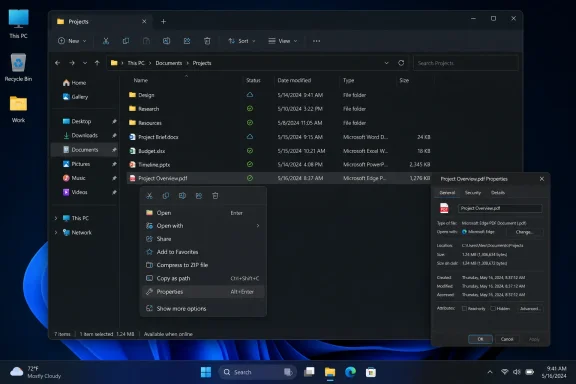 The Small White Box That Gives the Game Away
For years, Windows 11 has asked users to believe two things at once. The first is that the operating system is a modern, carefully designed desktop environment with rounded corners, translucent panels, centered taskbar icons, and a visual language that owes more to Fluent Design than to the gray beveled age of classic Win32. The second is that, at any moment, a routine action may drop you into a dialog that looks like it was preserved in amber.The File Explorer Properties dialog is the perfect offender because it is both ordinary and unavoidable. Right-click a file, choose Properties, and Windows leaves the polished surface of the shell for a bright, legacy modal window whose structure and sensibility date back to an older Windows lineage. On a system running dark mode, that white rectangle does not merely look dated; it interrupts the entire premise of a coherent theme.
That is why the apparent modernization of this specific dialog matters more than its modest footprint suggests. Microsoft is not simply repainting a wall. It appears to be relocating a deeply embedded piece of Explorer into the modern File Explorer framework, where dark mode, Fluent styling, accessibility affordances, and future shell behavior can be handled as part of the same architectural family.
The evidence, as reported, comes from strings related to “DeletedFileProperties” appearing in the modern File Explorer resource package. That is not the same thing as a public Microsoft announcement, and it does not guarantee timing, rollout channel, or final design. But in Windows development, resource migration is often a breadcrumb trail: if text that belongs to an old dialog is being added to a newer framework, somebody is doing more than changing a color value.
Windows 11’s Modern Shell Has Always Had a Basement
The mythology of Windows 11 is that it was a clean break from Windows 10’s clutter. In practice, it has always been a renovation rather than a rebuild. Microsoft changed the front door, refinished the lobby, and replaced some of the wiring, but the basement remained full of panels, controls, and assumptions from earlier eras.That is not laziness in the simple sense. Windows is a compatibility platform before it is a design object. File Explorer is not just an app for browsing folders; it is the visible face of shell namespaces, property handlers, preview handlers, context menu extensions, storage providers, network locations, enterprise policies, and decades of third-party assumptions. Replacing a dialog in Explorer is rarely just replacing a dialog.
Still, the Properties window has become a symbol of the gap between Windows’ presentation and its reality. Microsoft can modernize the command bar, add tabs, refresh the address bar, and build Gallery views, yet the moment a user asks for basic metadata, permissions, or file details, the operating system reveals its layered inheritance. That inheritance is part of Windows’ strength, but it is also why the OS so often feels like two products arguing inside the same frame.
Windows 11’s challenge has been to make those layers feel intentional rather than accidental. A modern Properties dialog would not erase the legacy beneath File Explorer, but it would reduce one of the most visible seams. In a desktop OS, seams matter. Users judge polish not by how impressive the keynote demo looks, but by how often the illusion breaks during mundane work.
Dark Mode Was the Symptom, Not the Disease
The most obvious benefit of a new Properties dialog would be dark mode support. The old dialog is infamous among dark-mode users because it ignores the system theme and appears as a bright white window in an otherwise dark Explorer session. That has made it a running joke among Windows enthusiasts: the OS can dim the taskbar, Start menu, Settings app, and much of Explorer, but still blind you when you inspect a file.But the real issue is not that Microsoft forgot to tick a dark-mode box. Classic Win32 UI did not evolve around the same theming model as WinUI 3, and retrofitting dark mode onto old dialogs is often messier than users assume. In many cases, the work is not simply “make the background black.” Text, controls, focus states, accessibility contrast, shell extensions, and old property pages all have to behave correctly.
That is why the WinUI 3 angle is important. If Microsoft is moving Properties into the modern File Explorer framework, dark mode becomes part of a broader architectural transition rather than a one-off patch. The company avoids spending effort on a legacy surface that it may ultimately want to retire, and it gains a dialog that can be shaped using the same design vocabulary as the rest of Windows 11.
The risk is that users will see this as yet another cosmetic change when what they actually want is speed and reliability. That skepticism is earned. Windows 11 has had moments where modern UI layers felt heavier than the classic components they replaced. A dark dialog that opens slowly, flickers, or drops features would be worse than an ugly one that works.
The Properties Dialog Is a Trap for Simplistic Modernization
A file Properties window looks easy until you remember what it does. It is not merely a static card with a name, size, and date. Depending on the file type, drive, permissions, location, and installed software, it may expose security settings, sharing controls, previous versions, digital signatures, custom property sheets, OneDrive state, compression, encryption, compatibility options, and extension-provided tabs.That makes modernization treacherous. Microsoft can probably produce a handsome General tab quickly. The hard part is preserving the ecosystem of shell property pages that administrators, developers, hardware vendors, security products, and power users rely on. The old dialog may be visually obsolete, but it is also a compatibility junction.
This is where Windows differs from Apple’s macOS or from many Linux desktop environments. Microsoft cannot simply decide that old integrations are aesthetically inconvenient and discard them without consequences. In enterprise environments especially, the Properties dialog is not just a place to admire metadata; it is a workflow endpoint. Permissions are audited there. File versions are checked there. Weird vendor tabs show up there because some line-of-business dependency put them there fifteen years ago and nobody wants to be the person who breaks it.
The most plausible path is therefore not a pure replacement on day one. Microsoft may modernize specific Properties experiences first, such as deleted file properties or common file metadata, while leaving deeper property sheet integrations bridged through existing mechanisms. That would be inelegant in theory but very Windows in practice: a modern frame where possible, compatibility plumbing where necessary.
WinUI 3 Is Both the Cure and the Suspect
WinUI 3 is Microsoft’s modern native UI framework for Windows desktop apps, and it has become central to the company’s attempt to give Windows 11 a coherent face. Explorer’s newer pieces already use modern XAML and WinUI-adjacent components, which makes a WinUI-based Properties dialog logical. If the shell is moving in that direction, using another framework for one of Explorer’s most common dialogs would be strange.Yet WinUI 3 also carries baggage in the Windows enthusiast community. Users have complained for years about sluggish context menus, delayed folder rendering, inconsistent animations, and modern surfaces that seem to take longer than their classic equivalents. Some of those complaints are anecdotal, some are hardware-dependent, and some are tied to specific builds, but the perception is real.
That means Microsoft has to win twice. It has to make the Properties dialog look like Windows 11, and it has to make it feel at least as immediate as the old one. A Properties dialog is a tiny interaction, which paradoxically makes latency more visible. If a user right-clicks a file and waits just long enough to notice the wait, the modernization has already failed emotionally.
The company knows this, or at least it has been saying the right things lately. Microsoft has been talking more openly about Explorer performance, reliability, and visual consistency, and recent preview work around dark mode and file operation dialogs suggests a more systematic clean-up of legacy shell surfaces. The open question is whether that work produces a desktop that feels lighter or merely one that hides its weight more elegantly.
The Run Dialog Shows the Playbook
The recent modernization of the Run dialog is a useful preview of Microsoft’s strategy. Run is one of the oldest-feeling Windows features that still matters to power users. It is not glamorous, but it is muscle memory: Win+R, type a command, hit Enter. Touch that workflow carelessly and enthusiasts will notice immediately.Microsoft’s newer Run work points toward a pattern: modernize the shell surface, support dark mode, align it with Windows 11’s visual language, and avoid disturbing the core behavior that made the feature useful. That is the template the Properties dialog must follow. Nobody is asking Microsoft to reinvent what Properties means. They are asking the company to stop making a core Explorer action look like a compatibility warning.
The Run example also shows why dark mode is only the opening move. Once a component is rebuilt in a modern framework, Microsoft can iterate on accessibility, scaling, input handling, localization, and layout consistency with less special-case legacy code. A dialog stops being a museum exhibit and becomes part of the living shell.
But Run is simpler than Properties. It is a small command surface. Properties is a container for many types of information and extension points. If Run was the proof that Microsoft can modernize a beloved old dialog without ruining it, Properties will be the test of whether it can do so under compatibility pressure.
File Explorer’s Performance Problem Is Really a Trust Problem
Microsoft’s broader File Explorer work in 2026 is being framed around performance improvements, crash reduction, dark-mode fixes, and interface consistency. That framing is sensible because Explorer has become one of the most scrutinized parts of Windows 11. When Explorer feels slow, Windows feels slow, even if the rest of the system is healthy.The problem is that users no longer give Microsoft the benefit of the doubt on Explorer rewrites. Every modern shell change arrives with a question attached: will this make the thing slower? The new context menu, for example, looked more consistent with Windows 11 but became a lightning rod because it hid legacy commands behind an extra step and was widely perceived as less responsive than the classic menu. Whether one agrees with every complaint, the lesson was clear. A cleaner interface does not automatically count as progress.
That history is why the Properties dialog will be judged harshly. If the new dialog supports dark mode but takes longer to open, enthusiasts will call it a regression. If it hides tabs, breaks shell extensions, or simplifies away advanced controls, administrators will call it a consumerization mistake. If it looks modern but flashes white while loading, dark-mode users will decide Microsoft has missed the point.
The best outcome is boring: the new dialog appears, matches the theme, opens quickly, preserves existing capability, and gradually makes users forget the old one existed. That kind of success rarely generates dramatic headlines, but it is exactly what Windows needs. After years of visible seams, the highest compliment for a shell modernization may be that nobody has to think about it.
The Windows 95 Comparison Is Funny Because It Is Unfair — and Fair
Calling the Properties dialog “Windows 95-era” is rhetorically effective, but technically messy. The dialog has evolved across Windows releases, and Windows 11’s implementation is not literally unchanged from 1995. Still, the comparison lands because the design pattern, density, and visual language evoke that era more than the current one.That is the uncomfortable truth about Windows modernization. Users do not care which code path dates to which release. They care that one part of the OS feels contemporary and another part feels inherited. If the transition is jarring, the technical nuance does not matter.
Microsoft has spent years trying to square this circle. Control Panel coexists with Settings. Classic applets coexist with modern pages. Win32, UWP, WinUI, WebView2, and various shell technologies coexist because Windows is a working city, not a planned community. You cannot bulldoze it without displacing too much.
But at some point, coexistence becomes clutter. Windows 11’s early pitch emphasized calm, focus, and modernity. Those values are hard to maintain when routine system interactions still surface mismatched typography, inconsistent spacing, legacy icons, and theme-breaking backgrounds. The Properties dialog is not the only culprit, but it is one of the most common.
Enterprise IT Will Watch the Tabs, Not the Corners
For home users, the big story is dark mode. For IT departments, the story is compatibility. A modern Properties dialog that looks better but disrupts established workflows will be treated as another Windows 11 nuisance to document, defer, or work around.Administrators care about the Security tab, ownership dialogs, advanced attributes, previous versions, network paths, file associations, and the subtle differences between local, cloud-backed, removable, and domain-managed storage. They care about whether third-party property sheets still load. They care about whether Group Policy, shell extensions, and management tools behave as expected. They care because the Properties dialog often appears at the exact moment something has gone wrong.
That is why Microsoft is likely to move cautiously. Insider builds can hide work for months, and features discovered through resource strings may not ship in the next public release. The company has to test not only the default dialog but also the strange cases: files in Recycle Bin, deleted files, offline files, OneDrive placeholders, protected system locations, network shares, compressed folders, and extension-heavy enterprise images.
The irony is that the more successful Microsoft is, the less most users will notice. A truly competent modern Properties dialog will be visually unsurprising and functionally conservative. It will not announce a revolution. It will simply stop embarrassing the rest of the shell.
This Is Microsoft Cleaning Up After Its Own Compromise
Windows 11’s interface inconsistencies are the result of a compromise Microsoft made long before this particular dialog. The company wanted a modern Windows without giving up the ecosystem gravity of old Windows. That meant layering new experiences over old foundations, sometimes elegantly and sometimes awkwardly.File Explorer has been one of the most visible laboratories for that compromise. Tabs arrived, but not without complaints. The command bar simplified the ribbon, but some users missed the old density. The address bar was modernized, then adjusted. Gallery and Home added consumer-friendly surfaces, while power users continued to demand speed, predictability, and classic affordances.
The Properties dialog sits at the intersection of those pressures. It is old enough to look wrong, important enough that it cannot be casually removed, and common enough that its flaws become part of the daily Windows experience. If Microsoft can modernize it properly, that would suggest the company’s shell work has matured from surface redesign to architectural housekeeping.
That distinction matters. Windows 11 has had plenty of surface redesign. What it needs now is coherence. Coherence means dark mode does not stop at the edge of a dialog. It means modern controls do not feel slower than old ones. It means the user does not need to mentally switch eras while managing files.
The Insider Breadcrumbs Point to a Longer Campaign
The reported strings for deleted file properties are a clue, not a shipping announcement. Microsoft could test the work internally, hide it behind feature flags, revise it, delay it, or abandon pieces of it. Windows enthusiasts know this rhythm well: a hidden feature appears, screenshots circulate, speculation hardens into expectation, and then the actual rollout follows its own calendar.Still, the clue fits a broader pattern. Microsoft has been extending dark mode into more legacy dialogs, addressing white flashes in Explorer, and talking more directly about performance and reliability improvements. The modern Properties work, if it ships, would be part of that campaign rather than an isolated flourish.
That broader campaign is necessary because Windows 11’s credibility depends less on new headline features than on reducing friction in the features people already use. AI integrations, cloud hooks, widgets, and new panels may get marketing attention, but Explorer is where the operating system proves itself every day. If file management feels inconsistent, the whole OS feels unfinished.
The Properties dialog is therefore a useful measuring stick for Microsoft’s priorities. It is not flashy. It is not a Copilot showcase. It is not a Store app refresh. It is basic desktop plumbing. Choosing to spend engineering time there suggests Microsoft understands that Windows 11’s next phase has to be about craft as much as capability.
The Flashbang Era Starts Looking Optional
The most memorable user complaint about Windows dark mode is the “flashbang” effect: a bright legacy window appearing in a dark workflow, especially at night. It is funny because nearly everyone who uses Windows dark mode has experienced some version of it. It is also damning because dark mode is no longer a novelty feature. It is a baseline expectation.A modern Properties dialog would remove one of the most frequent flashbangs left in File Explorer. It would not solve every inconsistency in Windows. Control Panel, administrative tools, legacy MMC snap-ins, old installers, and third-party utilities will continue to produce theme mismatches. But it would tell users that Microsoft is no longer treating those mismatches as charming artifacts.
There is a deeper accessibility point here as well. Dark mode is not only an aesthetic preference. For many users, consistent brightness and contrast reduce eye strain and make long sessions more comfortable. A single bright dialog in a dark environment can be more disruptive than a fully light-themed OS because it arrives unexpectedly.
That is where polish becomes practical. Consistency lowers cognitive and visual friction. The less the operating system surprises users for the wrong reasons, the more invisible it becomes. Good desktop design is not about making every surface exciting. It is about making routine actions feel stable, predictable, and respectful of the user’s chosen environment.
The File Properties Fix Is a Test Microsoft Cannot Fake
The apparent WinUI 3 Properties dialog is not a promise that Windows 11 will suddenly become visually unified. It is a sign that Microsoft may be moving from patching around legacy UI to replacing some of the legacy surfaces outright. That is harder, slower, and more valuable than a coat of dark paint.There are several concrete things to watch as this work moves from hidden strings to visible builds:
- Microsoft needs the modern Properties dialog to open as quickly as the legacy version, because users will judge the change in fractions of a second.
- The new dialog must preserve advanced tabs and shell extension behavior, or enterprise administrators will treat it as a regression no matter how polished it looks.
- Dark mode support has to be native and complete, not a partial skin that still flashes light surfaces during loading or elevation.
- The Recycle Bin and deleted-file scenarios matter because the discovered strings point specifically to deleted file properties.
- The rollout will probably be gradual, because File Explorer compatibility is too important for a single abrupt replacement across all scenarios.
- The change matters most if it is part of a wider Explorer reliability push rather than a standalone visual refresh.
A modern File Explorer Properties dialog will not transform Windows 11 by itself, but it would remove one of the OS’s most visible tells: the moment when a polished desktop suddenly admits how old its foundations are. If Microsoft can make this replacement fast, faithful, and boring in the best sense, the company will have done something more important than adding another feature. It will have made Windows feel a little less like a stack of eras and a little more like a platform with a future.
Source: Windows Latest Windows 11's Windows 95-era File Explorer Properties dialog is getting replaced with modern version and dark mode
