

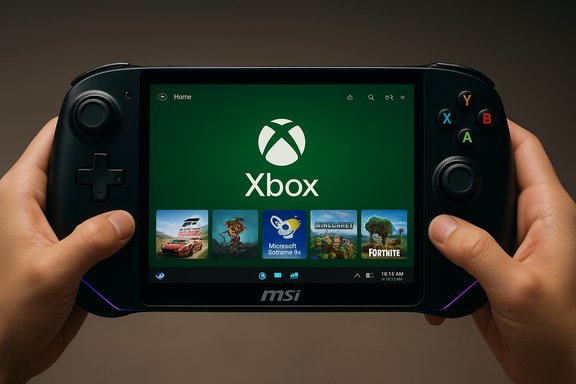
Microsoft’s Windows 11 preview has quietly pushed the Xbox Full Screen Experience (FSE) onto MSI’s Claw handheld family, expanding the console‑style, controller‑first shell beyond the Asus devices that shipped with it — but practical limits, buggy preview plumbing, and the growing strength of SteamOS mean the arrival is more milestone than finish line.
The Full Screen Experience is not a new operating system — it’s a layered shell inside Windows 11 that places a single “home app” (typically the Xbox PC app) front and center, trims desktop ornamentation, and defers many background processes to reclaim runtime resources for games. The feature debuted on the ASUS ROG Xbox Ally family and has been progressively expanded through Windows Insider preview flights; Microsoft’s recent cumulative update (Build 26220.7051, KB5067115) explicitly lists a preview rollout for MSI Claw models and promises additional OEM enablement in the months ahead. At its core, FSE does three practical things:
FSE’s pragmatic approach is therefore strategic: it promises smoother, more predictable gaming sessions without locking users into a curated platform. For OEMs like MSI, enabling FSE lets them deliver a console‑like first impression while preserving Windows’ ecosystem advantages. But the promise depends on coordinated firmware and driver tuning from vendors — without it, an experience that looks good on paper can feel flaky in the hand.
But the work is unfinished. Preview bugs, sleep/resume reliability, OEM overlay conflicts, and the persistent Linux anti‑cheat gap mean FSE is best treated as a meaningful step forward — a pragmatic experiment that needs OEM buy‑in and developer testing to reach mainstream polish.
For enthusiasts: try FSE on test hardware and report issues. For mainstream buyers: wait for MSI‑certified updates or ship images with FSE prevalidated. For Microsoft and OEMs: prioritize driver, firmware, and anti‑cheat compatibility work to turn this promising UX into the dependable handheld experience many users expect.
The expansion of the Xbox Full Screen Experience to MSI’s Claw family marks a material step in Windows’ handheld strategy — one that narrows the gap to SteamOS in usability while keeping Windows’ compatibility advantage intact — but its long‑term success will depend on performance consistency, validated OEM images, and whether anti‑cheat and driver partners align their stacks with a controller‑first future.
Source: TechRadar https://www.techradar.com/computing...s-but-i-still-wouldnt-choose-it-over-steamos/
 Background / Overview
The Full Screen Experience is not a new operating system — it’s a layered shell inside Windows 11 that places a single “home app” (typically the Xbox PC app) front and center, trims desktop ornamentation, and defers many background processes to reclaim runtime resources for games. The feature debuted on the ASUS ROG Xbox Ally family and has been progressively expanded through Windows Insider preview flights; Microsoft’s recent cumulative update (Build 26220.7051, KB5067115) explicitly lists a preview rollout for MSI Claw models and promises additional OEM enablement in the months ahead. At its core, FSE does three practical things:- Presents a controller‑first, full‑screen launcher (Xbox PC app by default).
- Suspends or defers many desktop startup items and Explorer ornamentation to free memory and reduce idle CPU wakeups.
- Reworks Game Bar and Task View flows for rapid, thumb‑friendly switching and capture controls.
What Microsoft shipped in Build 26220.7051 (KB5067115)
Microsoft published the Insider preview notes for Build 26220.7051, confirming the opt‑in taskbar Copilot entry and the broader handheld experiments, including the FSE preview to MSI Claw models. The official guidance shows the toggle in Settings → Gaming → Full screen experience and explains entry points via Task View, Game Bar, and an option to boot straight into FSE. Independent outlets and hands‑on reviewers corroborated the expansion, with coverage noting that the preview is gated by hardware entitlements and server‑side rollout decisions — the binary may be widely distributed, but visibility and reliability vary across devices and regions. That gating explains why some users see the toggle immediately while others need to run Insider builds or use community workarounds.Why this matters to handheld owners and OEMs
Handhelds are a unique class of PC: small displays, constrained thermals, and heavy reliance on controller navigation. Windows’ traditional desktop posture creates friction in this form factor; Explorer subsystems, startup agents, and floating UI elements consume memory and periodically wake the CPU — exactly the behaviors that shorten battery life and induce stutters under sustained load.FSE’s pragmatic approach is therefore strategic: it promises smoother, more predictable gaming sessions without locking users into a curated platform. For OEMs like MSI, enabling FSE lets them deliver a console‑like first impression while preserving Windows’ ecosystem advantages. But the promise depends on coordinated firmware and driver tuning from vendors — without it, an experience that looks good on paper can feel flaky in the hand.
The MSI Claw rollout: what to expect on real hardware
MSI’s Claw family spans recent Intel and AMD variants (Claw 7/8 and the Claw A8 with Ryzen Z2 Extreme), with 7–8‑inch 120Hz panels, Thunderbolt/USB4 ports, and high‑capacity batteries on larger SKUs. The Claw A8 in particular ships with up to 24GB LPDDR5x on many configurations and an 80Wh battery in some models — hardware that can benefit materially from runtime resource reclamation. But there are caveats:- FSE is delivered as a Windows 11 25H2/Insider preview component; MSI’s OEM image and MSI Center utilities must be updated to avoid overlay conflicts.
- Early community reports show interactions between Xbox app preview builds and MSI OSD/overlay utilities that in some cases produced blank or frozen overlays until vendor updates fixed the drivers. That’s a reminder that the feature stack stretches across Microsoft, OEM middleware, and driver suppliers.
How to enable the Full Screen Experience on an MSI Claw (official, supported path)
- Back up your system and create recovery media before changing channels.
- Update MSI Center, BIOS, and device drivers per MSI guidance.
- Enroll the device in the Windows Insider program on the Claw (choose the Insider channel that contains the 25H2 preview bits).
- Install or update the Xbox PC app to the latest Preview (via Xbox Insider Hub).
- Open Settings → Gaming → Full screen experience and select Xbox as your home app.
- Optionally toggle “Enter full screen experience on startup” and reboot.
Measured gains and realistic expectations
Early tests and community reports show directional benefits — not miracles.- Memory: Microsoft and reviewers have cited directional savings up to roughly 1–2 GB of reclaimed RAM on tuned devices. That order of magnitude matters on handhelds with 16–24GB soldered RAM because it reduces swapping pressure and idle memory churn. Expect variance: the figure depends on installed background clients and OEM utilities.
- Frame‑time stability: With fewer background wakeups, some titles show single‑digit to low‑double‑digit FPS improvements and fewer sustained stutters. These improvements are most visible under long play sessions where thermal throttling and background contention compound.
- Battery: Deferring background services reduces idle draw and can modestly extend runtime. The net benefit is workload‑dependent and won’t overcome poor thermal design or aggressive GPU power use.
Shortcomings, bugs and real‑world frictions
The preview rollout revealed predictable teething problems:- Boot/login friction: Some Insiders reported visible login PIN prompts, booting to the regular desktop instead of FSE, or the Xbox app appearing as a window rather than a full‑screen launcher. Those behaviors break the “appliance” illusion FSE is meant to create.
- Sleep/resume quirks: Handhelds depend on reliable suspend/resume. Early builds showed inconsistent sleep behavior or long resume delays when FSE was engaged — a poor fit for users who prize instant resume. SteamOS’s quick resume experience remains a competitive advantage here.
- OEM overlay conflicts: Utilities like MSI Center and OSDs that manage thermal and power profiles sometimes conflict with FSE’s reduced‑background model, producing blank overlays or misbehaving hotkeys until vendor updates resolve them. Vendors must ship validated images tuned to FSE to reduce this friction for mainstream buyers.
- Anti‑cheat and overlay compatibility: Some anti‑cheat systems operate at kernel level and assume a traditional Windows session. If FSE defers or suppresses services those systems expect, launch failures or functional problems can occur. This is not hypothetical — several high‑profile multiplayer titles historically blocked Linux alternatives because kernel‑level anti‑cheat was incompatible, and similar edge cases can appear in FSE if not tested thoroughly.
SteamOS vs Windows 11 FSE: why Valve’s platform still matters
Windows with FSE narrows the usability gap with SteamOS, but several structural advantages keep Valve’s SteamOS competitive for handheld users:- Lightweight, gaming‑first UX: SteamOS boots into a unified gaming environment, with an emphasis on sleep/quick‑resume, streamlined driver stacks, and minimal background noise. Reviewers and users consistently praise SteamOS for reliable suspend/resume and lower idle power — features that still outperform Windows on many handhelds.
- Performance headroom: Side‑by‑side tests on identical hardware have shown SteamOS delivering measurable frame‑time and battery advantages in multiple scenarios; reviewers have reported consistent low‑double‑digit percentage improvements in FPS and much better battery life in some titles. That advantage stems from a leaner userland and a driver stack optimized for Valve’s compatibility layer.
- Simpler out‑of‑the‑box experience: SteamOS’s curated, console‑forward workflow reduces launcher hopping and driver idiosyncrasies for the average handheld buyer.
- Game compatibility remains the largest blocker for many users. Kernel‑level anti‑cheat systems (EA’s Javelin, certain Riot/Valorant protections historically) have prevented some popular multiplayer titles from running under Proton/SteamOS. Until major anti‑cheat vendors fully support Linux environments or Valve develops robust compatibility workarounds, Windows remains the definitive platform for broadest game compatibility.
- Wider software ecosystem: Windows still offers the broadest support for third‑party launchers, accessories, and apps outside Steam’s ecosystem.
Practical advice for MSI Claw owners and buyers
- If you want daily stability: wait for MSI‑validated images. MSI and Microsoft need time to ship tuned drivers and firmware — the “supported” route will be the least risky path for a primary device.
- If you test Insider builds: make a full system backup, update MSI Center and BIOS/firmware, enroll in the Xbox PC app preview, and report bugs through Feedback Hub. Keep a recovery USB handy.
- Evaluate your game library: If you play competitive, kernel‑protected multiplayer titles (Battlefield series, certain EA and Activision titles), confirm anti‑cheat compatibility before trusting SteamOS or an FSE session that defers expected services. Windows remains the safest bet for the widest compatibility.
- Use FSE as a supplement, not a replacement: The fastest path to a smooth handheld gaming experience is a combined approach — OEM‑tuned Windows with FSE for console‑like sessions, plus the ability to exit to full Windows for productivity, modding, or titles requiring a different toolchain.
What Microsoft and OEMs should do next
- Ship validated OEM images with FSE pre‑enabled on supported SKUs to remove the guesswork for consumers.
- Publish compatibility checklists for anti‑cheat and overlays and provide vendor‑grade driver packages that preserve FSE’s reduced‑background model while meeting low‑level driver requirements.
- Document the exact runtime changes FSE enforces (what services are suppressed, how background tasks are reconciled when switching modes) so developers and IT admins can adapt builds and policies.
- Accelerate telemetry‑driven rollouts and issue timely firmware updates that address input‑button and overlay regressions reported by early adopters.
Final verdict: important milestone, not a finished product
The FSE arrival on MSI Claw validates Microsoft’s approach: layer a controller‑first shell onto Windows rather than forking the OS, and let OEMs tune the full stack. That balance preserves Windows’ broad compatibility while giving handheld users a usable, consolelike launcher.But the work is unfinished. Preview bugs, sleep/resume reliability, OEM overlay conflicts, and the persistent Linux anti‑cheat gap mean FSE is best treated as a meaningful step forward — a pragmatic experiment that needs OEM buy‑in and developer testing to reach mainstream polish.
For enthusiasts: try FSE on test hardware and report issues. For mainstream buyers: wait for MSI‑certified updates or ship images with FSE prevalidated. For Microsoft and OEMs: prioritize driver, firmware, and anti‑cheat compatibility work to turn this promising UX into the dependable handheld experience many users expect.
The expansion of the Xbox Full Screen Experience to MSI’s Claw family marks a material step in Windows’ handheld strategy — one that narrows the gap to SteamOS in usability while keeping Windows’ compatibility advantage intact — but its long‑term success will depend on performance consistency, validated OEM images, and whether anti‑cheat and driver partners align their stacks with a controller‑first future.
Source: TechRadar https://www.techradar.com/computing...s-but-i-still-wouldnt-choose-it-over-steamos/
