

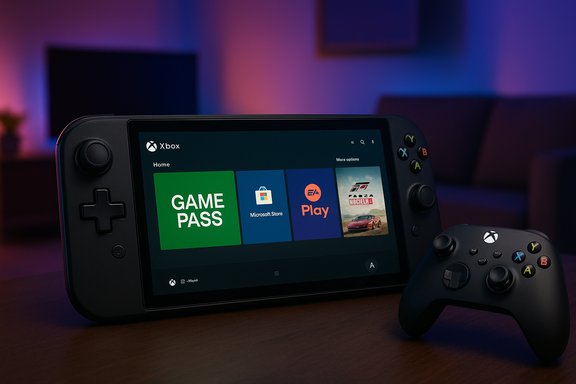
Microsoft has quietly folded a console‑style front door into Windows 11: the Xbox Full Screen Experience (FSE) — a controller‑first, full‑screen shell that began life on Xbox‑designed handhelds — is now available to Windows Insiders in the Dev and Beta channels and is rolling out to supported handhelds more broadly.
Background / Overview
Microsoft introduced the Full Screen Experience as a session‑level shell for Windows 11 to give handhelds and controller‑first PCs a more console‑like front end without shipping a separate operating system. In essence, FSE launches a chosen “home app” (the Xbox PC app by default) as a full‑screen UI, suppresses much of the Explorer shell and desktop chrome, and reorients the system around controller navigation and fast, “turn‑on‑and‑play” flows. The recent expansion places the FSE plumbing — notably surfaced in Windows 11 Insider Preview Build 26220.7271 — into the Dev and Beta channels for staged preview evaluations. Access to the PC preview is gated: Insiders who also join the Xbox Insider Program and opt into the PC Gaming preview are the first in line. Microsoft and OEMs are using staged entitlements and server‑side flags to control exposure while telemetry and compatibility checks proceed.What the Xbox Full Screen Experience actually is
A session posture, not a new OS
FSE is a layered, user‑space shell. It does not alter Windows kernels, GPU driver models, DRM frameworks, or kernel‑mode anti‑cheat systems. Instead, it changes which user‑facing components load at sign‑in and how the session presents itself. When FSE is active, the Xbox PC app becomes the active front end; wallpaper, many Explorer ornaments, and some startup apps are deferred to reduce background activity and reclaim runtime resources for games. This design preserves Windows’ openness — users can still run Steam, Epic, Battle.net, GOG and other storefronts — while offering a console‑like entry point optimized for controller navigation and quick switching. The trade‑off is behavioral: some keyboard shortcuts and desktop behaviors are intentionally altered to avoid accidental interruptions during gameplay.What users will see and how it behaves
- A large, tile‑based home screen centered on the Xbox PC app, with Game Pass, Microsoft Store, Xbox Play Anywhere titles and discovered installs from other storefronts surfaced in one place.
- Controller‑first navigation with an on‑screen controller keyboard where required, Xbox‑button long‑press task switching, and a Task View optimized for bumpers/sticks.
- Entry/exit methods: Task View (hovering the Task View icon or pressing Win + Tab), Game Bar settings, and a Win + F11 hotkey toggle. On supported hardware, a long press of the Xbox controller button switches between FSE and desktop.
How to get the FSE preview (official route)
- Join the Xbox Insider Program and opt into the PC Gaming preview via the Xbox Insider Hub.
- Join the Windows Insider Program and select the Dev or Beta channel, then update to the Insider Preview build that carries FSE (the rollout surfaced in the 26220.x family, with specific preview updates labeled 26220.7271).
- Install or update the Xbox PC app from the Microsoft Store (the Xbox app normally acts as the “home app”).
- Open Settings → Gaming → Full screen experience, choose Xbox (or another supported home app), and optionally enable “Enter full screen experience on startup.” A restart may be recommended to apply runtime optimizations.
Technical mechanics — what changes and what stays the same
What FSE modifies
- Shell behavior: The session uses the Xbox PC app as the visible shell rather than Explorer, suppressing wallpapers, Start menu decorations, and taskbar ornaments when active.
- Startup trimming: When configured to boot into FSE, Windows delays or defers many non‑essential startup agents and background jobs. This reduces idle CPU wakeups and keeps more memory available for games.
- UI input mapping: Some keyboard shortcuts are remapped or behave differently to maintain immersion and prevent accidental desktop interruptions.
What FSE does not change
- Low‑level subsystems such as kernel scheduling, GPU driver models, DRM, and anti‑cheat remain in place. Games that require kernel‑mode anti‑cheat will continue to require the same drivers and runtime stacks. This reduces the risk of deep incompatibilities and preserves the security model of Windows.
Performance and hands‑on results — what to expect
Early independent testing and vendor measurements show directional benefits, especially on thermally constrained handhelds.- Microsoft and independent outlets describe reclaimed memory in the realm of roughly 1–2 GB in favorable configurations when Windows skips loading Explorer and defers startup apps. This is a situational, best‑case observation rather than a guaranteed figure for every device. Actual savings depend on background software, OEM firmware, and device configuration.
- Device‑maker tests (for example, MSI’s Claw handheld benchmarks) show measurable memory reductions and modest FPS gains in demanding titles: MSI reported around 5–6% lower memory usage and single‑digit percent improvements in average frame rates for Cyberpunk 2077 and similar tests when FSE was enabled. Other independent measurements found real savings in the order of ~1.1 GB on certain handhelds, with vendor‑tuned scenarios approaching ~2 GB.
- Reported benefits include improved frame pacing and steadier sustained performance in prolonged scenes where background tasks otherwise cause CPU interruptions. Battery life effects are variable; some tests showed minor improvements, but battery gains are not universal.
Compatibility, gating, and community unlocks
Microsoft is shipping FSE as an OEM‑and‑server‑gated capability in Insider builds. That means:- Even if a device has the requisite preview binaries, Microsoft or the device OEM may withhold the toggle pending firmware, driver, or compatibility checks. This protects users from broad instability on unsupported hardware.
- Community workarounds and tools (e.g., ViVeTool unlocks and manual flags) have been used to force‑enable FSE on unsupported machines. Those efforts often produce mixed results: missing inputs, controller mapping glitches, and app compatibility issues have been widely reported. The safest route remains the official Insider/OEM path.
- Some OEMs (notably ASUS and MSI) have embraced the feature on their handhelds and published support materials and videos showing activation and benchmark comparisons. That OEM involvement matters: vendor tuning can produce a significantly more stable and enjoyable experience than community unlocks on unsupported devices.
Security, anti‑cheat, and stability considerations
Because FSE is a user‑space shell, it does not bypass anti‑cheat or DRM; however, changing session policies and deferring services can have unintended interactions.- Anti‑cheat stacks that rely on particular session flows or early initialization steps could behave differently when many startup agents are deferred. While Microsoft says kernel‑mode anti‑cheat remains intact, real‑world pairing with specific anti‑cheat implementations should be tested by OEMs and publishers.
- For competitive or online titles the recommended approach is conservative: test FSE with the specific anti‑cheat provider and game build before assuming parity with desktop sessions. Unverified community tweaks that flip internal flags risk introducing instability that could affect game launches or matchmaking.
- From a privacy posture, the FSE session still runs under Windows security and account models; it is a different UI, not a different OS. Normal Windows protections, telemetry settings and account controls remain relevant when using FSE.
What this means for OEMs, developers and the Windows gaming ecosystem
For OEMs
- Differentiation: Handheld OEMs can use FSE to deliver a consumer‑friendly console‑like out‑of‑box experience that better matches buyer expectations for a “turn on and play” device. ASUS’s ROG Xbox Ally family is the most prominent example.
- Certification and testing: OEMs must validate firmware, thermal profiles, controller mappings, and driver stacks to ensure the experience is reliable under FSE’s modified session policies. Early reports show manufacturer tuning materially affects stability and performance.
For developers and publishers
- Testing matrices expand: Games should be validated both in desktop sessions and in FSE sessions during QA — particularly multiplayer and titles with anti‑cheat dependencies — to ensure parity and catch any session‑dependent issues early.
- Opportunity for UX extensions: Developers can take advantage of the simplified, controller‑first surface for improved store presence and discoverability through the Xbox home app, and for optimizing UI flows for gamepad navigation.
For the Windows gaming ecosystem
- FSE is an incremental but meaningful attempt to unify the console and PC approaches to game discovery, reducing friction between Game Pass, Microsoft Store purchases, and games installed via other storefronts. It’s an acknowledgment that console‑style simplicity has strong appeal, especially on handheld and living‑room PC experiences.
Strengths: why this move matters
- Cleaner path to play: FSE shortens the time from power on to game launch and reduces accidental desktop interruptions during play. That matters for hand‑held and living‑room scenarios.
- Real, practical resource wins: On tuned devices, reclaiming idle memory and trimming startup processes delivers tangible improvements to frame stability and sometimes FPS, which translates to a noticeably smoother experience. Vendor tests validate the concept.
- Ecosystem leverage: Bundling Game Pass and Xbox storefront features into a prominent home surface may increase engagement with Xbox services while preserving access to third‑party stores. That can increase discoverability and convenience for many PC gamers.
Risks and downsides
- Fragmented behavior across devices: Because FSE is gated and OEM‑tuned, the experience may vary widely. Users on unsupported hardware or who force‑enable the feature may see bugs, control mapping issues, and app incompatibilities.
- Not a universal performance win: Gains are situational. Systems with few background agents or very capable thermal envelopes will see less benefit than thermally contended handhelds. The “up to ~2 GB” memory savings should be viewed as conditional on device configuration.
- Potential anti‑cheat and compatibility pitfalls: Shifting session initialization order can surface unexpected interactions with some anti‑cheat or driver behaviors. Publishers and QA teams will need to expand test matrices accordingly.
Practical advice for Windows enthusiasts and gamers
- Use the official Insider + Xbox Insider path if testing FSE: join the programs, install the Xbox app from the Store, and use Settings → Gaming → Full screen experience to enable the mode on devices that show the toggle. This minimizes risk and ensures you receive vendor‑tuned builds when available.
- Treat community unlocks with caution: manual flag flips or third‑party tools can enable FSE on unsupported hardware, but these approaches often deliver inconsistent results and may complicate troubleshooting.
- If you rely on your PC for competitive gaming or work, validate anti‑cheat compatibility and stability before switching to FSE as your default session posture. Do not assume parity without testing.
Bigger picture: Windows, consoles and the convergence of experiences
The Full Screen Experience represents another milestone in Microsoft’s long game to blend console simplicity with Windows’ openness. It doesn’t convert Windows into an Xbox OS, but it introduces a new session posture that can make Windows feel and behave more like a living‑room console for the duration of a gaming session.For consumers, that promise is powerful: one device can be both a full‑power desktop and a friction‑free console depending on the posture you choose at boot. For Microsoft and OEMs, it’s a lever to better align hardware, firmware and user experience for new handhelds and living‑room PCs.
Yet the move also surfaces unresolved questions about fragmentation, support, and consistency across the sprawling PC ecosystem. How smoothly FSE scales to larger displays and varied hardware — and how well OEMs, publishers and Microsoft coordinate around anti‑cheat, firmware, and driver testing — will determine whether this becomes a broadly loved feature or a niche convenience for a subset of devices.
Conclusion
The Xbox Full Screen Experience is a pragmatic, technically conservative step toward making Windows 11 feel more like a console when you want it to, while preserving the full Windows environment when you don’t. The staged rollout through Windows Insider Preview Build 26220.7271 and the Xbox Insider Program lets Microsoft and OEMs iterate safely, and early tests show real, if situational, resource and UX gains — especially on handheld hardware. However, the win is contextual: reclaimed RAM and smoother frame pacing help where system resources and thermal ceilings are constrained, but results will vary. Users and IT pros should adopt the feature via the official Insider/OEM lines, test for anti‑cheat and compatibility, and treat community workarounds as experimental. The Full Screen Experience is an important step toward unified gaming UX on Windows, but its ultimate success will hinge on consistent OEM tuning, publisher engagement and careful rollout beyond the preview stage.Source: Пепелац Ньюс https://pepelac.news/en/ampposts/id14723-windows-11-gets-xbox-full-screen-experience-via-insider/


