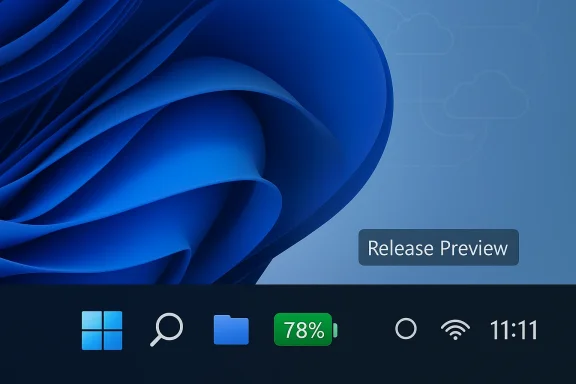
Microsoft is finally turning on the colorful battery icons and an on‑taskbar battery percentage in Windows 11 for more devices, delivering a small but long‑requested usability fix via the February 24, 2026 optional preview update (KB5077241).
Windows 11 shipped with a minimalist system tray and subdued taskbar indicators that many users found less informative than the equivalents on macOS, Android, and modern Linux desktops. The battery icon in particular remaie glyph that required a hover or a click to see exact charge. That absence became a conspicuous UX gap—one Microsoft repeatedly promised to address in Insider previews through 2024 and 2025.
Microsoft began testing a color‑aware battery icon with an optional battery percentage in Insider builds in late 2024. The feature entered broader preview and staged public delivery in late 2025, but as with many staged feature flips, the experience did not appear for every device immediately. The February 2026 preview (KB5077241) explicitly lists “updated battery icons and redesigned Start menu on more devices” in its announcement, confirming that the update pushes that UI change to additional machines as the servicing rollout continues.
Another open question: will Microsoft unify threshold behavior across OEM SKUs to reduce customer confusion? Current evidence suggests OEMs will retain some control over power profiles, meaning absolute parity across every laptop model is unlikely without additional vendor coordination.
In sum: a simple, overdue UX win has finally moved out of preview and into the hands of more users—delivered in Microsoft’s cautious, measured style.
Source: XDA A feature Windows 11 should have had on release is finally rolling out, says Microsoft
 Background
Windows 11 shipped with a minimalist system tray and subdued taskbar indicators that many users found less informative than the equivalents on macOS, Android, and modern Linux desktops. The battery icon in particular remaie glyph that required a hover or a click to see exact charge. That absence became a conspicuous UX gap—one Microsoft repeatedly promised to address in Insider previews through 2024 and 2025.Microsoft began testing a color‑aware battery icon with an optional battery percentage in Insider builds in late 2024. The feature entered broader preview and staged public delivery in late 2025, but as with many staged feature flips, the experience did not appear for every device immediately. The February 2026 preview (KB5077241) explicitly lists “updated battery icons and redesigned Start menu on more devices” in its announcement, confirming that the update pushes that UI change to additional machines as the servicing rollout continues.
What changed: the battery icon, explained
Visual and behavioral updates
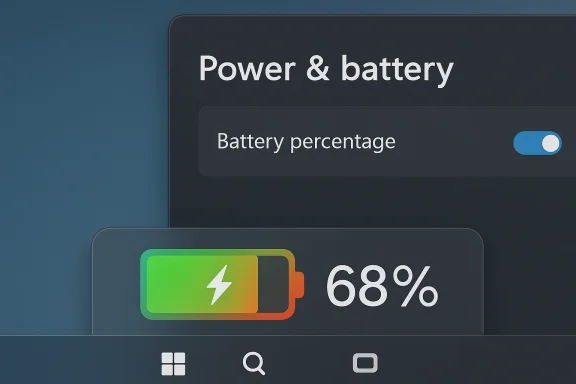
The battery indicator now:- Uses color to signal state: green when charging (with a clear bolt overlay), orange/yellow when battery saver or low battery is active, and red when the battery is critically low.
- Displays a wider internal progress bar inside the glyph so the remaining charge is visually clearer at a glance.
- Offers an optional Battery percentage toggle in Settings (System > Power & battery) that places a numeric percentage next to the icon in the system tray.
Thresholds and nuances
Across Insider notes and hands‑on reports, thresholds for the color changes and energy‑saver activation have been reported slightly differently by testers. Microsoft documentation and earlier previews consistently referenced the idea that enern% threshold, but hands‑on accounts have sometimes observed energy saver or color changes at 30% and a red critical state at very low single digits (reported around 6% or below). Because the rollout is staged and device OEMs can ship their own power profiles, small discrepancies have appeared in the wild; treat any specific percentage you read as implementation‑dependent until Microsoft publishes a definitive, single‑source spec for every SKU. ([linkcentre.com](Windows 11 Update Revamps Battery Indicator and Simplifies Start Menu | LinkCentre News & Headlines# Timeline: how we got here- December 2024 – Microsoft shows early Insider previews of a colorized battery icon and percentage option that drew immediate user interest.
- 2025 – The feature cycles through Insider channels, with multiple toggles, temporary pulls for fixes, and reintroductions as Microsoft refined visuals and behavior. Community threads tracked intermittent availability and toggled rollouts.
- November 2025 – Microsoft included the battery icon changes in the November Patch Tuesday cumulative updates and wider previews for 24H2/25H2 servicing channels, but activation remained staggered.
- February 24, 2026 – Microsoft published KB5077241 (OS Builds 26200.7922 and 26100.7922) as an optional, non‑security preview update noting “updated battery icons and redesigned Start menu on more devices,” confirming continued staged rollout. ([support.microsoft.com](February 24, 2026—KB5077241 (OS Builds 26200.7922 and 26100.7922) Preview - Microsoft Support February / early March 2026 – Users reporting that installing KB5077241 and enabling “Get the latest updates as soon as they’re available” accelerates the chance the feature will be activated on their device.
How to get the new icons on your machine
If you want the new battery icons and the on‑taskbar percentage, follow these steps:- Open Windows Update (Settings > Windows Update) and check for updates.
- Look for the optional preview release labeled KB5077241 (February 24, 2026 preview). Install it if available.
- If KB5077241 does not appear, enable “Get the latest updates as soon as they’re available” (sometimes labeled as a priority updates toggle) to enter Microsoft’s faster rollout queue. This increases the likelihood Windows will present staged feature flips sooner, though it does not guarantee immediate actest.com]
- After the patch and any necessary reboots, open Settings > System > Power & battery and enable Battery percentage to show the numeric percentage on the taskbar. If the toggle is missing, the feature is likely still server‑side gated for your hardware profile.
Why this should have shipped earlier (and why it matters)
At first glance, a colored battery icon and a visible percentractice, they belong to a class of small usability fixes that significantly reduce friction in daily use.- Faster decisions: A battery icon that conveys charge state visually reduces the time to determine whether you need to plug in before a meeting or save work. That matters for mobile users who rely on rapid context switches.
- Accessibility gains: Color, combined with numeric percentage, helps users with limited eyesight or cognitive load maket also reduces repetitive interactions (hover→read) that are extra work for people with dexterity challenges.
- Consistency with other platforms: Consumers now expect certain small affordances—Android and macOS included numeric battery indicators and visual cues for years. Removing that expectation from Windows introduced a continual UX gap and generated persistent user frustration. Restoring parity improves cross‑platform predictability.
Risks, caveats, and things to watch
Staged rollouts and uneven behavior
Microsoft’s phased deployment model—flipping features to cohorts of devices rather than pushing globally at once—introduces variability. Some devices will show the new icons immediately after KB5077241, while others will not until the server‑side gate opens. That inconsistency can frustrate users who expect parity after installistrators should plan communications accordingly.OEM power profiles and threshold variance
Because OEMs can customize power management settings, you may see different trigger points for energy saver and color changes across laptops from different vendors. Early tester reports already show slight threshold variance for when battery saver engages or when the icon turns to the “critical” red state. Organizations that depend on consistent behavior for device fleet policies should standardize power profiles via Group Policy or configuration management.Enterprise deployment considerations
- Optional preview updates like KB5077241 are not intended as broad, production pushes. Admins should test thoroughly in a controlled ring before wider distribution.
- The “Get the latest updates as soon as they’re available” toggle onvenience, not a replacement for Windows Update for Business or WSUS policies. Use enterprise controls to manage compatibility, compliance, and supportability.
Visual design and color semantics
Color as a signal can improve speed of recognition, but it also introduces accessibility pitfalls if contrast or color choices are insufficient for users with color vision deficiency. From the previews we’ve seen, Microsoft pairs color with shape changes and numeric percentage, which mitigates pure color dependence; still, the company must ensure contrast ratios and alternative cues meet accessibility guidelines. Early testing suggests the visual width and internal progress bar do provide non‑color cues, but accessibility verificatir base is required.The rollout strategy: A deliberate, if slow, refinement cycle
Microsoft’s approach—develop in Insiders, preview in Release Preview, then flip features in monthly servicing packages—reflects a conservative strategy designed to minimize regressions. That process, however, sometimes results in a multiyear drift between “preview” and consistent public availability for specific features. The battery icon exemplifies this tradeoff: iterative improvement and telemetry‑driven refinement at the cost of an extended perceived delay. ([windowsforum.com](Windows 11 February Preview: Colour Battery Icon with Percentage and Start Menu Update is a textbook case of the “staged activation” model: the update contains the code and updated assets, but the experience still depends on controlled feature gating. That explains why installing the patch might enable the feature for some users and not for others. The upside is faster rotigation if unforeseen issues appear; the downside is user confusion and the impression of an incomplete rollout.Hands‑on: what users report
Early hands‑on accounts and community threads show generally positive reception: the icon is more noticeable in the tray, the percentage is welcomed, and the charging bolt no longer obscures the internal progress indicator. Some users note minor differences—battery saver triggering at 30% on certain devices, or the red critical icon appearing at slightly different thresholds—underscoring the implementation variance referenced above. Overall impressions are that this is one of those “why didn’t this ship earlier?” features that now feels obviously right.Recommendations for users and admins
- Consumers: If you’re missing the icons, install KB5077241 from Optional Updates and enable the “Get the latest updates as soon as they’re available” toggle to increase your chance of being included sooner. After installation, enable Battery percentage in Settings > System > Power & battery. Keep in mind activation may still be gated server‑side.
- IT administrators: Do not use consumer toggles as a deployment strategy. Test KB5077241 in a pilot ring before broader deployment, and manage feature behavior with Windows Update for Business, policy controls, and documented power profile templates to ensure consistent behavior across OEM hardware.
- Accessibility advocates: Audit the new visuals with real‑world users, including people with color vision deficiencies and low‑vision users, to ensure the change increases usable information for everyone, not just those who perceive color normally.
What remains unsettled
Microsoft’s messaging indicates the new battery visuals will expand to Quick Settings and the Lock screen over time, but explicit timelines remain vague. Lock screen support in particular offers a high‑visibility surface for power state, and its eventual arrival will close the loop on the feature set first previewed in 2024. Meanwhile, some testers want the ability to customize thresholds and color mappings; that level of granular control has not been announced and may be constrained by consistency and accessibility considerations.Another open question: will Microsoft unify threshold behavior across OEM SKUs to reduce customer confusion? Current evidence suggests OEMs will retain some control over power profiles, meaning absolute parity across every laptop model is unlikely without additional vendor coordination.
A small change with outsized impact
The resurrection of a colored battery icon and a visible percentage in Windows 11 is an instructive example of human‑centered product design: modest engineering effort, but high user utility. It doesn’t rewrite Windows’ architecture or introduce new AI features, but it solves a persistent daily annoyance and brings the taskbar closer to what users intuitively expect. The measured rollout and gating reflect Microsoft’s cautious servicing strategy, which minimizes risk but costs patience. For most users, KB5077241 represents the day a tiny, overdue improvement finally landed—and one that will quietly make laptop life a little less stressful.Bottom line
If you’ve long wanted a clearer battery readout in Windows 11, the pieces are in place: the February 24, 2026 optional preview update (KB5077241) carries the updated assets and expands activation to more devices, and the new Battery percentage toggle lets you surface the numeric value on the taskbar when the experience is active. Expect staged rollouts, small threshold differences across hardware, and a continued push by Microsoft to finish polishing the feature across Quick Settings and the Lock screen over the months ahead. Install the preview if you’re comfortable with optional updates, enable the priority updates toggle if you want to accelerate exposure, and for corporate fleets, validate and deploy the update through managed channels.In sum: a simple, overdue UX win has finally moved out of preview and into the hands of more users—delivered in Microsoft’s cautious, measured style.
Source: XDA A feature Windows 11 should have had on release is finally rolling out, says Microsoft