

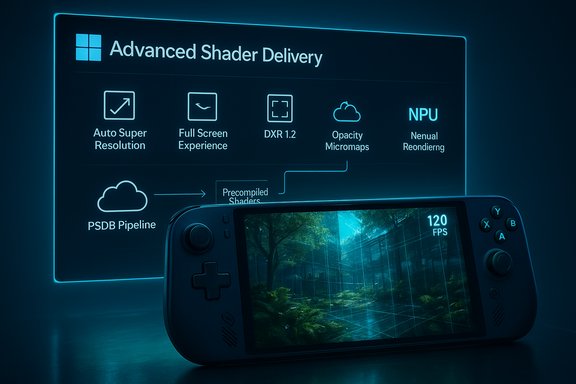
Windows 11’s next wave of gaming changes aims to do something that has eluded many operating‑system updates: remove long‑standing, user‑visible friction from PC play by treating performance as a platform outcome rather than a collection of isolated features. The package—centered on Advanced Shader Delivery (ASD), an OS‑level upscaler called Auto Super Resolution (Auto SR), a controller‑first Full Screen Experience (FSE), and DirectX/DXR innovations that lay the groundwork for neural rendering—is already shipping in previews and on a handful of handhelds, and it deserves close technical scrutiny for what it promises and the practical trade‑offs it introduces.
Microsoft’s recent messaging frames 2025–2026 as a pivot point for Windows gaming: optimize the entire stack—OS shell, scheduler and power management, the DirectX runtime and Agility SDK, driver delivery, and distribution pipelines—so that games run more smoothly on a range of devices from high‑end desktops to thermally constrained handhelds. That cross‑stack approach targets three recurring pain points for players:
This is a long‑horizon change: engines must adopt new shader models, vendors must expose hardware capabilities, and developers must tweak visual pipelines. Adoption will be gradual, but the directional impact on ray‑tracing efficiency and visual fidelity is substantial.
These platform moves—if broadly adopted and carefully managed—could materially reduce the small but persistent interruptions that have undermined PC gaming responsiveness for years. They also lay the foundation for a future where the rendering pipeline can dynamically assign tasks to the most efficient hardware units, enabling richer visuals without the prohibitive cost that has kept some advanced effects experimental until now. The next 12–24 months will determine whether this becomes an industry standard or another set of preview‑only curiosities; evidence so far shows real engineering work and selected ship‑room wins, but the proof will be in developer adoption, driver maturity, and the ability of stores to deliver precompiled shader bundles reliably at scale.
Source: NoobFeed Windows 11 Gaming Upgrades: Advanced Shader Delivery and Neural Rendering | NoobFeed
 Background / Overview
Microsoft’s recent messaging frames 2025–2026 as a pivot point for Windows gaming: optimize the entire stack—OS shell, scheduler and power management, the DirectX runtime and Agility SDK, driver delivery, and distribution pipelines—so that games run more smoothly on a range of devices from high‑end desktops to thermally constrained handhelds. That cross‑stack approach targets three recurring pain points for players:- Shader‑compile stutter and painful first‑run load times.
- Uneven frame pacing on battery‑ or thermally‑limited devices (handhelds, thin‑and‑lights).
- Heavy desktop/OS overhead that introduces micro‑stutters and steals CPU cycles.
What changed — the short list
- Advanced Shader Delivery (ASD): Precompiled, GPU/driver‑targeted shader bundles shipped or downloaded at install time to eliminate much of the runtime shader compilation that causes first‑run stutter.
- Auto Super Resolution (Auto SR): An OS‑level NPU‑accelerated upscaler that lets the system render at a lower internal resolution and upscale the image on the NPU, saving GPU cycles.
- Xbox Full Screen Experience (FSE): A controller‑first, full‑screen session posture that defers non‑essential background services to create a leaner runtime similar to a console.
- DirectX / DXR 1.2 and Shader Model advances: Features such as Opacity Micromaps (OMMs) and Shader Execution Reordering (SER) (part of DXR 1.2 / Shader Model 6.9) reduce ray‑tracing work and make neural rendering primitives feasible on consumer hardware.
- Windows on Arm and system glue: Improvements to the Prism emulator, anti‑cheat support, and platform driver updates that improve compatibility and performance on Arm and heterogeneous devices.
Advanced Shader Delivery (ASD): how it works and why it matters
The shader problem, in one paragraph
Modern PC games can generate tens of thousands of shader permutations to cover combinations of hardware, driver variants and rendering permutations. Historically, many of these shaders are compiled on the end‑user device—sometimes at install, often just‑in‑time—producing long first‑run loading times and the notorious “shader compile stutter” when new materials or effects are hit in gameplay.ASD: the high‑level flow
ASD shifts heavy compiler work out of the critical runtime path:- Developers or build systems generate a State Object Database (SODB) during packaging.
- Cloud or build pipelines compile that SODB into device‑specific precompiled shader databases (PSDBs), covering multiple GPU/driver permutations.
- PSDBs are distributed with the game or downloaded by the storefront client at install time.
- At runtime the game uses these precompiled shaders and avoids lengthy JIT compilation.
Reported gains and verification
Microsoft’s partner tests—cited in its platform updates—report dramatic improvements: first‑run load time reductions of ~80% for Avowed and ~95% for Call of Duty in the Ally testbeds, and some titles reporting up to 10× faster first launches in specific lab setups. Those numbers were published alongside the ASD rollouts for the ROG Xbox Ally series. These are vendor‑reported engineering results that illustrate the upper bound of possible improvement on shader‑heavy titles. Expect variation in real‑world results based on title, storage bandwidth, driver differences, and how complete the shipped PSDB is.Strengths
- Immediate UX payoff when a title ships with a comprehensive PSDB: near‑elimination of first‑run shader hitches.
- Battery/thermal wins on handhelds as local compilation spikes (CPU + disk activity) are avoided.
- Developer tooling support: ASD integrations in the Agility SDK make the workflow accessible for studios familiar with DirectX toolchains.
Risks, costs and adoption friction
- Operational cost for studios: Precompiling shaders for many GPU/driver combinations increases CI complexity and cloud storage costs.
- Fragmentation: Benefits are tied to where you buy the game. If only select storefronts deliver PSDBs, players using other launchers will see inconsistent results.
- Driver fragility: A driver update can invalidate precompiled bundles; the distribution system must seamlessly update or fallback without user pain.
- Security/supply concerns: Any new packaging and cloud‑build pipeline increases attack surface and must be validated for build integrity.
Auto Super Resolution (Auto SR): system‑level upscaling on the NPU
What Auto SR does
Auto SR is an OS integrated upscaler that intercepts DirectX 11/12 rendering and uses an on‑device neural accelerator (NPU) to upscale a lower‑resolution render to the display resolution. Because the upscaler is implemented at the OS layer, developers do not need to integrate it into their game; it can be applied broadly across titles supported by the mechanism. Early availability targeted Copilot+ Snapdragon X Series devices; Microsoft’s documentation confirms Auto SR requires specific hardware (Copilot+ PC with Hexagon NPU) and Windows 11 24H2 or later, with driver support and an Auto SR package installed.Why it matters
Offloading upscaling work from the GPU to an NPU can preserve GPU cycles for heavier tasks (ray tracing, shader work) and yield higher sustained frame rates on thermally constrained devices. As NPUs proliferate in SoCs and certain APUs, system‑level upscalers become a high‑leverage win for handhelds and laptops that include them.Caveats and limits
- Auto SR supports DirectX 11/12 titles and has explicit exclusions (e.g., DirectX 9, Vulkan, some 10‑bit formats). It requires compatible NPU drivers and currently targets specific platforms. Quality and latency characteristics depend heavily on the NPU architecture and the upscaling model. Competitive players must test input lag effects for their titles.
Xbox Full Screen Experience (FSE): turning Windows into a console shell
What FSE is
FSE is a controller‑first session posture—essentially a lightweight, full‑screen launcher that boots directly into a gaming home app (typically the Xbox PC app), suppresses non‑essential Explorer and background surfaces, and prioritizes the foreground game. The design intent is to minimize system noise and idle CPU wakeups that can interfere with frame delivery and input latency on handhelds and couch‑connected PCs. Microsoft has made FSE generally available on handhelds and is expanding it via Insiders to laptops, desktops and tablets.Real benefits
- Memory reclaimed and fewer background callbacks — meaningful on systems where every MB and milliwatt matters.
- Seamless controller UI and fast task switching — easier living‑room experiences for people who game with a controller on a big screen.
Limits
- FSE is a UX play; it does not change low‑level driver behavior or eliminate the need for proper driver and firmware tuning.
- It can be inconvenient for desktop users who rely on keyboard/mouse multitasking.
- Rollout has been gradual and device/firmware gated; availability variance is part of the current reality.
DirectX / DXR 1.2 and the road to neural rendering
OMM and SER: what they are
Microsoft’s DXR 1.2 additions—Opacity Micromaps (OMMs) and Shader Execution Reordering (SER)—are API and shader‑model level mechanisms designed to make ray tracing far more efficient and to enable shader pipelines to hand off work to the most efficient hardware unit (e.g., tensor units) when appropriate.- Opacity Micromaps (OMMs) let drivers and runtimes represent fine‑grained transparency at sub‑triangle levels, avoiding costly any‑hit shader invocations when geometry is clearly opaque or transparent. This reduces wasted shader work in scenes with foliage, chain‑link fences, or alpha‑masked assets.
- Shader Execution Reordering (SER) provides a mechanism for the runtime to regroup and reorder shading work to improve coherence and execution efficiency on GPUs—particularly valuable for path‑traced workloads where divergence kills utilization. SER introduces HLSL intrinsics and reordering points so implementations can optimize execution.
Where the vendors stand
- NVIDIA has been an early supporter of similar techniques (and has hardware and driver work in Blackwell/RTX 50 that map well to these features), meaning NVIDIA customers are likely to see early driver support for OMM and SER optimizations. Industry reporting indicates RTX 50 series showcased these features in early demos.
- AMD has announced parallel efforts (RDNA 5 radiance/“neural” cores and neural texture compression ideas) but historically ships some support later than NVIDIA for cutting‑edge DXR feature hooks—so adoption timelines will vary across vendors.
- Intel’s public cadence is less clear for advanced ray‑tracing tiers; driver and microarchitecture compatibility will determine uptake.
Neural rendering: where this leads
The shader model and DXR changes make it feasible to implement neural denoising, upscaling, and even neural primitives inside the rendering pipeline that prefer tensor/AI units for specific workloads. That is a structural shift: instead of forcing everything through CUDA/CU‑style raster cores, the runtime can dispatch tasks to the most efficient accelerator—tensor cores, NPU, or standard SIMD—based on cost and fidelity trade‑offs.This is a long‑horizon change: engines must adopt new shader models, vendors must expose hardware capabilities, and developers must tweak visual pipelines. Adoption will be gradual, but the directional impact on ray‑tracing efficiency and visual fidelity is substantial.
Ecosystem implications: who needs to change?
- Game developers must add PSDB generation to CI, test across driver permutations, and validate visual parity — an engineering and QA cost.
- Storefronts and launchers must support PSDB distribution mechanics and update flows to handle driver changes.
- GPU vendors must implement DXR 1.2 features in drivers and hardware microcode, and provide robust capability queries so runtimes can detect beneficial behavior.
- OEMs and firmware teams must expose tuned power/frequency profiles for handhelds so the OS scheduler improvements deliver steady clocks.
Xbox backward‑compatibility rumors and game preservation — cautious optimism
There are persistent rumors and some reporting that Microsoft is actively investing in game preservation and emulation work to expand backward compatibility for OG Xbox and Xbox 360 titles to modern platforms, possibly as part of a wider “Xbox Classics” or game preservation program. Job postings and third‑party reporting have fueled speculation, and independent leaks have surfaced intermittently. However, community developers of prominent unofficial emulators (e.g., Xenia) have denied formal collaboration with Microsoft, and no official, wide‑scale program has been confirmed that brings full OG/360 libraries to PC. Treat these items as plausible strategic priorities—Microsoft has publicly invested in compatibility teams—but unverified in scope and detail; licensing, legal and restoration work remain substantial obstacles.Practical advice for gamers, devs and IT pros
- Gamers who want early access: join the Windows Insider and/or Xbox Insider programs and keep firmware and drivers current—but expect preview instability and device‑specific rollouts.
- Gamers who prefer stability: wait for broad, vendor‑validated driver releases and store announcements that explicitly list ASD/Auto SR support for titles you play.
- Developers and CI owners:
- Evaluate whether integrating PSDB generation into your build pipelines is cost‑effective for the titles you ship.
- Use the Agility SDK to adopt DXR 1.2 and test OMM and SER benefits in representative path‑traced scenes.
- Invest in regression tests for PSDBs across driver updates and hardware variants.
- For reviewers and testers: measure before/after with objective tools (PresentMon, built‑in engine metrics, thermal logs) to quantify the impact of ASD, Auto SR, and power/scheduler changes.
Critical analysis — where the upside is strongest and where the risks lie
Notable strengths
- Targeted problem solving: ASD directly targets a widely recognized UX pain point; Auto SR exploits idle NPUs on modern hardware for clear system‑level gains; DXR 1.2 materially reduces ray‑tracing cost in many scene topologies.
- Cross‑stack approach: Microsoft’s coordination across OS, SDK, OEMs and GPU vendors increases the chance that improvements will compound rather than cancel each other.
- Handheld acceleration: On devices like the ROG Xbox Ally family, the combined effect of tuned power profiles, ASD and Auto SR can be transformational for first‑run responsiveness and sustained frame rates.
Key risks and unknowns
- Fragmentation and uneven adoption: Until major third‑party storefronts fully support PSDB distribution and all major GPU vendors show broad driver support for DXR 1.2 features, player benefits will be uneven.
- Operational and storage cost: Precompiled shader bundles add CI complexity and cloud hosting costs. Smaller studios may find the operational overhead prohibitive without third‑party tooling.
- Driver/patch fragility: Driver or microcode updates could invalidate PSDBs; the delivery model needs robust validation, automatic updates and easy fallback to avoid regressions.
- Quality variance for AI upscaling: Auto SR quality and latency will differ across NPUs, and some competitive players may reject any upscaling that introduces perceptible input lag.
- Licensing/legal barriers for classic titles: Even if Microsoft builds great emulation tech for OG/Xbox 360 titles, securing licensing and distribution rights remains arduous and may limit the scope of any preservation catalog.
Checklist: how to prepare (gamers and developers)
- Keep Windows 11 and your Xbox/Microsoft Store apps updated through official channels.
- Update GPU and NPU drivers from vendors rather than relying solely on Windows Update for the latest feature support.
- If you’re a developer: plan PSDB generation, add automated validation, and test OMM/SER/DXR 1.2 features in your CI.
- If you want early access to FSE or other preview features: enroll in Insider channels, but back up your system and be prepared for bugs.
- Monitor vendor release notes for explicit mentions of DXR 1.2, OMM/SER, and ASD/PSDB support before making compatibility claims in release notes or marketing materials.
Final assessment and timeline
Microsoft’s work is technically credible and well‑targeted: moving shader compilation out of the runtime, exposing NPU resources for system upscaling, and adding DXR features that reduce ray‑tracing overhead are precisely the levers engineers in the field have asked for. The technical case is solid—the DirectX specs, Agility SDK updates and platform previews document concrete primitives that engine teams can adopt. The practical rollout will be incremental and ecosystem‑dependent. Expect the most visible gains on:- Handheld machines that ship with validated driver stacks and retailer‑ or OEM‑coordinated updates (early ROG Xbox Ally units).
- AAA titles that invest in comprehensive PSDBs at release.
- Systems with capable NPUs where Auto SR is supported and properly tuned.
These platform moves—if broadly adopted and carefully managed—could materially reduce the small but persistent interruptions that have undermined PC gaming responsiveness for years. They also lay the foundation for a future where the rendering pipeline can dynamically assign tasks to the most efficient hardware units, enabling richer visuals without the prohibitive cost that has kept some advanced effects experimental until now. The next 12–24 months will determine whether this becomes an industry standard or another set of preview‑only curiosities; evidence so far shows real engineering work and selected ship‑room wins, but the proof will be in developer adoption, driver maturity, and the ability of stores to deliver precompiled shader bundles reliably at scale.
Source: NoobFeed Windows 11 Gaming Upgrades: Advanced Shader Delivery and Neural Rendering | NoobFeed
