

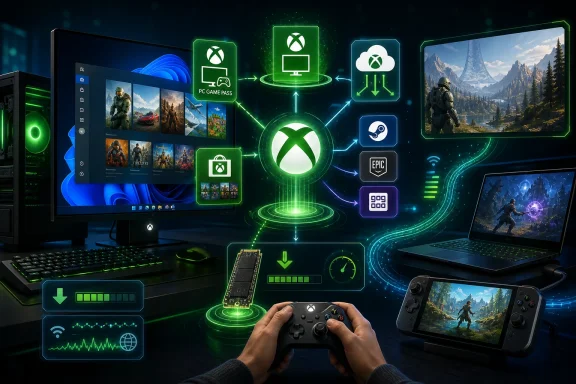
Microsoft is positioning Windows 11 PCs as the broadest Xbox-connected gaming platform, combining PC Game Pass, Xbox Cloud Gaming, the Xbox PC app, the Microsoft Store, and third-party storefronts such as Steam, Epic Games Store, and GOG into one flexible play-anywhere pitch. That sounds like a familiar Windows argument, but the emphasis has shifted. Microsoft is no longer merely saying that Windows is where PC games run; it is saying Windows is where Xbox becomes a service layer. The difference matters, because it reframes the PC not as a rival to console gaming, but as the place where Microsoft’s gaming ambitions either cohere or collide.
Microsoft’s latest Windows 11 gaming message is built around choice: download a game, stream a game, buy from Microsoft, buy from Steam, play with a controller, play with a mouse, sit at a desktop, open a laptop, or pick up a handheld. It is a generous pitch because Windows has earned it. No other mainstream consumer operating system can credibly claim the same breadth of game compatibility, storefront support, hardware variance, and input-device tolerance.
But the framing is doing more work than it first appears. Microsoft is not simply celebrating the old, messy openness of PC gaming. It is trying to wrap that openness in an Xbox-shaped interface, subscription, identity system, and cloud service without making Windows feel like a console.
That is a difficult balance. PC gamers tend to like libraries, mod folders, launcher arguments, graphics sliders, fan curves, ultrawide hacks, and the sovereign right to ignore whatever software a platform holder thinks should be central. Xbox, by contrast, is strongest when it abstracts all of that away.
The company’s argument is therefore subtle: Windows remains the open platform, but Xbox becomes the organizing layer. If that works, Microsoft gets to meet PC gamers where they already are while expanding the gravitational pull of Game Pass. If it fails, the Xbox app becomes one more launcher in a pile of launchers, and the promise of simplicity turns into another tab to close.
Windows 11 inherits that advantage, but Microsoft’s current pitch adds a different word: optionality. The company wants the modern Windows gaming PC to be not just the most compatible machine in the house, but the most adaptable one. The same device can behave like a high-performance rig, a cloud client, a Game Pass box, a storefront aggregator, or a handheld-style launcher depending on the moment.
That is why the marketing leans so heavily on “download or stream.” Installed PC games remain the gold standard for performance, latency, graphics settings, mod support, offline play, and long sessions. Cloud gaming, however, changes the psychology of access. It turns “I wonder if I’ll like this” into something closer to pressing play on a trailer.
This is where Microsoft has a real strategic opening. Steam dominates ownership and library behavior on PC, but Microsoft can position Game Pass as the experimentation layer: the place to sample, rotate, resume, and discover. That does not replace traditional PC buying habits. It sits beside them, which is exactly how Windows has always absorbed competing models.
The danger is that optionality can become complexity. A user may encounter PC Game Pass, Xbox Game Pass Ultimate, Essential, Premium, EA Play, cloud availability, regional limitations, rotating catalogs, storefront entitlements, Play Anywhere support, and separate third-party launchers. The Microsoft pitch says “choose how you play.” The user experience must make sure that does not become “research how you are allowed to play.”
PC Game Pass is the clearest version of that idea. It speaks directly to Windows players who want a downloadable PC library and day-one access to many new releases without buying into the full console-and-cloud bundle. For a desktop or gaming laptop user who mostly plays locally, that is the cleanest Microsoft subscription story.
Ultimate is broader and more ambitious. It folds in cloud gaming and multi-device access, making it more attractive for players who bounce between a PC, console, phone, tablet, smart TV, handheld, or browser. Microsoft’s Windows page presents that as flexibility, and in practice that is the strongest defense of the higher-tier subscription: it is not just a bigger catalog, but a looser relationship between game and device.
The newer Essential and Premium branding complicates the story, because tier names that sound intuitive rarely stay intuitive once rights, catalogs, platforms, and cloud permissions enter the picture. Microsoft has spent years trying to make Xbox feel less like a box and more like a network. Game Pass tiers are the invoice for that ambition.
The PC audience will tolerate a lot if the value is obvious. It will tolerate much less if plan boundaries feel arbitrary, if day-one access shifts, or if the Xbox app implies that a game is available only to reveal a launcher dependency or plan mismatch at install time. Subscription gaming depends on trust as much as price.
That matters most for the kinds of games that define PC culture: competitive shooters, simulation games, moddable RPGs, demanding open worlds, strategy titles with heavy input demands, and anything that benefits from high refresh rates or carefully tuned visual settings. Cloud gaming can be impressive, but it does not make a 240Hz monitor, a low-latency mouse, and a tuned graphics profile irrelevant.
The Windows 11 pitch wisely avoids pretending otherwise. It describes downloads as the better fit for performance, offline access, and longer uninterrupted sessions. That sounds obvious, but it is also a quiet admission that the cloud is not replacing the local PC anytime soon.
The more interesting question is how Microsoft uses the two modes together. If cloud gaming becomes a try-before-you-install button, a travel fallback, or a way to keep playing when the main rig is unavailable, it is additive. If it is presented as an equal substitute for native PC play, the enthusiast audience will reject the premise.
Windows succeeds here when it lets the user decide. A 150GB install may be worth it for a main game. It may be absurd for a one-hour curiosity. The value of Microsoft’s approach is not that one model wins, but that the PC can comfortably contain both.
It also has implications for handheld gaming. Windows handhelds have always had an awkward relationship with the operating system beneath them. They can run a huge PC library, but the desktop shell, update prompts, launcher sprawl, and controller navigation friction often remind users that Windows was not originally designed as a couch-first gaming surface.
Cloud gaming sidesteps some of that. A handheld does not need to render every game locally if it can stream a portion of the library. That does not solve Windows handheld usability, but it gives Microsoft more room to make the hardware category feel viable while the software catches up.
Still, cloud gaming is constrained by reality. Network quality, data caps, regional availability, server capacity, compression artifacts, and latency all shape the experience. Microsoft can market instant access, but the user’s broadband connection gets a vote.
For sysadmins and IT-minded readers, there is another practical angle: cloud gaming moves the workload off the endpoint but does not remove the endpoint from consideration. Authentication, browser policy, app deployment, network prioritization, and account management still matter. In households, schools, shared machines, and managed environments, “just stream it” is not always operationally simple.
That last part is crucial. The history of PC gaming is littered with clients that wanted to be the only client. Most failed, not because they lacked features, but because they misunderstood PC users’ attachment to existing libraries. Steam did not become dominant merely by being a store; it became a social graph, patching system, sale machine, mod hub, and default memory of what people own.
Microsoft cannot wish that away. The smarter move is to make the Xbox app useful even when the user’s games come from Steam, Epic, GOG, Battle.net, or elsewhere. A hub that respects the rest of the PC ecosystem has a chance. A hub that behaves like a walled garden on an unwalled platform does not.
The practical challenge is polish. PC gamers have long memories of broken installs, Gaming Services errors, confused Microsoft Store entitlements, Xbox app quirks, and folder-permission headaches. Microsoft has improved the experience, but the trust gap remains. On Windows, a gaming hub is judged not by the keynote demo but by what happens when a 90GB install pauses at 99 percent.
This is where Windows 11 has to become boring in the best possible way. Discovery, installation, updates, cloud saves, social presence, and controller support should fade into the background. Every time the Xbox app makes a user troubleshoot the platform instead of play the game, Steam gets stronger by comparison.
Steam is the default for many players because it solved enough PC annoyances for long enough to become infrastructure. Epic competes with exclusives, giveaways, and developer economics. GOG appeals to players who care about older games and DRM-free ownership. Itch.io, Battle.net, Ubisoft Connect, EA app, Riot Client, and others all occupy their own corners of the map.
This fragmentation is frustrating, but it is also the source of Windows’ resilience. No single company can fully break PC gaming because no single company fully owns it. If one store disappoints, users shift behavior. If one launcher fails, another may still work. If a subscription rotates a game out, a purchased copy elsewhere can remain.
Microsoft’s strongest PC argument is therefore not that the Xbox ecosystem replaces the rest. It is that Windows can host the rest while making Xbox more convenient. That is a humbler pitch, and probably the right one.
It also puts pressure on Microsoft’s behavior. The company cannot credibly celebrate third-party choice while nudging users into confusing defaults, restrictive packaging, or opaque entitlements. On PC, openness is not a slogan; it is something users test every time they install, back up, mod, migrate, or refund a game.
Game Bar has also become more than a screenshot overlay. It is a control surface for capture, audio, social widgets, performance information, and, on supported systems, gaming-related display features. For many users, it is one of those Windows components that becomes invisible until a shortcut accidentally opens it; for others, it is a genuinely useful overlay.
The arrival of AI-inflected and hardware-specific features such as Automatic Super Resolution on supported Copilot+ PCs and certain handhelds shows where Microsoft wants Windows gaming to go next. Upscaling, power management, controller-first interfaces, and handheld tuning are becoming operating-system concerns, not just GPU-driver or game-engine concerns.
But these features are not why Windows wins. They help, and in some cases they are technically impressive. The reason Windows wins is that it can run the game, the launcher, the mod manager, the driver utility, the chat app, the capture tool, and the weird fan-made patch from 2013.
That distinction matters because Microsoft sometimes overestimates how much gamers care about branded OS features and underestimates how much they care about the absence of friction. A Windows gaming feature succeeds when it quietly improves the session. It fails when it becomes another compatibility variable.
This is where Microsoft’s Xbox layer becomes strategically important. A controller-first launcher, unified library view, cloud fallback, and quick access to Game Pass can make a Windows handheld feel less like a tiny desktop and more like a gaming device. Microsoft’s ongoing work around Xbox-style modes and full-screen gaming experiences reflects that pressure.
The stakes are larger than convenience. Valve used Linux and Proton to prove that a non-Windows handheld could deliver a coherent portable PC gaming experience. Compatibility is still uneven compared with Windows, especially around some multiplayer anti-cheat systems, but the Steam Deck showed that user experience can beat raw platform breadth in a dedicated form factor.
Microsoft does not need Windows handhelds to become consoles, but it does need them to stop feeling like emergency desktops. The company’s Windows 11 gaming message points toward that future without fully arriving there. Game Pass and cloud gaming give handhelds content; the interface still has to make that content feel natural.
For enthusiasts, the current trade-off is familiar. Windows handhelds can access more launchers and more games, but often demand more fiddling. SteamOS-style devices can feel more coherent, but may hit compatibility walls. Microsoft’s opportunity is to reduce the fiddling without sacrificing the breadth.
The complication is that distribution strategy now involves more than choosing a storefront. Developers must think about Steam visibility, Epic deals, Microsoft Store packaging, Game Pass economics, Xbox Play Anywhere support, cloud streaming rights, achievements, cross-save expectations, controller support, handheld compatibility, anti-cheat, and performance across wildly different PC hardware.
Game Pass can be particularly double-edged. For some studios, a subscription deal offers guaranteed money, launch visibility, and a lower barrier to player adoption. For others, it may complicate long-tail sales expectations or condition audiences to wait for catalog access. Microsoft’s pitch to players is simplicity; the developer side is anything but.
There is also a technical trust issue. If the Xbox app and Microsoft Store install pipeline are smooth, developers benefit from another strong distribution channel. If users associate that pipeline with errors or restrictions, developers absorb some of the frustration even when the game itself is not at fault.
That is why Microsoft’s PC gaming credibility depends on infrastructure. Store policy, packaging, entitlement reliability, mod support, update behavior, and error recovery are not glamorous. They are the plumbing beneath the subscription pitch.
The Xbox PC app being preinstalled on many Windows 11 systems is convenient for players, but not every organization wants gaming surfaces visible or active. Admins may care about Microsoft Store access, app removal, background services, bandwidth use, cloud gaming domains, local storage consumption, and whether users can sign into personal Microsoft accounts.
Game Bar is another example. It is useful for players and creators, but screen capture, overlays, and background recording can raise policy concerns in regulated or productivity-focused environments. The same is true for cloud gaming, which can turn a low-spec managed device into a gaming endpoint if access is not controlled.
None of this makes Windows 11 gaming bad for IT. It simply reinforces that Microsoft’s consumer and enterprise worlds share the same operating system. The platform’s strength is versatility; the administrative burden is deciding which parts of that versatility belong in a given environment.
For home power users, the same logic applies at smaller scale. Parents, shared PC owners, and bandwidth-conscious households may need to manage subscriptions, installs, playtime, storage, and accounts. Microsoft’s “more ways to play” slogan is attractive, but more ways to play also means more ways to configure.
The player does not care which service owns the entitlement database when an install fails. The player does not care whether a cloud limitation is a licensing issue, a regional issue, or a plan issue. The player does not care whether a game launches through Xbox, EA, Ubisoft, or Battle.net if the result is a cascade of sign-in prompts.
This is why Microsoft’s openness pitch must be matched by ruthless product discipline. The Windows gaming ecosystem can be broad and still feel coherent, but only if the seams are handled gracefully. A unified library is useful if it launches games reliably. A subscription catalog is useful if availability is clear. Cloud gaming is useful if the app explains its limits before the user hits them.
Steam’s great achievement was not eliminating PC complexity. It was making enough of the routine work predictable that users forgave the rest. Microsoft’s task is similar, except harder, because it is layering Xbox services onto an operating system and storefront ecosystem it does not fully control.
That is also why the company’s best move may be restraint. Windows users do not need every gaming interaction to become an Xbox interaction. They need Xbox interactions to be good enough that opening the app feels like a benefit, not a detour.
Windows 11 gaming is therefore best understood as Microsoft’s attempt to turn the PC’s sprawl into a service advantage without sanding off what made the PC valuable in the first place. The company has the catalog, the operating system, the cloud infrastructure, the subscription, and the Xbox identity layer to make that work. What it still has to prove, session by session, is that more ways to play can feel like freedom rather than another layer of account prompts, plan comparisons, and launcher choreography.
 Microsoft’s New PC Gaming Pitch Is Really an Xbox Pitch
Microsoft’s latest Windows 11 gaming message is built around choice: download a game, stream a game, buy from Microsoft, buy from Steam, play with a controller, play with a mouse, sit at a desktop, open a laptop, or pick up a handheld. It is a generous pitch because Windows has earned it. No other mainstream consumer operating system can credibly claim the same breadth of game compatibility, storefront support, hardware variance, and input-device tolerance.But the framing is doing more work than it first appears. Microsoft is not simply celebrating the old, messy openness of PC gaming. It is trying to wrap that openness in an Xbox-shaped interface, subscription, identity system, and cloud service without making Windows feel like a console.
That is a difficult balance. PC gamers tend to like libraries, mod folders, launcher arguments, graphics sliders, fan curves, ultrawide hacks, and the sovereign right to ignore whatever software a platform holder thinks should be central. Xbox, by contrast, is strongest when it abstracts all of that away.
The company’s argument is therefore subtle: Windows remains the open platform, but Xbox becomes the organizing layer. If that works, Microsoft gets to meet PC gamers where they already are while expanding the gravitational pull of Game Pass. If it fails, the Xbox app becomes one more launcher in a pile of launchers, and the promise of simplicity turns into another tab to close.
The Old Windows Advantage Was Compatibility; the New One Is Optionality
For decades, the winning argument for Windows gaming was brutally simple: the games were there. The best GPU drivers were there, the multiplayer communities were there, the anti-cheat vendors were there, and the storefronts were there. Even when Windows itself annoyed gamers, the platform’s sheer compatibility made alternatives feel like side quests.Windows 11 inherits that advantage, but Microsoft’s current pitch adds a different word: optionality. The company wants the modern Windows gaming PC to be not just the most compatible machine in the house, but the most adaptable one. The same device can behave like a high-performance rig, a cloud client, a Game Pass box, a storefront aggregator, or a handheld-style launcher depending on the moment.
That is why the marketing leans so heavily on “download or stream.” Installed PC games remain the gold standard for performance, latency, graphics settings, mod support, offline play, and long sessions. Cloud gaming, however, changes the psychology of access. It turns “I wonder if I’ll like this” into something closer to pressing play on a trailer.
This is where Microsoft has a real strategic opening. Steam dominates ownership and library behavior on PC, but Microsoft can position Game Pass as the experimentation layer: the place to sample, rotate, resume, and discover. That does not replace traditional PC buying habits. It sits beside them, which is exactly how Windows has always absorbed competing models.
The danger is that optionality can become complexity. A user may encounter PC Game Pass, Xbox Game Pass Ultimate, Essential, Premium, EA Play, cloud availability, regional limitations, rotating catalogs, storefront entitlements, Play Anywhere support, and separate third-party launchers. The Microsoft pitch says “choose how you play.” The user experience must make sure that does not become “research how you are allowed to play.”
Game Pass Is the Centerpiece, but the Center Keeps Moving
Game Pass remains the most important piece of Microsoft’s PC gaming story because it gives the Xbox app a reason to exist on Windows beyond social features and first-party purchases. A launcher without unique content is a utility. A launcher with a subscription catalog is a destination, at least for as long as the catalog feels worth opening.PC Game Pass is the clearest version of that idea. It speaks directly to Windows players who want a downloadable PC library and day-one access to many new releases without buying into the full console-and-cloud bundle. For a desktop or gaming laptop user who mostly plays locally, that is the cleanest Microsoft subscription story.
Ultimate is broader and more ambitious. It folds in cloud gaming and multi-device access, making it more attractive for players who bounce between a PC, console, phone, tablet, smart TV, handheld, or browser. Microsoft’s Windows page presents that as flexibility, and in practice that is the strongest defense of the higher-tier subscription: it is not just a bigger catalog, but a looser relationship between game and device.
The newer Essential and Premium branding complicates the story, because tier names that sound intuitive rarely stay intuitive once rights, catalogs, platforms, and cloud permissions enter the picture. Microsoft has spent years trying to make Xbox feel less like a box and more like a network. Game Pass tiers are the invoice for that ambition.
The PC audience will tolerate a lot if the value is obvious. It will tolerate much less if plan boundaries feel arbitrary, if day-one access shifts, or if the Xbox app implies that a game is available only to reveal a launcher dependency or plan mismatch at install time. Subscription gaming depends on trust as much as price.
Downloading Still Defines Serious PC Play
Microsoft is right to treat downloads and cloud streaming as complementary rather than equivalent. A streamed game is convenient, but a locally installed PC game is still where Windows flexes its hardware advantage. The GPU, CPU, SSD, display, cooling system, input latency, and driver stack are the reason people buy gaming PCs in the first place.That matters most for the kinds of games that define PC culture: competitive shooters, simulation games, moddable RPGs, demanding open worlds, strategy titles with heavy input demands, and anything that benefits from high refresh rates or carefully tuned visual settings. Cloud gaming can be impressive, but it does not make a 240Hz monitor, a low-latency mouse, and a tuned graphics profile irrelevant.
The Windows 11 pitch wisely avoids pretending otherwise. It describes downloads as the better fit for performance, offline access, and longer uninterrupted sessions. That sounds obvious, but it is also a quiet admission that the cloud is not replacing the local PC anytime soon.
The more interesting question is how Microsoft uses the two modes together. If cloud gaming becomes a try-before-you-install button, a travel fallback, or a way to keep playing when the main rig is unavailable, it is additive. If it is presented as an equal substitute for native PC play, the enthusiast audience will reject the premise.
Windows succeeds here when it lets the user decide. A 150GB install may be worth it for a main game. It may be absurd for a one-hour curiosity. The value of Microsoft’s approach is not that one model wins, but that the PC can comfortably contain both.
Cloud Gaming Turns Windows Into a Thin Client When It Needs To
The cloud part of the pitch is less about beating the gaming PC and more about extending it. Xbox Cloud Gaming gives Windows devices a second identity: even a modest laptop can become an access point to games that might otherwise exceed its hardware or storage limits. For users with underpowered machines, small SSDs, or travel-heavy routines, that is not a gimmick.It also has implications for handheld gaming. Windows handhelds have always had an awkward relationship with the operating system beneath them. They can run a huge PC library, but the desktop shell, update prompts, launcher sprawl, and controller navigation friction often remind users that Windows was not originally designed as a couch-first gaming surface.
Cloud gaming sidesteps some of that. A handheld does not need to render every game locally if it can stream a portion of the library. That does not solve Windows handheld usability, but it gives Microsoft more room to make the hardware category feel viable while the software catches up.
Still, cloud gaming is constrained by reality. Network quality, data caps, regional availability, server capacity, compression artifacts, and latency all shape the experience. Microsoft can market instant access, but the user’s broadband connection gets a vote.
For sysadmins and IT-minded readers, there is another practical angle: cloud gaming moves the workload off the endpoint but does not remove the endpoint from consideration. Authentication, browser policy, app deployment, network prioritization, and account management still matter. In households, schools, shared machines, and managed environments, “just stream it” is not always operationally simple.
The Xbox PC App Wants to Be the Front Door Without Locking the House
The Xbox PC app is the most visible expression of Microsoft’s gaming strategy on Windows 11. It is preinstalled on many Windows 11 systems, connects to Microsoft accounts, surfaces Game Pass, tracks achievements, manages installs, shows friends, and increasingly tries to acknowledge games obtained elsewhere. The app’s job is to make Xbox feel native to Windows without pretending that Windows gamers live only inside Microsoft’s store.That last part is crucial. The history of PC gaming is littered with clients that wanted to be the only client. Most failed, not because they lacked features, but because they misunderstood PC users’ attachment to existing libraries. Steam did not become dominant merely by being a store; it became a social graph, patching system, sale machine, mod hub, and default memory of what people own.
Microsoft cannot wish that away. The smarter move is to make the Xbox app useful even when the user’s games come from Steam, Epic, GOG, Battle.net, or elsewhere. A hub that respects the rest of the PC ecosystem has a chance. A hub that behaves like a walled garden on an unwalled platform does not.
The practical challenge is polish. PC gamers have long memories of broken installs, Gaming Services errors, confused Microsoft Store entitlements, Xbox app quirks, and folder-permission headaches. Microsoft has improved the experience, but the trust gap remains. On Windows, a gaming hub is judged not by the keynote demo but by what happens when a 90GB install pauses at 99 percent.
This is where Windows 11 has to become boring in the best possible way. Discovery, installation, updates, cloud saves, social presence, and controller support should fade into the background. Every time the Xbox app makes a user troubleshoot the platform instead of play the game, Steam gets stronger by comparison.
Third-Party Storefronts Are Not a Side Note; They Are the Platform
Microsoft’s page name-checks Steam, Epic Games Store, and GOG, and that inclusion is more than courtesy. It is the admission that Windows gaming is powerful precisely because Microsoft does not control all of it. The PC’s value comes from the coexistence of competing stores, launchers, DRM models, sales calendars, refund policies, mod ecosystems, and preservation philosophies.Steam is the default for many players because it solved enough PC annoyances for long enough to become infrastructure. Epic competes with exclusives, giveaways, and developer economics. GOG appeals to players who care about older games and DRM-free ownership. Itch.io, Battle.net, Ubisoft Connect, EA app, Riot Client, and others all occupy their own corners of the map.
This fragmentation is frustrating, but it is also the source of Windows’ resilience. No single company can fully break PC gaming because no single company fully owns it. If one store disappoints, users shift behavior. If one launcher fails, another may still work. If a subscription rotates a game out, a purchased copy elsewhere can remain.
Microsoft’s strongest PC argument is therefore not that the Xbox ecosystem replaces the rest. It is that Windows can host the rest while making Xbox more convenient. That is a humbler pitch, and probably the right one.
It also puts pressure on Microsoft’s behavior. The company cannot credibly celebrate third-party choice while nudging users into confusing defaults, restrictive packaging, or opaque entitlements. On PC, openness is not a slogan; it is something users test every time they install, back up, mod, migrate, or refund a game.
Windows 11’s Gaming Features Are Useful, but They Are Not the Headline
Windows 11 does include gaming-specific technologies that matter. DirectStorage is designed to reduce load-time bottlenecks by letting games better exploit fast NVMe storage. Auto HDR can improve the presentation of older DirectX games on supported HDR displays. Optimizations for windowed games can reduce latency and enable modern display features in scenarios that used to favor exclusive fullscreen.Game Bar has also become more than a screenshot overlay. It is a control surface for capture, audio, social widgets, performance information, and, on supported systems, gaming-related display features. For many users, it is one of those Windows components that becomes invisible until a shortcut accidentally opens it; for others, it is a genuinely useful overlay.
The arrival of AI-inflected and hardware-specific features such as Automatic Super Resolution on supported Copilot+ PCs and certain handhelds shows where Microsoft wants Windows gaming to go next. Upscaling, power management, controller-first interfaces, and handheld tuning are becoming operating-system concerns, not just GPU-driver or game-engine concerns.
But these features are not why Windows wins. They help, and in some cases they are technically impressive. The reason Windows wins is that it can run the game, the launcher, the mod manager, the driver utility, the chat app, the capture tool, and the weird fan-made patch from 2013.
That distinction matters because Microsoft sometimes overestimates how much gamers care about branded OS features and underestimates how much they care about the absence of friction. A Windows gaming feature succeeds when it quietly improves the session. It fails when it becomes another compatibility variable.
Handheld PCs Expose the Gap Between Windows’ Reach and Its Interface
The most interesting stress test for Microsoft’s pitch is not the tower PC or the gaming laptop. It is the handheld. Devices in the Steam Deck, ROG Ally, Legion Go, and Xbox-branded handheld orbit have made one thing clear: Windows can run the games, but it does not always feel like it belongs in your hands.This is where Microsoft’s Xbox layer becomes strategically important. A controller-first launcher, unified library view, cloud fallback, and quick access to Game Pass can make a Windows handheld feel less like a tiny desktop and more like a gaming device. Microsoft’s ongoing work around Xbox-style modes and full-screen gaming experiences reflects that pressure.
The stakes are larger than convenience. Valve used Linux and Proton to prove that a non-Windows handheld could deliver a coherent portable PC gaming experience. Compatibility is still uneven compared with Windows, especially around some multiplayer anti-cheat systems, but the Steam Deck showed that user experience can beat raw platform breadth in a dedicated form factor.
Microsoft does not need Windows handhelds to become consoles, but it does need them to stop feeling like emergency desktops. The company’s Windows 11 gaming message points toward that future without fully arriving there. Game Pass and cloud gaming give handhelds content; the interface still has to make that content feel natural.
For enthusiasts, the current trade-off is familiar. Windows handhelds can access more launchers and more games, but often demand more fiddling. SteamOS-style devices can feel more coherent, but may hit compatibility walls. Microsoft’s opportunity is to reduce the fiddling without sacrificing the breadth.
For Developers, Windows Remains the Necessary Market With New Distribution Math
For game developers, Microsoft’s Windows pitch is both an opportunity and a complication. The opportunity is obvious: Windows remains the default PC gaming target, and Game Pass can put a game in front of players who might never buy it outright. Cloud availability can extend reach to weaker devices, while the Xbox app can surface games inside a subscription-first discovery model.The complication is that distribution strategy now involves more than choosing a storefront. Developers must think about Steam visibility, Epic deals, Microsoft Store packaging, Game Pass economics, Xbox Play Anywhere support, cloud streaming rights, achievements, cross-save expectations, controller support, handheld compatibility, anti-cheat, and performance across wildly different PC hardware.
Game Pass can be particularly double-edged. For some studios, a subscription deal offers guaranteed money, launch visibility, and a lower barrier to player adoption. For others, it may complicate long-tail sales expectations or condition audiences to wait for catalog access. Microsoft’s pitch to players is simplicity; the developer side is anything but.
There is also a technical trust issue. If the Xbox app and Microsoft Store install pipeline are smooth, developers benefit from another strong distribution channel. If users associate that pipeline with errors or restrictions, developers absorb some of the frustration even when the game itself is not at fault.
That is why Microsoft’s PC gaming credibility depends on infrastructure. Store policy, packaging, entitlement reliability, mod support, update behavior, and error recovery are not glamorous. They are the plumbing beneath the subscription pitch.
For IT Pros, Gaming Features Are Also Manageability Questions
WindowsForum readers know that “consumer feature” rarely stays in the consumer lane. Gaming services, overlays, store apps, cloud streaming, controller support, capture tools, and account sign-ins all intersect with managed Windows environments. A feature that delights a home user can become a policy question on a school laptop, shared workstation, or corporate device.The Xbox PC app being preinstalled on many Windows 11 systems is convenient for players, but not every organization wants gaming surfaces visible or active. Admins may care about Microsoft Store access, app removal, background services, bandwidth use, cloud gaming domains, local storage consumption, and whether users can sign into personal Microsoft accounts.
Game Bar is another example. It is useful for players and creators, but screen capture, overlays, and background recording can raise policy concerns in regulated or productivity-focused environments. The same is true for cloud gaming, which can turn a low-spec managed device into a gaming endpoint if access is not controlled.
None of this makes Windows 11 gaming bad for IT. It simply reinforces that Microsoft’s consumer and enterprise worlds share the same operating system. The platform’s strength is versatility; the administrative burden is deciding which parts of that versatility belong in a given environment.
For home power users, the same logic applies at smaller scale. Parents, shared PC owners, and bandwidth-conscious households may need to manage subscriptions, installs, playtime, storage, and accounts. Microsoft’s “more ways to play” slogan is attractive, but more ways to play also means more ways to configure.
The Real Competition Is Not Sony or Steam, but Friction
It is tempting to frame Microsoft’s Windows 11 gaming pitch as a fight with PlayStation, Steam, or even Valve’s Linux-based handheld strategy. Those comparisons matter, but the more immediate enemy is friction. PC gaming is full of small points of failure, and Microsoft’s strategy succeeds only if it removes more of them than it adds.The player does not care which service owns the entitlement database when an install fails. The player does not care whether a cloud limitation is a licensing issue, a regional issue, or a plan issue. The player does not care whether a game launches through Xbox, EA, Ubisoft, or Battle.net if the result is a cascade of sign-in prompts.
This is why Microsoft’s openness pitch must be matched by ruthless product discipline. The Windows gaming ecosystem can be broad and still feel coherent, but only if the seams are handled gracefully. A unified library is useful if it launches games reliably. A subscription catalog is useful if availability is clear. Cloud gaming is useful if the app explains its limits before the user hits them.
Steam’s great achievement was not eliminating PC complexity. It was making enough of the routine work predictable that users forgave the rest. Microsoft’s task is similar, except harder, because it is layering Xbox services onto an operating system and storefront ecosystem it does not fully control.
That is also why the company’s best move may be restraint. Windows users do not need every gaming interaction to become an Xbox interaction. They need Xbox interactions to be good enough that opening the app feels like a benefit, not a detour.
The Choice Microsoft Is Selling Comes With Receipts
Microsoft’s Windows 11 gaming message is strongest when it stays concrete. The pitch is not that every player should subscribe, stream, and centralize everything in the Xbox app. The pitch is that Windows can support those choices without giving up the older PC virtues of hardware control and storefront freedom.- Windows 11’s biggest gaming advantage remains the breadth of the PC ecosystem, not any single Microsoft feature.
- PC Game Pass is the cleanest subscription fit for players who mainly want downloadable Windows games.
- Xbox Game Pass Ultimate makes the most sense when cloud gaming and multi-device play are genuinely part of the routine.
- Local installation still matters for performance, latency, offline access, mods, and the full value of gaming hardware.
- The Xbox PC app will win trust only if installs, entitlements, third-party library handling, and error recovery feel dependable.
- Microsoft’s handheld and cloud ambitions depend on making Windows feel less like a desktop compromise when used away from a desk.
Windows 11 gaming is therefore best understood as Microsoft’s attempt to turn the PC’s sprawl into a service advantage without sanding off what made the PC valuable in the first place. The company has the catalog, the operating system, the cloud infrastructure, the subscription, and the Xbox identity layer to make that work. What it still has to prove, session by session, is that more ways to play can feel like freedom rather than another layer of account prompts, plan comparisons, and launcher choreography.
References
- Primary source: Microsoft
Published: 2026-05-20T21:10:08.549427
More Ways to Play: PC Gaming on Windows 11 | Microsoft Windows
Explore more ways to play on Windows 11—from XBOX Game Pass and cloud streaming to Steam—plus gaming features that enhance your experience.www.microsoft.com
- Related coverage: windowscentral.com
Forza Horizon 6 is now available on Xbox Game Pass, just as fourteen other games have been revealed for May 2026's second batch and beyond | Windows Central
Here are all the incredible games joining Game Pass in the coming weeks, including Microsoft's biggest new game of the year.www.windowscentral.com - Official source: support.microsoft.com
Automatic Super Resolution - Microsoft Support
Automatic Super Resolution is the first OS-integrated AI technique where your games not only play better but look stunning too!support.microsoft.com - Related coverage: gamingpromax.com
Xbox Cloud Gaming vs Game Pass: What's the Difference? (2026)
Xbox Cloud Gaming and Game Pass aren't the same thing. Game Pass is the subscription. Cloud Gaming is the streaming feature inside it. Full comparisongamingpromax.com - Related coverage: tomshardware.com
Xbox app is now available on all Arm-based Windows 11 devices — Microsoft says ‘more than 85% of Game Pass catalog is compatible with these PCs’ | Tom's Hardware
This move opens gaming to Snapdragon X-powered laptops.www.tomshardware.com - Related coverage: gamesradar.com
If you want to play Xbox Game Pass games like The Outer Worlds 2 or Black Ops 7 on day one, you're going to have to pay a full $30 a month for Ultimate | GamesRadar+
But hey, at least we're getting PC games on the lower tiers now, right?www.gamesradar.com
- Related coverage: t3.com
Xbox Game Pass Ultimate price plummets – but there's a catch | T3
A big price drop arrives for Ultimate membership, but not without costwww.t3.com
