

Microsoft’s new handheld gaming mode for Windows 11 landed as a welcome UX fix for a long-standing problem — but in execution it underlines the same strategic weaknesses critics have been warning about: slow timelines, gated rollouts, and surface-level fixes where deeper system rethinking was required.
But the rollout choices and the limited ambition behind the change crystallize a recurring Microsoft problem: incrementalism plus commercial gating, rather than bold structural engineering. The company had a clearly better strategic option in the form of a modular Windows vision; instead, the result is an improved skin atop a monolithic OS. For users, that means a better launcher today — and ongoing tradeoffs for performance‑demanding handheld gaming scenarios unless Microsoft moves toward a more modular, documented, and widely available solution.
For Windows to truly own handhelds (and to bring the same controller-first convenience to living-room PCs and HTPCs), Microsoft must pair the cosmetic and API work it’s doing now with openness, better documentation, and a willingness to pursue a modular runtime path. Until then, the Full‑Screen Experience will be a welcome convenience for many, an early showcase for some, and a reminder of what might have been for anyone who watched Windows 10X and Core OS fade away.
Source: XDA Windows 11's new gaming mode is the latest example of Microsoft snatching defeat from the jaws of victory
 Background
Why handhelds exposed a Windows problem
Handheld gaming PCs (Steam Deck, ROG Ally, Legion Go and many boutique Windows handhelds) forced an uncomfortable truth: Windows is a desktop-first OS that behaves awkwardly on a 7-inch controller-first device. The Steam Deck’s rise in 2022 crystallized the demand for a console-like launcher, simple controller navigation, and aggressive background service trimming to protect battery and thermals. Microsoft’s recent Full‑Screen Experience (often called the “Xbox” or “handheld” mode) is an attempt to close that gap, shipping first on the Asus ROG Xbox Ally family and rolling into Windows Insider preview channels as part of the 25H2 work.What Microsoft actually delivered
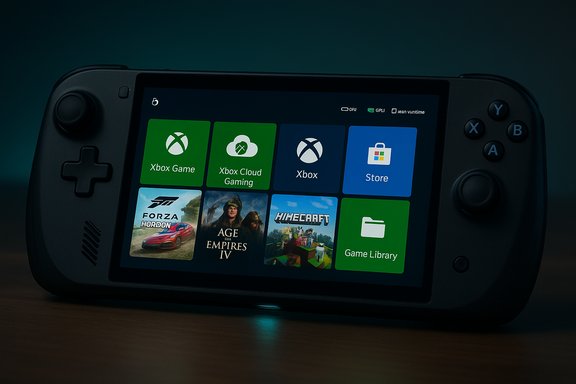
At a glance, the new mode is a layered shell built around the Xbox PC app and Game Bar that becomes the device’s “home” when enabled. It consolidates games, improves controller navigation, and trims desktop baggage by deferring or not loading certain UI elements and background processes at startup. That design keeps the underlying Windows compatibility intact — games and desktop apps still run — while presenting a controller-first launcher on top. Early hands‑on reports describe it as a real usability win for handhelds.What’s new — the engineering and UX changes
A controller-first shell, not a new OS
Microsoft intentionally avoided forking Windows. Instead, the Full‑Screen Experience (FSE) uses the Xbox PC app as a full-screen home app and exposes system hooks so Windows can boot into a leaner runtime for gaming sessions. That means the desktop is still present, but it’s deferred to reduce memory and idle CPU use — a pragmatic engineering choice that preserves compatibility.Real, measurable system trimming
The visible improvements are modest but tangible:- The mode suppresses startup apps and many non-essential background services, freeing memory and reducing idle wakeups.
- Some Explorer shell elements (taskbar, desktop wallpaper at boot) are not loaded immediately, giving the launcher a faster, cleaner feel.
- Boot‑time kernel/network components related to legacy WAN and VPN support are omitted in this mode on affected devices, removing drivers that can otherwise generate periodic kernel activity on constrained hardware. These lower‑level omissions are what produce most of the real battery and idle-power wins, not magic GPU tricks.
Aggregated game library and better controller navigation
The Xbox app’s “My apps / My games” aggregation reduces the infamous “launcher hopping” problem on handhelds. Game Bar has been refactored into a controller-friendly overlay, and the system maps the Xbox button into central navigation flows — small but important quality‑of‑life wins for controller-first users.Strengths: What Microsoft got right
- UX-first correction: The shell makes Windows actually usable on handhelds. For anyone who’s tried to navigate standard Windows on a 7-inch device, this is a big step forward. The unified launcher and improved Game Bar feel purpose-built for the form factor.
- Compatibility preserved: Because this is a shell layered on Windows, not a new OS, compatibility with the huge Windows game ecosystem remains intact — a strategic advantage over closed, Linux-only handheld UXes.
- Practical system pruning: The measurable battery and idle-power wins come from sensible engineering: don’t start everything by default, and don’t load desktop services that aren’t needed during controller-first sessions. That’s a lightweight, low-risk optimization with immediate consumer value.
Problems and risks — the “defeat from the jaws of victory” critique
1) Gated rollouts and timed exclusivity
Microsoft’s decision to debut the experience preinstalled on the Asus ROG Xbox Ally family — and to market it as an Ally feature initially — created an avoidable perception problem. Early adopters and other OEMs saw a Microsoft UI positioned as an OEM exclusive even though the underlying bits were being pushed into Windows. Community members quickly found ways to enable the mode on other handhelds through the Insider channels or simple registry tweaks, highlighting the dissonance between marketing and engineering reality. This gating damaged initial goodwill.2) Artificial device gating (screen-size checks and controller restrictions)
Multiple early reports — and community experimentation — indicate the mode’s availability is tied to form-factor heuristics (screen size / device profile) and controller detection logic, locking out other logical uses such as HTPCs or desktops used with a controller. Community posts note tools and registry edits that can “spoof” eligibility, but Microsoft hasn’t published a transparent checklist of what qualifies. That leaves users and integrators guessing and fosters unnecessary workarounds and fragmentation. Some aspects of the “gating by screen size” claim remain unconfirmed in official docs and should be treated cautiously, but the frustration among users is real.3) Surface-level performance gains
This mode does not rewrite the OS scheduler or GPU driver stack. The main performance improvements come from not loading certain services and drivers — effective, but incremental. Benchmarks show modest frame‑rate uplifts and better idle battery life under constrained scenarios, but they do not approach the kinds of gains a truly lean OS image can produce. Enthusiast testing has shown that lightweight Linux-based images (SteamOS variants / community builds like Bazzite) can produce materially smoother sustained frame times in shader-heavy games on the same hardware — because the whole system stack is leaner and tuned end‑to‑end. Microsoft’s choice to ship a layered shell, rather than a modular core of Windows for constrained devices, limits how far the company can go without deeper structural change.4) Fragmented rollout channels and uncertainty for mainstream users
Initially rolling the experience through Dev/Beta Insider builds — rather than Release Preview or a broad stable channel — created uncertainty over when mainstream users would see it. That slow, staggered cadence is familiar for Windows features, but for a user-visible UX that directly competes with polished alternatives (SteamOS) it undercuts momentum. Windows users expecting to buy a handheld and get a ready console-like experience were confused by conditional availability.5) Compatibility, overlays and vendor tooling
Third‑party overlays (Discord, Armoury Crate, multi‑vendor RGB and performance utilities) have historically caused issues on handhelds. Early adopters reported input-mapping problems and conflicts with OEM utilities when switching to FSE. Those rough edges are solvable, but they require Microsoft and OEMs to coordinate closely with overlay vendors — something that didn’t happen at scale before the initial Ally launch.6) The modular Windows that never was
Perhaps the deepest criticism is strategic. For years there were signals Microsoft considered a modular Windows (Core OS / CorePC / Windows 10X) — a path that would have allowed a truly slimmed-down image for handhelds and other non-desktop devices. That project was scrapped and its UI fragments were absorbed into Windows 11. The FSE is a pragmatic stopgap, but it cannot match the benefits of a modular OS built from the kernel up to be minimal and purpose-specific. The result: incremental wins at the UI layer, but persistent structural limits.Evidence and cross-checks
- Multiple outlets, including Windows Central and The Verge, confirm the Ally-first launch and staged rollout into Insider channels. Those reports align with the initial Asus co‑development messaging.
- Community analysis and boot-log diffs show the FSE intentionally avoids loading legacy RAS networking components and defers Explorer / taskbar elements — this technical detail is repeatably observed by testers and reported in multiple community writeups. Those kernel-level observations explain where most idle-power and memory improvements come from.
- Hands‑on and benchmark notes from enthusiasts also show that while FSE cleans the UX, leaner OS builds still outperform Windows images in some sustained workload scenarios on handheld hardware. Independent tests comparing a SteamOS-style Linux image to Windows on the same Ally X hardware reported meaningful FPS and frame-time improvements. This supports the argument that a deeper platform change (not just a launcher) can unlock larger gains.
What Microsoft should do next (practical recommendations)
- Publish clear eligibility and detection documentation
- Make the detection logic and any screen-size thresholds public so OEMs, HTPC builders, and enthusiasts understand how the mode is triggered and why some devices are excluded. This will reduce the need for risky hacks.
- Make the mode opt‑in and broadly available
- Rather than timed exclusives or OEM gating, ship FSE as an opt-in system setting for any Windows 11 device that meets minimal capability checks. This would remove the perception of arbitrary vendor favoritism and accelerate user uptake.
- Expose developer APIs and certification guidance
- Publish an official “Handheld/Controller‑Friendly” checklist and SDK hooks so publishers and overlay vendors can certify compatibility, avoid broken inputs, and optimize UI overlays for controller navigation.
- Consider a modular OS path for truly constrained devices
- If Microsoft wants to win the handheld form factor beyond cosmetic fixes, it should revisit the modular Windows idea in some form: a validated, minimal runtime image (signed, supported) that OEMs can ship on thermally constrained hardware. This would directly counter the performance advantages seen in dedicated Linux images.
- Coordinate transparently with OEMs and overlay vendors
- Ensure Armoury Crate, RGB/overlay vendors, and Steam/Epic/other storefronts have certified pathways for integration to avoid the rough edges early adopters encountered.
The market context: Windows vs. SteamOS and Linux handheld options
Windows remains the dominant platform by sheer compatibility and the sheer size of the PC gaming ecosystem. That’s why OEMs ship Windows handhelds and why Microsoft’s UX play matters. But the practical lesson from recent handheld testing is blunt: a lightweight OS image that removes desktop baggage end‑to‑end (driver stack, compositor, shader handling policies) can produce smoother, more consistent gaming experiences on constrained hardware. Community Linux builds and Valve’s SteamOS forks have shown this in real tests, and that’s the competitive pressure Microsoft needs to take seriously. If Microsoft only applies cosmetic and selective runtime pruning, Linux alternatives will keep luring the performance‑sensitive segment.Final appraisal — a useful fix, but not the structural shift the market wanted
The Full‑Screen Experience is a practical and welcome UX correction: it makes Windows handhelds feel usable and reduces background noise that harmed battery and thermal profiles. The engineering is sensible, low-risk, and it preserves the massive Windows software ecosystem — all strengths.But the rollout choices and the limited ambition behind the change crystallize a recurring Microsoft problem: incrementalism plus commercial gating, rather than bold structural engineering. The company had a clearly better strategic option in the form of a modular Windows vision; instead, the result is an improved skin atop a monolithic OS. For users, that means a better launcher today — and ongoing tradeoffs for performance‑demanding handheld gaming scenarios unless Microsoft moves toward a more modular, documented, and widely available solution.
Conclusion
Windows 11’s handheld gaming mode fixes a clear pain point and demonstrates that Microsoft can deliver pragmatic, UX-focused improvements when it chooses to. But the manner of its release — Ally-first positioning, gated availability, and a solution that leans on deferral rather than re-architecture — feeds the narrative that Microsoft often chooses the path of least disruption instead of a bold reimagining. That pattern turns promising opportunities into incremental wins rather than platform-defining shifts.For Windows to truly own handhelds (and to bring the same controller-first convenience to living-room PCs and HTPCs), Microsoft must pair the cosmetic and API work it’s doing now with openness, better documentation, and a willingness to pursue a modular runtime path. Until then, the Full‑Screen Experience will be a welcome convenience for many, an early showcase for some, and a reminder of what might have been for anyone who watched Windows 10X and Core OS fade away.
Source: XDA Windows 11's new gaming mode is the latest example of Microsoft snatching defeat from the jaws of victory
