

Microsoft began rolling out Xbox Mode to Windows 11 PCs on April 30, 2026, extending its controller-first full-screen gaming interface beyond handhelds to select-market desktops, laptops, and tablets through the latest Windows and Xbox app updates. The move is not merely a new launcher skin. It is Microsoft’s most direct answer yet to the uncomfortable question Valve has been asking since the Steam Deck arrived: why does PC gaming still have to feel like desktop computing?
The answer, for years, has been that Windows was too valuable as a general-purpose platform to be made invisible. Xbox Mode is Microsoft’s admission that the desktop is sometimes the problem. The company is not replacing Windows with a console OS, but it is finally giving gamers a way to pretend, for a few hours at a time, that Windows knows when to get out of the way.
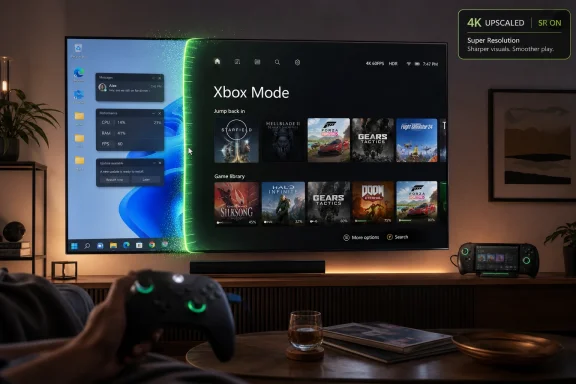
Xbox Mode is the consumer name for what many Windows watchers have known as the Full Screen Experience, a controller-optimized environment that originally made sense on handheld gaming PCs and then started looking too important to leave there. It presents the Xbox app as the home surface, pulls together installed games from multiple storefronts, and is designed to be navigable from the couch without reaching for a keyboard or mouse.
That sounds modest until you remember what Windows normally does when placed under a TV. It asks for a password, throws a notification, exposes a tiny cursor, opens a launcher that wants an update, and then reminds you that PC gaming’s greatest strength — openness — is also its least living-room-friendly habit. Steam’s Big Picture Mode solved part of that problem inside Steam. SteamOS went further by making the whole device feel purpose-built.
Microsoft’s bet is more conservative and more complicated. Xbox Mode does not make Windows into an Xbox, and it does not magically give PC users console compatibility with Xbox-only games. It gives Windows 11 a gaming shell that can suppress some desktop friction, prioritize play, and make a controller feel like a first-class input device rather than an accommodation.
That distinction matters because Microsoft is trying to defend two businesses at once. It wants Windows to remain the default PC gaming platform while also expanding Xbox beyond the console box. Xbox Mode is the interface where those strategies meet, and where their tensions become visible.
The ROG Xbox Ally and Ally X pushed Microsoft into a sharper position. If Xbox branding was going to sit on a Windows handheld, the experience could not merely be “Windows, but smaller and more awkward.” It needed a boot path, a library view, a Game Bar flow, and a way to treat a handheld as something closer to a console.
Now that same work is moving to desktops, laptops, and tablets. That is the important part of this week’s rollout. Microsoft is no longer treating full-screen gaming as a niche accessibility layer for handhelds; it is treating it as a new Windows posture.
A gaming desktop connected to a television has many of the same problems as a handheld, just at a different scale. The text is too small, launchers compete for attention, notifications interrupt the room, and switching between apps often breaks the illusion that this machine belongs next to a console. Xbox Mode is Microsoft’s attempt to make a Windows PC feel less like an office machine moonlighting as entertainment hardware.
This is Microsoft’s platform-level answer to a problem usually handled by game engines, GPU vendors, or per-title technologies. Nvidia has DLSS, AMD has FSR, and Intel has XeSS; Microsoft’s Auto SR is trying to occupy a different layer, making upscaling more automatic and less dependent on whether a particular game has implemented the right menu toggle.
The Ally X is a logical proving ground. A handheld that is acceptable at 720p or 900p on its own screen can look exposed when docked to a 4K television. Auto SR is an attempt to bridge that expectation gap without asking the device’s silicon to perform miracles.
There will be trade-offs, as there always are with upscaling. Image quality will vary by game, latency can matter, and enthusiasts will still prefer native rendering where the hardware allows it. But for a handheld docked to a living-room screen, the relevant comparison is not perfection. It is whether the result is better than lowering settings until the game runs acceptably and then living with the blur.
That argument became credible because the Steam Deck worked. It did not run every game, and anti-cheat compatibility remains a thorny Linux problem, but it made a handheld PC feel coherent. It showed that the launcher, update mechanism, performance overlay, controller mapping, sleep behavior, and store could all belong to one experience rather than a pile of Windows-era compromises.
Valve is now preparing that argument for broader hardware. SteamOS updates have been adding support for more devices and laying groundwork for the new Steam Machine, a living-room PC that revives an old Valve dream under much better conditions than existed a decade ago. Proton is more mature, PC gamers are more comfortable with portable and couch PC form factors, and the Steam Deck has trained a market to accept Linux as invisible infrastructure.
Microsoft sees the danger. If Valve can make SteamOS feel like the default couch and handheld PC gaming environment, Windows risks becoming the thing users tolerate for compatibility rather than the thing they prefer. Xbox Mode is therefore defensive as much as it is innovative.
A Windows gaming shell can aggregate games from multiple storefronts in a way that aligns with how many people actually use PCs. A player may have Game Pass titles in the Xbox app, a backlog in Steam, freebies in Epic, older games in GOG, a competitive shooter with its own launcher, and a mod manager that exists somewhere outside any store’s blessing. SteamOS can accommodate some of that world. Windows already is that world.
That is why Microsoft does not need Xbox Mode to beat SteamOS on elegance on day one. It needs Xbox Mode to make the Windows advantage feel less chaotic. If Microsoft can give users the library breadth of Windows with enough of the appliance feel of SteamOS, it has a credible middle path.
But that is a difficult balance. The more Xbox Mode hides Windows, the more users will expect console-like consistency. The more it exposes Windows, the less it solves. Microsoft is walking a narrow ridge between openness and polish, and PC gamers are very good at noticing when either one is being faked.
That market has always existed, but Windows has rarely treated it as a first-class scenario. Enthusiasts built around the problem with wireless keyboards, Steam Big Picture, Playnite, custom scripts, wake-on-LAN setups, and a tolerance for occasional absurdity. Microsoft’s pitch is that the operating system should now help rather than merely endure those arrangements.
The ability to toggle a console-like environment through Game Bar or Task View is part of that shift. It suggests Xbox Mode is not only a boot experience but a state Windows can enter and exit. That is sensible because a gaming PC is often still a PC. The same machine may run Discord, OBS, a browser, a mod tool, a work app, and then, at night, become the family’s game box.
Microsoft’s challenge is to make that transition feel intentional. If Xbox Mode becomes just another full-screen app that occasionally dumps users back into desktop weirdness, it will be useful but not transformative. If it becomes a reliable mode of the system, it can change how people think about Windows hardware in shared spaces.
Xbox Mode is a Windows PC gaming experience wrapped in Xbox identity. It does not erase the technical and commercial boundaries between console Xbox and Windows PC. It does, however, advance Microsoft’s broader effort to make Xbox mean a service layer, a social graph, a storefront, a subscription, a controller vocabulary, and a design language rather than one box under one television.
That strategy has been underway for years, but Xbox Mode makes it tangible on the PC itself. When the Xbox interface becomes the living-room shell for Windows, the console brand starts functioning as Microsoft’s gaming UX brand. The Xbox is no longer only hardware; it is the shape Windows takes when gaming is the priority.
This may irritate purists who want Windows gaming to stay store-neutral and launcher-neutral. It may also reassure users who want Microsoft to impose some order on a fragmented PC gaming experience. Both reactions are rational, and both point to the same truth: interface control is strategic control.
Gaming magnifies those complaints. A frame hitch, a background process, a notification, a driver conflict, or an overlay fight is not an abstract UX issue when it interrupts a match or ruins a couch session. Gamers are among Windows’ most demanding customers because they experience the operating system not as a productivity platform but as a performance tax.
Xbox Mode can hide some of that. It cannot fix all of it. A full-screen shell does not matter if updates are disruptive, sleep behavior is unreliable, Bluetooth pairing is flaky, HDR is inconsistent, or shader compilation turns the first fifteen minutes of a game into a stutter festival.
That is why Xbox Mode should be seen as the visible edge of a deeper repair job. If Project K2 or its equivalent makes Windows leaner and more predictable underneath, Xbox Mode could become the face of a real gaming renaissance. If the underlying system remains noisy, Xbox Mode risks becoming a handsome lobby attached to a messy hotel.
For Xbox Mode to work, it cannot feel like a funnel that tolerates other stores while privileging Microsoft’s ecosystem at every turn. PC gamers will accept an Xbox-branded home screen if it respects the reality of their libraries. They will reject it if launching a Steam or GOG game feels like leaving the “real” experience.
The encouraging sign is that Microsoft is talking about aggregated libraries and installed games from leading PC storefronts, not merely Xbox app content. The less encouraging historical memory is that Microsoft often designs beautifully around integration and then monetizes around gravity. Windows users know the pattern: defaults become prompts, prompts become nudges, nudges become resentment.
This is where Valve has an advantage despite owning the dominant PC game store. SteamOS is obviously Steam-centered, but players understand the bargain. Microsoft has to prove that Xbox Mode is not Windows wearing a Game Pass billboard.
That matters because Windows hardware is diverse to the point of chaos. Valve can tune SteamOS for the Steam Deck and, eventually, its own Steam Machine. Microsoft must support everything from cheap tablets to monster desktops to handhelds with custom controls and vendor utilities. The Ally X gives Microsoft a high-profile target without requiring it to become a vertically integrated hardware company overnight.
Auto SR also gives the Ally X a story that the original Windows handheld wave often lacked. Early devices were sold on raw possibility: it is a PC, it runs your games, good luck with the rest. The new pitch is more refined: it is a PC, but the system is learning how to behave like gaming hardware.
That distinction is the difference between an enthusiast toy and a mainstream category. The more Microsoft can make Windows handhelds and docked handhelds feel appliance-like without locking them down, the more pressure it puts on both traditional consoles and SteamOS devices.
That is normal for a Windows feature, but it cuts against the console metaphor. Console experiences work because everyone gets roughly the same thing at roughly the same time on roughly the same hardware. Windows experiences roll out through channels, regions, drivers, OEM layers, Store updates, and feature flags.
Microsoft cannot eliminate that complexity without eliminating what makes Windows Windows. It can only manage it better. The test for Xbox Mode is not whether every user gets a perfect console experience this week; it is whether the experience improves steadily enough that Windows gaming hardware stops feeling like a collection of exceptions.
There is also the question of performance claims. Reducing background activity and desktop overhead is useful, especially on handhelds and low-power systems, but users should not expect miracles on a high-end desktop where the GPU is already the limiting factor. Xbox Mode’s biggest performance gain may be psychological and operational: fewer interruptions, fewer input mismatches, and less time fighting the OS before the game starts.
That shift explains why Xbox Mode matters more than its feature list suggests. Microsoft is not just adding a view to the Xbox app. It is trying to make Windows legible as gaming hardware at a time when Valve is making Linux legible as gaming hardware. Both companies want to own the default experience between pressing the power button and launching the game.
The stakes extend to developers. If Windows remains the obvious place to ship PC games, Microsoft’s job is easier. If SteamOS grows into a meaningful second target across handhelds and living-room PCs, developers will think harder about Proton compatibility, anti-cheat support, controller behavior, suspend-resume, and performance profiles outside Windows. That is good for users, but it weakens Windows’ monopoly on PC gaming assumptions.
Microsoft’s best response is not to block that future. It is to make Windows better enough that users choose it voluntarily. Xbox Mode is one step in that direction, but the operating system underneath must earn the choice.
The practical implications are clear enough for users deciding whether to care right now:
Microsoft’s advantage is that Windows already sits under most PC gaming; its problem is that players increasingly notice the weight of it. Xbox Mode is a promising attempt to make Windows disappear at the moment it most needs to, while Auto SR on the Ally X shows that Microsoft is willing to solve gaming problems below the launcher layer as well as above it. If the company follows through with a leaner, calmer Windows and a genuinely respectful multi-store experience, this week’s rollout may be remembered as the moment Windows stopped assuming gamers would tolerate anything and started competing for the right to stay in the room.
Source: TechRadar Microsoft's Xbox Mode is finally rolling out to desktop PCs — and there's great news for Ally X users too
The answer, for years, has been that Windows was too valuable as a general-purpose platform to be made invisible. Xbox Mode is Microsoft’s admission that the desktop is sometimes the problem. The company is not replacing Windows with a console OS, but it is finally giving gamers a way to pretend, for a few hours at a time, that Windows knows when to get out of the way.
 Microsoft Finally Lets Windows Leave the Room
Xbox Mode is the consumer name for what many Windows watchers have known as the Full Screen Experience, a controller-optimized environment that originally made sense on handheld gaming PCs and then started looking too important to leave there. It presents the Xbox app as the home surface, pulls together installed games from multiple storefronts, and is designed to be navigable from the couch without reaching for a keyboard or mouse.That sounds modest until you remember what Windows normally does when placed under a TV. It asks for a password, throws a notification, exposes a tiny cursor, opens a launcher that wants an update, and then reminds you that PC gaming’s greatest strength — openness — is also its least living-room-friendly habit. Steam’s Big Picture Mode solved part of that problem inside Steam. SteamOS went further by making the whole device feel purpose-built.
Microsoft’s bet is more conservative and more complicated. Xbox Mode does not make Windows into an Xbox, and it does not magically give PC users console compatibility with Xbox-only games. It gives Windows 11 a gaming shell that can suppress some desktop friction, prioritize play, and make a controller feel like a first-class input device rather than an accommodation.
That distinction matters because Microsoft is trying to defend two businesses at once. It wants Windows to remain the default PC gaming platform while also expanding Xbox beyond the console box. Xbox Mode is the interface where those strategies meet, and where their tensions become visible.
The Handheld Experiment Has Escaped the Handheld
The first real test bed for this idea was the modern Windows handheld. Devices like the Asus ROG Ally family proved that PC gaming could be squeezed into a portable form factor, but they also proved that Windows was not born for seven-inch screens, thumbsticks, and suspend-resume expectations shaped by Nintendo and Valve.The ROG Xbox Ally and Ally X pushed Microsoft into a sharper position. If Xbox branding was going to sit on a Windows handheld, the experience could not merely be “Windows, but smaller and more awkward.” It needed a boot path, a library view, a Game Bar flow, and a way to treat a handheld as something closer to a console.
Now that same work is moving to desktops, laptops, and tablets. That is the important part of this week’s rollout. Microsoft is no longer treating full-screen gaming as a niche accessibility layer for handhelds; it is treating it as a new Windows posture.
A gaming desktop connected to a television has many of the same problems as a handheld, just at a different scale. The text is too small, launchers compete for attention, notifications interrupt the room, and switching between apps often breaks the illusion that this machine belongs next to a console. Xbox Mode is Microsoft’s attempt to make a Windows PC feel less like an office machine moonlighting as entertainment hardware.
Auto SR Gives the Ally X a More Specific Win
The best news for ROG Xbox Ally X owners is more concrete than the broader Xbox Mode rollout. Microsoft is making Auto Super Resolution available in preview for Xbox Insiders on the Ally X, with the feature aimed particularly at docked play. The idea is familiar: render at a lower internal resolution to improve performance, then upscale the image so the output looks sharper on a larger display.This is Microsoft’s platform-level answer to a problem usually handled by game engines, GPU vendors, or per-title technologies. Nvidia has DLSS, AMD has FSR, and Intel has XeSS; Microsoft’s Auto SR is trying to occupy a different layer, making upscaling more automatic and less dependent on whether a particular game has implemented the right menu toggle.
The Ally X is a logical proving ground. A handheld that is acceptable at 720p or 900p on its own screen can look exposed when docked to a 4K television. Auto SR is an attempt to bridge that expectation gap without asking the device’s silicon to perform miracles.
There will be trade-offs, as there always are with upscaling. Image quality will vary by game, latency can matter, and enthusiasts will still prefer native rendering where the hardware allows it. But for a handheld docked to a living-room screen, the relevant comparison is not perfection. It is whether the result is better than lowering settings until the game runs acceptably and then living with the blur.
The Real Rival Is Not Steam Big Picture, It Is SteamOS
It is tempting to describe Xbox Mode as Microsoft’s version of Steam Big Picture, but that understates the competitive pressure. Big Picture is an interface. SteamOS is a platform argument. Valve’s claim is that PC gaming can be open, familiar, and console-like without Windows at the center.That argument became credible because the Steam Deck worked. It did not run every game, and anti-cheat compatibility remains a thorny Linux problem, but it made a handheld PC feel coherent. It showed that the launcher, update mechanism, performance overlay, controller mapping, sleep behavior, and store could all belong to one experience rather than a pile of Windows-era compromises.
Valve is now preparing that argument for broader hardware. SteamOS updates have been adding support for more devices and laying groundwork for the new Steam Machine, a living-room PC that revives an old Valve dream under much better conditions than existed a decade ago. Proton is more mature, PC gamers are more comfortable with portable and couch PC form factors, and the Steam Deck has trained a market to accept Linux as invisible infrastructure.
Microsoft sees the danger. If Valve can make SteamOS feel like the default couch and handheld PC gaming environment, Windows risks becoming the thing users tolerate for compatibility rather than the thing they prefer. Xbox Mode is therefore defensive as much as it is innovative.
Windows Still Has the Library Advantage
Microsoft’s strongest card remains compatibility. For all the progress SteamOS has made, Windows still runs the broadest range of PC games, launchers, anti-cheat systems, mods, overlays, peripherals, and oddball utilities. That matters because PC gaming is not just Steam, however much Steam defines the center of gravity.A Windows gaming shell can aggregate games from multiple storefronts in a way that aligns with how many people actually use PCs. A player may have Game Pass titles in the Xbox app, a backlog in Steam, freebies in Epic, older games in GOG, a competitive shooter with its own launcher, and a mod manager that exists somewhere outside any store’s blessing. SteamOS can accommodate some of that world. Windows already is that world.
That is why Microsoft does not need Xbox Mode to beat SteamOS on elegance on day one. It needs Xbox Mode to make the Windows advantage feel less chaotic. If Microsoft can give users the library breadth of Windows with enough of the appliance feel of SteamOS, it has a credible middle path.
But that is a difficult balance. The more Xbox Mode hides Windows, the more users will expect console-like consistency. The more it exposes Windows, the less it solves. Microsoft is walking a narrow ridge between openness and polish, and PC gamers are very good at noticing when either one is being faked.
The Desktop Rollout Is Really a Living-Room Rollout
The phrase “desktop PCs” makes this sound like a feature for tower owners sitting at monitors. In practice, the more interesting target is the living-room PC: the compact build under the television, the gaming laptop docked to a big display, the mini PC that wants to be a console without giving up the PC library.That market has always existed, but Windows has rarely treated it as a first-class scenario. Enthusiasts built around the problem with wireless keyboards, Steam Big Picture, Playnite, custom scripts, wake-on-LAN setups, and a tolerance for occasional absurdity. Microsoft’s pitch is that the operating system should now help rather than merely endure those arrangements.
The ability to toggle a console-like environment through Game Bar or Task View is part of that shift. It suggests Xbox Mode is not only a boot experience but a state Windows can enter and exit. That is sensible because a gaming PC is often still a PC. The same machine may run Discord, OBS, a browser, a mod tool, a work app, and then, at night, become the family’s game box.
Microsoft’s challenge is to make that transition feel intentional. If Xbox Mode becomes just another full-screen app that occasionally dumps users back into desktop weirdness, it will be useful but not transformative. If it becomes a reliable mode of the system, it can change how people think about Windows hardware in shared spaces.
The Word “Xbox” Is Doing Unusual Work Here
There is branding risk in calling this Xbox Mode. To some users, “Xbox” suggests console games, console simplicity, and perhaps even access to Xbox exclusives in the way they run on an actual Xbox Series X or Series S. That is not what this is.Xbox Mode is a Windows PC gaming experience wrapped in Xbox identity. It does not erase the technical and commercial boundaries between console Xbox and Windows PC. It does, however, advance Microsoft’s broader effort to make Xbox mean a service layer, a social graph, a storefront, a subscription, a controller vocabulary, and a design language rather than one box under one television.
That strategy has been underway for years, but Xbox Mode makes it tangible on the PC itself. When the Xbox interface becomes the living-room shell for Windows, the console brand starts functioning as Microsoft’s gaming UX brand. The Xbox is no longer only hardware; it is the shape Windows takes when gaming is the priority.
This may irritate purists who want Windows gaming to stay store-neutral and launcher-neutral. It may also reassure users who want Microsoft to impose some order on a fragmented PC gaming experience. Both reactions are rational, and both point to the same truth: interface control is strategic control.
Project K2 Is the Shadow Over the Whole Announcement
The timing of this rollout lands amid reporting about Microsoft’s Windows “K2” effort, an internal push said to focus on performance, craft, and reliability. Whether the label survives or not, the premise is painfully plausible. Windows 11 has spent years accumulating user frustration around distractions, perceived bloat, inconsistent settings, hardware quirks, and a sense that Microsoft’s priorities often arrive before the user’s.Gaming magnifies those complaints. A frame hitch, a background process, a notification, a driver conflict, or an overlay fight is not an abstract UX issue when it interrupts a match or ruins a couch session. Gamers are among Windows’ most demanding customers because they experience the operating system not as a productivity platform but as a performance tax.
Xbox Mode can hide some of that. It cannot fix all of it. A full-screen shell does not matter if updates are disruptive, sleep behavior is unreliable, Bluetooth pairing is flaky, HDR is inconsistent, or shader compilation turns the first fifteen minutes of a game into a stutter festival.
That is why Xbox Mode should be seen as the visible edge of a deeper repair job. If Project K2 or its equivalent makes Windows leaner and more predictable underneath, Xbox Mode could become the face of a real gaming renaissance. If the underlying system remains noisy, Xbox Mode risks becoming a handsome lobby attached to a messy hotel.
Microsoft’s Store Problem Has Not Vanished
A unified Xbox interface sounds appealing, but Microsoft’s history with PC gaming storefronts gives users reason to be cautious. The company has improved the Xbox app, made Game Pass on PC more compelling, and backed away from some of the worst restrictions of earlier Microsoft Store game packaging. Still, Steam’s goodwill was earned over decades, while Microsoft has often had to recover from its own platform decisions.For Xbox Mode to work, it cannot feel like a funnel that tolerates other stores while privileging Microsoft’s ecosystem at every turn. PC gamers will accept an Xbox-branded home screen if it respects the reality of their libraries. They will reject it if launching a Steam or GOG game feels like leaving the “real” experience.
The encouraging sign is that Microsoft is talking about aggregated libraries and installed games from leading PC storefronts, not merely Xbox app content. The less encouraging historical memory is that Microsoft often designs beautifully around integration and then monetizes around gravity. Windows users know the pattern: defaults become prompts, prompts become nudges, nudges become resentment.
This is where Valve has an advantage despite owning the dominant PC game store. SteamOS is obviously Steam-centered, but players understand the bargain. Microsoft has to prove that Xbox Mode is not Windows wearing a Game Pass billboard.
The Ally X Becomes Microsoft’s Most Important Test Machine
The ROG Xbox Ally X now sits in an unusually important position. It is not merely another handheld; it is the device where Microsoft’s Windows gaming ambitions become measurable. If Xbox Mode, Auto SR, docking improvements, library management, vibration enhancements, and controller-first navigation feel cohesive there, Microsoft can point to a credible reference experience.That matters because Windows hardware is diverse to the point of chaos. Valve can tune SteamOS for the Steam Deck and, eventually, its own Steam Machine. Microsoft must support everything from cheap tablets to monster desktops to handhelds with custom controls and vendor utilities. The Ally X gives Microsoft a high-profile target without requiring it to become a vertically integrated hardware company overnight.
Auto SR also gives the Ally X a story that the original Windows handheld wave often lacked. Early devices were sold on raw possibility: it is a PC, it runs your games, good luck with the rest. The new pitch is more refined: it is a PC, but the system is learning how to behave like gaming hardware.
That distinction is the difference between an enthusiast toy and a mainstream category. The more Microsoft can make Windows handhelds and docked handhelds feel appliance-like without locking them down, the more pressure it puts on both traditional consoles and SteamOS devices.
The Limits Are as Important as the Launch
A rolling launch in select markets is not a coronation. Some users will not see Xbox Mode immediately. Some will need app updates, Insider access, or specific configuration paths. Others will enable it, poke around, and decide Steam Big Picture or Playnite still fits their habits better.That is normal for a Windows feature, but it cuts against the console metaphor. Console experiences work because everyone gets roughly the same thing at roughly the same time on roughly the same hardware. Windows experiences roll out through channels, regions, drivers, OEM layers, Store updates, and feature flags.
Microsoft cannot eliminate that complexity without eliminating what makes Windows Windows. It can only manage it better. The test for Xbox Mode is not whether every user gets a perfect console experience this week; it is whether the experience improves steadily enough that Windows gaming hardware stops feeling like a collection of exceptions.
There is also the question of performance claims. Reducing background activity and desktop overhead is useful, especially on handhelds and low-power systems, but users should not expect miracles on a high-end desktop where the GPU is already the limiting factor. Xbox Mode’s biggest performance gain may be psychological and operational: fewer interruptions, fewer input mismatches, and less time fighting the OS before the game starts.
The Console War Has Become an Operating-System War
The old console war was easy to draw: Xbox versus PlayStation versus Nintendo. The new one is messier. It is Xbox-as-service versus SteamOS-as-platform versus PlayStation’s console exclusivity strategy versus Nintendo’s hardware-software toy box. Windows, once the neutral ground beneath PC gaming, is now an active combatant.That shift explains why Xbox Mode matters more than its feature list suggests. Microsoft is not just adding a view to the Xbox app. It is trying to make Windows legible as gaming hardware at a time when Valve is making Linux legible as gaming hardware. Both companies want to own the default experience between pressing the power button and launching the game.
The stakes extend to developers. If Windows remains the obvious place to ship PC games, Microsoft’s job is easier. If SteamOS grows into a meaningful second target across handhelds and living-room PCs, developers will think harder about Proton compatibility, anti-cheat support, controller behavior, suspend-resume, and performance profiles outside Windows. That is good for users, but it weakens Windows’ monopoly on PC gaming assumptions.
Microsoft’s best response is not to block that future. It is to make Windows better enough that users choose it voluntarily. Xbox Mode is one step in that direction, but the operating system underneath must earn the choice.
The April Rollout Shows Where Microsoft Knows It Is Vulnerable
The most concrete lesson from the April 30 rollout is that Microsoft has stopped pretending the Windows desktop is always an asset. For gaming, especially away from a desk, the desktop can be overhead. Xbox Mode is the company’s first broad attempt to formalize that truth.The practical implications are clear enough for users deciding whether to care right now:
- Xbox Mode is beginning its rollout to Windows 11 PCs across desktops, laptops, and tablets, but availability may vary by market, update channel, and app version.
- The feature is a controller-first full-screen Xbox experience for PC gaming, not a way to turn a Windows PC into an Xbox console with native console-game compatibility.
- The strongest use cases are living-room PCs, docked laptops, tablets, and handheld-style setups where the traditional Windows desktop is awkward.
- ROG Xbox Ally X owners in the Xbox Insider program get the additional benefit of Auto SR preview support, aimed at improving docked play through automatic upscaling.
- Microsoft’s larger challenge is not launching a shell but proving that Windows 11 can become quieter, faster, and more reliable for gaming underneath that shell.
- Valve’s SteamOS push gives Microsoft a real competitor for the couch and handheld PC experience, which is why this rollout matters beyond the Xbox app itself.
Microsoft’s advantage is that Windows already sits under most PC gaming; its problem is that players increasingly notice the weight of it. Xbox Mode is a promising attempt to make Windows disappear at the moment it most needs to, while Auto SR on the Ally X shows that Microsoft is willing to solve gaming problems below the launcher layer as well as above it. If the company follows through with a leaner, calmer Windows and a genuinely respectful multi-store experience, this week’s rollout may be remembered as the moment Windows stopped assuming gamers would tolerate anything and started competing for the right to stay in the room.
Source: TechRadar Microsoft's Xbox Mode is finally rolling out to desktop PCs — and there's great news for Ally X users too
