

Microsoft began rolling out Xbox mode on April 30, 2026, to Windows 11 PCs in select markets, extending a console-inspired, controller-friendly gaming interface beyond handhelds to laptops, desktops, and tablets while previewing Auto SR for Xbox Insiders on the ROG Xbox Ally X. The move is small in distribution and large in intent. Microsoft is no longer treating Windows gaming as a desktop-first experience with a game launcher bolted on; it is trying to make Windows feel like Xbox when the player wants it to. That is both the promise and the tension of this rollout: the PC is powerful because it is messy, and Xbox mode exists because that mess has become harder to defend.
For decades, Windows has been the center of PC gaming by gravity rather than by grace. The games were there, the drivers were there, the stores were there, and the hardware ecosystem was too big for anyone else to match. But the actual living-room experience — sitting back, grabbing a controller, waking a machine, launching a game, and never seeing a taskbar — was never Windows’ native language.
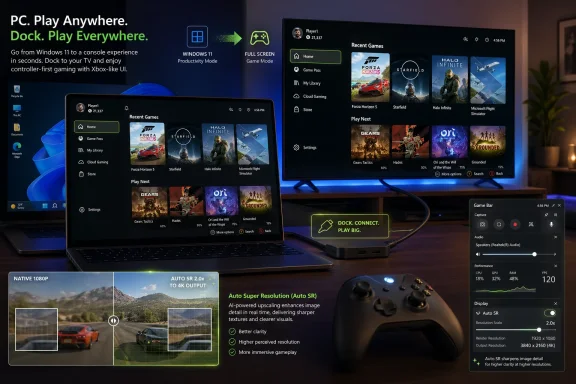
Xbox mode is Microsoft’s latest attempt to translate. It offers a full-screen, controller-optimized interface that foregrounds a player’s library and recently played games while minimizing the usual desktop distractions. It can be entered and exited, rather than replacing Windows outright, which is a crucial distinction. Microsoft is not shipping an Xbox OS for PCs; it is shipping a gaming posture for Windows 11.
That difference matters. A console is a tightly managed appliance. A Windows PC is a thousand software histories arguing in a trench coat. Xbox mode does not erase the updater, the overlay, the driver panel, the third-party launcher, or the notification stack. It simply tries to keep them offstage long enough for a PC to behave like a gaming device.
The fact that Microsoft is now rolling the experience to laptops, desktops, and tablets suggests the ROG Xbox Ally was not the destination. It was the test rig.
The original promise of the Xbox full-screen experience was simple: boot into something that feels like a game console, not a productivity machine. That idea was born in handhelds because the pain was most obvious there. A seven-inch screen, thumbsticks, and a Windows desktop make for an almost comic mismatch. Tiny close buttons, pop-up windows, login prompts, and launcher detours quickly turn “portable console” into “ultrabook without a keyboard.”
But the underlying problem was never limited to handhelds. Many PC gamers already use Windows machines like consoles: connected to TVs, docked near couches, controlled with Xbox pads, or used as single-purpose gaming boxes. The difference is that desktops and laptops had enough screen, mouse, and keyboard convenience to hide the friction.
Xbox mode brings that handheld lesson back to the larger PC market. It says the form factor may differ, but the session type is the same. Sometimes a Windows PC is a workstation. Sometimes it is a streaming box. Sometimes it is a console under the television. Microsoft now wants the operating system to acknowledge those states instead of forcing every one of them through the same desktop doorway.
That caution is not just logistical. Xbox mode touches the most sensitive part of Windows: user expectation. If it is too aggressive, power users will resent it. If it is too timid, console players will ignore it. If it breaks launchers, overlays, anti-cheat systems, HDR behavior, controller focus, or multi-monitor layouts, it will confirm every suspicion that Windows cannot be made console-simple.
The name change is also telling. Microsoft previously referred to this as the full screen experience, a phrase that sounded internal, mechanical, and slightly apologetic. “Xbox mode” is cleaner and more marketable. It also claims ownership. This is not merely a display state; it is an identity layer.
That identity layer is useful, but it is politically delicate. Windows is still the open platform where Steam, Epic, Battle.net, GOG, itch.io, emulators, mods, overlays, and utilities coexist. Xbox mode must be Xbox enough to feel coherent without becoming Xbox enough to feel exclusionary. Microsoft’s pitch is that the library can aggregate games from Xbox Game Pass and leading PC storefronts, not that it will herd everyone into the Microsoft Store.
That is the line it cannot afford to cross.
The pitch is straightforward: when the ROG Xbox Ally X is connected to an external display, Auto SR can deliver “1440p-like” detail while keeping frame rates smoother than native rendering would allow. In practice, that places Microsoft in the same broad conversation as DLSS, FSR, XeSS, and the various upscaling paths that have become central to modern PC gaming. The difference is that Microsoft is trying to make the feature feel automatic and system-integrated rather than game-by-game and vendor-branded.
That ambition makes sense on a handheld. Portable gaming PCs are thermal compromises. They can play an astonishing range of Windows games, but they cannot repeal physics. Once docked to a television or monitor, the same device that looked sharp enough at 7 inches suddenly has to survive scrutiny at 27, 42, or 55 inches. Native resolution becomes expensive, and upscaling becomes less of a luxury than a requirement.
By integrating Auto SR controls into Game Bar, Microsoft is also making a subtle but important claim: performance tuning should not require a pilgrimage through driver panels, launcher settings, in-game menus, and OEM utilities. If Xbox mode is about simplifying entry into play, Auto SR is about simplifying the visual compromise that happens once play begins.
That is a reasonable goal. It is also one that will be judged brutally. Upscaling quality is not a checkbox feature. Players notice shimmer, ghosting, UI artifacts, smeared text, and inconsistent frame pacing. “1440p-like” is useful marketing language, but the real test will be whether Auto SR can disappear during motion.
The new behavior defaults gameplay to the TV display when docked and turns off the handheld screen. That sounds mundane until you have lived the alternative: duplicated displays, wrong primary monitors, games opening on the tiny panel, HDR toggles buried in Settings, refresh rates stuck at the wrong value, and controllers fighting built-in inputs. These are not glamorous problems, but they are the problems that make a device feel unfinished.
Microsoft and ASUS are also adding automatic gaming enhancements for supported smart TVs from Samsung, LG, and Vizio, including low-latency modes and game modes. Supported docks add pieces such as HDR10 and, in the case of the ROG Bulwark Dock, Variable Refresh Rate. The strategic point is obvious. A docked Ally should behave less like a laptop plugged into a random HDMI chain and more like a console negotiating with a TV.
The Display Widget in Game Bar fits the same philosophy. Resolution, refresh rate, and projection mode are basic settings, but in Windows they live in a context designed for desks and monitors, not couches and controllers. Moving those controls into Game Bar gives Microsoft a place to build a console-like control surface without pretending Windows Settings was ever designed for this use case.
Improved controller pairing is another unglamorous but important fix. When an external Xbox or Designed for Xbox controller is paired, the built-in controls on the docked handheld can be disabled automatically. That is the kind of detail that separates a good demo from a good living-room product. Nobody wants to troubleshoot phantom inputs from a device sitting in a dock across the room.
Auto SR controls live there. Display controls live there. Gamepad Cursor is rolling out through it. The Xbox button on handhelds depends on it. This is Microsoft using an existing Windows layer as the place where gaming-specific affordances can appear without rebuilding the entire operating system.
Gamepad Cursor is a particularly revealing feature. It allows controller navigation in apps and storefronts that do not support controller input well, including browsers, music apps, and third-party launchers. That is not a glamorous innovation; it is an admission that the PC ecosystem will never be fully controller-native. Rather than waiting for every app developer and storefront to behave like a console dashboard, Microsoft is building a bridge over the mess.
This is the correct instinct. Windows’ strength is that it runs everything. Windows’ weakness is also that it runs everything. A gaming shell that only works inside Microsoft-approved boundaries would be clean and irrelevant. A gaming shell that can tolerate Steam, Epic, mod managers, browser logins, launch arguments, and the occasional weird installer has a chance.
The risk is layering. ROG Xbox Ally users already deal with Windows 11, the Xbox app, Game Bar, Armoury Crate SE, game launchers, driver software, and game-specific settings. Every new widget can reduce friction if done well, or become another surface to update and troubleshoot if done poorly. Microsoft is trying to simplify Windows gaming by adding more software. That can work, but only if the added software becomes invisible at the right moments.
That is not just convenience. It is Microsoft conceding that the PC gaming library is no longer a single-store concept. Game Pass may be the subscription anchor, but the average enthusiast has years of purchases scattered across Steam, Epic, GOG, EA, Ubisoft, Battle.net, itch.io, and standalone installers. Any “console-like” PC interface that ignores that reality becomes a walled garden with bad timing.
Valve understood this earlier with Steam Big Picture and, more successfully, SteamOS on the Steam Deck. The Deck’s advantage was never raw compatibility with every Windows game; it was the confidence of a coherent front door. You pick up the device and it knows what it is. Windows handhelds have often had the opposite problem: more compatibility in theory, more friction in practice.
Microsoft is now trying to borrow the front-door lesson without giving up the Windows back room. That is the right play. It is also harder than Valve’s approach because Windows must remain broadly compatible with software that was never designed for a couch, a controller, or a fixed thermal envelope.
The custom library feature is therefore more important than it looks. It gives users a way to domesticate the chaos. If the Xbox experience can become the place where the library lives — regardless of where the executable came from — Microsoft gains the emotional center of PC gaming without needing to own every transaction.
That is sensible engineering, but it creates a two-tier experience. Owners of the more capable device get the preview. Owners of other Windows PCs get Xbox mode on a staged basis. Owners of older handhelds wait to see which features escape the ROG orbit and which remain tied to specific hardware, docks, firmware, or AI acceleration.
This is the unavoidable reality of PC gaming in 2026. The platform is open, but the best experiences are increasingly hardware-aware. Upscaling, shader delivery, default game profiles, HDR behavior, VRR, Bluetooth LE Audio, and controller routing all depend on combinations of OS support, device firmware, drivers, peripherals, and developer participation.
Microsoft says more than 1,000 PC games now play well immediately through its Handheld Compatibility program. It has also introduced Default Game Profiles and Advanced Shader Delivery, both aimed at making supported games behave better on handheld hardware. These are the kinds of programs that consoles have always hidden from users: certification, defaults, precompilation, expected behavior. Windows is learning to do some of that in public.
The uncomfortable truth is that public certification feels messier than console certification because users see the seams. They see which games are supported, which are not, which launchers cooperate, and which features require Insider status. But the alternative is the old Windows shrug: everything is possible, and everything is your problem.
But Xbox mode is not inherently hostile to the desktop. The desktop remains essential because PC gaming is not just playing games. It is modding, streaming, benchmarking, chatting, editing config files, installing community patches, managing save folders, undervolting, overclocking, troubleshooting, and running three utilities whose names you forgot but whose tray icons you trust.
The point of Xbox mode is not that those behaviors disappear. The point is that they should not be mandatory for every session. A good PC gaming machine should let a user spend Saturday afternoon tuning frame pacing and Sunday night launching a game from the couch without touching a mouse. Windows has historically been good at the former and clumsy at the latter.
That distinction is why the ability to jump between Xbox mode and the Windows 11 desktop matters. The winning version of this feature is not a locked-down console skin. It is a reversible state. When you want Windows, you get Windows. When you want Xbox, you get enough Xbox to stop thinking about Windows.
If Microsoft respects that boundary, Xbox mode could become one of the more useful Windows gaming additions in years. If it uses the mode as a funnel for subscriptions and store placement at the expense of openness, users will route around it with the speed and creativity that PC gamers have always shown.
Xbox mode is a sideways console strategy. Instead of forcing Windows users to buy Xbox hardware, Microsoft is trying to make Windows hardware adopt Xbox behaviors. That fits the broader Game Pass and cross-device strategy, but it also reflects the market reality that the dedicated console is no longer the only premium gaming endpoint.
For Windows users, this could be good news. Microsoft has a business reason to make the PC gaming experience less embarrassing in the living room and less fiddly on handhelds. That incentive did not always exist. For years, Windows gaming succeeded despite the experience around the game. Now the experience around the game is the product.
The ROG Xbox Ally updates show how detailed that work has become. TV defaults, HDR and VRR support through docks, controller behavior, Bluetooth audio improvements, haptics, display widgets, Gamepad Cursor, aggregated libraries, shader delivery, and Auto SR are not one big moonshot. They are dozens of small repairs to the PC-as-console illusion.
And that is the right scale of ambition. Windows does not need one dramatic reinvention for gaming. It needs hundreds of irritations removed, one by one, until the machine stops reminding you that it was designed for spreadsheets before it was designed for Forza.
But the direction is clear. Microsoft is building a gaming layer that treats Windows devices as shape-shifters. A desktop can be a console. A handheld can be a docked living-room box. A laptop can become a controller-first gaming screen. The operating system is being asked to adapt to the posture of play.
That has implications beyond Xbox branding. If Microsoft gets this right, OEMs can build Windows gaming hardware without each inventing a half-baked shell. ASUS, Lenovo, MSI, Ayaneo, and others could compete on hardware while relying on a more consistent Windows gaming surface. If Microsoft gets it wrong, the market will continue to split between powerful-but-fussy Windows handhelds and less-compatible-but-coherent alternatives.
The next year will tell us whether Xbox mode is a feature or a foundation. A feature gets announced, rolled out, and occasionally updated. A foundation becomes the place where Microsoft puts new gaming capabilities first. Auto SR in Game Bar, docked display controls, and cross-store library management suggest Microsoft wants the latter.
Source: Windows Blog Windows 11 PC gamers: Xbox mode rolls out and ROG Xbox Ally updates include Auto SR preview
 Microsoft Finally Admits the Desktop Is Not the Default Gaming Room
For decades, Windows has been the center of PC gaming by gravity rather than by grace. The games were there, the drivers were there, the stores were there, and the hardware ecosystem was too big for anyone else to match. But the actual living-room experience — sitting back, grabbing a controller, waking a machine, launching a game, and never seeing a taskbar — was never Windows’ native language.Xbox mode is Microsoft’s latest attempt to translate. It offers a full-screen, controller-optimized interface that foregrounds a player’s library and recently played games while minimizing the usual desktop distractions. It can be entered and exited, rather than replacing Windows outright, which is a crucial distinction. Microsoft is not shipping an Xbox OS for PCs; it is shipping a gaming posture for Windows 11.
That difference matters. A console is a tightly managed appliance. A Windows PC is a thousand software histories arguing in a trench coat. Xbox mode does not erase the updater, the overlay, the driver panel, the third-party launcher, or the notification stack. It simply tries to keep them offstage long enough for a PC to behave like a gaming device.
The fact that Microsoft is now rolling the experience to laptops, desktops, and tablets suggests the ROG Xbox Ally was not the destination. It was the test rig.
The Handheld Was the Prototype, Not the Product
When Microsoft and ASUS launched the ROG Xbox Ally and ROG Xbox Ally X in October 2025, the most interesting part was not the plastic shell or even the AMD silicon. It was the software concession. Microsoft had finally acknowledged that standard Windows 11 was a poor first impression on handheld gaming PCs.The original promise of the Xbox full-screen experience was simple: boot into something that feels like a game console, not a productivity machine. That idea was born in handhelds because the pain was most obvious there. A seven-inch screen, thumbsticks, and a Windows desktop make for an almost comic mismatch. Tiny close buttons, pop-up windows, login prompts, and launcher detours quickly turn “portable console” into “ultrabook without a keyboard.”
But the underlying problem was never limited to handhelds. Many PC gamers already use Windows machines like consoles: connected to TVs, docked near couches, controlled with Xbox pads, or used as single-purpose gaming boxes. The difference is that desktops and laptops had enough screen, mouse, and keyboard convenience to hide the friction.
Xbox mode brings that handheld lesson back to the larger PC market. It says the form factor may differ, but the session type is the same. Sometimes a Windows PC is a workstation. Sometimes it is a streaming box. Sometimes it is a console under the television. Microsoft now wants the operating system to acknowledge those states instead of forcing every one of them through the same desktop doorway.
The Rollout Is Cautious Because the Stakes Are Awkward
Microsoft says Xbox mode is beginning in select markets and will expand over the coming weeks. That phrasing is familiar to anyone who follows Windows feature delivery: server-side switches, staged availability, compatibility checks, and a certain amount of mystery. Users who want early access are being told to enable “Get the latest updates as soon as they are available” in Windows Update.That caution is not just logistical. Xbox mode touches the most sensitive part of Windows: user expectation. If it is too aggressive, power users will resent it. If it is too timid, console players will ignore it. If it breaks launchers, overlays, anti-cheat systems, HDR behavior, controller focus, or multi-monitor layouts, it will confirm every suspicion that Windows cannot be made console-simple.
The name change is also telling. Microsoft previously referred to this as the full screen experience, a phrase that sounded internal, mechanical, and slightly apologetic. “Xbox mode” is cleaner and more marketable. It also claims ownership. This is not merely a display state; it is an identity layer.
That identity layer is useful, but it is politically delicate. Windows is still the open platform where Steam, Epic, Battle.net, GOG, itch.io, emulators, mods, overlays, and utilities coexist. Xbox mode must be Xbox enough to feel coherent without becoming Xbox enough to feel exclusionary. Microsoft’s pitch is that the library can aggregate games from Xbox Game Pass and leading PC storefronts, not that it will herd everyone into the Microsoft Store.
That is the line it cannot afford to cross.
Auto SR Is the More Technical Bet Hiding Behind the Interface Story
The flashier announcement is the wider Xbox mode rollout, but the more technically revealing one is Auto SR entering preview for Xbox Insiders on the ROG Xbox Ally X. Automatic Super Resolution is Microsoft’s attempt to make the resolution-versus-performance tradeoff less visible to players, especially when a handheld is docked to a larger display.The pitch is straightforward: when the ROG Xbox Ally X is connected to an external display, Auto SR can deliver “1440p-like” detail while keeping frame rates smoother than native rendering would allow. In practice, that places Microsoft in the same broad conversation as DLSS, FSR, XeSS, and the various upscaling paths that have become central to modern PC gaming. The difference is that Microsoft is trying to make the feature feel automatic and system-integrated rather than game-by-game and vendor-branded.
That ambition makes sense on a handheld. Portable gaming PCs are thermal compromises. They can play an astonishing range of Windows games, but they cannot repeal physics. Once docked to a television or monitor, the same device that looked sharp enough at 7 inches suddenly has to survive scrutiny at 27, 42, or 55 inches. Native resolution becomes expensive, and upscaling becomes less of a luxury than a requirement.
By integrating Auto SR controls into Game Bar, Microsoft is also making a subtle but important claim: performance tuning should not require a pilgrimage through driver panels, launcher settings, in-game menus, and OEM utilities. If Xbox mode is about simplifying entry into play, Auto SR is about simplifying the visual compromise that happens once play begins.
That is a reasonable goal. It is also one that will be judged brutally. Upscaling quality is not a checkbox feature. Players notice shimmer, ghosting, UI artifacts, smeared text, and inconsistent frame pacing. “1440p-like” is useful marketing language, but the real test will be whether Auto SR can disappear during motion.
Docking Is Where Windows Handhelds Become Honest
The ROG Xbox Ally update package is heavily focused on docked play, and that is not accidental. Docking is the moment a handheld PC has to stop behaving like a gadget and start behaving like a console.The new behavior defaults gameplay to the TV display when docked and turns off the handheld screen. That sounds mundane until you have lived the alternative: duplicated displays, wrong primary monitors, games opening on the tiny panel, HDR toggles buried in Settings, refresh rates stuck at the wrong value, and controllers fighting built-in inputs. These are not glamorous problems, but they are the problems that make a device feel unfinished.
Microsoft and ASUS are also adding automatic gaming enhancements for supported smart TVs from Samsung, LG, and Vizio, including low-latency modes and game modes. Supported docks add pieces such as HDR10 and, in the case of the ROG Bulwark Dock, Variable Refresh Rate. The strategic point is obvious. A docked Ally should behave less like a laptop plugged into a random HDMI chain and more like a console negotiating with a TV.
The Display Widget in Game Bar fits the same philosophy. Resolution, refresh rate, and projection mode are basic settings, but in Windows they live in a context designed for desks and monitors, not couches and controllers. Moving those controls into Game Bar gives Microsoft a place to build a console-like control surface without pretending Windows Settings was ever designed for this use case.
Improved controller pairing is another unglamorous but important fix. When an external Xbox or Designed for Xbox controller is paired, the built-in controls on the docked handheld can be disabled automatically. That is the kind of detail that separates a good demo from a good living-room product. Nobody wants to troubleshoot phantom inputs from a device sitting in a dock across the room.
Game Bar Is Becoming the Console Shell Microsoft Never Shipped
For years, Game Bar has occupied an odd place in Windows. It was useful, sometimes intrusive, sometimes ignored, and often associated with capture widgets and overlays rather than a coherent gaming system. In this new strategy, Game Bar looks less like an accessory and more like the connective tissue of Microsoft’s PC gaming ambitions.Auto SR controls live there. Display controls live there. Gamepad Cursor is rolling out through it. The Xbox button on handhelds depends on it. This is Microsoft using an existing Windows layer as the place where gaming-specific affordances can appear without rebuilding the entire operating system.
Gamepad Cursor is a particularly revealing feature. It allows controller navigation in apps and storefronts that do not support controller input well, including browsers, music apps, and third-party launchers. That is not a glamorous innovation; it is an admission that the PC ecosystem will never be fully controller-native. Rather than waiting for every app developer and storefront to behave like a console dashboard, Microsoft is building a bridge over the mess.
This is the correct instinct. Windows’ strength is that it runs everything. Windows’ weakness is also that it runs everything. A gaming shell that only works inside Microsoft-approved boundaries would be clean and irrelevant. A gaming shell that can tolerate Steam, Epic, mod managers, browser logins, launch arguments, and the occasional weird installer has a chance.
The risk is layering. ROG Xbox Ally users already deal with Windows 11, the Xbox app, Game Bar, Armoury Crate SE, game launchers, driver software, and game-specific settings. Every new widget can reduce friction if done well, or become another surface to update and troubleshoot if done poorly. Microsoft is trying to simplify Windows gaming by adding more software. That can work, but only if the added software becomes invisible at the right moments.
The Aggregated Library Is the Real Competitive Front
Microsoft’s library work may matter more than the shell. The Xbox PC app now aims to bring installed games from multiple PC storefronts into one place, and the latest ROG Xbox Ally updates let users add, remove, edit, and launch installed games and apps directly from the Xbox experience. Custom entries can include names, images, launch targets, and command-line options.That is not just convenience. It is Microsoft conceding that the PC gaming library is no longer a single-store concept. Game Pass may be the subscription anchor, but the average enthusiast has years of purchases scattered across Steam, Epic, GOG, EA, Ubisoft, Battle.net, itch.io, and standalone installers. Any “console-like” PC interface that ignores that reality becomes a walled garden with bad timing.
Valve understood this earlier with Steam Big Picture and, more successfully, SteamOS on the Steam Deck. The Deck’s advantage was never raw compatibility with every Windows game; it was the confidence of a coherent front door. You pick up the device and it knows what it is. Windows handhelds have often had the opposite problem: more compatibility in theory, more friction in practice.
Microsoft is now trying to borrow the front-door lesson without giving up the Windows back room. That is the right play. It is also harder than Valve’s approach because Windows must remain broadly compatible with software that was never designed for a couch, a controller, or a fixed thermal envelope.
The custom library feature is therefore more important than it looks. It gives users a way to domesticate the chaos. If the Xbox experience can become the place where the library lives — regardless of where the executable came from — Microsoft gains the emotional center of PC gaming without needing to own every transaction.
The ROG Xbox Ally X Becomes Microsoft’s Rolling Lab
The Auto SR preview being limited to Xbox Insiders on the ROG Xbox Ally X is a reminder that Microsoft’s most advanced gaming experiments are still constrained by hardware, silicon, and telemetry. The Ally X is not just a product; it is a controlled test case. Microsoft can tune for a known platform, gather feedback from enthusiasts, and expand only when the feature survives contact with real games.That is sensible engineering, but it creates a two-tier experience. Owners of the more capable device get the preview. Owners of other Windows PCs get Xbox mode on a staged basis. Owners of older handhelds wait to see which features escape the ROG orbit and which remain tied to specific hardware, docks, firmware, or AI acceleration.
This is the unavoidable reality of PC gaming in 2026. The platform is open, but the best experiences are increasingly hardware-aware. Upscaling, shader delivery, default game profiles, HDR behavior, VRR, Bluetooth LE Audio, and controller routing all depend on combinations of OS support, device firmware, drivers, peripherals, and developer participation.
Microsoft says more than 1,000 PC games now play well immediately through its Handheld Compatibility program. It has also introduced Default Game Profiles and Advanced Shader Delivery, both aimed at making supported games behave better on handheld hardware. These are the kinds of programs that consoles have always hidden from users: certification, defaults, precompilation, expected behavior. Windows is learning to do some of that in public.
The uncomfortable truth is that public certification feels messier than console certification because users see the seams. They see which games are supported, which are not, which launchers cooperate, and which features require Insider status. But the alternative is the old Windows shrug: everything is possible, and everything is your problem.
This Is Not the Death of the Desktop
There will be a predictable backlash from some PC traditionalists who see Xbox mode as another attempt to console-ify Windows. The concern is not baseless. Microsoft has spent years nudging Windows toward services, accounts, recommendations, subscriptions, and curated surfaces. Any new full-screen branded mode will raise eyebrows.But Xbox mode is not inherently hostile to the desktop. The desktop remains essential because PC gaming is not just playing games. It is modding, streaming, benchmarking, chatting, editing config files, installing community patches, managing save folders, undervolting, overclocking, troubleshooting, and running three utilities whose names you forgot but whose tray icons you trust.
The point of Xbox mode is not that those behaviors disappear. The point is that they should not be mandatory for every session. A good PC gaming machine should let a user spend Saturday afternoon tuning frame pacing and Sunday night launching a game from the couch without touching a mouse. Windows has historically been good at the former and clumsy at the latter.
That distinction is why the ability to jump between Xbox mode and the Windows 11 desktop matters. The winning version of this feature is not a locked-down console skin. It is a reversible state. When you want Windows, you get Windows. When you want Xbox, you get enough Xbox to stop thinking about Windows.
If Microsoft respects that boundary, Xbox mode could become one of the more useful Windows gaming additions in years. If it uses the mode as a funnel for subscriptions and store placement at the expense of openness, users will route around it with the speed and creativity that PC gamers have always shown.
The April 30 Drop Shows Microsoft’s Console Strategy Moving Sideways
The most interesting thing about this announcement is what it says about Xbox as a business. Microsoft’s console strategy is no longer just about selling a box under a television. It is about making the Xbox layer available wherever games are played: console, PC, handheld, cloud, and increasingly the TV-adjacent Windows device.Xbox mode is a sideways console strategy. Instead of forcing Windows users to buy Xbox hardware, Microsoft is trying to make Windows hardware adopt Xbox behaviors. That fits the broader Game Pass and cross-device strategy, but it also reflects the market reality that the dedicated console is no longer the only premium gaming endpoint.
For Windows users, this could be good news. Microsoft has a business reason to make the PC gaming experience less embarrassing in the living room and less fiddly on handhelds. That incentive did not always exist. For years, Windows gaming succeeded despite the experience around the game. Now the experience around the game is the product.
The ROG Xbox Ally updates show how detailed that work has become. TV defaults, HDR and VRR support through docks, controller behavior, Bluetooth audio improvements, haptics, display widgets, Gamepad Cursor, aggregated libraries, shader delivery, and Auto SR are not one big moonshot. They are dozens of small repairs to the PC-as-console illusion.
And that is the right scale of ambition. Windows does not need one dramatic reinvention for gaming. It needs hundreds of irritations removed, one by one, until the machine stops reminding you that it was designed for spreadsheets before it was designed for Forza.
The Signal in This Rollout Is Stronger Than the Rollout Itself
For most Windows 11 users, April 30 will not instantly transform the gaming experience. Xbox mode is staged. Auto SR is a preview. Some features are tied to the ROG Xbox Ally family, some to the Ally X, some to Game Bar updates, some to docks, and some to supported TVs. This is not a clean platform reset.But the direction is clear. Microsoft is building a gaming layer that treats Windows devices as shape-shifters. A desktop can be a console. A handheld can be a docked living-room box. A laptop can become a controller-first gaming screen. The operating system is being asked to adapt to the posture of play.
That has implications beyond Xbox branding. If Microsoft gets this right, OEMs can build Windows gaming hardware without each inventing a half-baked shell. ASUS, Lenovo, MSI, Ayaneo, and others could compete on hardware while relying on a more consistent Windows gaming surface. If Microsoft gets it wrong, the market will continue to split between powerful-but-fussy Windows handhelds and less-compatible-but-coherent alternatives.
The next year will tell us whether Xbox mode is a feature or a foundation. A feature gets announced, rolled out, and occasionally updated. A foundation becomes the place where Microsoft puts new gaming capabilities first. Auto SR in Game Bar, docked display controls, and cross-store library management suggest Microsoft wants the latter.
The New Rules for a Windows PC That Wants to Be an Xbox
The practical message for enthusiasts is not that every Windows 11 PC has suddenly become a console. It is that Microsoft is formalizing a mode of use that many players had already invented for themselves.- Xbox mode is beginning as a gradual rollout in select markets for Windows 11 laptops, desktops, and tablets, not as an instant worldwide switch for every PC.
- The experience is designed around controller-friendly, full-screen access to recent games and library content while preserving the ability to return to the Windows desktop.
- Auto SR is currently a preview for Xbox Insiders on the ROG Xbox Ally X, aimed especially at docked play on external displays.
- The ROG Xbox Ally updates focus heavily on living-room friction, including TV display defaults, display controls in Game Bar, controller pairing improvements, and smart TV gaming modes.
- Game Bar is becoming the control plane for Microsoft’s PC gaming strategy, not merely an overlay for capture and widgets.
- The success of Xbox mode will depend less on how Xbox-like it looks and more on how gracefully it handles the non-Xbox reality of PC gaming.
Source: Windows Blog Windows 11 PC gamers: Xbox mode rolls out and ROG Xbox Ally updates include Auto SR preview
