

Microsoft began rolling out Xbox Mode for Windows 11 PCs on April 30, 2026, in select markets, extending a controller-first, console-style gaming interface from Windows handhelds to laptops, desktops, and tablets. The feature is not a new operating system and not a magic compatibility layer for Xbox console games. It is Microsoft’s latest attempt to make Windows feel less like Windows at the exact moment PC gaming is becoming the center of Xbox’s future.
That distinction matters. Xbox Mode is being marketed as a convenience feature, but it is really a strategic concession: Microsoft knows the Windows desktop is powerful, ubiquitous, and irritating from ten feet away. If Xbox is going to live across devices rather than inside a single box under the television, Windows has to learn a trick it has historically performed badly — disappearing.
For decades, Windows has been the default PC gaming platform because it had the games, the drivers, the hardware ecosystem, and the developer gravity. It did not win because it was elegant from the couch. It won because everything else was worse, smaller, or too weird to matter.
That bargain has started to look less comfortable. Valve’s Steam Deck did not merely prove that Linux could run many Windows games well enough; it proved that a handheld gaming PC could feel like an appliance. The important innovation was not Proton alone. It was the sense that the device knew what it was for the moment it woke up.
Windows handhelds exposed the opposite problem. Devices like the ROG Ally and Legion Go could be faster, sharper, and more flexible than a Steam Deck, yet still trip over login prompts, desktop scaling, launcher clutter, update nags, background processes, and the indignity of using a gamepad as a mouse. The hardware was modern. The operating system behaved like it had wandered in from an office procurement meeting.
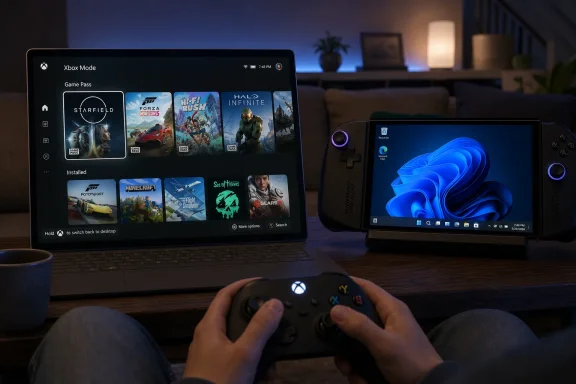
Xbox Mode is Microsoft’s answer to that embarrassment. It gives Windows 11 a full-screen, controller-optimized interface for browsing and launching games, switching back to the desktop, and aggregating titles from Game Pass and major PC storefronts. That sounds modest because, technically, it is. Strategically, it is Microsoft saying that Windows cannot simply be the place where gaming happens; it has to become a gaming product in its own right.
The rebrand to Xbox Mode is not cosmetic. Microsoft is attaching the Xbox brand to a Windows shell, which means it wants players to understand this as part of the Xbox experience rather than a convenience layer inside the Xbox app. That is a subtle but important inversion. Xbox used to be hardware with services attached. Increasingly, Xbox is becoming a service and interface layer that happens to run on hardware Microsoft may or may not sell.
The timing reinforces the point. Microsoft is rolling this out beyond handhelds to ordinary Windows 11 PCs, including desktops, laptops, and tablets. That means the company is not just solving the “small screen with analog sticks” problem. It is trying to create a common front door for PC gaming, whether the device is docked under a TV, sitting on a desk, or carried in a backpack.
The company’s language is careful. Xbox Mode is “built on Windows,” and users can jump back to the regular desktop whenever they want. That is not a throwaway reassurance. Microsoft cannot afford to alienate the PC audience by walling off the machine, but it also cannot build a console-like future if every session begins with taskbar archaeology.
That limitation is not a footnote; it is the boundary of the entire project. Microsoft can aggregate PC storefronts, surface Game Pass, and make Windows more pleasant with a controller. But years of Xbox console purchases do not suddenly become native Windows executables because the UI looks more like a console dashboard.
This is where Microsoft’s branding does the company both favors and damage. “Xbox” now means console, PC app, cloud gaming, subscription service, account identity, publishing label, and cross-device strategy. That flexibility helps Microsoft tell investors and players that Xbox is bigger than a box. It also makes every product announcement vulnerable to category confusion.
For WindowsForum readers, the technical reality is straightforward. Xbox Mode sits on top of Windows 11 and improves the path into games that already belong in the Windows PC ecosystem. It may reduce friction, streamline navigation, and suppress some background noise. It does not erase the architectural and licensing differences between Xbox console software and PC software.
Microsoft has tried to solve this before in fragments. Big Picture-style interfaces, Game Bar overlays, Xbox app improvements, and Windows gaming settings all attacked pieces of the same problem. None of them fully changed the sensation that PC gaming on Windows was a stack of launchers and compromises hiding under a desktop OS.
Xbox Mode tries to make the game library the center of gravity. Recent titles, Game Pass, and installed games from other storefronts are meant to appear in one navigable space. The promise is not that Steam, Epic, Xbox, and everything else become one coherent platform. The promise is that players do not have to think about the seams quite as often.
That matters more on a TV than on a monitor. At a desk, opening Steam is muscle memory. On a couch, every unexpected dialog box feels like a betrayal. If Microsoft can make Windows tolerable at ten feet, it opens a path for more gaming PCs to behave like consoles without giving up the messy abundance that made PC gaming dominant.
That is harder than it sounds. Valve controls the Steam Deck experience tightly: hardware profile, interface, store, shader pipeline, sleep behavior, verified badges, and the economics of its own storefront. Microsoft has a far larger ecosystem but far less control over any single configuration. Windows has to accommodate RGB utilities, anti-cheat drivers, OEM overlays, launchers, overlays on top of launchers, and decades of assumptions about user freedom.
Xbox Mode therefore has to walk a narrow line. If it is merely the Xbox app in a full-screen coat, enthusiasts will dismiss it as theater. If it locks down too much, it will offend the very PC audience Microsoft needs. The viable middle path is a mode that feels opinionated when you want to play and permissive when you need to tinker.
That middle path is also where Windows has historically struggled. Microsoft is excellent at platform breadth. It is less consistent at product restraint. Xbox Mode will succeed only if the company treats the absence of interruptions as a feature, not an empty space waiting to be filled with promotions, prompts, and account funnels.
That context makes Xbox Mode more than a UI update. Game Pass needs surfaces where it can feel immediate. A full-screen Xbox environment on Windows gives Microsoft a place to make the subscription visible without relying on users to open the standard Xbox app from the desktop.
But the same interface also exposes Game Pass’ weakness on PC. PC players are not short of libraries. They already have Steam backlogs, Epic giveaways, GOG installers, Battle.net accounts, Ubisoft Connect regrets, EA app scars, and itch.io curiosities. Microsoft’s subscription has to compete inside a market defined by abundance and habit.
An aggregated library helps, but aggregation is not loyalty. If Xbox Mode becomes a genuinely useful launcher, it gives Microsoft more chances to keep users in its orbit. If it becomes another storefront-forward shell, it will join the pile of software PC gamers tolerate until it gets in the way.
The rollout mechanism matters here. Microsoft says users should enable “Get the latest updates as soon as they are available” to receive the feature when it reaches their device and region. That phrasing places Xbox Mode inside the modern Windows feature-delivery machine, not as a standalone enthusiast download.
For managed environments, the immediate question is not whether Xbox Mode is dangerous. It is whether Microsoft will document the controls clearly enough for admins to suppress, defer, or ignore it without spelunking through policy settings. Windows 11 has increasingly blurred the line between OS feature, app update, Store-delivered component, and cloud-configured experience. Xbox Mode is another example of why that blur is convenient for Microsoft and irritating for administrators.
There is also a cultural point. Windows 11 Pro is no longer a sanctuary from consumer experience drift. Microsoft’s platform strategy assumes one Windows with different management states layered on top. That may be rational engineering, but it means IT departments must keep tracking features that sound like they belong in a gaming blog until they appear on real machines.
That kind of staged rollout is normal for Windows features, but it is also a hedge. Xbox Mode touches enough variables — device type, Windows build, Xbox app state, Store components, regional services, storefront integrations, and user expectations — that Microsoft benefits from turning the dial slowly. A bad gaming shell is not just a bug; it is a meme factory.
The rollout also lets Microsoft measure behavior. How many users enter Xbox Mode and stay there? How often do they bounce back to the desktop? Which storefront integrations matter? Do desktop users care, or is this mainly for handhelds and living-room PCs? These are product questions disguised as deployment questions.
For enthusiasts, the practical advice is simple: fully update Windows 11, enable early update availability if you want the feature sooner, and do not assume day-one access even if the marketing says “today.” In Microsoft rollout language, today often means the first visible step in a distribution campaign, not universal availability at noon.
Microsoft has spent years telling the market that Xbox is not confined to a console. The problem is that slogans do not replace product coherence. If every screen is an Xbox, then the Xbox experience has to feel recognizable across those screens. Xbox Mode is one piece of that coherence.
This does not mean the next Xbox is simply a Windows PC in a plastic shell. But it does suggest Microsoft is trying to narrow the experiential gap between console and PC. A future Xbox that supports broader PC libraries, or borrows more heavily from Windows internals, needs a front end that can manage openness without looking like a desktop.
That is the hard problem. Consoles are loved partly because they are limited. PCs are loved partly because they are not. Microsoft’s strategic fantasy is to combine the trust of the former with the breadth of the latter. Xbox Mode is a small, public test of whether that combination can feel like a product instead of a compromise.
Does a controller remain enough when a game crashes? Does sign-in stay sane across storefronts? Do update prompts wait their turn? Does the system resume into a playable state? Does the interface respect non-Microsoft libraries without treating them like second-class citizens? Does it feel fast on midrange hardware, or only on devices built to flatter the demo?
Performance claims also deserve scrutiny. Reducing background tasks can help, especially on handhelds and lower-power systems, but Windows gaming performance is an ecosystem problem rather than a single toggle. Drivers, overlays, anti-cheat, shader compilation, power profiles, and vendor utilities all have their say.
Still, perception matters. If Xbox Mode makes a Windows gaming PC feel calmer, it will have done real work. The best interface improvements are often measured not by what users notice, but by what they stop complaining about.
Xbox Mode is an attempt to reclaim the entrance. Not by banning other doors, because that would fail instantly, but by making the Windows-level experience more attractive. If the first thing a player sees is an Xbox-branded library that includes non-Xbox games, Microsoft gains a strategic perch.
This is why the aggregated library is more important than it sounds. A Microsoft-only Xbox Mode would be dead on arrival for many PC gamers. A mode that accepts the reality of Steam and other storefronts has at least a chance of becoming habitual.
But trust will be fragile. PC gamers are exquisitely sensitive to anything that smells like forced engagement. Microsoft needs Xbox Mode to feel like a shortcut, not a sales funnel; a room, not a cage.
Source: Video Games Chronicle Microsoft’s Xbox Mode hits Windows 11 PCs today | VGC
That distinction matters. Xbox Mode is being marketed as a convenience feature, but it is really a strategic concession: Microsoft knows the Windows desktop is powerful, ubiquitous, and irritating from ten feet away. If Xbox is going to live across devices rather than inside a single box under the television, Windows has to learn a trick it has historically performed badly — disappearing.
 Microsoft Is Finally Admitting That the Desktop Is the Problem
For decades, Windows has been the default PC gaming platform because it had the games, the drivers, the hardware ecosystem, and the developer gravity. It did not win because it was elegant from the couch. It won because everything else was worse, smaller, or too weird to matter.That bargain has started to look less comfortable. Valve’s Steam Deck did not merely prove that Linux could run many Windows games well enough; it proved that a handheld gaming PC could feel like an appliance. The important innovation was not Proton alone. It was the sense that the device knew what it was for the moment it woke up.
Windows handhelds exposed the opposite problem. Devices like the ROG Ally and Legion Go could be faster, sharper, and more flexible than a Steam Deck, yet still trip over login prompts, desktop scaling, launcher clutter, update nags, background processes, and the indignity of using a gamepad as a mouse. The hardware was modern. The operating system behaved like it had wandered in from an office procurement meeting.
Xbox Mode is Microsoft’s answer to that embarrassment. It gives Windows 11 a full-screen, controller-optimized interface for browsing and launching games, switching back to the desktop, and aggregating titles from Game Pass and major PC storefronts. That sounds modest because, technically, it is. Strategically, it is Microsoft saying that Windows cannot simply be the place where gaming happens; it has to become a gaming product in its own right.
The Name Changed Because the Ambition Changed
Xbox Mode began life as the “full screen experience,” a label so literal it almost seemed designed to lower expectations. It arrived first on Windows 11 handhelds, where the need was obvious. A handheld that boots into a tiny desktop is not a console competitor; it is a small laptop having an identity crisis.The rebrand to Xbox Mode is not cosmetic. Microsoft is attaching the Xbox brand to a Windows shell, which means it wants players to understand this as part of the Xbox experience rather than a convenience layer inside the Xbox app. That is a subtle but important inversion. Xbox used to be hardware with services attached. Increasingly, Xbox is becoming a service and interface layer that happens to run on hardware Microsoft may or may not sell.
The timing reinforces the point. Microsoft is rolling this out beyond handhelds to ordinary Windows 11 PCs, including desktops, laptops, and tablets. That means the company is not just solving the “small screen with analog sticks” problem. It is trying to create a common front door for PC gaming, whether the device is docked under a TV, sitting on a desk, or carried in a backpack.
The company’s language is careful. Xbox Mode is “built on Windows,” and users can jump back to the regular desktop whenever they want. That is not a throwaway reassurance. Microsoft cannot afford to alienate the PC audience by walling off the machine, but it also cannot build a console-like future if every session begins with taskbar archaeology.
This Is Not an Xbox Console on Your PC
The most predictable disappointment around Xbox Mode will come from the name. Some users will assume it means Windows 11 can now play their full digital Xbox console libraries. It cannot. Xbox Mode is an interface for PC gaming, not a general Xbox console compatibility environment.That limitation is not a footnote; it is the boundary of the entire project. Microsoft can aggregate PC storefronts, surface Game Pass, and make Windows more pleasant with a controller. But years of Xbox console purchases do not suddenly become native Windows executables because the UI looks more like a console dashboard.
This is where Microsoft’s branding does the company both favors and damage. “Xbox” now means console, PC app, cloud gaming, subscription service, account identity, publishing label, and cross-device strategy. That flexibility helps Microsoft tell investors and players that Xbox is bigger than a box. It also makes every product announcement vulnerable to category confusion.
For WindowsForum readers, the technical reality is straightforward. Xbox Mode sits on top of Windows 11 and improves the path into games that already belong in the Windows PC ecosystem. It may reduce friction, streamline navigation, and suppress some background noise. It does not erase the architectural and licensing differences between Xbox console software and PC software.
The Controller Is the Trojan Horse
The headline feature is controller navigation, but the real target is context. A mouse and keyboard PC assumes a user who is close to the screen, comfortable with windows, and willing to manage multiple surfaces. A living-room PC assumes almost none of that. The difference is not input alone; it is posture.Microsoft has tried to solve this before in fragments. Big Picture-style interfaces, Game Bar overlays, Xbox app improvements, and Windows gaming settings all attacked pieces of the same problem. None of them fully changed the sensation that PC gaming on Windows was a stack of launchers and compromises hiding under a desktop OS.
Xbox Mode tries to make the game library the center of gravity. Recent titles, Game Pass, and installed games from other storefronts are meant to appear in one navigable space. The promise is not that Steam, Epic, Xbox, and everything else become one coherent platform. The promise is that players do not have to think about the seams quite as often.
That matters more on a TV than on a monitor. At a desk, opening Steam is muscle memory. On a couch, every unexpected dialog box feels like a betrayal. If Microsoft can make Windows tolerable at ten feet, it opens a path for more gaming PCs to behave like consoles without giving up the messy abundance that made PC gaming dominant.
SteamOS Is the Shadow Competitor in the Room
Microsoft will not frame Xbox Mode as an answer to SteamOS, but everyone in PC gaming can read the room. Valve demonstrated that a curated, controller-first shell can make a general-purpose computing platform feel purpose-built. Microsoft is now trying to do something similar without surrendering Windows’ enormous compatibility advantage.That is harder than it sounds. Valve controls the Steam Deck experience tightly: hardware profile, interface, store, shader pipeline, sleep behavior, verified badges, and the economics of its own storefront. Microsoft has a far larger ecosystem but far less control over any single configuration. Windows has to accommodate RGB utilities, anti-cheat drivers, OEM overlays, launchers, overlays on top of launchers, and decades of assumptions about user freedom.
Xbox Mode therefore has to walk a narrow line. If it is merely the Xbox app in a full-screen coat, enthusiasts will dismiss it as theater. If it locks down too much, it will offend the very PC audience Microsoft needs. The viable middle path is a mode that feels opinionated when you want to play and permissive when you need to tinker.
That middle path is also where Windows has historically struggled. Microsoft is excellent at platform breadth. It is less consistent at product restraint. Xbox Mode will succeed only if the company treats the absence of interruptions as a feature, not an empty space waiting to be filled with promotions, prompts, and account funnels.
Game Pass Makes the Interface More Urgent and More Awkward
Xbox Mode arrives during a complicated moment for Game Pass. Microsoft has been adjusting pricing, messaging, and catalog expectations while trying to convince players that the subscription still represents value. Removing new Call of Duty releases from day-one availability, while reportedly cutting prices, changes the emotional contract of the service.That context makes Xbox Mode more than a UI update. Game Pass needs surfaces where it can feel immediate. A full-screen Xbox environment on Windows gives Microsoft a place to make the subscription visible without relying on users to open the standard Xbox app from the desktop.
But the same interface also exposes Game Pass’ weakness on PC. PC players are not short of libraries. They already have Steam backlogs, Epic giveaways, GOG installers, Battle.net accounts, Ubisoft Connect regrets, EA app scars, and itch.io curiosities. Microsoft’s subscription has to compete inside a market defined by abundance and habit.
An aggregated library helps, but aggregation is not loyalty. If Xbox Mode becomes a genuinely useful launcher, it gives Microsoft more chances to keep users in its orbit. If it becomes another storefront-forward shell, it will join the pile of software PC gamers tolerate until it gets in the way.
The Enterprise Angle Is Small but Not Zero
On paper, Xbox Mode sounds irrelevant to business IT. In practice, many WindowsForum readers know that consumer features have a way of appearing on mixed-use machines, BYOD fleets, executive laptops, lab PCs, classroom devices, and workstations that someone insists are “also for testing.” A gaming mode is not automatically a management crisis, but it is another surface administrators will want to understand.The rollout mechanism matters here. Microsoft says users should enable “Get the latest updates as soon as they are available” to receive the feature when it reaches their device and region. That phrasing places Xbox Mode inside the modern Windows feature-delivery machine, not as a standalone enthusiast download.
For managed environments, the immediate question is not whether Xbox Mode is dangerous. It is whether Microsoft will document the controls clearly enough for admins to suppress, defer, or ignore it without spelunking through policy settings. Windows 11 has increasingly blurred the line between OS feature, app update, Store-delivered component, and cloud-configured experience. Xbox Mode is another example of why that blur is convenient for Microsoft and irritating for administrators.
There is also a cultural point. Windows 11 Pro is no longer a sanctuary from consumer experience drift. Microsoft’s platform strategy assumes one Windows with different management states layered on top. That may be rational engineering, but it means IT departments must keep tracking features that sound like they belong in a gaming blog until they appear on real machines.
Select Markets Means Microsoft Still Wants a Safety Valve
The phrase “select markets” is doing a lot of work. Microsoft has not clearly named every region in the initial rollout, though localized Xbox Wire posts indicate at least some markets beyond the United States are included. The company says availability will expand over the next several weeks.That kind of staged rollout is normal for Windows features, but it is also a hedge. Xbox Mode touches enough variables — device type, Windows build, Xbox app state, Store components, regional services, storefront integrations, and user expectations — that Microsoft benefits from turning the dial slowly. A bad gaming shell is not just a bug; it is a meme factory.
The rollout also lets Microsoft measure behavior. How many users enter Xbox Mode and stay there? How often do they bounce back to the desktop? Which storefront integrations matter? Do desktop users care, or is this mainly for handhelds and living-room PCs? These are product questions disguised as deployment questions.
For enthusiasts, the practical advice is simple: fully update Windows 11, enable early update availability if you want the feature sooner, and do not assume day-one access even if the marketing says “today.” In Microsoft rollout language, today often means the first visible step in a distribution campaign, not universal availability at noon.
Xbox Mode Is a Preview of the Next Xbox Argument
The most interesting part of Xbox Mode is not what it does today. It is what it suggests Microsoft thinks the next Xbox has to be. The old console bargain — fixed hardware, fixed storefront, fixed generation — is under pressure from PC handhelds, cloud gaming, rising component costs, cross-platform publishing, and subscription economics.Microsoft has spent years telling the market that Xbox is not confined to a console. The problem is that slogans do not replace product coherence. If every screen is an Xbox, then the Xbox experience has to feel recognizable across those screens. Xbox Mode is one piece of that coherence.
This does not mean the next Xbox is simply a Windows PC in a plastic shell. But it does suggest Microsoft is trying to narrow the experiential gap between console and PC. A future Xbox that supports broader PC libraries, or borrows more heavily from Windows internals, needs a front end that can manage openness without looking like a desktop.
That is the hard problem. Consoles are loved partly because they are limited. PCs are loved partly because they are not. Microsoft’s strategic fantasy is to combine the trust of the former with the breadth of the latter. Xbox Mode is a small, public test of whether that combination can feel like a product instead of a compromise.
The Feature Will Be Judged by the Interruptions It Prevents
Microsoft’s announcement emphasizes browsing, launching, switching, and aggregation. Those are useful, but they are not the whole standard by which Xbox Mode should be judged. The real test is how often it keeps Windows from breaking the spell.Does a controller remain enough when a game crashes? Does sign-in stay sane across storefronts? Do update prompts wait their turn? Does the system resume into a playable state? Does the interface respect non-Microsoft libraries without treating them like second-class citizens? Does it feel fast on midrange hardware, or only on devices built to flatter the demo?
Performance claims also deserve scrutiny. Reducing background tasks can help, especially on handhelds and lower-power systems, but Windows gaming performance is an ecosystem problem rather than a single toggle. Drivers, overlays, anti-cheat, shader compilation, power profiles, and vendor utilities all have their say.
Still, perception matters. If Xbox Mode makes a Windows gaming PC feel calmer, it will have done real work. The best interface improvements are often measured not by what users notice, but by what they stop complaining about.
The Windows Gaming PC Gets a Front Door
The PC has always had front doors, but most of them belonged to someone else. Steam became the default because it was the most useful library, store, social layer, patcher, and launcher. Epic bought attention with free games. Nvidia and AMD built overlays around hardware. Discord became the social tissue. Microsoft, despite owning Windows, often felt like a tenant in its own gaming house.Xbox Mode is an attempt to reclaim the entrance. Not by banning other doors, because that would fail instantly, but by making the Windows-level experience more attractive. If the first thing a player sees is an Xbox-branded library that includes non-Xbox games, Microsoft gains a strategic perch.
This is why the aggregated library is more important than it sounds. A Microsoft-only Xbox Mode would be dead on arrival for many PC gamers. A mode that accepts the reality of Steam and other storefronts has at least a chance of becoming habitual.
But trust will be fragile. PC gamers are exquisitely sensitive to anything that smells like forced engagement. Microsoft needs Xbox Mode to feel like a shortcut, not a sales funnel; a room, not a cage.
The Rollout Says More Than the Dashboard
The concrete facts are narrow, but they point to a broader shift in Windows gaming:- Xbox Mode began rolling out on April 30, 2026, for fully updated Windows 11 PCs in select markets, with availability expanding gradually over the following weeks.
- The feature brings a controller-optimized, full-screen interface to laptops, desktops, tablets, and Windows 11 gaming handhelds.
- Xbox Mode can surface an aggregated game library that includes Xbox Game Pass and installed games from leading PC storefronts.
- The mode does not turn a Windows PC into an Xbox console or automatically unlock every digital Xbox console purchase on PC.
- Users who want early access should fully update Windows 11 and enable the setting to receive the latest updates as soon as they are available.
- The feature is best understood as part of Microsoft’s larger attempt to make Xbox a cross-device experience rather than a console-only business.
Source: Video Games Chronicle Microsoft’s Xbox Mode hits Windows 11 PCs today | VGC
