

Microsoft began rolling out Xbox Mode on April 30, 2026, to Windows 11 PCs in select markets, bringing a controller-optimized, full-screen Xbox interface to laptops, desktops, tablets, and handhelds through a gradual Windows Update release. The important word is not “Xbox,” and it is not “mode.” It is Windows. Microsoft is not turning every PC into a console; it is admitting, finally and publicly, that the default Windows desktop has become the wrong front door for a growing slice of PC gaming.
That distinction matters because Xbox Mode is easy to dismiss as a blown-up Xbox app with a friendlier couch interface. In the narrowest sense, that is exactly what many users will see: a console-like shell, a library view, controller navigation, Game Bar integration, and access to Xbox Game Pass and installed games from other PC storefronts. But strategically, this is Microsoft’s most explicit attempt yet to make Windows feel less like baggage in the living room and less like a tax on handheld gaming.
For decades, the Windows desktop has been Microsoft’s universal answer to every question. Laptop? Desktop. Tablet? Desktop, with gestures. Touchscreen convertible? Desktop, plus hope. Gaming handheld? Desktop, but smaller, more awkward, and usually navigated with a thumbstick pretending to be a mouse.
Xbox Mode is Microsoft conceding that this universality has limits. A 27-inch monitor, keyboard, and mouse can tolerate the Start menu, system tray, update nag, hidden launcher, and notification swarm. A handheld PC, a TV-connected mini PC, or a controller-only setup cannot. Those devices expose every assumption Windows still makes about how a person is sitting, what input device they are holding, and how much patience they have before launching a game.
That is why the feature’s origin story matters. Before Xbox Mode arrived for standard Windows 11 PCs, Microsoft pushed the Xbox full-screen experience on Windows handhelds, especially around the ROG Xbox Ally line. The problem it was solving was not theoretical. Handheld PC gaming has been haunted by a simple contradiction: the hardware is console-like, the games are PC games, but the operating system behaves as though a keyboard and mouse are always nearby.
Valve solved that contradiction with SteamOS by hiding Linux behind a purpose-built gaming interface. Microsoft, for obvious reasons, cannot hide Windows quite so easily. Windows is not merely the platform; it is the business model, compatibility promise, driver layer, enterprise expectation, developer target, and political settlement between decades of software vendors. Xbox Mode is therefore not a replacement for Windows. It is a truce between Windows and the moments when users would rather forget Windows is there.
The Windows gaming problem has never been that Windows cannot run games. It can run more of them than anything else. The problem is that Windows runs everything else too, whether the player asked for it or not: launchers, overlays, updaters, tray utilities, RGB control panels, telemetry components, notification brokers, browser helpers, sync clients, and vendor services with names that sound like rejected Marvel organizations. On a high-end desktop, those background processes are an annoyance. On a handheld, they are battery life, memory pressure, thermals, and dropped frames.
Xbox Mode will not magically turn Windows into a lean console OS. It still sits on top of Windows 11, and Microsoft is not promising that a gaming PC suddenly becomes an Xbox Series X. But even the attempt to create a quieter, more game-centered session changes the conversation. Microsoft is acknowledging that less Windows can be a feature.
That is a delicate thing for Microsoft to say. The company wants the openness of PC gaming when it is competing with closed consoles, but it wants the polish of consoles when it is competing with Steam Deck. Xbox Mode is the compromise: a controller-first shell that keeps the Windows escape hatch visible, rather than a locked-down appliance that would alienate the very PC audience Microsoft needs.
That is why Xbox Mode’s migration from handhelds to standard PCs is more than a feature rollout. It is the productization of lessons learned from a category where Microsoft was at risk of being the weak link. AMD APUs, high-refresh displays, fast storage, and improved controller hardware have made Windows handhelds credible. Windows itself remained the least console-like part of the experience.
By bringing the interface to desktops, laptops, and tablets, Microsoft is broadening the use case. The company is no longer saying, “This is for handhelds because handhelds are awkward.” It is saying, “There are many times when a Windows PC should behave like a gaming device first.” That includes living-room PCs, docked handhelds, gaming laptops connected to TVs, and desktops used from the couch.
The move also gives Microsoft a larger feedback surface. Handheld users are vocal, but they are still a subset. Desktop users will reveal different pain points: multi-monitor quirks, launcher behavior, HDR switching, audio device confusion, controller pairing, sleep and resume reliability, and the usual Windows Update timing anxiety. If Xbox Mode is going to become a serious layer of the Windows gaming stack, Microsoft needs that mess.
Steam, Epic Games Store, Battle.net, GOG, Ubisoft Connect, EA app, itch.io, and publisher-specific launchers all want to be the first screen. Microsoft cannot realistically beat Steam by pretending Steam does not exist. Xbox Mode’s smarter play is to become the living-room layer above the storefront fight.
This is where the April Xbox update matters almost as much as Xbox Mode itself. Microsoft is adding the ability, at least in its PC and handheld context, to manually add installed games or apps to the Xbox library, customize how they appear, and set launch options. That sounds mundane until you remember that PC gaming is full of edge cases: modded executables, non-Steam shortcuts, emulators, fan patches, alternate launch parameters, and games installed in places no tidy app ecosystem would choose.
If Xbox Mode is too pure, it fails. PC gamers do not live in one catalog. They have libraries that look like archaeological digs. Microsoft’s challenge is to make the interface feel clean without requiring the user’s gaming life to become clean first.
The company’s decision to include a gamepad cursor is part of the same realism. A controller-first interface is only as strong as its weakest unavoidable dialog box. Spotify, Discord, installers, launchers, account prompts, mod managers, and cloud sync warnings all have a way of appearing precisely when a player has put the mouse away. Turning the controller into a pointer is not elegant, but it is honest. The PC cannot be console-smooth until every app in the chain behaves, and every app in the chain will not behave.
Microsoft’s answer has been slower because Microsoft’s problem is harder. Valve can optimize around Steam. Microsoft must support Steam, Game Pass, Epic, anti-cheat systems, legacy Win32 software, vendor drivers, Xbox services, Microsoft Store packaging, and the open chaos that made Windows dominant in the first place. The same openness that gives Windows its unmatched catalog makes it difficult to polish.
Xbox Mode is therefore not a SteamOS clone. It is Microsoft trying to achieve some of SteamOS’s emotional effect without giving up the Windows contract. The user should feel as though they are in a gaming environment, but the system must still be able to fall back to the desktop, run arbitrary software, and accommodate the weirdness of PC hardware.
That compromise will frustrate purists on both sides. Console players may wonder why launchers, account prompts, driver updates, and Windows behaviors still leak through. PC traditionalists may see a full-screen Xbox shell as another attempt to funnel attention toward Microsoft’s services. Both critiques have merit. The reason Xbox Mode still matters is that Microsoft cannot afford to satisfy only one of those groups.
But optional features can still reveal mandatory strategy. Microsoft’s gaming future increasingly depends on making Xbox a screen-agnostic identity: console, PC, handheld, cloud, mobile, and TV. The brand cannot rely solely on a box under the television. It has to feel coherent across devices that behave very differently.
Xbox Mode is one piece of that coherence. The Xbox app, Game Bar, PC Game Pass, Xbox Play Anywhere, cloud gaming, and cross-device play history are others. The company is trying to build a layer that says: wherever you are, this is still Xbox. The harder part is making that feel useful rather than merely branded.
Consistency is not the same as sameness. A console interface on a desktop can feel patronizing if it hides too much. A desktop interface on a handheld can feel negligent if it exposes too much. Xbox Mode is Microsoft’s attempt to create a middle tier: not the raw desktop, not a closed console, but a gaming-first session that understands a controller is in the user’s hands.
Xbox Mode does not erase those problems, but it attacks the most visible one. A living-room PC should not greet the user with desktop clutter. It should not require a keyboard to launch the game everyone came to play. It should not make a $2,000 gaming rig feel less accessible than a $300 console.
The interesting possibility is not that Xbox Mode replaces consoles. It is that it makes a Windows PC more acceptable in console territory. A user with a gaming laptop can plug into a TV and enter a controller-first environment. A compact desktop can become a more plausible family-room machine. A handheld can dock without immediately exposing Windows scaling weirdness to everyone on the couch.
Still, the living room is unforgiving. A desktop user will tolerate a misbehaving launcher. A couch user will resent it. A handheld user may fiddle with settings. A family member handed a controller expects the thing to work. If Xbox Mode is going to earn living-room trust, Microsoft will need to treat small interruptions as major failures.
The rollout through Windows Update means administrators will want to know where Xbox Mode appears, which editions receive it, how it interacts with the Xbox app and Game Bar, and what controls exist through policy or provisioning. A gaming interface on a personal laptop is harmless. The same interface on a shared workstation, classroom device, or corporate laptop may be unwelcome noise.
Microsoft’s challenge here is familiar: the company sells one Windows to many audiences. Gamers want fewer barriers. IT wants predictable configuration. OEMs want differentiated devices. Microsoft wants services visible. Xbox Mode can be a win for consumer Windows while still adding another variable for organizations that already spend too much time removing distractions from managed builds.
The good news is that Xbox Mode’s current framing is user-initiated and gaming-centered, not a forced replacement for the desktop. The better news would be clear documentation, policy hooks, and edition-aware defaults. If Microsoft wants Xbox Mode to be seen as polish rather than bloat, it should make the administrative story boring.
That is consistent with the company’s broader gaming rhetoric. Xbox is no longer just console hardware; it is a platform concept spread across devices. But slogans are cheap. The difficult part is making Xbox on Windows feel like more than a subscription storefront.
For years, Microsoft has struggled with PC gamers’ perception that the Xbox app is a necessary inconvenience rather than a beloved hub. Game Pass improved the value proposition, but the app experience has often lagged behind Steam in reliability, flexibility, social gravity, and user trust. Xbox Mode puts that app-adjacent experience under brighter lights. If it is slow, buggy, or too Microsoft-centric, users will not judge it as a minor app problem. They will judge it as the face of Xbox on PC.
The name also raises expectations. “Mode” implies a system-level transformation, not just a maximized app. Users will expect better controller behavior, fewer interruptions, faster access to games, cleaner task switching, and sensible handling of non-Xbox titles. If Microsoft uses the word Xbox, players will bring console expectations with them.
PC gaming edge cases are not rare exceptions; they are the product. One user launches a Game Pass title with cloud saves. Another launches a Steam game with a third-party launcher. Another has three monitors, one HDR TV, a Bluetooth controller, a USB headset, a Discord overlay, a mod manager, and an antivirus pop-up waiting in ambush. Another expects a handheld to wake instantly, reconnect Wi-Fi, resume audio, and preserve battery.
A console can be tested against a narrow hardware and software matrix. Windows cannot. The best Microsoft can do is roll carefully, gather telemetry and feedback, and improve the paths that break most often. That is less glamorous than a console launch, but it is the only realistic way to make this feature mature.
The danger is that early users will judge Xbox Mode against SteamOS and Xbox consoles, not against the previous Windows desktop experience. That comparison is harsh but inevitable. Microsoft chose the console-inspired framing, and users will evaluate the result accordingly.
The most successful consumer technology often wins by reducing the number of decisions a person has to make before doing the thing they actually intended to do. Consoles win because the path from power button to play is short. Steam Deck wins because the interface respects the fact that a handheld is not a laptop. Windows has often won despite its friction because compatibility was worth it.
Xbox Mode tries to preserve that compatibility while reducing the visible cost. That is exactly the right problem to solve. It is also the kind of problem Microsoft historically struggles to finish, because the company’s ecosystem incentives tend to reintroduce clutter over time.
If Xbox Mode becomes another surface for promotions, engagement widgets, subscription nudges, and default-service politics, it will betray its premise. If it remains focused on the player’s library, controller navigation, quick switching, and reduced background noise, it could become one of the more important Windows gaming improvements in years.
These are the moments where console-like experiences either hold or collapse. Xbox Mode cannot prevent every PC problem, but it can decide whether the user remains in a coherent, controller-navigable flow or gets dumped back into desktop archaeology. The difference between those outcomes is the difference between a mode people use daily and a novelty they try once.
Microsoft’s advantage is that it controls more of the stack than most PC gaming companies. It controls Windows, DirectX, the Xbox app, Game Bar, the Microsoft Store, Game Pass, and a growing amount of Xbox identity infrastructure. Its disadvantage is that PC gamers live outside Microsoft’s stack as often as inside it.
That means Xbox Mode should be judged less by how beautifully it launches Halo or Forza and more by how gracefully it handles the messy middle of PC gaming. The feature’s credibility will be built in Steam shortcuts, EA sign-ins, Discord windows, modded games, obscure indie launchers, and the thousand tiny interruptions that separate a PC from a console.
Steam owns that starting point for many PC gamers. Xbox owns it on Xbox consoles. Sony owns it on PlayStation. Nintendo owns it through hardware-software integration that remains stubbornly effective. Microsoft’s problem is that Windows, despite being the dominant PC gaming platform, does not automatically make Xbox the default PC gaming experience.
Xbox Mode is an attempt to change that without closing the PC. It invites Microsoft to say: keep your PC games, keep your storefronts, keep your desktop, but when you want to play with a controller, start here. That is a more plausible strategy than trying to force PC gamers into a walled garden they will reject.
The risk is that “start here” becomes “shop here.” Users can smell when an interface is designed around corporate priorities rather than their own. If Xbox Mode privileges the player’s actual library, it has a chance. If it privileges Microsoft’s preferred catalog at the expense of everything else, it will become another launcher in a market already exhausted by launchers.
But the larger lesson is that Microsoft is finally treating gaming input and device context as first-class Windows design constraints. That is overdue. The PC is no longer just a desk machine, and Windows cannot keep assuming that every gaming session begins with a mouse pointer.
The next few weeks will reveal how much of Xbox Mode is architecture and how much is presentation. A controller-friendly library is welcome. A quieter Windows gaming session is better. A reliable living-room and handheld layer that can survive real PC chaos would be genuinely significant.
Source: Pure Xbox https://www.purexbox.com/news/2026/...ng-a-console-inspired-experience-to-pc-users/
That distinction matters because Xbox Mode is easy to dismiss as a blown-up Xbox app with a friendlier couch interface. In the narrowest sense, that is exactly what many users will see: a console-like shell, a library view, controller navigation, Game Bar integration, and access to Xbox Game Pass and installed games from other PC storefronts. But strategically, this is Microsoft’s most explicit attempt yet to make Windows feel less like baggage in the living room and less like a tax on handheld gaming.
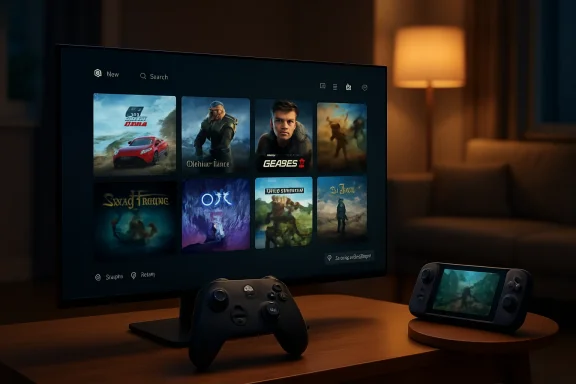 Microsoft Is No Longer Pretending the Desktop Fits Every Screen
For decades, the Windows desktop has been Microsoft’s universal answer to every question. Laptop? Desktop. Tablet? Desktop, with gestures. Touchscreen convertible? Desktop, plus hope. Gaming handheld? Desktop, but smaller, more awkward, and usually navigated with a thumbstick pretending to be a mouse.Xbox Mode is Microsoft conceding that this universality has limits. A 27-inch monitor, keyboard, and mouse can tolerate the Start menu, system tray, update nag, hidden launcher, and notification swarm. A handheld PC, a TV-connected mini PC, or a controller-only setup cannot. Those devices expose every assumption Windows still makes about how a person is sitting, what input device they are holding, and how much patience they have before launching a game.
That is why the feature’s origin story matters. Before Xbox Mode arrived for standard Windows 11 PCs, Microsoft pushed the Xbox full-screen experience on Windows handhelds, especially around the ROG Xbox Ally line. The problem it was solving was not theoretical. Handheld PC gaming has been haunted by a simple contradiction: the hardware is console-like, the games are PC games, but the operating system behaves as though a keyboard and mouse are always nearby.
Valve solved that contradiction with SteamOS by hiding Linux behind a purpose-built gaming interface. Microsoft, for obvious reasons, cannot hide Windows quite so easily. Windows is not merely the platform; it is the business model, compatibility promise, driver layer, enterprise expectation, developer target, and political settlement between decades of software vendors. Xbox Mode is therefore not a replacement for Windows. It is a truce between Windows and the moments when users would rather forget Windows is there.
The Console Interface Is Really a Performance Argument
Microsoft’s public language emphasizes immersion, controller navigation, and a “console-inspired” experience. That is safe marketing. Nobody objects to a better library screen. But the more interesting claim is that Xbox Mode minimizes background distractions, because that phrase points to the real complaint PC gamers have been making for years.The Windows gaming problem has never been that Windows cannot run games. It can run more of them than anything else. The problem is that Windows runs everything else too, whether the player asked for it or not: launchers, overlays, updaters, tray utilities, RGB control panels, telemetry components, notification brokers, browser helpers, sync clients, and vendor services with names that sound like rejected Marvel organizations. On a high-end desktop, those background processes are an annoyance. On a handheld, they are battery life, memory pressure, thermals, and dropped frames.
Xbox Mode will not magically turn Windows into a lean console OS. It still sits on top of Windows 11, and Microsoft is not promising that a gaming PC suddenly becomes an Xbox Series X. But even the attempt to create a quieter, more game-centered session changes the conversation. Microsoft is acknowledging that less Windows can be a feature.
That is a delicate thing for Microsoft to say. The company wants the openness of PC gaming when it is competing with closed consoles, but it wants the polish of consoles when it is competing with Steam Deck. Xbox Mode is the compromise: a controller-first shell that keeps the Windows escape hatch visible, rather than a locked-down appliance that would alienate the very PC audience Microsoft needs.
The ROG Xbox Ally Was the Test Bed, Not the Destination
The ROG Xbox Ally made the problem impossible to ignore. Its pitch depended on the idea that Windows handhelds could offer the breadth of PC gaming without the rough edges that made earlier devices feel like enthusiast kits. Yet the moment users had to poke at desktop windows, dismiss pop-ups, sign into launchers, or fight scaling issues, the illusion broke.That is why Xbox Mode’s migration from handhelds to standard PCs is more than a feature rollout. It is the productization of lessons learned from a category where Microsoft was at risk of being the weak link. AMD APUs, high-refresh displays, fast storage, and improved controller hardware have made Windows handhelds credible. Windows itself remained the least console-like part of the experience.
By bringing the interface to desktops, laptops, and tablets, Microsoft is broadening the use case. The company is no longer saying, “This is for handhelds because handhelds are awkward.” It is saying, “There are many times when a Windows PC should behave like a gaming device first.” That includes living-room PCs, docked handhelds, gaming laptops connected to TVs, and desktops used from the couch.
The move also gives Microsoft a larger feedback surface. Handheld users are vocal, but they are still a subset. Desktop users will reveal different pain points: multi-monitor quirks, launcher behavior, HDR switching, audio device confusion, controller pairing, sleep and resume reliability, and the usual Windows Update timing anxiety. If Xbox Mode is going to become a serious layer of the Windows gaming stack, Microsoft needs that mess.
A Unified Library Is the Prize Microsoft Still Has to Earn
One of Xbox Mode’s most important promises is an aggregated game library. In practical terms, that means players can browse Xbox PC titles, PC Game Pass games, and installed games from other storefronts that the Xbox app can see or that users manually add. That is the right ambition, because the PC gaming market is fragmented by design.Steam, Epic Games Store, Battle.net, GOG, Ubisoft Connect, EA app, itch.io, and publisher-specific launchers all want to be the first screen. Microsoft cannot realistically beat Steam by pretending Steam does not exist. Xbox Mode’s smarter play is to become the living-room layer above the storefront fight.
This is where the April Xbox update matters almost as much as Xbox Mode itself. Microsoft is adding the ability, at least in its PC and handheld context, to manually add installed games or apps to the Xbox library, customize how they appear, and set launch options. That sounds mundane until you remember that PC gaming is full of edge cases: modded executables, non-Steam shortcuts, emulators, fan patches, alternate launch parameters, and games installed in places no tidy app ecosystem would choose.
If Xbox Mode is too pure, it fails. PC gamers do not live in one catalog. They have libraries that look like archaeological digs. Microsoft’s challenge is to make the interface feel clean without requiring the user’s gaming life to become clean first.
The company’s decision to include a gamepad cursor is part of the same realism. A controller-first interface is only as strong as its weakest unavoidable dialog box. Spotify, Discord, installers, launchers, account prompts, mod managers, and cloud sync warnings all have a way of appearing precisely when a player has put the mouse away. Turning the controller into a pointer is not elegant, but it is honest. The PC cannot be console-smooth until every app in the chain behaves, and every app in the chain will not behave.
SteamOS Forced Microsoft to Argue With Its Own Platform
It is impossible to read Xbox Mode outside the shadow of Steam Deck. Valve did not invent handheld PC gaming, but it gave the category a coherent software answer. SteamOS boots into a gaming interface, handles suspend and resume with console-like confidence, and treats the desktop as a secondary mode rather than the main event.Microsoft’s answer has been slower because Microsoft’s problem is harder. Valve can optimize around Steam. Microsoft must support Steam, Game Pass, Epic, anti-cheat systems, legacy Win32 software, vendor drivers, Xbox services, Microsoft Store packaging, and the open chaos that made Windows dominant in the first place. The same openness that gives Windows its unmatched catalog makes it difficult to polish.
Xbox Mode is therefore not a SteamOS clone. It is Microsoft trying to achieve some of SteamOS’s emotional effect without giving up the Windows contract. The user should feel as though they are in a gaming environment, but the system must still be able to fall back to the desktop, run arbitrary software, and accommodate the weirdness of PC hardware.
That compromise will frustrate purists on both sides. Console players may wonder why launchers, account prompts, driver updates, and Windows behaviors still leak through. PC traditionalists may see a full-screen Xbox shell as another attempt to funnel attention toward Microsoft’s services. Both critiques have merit. The reason Xbox Mode still matters is that Microsoft cannot afford to satisfy only one of those groups.
The Feature Is Optional, but the Strategy Is Not
Microsoft is careful to present Xbox Mode as a choice. Users can jump into it when they want, and jump back to the Windows 11 desktop when they need to. That is the right posture for standard PCs, where the phrase “boot directly into Xbox” would cause predictable panic among users who bought a computer, not a console.But optional features can still reveal mandatory strategy. Microsoft’s gaming future increasingly depends on making Xbox a screen-agnostic identity: console, PC, handheld, cloud, mobile, and TV. The brand cannot rely solely on a box under the television. It has to feel coherent across devices that behave very differently.
Xbox Mode is one piece of that coherence. The Xbox app, Game Bar, PC Game Pass, Xbox Play Anywhere, cloud gaming, and cross-device play history are others. The company is trying to build a layer that says: wherever you are, this is still Xbox. The harder part is making that feel useful rather than merely branded.
Consistency is not the same as sameness. A console interface on a desktop can feel patronizing if it hides too much. A desktop interface on a handheld can feel negligent if it exposes too much. Xbox Mode is Microsoft’s attempt to create a middle tier: not the raw desktop, not a closed console, but a gaming-first session that understands a controller is in the user’s hands.
The Living Room PC Gets Another Chance
The living-room PC has been “about to happen” for roughly twenty years. Windows Media Center had a moment. Steam Machines had a moment. Mini PCs, home theater PCs, and couch gaming rigs have all had communities, but none became the default alternative to a console. The reasons were familiar: complexity, input friction, inconsistent sleep behavior, storefront sprawl, and the general indignity of troubleshooting a PC from ten feet away.Xbox Mode does not erase those problems, but it attacks the most visible one. A living-room PC should not greet the user with desktop clutter. It should not require a keyboard to launch the game everyone came to play. It should not make a $2,000 gaming rig feel less accessible than a $300 console.
The interesting possibility is not that Xbox Mode replaces consoles. It is that it makes a Windows PC more acceptable in console territory. A user with a gaming laptop can plug into a TV and enter a controller-first environment. A compact desktop can become a more plausible family-room machine. A handheld can dock without immediately exposing Windows scaling weirdness to everyone on the couch.
Still, the living room is unforgiving. A desktop user will tolerate a misbehaving launcher. A couch user will resent it. A handheld user may fiddle with settings. A family member handed a controller expects the thing to work. If Xbox Mode is going to earn living-room trust, Microsoft will need to treat small interruptions as major failures.
Enterprise IT Will See Another Consumer Shell Riding on Windows
For WindowsForum readers on the admin side, Xbox Mode may look less like a gaming milestone and more like another Windows surface that has to be understood, governed, or disabled. That reaction is not paranoia. Windows 11 already carries a mix of consumer and enterprise identities, and gaming features can raise policy questions in managed environments.The rollout through Windows Update means administrators will want to know where Xbox Mode appears, which editions receive it, how it interacts with the Xbox app and Game Bar, and what controls exist through policy or provisioning. A gaming interface on a personal laptop is harmless. The same interface on a shared workstation, classroom device, or corporate laptop may be unwelcome noise.
Microsoft’s challenge here is familiar: the company sells one Windows to many audiences. Gamers want fewer barriers. IT wants predictable configuration. OEMs want differentiated devices. Microsoft wants services visible. Xbox Mode can be a win for consumer Windows while still adding another variable for organizations that already spend too much time removing distractions from managed builds.
The good news is that Xbox Mode’s current framing is user-initiated and gaming-centered, not a forced replacement for the desktop. The better news would be clear documentation, policy hooks, and edition-aware defaults. If Microsoft wants Xbox Mode to be seen as polish rather than bloat, it should make the administrative story boring.
The Branding Shift Says More Than the Feature Name
The move from “full screen experience” to “Xbox Mode” is a small branding change with a large strategic tell. “Full screen experience” describes a UI state. “Xbox Mode” describes an identity. Microsoft wants this to be understood not as a windowing trick but as a deliberate way for Windows to become Xbox-like when the user asks it to.That is consistent with the company’s broader gaming rhetoric. Xbox is no longer just console hardware; it is a platform concept spread across devices. But slogans are cheap. The difficult part is making Xbox on Windows feel like more than a subscription storefront.
For years, Microsoft has struggled with PC gamers’ perception that the Xbox app is a necessary inconvenience rather than a beloved hub. Game Pass improved the value proposition, but the app experience has often lagged behind Steam in reliability, flexibility, social gravity, and user trust. Xbox Mode puts that app-adjacent experience under brighter lights. If it is slow, buggy, or too Microsoft-centric, users will not judge it as a minor app problem. They will judge it as the face of Xbox on PC.
The name also raises expectations. “Mode” implies a system-level transformation, not just a maximized app. Users will expect better controller behavior, fewer interruptions, faster access to games, cleaner task switching, and sensible handling of non-Xbox titles. If Microsoft uses the word Xbox, players will bring console expectations with them.
The Rollout Is Gradual Because the Edge Cases Are the Product
Microsoft says Xbox Mode is beginning in select markets and expanding over the following weeks. That kind of gradual rollout is standard for Windows features, but here it is especially sensible. A full-screen gaming layer touches too many unpredictable pieces to ship with swagger.PC gaming edge cases are not rare exceptions; they are the product. One user launches a Game Pass title with cloud saves. Another launches a Steam game with a third-party launcher. Another has three monitors, one HDR TV, a Bluetooth controller, a USB headset, a Discord overlay, a mod manager, and an antivirus pop-up waiting in ambush. Another expects a handheld to wake instantly, reconnect Wi-Fi, resume audio, and preserve battery.
A console can be tested against a narrow hardware and software matrix. Windows cannot. The best Microsoft can do is roll carefully, gather telemetry and feedback, and improve the paths that break most often. That is less glamorous than a console launch, but it is the only realistic way to make this feature mature.
The danger is that early users will judge Xbox Mode against SteamOS and Xbox consoles, not against the previous Windows desktop experience. That comparison is harsh but inevitable. Microsoft chose the console-inspired framing, and users will evaluate the result accordingly.
Xbox Mode Makes Windows Better by Admitting Windows Is Too Much
There is a strange humility in Xbox Mode. Microsoft is not saying Windows 11 needs more visible capability. It is saying that, for gaming, Windows 11 sometimes needs to get out of the way. That is a healthier design instinct than the old impulse to add another panel, another feed, another notification, another integration.The most successful consumer technology often wins by reducing the number of decisions a person has to make before doing the thing they actually intended to do. Consoles win because the path from power button to play is short. Steam Deck wins because the interface respects the fact that a handheld is not a laptop. Windows has often won despite its friction because compatibility was worth it.
Xbox Mode tries to preserve that compatibility while reducing the visible cost. That is exactly the right problem to solve. It is also the kind of problem Microsoft historically struggles to finish, because the company’s ecosystem incentives tend to reintroduce clutter over time.
If Xbox Mode becomes another surface for promotions, engagement widgets, subscription nudges, and default-service politics, it will betray its premise. If it remains focused on the player’s library, controller navigation, quick switching, and reduced background noise, it could become one of the more important Windows gaming improvements in years.
The Real Test Will Be the First Time Something Goes Wrong
A polished launch screen is easy to demo. Failure states define platforms. What happens when a game needs an update from another launcher? What happens when a title opens a browser login? What happens when Windows wants a reboot? What happens when the controller disconnects, HDR fails to engage, audio switches to the wrong device, or a cloud save conflict appears behind the full-screen shell?These are the moments where console-like experiences either hold or collapse. Xbox Mode cannot prevent every PC problem, but it can decide whether the user remains in a coherent, controller-navigable flow or gets dumped back into desktop archaeology. The difference between those outcomes is the difference between a mode people use daily and a novelty they try once.
Microsoft’s advantage is that it controls more of the stack than most PC gaming companies. It controls Windows, DirectX, the Xbox app, Game Bar, the Microsoft Store, Game Pass, and a growing amount of Xbox identity infrastructure. Its disadvantage is that PC gamers live outside Microsoft’s stack as often as inside it.
That means Xbox Mode should be judged less by how beautifully it launches Halo or Forza and more by how gracefully it handles the messy middle of PC gaming. The feature’s credibility will be built in Steam shortcuts, EA sign-ins, Discord windows, modded games, obscure indie launchers, and the thousand tiny interruptions that separate a PC from a console.
The Console War Is Becoming an Interface War
Xbox Mode arrives at a moment when the old console-war map is less useful than it used to be. Microsoft publishes more broadly, cloud gaming keeps shifting the definition of a device, handheld PCs blur the line between console and computer, and subscription libraries compete with storefront loyalty. The fight is no longer only about which box has which exclusive. It is about which interface becomes the player’s default starting point.Steam owns that starting point for many PC gamers. Xbox owns it on Xbox consoles. Sony owns it on PlayStation. Nintendo owns it through hardware-software integration that remains stubbornly effective. Microsoft’s problem is that Windows, despite being the dominant PC gaming platform, does not automatically make Xbox the default PC gaming experience.
Xbox Mode is an attempt to change that without closing the PC. It invites Microsoft to say: keep your PC games, keep your storefronts, keep your desktop, but when you want to play with a controller, start here. That is a more plausible strategy than trying to force PC gamers into a walled garden they will reject.
The risk is that “start here” becomes “shop here.” Users can smell when an interface is designed around corporate priorities rather than their own. If Xbox Mode privileges the player’s actual library, it has a chance. If it privileges Microsoft’s preferred catalog at the expense of everything else, it will become another launcher in a market already exhausted by launchers.
The April Rollout Gives Microsoft a Narrow Opening
The immediate practical advice is simple: Windows 11 users in supported markets should watch Windows Update, enable the option to receive the latest updates as soon as they are available if they want early access, and expect availability to expand gradually rather than appear everywhere at once. Once installed, Xbox Mode is designed to be entered from the PC experience rather than replacing the desktop outright.But the larger lesson is that Microsoft is finally treating gaming input and device context as first-class Windows design constraints. That is overdue. The PC is no longer just a desk machine, and Windows cannot keep assuming that every gaming session begins with a mouse pointer.
The next few weeks will reveal how much of Xbox Mode is architecture and how much is presentation. A controller-friendly library is welcome. A quieter Windows gaming session is better. A reliable living-room and handheld layer that can survive real PC chaos would be genuinely significant.
Microsoft’s New Xbox Door Into Windows Has to Stay Open Without Becoming Noisy
Xbox Mode’s first version should be understood as a foundation, not a finish line. The concrete wins are modest, but they point in the right direction for anyone who uses Windows as a gaming machine beyond the desk.- Xbox Mode is rolling out gradually to Windows 11 PCs in select markets, with broader availability expected over the following weeks rather than as a single global switch.
- The feature provides a controller-optimized, full-screen interface for browsing and launching games while preserving access to the regular Windows 11 desktop.
- Microsoft is positioning the mode as a bridge between Xbox, PC Game Pass, Windows handhelds, and games installed from other PC storefronts.
- The accompanying Xbox PC updates, including manual library additions, pinned games, gamepad cursor support, and notification placement controls, are crucial to making the mode usable outside Microsoft’s own catalog.
- The real measure of success will be how well Xbox Mode handles messy PC realities such as third-party launchers, update prompts, overlays, sleep and resume behavior, and non-controller-friendly apps.
- For managed Windows environments, the feature is another reason to watch gaming-related Windows components, Game Bar behavior, and policy controls closely as the rollout expands.
Source: Pure Xbox https://www.purexbox.com/news/2026/...ng-a-console-inspired-experience-to-pc-users/
