

Microsoft made Auto Super Resolution available in preview to Xbox Insiders on the ROG Xbox Ally X on April 30, 2026, initially for docked play on external displays through Windows 11, Xbox Game Bar, and an updated Auto SR package. That narrow rollout sounds like a footnote, but it is really a test of Microsoft’s larger bet: that Windows handhelds can become console-like not by hiding the PC, but by teaching Windows to behave better under gamepad pressure. AutoSR is the flashy part. The real story is whether Microsoft can make the Windows gaming stack feel intentional on hardware that has never had much room for waste.
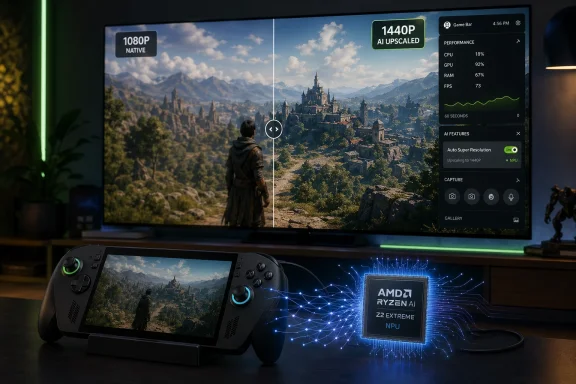
AutoSR was one of the more intriguing promises attached to the ROG Xbox Ally X because it suggested a new role for the neural processing unit sitting inside AMD’s Ryzen AI Z2 Extreme. For months, that NPU was mostly a future-tense specification, the sort of line item that looks good on a product page while gamers wait for software to justify it. Now Microsoft is finally putting it to work.
The preview is limited, and that limitation is revealing. AutoSR is not rolling out as a universal magic switch for every handheld scenario. It starts with the Ally X connected to a TV or external monitor, where a 7-inch 1080p portable PC suddenly has to satisfy the expectations of a living-room screen.
That is exactly where handheld PCs tend to look least console-like. The silicon may be efficient, the software may be optimized, and the library may be enormous, but dock a Windows handheld to a 1440p display and the seams show quickly. A game that feels acceptable at 720p or 900p in your hands can look soft, unstable, or simply underpowered once it is blown up across a television.
Microsoft’s answer is to render lower, upscale higher, and offload the reconstruction work to the NPU instead of asking the GPU to do still more work. That is not a new ambition in graphics. It is, however, a meaningful shift in where the work happens.
AutoSR gives the NPU a clean job description. The GPU renders a game at a lower internal resolution, and the NPU runs an AI model that reconstructs the image for a higher-resolution output. Microsoft’s argument is that this allows a larger model than the tiny upscaling workloads that must fit inside a GPU frame-time budget.
That matters on handhelds because memory bandwidth is one of the quiet villains of portable PC gaming. A device like the Ally X can have capable integrated graphics and still run into the brutal arithmetic of shared memory, limited power, and thermal limits. Every frame is a negotiation between pixels, textures, bandwidth, wattage, and heat.
By moving the upscaling model to the NPU, Microsoft is trying to avoid some of that contention. The GPU gets to move on to the next frame while the NPU handles reconstruction in parallel. The tradeoff is not free: Microsoft is clear that AutoSR can add a frame of latency. But in the docked, big-screen use case, the company is betting that better image quality and higher apparent performance will be worth that cost.
This is also why AutoSR is not simply “DLSS for Xbox Ally.” Nvidia’s DLSS, AMD’s FSR, Intel’s XeSS, Radeon Super Resolution, and Nvidia Image Scaling all occupy different places in the upscaling hierarchy. Some are deeply integrated into games and can use motion vectors and other engine-level data. Others sit closer to the driver and work more broadly, but with less knowledge of the scene. AutoSR is Microsoft trying to carve out a third lane: broad Windows-level availability with a more ambitious AI reconstruction model than a conventional spatial scaler.
It is also the risk. Game-agnostic graphics features tend to be compelling in slides and uneven in practice. A technique that sits outside the game engine can help titles that would never receive native upscaler support, but it also has less context than a game-integrated solution. It may not know enough about motion, fine UI elements, particle effects, temporal instability, or post-processing quirks to behave perfectly everywhere.
Microsoft appears to understand this, which is why the feature is arriving through the Xbox Insider path rather than as a fully polished consumer default. Game Bar will show AutoSR status and controls, and users may need to follow game-specific guidance. That is preview language, but it is also Windows language: powerful, flexible, sometimes fiddly.
The bigger strategic question is how much fiddliness Xbox-branded hardware can tolerate. The Xbox Ally X is not a Steam Deck, and it is not a traditional Xbox console. It is a Windows 11 PC with Xbox ergonomics, Xbox software affordances, and access to the chaos and abundance of PC gaming. AutoSR has to live inside that compromise.
If it works well, Microsoft gets a feature that makes non-optimized PC games look better on a device that needs every efficiency trick it can get. If it works inconsistently, AutoSR risks becoming another setting that enthusiasts understand and ordinary players ignore.
A docked handheld wants to be a console. It wants to wake cleanly, detect the TV, choose the right display, pair with the controller, avoid desktop detours, and land the player in a game without requiring a mouse. Historically, Windows has been bad at that. It can do everything, but it often asks the user to prove they know where the settings are.
The latest Xbox Ally updates around external displays are therefore as important as AutoSR itself. Moving display controls into Xbox Game Bar, improving controller behavior, and making external display handling less dependent on desktop settings are not glamorous engineering feats. They are the kind of plumbing that determines whether a product feels finished.
This is where Microsoft’s handheld project becomes more interesting than another device launch. The Ally X is a retail product, but it is also a proving ground for a living-room Windows experience. Every improvement to Game Bar, display management, controller navigation, and full-screen Xbox mode is a small step toward making Windows less hostile to the couch.
AutoSR fits that same pattern. It is not just about squeezing more frames from the Z2 Extreme. It is about making a Windows handheld more credible when it is asked to impersonate a console.
This is why the “automatic” in AutoSR needs to be handled carefully. Automatic should not mean invisible or unavoidable. It should mean discoverable, understandable, and easy to reverse. If Microsoft buries the feature too deeply, players will miss it. If it enables too aggressively, players will blame the hardware for input lag they did not knowingly choose.
The best version of AutoSR is situational. It should be a strong recommendation when a game is struggling below 60 FPS on an external display. It should be less insistent when a game already runs well, or when latency matters more than image reconstruction. Microsoft’s Game Bar integration is the right venue because it can meet players where they already adjust performance, capture, audio, and display behavior.
That said, Microsoft is walking into a trust problem that PC gamers know well. Upscaling, frame generation, and driver-level enhancements can improve the experience, but they can also muddy performance claims. A “30 percent” uplift can mean many things depending on render resolution, output resolution, settings, power mode, and whether the game is bandwidth-limited or compute-limited.
The right way to evaluate AutoSR will not be a single FPS chart. It will be a matrix of image quality, latency, power draw, frame pacing, and ease of use. On a handheld, performance is never just performance. It is performance under constraint.
That hybridity is the point. Microsoft’s gaming strategy has been moving away from the idea that Xbox is a single box under the TV. Xbox is a service layer, a store, a controller language, a subscription business, a cloud endpoint, and increasingly a Windows gaming shell. The Ally X is what happens when that strategy becomes hardware you can hold.
AutoSR helps Microsoft tell a more coherent hardware story. The NPU is no longer a speculative AI accessory. It is part of the gaming pipeline. The Xbox button is no longer just branding. It becomes the way users reach the controls that make docked play tolerable. Windows is no longer merely the compatibility layer. It becomes the substrate for features that a traditional console might have handled at the system level.
None of this makes the Ally X a mainstream console. It remains too expensive, too PC-like, and too dependent on user tolerance for troubleshooting to replace an Xbox Series X or a Steam Deck OLED in most households. But it does make the device a useful preview of where Microsoft wants Xbox-on-Windows to go.
The company is not trying to beat Valve by copying SteamOS overnight. It is trying to make Windows less embarrassing in the places where SteamOS feels effortless.
The more interesting targets are older games, mid-budget games, and live-service titles that do not receive cutting-edge rendering updates. These are the games that make PC handhelds appealing in the first place: not just the latest showcase releases, but the backlog, the oddities, the multiplayer staples, and the comfort games that players already own.
A system-level upscaler can widen the performance envelope for those games without waiting for developers to revisit them. That is especially important on Windows handhelds because the library is so broad and uneven. Microsoft does not control the whole stack the way Nintendo controls the Switch or Valve increasingly shapes the Deck’s verified experience.
AutoSR is, in effect, a compatibility feature masquerading as a graphics feature. It tries to make more of the PC library feel viable in a scenario where the hardware is being pushed beyond its native comfort zone. That is a very Microsoft sort of solution: build a layer that absorbs inconsistency below it.
The danger is that games with native, engine-aware upscalers will often still look better using those built-in methods. Microsoft’s own guidance acknowledges that game-integrated super resolution remains the preferred option when available and effective. AutoSR is not here to dethrone the best implementations of DLSS or FSR. It is here to cover the gaps.
But handheld mode changes the calculation. Battery life becomes central. Thermal headroom tightens. The NPU may be efficient, but it is not free. If AutoSR draws enough power to reduce battery life materially, Microsoft will have to decide whether the gain in image quality is worth the loss in portability.
There is also the matter of visual payoff. On a 7-inch screen, the difference between native rendering, a good game-integrated upscaler, and a system-level reconstruction method may be less obvious than it is on a 1440p monitor or TV. Players may prefer lower latency, longer battery life, or higher frame rates over cleaner reconstruction.
That does not mean handheld AutoSR is unnecessary. It means Microsoft needs a sharper policy for when to recommend it. The best handheld gaming experiences are not the ones that expose every possible toggle; they are the ones that select sane defaults and then give enthusiasts room to override them.
If AutoSR becomes available in portable mode, it should arrive with careful presets tied to power profiles, refresh targets, and game behavior. Otherwise, Microsoft risks adding another layer of PC decision fatigue to a category that succeeds when it hides complexity.
This is why Microsoft’s software work matters. The company cannot simply wait for AMD to deliver faster APUs and expect Windows handhelds to become consoles by accident. It has to reduce overhead, smooth the interface, improve sleep and resume, rationalize settings, and make docked behavior predictable.
AutoSR contributes to that effort, but it is only one part of the equation. A 30 percent improvement in a favorable scenario is meaningful, especially if it turns a borderline docked experience into a playable one. But a user who needs a mouse to fix display settings, a keyboard to dismiss a Windows dialog, or a forum thread to understand why a game will not launch is not having a console experience.
That is the tension Microsoft must resolve. Windows is the reason the Ally X can run so many games and stores. Windows is also the reason the device can feel less appliance-like than its console branding implies. Every new Game Bar control is an admission that the desktop cannot be the default interface for this form factor.
The most optimistic reading is that Microsoft has finally identified the right layer to fix. Instead of pretending Windows is already fine for handhelds, it is building a gaming shell that increasingly handles the practical things players need. AutoSR is valuable because it lives in that shell, not because it is another obscure graphics setting buried three panels deep.
Nintendo’s Switch succeeded not because it had the strongest hardware, but because docking and undocking were conceptually obvious. Valve’s Steam Deck succeeded because SteamOS made a Linux handheld feel more appliance-like than most Windows gaming laptops. Microsoft and Asus are trying to sell a more open, more powerful, more flexible version of that idea, but flexibility is only an advantage after the basics feel easy.
AutoSR’s docked debut is therefore a symbolic milestone. Microsoft is acknowledging that a handheld connected to a TV is not merely a PC with an HDMI cable. It is a living-room device with different expectations. The player is farther from the screen, using a controller, expecting the display to configure itself, and judging the experience against consoles.
That is a high bar for Windows. It is also where Microsoft has the most to gain. If Windows handhelds can become credible both in the hand and on the TV, they occupy a space that neither traditional consoles nor locked-down handhelds fully own. They become portable PCs with console manners.
AutoSR will not deliver that future alone. But it is one of the first features that treats the Ally X’s unusual hardware combination as a platform rather than a bundle of parts.
That distinction matters because handheld PC buyers are already navigating a crowded field of near-overlapping devices. A faster APU is easy to understand for a year and then easy to surpass. A software feature pipeline tied to specialized hardware can age differently. If Microsoft keeps adding NPU-backed gaming features, the Ally X’s premium may look less like an early-adopter tax and more like access to a specific roadmap.
But Microsoft has to earn that interpretation. One preview feature, limited to docked play, is not enough to justify grand claims about AI gaming. Users have heard too many vague promises about NPUs changing everything. What makes AutoSR interesting is that it is measurable: either the game looks better at a higher output resolution with acceptable latency and frame pacing, or it does not.
The feature’s first months will therefore be defined by community testing. Enthusiasts will compare screenshots, frame-time graphs, capture footage, latency impressions, and battery behavior. They will discover which games benefit, which games glitch, and which settings combinations make the most sense. Microsoft should welcome that scrutiny because it is the only way AutoSR becomes more than a launch promise finally checked off.
Source: IGN Southeast Asia The Xbox Ally X's Fancy Upscaling Tech Is Available to Xbox Insiders Today
 Microsoft’s Upscaler Arrives as a Docked-Mode Reality Check
AutoSR was one of the more intriguing promises attached to the ROG Xbox Ally X because it suggested a new role for the neural processing unit sitting inside AMD’s Ryzen AI Z2 Extreme. For months, that NPU was mostly a future-tense specification, the sort of line item that looks good on a product page while gamers wait for software to justify it. Now Microsoft is finally putting it to work.The preview is limited, and that limitation is revealing. AutoSR is not rolling out as a universal magic switch for every handheld scenario. It starts with the Ally X connected to a TV or external monitor, where a 7-inch 1080p portable PC suddenly has to satisfy the expectations of a living-room screen.
That is exactly where handheld PCs tend to look least console-like. The silicon may be efficient, the software may be optimized, and the library may be enormous, but dock a Windows handheld to a 1440p display and the seams show quickly. A game that feels acceptable at 720p or 900p in your hands can look soft, unstable, or simply underpowered once it is blown up across a television.
Microsoft’s answer is to render lower, upscale higher, and offload the reconstruction work to the NPU instead of asking the GPU to do still more work. That is not a new ambition in graphics. It is, however, a meaningful shift in where the work happens.
The NPU Finally Gets a Gaming Job
For the past few years, the NPU has been marketed as the next great client-PC accelerator, even as many buyers struggled to name a daily task that truly depended on it. Webcam effects, transcription, local generative AI, and battery-friendly background processing have all had their moments. Gaming, though, is a harsher test because gamers are very good at noticing when theory becomes latency, blur, or stutter.AutoSR gives the NPU a clean job description. The GPU renders a game at a lower internal resolution, and the NPU runs an AI model that reconstructs the image for a higher-resolution output. Microsoft’s argument is that this allows a larger model than the tiny upscaling workloads that must fit inside a GPU frame-time budget.
That matters on handhelds because memory bandwidth is one of the quiet villains of portable PC gaming. A device like the Ally X can have capable integrated graphics and still run into the brutal arithmetic of shared memory, limited power, and thermal limits. Every frame is a negotiation between pixels, textures, bandwidth, wattage, and heat.
By moving the upscaling model to the NPU, Microsoft is trying to avoid some of that contention. The GPU gets to move on to the next frame while the NPU handles reconstruction in parallel. The tradeoff is not free: Microsoft is clear that AutoSR can add a frame of latency. But in the docked, big-screen use case, the company is betting that better image quality and higher apparent performance will be worth that cost.
This is also why AutoSR is not simply “DLSS for Xbox Ally.” Nvidia’s DLSS, AMD’s FSR, Intel’s XeSS, Radeon Super Resolution, and Nvidia Image Scaling all occupy different places in the upscaling hierarchy. Some are deeply integrated into games and can use motion vectors and other engine-level data. Others sit closer to the driver and work more broadly, but with less knowledge of the scene. AutoSR is Microsoft trying to carve out a third lane: broad Windows-level availability with a more ambitious AI reconstruction model than a conventional spatial scaler.
Broad Compatibility Is the Promise, Not the Proof
The most seductive claim around AutoSR is that it should work across a broad range of DirectX games without developers integrating it one title at a time. Microsoft’s own preview guidance points to DirectX 10 or later games, and the suggested test list includes a mix of older titles, modern AAA releases, and service games. That breadth is the hook.It is also the risk. Game-agnostic graphics features tend to be compelling in slides and uneven in practice. A technique that sits outside the game engine can help titles that would never receive native upscaler support, but it also has less context than a game-integrated solution. It may not know enough about motion, fine UI elements, particle effects, temporal instability, or post-processing quirks to behave perfectly everywhere.
Microsoft appears to understand this, which is why the feature is arriving through the Xbox Insider path rather than as a fully polished consumer default. Game Bar will show AutoSR status and controls, and users may need to follow game-specific guidance. That is preview language, but it is also Windows language: powerful, flexible, sometimes fiddly.
The bigger strategic question is how much fiddliness Xbox-branded hardware can tolerate. The Xbox Ally X is not a Steam Deck, and it is not a traditional Xbox console. It is a Windows 11 PC with Xbox ergonomics, Xbox software affordances, and access to the chaos and abundance of PC gaming. AutoSR has to live inside that compromise.
If it works well, Microsoft gets a feature that makes non-optimized PC games look better on a device that needs every efficiency trick it can get. If it works inconsistently, AutoSR risks becoming another setting that enthusiasts understand and ordinary players ignore.
Docked Play Is Where Windows Still Looks Least Like Xbox
The decision to start with docked play is technically sensible, but it also exposes the unresolved problem at the heart of Windows handhelds. Portable mode has its compromises, yet it is at least coherent: a small screen, integrated controls, battery-aware performance modes, and a front-end designed to reduce desktop friction. Docked mode asks Windows to perform a much harder illusion.A docked handheld wants to be a console. It wants to wake cleanly, detect the TV, choose the right display, pair with the controller, avoid desktop detours, and land the player in a game without requiring a mouse. Historically, Windows has been bad at that. It can do everything, but it often asks the user to prove they know where the settings are.
The latest Xbox Ally updates around external displays are therefore as important as AutoSR itself. Moving display controls into Xbox Game Bar, improving controller behavior, and making external display handling less dependent on desktop settings are not glamorous engineering feats. They are the kind of plumbing that determines whether a product feels finished.
This is where Microsoft’s handheld project becomes more interesting than another device launch. The Ally X is a retail product, but it is also a proving ground for a living-room Windows experience. Every improvement to Game Bar, display management, controller navigation, and full-screen Xbox mode is a small step toward making Windows less hostile to the couch.
AutoSR fits that same pattern. It is not just about squeezing more frames from the Z2 Extreme. It is about making a Windows handheld more credible when it is asked to impersonate a console.
The Latency Tradeoff Will Separate the Believers From the Skeptics
Microsoft’s own explanation of AutoSR contains the line that will matter most to competitive players: the technique can exchange near-zero GPU frame-time overhead for an extra frame of latency. That is a reasonable engineering trade, but not a universal one. A cinematic single-player RPG, racing game, or adventure title may benefit greatly from cleaner 1440p presentation. A twitch shooter may not.This is why the “automatic” in AutoSR needs to be handled carefully. Automatic should not mean invisible or unavoidable. It should mean discoverable, understandable, and easy to reverse. If Microsoft buries the feature too deeply, players will miss it. If it enables too aggressively, players will blame the hardware for input lag they did not knowingly choose.
The best version of AutoSR is situational. It should be a strong recommendation when a game is struggling below 60 FPS on an external display. It should be less insistent when a game already runs well, or when latency matters more than image reconstruction. Microsoft’s Game Bar integration is the right venue because it can meet players where they already adjust performance, capture, audio, and display behavior.
That said, Microsoft is walking into a trust problem that PC gamers know well. Upscaling, frame generation, and driver-level enhancements can improve the experience, but they can also muddy performance claims. A “30 percent” uplift can mean many things depending on render resolution, output resolution, settings, power mode, and whether the game is bandwidth-limited or compute-limited.
The right way to evaluate AutoSR will not be a single FPS chart. It will be a matrix of image quality, latency, power draw, frame pacing, and ease of use. On a handheld, performance is never just performance. It is performance under constraint.
The Ally X Becomes Microsoft’s Smallest Console Lab
The ROG Xbox Ally X is a strange device in the best and worst senses. It carries the Xbox name, but it is not locked to the Xbox console ecosystem. It runs Windows, but it tries to route users around the least pleasant parts of Windows. It has handheld ergonomics, yet Microsoft is now prioritizing its docked behavior.That hybridity is the point. Microsoft’s gaming strategy has been moving away from the idea that Xbox is a single box under the TV. Xbox is a service layer, a store, a controller language, a subscription business, a cloud endpoint, and increasingly a Windows gaming shell. The Ally X is what happens when that strategy becomes hardware you can hold.
AutoSR helps Microsoft tell a more coherent hardware story. The NPU is no longer a speculative AI accessory. It is part of the gaming pipeline. The Xbox button is no longer just branding. It becomes the way users reach the controls that make docked play tolerable. Windows is no longer merely the compatibility layer. It becomes the substrate for features that a traditional console might have handled at the system level.
None of this makes the Ally X a mainstream console. It remains too expensive, too PC-like, and too dependent on user tolerance for troubleshooting to replace an Xbox Series X or a Steam Deck OLED in most households. But it does make the device a useful preview of where Microsoft wants Xbox-on-Windows to go.
The company is not trying to beat Valve by copying SteamOS overnight. It is trying to make Windows less embarrassing in the places where SteamOS feels effortless.
AutoSR Is a Feature for the Games That Get Left Behind
The most valuable use case for AutoSR may not be the newest blockbuster with a settings menu full of native upscalers. Modern AAA games increasingly ship with FSR, DLSS, XeSS, or some custom temporal scaling option. They may not always implement those features perfectly, but they usually acknowledge that upscaling is now part of PC graphics.The more interesting targets are older games, mid-budget games, and live-service titles that do not receive cutting-edge rendering updates. These are the games that make PC handhelds appealing in the first place: not just the latest showcase releases, but the backlog, the oddities, the multiplayer staples, and the comfort games that players already own.
A system-level upscaler can widen the performance envelope for those games without waiting for developers to revisit them. That is especially important on Windows handhelds because the library is so broad and uneven. Microsoft does not control the whole stack the way Nintendo controls the Switch or Valve increasingly shapes the Deck’s verified experience.
AutoSR is, in effect, a compatibility feature masquerading as a graphics feature. It tries to make more of the PC library feel viable in a scenario where the hardware is being pushed beyond its native comfort zone. That is a very Microsoft sort of solution: build a layer that absorbs inconsistency below it.
The danger is that games with native, engine-aware upscalers will often still look better using those built-in methods. Microsoft’s own guidance acknowledges that game-integrated super resolution remains the preferred option when available and effective. AutoSR is not here to dethrone the best implementations of DLSS or FSR. It is here to cover the gaps.
Handheld Mode Is the Unanswered Question
For all the logic behind a docked-first preview, the obvious question is when AutoSR comes to handheld mode. The Ally X has a 1080p display, and plenty of demanding games still struggle to run smoothly at that resolution without compromises. A lower internal render plus NPU reconstruction could be useful even on the built-in screen.But handheld mode changes the calculation. Battery life becomes central. Thermal headroom tightens. The NPU may be efficient, but it is not free. If AutoSR draws enough power to reduce battery life materially, Microsoft will have to decide whether the gain in image quality is worth the loss in portability.
There is also the matter of visual payoff. On a 7-inch screen, the difference between native rendering, a good game-integrated upscaler, and a system-level reconstruction method may be less obvious than it is on a 1440p monitor or TV. Players may prefer lower latency, longer battery life, or higher frame rates over cleaner reconstruction.
That does not mean handheld AutoSR is unnecessary. It means Microsoft needs a sharper policy for when to recommend it. The best handheld gaming experiences are not the ones that expose every possible toggle; they are the ones that select sane defaults and then give enthusiasts room to override them.
If AutoSR becomes available in portable mode, it should arrive with careful presets tied to power profiles, refresh targets, and game behavior. Otherwise, Microsoft risks adding another layer of PC decision fatigue to a category that succeeds when it hides complexity.
Windows Handhelds Need More Than Better Silicon
The Ally X’s Ryzen AI Z2 Extreme is capable silicon, but the broader handheld race has already proved that hardware alone does not decide the category. Battery capacity, screen quality, controls, thermal design, software polish, suspend behavior, shader compilation, driver updates, and storefront integration all matter. A handheld gaming PC is not a laptop with thumbsticks. It is a whole experience compressed into a very small power budget.This is why Microsoft’s software work matters. The company cannot simply wait for AMD to deliver faster APUs and expect Windows handhelds to become consoles by accident. It has to reduce overhead, smooth the interface, improve sleep and resume, rationalize settings, and make docked behavior predictable.
AutoSR contributes to that effort, but it is only one part of the equation. A 30 percent improvement in a favorable scenario is meaningful, especially if it turns a borderline docked experience into a playable one. But a user who needs a mouse to fix display settings, a keyboard to dismiss a Windows dialog, or a forum thread to understand why a game will not launch is not having a console experience.
That is the tension Microsoft must resolve. Windows is the reason the Ally X can run so many games and stores. Windows is also the reason the device can feel less appliance-like than its console branding implies. Every new Game Bar control is an admission that the desktop cannot be the default interface for this form factor.
The most optimistic reading is that Microsoft has finally identified the right layer to fix. Instead of pretending Windows is already fine for handhelds, it is building a gaming shell that increasingly handles the practical things players need. AutoSR is valuable because it lives in that shell, not because it is another obscure graphics setting buried three panels deep.
The Real Competition Is the Feeling of Effortlessness
It is tempting to frame AutoSR as a fight against DLSS, FSR, or Steam Deck performance tricks. That misses the emotional competition. The real rival is effortlessness.Nintendo’s Switch succeeded not because it had the strongest hardware, but because docking and undocking were conceptually obvious. Valve’s Steam Deck succeeded because SteamOS made a Linux handheld feel more appliance-like than most Windows gaming laptops. Microsoft and Asus are trying to sell a more open, more powerful, more flexible version of that idea, but flexibility is only an advantage after the basics feel easy.
AutoSR’s docked debut is therefore a symbolic milestone. Microsoft is acknowledging that a handheld connected to a TV is not merely a PC with an HDMI cable. It is a living-room device with different expectations. The player is farther from the screen, using a controller, expecting the display to configure itself, and judging the experience against consoles.
That is a high bar for Windows. It is also where Microsoft has the most to gain. If Windows handhelds can become credible both in the hand and on the TV, they occupy a space that neither traditional consoles nor locked-down handhelds fully own. They become portable PCs with console manners.
AutoSR will not deliver that future alone. But it is one of the first features that treats the Ally X’s unusual hardware combination as a platform rather than a bundle of parts.
The Docked Upscaler Tells Buyers Exactly What They Own
The AutoSR preview clarifies the ROG Xbox Ally X’s identity more than any spec sheet did. This is not merely the premium model with more RAM, more storage, and the better AMD chip. It is the model Microsoft can use to test AI-assisted gaming features that depend on an NPU. Buyers of the cheaper Ally are not getting the same runway.That distinction matters because handheld PC buyers are already navigating a crowded field of near-overlapping devices. A faster APU is easy to understand for a year and then easy to surpass. A software feature pipeline tied to specialized hardware can age differently. If Microsoft keeps adding NPU-backed gaming features, the Ally X’s premium may look less like an early-adopter tax and more like access to a specific roadmap.
But Microsoft has to earn that interpretation. One preview feature, limited to docked play, is not enough to justify grand claims about AI gaming. Users have heard too many vague promises about NPUs changing everything. What makes AutoSR interesting is that it is measurable: either the game looks better at a higher output resolution with acceptable latency and frame pacing, or it does not.
The feature’s first months will therefore be defined by community testing. Enthusiasts will compare screenshots, frame-time graphs, capture footage, latency impressions, and battery behavior. They will discover which games benefit, which games glitch, and which settings combinations make the most sense. Microsoft should welcome that scrutiny because it is the only way AutoSR becomes more than a launch promise finally checked off.
The Ally X Finally Gets Its AI Receipt
The early AutoSR preview is not a revolution, but it gives Windows handheld gaming a more credible direction than raw performance chasing alone. The important points are concrete, and they point to a bigger shift in how Microsoft wants Windows to behave around games.- AutoSR is available first as a preview for Xbox Insiders using the ROG Xbox Ally X in docked mode with an external display.
- The feature uses the Ryzen AI Z2 Extreme’s NPU to upscale lower-resolution game output, aiming to improve 1440p-class play without putting the same reconstruction workload on the GPU.
- Microsoft is positioning AutoSR as a broad DirectX feature for games that lack strong built-in upscaling, not as a replacement for the best native DLSS, FSR, or XeSS implementations.
- The tradeoff to watch is latency, because AutoSR can use an extra frame to run its model even as it reduces GPU frame-time pressure.
- The surrounding docked-mode improvements to Game Bar, display handling, and controller behavior may matter as much as the upscaler because they make Windows handhelds feel less like tiny laptops attached to TVs.
- Handheld-mode support remains the key missing piece, but battery life, thermals, and the smaller 1080p screen make that a more complicated decision than simply flipping the same switch everywhere.
Source: IGN Southeast Asia The Xbox Ally X's Fancy Upscaling Tech Is Available to Xbox Insiders Today
