

Windows 11 has become Microsoft’s main desktop platform for hybrid work after Windows 10 support ended on October 14, 2025, giving businesses a more secure and collaboration-friendly operating system while also forcing many of them into hardware, licensing, training, and management costs. The question is not whether Windows 11 can make hybrid work smoother; in many ordinary ways, it can. The harder question is whether those gains arrive cheaply enough to justify the migration bill. For many organizations, Windows 11 is less a free upgrade than a budget reckoning disguised as a productivity story.
Windows 11 was never merely a Start menu redesign with rounded corners. Microsoft positioned it as the desktop layer for a world where the office is no longer a single place, and where the PC must follow workers between a corporate network, a home router, a coffee-shop Wi-Fi connection, and a meeting room dock.
That pitch has real substance. Snap Layouts, virtual desktops, cleaner window management, better support for modern security baselines, and tighter integration with Microsoft 365 all address pain points that became more visible during the hybrid-work shift. The operating system is built around the assumption that the user is juggling Teams calls, browser tabs, documents, cloud files, dashboards, and endpoint security agents all day.
But the same pitch also conceals a familiar enterprise truth: when Microsoft changes the baseline, IT pays to meet it. The productivity gains are incremental and distributed across thousands of small moments. The costs, by contrast, often arrive as purchase orders, device refresh plans, deployment projects, and help desk tickets.
Snap Layouts are a good example. On a single laptop screen, they are a tidy convenience; across a docked hybrid setup with two monitors, a video call, a chat window, a browser, a spreadsheet, and a line-of-business app, they become genuinely useful. Hybrid work made context switching the default state of the knowledge worker, and Windows 11 is better than Windows 10 at making that chaos feel organized.
Virtual desktops tell the same story. The feature is not new in concept, but Windows 11 makes it feel more central and more approachable. A user can keep a client presentation, a personal browser session, and an internal project space separated without pretending that humans actually work in one tidy app at a time.
These improvements will not show up as a neat line item in a CFO’s spreadsheet. No one saves exactly 11 minutes every Tuesday because of a better snap grid. But across a company, fewer interruptions and faster recovery from context switching can matter, especially for employees who move between home, office, and travel setups.
That matters because hybrid work is not only about where people sit. It is about how quickly they can move from chat to meeting to document to decision. Microsoft’s advantage is that Windows, Microsoft 365, Teams, OneDrive, Intune, Defender, and Entra ID can be made to behave like one managed environment.
For organizations already deep into Microsoft’s stack, Windows 11 can reduce the number of seams IT has to stitch together. Policies, identity, device compliance, app deployment, and data protection can be managed as part of a wider ecosystem. That does not make the environment simple, but it does make it coherent.
The risk is lock-in by convenience. The more a business relies on Windows 11 as the front door to Microsoft 365, the more expensive it becomes to question the bundle later. Hybrid work did not create that dependency, but it made it easier to justify.
Microsoft’s hardware requirements changed the economics. TPM 2.0, Secure Boot, supported CPUs, memory, storage, and firmware expectations were framed as security necessities, not arbitrary hurdles. In fairness, the security argument is real: modern endpoint protection depends on hardware-backed trust more than older Windows eras did.
But a good security rationale does not erase the cost. Many Windows 10 PCs that still felt usable in spreadsheets, browsers, and email did not qualify cleanly for Windows 11. Some needed firmware changes. Some needed replacement. Some were simply stranded by processor support lists.
That is where the upgrade becomes a fleet-management problem. A five-year-old laptop that still runs payroll software may be acceptable from a performance standpoint but unacceptable from a Windows 11 readiness standpoint. Multiply that by hundreds or thousands of devices, and “free” becomes a word only marketing departments can love.
That deadline changed internal politics. Before end of support, IT could argue for modernization. After it, security teams could argue against delay. The difference matters because the strongest Windows 11 business case may not be “better hybrid productivity” at all; it may be “continued patching on a supported endpoint platform.”
This is where the promotional framing around hybrid work becomes too soft. The real enterprise question is not whether Snap Layouts are useful. It is whether the company can responsibly keep unsupported Windows 10 machines in circulation while employees connect from home networks and carry sensitive data across multiple locations.
Hybrid work makes the endpoint more important, not less. When the perimeter is everywhere, the laptop becomes the perimeter. That reality gives Windows 11’s security baseline more weight, but it also means organizations cannot avoid spending money somewhere.
There is device assessment. IT has to know which machines are eligible, which need firmware changes, which should be replaced, and which run specialized hardware or legacy applications. That inventory work is unglamorous, but it is where many migration projects succeed or fail.
There is deployment engineering. Even an in-place upgrade needs testing, rollback planning, application validation, driver checks, and communication. A clean device refresh may be better long term, but it raises procurement, imaging, enrollment, and logistics work.
There is user disruption. Windows 11 is not alien to Windows 10 users, but it is different enough to generate questions: the centered taskbar, changed settings paths, altered context menus, new defaults, and evolving Microsoft account and cloud prompts. In a hybrid environment, those questions often arrive remotely, where support is slower and more expensive.
But businesses should be careful about treating consumer-style key shopping as an IT strategy. A Windows activation key is not the same thing as a compliant licensing posture. Organizations need auditability, transfer rights, deployment rights, volume management, support expectations, and clear records of purchase.
This does not mean every third-party marketplace is inherently shady. It does mean that the cheaper the route, the more important the paperwork becomes. For a home user, a failed activation is an inconvenience. For a business, murky licensing can become a compliance problem, a support problem, or a procurement mess.
The hybrid-work angle makes this worse. Distributed employees may buy, activate, or reinstall software outside normal channels if IT does not provide a clear path. The result can be a patchwork of machines that look operational but are difficult to govern.
That matters because remote and hybrid employees increase exposure. Devices leave controlled offices. They connect to consumer routers. They share physical space with family members, guests, and public networks. They rely on cloud identity more heavily and may spend more time outside traditional network monitoring.
Still, Windows 11 does not eliminate the need for disciplined IT. A supported OS is only one layer. Businesses still need patch management, least-privilege access, phishing-resistant authentication where possible, data-loss controls, backup, device encryption, and a plan for lost or stolen laptops.
The danger is believing the upgrade itself is the security program. Windows 11 can raise the floor. It cannot replace the people and processes that keep the floor from collapsing.
Modern SaaS-heavy companies may glide through Windows 11 with minimal pain. If the business runs mostly in browsers, Microsoft 365, cloud storage, and standard endpoint agents, the upgrade can be relatively straightforward. The OS matters, but it is no longer the place where every application lives.
Older organizations are different. Manufacturers, law firms, clinics, local governments, engineering shops, and finance departments often have one or two stubborn applications that quietly dictate the pace of modernization. A label printer driver, VPN client, accounting package, custom Access database, or old peripheral can become the anchor that holds back an entire fleet.
Hybrid work complicates this because the edge cases are harder to support remotely. A legacy app that behaved badly in the office can be diagnosed by walking over to a desk. The same app failing on a home laptop during a client call becomes a very different support experience.
Performance is measurable in device boot times, app launch speed, battery life, and update reliability. Productivity is messier. It includes whether employees can find what they need, stay focused, collaborate without friction, and recover quickly when something breaks.
Hybrid work pushed companies to confuse the two. A faster PC does not fix unclear meeting culture. A cleaner desktop does not solve notification overload. A better window manager does not make a badly run Teams meeting useful.
This is why Windows 11 should be viewed as enabling infrastructure, not a productivity cure. It can remove obstacles. It cannot decide which meetings should not exist, which apps are redundant, or which workflows are broken because nobody wants to challenge a department head.
For hybrid organizations, that could be valuable. Employees drowning in meetings, chats, documents, and notifications need better summarization, retrieval, and automation. If AI features can reduce administrative drag, the OS becomes more than a shell around productivity apps.
But this also threatens to restart the cost cycle. AI-forward Windows experiences increasingly depend on newer hardware, especially systems with NPUs. That means companies that just finished justifying a Windows 11 migration may soon face a second question: whether their Windows 11 devices are good enough for the next version of Windows 11’s promise.
There is also the privacy problem. Hybrid work already blurs personal and professional boundaries. AI features that index, summarize, remember, or infer user activity will require careful governance. The more helpful the operating system becomes, the more sensitive its telemetry and local data handling appear.
Small businesses often experience the same transition as a pileup. The owner discovers that several PCs cannot upgrade, a key application needs an update, staff need help with changed workflows, and the cheapest replacement laptops may not be the best long-term buy. The cost arrives all at once.
For a five-person firm, the productivity benefits may be real but hard to value. If Windows 11 saves each employee a few minutes a day, that is meaningful over time. But if the upgrade forces a device refresh, a support contract, and a weekend of disruption, the payback is not obvious.
This is where Microsoft’s one-size-fits-most narrative breaks down. A hybrid Fortune 500 employee and a hybrid small-business bookkeeper may both use Windows 11, Teams, and OneDrive. Their economics are completely different.
A company moving to Windows 11 should revisit endpoint standards, identity policy, device encryption, backup expectations, application rationalization, and support channels. It should decide which devices are truly corporate-managed, which are bring-your-own-device exceptions, and which should not touch company data at all.
It should also decide what hybrid work actually means. If employees are expected to move between locations, the device kit matters: laptop quality, dock compatibility, webcam performance, headset standards, VPN reliability, and monitor setups. Windows 11 can improve multitasking, but poor hardware can erase that benefit quickly.
The migration is therefore less about the OS image and more about the operating model. Windows 11 is the visible part of a larger decision about how much structure hybrid work needs.
If it is layered on top of existing chaos, it becomes another expense. Users still have too many apps. IT still has too many exceptions. Security still has too many unmanaged endpoints. Finance still sees only the invoice.
The difference is planning. A rushed upgrade prompted by Windows 10’s end of support will solve the support deadline but may miss the operational opportunity. A deliberate upgrade can reduce future support load, improve security posture, and give employees a more consistent hybrid experience.
That is the central irony. Windows 11 is most valuable when companies avoid treating Windows 11 as the main event.
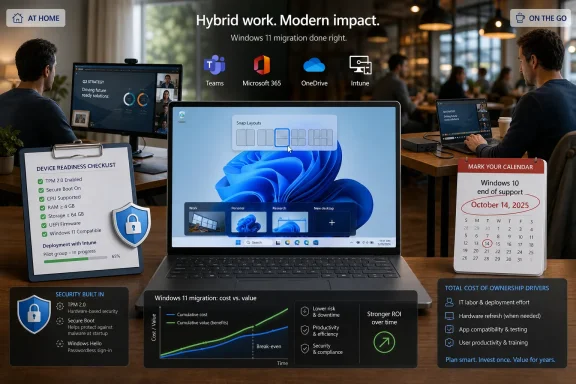 Microsoft Sold a Workflow, Not Just an Operating System
Windows 11 was never merely a Start menu redesign with rounded corners. Microsoft positioned it as the desktop layer for a world where the office is no longer a single place, and where the PC must follow workers between a corporate network, a home router, a coffee-shop Wi-Fi connection, and a meeting room dock.That pitch has real substance. Snap Layouts, virtual desktops, cleaner window management, better support for modern security baselines, and tighter integration with Microsoft 365 all address pain points that became more visible during the hybrid-work shift. The operating system is built around the assumption that the user is juggling Teams calls, browser tabs, documents, cloud files, dashboards, and endpoint security agents all day.
But the same pitch also conceals a familiar enterprise truth: when Microsoft changes the baseline, IT pays to meet it. The productivity gains are incremental and distributed across thousands of small moments. The costs, by contrast, often arrive as purchase orders, device refresh plans, deployment projects, and help desk tickets.
The Little Conveniences Are the Strongest Part of the Case
The best argument for Windows 11 in hybrid work is not some grand transformation. It is that the operating system trims friction from the boring parts of the day.Snap Layouts are a good example. On a single laptop screen, they are a tidy convenience; across a docked hybrid setup with two monitors, a video call, a chat window, a browser, a spreadsheet, and a line-of-business app, they become genuinely useful. Hybrid work made context switching the default state of the knowledge worker, and Windows 11 is better than Windows 10 at making that chaos feel organized.
Virtual desktops tell the same story. The feature is not new in concept, but Windows 11 makes it feel more central and more approachable. A user can keep a client presentation, a personal browser session, and an internal project space separated without pretending that humans actually work in one tidy app at a time.
These improvements will not show up as a neat line item in a CFO’s spreadsheet. No one saves exactly 11 minutes every Tuesday because of a better snap grid. But across a company, fewer interruptions and faster recovery from context switching can matter, especially for employees who move between home, office, and travel setups.
Teams Integration Was a Signal of Microsoft’s Real Strategy
The original Windows 11 marketing leaned heavily into communication and collaboration, including prominent Teams integration. Even as Microsoft has adjusted how Teams appears in Windows over time, the strategic message remains intact: the desktop is not just where work happens, but where Microsoft wants the work graph to live.That matters because hybrid work is not only about where people sit. It is about how quickly they can move from chat to meeting to document to decision. Microsoft’s advantage is that Windows, Microsoft 365, Teams, OneDrive, Intune, Defender, and Entra ID can be made to behave like one managed environment.
For organizations already deep into Microsoft’s stack, Windows 11 can reduce the number of seams IT has to stitch together. Policies, identity, device compliance, app deployment, and data protection can be managed as part of a wider ecosystem. That does not make the environment simple, but it does make it coherent.
The risk is lock-in by convenience. The more a business relies on Windows 11 as the front door to Microsoft 365, the more expensive it becomes to question the bundle later. Hybrid work did not create that dependency, but it made it easier to justify.
The Hardware Line Is Where the Free Upgrade Stops Feeling Free
For consumers, Windows 11 was often described as a free upgrade. For businesses, that phrase was always incomplete.Microsoft’s hardware requirements changed the economics. TPM 2.0, Secure Boot, supported CPUs, memory, storage, and firmware expectations were framed as security necessities, not arbitrary hurdles. In fairness, the security argument is real: modern endpoint protection depends on hardware-backed trust more than older Windows eras did.
But a good security rationale does not erase the cost. Many Windows 10 PCs that still felt usable in spreadsheets, browsers, and email did not qualify cleanly for Windows 11. Some needed firmware changes. Some needed replacement. Some were simply stranded by processor support lists.
That is where the upgrade becomes a fleet-management problem. A five-year-old laptop that still runs payroll software may be acceptable from a performance standpoint but unacceptable from a Windows 11 readiness standpoint. Multiply that by hundreds or thousands of devices, and “free” becomes a word only marketing departments can love.
Windows 10’s End Turned Optional Planning Into Deadline Management
The Windows 10 end-of-support date sharpened the issue. After October 14, 2025, organizations could no longer treat Windows 11 as a vague future migration. They had to choose between upgrading, paying for extended security coverage where available, isolating older machines, moving workloads to cloud PCs, or accepting unacceptable risk.That deadline changed internal politics. Before end of support, IT could argue for modernization. After it, security teams could argue against delay. The difference matters because the strongest Windows 11 business case may not be “better hybrid productivity” at all; it may be “continued patching on a supported endpoint platform.”
This is where the promotional framing around hybrid work becomes too soft. The real enterprise question is not whether Snap Layouts are useful. It is whether the company can responsibly keep unsupported Windows 10 machines in circulation while employees connect from home networks and carry sensitive data across multiple locations.
Hybrid work makes the endpoint more important, not less. When the perimeter is everywhere, the laptop becomes the perimeter. That reality gives Windows 11’s security baseline more weight, but it also means organizations cannot avoid spending money somewhere.
The Expense Is Not Just the License
The article that sparked this discussion focuses partly on Windows 11 keys and marketplaces, but licensing is only one part of the cost picture. For legitimate business deployments, the bigger costs usually sit around the operating system rather than inside the sticker price of the operating system itself.There is device assessment. IT has to know which machines are eligible, which need firmware changes, which should be replaced, and which run specialized hardware or legacy applications. That inventory work is unglamorous, but it is where many migration projects succeed or fail.
There is deployment engineering. Even an in-place upgrade needs testing, rollback planning, application validation, driver checks, and communication. A clean device refresh may be better long term, but it raises procurement, imaging, enrollment, and logistics work.
There is user disruption. Windows 11 is not alien to Windows 10 users, but it is different enough to generate questions: the centered taskbar, changed settings paths, altered context menus, new defaults, and evolving Microsoft account and cloud prompts. In a hybrid environment, those questions often arrive remotely, where support is slower and more expensive.
Cheap Keys Are a Symptom of a Bigger Trust Problem
Digital key marketplaces exist because users and small businesses want lower software prices, faster access, and less procurement friction. That demand is understandable. Nobody enjoys paying more than necessary for software activation.But businesses should be careful about treating consumer-style key shopping as an IT strategy. A Windows activation key is not the same thing as a compliant licensing posture. Organizations need auditability, transfer rights, deployment rights, volume management, support expectations, and clear records of purchase.
This does not mean every third-party marketplace is inherently shady. It does mean that the cheaper the route, the more important the paperwork becomes. For a home user, a failed activation is an inconvenience. For a business, murky licensing can become a compliance problem, a support problem, or a procurement mess.
The hybrid-work angle makes this worse. Distributed employees may buy, activate, or reinstall software outside normal channels if IT does not provide a clear path. The result can be a patchwork of machines that look operational but are difficult to govern.
Security Gains Are Real, But They Are Not Magic
Windows 11’s security story is stronger than its productivity story. Hardware-backed security, modern identity integration, virtualization-based protections, and better endpoint-management hooks fit the threat model of hybrid work better than older assumptions did.That matters because remote and hybrid employees increase exposure. Devices leave controlled offices. They connect to consumer routers. They share physical space with family members, guests, and public networks. They rely on cloud identity more heavily and may spend more time outside traditional network monitoring.
Still, Windows 11 does not eliminate the need for disciplined IT. A supported OS is only one layer. Businesses still need patch management, least-privilege access, phishing-resistant authentication where possible, data-loss controls, backup, device encryption, and a plan for lost or stolen laptops.
The danger is believing the upgrade itself is the security program. Windows 11 can raise the floor. It cannot replace the people and processes that keep the floor from collapsing.
Compatibility Is the Tax Nobody Wants to Discuss
Every Windows migration carries a compatibility tax. It is lower today than it was in the XP-to-7 or 7-to-10 eras, but it has not disappeared.Modern SaaS-heavy companies may glide through Windows 11 with minimal pain. If the business runs mostly in browsers, Microsoft 365, cloud storage, and standard endpoint agents, the upgrade can be relatively straightforward. The OS matters, but it is no longer the place where every application lives.
Older organizations are different. Manufacturers, law firms, clinics, local governments, engineering shops, and finance departments often have one or two stubborn applications that quietly dictate the pace of modernization. A label printer driver, VPN client, accounting package, custom Access database, or old peripheral can become the anchor that holds back an entire fleet.
Hybrid work complicates this because the edge cases are harder to support remotely. A legacy app that behaved badly in the office can be diagnosed by walking over to a desk. The same app failing on a home laptop during a client call becomes a very different support experience.
Hybrid Work Exposes the Difference Between Productivity and Performance
Windows 11 can help employees move faster, but efficiency is not the same thing as productivity. That distinction matters.Performance is measurable in device boot times, app launch speed, battery life, and update reliability. Productivity is messier. It includes whether employees can find what they need, stay focused, collaborate without friction, and recover quickly when something breaks.
Hybrid work pushed companies to confuse the two. A faster PC does not fix unclear meeting culture. A cleaner desktop does not solve notification overload. A better window manager does not make a badly run Teams meeting useful.
This is why Windows 11 should be viewed as enabling infrastructure, not a productivity cure. It can remove obstacles. It cannot decide which meetings should not exist, which apps are redundant, or which workflows are broken because nobody wants to challenge a department head.
The AI Layer Raises the Stakes Again
Windows 11 is increasingly tied to Microsoft’s broader AI ambitions. Copilot, Copilot+ PCs, neural processing units, Recall-style debates, and AI-assisted search all point toward a desktop that does more than launch applications. Microsoft wants Windows to become an intelligent work surface.For hybrid organizations, that could be valuable. Employees drowning in meetings, chats, documents, and notifications need better summarization, retrieval, and automation. If AI features can reduce administrative drag, the OS becomes more than a shell around productivity apps.
But this also threatens to restart the cost cycle. AI-forward Windows experiences increasingly depend on newer hardware, especially systems with NPUs. That means companies that just finished justifying a Windows 11 migration may soon face a second question: whether their Windows 11 devices are good enough for the next version of Windows 11’s promise.
There is also the privacy problem. Hybrid work already blurs personal and professional boundaries. AI features that index, summarize, remember, or infer user activity will require careful governance. The more helpful the operating system becomes, the more sensitive its telemetry and local data handling appear.
Small Businesses Face the Sharpest Trade-Off
Large enterprises can absorb Windows 11 as part of normal fleet renewal. They have procurement teams, endpoint-management platforms, pilot rings, application testing groups, and security staff. The migration may be expensive, but it is at least an expected kind of expensive.Small businesses often experience the same transition as a pileup. The owner discovers that several PCs cannot upgrade, a key application needs an update, staff need help with changed workflows, and the cheapest replacement laptops may not be the best long-term buy. The cost arrives all at once.
For a five-person firm, the productivity benefits may be real but hard to value. If Windows 11 saves each employee a few minutes a day, that is meaningful over time. But if the upgrade forces a device refresh, a support contract, and a weekend of disruption, the payback is not obvious.
This is where Microsoft’s one-size-fits-most narrative breaks down. A hybrid Fortune 500 employee and a hybrid small-business bookkeeper may both use Windows 11, Teams, and OneDrive. Their economics are completely different.
IT Departments Should Treat Windows 11 as a Process Change
The worst way to deploy Windows 11 is to treat it as a cosmetic upgrade. The better approach is to use the migration as a forcing function.A company moving to Windows 11 should revisit endpoint standards, identity policy, device encryption, backup expectations, application rationalization, and support channels. It should decide which devices are truly corporate-managed, which are bring-your-own-device exceptions, and which should not touch company data at all.
It should also decide what hybrid work actually means. If employees are expected to move between locations, the device kit matters: laptop quality, dock compatibility, webcam performance, headset standards, VPN reliability, and monitor setups. Windows 11 can improve multitasking, but poor hardware can erase that benefit quickly.
The migration is therefore less about the OS image and more about the operating model. Windows 11 is the visible part of a larger decision about how much structure hybrid work needs.
The Upgrade Pays Off When It Replaces Sprawl With Discipline
Windows 11 delivers the best return when it is part of simplification. If the upgrade coincides with retiring old hardware, removing redundant apps, standardizing device management, enforcing modern authentication, and improving support documentation, it can be a genuine modernization project.If it is layered on top of existing chaos, it becomes another expense. Users still have too many apps. IT still has too many exceptions. Security still has too many unmanaged endpoints. Finance still sees only the invoice.
The difference is planning. A rushed upgrade prompted by Windows 10’s end of support will solve the support deadline but may miss the operational opportunity. A deliberate upgrade can reduce future support load, improve security posture, and give employees a more consistent hybrid experience.
That is the central irony. Windows 11 is most valuable when companies avoid treating Windows 11 as the main event.
The Windows 11 Hybrid Bargain Is Written in the Fine Print
The practical reading of Windows 11 for hybrid work is neither hype nor dismissal. It is a bargain with conditions.- Windows 11 can make hybrid work smoother, especially for users who live in multiple windows, multiple monitors, Teams meetings, and cloud documents.
- The security baseline is a stronger argument than the interface redesign, particularly now that Windows 10 has exited mainstream support.
- The real cost is not just activation or licensing, but hardware readiness, deployment labor, application testing, user training, and long-term management.
- Small businesses are more exposed to upgrade shock because they have less room to spread device refresh and support costs over time.
- Cheap software keys may reduce upfront spend, but businesses still need licensing clarity, auditability, and support confidence.
- The best migrations use Windows 11 as a trigger to clean up endpoint management rather than as a decorative refresh.
References
- Primary source: deeside.com
Published: 2026-06-17T17:16:08.189456
- Official source: support.microsoft.com
Making the transition to a new era of computing - Microsoft Support
 support.microsoft.com
- Official source: learn.microsoft.com
Windows 11 overview for administrators | Microsoft Learn
Learn more about Windows 11. Read about the features IT professionals and administrators should know about Windows 11, including security, apps, the new desktop, and deploying and servicing PCs.learn.microsoft.com - Related coverage: windowscentral.com
How to join Windows 10 ESU for extended security updates | Windows Central
Windows 10 Extended Security Updates (ESU) lets PCs get security patches until October 13, 2026, since main support ends October 14. Here's how to enroll.www.windowscentral.com - Official source: microsoft.com
Windows 11 Specs and System Requirements | Microsoft Windows
View Windows 11 specs, system requirements, and features from Microsoft. Learn about the device specifications, versions, and languages available for Windows 11.www.microsoft.com - Related coverage: tomsguide.com
Windows 10 support officially ends — are you upgrading to Windows 11? | Tom's Guide
Windows 10 has reached its end of life, but millions of PCs are still using Microsoft's older OS. Tell us if you're upgrading to Windows 11 or keeping your Windows 10 PC!www.tomsguide.com

- Related coverage: dir.md

Windows 11 System Requirements 2026: Check If Your PC Is Compatible (Avoid Upgrade Failures!)
Can your PC run Windows 11? Discover official system requirements, compatibility checks, and expert tips before upgrading. Check your device now!
dir.md
- Related coverage: windowsforum.com
Windows 10 End of Servicing 2025: ESU Options and Windows 11 Upgrade Path | Windows Forum
Microsoft has confirmed what many household and small-business PC owners have been bracing for: the October 2025 Patch Tuesday release will be the last free...windowsforum.com - Related coverage: tomshardware.com
Microsoft no longer permits local Windows 10 accounts if you want Consumer Extended Security Updates — support beyond EOL requires a Microsoft Account link-up even if you pay $30 | Tom's Hardware
$30 covers up to 10 machines for one yearwww.tomshardware.com - Related coverage: techradar.com
Microsoft in 2025: year in review | TechRadar
Microsoft pushed AI even harder this year – and Windows 11 users rebelledwww.techradar.com - Related coverage: as.com
Cómo seguir usando Windows 10 después del fin del soporte en octubre de 2025: así funciona el programa ESU de Microsoft - Meristation
Microsoft continuará ofreciendo una alternativa para los usuarios de Windows 10 tras el cese del soporte oficial. Así funciona el programa ESU de W10.as.com - Related coverage: atomicdata.com
- Related coverage: transparity.com
- Related coverage: gallup.com
Global Indicator: Hybrid Work - Gallup
Explore U.S. remote-capable employees’ work locations, preferences and experiences, as well as how to create a hybrid work strategy for your organization. www.gallup.com
- Related coverage: pcworld.com
Windows 11 market share keeps climbing despite all the issues | PCWorld
Dozens of high-profile bugs and problems from the start of this year haven't slowed down Windows 11's growth in adoption.www.pcworld.com - Related coverage: windowsreport.com
Windows 11 Market Share Explodes to 72.78% in February 2026, Leaving Windows 10 at 26.27%
Windows 11 hits 72.78% market share in February 2026, jumping 10.36%, while Windows 10 drops 9.50% to 26.27%. windowsreport.com
- Related coverage: axios.com
Expect more office mandates and 'microshifting' in 2026 - Axios Boston
Employers may expect a traditional full-time workplace but life entering 2026 is anything but.www.axios.com
- Official source: blogs.microsoft.com
The philosophy and practice of our hybrid workplace - The Official Microsoft Blog
In the midst of numerous and difficult circumstances brought on by the COVID-19 pandemic, we’ve made important observations about the future of work, and how and where our employees know they work best. What we’re learning and understanding has led us to use this period in time to grow and...blogs.microsoft.com - Related coverage: spicatech.co.uk
- Official source: news.microsoft.com
MS-365_logo_horiz_c-gray_rgb
Portrait of smiling businesswoman with disability working on laptop at modern workplacenews.microsoft.com
- Official source: microsoftcloud.s3.amazonaws.com
- Related coverage: johnsoncenter.org
</rdf:Alt> </dc:title> <dc:description> <rdf:Alt> <rdf:li xml:lang="x-default"/> </rdf:Alt> </dc:description> <dc:creator> <rdf:Seq> <rdf:li>Tory Ma
</rdf:Alt> </dc:description> <dc:creator> <rdf:Seq> <rdf:li>Tory Martinjohnsoncenter.org

