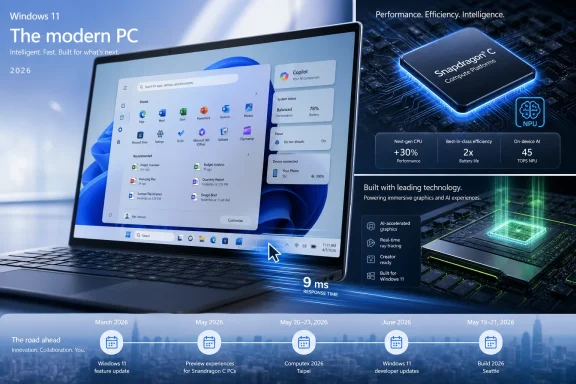
Microsoft’s last full week of May 2026 turned into a preview of where the Windows PC is headed: Windows 11 received an optional update with performance and device-sharing changes, Insiders saw a redesigned Start menu move forward, Qualcomm pushed Arm laptops toward the $300 tier, and Microsoft and Nvidia teased a broader PC announcement for Computex. The individual items look routine if read as a weekly changelog. Taken together, they show Microsoft trying to make the PC feel faster, cheaper, more personal, and more AI-ready without calling the moment “Windows 12.” The bet is that Windows can enter a new hardware cycle while the operating system itself evolves by accumulation rather than by a single dramatic launch.
For years, the cleanest way for Microsoft to declare a new era was to change the version number. Windows 95, XP, 7, 10, and 11 each served as a line in the sand, a marketing reset button that told consumers and IT departments the old model had given way to a new one. In 2026, Microsoft seems less interested in that kind of theatrical break.
That does not mean the platform is standing still. The May 2026 optional update for Windows 11 versions 24H2 and 25H2, KB5089573, is exactly the sort of release that would once have been buried beneath the phrase “quality improvements.” But the actual payload tells a different story: low-latency responsiveness work, shared audio, multi-app camera support, Task Manager refinements, and the usual set of reliability fixes.
This is Microsoft’s current Windows strategy in miniature. The company is not asking users to reinstall their digital lives around a new brand. It is trying to make the installed base more useful one cumulative update at a time, while leaving the bigger platform narrative to silicon partners, AI features, and hardware events.
That approach is less glamorous than a Windows 12 unveiling, but it is also more practical. The Windows ecosystem is too large, too regulated, and too hardware-diverse to reinvent itself every few years without collateral damage. The more interesting question is whether Microsoft can make this slow-motion reinvention feel coherent to users who only notice Windows when something breaks.
This time, the staging ground is unusually consequential. Low-latency mode is the headline-grabber because it promises the thing Windows users always want and rarely believe they will get from an update: a PC that feels faster. The idea is not magic. Windows can temporarily push processor behavior more aggressively during moments such as launching apps or opening shell surfaces, shaving off the pauses that make a modern machine feel oddly sluggish.
The key word is feel. Microsoft knows the PC market is no longer won only by synthetic benchmarks or CPU core counts. A five-year-old laptop that opens the Start menu instantly can seem more modern than a newer machine that hesitates before responding. Responsiveness is a user-experience metric masquerading as a performance metric, and Microsoft is right to treat it as central to the operating system.
Shared audio and multi-app camera support sit in the same category of overdue-but-important platform plumbing. Phones normalized simultaneous and flexible media experiences years ago; Windows often still behaves as if one app, one device, and one user scenario should dominate at a time. Letting two people listen from one PC, or letting multiple applications access the same camera stream, reflects how PCs are actually used in classrooms, hybrid offices, streaming setups, telehealth calls, and support sessions.
The risk is that Windows’ greatest strength remains its greatest liability. Features roll out gradually, depend on hardware support, and sometimes arrive hidden behind compatibility gates or regional switches. Microsoft can ship a better Windows experience and still leave many users wondering why their own machine does not behave like the demo.
Windows 11’s original Start menu was clean, centered, and controversial. Microsoft stripped away live tiles, reduced density, and pushed a simplified grid-and-recommendation model that made sense aesthetically but irritated users who had tuned years of muscle memory around older layouts. The company was not wrong to modernize it, but it underestimated how personal the Start menu is.
A modular and resizable approach is Microsoft’s belated admission that one Start menu cannot satisfy everyone. Power users want density and control. Casual users want fewer distractions. Enterprise administrators want predictability. Microsoft wants room for recommendations, Microsoft 365 hooks, and eventually more Copilot-adjacent surfaces. Those incentives collide in the same small rectangle.
The new design direction suggests Microsoft has learned a useful lesson from Windows 11’s early rigidity. A good Start menu in 2026 is not a monument to a design team’s taste; it is a negotiated space between user intent, corporate policy, and Microsoft’s services strategy. Resizing is not just a cosmetic option. It is a concession that the Windows desktop works because people bend it around their habits.
That does not mean the fight is over. If Microsoft uses modularity to give users control, the change will be welcomed. If it uses modularity mainly to make promotional and cloud-connected content easier to insert, the old suspicions will return immediately. Windows users have long memories when it comes to Start menu experiments.
The pitch is familiar but still compelling. Quiet machines, low temperatures, long battery life, built-in NPUs, and enough performance for web, Office, video calls, and basic productivity. If Qualcomm and Microsoft can deliver that at scale, Windows gets a stronger answer to both Chromebooks and low-cost tablets with keyboards.
But the budget PC market punishes optimism. A $300 Windows laptop can be a triumph of efficiency or a landfill-bound compromise, and the difference often comes down to the unglamorous parts of the spec sheet. RAM, storage speed, display quality, keyboard stiffness, webcam quality, and driver maturity matter more than any launch slide about all-day battery life.
The reported concern around early Snapdragon C systems offering “up to 8GB” of RAM is not nitpicking. In 2026, a Windows 11 machine with 4GB or 6GB of memory would risk feeling constrained almost immediately, particularly once browsers, Teams, security agents, and background updaters enter the picture. Windows on Arm can be efficient, but it cannot repeal the laws of modern software bloat.
This is where Microsoft’s operating-system work and Qualcomm’s silicon strategy intersect. Low-latency tuning can make a modest PC feel less modest, but it cannot compensate for starved memory or bargain-bin storage. If the Snapdragon C generation is to succeed, the ecosystem has to resist the temptation to hit the headline price by shipping configurations that make Windows look bad.
Reports and industry expectations around Nvidia’s N1-class PC processors point toward a more ambitious play than simply another low-power laptop chip. If Nvidia enters the Windows PC CPU market in earnest, the Windows on Arm discussion shifts from battery-life niche to performance-platform contest. That would put pressure not only on Qualcomm, but also on Intel and AMD.
The important caveat is that teasers are not products. Windows history is littered with “new eras” that arrived as reference designs, limited SKUs, or premium devices with limited distribution. Nvidia silicon inside Windows PCs would be a major development, but the real test will be driver maturity, x86 compatibility, OEM variety, thermals, battery life, price, and how well Windows treats these systems as first-class PCs rather than exotic variants.
Still, the timing is hard to ignore. Microsoft does not need to announce Windows 12 at Build if it can let hardware partners carry the sense of platform renewal. A Windows PC with Nvidia CPU and GPU technology, local AI acceleration, and tight integration with Microsoft’s Copilot stack is a stronger “new era” story than a version-number bump by itself.
This also explains why Microsoft’s Windows messaging feels distributed across updates, Insider builds, AI announcements, and partner teasers. The company is not launching one product. It is trying to align an ecosystem.
There is a real technical case for local AI. On-device models can reduce latency, preserve privacy in some scenarios, lower cloud costs, and enable features that work even when connectivity is poor. For enterprises, local inference could eventually make certain workflows faster and easier to govern than cloud-only assistants.
But the user-facing case remains muddier. Many Windows users still experience AI as a button they did not ask for, a search result that got noisier, or a subscription upsell attached to a productivity suite. That perception is not fatal, but it is a warning. The AI PC cannot succeed merely because the silicon supports it; it has to solve problems that ordinary users and administrators recognize.
This is why the week’s non-AI Windows changes may matter more than the AI branding around them. Faster app launches, better camera sharing, more flexible audio, and a Start menu that adapts to user preference are concrete improvements. They make the PC feel better before asking anyone to care about TOPS.
Microsoft should take the hint. If AI becomes part of Windows’ ambient capability rather than the centerpiece of every interaction, users may accept it. If it becomes another layer of promotional chrome in the shell, it will be treated like every other unwanted Windows intrusion: disabled where possible, mocked where not.
That matters because the Windows installed base does not turn like a smartphone market. PCs last longer, organizations validate slowly, and home users often replace machines only when something breaks. Microsoft can create an exciting 2026 Windows PC story and still face a migration drag that extends well beyond any single launch season.
For IT departments, the persistence of Windows 10 is not nostalgia. It is risk management. Application compatibility, device fleets, user training, procurement cycles, and security tooling all shape upgrade decisions. A better Start menu in a Dev Channel build is interesting; a predictable servicing path is operationally necessary.
The approaching divide is therefore not simply Windows 10 versus Windows 11. It is between PCs that can participate in Microsoft’s next platform assumptions and PCs that cannot. Secure Boot certificate updates, Windows 11 hardware requirements, AI-capable silicon, and Arm compatibility all become part of the same modernization pressure.
Microsoft’s challenge is to keep that pressure from feeling like coercion. Users will accept a new era if it gives them better machines and fewer headaches. They will resent it if it feels like a compliance deadline wrapped in marketing language.
Its retirement fits the broader pattern. The PC ecosystem is consolidating scattered utilities into more modern hubs, often with account integration, update mechanisms, telemetry, overlays, and service hooks attached. Sometimes that improves the experience. Sometimes it turns a straightforward driver panel into another app that wants to be a platform.
The generous reading is that Nvidia is cleaning up decades of UI sediment. The less generous reading is that yet another quiet, local, power-user tool is being replaced by a branded front end with broader ambitions. Both can be true at once.
For Windows enthusiasts, this is the emotional texture behind many modernization debates. People do not oppose new interfaces because they love old gray dialog boxes in the abstract. They oppose new interfaces when they trade precision for marketing, speed for animation, or local control for cloud-mediated convenience.
Microsoft faces the same problem at operating-system scale. The new Start menu, Settings app migrations, Copilot surfaces, and AI PC branding will be judged not by how modern they look, but by whether they preserve the agency that made Windows worth using in the first place.
New driver releases from Intel and Nvidia, GeForce NOW additions, and the continued churn of major game launches all reinforce how much of Windows’ value comes from ecosystem coordination. A Windows PC is not just the OS. It is graphics drivers, anti-cheat systems, storefronts, cloud saves, input stacks, display technologies, and performance profiles all trying not to trip over one another.
That is why low-latency work in Windows is especially interesting. If Microsoft can make the shell and everyday app launches feel more immediate without introducing instability, everyone benefits. If the same tuning causes edge-case regressions in games, drivers, or power behavior, enthusiasts will find them quickly and loudly.
The broader Xbox and PC gaming strategy also hangs over this. Microsoft wants Windows to remain the natural home of PC gaming even as Xbox becomes more service-like and less tied to a single console box. That makes Windows performance and hardware diversity strategically important. A future in which Nvidia, Qualcomm, AMD, and Intel all ship credible Windows systems is good for Microsoft only if the software layer keeps the experience consistent.
The Steam Deck’s pricing pressure and the uncertain affordability of future living-room PC hardware underline the same point. The Windows PC has room to expand, but it also has to compete against devices that feel simpler, cheaper, or more purpose-built. Microsoft cannot assume that legacy alone will keep gamers loyal.
The danger for Microsoft is fragmentation disguised as choice. Windows has survived for decades because it abstracts hardware variety better than any rival desktop platform. If the next era brings Arm laptops, AI-specific features, NPU-gated experiences, new driver models, and staggered feature rollouts, Microsoft must work harder to make Windows feel like one platform rather than a set of related editions.
The opportunity is just as large. If Microsoft gets this right, the Windows PC in 2026 and 2027 could become genuinely more diverse: fanless budget machines with good battery life, creator laptops with Nvidia-class graphics and AI acceleration, business devices with better conferencing features, and desktops that feel snappier without users needing to understand why.
That is a better story than “Windows 12 is coming.” It is also harder to tell. Version numbers are simple. Ecosystem transitions are messy.
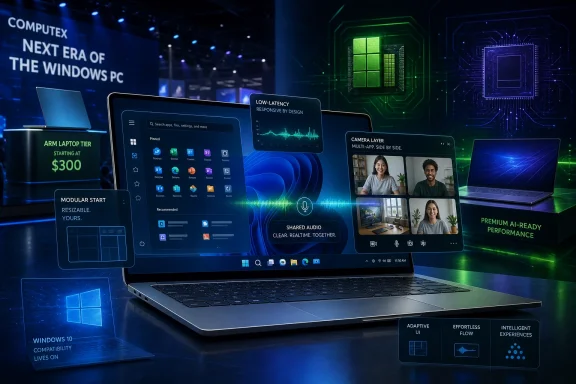 Microsoft Is Rebuilding the PC Without Rebranding Windows
For years, the cleanest way for Microsoft to declare a new era was to change the version number. Windows 95, XP, 7, 10, and 11 each served as a line in the sand, a marketing reset button that told consumers and IT departments the old model had given way to a new one. In 2026, Microsoft seems less interested in that kind of theatrical break.That does not mean the platform is standing still. The May 2026 optional update for Windows 11 versions 24H2 and 25H2, KB5089573, is exactly the sort of release that would once have been buried beneath the phrase “quality improvements.” But the actual payload tells a different story: low-latency responsiveness work, shared audio, multi-app camera support, Task Manager refinements, and the usual set of reliability fixes.
This is Microsoft’s current Windows strategy in miniature. The company is not asking users to reinstall their digital lives around a new brand. It is trying to make the installed base more useful one cumulative update at a time, while leaving the bigger platform narrative to silicon partners, AI features, and hardware events.
That approach is less glamorous than a Windows 12 unveiling, but it is also more practical. The Windows ecosystem is too large, too regulated, and too hardware-diverse to reinvent itself every few years without collateral damage. The more interesting question is whether Microsoft can make this slow-motion reinvention feel coherent to users who only notice Windows when something breaks.
The Optional Update Is a Dress Rehearsal for June
KB5089573 is technically optional, which means most mainstream users will not encounter it unless they go looking for preview updates. That distinction matters. Optional C-week updates have become Microsoft’s public staging ground for changes that are likely to arrive more broadly in the following Patch Tuesday cycle.This time, the staging ground is unusually consequential. Low-latency mode is the headline-grabber because it promises the thing Windows users always want and rarely believe they will get from an update: a PC that feels faster. The idea is not magic. Windows can temporarily push processor behavior more aggressively during moments such as launching apps or opening shell surfaces, shaving off the pauses that make a modern machine feel oddly sluggish.
The key word is feel. Microsoft knows the PC market is no longer won only by synthetic benchmarks or CPU core counts. A five-year-old laptop that opens the Start menu instantly can seem more modern than a newer machine that hesitates before responding. Responsiveness is a user-experience metric masquerading as a performance metric, and Microsoft is right to treat it as central to the operating system.
Shared audio and multi-app camera support sit in the same category of overdue-but-important platform plumbing. Phones normalized simultaneous and flexible media experiences years ago; Windows often still behaves as if one app, one device, and one user scenario should dominate at a time. Letting two people listen from one PC, or letting multiple applications access the same camera stream, reflects how PCs are actually used in classrooms, hybrid offices, streaming setups, telehealth calls, and support sessions.
The risk is that Windows’ greatest strength remains its greatest liability. Features roll out gradually, depend on hardware support, and sometimes arrive hidden behind compatibility gates or regional switches. Microsoft can ship a better Windows experience and still leave many users wondering why their own machine does not behave like the demo.
The Start Menu Becomes a Negotiation, Not a Monument
The more emotionally charged change is not in the stable preview update but in the Insider builds. The Dev Channel build advancing a modular, resizable Start menu matters because the Start menu is not just another shell component. It is the symbolic front door to Windows.Windows 11’s original Start menu was clean, centered, and controversial. Microsoft stripped away live tiles, reduced density, and pushed a simplified grid-and-recommendation model that made sense aesthetically but irritated users who had tuned years of muscle memory around older layouts. The company was not wrong to modernize it, but it underestimated how personal the Start menu is.
A modular and resizable approach is Microsoft’s belated admission that one Start menu cannot satisfy everyone. Power users want density and control. Casual users want fewer distractions. Enterprise administrators want predictability. Microsoft wants room for recommendations, Microsoft 365 hooks, and eventually more Copilot-adjacent surfaces. Those incentives collide in the same small rectangle.
The new design direction suggests Microsoft has learned a useful lesson from Windows 11’s early rigidity. A good Start menu in 2026 is not a monument to a design team’s taste; it is a negotiated space between user intent, corporate policy, and Microsoft’s services strategy. Resizing is not just a cosmetic option. It is a concession that the Windows desktop works because people bend it around their habits.
That does not mean the fight is over. If Microsoft uses modularity to give users control, the change will be welcomed. If it uses modularity mainly to make promotional and cloud-connected content easier to insert, the old suspicions will return immediately. Windows users have long memories when it comes to Start menu experiments.
Qualcomm’s $300 Arm Push Tests the Bottom of the Market
Qualcomm’s Snapdragon C announcement adds a second thread to the week’s story: the Windows PC is not only trying to become more responsive, it is trying to become cheaper without returning to the netbook era’s worst habits. A Windows on Arm laptop at roughly the $300 level sounds, on paper, like exactly the kind of device Microsoft has wanted for education, emerging markets, front-line work, and Chromebook competition.The pitch is familiar but still compelling. Quiet machines, low temperatures, long battery life, built-in NPUs, and enough performance for web, Office, video calls, and basic productivity. If Qualcomm and Microsoft can deliver that at scale, Windows gets a stronger answer to both Chromebooks and low-cost tablets with keyboards.
But the budget PC market punishes optimism. A $300 Windows laptop can be a triumph of efficiency or a landfill-bound compromise, and the difference often comes down to the unglamorous parts of the spec sheet. RAM, storage speed, display quality, keyboard stiffness, webcam quality, and driver maturity matter more than any launch slide about all-day battery life.
The reported concern around early Snapdragon C systems offering “up to 8GB” of RAM is not nitpicking. In 2026, a Windows 11 machine with 4GB or 6GB of memory would risk feeling constrained almost immediately, particularly once browsers, Teams, security agents, and background updaters enter the picture. Windows on Arm can be efficient, but it cannot repeal the laws of modern software bloat.
This is where Microsoft’s operating-system work and Qualcomm’s silicon strategy intersect. Low-latency tuning can make a modest PC feel less modest, but it cannot compensate for starved memory or bargain-bin storage. If the Snapdragon C generation is to succeed, the ecosystem has to resist the temptation to hit the headline price by shipping configurations that make Windows look bad.
Nvidia’s Teaser Changes the Arm Conversation
Qualcomm is no longer the only Arm story in town. Microsoft and Nvidia teasing “a new era of PC” ahead of Computex is significant because Nvidia brings a different kind of gravity to Windows on Arm. Qualcomm has mobile heritage and modem credibility. Nvidia has GPU dominance, AI infrastructure power, developer mindshare, and the kind of brand heat that can make OEMs rearrange roadmaps.Reports and industry expectations around Nvidia’s N1-class PC processors point toward a more ambitious play than simply another low-power laptop chip. If Nvidia enters the Windows PC CPU market in earnest, the Windows on Arm discussion shifts from battery-life niche to performance-platform contest. That would put pressure not only on Qualcomm, but also on Intel and AMD.
The important caveat is that teasers are not products. Windows history is littered with “new eras” that arrived as reference designs, limited SKUs, or premium devices with limited distribution. Nvidia silicon inside Windows PCs would be a major development, but the real test will be driver maturity, x86 compatibility, OEM variety, thermals, battery life, price, and how well Windows treats these systems as first-class PCs rather than exotic variants.
Still, the timing is hard to ignore. Microsoft does not need to announce Windows 12 at Build if it can let hardware partners carry the sense of platform renewal. A Windows PC with Nvidia CPU and GPU technology, local AI acceleration, and tight integration with Microsoft’s Copilot stack is a stronger “new era” story than a version-number bump by itself.
This also explains why Microsoft’s Windows messaging feels distributed across updates, Insider builds, AI announcements, and partner teasers. The company is not launching one product. It is trying to align an ecosystem.
The PC’s AI Era Still Has a Trust Problem
The industry would like users to understand this moment as the AI PC era. Microsoft, Qualcomm, Nvidia, AMD, and Intel all have incentives to make local AI acceleration sound inevitable. NPUs are now a platform checkbox, Copilot is being redesigned and repositioned across Microsoft 365, and hardware vendors are looking for a reason to restart the upgrade cycle after the pandemic PC boom cooled.There is a real technical case for local AI. On-device models can reduce latency, preserve privacy in some scenarios, lower cloud costs, and enable features that work even when connectivity is poor. For enterprises, local inference could eventually make certain workflows faster and easier to govern than cloud-only assistants.
But the user-facing case remains muddier. Many Windows users still experience AI as a button they did not ask for, a search result that got noisier, or a subscription upsell attached to a productivity suite. That perception is not fatal, but it is a warning. The AI PC cannot succeed merely because the silicon supports it; it has to solve problems that ordinary users and administrators recognize.
This is why the week’s non-AI Windows changes may matter more than the AI branding around them. Faster app launches, better camera sharing, more flexible audio, and a Start menu that adapts to user preference are concrete improvements. They make the PC feel better before asking anyone to care about TOPS.
Microsoft should take the hint. If AI becomes part of Windows’ ambient capability rather than the centerpiece of every interaction, users may accept it. If it becomes another layer of promotional chrome in the shell, it will be treated like every other unwanted Windows intrusion: disabled where possible, mocked where not.
Windows 10 Lingers as the Reality Check
Any conversation about a new PC era has to pass through the stubborn reality of Windows 10. Even as Microsoft improves Windows 11 and pushes new hardware categories, a large population of users remains comfortable on the older operating system. Some are blocked by hardware requirements. Some are wary of Windows 11’s interface changes. Some simply do not see the business case for moving.That matters because the Windows installed base does not turn like a smartphone market. PCs last longer, organizations validate slowly, and home users often replace machines only when something breaks. Microsoft can create an exciting 2026 Windows PC story and still face a migration drag that extends well beyond any single launch season.
For IT departments, the persistence of Windows 10 is not nostalgia. It is risk management. Application compatibility, device fleets, user training, procurement cycles, and security tooling all shape upgrade decisions. A better Start menu in a Dev Channel build is interesting; a predictable servicing path is operationally necessary.
The approaching divide is therefore not simply Windows 10 versus Windows 11. It is between PCs that can participate in Microsoft’s next platform assumptions and PCs that cannot. Secure Boot certificate updates, Windows 11 hardware requirements, AI-capable silicon, and Arm compatibility all become part of the same modernization pressure.
Microsoft’s challenge is to keep that pressure from feeling like coercion. Users will accept a new era if it gives them better machines and fewer headaches. They will resent it if it feels like a compliance deadline wrapped in marketing language.
The Nvidia Control Panel’s Exit Marks Another End of an Old PC Ritual
One smaller item from the week deserves more attention than it will probably receive: Nvidia’s continued move away from its legacy Control Panel in favor of the newer Nvidia App. For a certain kind of Windows user, the old Control Panel was part of the PC gaming and workstation ritual. It was not beautiful, but it was familiar, dense, and trusted.Its retirement fits the broader pattern. The PC ecosystem is consolidating scattered utilities into more modern hubs, often with account integration, update mechanisms, telemetry, overlays, and service hooks attached. Sometimes that improves the experience. Sometimes it turns a straightforward driver panel into another app that wants to be a platform.
The generous reading is that Nvidia is cleaning up decades of UI sediment. The less generous reading is that yet another quiet, local, power-user tool is being replaced by a branded front end with broader ambitions. Both can be true at once.
For Windows enthusiasts, this is the emotional texture behind many modernization debates. People do not oppose new interfaces because they love old gray dialog boxes in the abstract. They oppose new interfaces when they trade precision for marketing, speed for animation, or local control for cloud-mediated convenience.
Microsoft faces the same problem at operating-system scale. The new Start menu, Settings app migrations, Copilot surfaces, and AI PC branding will be judged not by how modern they look, but by whether they preserve the agency that made Windows worth using in the first place.
Gaming Remains the Stress Test for Every Windows Promise
The gaming news orbiting this week’s Microsoft recap is not separate from the Windows platform story. PC gaming remains one of the clearest stress tests for whether Windows modernization is working. Gamers notice latency, driver regressions, overlay conflicts, controller problems, scheduler quirks, and background processes with a level of intensity that ordinary productivity users rarely match.New driver releases from Intel and Nvidia, GeForce NOW additions, and the continued churn of major game launches all reinforce how much of Windows’ value comes from ecosystem coordination. A Windows PC is not just the OS. It is graphics drivers, anti-cheat systems, storefronts, cloud saves, input stacks, display technologies, and performance profiles all trying not to trip over one another.
That is why low-latency work in Windows is especially interesting. If Microsoft can make the shell and everyday app launches feel more immediate without introducing instability, everyone benefits. If the same tuning causes edge-case regressions in games, drivers, or power behavior, enthusiasts will find them quickly and loudly.
The broader Xbox and PC gaming strategy also hangs over this. Microsoft wants Windows to remain the natural home of PC gaming even as Xbox becomes more service-like and less tied to a single console box. That makes Windows performance and hardware diversity strategically important. A future in which Nvidia, Qualcomm, AMD, and Intel all ship credible Windows systems is good for Microsoft only if the software layer keeps the experience consistent.
The Steam Deck’s pricing pressure and the uncertain affordability of future living-room PC hardware underline the same point. The Windows PC has room to expand, but it also has to compete against devices that feel simpler, cheaper, or more purpose-built. Microsoft cannot assume that legacy alone will keep gamers loyal.
The Weekly Recap Reveals a Platform in Transition
Microsoft’s week looked busy because the PC itself is in an unusually fluid state. The old Wintel center of gravity is still powerful, but it is no longer the only plausible future. Arm is pushing down into budget laptops and up into premium AI machines. Nvidia is preparing to test whether its data-center aura can translate into client PCs. Microsoft is trying to make Windows 11 feel more responsive while keeping the update train moving.The danger for Microsoft is fragmentation disguised as choice. Windows has survived for decades because it abstracts hardware variety better than any rival desktop platform. If the next era brings Arm laptops, AI-specific features, NPU-gated experiences, new driver models, and staggered feature rollouts, Microsoft must work harder to make Windows feel like one platform rather than a set of related editions.
The opportunity is just as large. If Microsoft gets this right, the Windows PC in 2026 and 2027 could become genuinely more diverse: fanless budget machines with good battery life, creator laptops with Nvidia-class graphics and AI acceleration, business devices with better conferencing features, and desktops that feel snappier without users needing to understand why.
That is a better story than “Windows 12 is coming.” It is also harder to tell. Version numbers are simple. Ecosystem transitions are messy.
The Week’s Signal Is Bigger Than the Changelog
This week’s Microsoft news is best read as a map of pressure points rather than a pile of announcements. The details matter because they show where Microsoft, its partners, and users are negotiating the future shape of the PC.- Windows 11 KB5089573 is an optional preview update, but its low-latency, shared audio, and multi-app camera changes point toward practical improvements likely to matter more than cosmetic polish.
- The redesigned Start menu moving through Insider builds shows Microsoft retreating from one-size-fits-all shell design and inching back toward user-controlled flexibility.
- Qualcomm’s Snapdragon C push could make Windows on Arm more affordable, but memory and storage compromises could undermine the entire pitch if OEMs chase the lowest possible sticker price.
- Nvidia’s “new era of PC” teaser raises the stakes for Windows on Arm by bringing a far more powerful hardware brand into the conversation.
- Microsoft’s AI PC strategy will land better if it is attached to visible everyday improvements rather than treated as a reason to insert Copilot into every surface.
- Windows 10’s lingering popularity remains the practical constraint on every grand Windows 11 and AI PC ambition.
References
- Primary source: Neowin
Published: Sat, 30 May 2026 16:20:00 GMT
Microsoft Weekly: Big Start menu upgrade and a new era of PC - Neowin
Catch up with this week's Microsoft news in our weekly recap. New processors, big Start menu updates, and Microsoft promising "a new era of PC." www.neowin.net
- Related coverage: axios.com
Microsoft, Dell to debut Nvidia-powered laptops
The chips will appear in Microsoft Surface computers and PCs from other manufacturers.www.axios.com
- Related coverage: windowscentral.com
Microsoft rolls out Windows 11 KB5089573 update that makes your PC genuinely faster and more responsive | Windows Central
Windows 11 update KB5089573 is now generally available as Microsoft's non-security preview update for May, and is packing genuinely notable performance improvements.www.windowscentral.com - Related coverage: pcgamer.com
It's only a little thing but with the latest Windows update, Microsoft has dragged its OS into the modern world of sharing audio streams | PC Gamer
The checklist for it all to work is a tad convoluted, though.www.pcgamer.com - Related coverage: windowslatest.com
Microsoft is killing the one-app-at-a-time camera limit in Windows 11 with new Multi-App mode
Windows 11 has just rolled out a new feature that allows two or more apps to use your camera, ending the one-app-at-a-time camera lock. This change is included with Windows 11 KB5089573 (May 2026 optional update), and it’ll roll out to everyone with the June 2026 Patch Tuesday. Right now... www.windowslatest.com
- Related coverage: tomshardware.com
Nvidia and Microsoft tease "a new era of PC" ahead of Computex 2026 — coordinated social media posts could indicate that rumored N1X laptops will be Windows on Arm systems | Tom's Hardware
An Nvidia-powered Arm PC running Windows could inspire new local AI experiences beyond Copilot+.www.tomshardware.com
- Official source: support.microsoft.com