

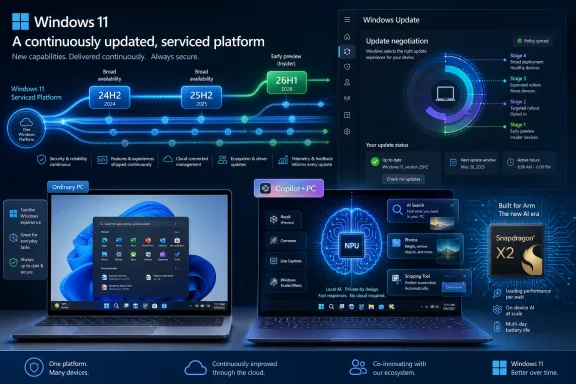
Microsoft’s 2026 Windows 11 story is that supported releases 24H2, 25H2, and the hardware-specific 26H1 now matter less as separate destinations than as serviced branches of one continuously updated operating system. That is the practical answer behind Paul Thurrott’s latest Windows 11 field-guide framing: Windows 11 has become less a versioned product than a moving platform. The upside is faster feature delivery and less drama around annual upgrades. The downside is that Windows now asks users and IT departments to understand a more complicated split between feature availability, hardware capability, and Microsoft’s increasingly AI-shaped priorities.
For decades, Windows trained users to think in releases. Windows 95, Windows XP, Windows 7, Windows 10, Windows 11: each name carried a set of expectations, a compatibility story, and usually a reason to buy a new PC or defer the upgrade. Even inside Windows 10 and early Windows 11, the annual “H1” and “H2” markers gave administrators a rough map of where they were in the lifecycle.
That map is now less useful than it looks. Microsoft still ships annual Windows 11 versions, and those versions still carry support deadlines. But the feature story has shifted toward a shared servicing model, where currently supported Windows 11 releases can receive essentially the same visible features through cumulative updates, controlled rollouts, and enablement mechanisms.
That is why Thurrott’s argument that “it’s not about version numbers anymore” lands. A Windows 11 PC on 24H2 and another on 25H2 may differ in build number and lifecycle, but the user-facing experience can be nearly identical. For enthusiasts, this makes Windows feel less cleanly segmented. For IT, it changes the test matrix: the question is no longer only “which version are we deploying?” but also “which features has Microsoft lit up on this machine, in this channel, for this hardware?”
Windows has been drifting in this direction for years. The monthly cumulative update became the real delivery vehicle, while feature updates became smaller, faster, and sometimes little more than support-policy milestones. In 2026, Windows 11 is the clearest expression yet of that strategy: an operating system whose visible capabilities are increasingly decoupled from the version printed in Settings.
That matters because 26H1 is not a mainstream upgrade offer for existing Windows 11 PCs. If you are running a typical Intel, AMD, or first-generation Snapdragon X machine, 26H1 is not meant to be your next stop. Microsoft’s broader Windows 11 feature train remains aimed at the supported mainstream releases and, later, the next general release.
This is a subtle but important shift. Microsoft is using a Windows version number to solve a platform enablement problem: new silicon needs new plumbing, power behavior, scheduler assumptions, drivers, and low-level support. Rather than waiting for the next general Windows release, Microsoft can ship a targeted OS branch with the machines that need it.
That approach is sensible engineering, but it creates messaging risk. Windows users have been trained to assume that a higher version number is a better or newer Windows. In 2026, that assumption breaks down. A 26H1 device is not necessarily “ahead” of a 25H2 device in everyday features; it may simply be on the branch required for its processor.
For WindowsForum readers, the lesson is blunt: do not treat 26H1 as the prize. Treat it as a support vehicle for specific hardware. The more relevant questions are whether the machine receives the same monthly fixes, whether feature rollouts arrive on time, and whether the hardware platform is stable enough for the workload you intend to run.
By 2026, the minimum requirements look less outrageous than they once did. A 4GB RAM floor and modest storage requirement are not generous for modern Windows; they are almost comically optimistic. Many unsupported PCs can still be coerced into running Windows 11, but that has always been a distinction between “possible” and “supported.”
The more meaningful divide now is between ordinary Windows 11 PCs and Copilot+ PCs. Microsoft’s AI PC branding, introduced in 2024, created a second tier of Windows capability around machines with NPUs capable of at least 40 TOPS, along with higher baseline memory and storage. That is not just a marketing sticker. It is increasingly the line between cloud-assisted Windows features and local AI features that run on device.
This is where Microsoft’s hardware strategy becomes clearer. The company is not merely saying that Windows 11 is more secure on newer PCs. It is saying that Windows 11 is more complete on newer PCs. Features such as local image processing, semantic search, AI-assisted creation, and on-device models depend on hardware that older systems lack.
That has a familiar smell. Windows has always used hardware progress to justify software ambition, from DirectX gaming to BitLocker to virtualization-based security. The difference in 2026 is that the new dividing line is less visible to users. A PC can run Windows 11 perfectly well and still be on the wrong side of Microsoft’s AI feature roadmap.
That local angle is not cosmetic. If AI features are going to be woven into search, screenshots, photos, accessibility, productivity, and system-level workflows, latency and privacy become part of the product. A cloud chatbot can answer a question; an on-device model can potentially understand local context faster and with fewer round trips. Whether Microsoft always makes the right privacy choices is another matter, but the hardware logic is sound.
The catch is that this creates a two-speed Windows. One Windows 11 machine gets a familiar desktop, File Explorer, Settings, Edge, Store apps, and the normal security stack. Another gets those things plus a growing set of AI-assisted capabilities that Microsoft can advertise as the future of personal computing.
That split will be tolerable if Microsoft communicates it honestly. It will become corrosive if users discover that “Windows 11” means materially different things depending on hardware, region, account type, subscription, and rollout status. The company has spent years moving Windows away from boxed-product clarity. Copilot+ accelerates that ambiguity.
For administrators, Copilot+ also complicates procurement. Buying “Windows 11 compatible” hardware is no longer the same as buying hardware that will receive the full Windows 11 experience over the next several years. A fleet plan now has to account for NPU performance, memory baselines, battery behavior, driver maturity, and whether local AI features are desirable or even allowed under organizational policy.
Microsoft appears to understand the problem. Its 2026 work on lower resource usage, responsiveness under load, and a less disruptive update experience is an implicit concession that the operating system’s feel matters as much as its feature checklist. Start menu latency, File Explorer pauses, memory pressure, and update interruptions are not edge complaints. They are the daily texture of Windows.
That is especially important for the low end. Plenty of Windows 11 systems technically meet the requirements but do not have the headroom that makes the OS pleasant. An 8GB laptop can be usable or miserable depending on background activity, vendor preload, browser load, and update timing. Reducing Windows’ footprint is not glamorous, but it may be more meaningful to most users than another AI button.
There is also a trust angle. Users tolerate change more readily when the machine feels better afterward. If a Windows update delivers a new Copilot surface but makes the desktop feel heavier, the update is experienced as an imposition. If it reduces stalls, resumes faster, and stays out of the way, the platform earns more room to evolve.
This is the strongest part of Microsoft’s 2026 posture. A modern OS should not require premium silicon merely to feel coherent. If Microsoft wants Windows 11 to be the default home for AI-era PCs, it first has to make sure ordinary PCs do not feel like collateral damage.
The 2026 update story is about reducing that friction. Microsoft’s direction is toward more predictable updates, fewer interruptions, and less visible disruption for people who do not want to micromanage the OS. That is the right goal. The average user should not need to understand enablement packages, controlled feature rollouts, servicing stacks, or safeguard holds to keep a PC healthy.
But predictability is not the same as control. Windows increasingly decides when a device is ready, when a feature should appear, and when an older release should be moved forward. For consumers, that may be a fair trade. For businesses, labs, and power users, it remains a tension between Microsoft’s telemetry-driven confidence and the operator’s need for deterministic behavior.
This is where Windows 11’s “same features across supported versions” model cuts both ways. It reduces the old cliff edge of feature updates, but it also means meaningful change can arrive in ordinary monthly servicing. The scary upgrade may be smaller, but the routine patch becomes more consequential.
IT departments will respond the way they always do: rings, deferrals, pilot groups, rollback plans, and a healthy distrust of anything described as seamless. The difference is that feature validation now has to be continuous. Windows is no longer something you certify once a year and forget. It is something you negotiate with every month.
That familiarity is not nostalgia. It is risk management. Microsoft learned from Windows 8 that users will reject an operating system that treats decades of muscle memory as technical debt. Windows 11 modernizes the surface without discarding the basic desktop contract.
The Start menu is the most obvious example. It has been revised repeatedly since Windows 11 launched, and Microsoft has slowly clawed back some of the flexibility users expected. The taskbar has also recovered from some early regressions. This is Windows development as public correction: ship the simplified thing, absorb the backlash, restore enough capability to quiet the room.
The right-click context menu shows the same pattern. Microsoft wanted a cleaner, less chaotic menu. Power users wanted immediate access to the commands they actually use. The resulting compromise is more visually coherent but still occasionally irritating, especially when the command you need is hidden behind the older menu.
Settings is another long-running transition. The modern Settings app is far more capable than it was in the Windows 8 and early Windows 10 era, and it now handles a vast range of personalization, system, accessibility, update, recovery, and device options. But Control Panel’s ghost still haunts Windows because some administrative surfaces and legacy expectations refuse to die.
Windows 11’s File Explorer has improved substantially since launch. It has a more modern visual style, better integration with OneDrive, Home and Gallery views, tab support, improved archive handling, and updated context menus. The app is far more aligned with the rest of Windows 11 than the older Explorer shell ever was.
But File Explorer also carries the burden of Microsoft’s cloud strategy. OneDrive Files On Demand is genuinely useful, especially on laptops with limited storage. Folder backup can protect users who would otherwise keep irreplaceable files on the desktop and hope for the best. Yet cloud integration can also blur the line between local files, synced placeholders, account prompts, and subscription nudges.
That ambiguity matters. File management is one of the places where users expect the computer to be literal. A file is here or it is not. It is local or remote. It is backed up or it is not. When Windows makes those states too abstract, convenience can turn into confusion.
The best version of Windows 11 is one where File Explorer becomes faster, clearer, and more capable without becoming another billboard for Microsoft 365. That is the line Microsoft has to walk across the entire OS.
But Edge does not exist in a vacuum. It exists inside Microsoft’s habit of pushing, prompting, pleading, and sometimes dark-patterning users toward Microsoft services. Default browser settings, search engine prompts, Microsoft account tie-ins, shopping features, sidebar integrations, and Bing/Copilot surfaces all contribute to the sense that Edge is less a browser than a strategic beachhead.
This is self-defeating. Microsoft finally built a browser good enough to win users on merit, then surrounded it with behavior that reminds people why they mistrusted Microsoft’s browser strategy in the first place. The result is that Edge’s quality and Edge’s reputation diverge.
Windows 11 makes the issue more visible because the OS itself often routes experiences through Microsoft-controlled services. Search, Widgets, Copilot, web results, and account flows can make the default-browser choice feel less respected than it should be. Third-party utilities exist because users have learned that Windows preferences do not always mean what normal people think preferences mean.
For enterprises, Edge is often easier to defend. It is manageable, policy-rich, integrated with Microsoft 365, and familiar to security teams. For consumers, the calculus is more emotional: a good browser that nags too much stops feeling good.
Notepad is a particularly revealing case. For years, it was treated as a museum piece. Now it has tabs, modern editing conveniences, and AI-adjacent features depending on rollout and configuration. Paint, once the punchline of Windows creativity, has become a surprisingly capable lightweight image tool with newer generative and editing features on supported systems.
Snipping Tool has also become central to modern Windows. Screenshots, screen recording, text extraction, and quick annotation fit the way people actually work. These are small tools, but they remove reasons to install third-party utilities on day one.
Phone Link is more strategic. Its deepest value appears when paired with Android, where messages, notifications, photos, calls, and app experiences can bridge phone and PC. Apple’s ecosystem still has the tighter handoff story, but Microsoft has made Windows a more credible companion to the phone most of the world actually uses.
Terminal and the newer Advanced settings area speak to another audience entirely. Developers, administrators, and power users need Windows to be approachable without being shallow. A modern terminal, better command-line tooling, Windows Package Manager, WSL, and exposed developer settings help Windows remain viable for serious technical work instead of merely office productivity.
Windows 11 has not transformed gaming in the way marketing sometimes implies, but it has continued to refine the platform. Features like Auto HDR, DirectStorage support where hardware and games cooperate, improved windowed gaming behavior, and gaming-focused system options all reinforce the idea that Windows is the default gaming PC OS.
The interesting 2026 angle is performance discipline. Gamers are among the least forgiving Windows users because they can feel latency, stutter, background load, and driver problems immediately. A leaner, more predictable Windows helps gaming even when the improvement is not gaming-specific.
Handheld gaming PCs also pressure Microsoft in useful ways. Devices inspired by the Steam Deck and powered by Windows expose how awkward the desktop can be on smaller screens, controller-first interfaces, and battery-limited hardware. The more Microsoft takes that category seriously, the more Windows may have to adapt beyond the traditional keyboard-and-mouse shell.
This is one area where Microsoft cannot rely on inertia forever. SteamOS and Linux gaming have improved, and cloud gaming continues to evolve. Windows remains dominant, but dominance is not the same as delight. If Microsoft can make Windows 11 lighter and more console-aware without sacrificing openness, it can turn a defensive position into a renewed advantage.
In 2026, that argument is stronger. Ransomware, credential theft, firmware attacks, phishing, infostealers, and supply-chain compromises have made endpoint security more important, not less. A Windows PC is not just a personal device; it is often the front door to identity, cloud storage, corporate data, banking, and communications.
Windows Hello remains one of Microsoft’s clearest wins. Biometric or PIN-backed authentication tied to hardware is generally better than training users to type reusable passwords everywhere. Device encryption, when configured properly and recoverable, protects against a lost laptop becoming a data breach.
The challenge is that security and account strategy are tangled. Microsoft strongly prefers Microsoft accounts or work/school accounts because they enable recovery, sync, identity protection, subscriptions, and service integration. Many enthusiasts still prefer local accounts because they reduce cloud dependency and preserve a sense of ownership.
Both instincts are understandable. A Microsoft account can make a consumer PC safer and easier to recover. A local account can be more private, simpler, and less exposed to service-layer nudging. The right answer depends on the user, but Windows setup too often behaves as though the debate has already been settled in Microsoft’s favor.
Recovery is the other half of the security story. Windows 11’s growing set of reset, repair, and recovery tools acknowledges that things will go wrong. A secure OS that cannot recover gracefully is only half-built. The more Microsoft can make recovery reliable without wiping user trust or data, the more credible its security posture becomes.
Windows Terminal is a first-class tool rather than an afterthought. PowerShell, Command Prompt, WSL distributions, Azure shells, and custom profiles can coexist in a modern tabbed interface. For developers and administrators, that matters more than another coat of paint on the Start menu.
Windows Package Manager also changes the setup story. The ability to script app discovery, installation, and updates through winget brings Windows closer to the repeatability that Linux and macOS power users have long valued. It is not perfect, and the repository model can still be confusing, but it is a real step toward treating Windows as an automatable platform.
The new Advanced area in Settings is part of the same trend. Microsoft is trying to separate everyday settings from developer and power-user controls without burying the latter in forgotten dialogs. That is the correct instinct. A modern OS should be friendly to normal users and still transparent to people who need to operate it deeply.
This is where Windows 11’s dual identity is most productive. It can be a polished consumer OS on the surface and a serious workstation underneath. Microsoft gets into trouble only when it confuses simplification with concealment.
The 2026 Windows 11 story shows both the promise and the strain. Feature parity across supported releases reduces fragmentation, but hardware-specific branches like 26H1 complicate the narrative. Copilot+ creates a clearer AI PC standard, but it also turns Windows features into a spec-sheet privilege. Performance work shows Microsoft is listening, but users will judge the result by whether their own PCs feel faster, quieter, and less intrusive.
For Windows enthusiasts, this is a more interesting OS than the launch version of Windows 11. It is more capable, more polished, and more willing to correct its early mistakes. For administrators, it is also more fluid, which means governance matters more. For everyday users, it may finally be approaching the promise Microsoft made in 2021: a cleaner, calmer Windows that still behaves like Windows.
The next phase will test whether Microsoft can keep that balance. If Windows 11 becomes a stable, responsive base for both classic desktop work and genuinely useful local AI, the version-number confusion will fade into trivia. If it becomes a rolling bundle of prompts, gated features, and hardware caveats, users will remember why they cared about versions in the first place.
 Windows 11 Has Quietly Outgrown the Version Number
For decades, Windows trained users to think in releases. Windows 95, Windows XP, Windows 7, Windows 10, Windows 11: each name carried a set of expectations, a compatibility story, and usually a reason to buy a new PC or defer the upgrade. Even inside Windows 10 and early Windows 11, the annual “H1” and “H2” markers gave administrators a rough map of where they were in the lifecycle.That map is now less useful than it looks. Microsoft still ships annual Windows 11 versions, and those versions still carry support deadlines. But the feature story has shifted toward a shared servicing model, where currently supported Windows 11 releases can receive essentially the same visible features through cumulative updates, controlled rollouts, and enablement mechanisms.
That is why Thurrott’s argument that “it’s not about version numbers anymore” lands. A Windows 11 PC on 24H2 and another on 25H2 may differ in build number and lifecycle, but the user-facing experience can be nearly identical. For enthusiasts, this makes Windows feel less cleanly segmented. For IT, it changes the test matrix: the question is no longer only “which version are we deploying?” but also “which features has Microsoft lit up on this machine, in this channel, for this hardware?”
Windows has been drifting in this direction for years. The monthly cumulative update became the real delivery vehicle, while feature updates became smaller, faster, and sometimes little more than support-policy milestones. In 2026, Windows 11 is the clearest expression yet of that strategy: an operating system whose visible capabilities are increasingly decoupled from the version printed in Settings.
26H1 Is a Silicon Release Wearing an OS Version Badge
The strangest piece of the 2026 picture is Windows 11 version 26H1. At a glance, it looks like Microsoft has revived the old first-half Windows release cadence. In practice, it is much narrower: a targeted release for new Arm hardware, especially systems built around Qualcomm’s Snapdragon X2 platform.That matters because 26H1 is not a mainstream upgrade offer for existing Windows 11 PCs. If you are running a typical Intel, AMD, or first-generation Snapdragon X machine, 26H1 is not meant to be your next stop. Microsoft’s broader Windows 11 feature train remains aimed at the supported mainstream releases and, later, the next general release.
This is a subtle but important shift. Microsoft is using a Windows version number to solve a platform enablement problem: new silicon needs new plumbing, power behavior, scheduler assumptions, drivers, and low-level support. Rather than waiting for the next general Windows release, Microsoft can ship a targeted OS branch with the machines that need it.
That approach is sensible engineering, but it creates messaging risk. Windows users have been trained to assume that a higher version number is a better or newer Windows. In 2026, that assumption breaks down. A 26H1 device is not necessarily “ahead” of a 25H2 device in everyday features; it may simply be on the branch required for its processor.
For WindowsForum readers, the lesson is blunt: do not treat 26H1 as the prize. Treat it as a support vehicle for specific hardware. The more relevant questions are whether the machine receives the same monthly fixes, whether feature rollouts arrive on time, and whether the hardware platform is stable enough for the workload you intend to run.
The Real Divide Is No Longer Windows 10 Versus Windows 11
The old Windows 11 controversy was about minimum requirements. TPM 2.0, Secure Boot, supported CPUs, and Microsoft’s refusal to bless many still-useful PCs made the 2021 launch feel arbitrary to a portion of the installed base. That fight has not disappeared, but it has aged into something more practical.By 2026, the minimum requirements look less outrageous than they once did. A 4GB RAM floor and modest storage requirement are not generous for modern Windows; they are almost comically optimistic. Many unsupported PCs can still be coerced into running Windows 11, but that has always been a distinction between “possible” and “supported.”
The more meaningful divide now is between ordinary Windows 11 PCs and Copilot+ PCs. Microsoft’s AI PC branding, introduced in 2024, created a second tier of Windows capability around machines with NPUs capable of at least 40 TOPS, along with higher baseline memory and storage. That is not just a marketing sticker. It is increasingly the line between cloud-assisted Windows features and local AI features that run on device.
This is where Microsoft’s hardware strategy becomes clearer. The company is not merely saying that Windows 11 is more secure on newer PCs. It is saying that Windows 11 is more complete on newer PCs. Features such as local image processing, semantic search, AI-assisted creation, and on-device models depend on hardware that older systems lack.
That has a familiar smell. Windows has always used hardware progress to justify software ambition, from DirectX gaming to BitLocker to virtualization-based security. The difference in 2026 is that the new dividing line is less visible to users. A PC can run Windows 11 perfectly well and still be on the wrong side of Microsoft’s AI feature roadmap.
Copilot+ Turns the PC Spec Sheet Into a Feature Map
Copilot+ is Microsoft’s attempt to make “AI PC” mean something specific rather than whatever a laptop vendor prints on a box. In its strict form, that means a modern processor with a capable neural processing unit, 16GB of RAM, and 256GB of storage. The NPU is the star because it lets Windows run certain machine-learning workloads locally without leaning entirely on the cloud or hammering the CPU and GPU.That local angle is not cosmetic. If AI features are going to be woven into search, screenshots, photos, accessibility, productivity, and system-level workflows, latency and privacy become part of the product. A cloud chatbot can answer a question; an on-device model can potentially understand local context faster and with fewer round trips. Whether Microsoft always makes the right privacy choices is another matter, but the hardware logic is sound.
The catch is that this creates a two-speed Windows. One Windows 11 machine gets a familiar desktop, File Explorer, Settings, Edge, Store apps, and the normal security stack. Another gets those things plus a growing set of AI-assisted capabilities that Microsoft can advertise as the future of personal computing.
That split will be tolerable if Microsoft communicates it honestly. It will become corrosive if users discover that “Windows 11” means materially different things depending on hardware, region, account type, subscription, and rollout status. The company has spent years moving Windows away from boxed-product clarity. Copilot+ accelerates that ambiguity.
For administrators, Copilot+ also complicates procurement. Buying “Windows 11 compatible” hardware is no longer the same as buying hardware that will receive the full Windows 11 experience over the next several years. A fleet plan now has to account for NPU performance, memory baselines, battery behavior, driver maturity, and whether local AI features are desirable or even allowed under organizational policy.
Microsoft Is Finally Admitting That Responsiveness Is a Feature
One of the more encouraging 2026 themes is Microsoft’s renewed focus on performance and reliability. Windows 11 has always looked cleaner than Windows 10, but “cleaner” is not the same as faster. The modern shell, new Settings surfaces, Widgets, Edge integration, Teams remnants, cloud prompts, and AI hooks have all contributed to a perception that Windows is carrying more furniture than many users asked for.Microsoft appears to understand the problem. Its 2026 work on lower resource usage, responsiveness under load, and a less disruptive update experience is an implicit concession that the operating system’s feel matters as much as its feature checklist. Start menu latency, File Explorer pauses, memory pressure, and update interruptions are not edge complaints. They are the daily texture of Windows.
That is especially important for the low end. Plenty of Windows 11 systems technically meet the requirements but do not have the headroom that makes the OS pleasant. An 8GB laptop can be usable or miserable depending on background activity, vendor preload, browser load, and update timing. Reducing Windows’ footprint is not glamorous, but it may be more meaningful to most users than another AI button.
There is also a trust angle. Users tolerate change more readily when the machine feels better afterward. If a Windows update delivers a new Copilot surface but makes the desktop feel heavier, the update is experienced as an imposition. If it reduces stalls, resumes faster, and stays out of the way, the platform earns more room to evolve.
This is the strongest part of Microsoft’s 2026 posture. A modern OS should not require premium silicon merely to feel coherent. If Microsoft wants Windows 11 to be the default home for AI-era PCs, it first has to make sure ordinary PCs do not feel like collateral damage.
Windows Update Is Becoming Less of an Event and More of a Negotiation
Windows Update has always been both Microsoft’s security lifeline and its customer-relations hazard. The company must patch billions of machines across chaotic hardware and software combinations. Users, meanwhile, mostly notice Windows Update when it interrupts them, changes something they liked, or fails at the worst possible time.The 2026 update story is about reducing that friction. Microsoft’s direction is toward more predictable updates, fewer interruptions, and less visible disruption for people who do not want to micromanage the OS. That is the right goal. The average user should not need to understand enablement packages, controlled feature rollouts, servicing stacks, or safeguard holds to keep a PC healthy.
But predictability is not the same as control. Windows increasingly decides when a device is ready, when a feature should appear, and when an older release should be moved forward. For consumers, that may be a fair trade. For businesses, labs, and power users, it remains a tension between Microsoft’s telemetry-driven confidence and the operator’s need for deterministic behavior.
This is where Windows 11’s “same features across supported versions” model cuts both ways. It reduces the old cliff edge of feature updates, but it also means meaningful change can arrive in ordinary monthly servicing. The scary upgrade may be smaller, but the routine patch becomes more consequential.
IT departments will respond the way they always do: rings, deferrals, pilot groups, rollback plans, and a healthy distrust of anything described as seamless. The difference is that feature validation now has to be continuous. Windows is no longer something you certify once a year and forget. It is something you negotiate with every month.
The Interface Is Familiar Because Microsoft Cannot Afford Another Break
Windows 11’s design remains one of Microsoft’s more successful balancing acts. It looks more modern than Windows 10, with centered taskbar icons, rounded corners, updated context menus, Light and Dark modes, and Fluent design cues. Yet it remains recognizably Windows: desktop, taskbar, Start, File Explorer, Settings, app windows, Alt+Tab, and the system tray.That familiarity is not nostalgia. It is risk management. Microsoft learned from Windows 8 that users will reject an operating system that treats decades of muscle memory as technical debt. Windows 11 modernizes the surface without discarding the basic desktop contract.
The Start menu is the most obvious example. It has been revised repeatedly since Windows 11 launched, and Microsoft has slowly clawed back some of the flexibility users expected. The taskbar has also recovered from some early regressions. This is Windows development as public correction: ship the simplified thing, absorb the backlash, restore enough capability to quiet the room.
The right-click context menu shows the same pattern. Microsoft wanted a cleaner, less chaotic menu. Power users wanted immediate access to the commands they actually use. The resulting compromise is more visually coherent but still occasionally irritating, especially when the command you need is hidden behind the older menu.
Settings is another long-running transition. The modern Settings app is far more capable than it was in the Windows 8 and early Windows 10 era, and it now handles a vast range of personalization, system, accessibility, update, recovery, and device options. But Control Panel’s ghost still haunts Windows because some administrative surfaces and legacy expectations refuse to die.
File Explorer Is the Bellwether for Whether Modern Windows Works
No app better reveals the state of Windows than File Explorer. It is both mundane and mission-critical, used by casual users, sysadmins, developers, gamers, and office workers. If File Explorer feels slow, inconsistent, or overdesigned, Windows feels slow, inconsistent, or overdesigned.Windows 11’s File Explorer has improved substantially since launch. It has a more modern visual style, better integration with OneDrive, Home and Gallery views, tab support, improved archive handling, and updated context menus. The app is far more aligned with the rest of Windows 11 than the older Explorer shell ever was.
But File Explorer also carries the burden of Microsoft’s cloud strategy. OneDrive Files On Demand is genuinely useful, especially on laptops with limited storage. Folder backup can protect users who would otherwise keep irreplaceable files on the desktop and hope for the best. Yet cloud integration can also blur the line between local files, synced placeholders, account prompts, and subscription nudges.
That ambiguity matters. File management is one of the places where users expect the computer to be literal. A file is here or it is not. It is local or remote. It is backed up or it is not. When Windows makes those states too abstract, convenience can turn into confusion.
The best version of Windows 11 is one where File Explorer becomes faster, clearer, and more capable without becoming another billboard for Microsoft 365. That is the line Microsoft has to walk across the entire OS.
Edge Is the Browser Microsoft Deserves and the Default Fight It Keeps Losing
Microsoft Edge is a technically strong browser. It is fast, compatible, attractive, and built on Chromium, which means it avoids the web-compatibility disasters that haunted Internet Explorer and the original EdgeHTML-based Edge. In a vacuum, it is one of the better pieces of software bundled with Windows 11.But Edge does not exist in a vacuum. It exists inside Microsoft’s habit of pushing, prompting, pleading, and sometimes dark-patterning users toward Microsoft services. Default browser settings, search engine prompts, Microsoft account tie-ins, shopping features, sidebar integrations, and Bing/Copilot surfaces all contribute to the sense that Edge is less a browser than a strategic beachhead.
This is self-defeating. Microsoft finally built a browser good enough to win users on merit, then surrounded it with behavior that reminds people why they mistrusted Microsoft’s browser strategy in the first place. The result is that Edge’s quality and Edge’s reputation diverge.
Windows 11 makes the issue more visible because the OS itself often routes experiences through Microsoft-controlled services. Search, Widgets, Copilot, web results, and account flows can make the default-browser choice feel less respected than it should be. Third-party utilities exist because users have learned that Windows preferences do not always mean what normal people think preferences mean.
For enterprises, Edge is often easier to defend. It is manageable, policy-rich, integrated with Microsoft 365, and familiar to security teams. For consumers, the calculus is more emotional: a good browser that nags too much stops feeling good.
The Inbox Apps Are Better Because Microsoft Finally Remembered They Matter
One of the underrated Windows 11 improvements is the quality of several inbox apps. Notepad, Paint, Photos, Snipping Tool, Media Player, Clipchamp, Phone Link, and Terminal are not all perfect, but they are no longer neglected relics. Microsoft has rediscovered that bundled apps shape the first impression of the OS.Notepad is a particularly revealing case. For years, it was treated as a museum piece. Now it has tabs, modern editing conveniences, and AI-adjacent features depending on rollout and configuration. Paint, once the punchline of Windows creativity, has become a surprisingly capable lightweight image tool with newer generative and editing features on supported systems.
Snipping Tool has also become central to modern Windows. Screenshots, screen recording, text extraction, and quick annotation fit the way people actually work. These are small tools, but they remove reasons to install third-party utilities on day one.
Phone Link is more strategic. Its deepest value appears when paired with Android, where messages, notifications, photos, calls, and app experiences can bridge phone and PC. Apple’s ecosystem still has the tighter handoff story, but Microsoft has made Windows a more credible companion to the phone most of the world actually uses.
Terminal and the newer Advanced settings area speak to another audience entirely. Developers, administrators, and power users need Windows to be approachable without being shallow. A modern terminal, better command-line tooling, Windows Package Manager, WSL, and exposed developer settings help Windows remain viable for serious technical work instead of merely office productivity.
Gaming Remains Windows’ Most Durable Consumer Advantage
For all the talk about AI, Windows’ strongest consumer moat may still be games. The PC gaming ecosystem is enormous, messy, backward-compatible, performance-obsessed, and deeply tied to Windows. Microsoft’s Xbox app, Game Pass integration, Game Bar, graphics stack, driver model, and DirectX heritage keep Windows at the center of that world.Windows 11 has not transformed gaming in the way marketing sometimes implies, but it has continued to refine the platform. Features like Auto HDR, DirectStorage support where hardware and games cooperate, improved windowed gaming behavior, and gaming-focused system options all reinforce the idea that Windows is the default gaming PC OS.
The interesting 2026 angle is performance discipline. Gamers are among the least forgiving Windows users because they can feel latency, stutter, background load, and driver problems immediately. A leaner, more predictable Windows helps gaming even when the improvement is not gaming-specific.
Handheld gaming PCs also pressure Microsoft in useful ways. Devices inspired by the Steam Deck and powered by Windows expose how awkward the desktop can be on smaller screens, controller-first interfaces, and battery-limited hardware. The more Microsoft takes that category seriously, the more Windows may have to adapt beyond the traditional keyboard-and-mouse shell.
This is one area where Microsoft cannot rely on inertia forever. SteamOS and Linux gaming have improved, and cloud gaming continues to evolve. Windows remains dominant, but dominance is not the same as delight. If Microsoft can make Windows 11 lighter and more console-aware without sacrificing openness, it can turn a defensive position into a renewed advantage.
Security Is the Justification That Still Carries the Most Weight
Windows 11’s original hardware requirements were easiest to defend on security grounds. TPM 2.0, Secure Boot, virtualization-based security, device encryption, Windows Hello, and modern CPU support all fit Microsoft’s argument that the PC baseline had to move. Users disputed the cutoff lines, but the security direction was not imaginary.In 2026, that argument is stronger. Ransomware, credential theft, firmware attacks, phishing, infostealers, and supply-chain compromises have made endpoint security more important, not less. A Windows PC is not just a personal device; it is often the front door to identity, cloud storage, corporate data, banking, and communications.
Windows Hello remains one of Microsoft’s clearest wins. Biometric or PIN-backed authentication tied to hardware is generally better than training users to type reusable passwords everywhere. Device encryption, when configured properly and recoverable, protects against a lost laptop becoming a data breach.
The challenge is that security and account strategy are tangled. Microsoft strongly prefers Microsoft accounts or work/school accounts because they enable recovery, sync, identity protection, subscriptions, and service integration. Many enthusiasts still prefer local accounts because they reduce cloud dependency and preserve a sense of ownership.
Both instincts are understandable. A Microsoft account can make a consumer PC safer and easier to recover. A local account can be more private, simpler, and less exposed to service-layer nudging. The right answer depends on the user, but Windows setup too often behaves as though the debate has already been settled in Microsoft’s favor.
Recovery is the other half of the security story. Windows 11’s growing set of reset, repair, and recovery tools acknowledges that things will go wrong. A secure OS that cannot recover gracefully is only half-built. The more Microsoft can make recovery reliable without wiping user trust or data, the more credible its security posture becomes.
The Power User Story Is Better Than the Shell Suggests
Windows 11 can look simplified to the point of suspicion. The centered taskbar, cleaner menus, and Settings-first design can give longtime users the impression that Microsoft is sanding away the knobs. Underneath, however, the power-user story is stronger than it was in many earlier eras.Windows Terminal is a first-class tool rather than an afterthought. PowerShell, Command Prompt, WSL distributions, Azure shells, and custom profiles can coexist in a modern tabbed interface. For developers and administrators, that matters more than another coat of paint on the Start menu.
Windows Package Manager also changes the setup story. The ability to script app discovery, installation, and updates through winget brings Windows closer to the repeatability that Linux and macOS power users have long valued. It is not perfect, and the repository model can still be confusing, but it is a real step toward treating Windows as an automatable platform.
The new Advanced area in Settings is part of the same trend. Microsoft is trying to separate everyday settings from developer and power-user controls without burying the latter in forgotten dialogs. That is the correct instinct. A modern OS should be friendly to normal users and still transparent to people who need to operate it deeply.
This is where Windows 11’s dual identity is most productive. It can be a polished consumer OS on the surface and a serious workstation underneath. Microsoft gets into trouble only when it confuses simplification with concealment.
The 2026 Windows Checklist Is Really a Hardware, Policy, and Patience Test
The practical takeaway from Windows 11 in 2026 is not that everyone needs to chase the newest version number. It is that Windows has become a matrix of servicing status, hardware capability, AI eligibility, update policy, and user tolerance. That is less tidy than the old model, but it is the model Microsoft has chosen.- Windows 11 versions 24H2 and 25H2 remain the mainstream supported releases most users and organizations should care about in 2026.
- Windows 11 version 26H1 is best understood as a targeted release for new Arm silicon, not a general-purpose upgrade milestone.
- Copilot+ PC hardware is becoming the dividing line for many local AI features, especially where an NPU with sufficient performance is required.
- Microsoft’s performance and reliability work may matter more to most users than the next visible feature, because responsiveness defines daily satisfaction.
- Windows Update is becoming more continuous and less event-driven, which reduces annual upgrade drama but increases the importance of staged testing.
- The best Windows 11 experience increasingly depends on choosing hardware with enough memory, storage, driver maturity, and AI headroom for the next several years.
Microsoft’s Bet Is That Windows Can Become Continuous Without Becoming Unknowable
Microsoft is trying to thread a difficult needle. It wants Windows to evolve continuously like a service, support new hardware quickly like a platform vendor, defend users against modern threats like a security company, and sell AI-era experiences like a cloud giant. Those goals are not always aligned.The 2026 Windows 11 story shows both the promise and the strain. Feature parity across supported releases reduces fragmentation, but hardware-specific branches like 26H1 complicate the narrative. Copilot+ creates a clearer AI PC standard, but it also turns Windows features into a spec-sheet privilege. Performance work shows Microsoft is listening, but users will judge the result by whether their own PCs feel faster, quieter, and less intrusive.
For Windows enthusiasts, this is a more interesting OS than the launch version of Windows 11. It is more capable, more polished, and more willing to correct its early mistakes. For administrators, it is also more fluid, which means governance matters more. For everyday users, it may finally be approaching the promise Microsoft made in 2021: a cleaner, calmer Windows that still behaves like Windows.
The next phase will test whether Microsoft can keep that balance. If Windows 11 becomes a stable, responsive base for both classic desktop work and genuinely useful local AI, the version-number confusion will fade into trivia. If it becomes a rolling bundle of prompts, gated features, and hardware caveats, users will remember why they cared about versions in the first place.
References
- Primary source: thurrott.com
Published: Sun, 14 Jun 2026 16:28:24 GMT
What's New With Windows 11 in 2026 - Thurrott.com
Windows 11 is simpler, more attractive, and more modern than its predecessors, but it's also familiar and offers the same basic interactions and interfaces.www.thurrott.com - Related coverage: windowscentral.com
Microsoft launches new Windows 11 Beta channel for next-gen Arm PCs powered by Snapdragon X2 and RTX Spark chips | Windows Central
Windows 11 version 26H1 just gained a new preview channel, splitting testing between Experimental and Beta Channels on devices powered by Snapdragon X2 and RTX Spark chips.www.windowscentral.com - Related coverage: techradar.com
Microsoft is bringing AI features to more Windows 11 PCs — just in case you were under the impression that AI was being cut back | TechRadar
There's no need for an NPU for certain AI features now, as an Nvidia GPU will do the jobwww.techradar.com - Related coverage: pcgamer.com
Microsoft rolls out Windows Low Latency Profile, giving older PCs a bit more snap when opening the Start Menu and apps | PC Gamer
Every little helps, even if it really is very little.www.pcgamer.com - Related coverage: windowslatest.com
Microsoft details Windows 11 26H1 support cycle, CPU requirements (just Snapdragon X2 for now), and more
Microsoft says Windows 11 26H1 is supported until March 2028 for consumers and is now rolling out on PCs with eligible CPUs. www.windowslatest.com
- Official source: microsoft.com
Windows 11 Specs and System Requirements | Microsoft Windows
View Windows 11 specs, system requirements, and features from Microsoft. Learn about the device specifications, versions, and languages available for Windows 11.www.microsoft.com
- Official source: support.microsoft.com
Windows Copilot+ AI components - Microsoft Support
 support.microsoft.com
- Related coverage: tomshardware.com
Microsoft confirms Windows 11 26H1 will be for Arm devices only at launch — Snapdragon X2-powered devices officially shipping with 26H1 | Tom's Hardware
It's 24H2 all over again, but with the caveat that 26H1 will only support specific hardware for its entire lifecycle. Devices running 26H1 will not be able to upgrade to 26H2.www.tomshardware.com - Official source: techcommunity.microsoft.com
What to know about Windows 11, version 26H1 - Windows IT Pro Blog
Explore this specialized Windows release designed to support the next generation of hardware innovation. techcommunity.microsoft.com
- Official source: news.microsoft.com
