

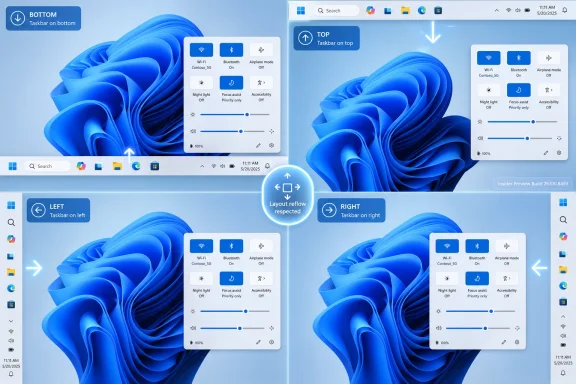
Microsoft began testing a movable Windows 11 taskbar in Insider Preview Build 26300.8493, released to the Experimental channel in mid-May 2026, restoring the ability to place the taskbar at the bottom, top, left, or right edge of the desktop. The change is not yet a production feature, and it may still mutate before it reaches mainstream PCs. But symbolically, it is already larger than its checkbox in Settings. Microsoft has spent nearly five years relearning a lesson Windows users tried to teach it on day one: the desktop is not a showroom, it is a workspace.
Windows 11 launched in October 2021 with a taskbar that looked calmer, cleaner, and more modern than the Windows 10 version it replaced. It was also less capable. Microsoft centered the Start button, simplified the system tray, removed several right-click affordances, and locked the taskbar to the bottom of the screen.
That decision was defended at the time as a matter of design coherence and engineering reality. The new shell had been rebuilt, and moving the taskbar was treated not as an old option temporarily missing, but as a complication that threatened the intended experience. The argument was that a repositioned taskbar could cause disruptive layout reflow and undermine the tidy geometry of Windows 11.
That explanation never landed with the people who actually used the old feature. For many users, the left or top taskbar was not aesthetic rebellion; it was muscle memory, monitor ergonomics, or screen-efficiency logic. Ultrawide users, vertical-monitor users, developers, spreadsheet workers, and anyone who had spent decades tuning Windows to their hands saw the removal as a regression dressed as taste.
Build 26300.8493 does not merely add a novelty toggle. It reverses one of Windows 11’s most visible early acts of subtraction. The operating system that once asked users to accept a less configurable desktop now appears to be conceding that configurability was part of the product’s value all along.
When Windows 11 removed taskbar movement, it also removed a small but powerful signal: that Windows belonged to the person sitting in front of it. Windows has always been messy, sometimes maddeningly so, but its power-user appeal came from the sense that the system could be bent into shape. You could make it ugly, efficient, strange, dense, sparse, left-handed, vertical, scriptable, or boring.
Windows 11’s first impression was different. It was visually disciplined but behaviorally narrower. The operating system seemed more willing to protect Microsoft’s preferred layout than to preserve users’ established workflows.
That made the locked taskbar a stand-in for broader frustrations: advertising in system surfaces, Microsoft account nudges, Edge promotion, changing defaults, Copilot placement, and the slow erosion of local-first assumptions. The bottom-only taskbar was not the worst of these decisions, but it was the easiest to point at. Everyone could understand the complaint: Windows used to let me do this, and now it does not.
That delay makes the restoration feel less like a feature release and more like a product-management confession. Microsoft has been able to ship ambitious changes when those changes aligned with its strategic priorities. It has moved quickly on cloud identity, subscriptions, AI entry points, and service-connected experiences. By comparison, restoring old desktop flexibility often seemed to sit in the backlog behind shinier corporate imperatives.
This is why the reaction from longtime users has been equal parts relief and mockery. Yes, the taskbar is back in motion. But the dominant emotional register is not surprise at innovation; it is disbelief that Windows needed half a decade to regain behavior that Windows 10, Windows 7, and earlier releases handled without drama.
That matters because operating-system trust is cumulative. Users tolerate change when they believe the vendor understands the cost of disruption. They revolt, or quietly disengage, when they think the vendor removed useful behavior for reasons that sounded more like branding than necessity.
That detail is important. A movable taskbar is not just the bar itself. It is a contract with every shell surface that depends on it. Menus need to open in the right direction. Flyouts need to anchor correctly. Notifications, overflow panels, hit targets, and window work areas all need to understand where the taskbar lives.
The vertical taskbar behavior may prove especially interesting. According to early hands-on testing, enabling a left-side taskbar can turn uncombined app windows into labeled vertical tabs, an arrangement that resembles the logic of vertical tabs in browsers such as Edge or Chrome. That is not merely nostalgia; it is a modern interpretation of an old feature for screens that are often wider than they are tall.
The smaller taskbar option also addresses a separate sore point. Earlier Windows 11 tweaks could shrink icons without truly reclaiming the taskbar’s full height. The new work appears to include a genuinely smaller taskbar mode, which should matter on compact laptops, handheld-style PCs, remote sessions, and any display where vertical pixels are at a premium.
Those caveats are not footnotes for Microsoft’s engineers; they are the feature. Windows 11’s taskbar is no longer just a row of buttons. It is a junction point for mouse, touch, pen, tablet posture, virtual desktops, widgets, search, AI surfaces, notification plumbing, accessibility tools, and legacy Win32 expectations.
A bottom-only taskbar simplifies that matrix. A four-position taskbar multiplies it. Every flyout direction, animation, focus order, screen-reader path, gesture zone, and collision with app windows has to be reconsidered. The old Windows taskbar did many of these things, but the new shell architecture, visual language, and input model mean Microsoft could not simply paste the Windows 10 code back in.
That does not excuse the original removal, but it does explain why the return is arriving in stages. The company made the initial problem by shipping Windows 11 without parity. Now it has to solve parity inside a more complex, more service-connected shell than the one it left behind.
That distinction will frustrate users who have waited since 2021, but it is also the right place for this feature to reappear. A movable taskbar touches too many pieces of the desktop to be rushed into general availability. Microsoft needs telemetry from different hardware, monitor layouts, DPI settings, languages, accessibility configurations, tablet modes, and enterprise environments.
The bigger question is whether Microsoft will treat Insider feedback as a validation exercise or a design input. The company has often asked users to test features whose strategic direction was already settled. Here, the feedback should shape the details: how vertical labels behave, how dense the small taskbar becomes, what happens on multi-monitor setups, and how the feature interacts with Copilot and Search.
If Microsoft wants credit for listening, it must do more than reintroduce the checkbox. It has to show that the restored feature is not fragile, grudging, or artificially constrained.
The safest version of this feature would ship with manageable defaults and clear policy behavior. Enterprises will want to know whether taskbar placement can be configured, locked, roamed, reset, or excluded from certain device classes. They will also care how it behaves in Windows 365, Azure Virtual Desktop, multi-monitor docking scenarios, kiosk configurations, and shared machines.
There is also a subtle support issue here: once Microsoft restores taskbar movement, users will expect it to work everywhere. If the taskbar can move on a laptop but behaves inconsistently on a tablet, remote desktop session, or managed profile, IT departments will inherit the ambiguity. “It works on my home PC” is one of the most expensive sentences in enterprise support.
Still, the return of a movable taskbar should ultimately help administrators more than hurt them. Many organizations delayed Windows 11 adoption not because of this one missing feature, but because the operating system felt like it removed familiar controls at the same time it added new distractions. Restoring user-facing competence can reduce resistance to migration.
A real small taskbar mode also speaks to a broader failure of modern desktop design: the tendency to optimize for presentation screenshots rather than dense work. Large touch-friendly targets are useful on convertible devices, but Windows still runs on fleets of keyboard-and-mouse PCs where information density is not a vice. The same operating system has to serve a Surface tablet, a trading desk, a developer workstation, and a cheap school laptop.
Microsoft’s challenge is to make compactness feel supported rather than tolerated. If the small taskbar breaks badges, truncates labels badly, or leaves flyouts oversized and clumsy, users will read it as another half-return. If it works cleanly, it could become one of those quiet features that makes Windows 11 feel less like a tablet shell stretched over a desktop and more like a desktop OS again.
This is where the company’s design language will be tested. Fluent design can coexist with density, but only if Microsoft resists the urge to equate whitespace with quality. Professional users are not asking Windows to become ugly. They are asking it to stop wasting room they need for work.
This is the hierarchy users wanted all along. The taskbar is infrastructure. Copilot is a feature. Search is a feature. Widgets are a feature. They should behave according to the desktop layout the user chooses, not dictate which layouts are viable.
The danger for Microsoft is that restored customization could become another venue for promotion. A movable taskbar that works beautifully except where Microsoft’s preferred service entry points are involved would reignite the old suspicion that Windows 11’s design constraints are less about engineering and more about funnel control. Users are remarkably tolerant of bugs in preview builds. They are less tolerant of bugs that seem to protect the vendor’s business model.
The right move is obvious: make Copilot, Search, Widgets, and tray experiences good citizens wherever the taskbar is placed. If Microsoft wants AI to be part of Windows, it has to accept Windows’ oldest bargain. The user gets to arrange the desk.
But the taskbar’s missing options were uniquely visible because they contradicted Windows’ historical identity. Windows was never beloved because it was the most elegant operating system. It endured because it was compatible, adaptable, and everywhere. Users accepted its compromises because it accepted theirs.
The return of taskbar movement suggests Microsoft understands at least part of that equation again. The company has recently signaled a broader push to improve Windows 11 performance, consistency, and quality. If that effort is real, the taskbar is a good early test because it is concrete, emotionally resonant, and difficult enough to prove seriousness.
Yet Microsoft should not mistake applause for absolution. Restoring old features after years of complaint does not transform subtraction into strategy. It merely begins the repair job.
 Microsoft Finally Admits the Bottom Edge Was Not Sacred
Windows 11 launched in October 2021 with a taskbar that looked calmer, cleaner, and more modern than the Windows 10 version it replaced. It was also less capable. Microsoft centered the Start button, simplified the system tray, removed several right-click affordances, and locked the taskbar to the bottom of the screen.That decision was defended at the time as a matter of design coherence and engineering reality. The new shell had been rebuilt, and moving the taskbar was treated not as an old option temporarily missing, but as a complication that threatened the intended experience. The argument was that a repositioned taskbar could cause disruptive layout reflow and undermine the tidy geometry of Windows 11.
That explanation never landed with the people who actually used the old feature. For many users, the left or top taskbar was not aesthetic rebellion; it was muscle memory, monitor ergonomics, or screen-efficiency logic. Ultrawide users, vertical-monitor users, developers, spreadsheet workers, and anyone who had spent decades tuning Windows to their hands saw the removal as a regression dressed as taste.
Build 26300.8493 does not merely add a novelty toggle. It reverses one of Windows 11’s most visible early acts of subtraction. The operating system that once asked users to accept a less configurable desktop now appears to be conceding that configurability was part of the product’s value all along.
The Taskbar Became a Proxy War Over Windows 11 Itself
The reason this particular feature generated such persistent irritation is that the taskbar is not a decorative strip. It is the control surface of Windows. It anchors launching, switching, notifications, pinned workflows, tray utilities, quick settings, search, and the user’s sense of where the operating system begins.When Windows 11 removed taskbar movement, it also removed a small but powerful signal: that Windows belonged to the person sitting in front of it. Windows has always been messy, sometimes maddeningly so, but its power-user appeal came from the sense that the system could be bent into shape. You could make it ugly, efficient, strange, dense, sparse, left-handed, vertical, scriptable, or boring.
Windows 11’s first impression was different. It was visually disciplined but behaviorally narrower. The operating system seemed more willing to protect Microsoft’s preferred layout than to preserve users’ established workflows.
That made the locked taskbar a stand-in for broader frustrations: advertising in system surfaces, Microsoft account nudges, Edge promotion, changing defaults, Copilot placement, and the slow erosion of local-first assumptions. The bottom-only taskbar was not the worst of these decisions, but it was the easiest to point at. Everyone could understand the complaint: Windows used to let me do this, and now it does not.
Five Years Is a Long Time to Restore a Checkbox
The awkward part for Microsoft is not that the movable taskbar took engineering work. The awkward part is the calendar. Windows 11 has received major updates, AI integrations, Store revisions, File Explorer changes, Start menu experiments, Settings migrations, security hardening, and a parade of visual refinements since 2021. Yet one of the oldest desktop affordances remained absent until now in preview form.That delay makes the restoration feel less like a feature release and more like a product-management confession. Microsoft has been able to ship ambitious changes when those changes aligned with its strategic priorities. It has moved quickly on cloud identity, subscriptions, AI entry points, and service-connected experiences. By comparison, restoring old desktop flexibility often seemed to sit in the backlog behind shinier corporate imperatives.
This is why the reaction from longtime users has been equal parts relief and mockery. Yes, the taskbar is back in motion. But the dominant emotional register is not surprise at innovation; it is disbelief that Windows needed half a decade to regain behavior that Windows 10, Windows 7, and earlier releases handled without drama.
That matters because operating-system trust is cumulative. Users tolerate change when they believe the vendor understands the cost of disruption. They revolt, or quietly disengage, when they think the vendor removed useful behavior for reasons that sounded more like branding than necessity.
The Preview Build Suggests Microsoft Did the Hard Part Properly
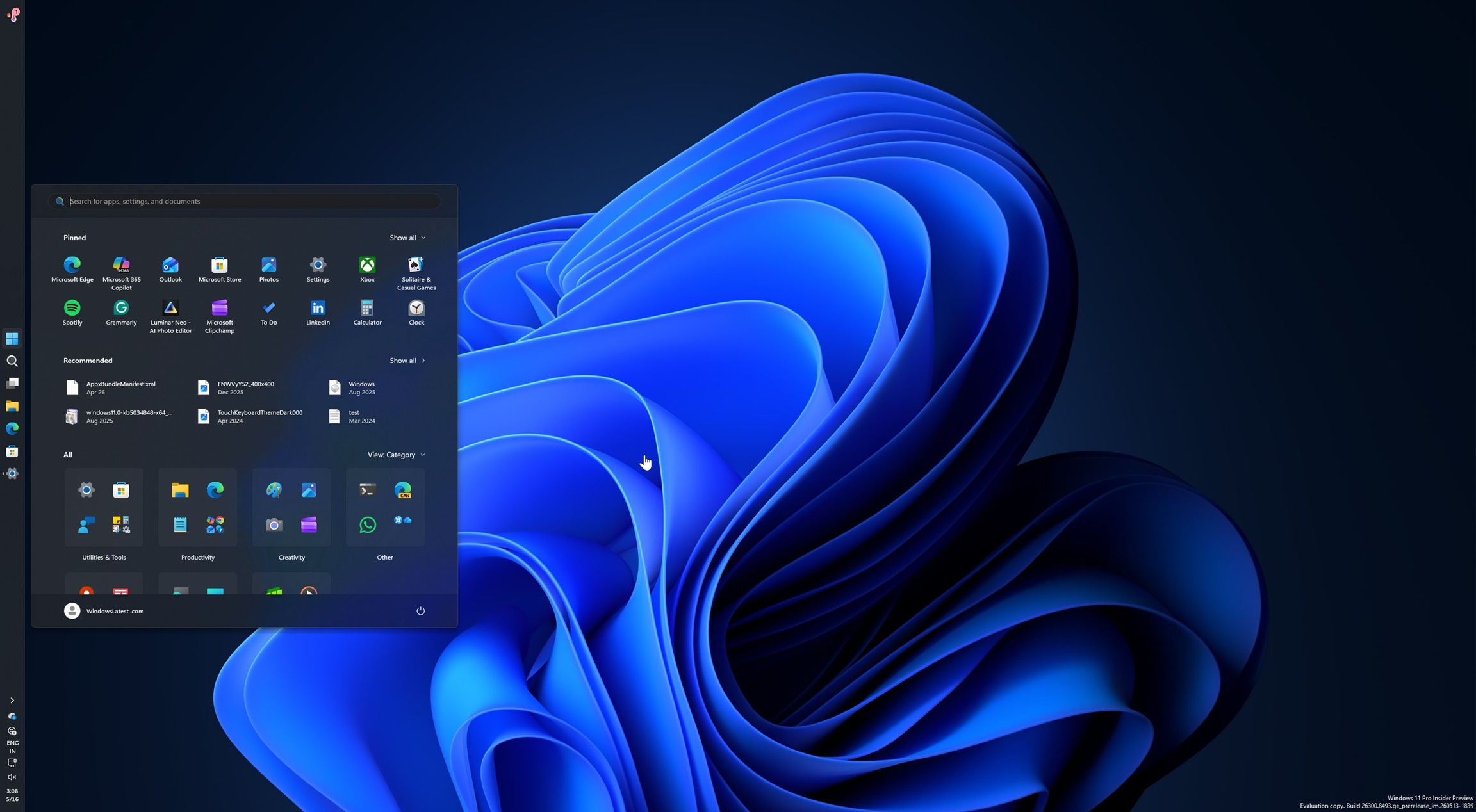
The early reports around Build 26300.8493 are encouraging because the feature appears to be more than a registry hack with a UI bolted on. Testers say the taskbar can be placed on all four screen edges: bottom, top, left, and right. The Start menu, Windows Search, system tray flyouts, and Quick Settings reportedly respect the new placement instead of awkwardly pretending the taskbar is still at the bottom.That detail is important. A movable taskbar is not just the bar itself. It is a contract with every shell surface that depends on it. Menus need to open in the right direction. Flyouts need to anchor correctly. Notifications, overflow panels, hit targets, and window work areas all need to understand where the taskbar lives.
The vertical taskbar behavior may prove especially interesting. According to early hands-on testing, enabling a left-side taskbar can turn uncombined app windows into labeled vertical tabs, an arrangement that resembles the logic of vertical tabs in browsers such as Edge or Chrome. That is not merely nostalgia; it is a modern interpretation of an old feature for screens that are often wider than they are tall.
The smaller taskbar option also addresses a separate sore point. Earlier Windows 11 tweaks could shrink icons without truly reclaiming the taskbar’s full height. The new work appears to include a genuinely smaller taskbar mode, which should matter on compact laptops, handheld-style PCs, remote sessions, and any display where vertical pixels are at a premium.
The Missing Pieces Show Why This Took So Long
The preview is not complete, and the gaps are revealing. Touch gestures are still in progress. The Search box and Ask Copilot do not fully support alternate taskbar positions. Auto-hide and the touch-optimized taskbar are not supported in the new placements yet.Those caveats are not footnotes for Microsoft’s engineers; they are the feature. Windows 11’s taskbar is no longer just a row of buttons. It is a junction point for mouse, touch, pen, tablet posture, virtual desktops, widgets, search, AI surfaces, notification plumbing, accessibility tools, and legacy Win32 expectations.
A bottom-only taskbar simplifies that matrix. A four-position taskbar multiplies it. Every flyout direction, animation, focus order, screen-reader path, gesture zone, and collision with app windows has to be reconsidered. The old Windows taskbar did many of these things, but the new shell architecture, visual language, and input model mean Microsoft could not simply paste the Windows 10 code back in.
That does not excuse the original removal, but it does explain why the return is arriving in stages. The company made the initial problem by shipping Windows 11 without parity. Now it has to solve parity inside a more complex, more service-connected shell than the one it left behind.
The Experimental Channel Is a Promise, Not a Delivery Date
The build’s placement in the Experimental channel matters. This is not a Patch Tuesday feature update. It is not something most users should install on a work machine just to move the taskbar to the left. Insider builds are test beds, and features in them can be delayed, altered, hidden behind controlled rollouts, or removed if Microsoft finds serious problems.That distinction will frustrate users who have waited since 2021, but it is also the right place for this feature to reappear. A movable taskbar touches too many pieces of the desktop to be rushed into general availability. Microsoft needs telemetry from different hardware, monitor layouts, DPI settings, languages, accessibility configurations, tablet modes, and enterprise environments.
The bigger question is whether Microsoft will treat Insider feedback as a validation exercise or a design input. The company has often asked users to test features whose strategic direction was already settled. Here, the feedback should shape the details: how vertical labels behave, how dense the small taskbar becomes, what happens on multi-monitor setups, and how the feature interacts with Copilot and Search.
If Microsoft wants credit for listening, it must do more than reintroduce the checkbox. It has to show that the restored feature is not fragile, grudging, or artificially constrained.
Enterprise IT Will Care Less About Nostalgia Than Predictability
For sysadmins, the movable taskbar is not primarily about sentiment. It is about user disruption, help-desk load, standard images, training material, and policy control. Any shell change that alters where users launch apps or find system controls can create tickets, even when the change is optional.The safest version of this feature would ship with manageable defaults and clear policy behavior. Enterprises will want to know whether taskbar placement can be configured, locked, roamed, reset, or excluded from certain device classes. They will also care how it behaves in Windows 365, Azure Virtual Desktop, multi-monitor docking scenarios, kiosk configurations, and shared machines.
There is also a subtle support issue here: once Microsoft restores taskbar movement, users will expect it to work everywhere. If the taskbar can move on a laptop but behaves inconsistently on a tablet, remote desktop session, or managed profile, IT departments will inherit the ambiguity. “It works on my home PC” is one of the most expensive sentences in enterprise support.
Still, the return of a movable taskbar should ultimately help administrators more than hurt them. Many organizations delayed Windows 11 adoption not because of this one missing feature, but because the operating system felt like it removed familiar controls at the same time it added new distractions. Restoring user-facing competence can reduce resistance to migration.
The Small Taskbar May Matter More Than the Movable One
The headline feature is movement, but the genuinely small taskbar may be the more practical improvement for many users. Windows 11’s default taskbar consumes a meaningful amount of vertical space on smaller displays. On 13-inch laptops, budget notebooks, and remote desktops squeezed into browser windows, that space matters.A real small taskbar mode also speaks to a broader failure of modern desktop design: the tendency to optimize for presentation screenshots rather than dense work. Large touch-friendly targets are useful on convertible devices, but Windows still runs on fleets of keyboard-and-mouse PCs where information density is not a vice. The same operating system has to serve a Surface tablet, a trading desk, a developer workstation, and a cheap school laptop.
Microsoft’s challenge is to make compactness feel supported rather than tolerated. If the small taskbar breaks badges, truncates labels badly, or leaves flyouts oversized and clumsy, users will read it as another half-return. If it works cleanly, it could become one of those quiet features that makes Windows 11 feel less like a tablet shell stretched over a desktop and more like a desktop OS again.
This is where the company’s design language will be tested. Fluent design can coexist with density, but only if Microsoft resists the urge to equate whitespace with quality. Professional users are not asking Windows to become ugly. They are asking it to stop wasting room they need for work.
Copilot Now Has to Fit Into the Desktop Instead of Colonizing It
One of the more telling limitations in the preview is that Ask Copilot does not yet fully support alternate taskbar positions. That is almost too perfect as a metaphor for Windows in 2026. Microsoft has spent years finding places to put AI, and now a restored piece of desktop agency is forcing the AI surface to adapt.This is the hierarchy users wanted all along. The taskbar is infrastructure. Copilot is a feature. Search is a feature. Widgets are a feature. They should behave according to the desktop layout the user chooses, not dictate which layouts are viable.
The danger for Microsoft is that restored customization could become another venue for promotion. A movable taskbar that works beautifully except where Microsoft’s preferred service entry points are involved would reignite the old suspicion that Windows 11’s design constraints are less about engineering and more about funnel control. Users are remarkably tolerant of bugs in preview builds. They are less tolerant of bugs that seem to protect the vendor’s business model.
The right move is obvious: make Copilot, Search, Widgets, and tray experiences good citizens wherever the taskbar is placed. If Microsoft wants AI to be part of Windows, it has to accept Windows’ oldest bargain. The user gets to arrange the desk.
Windows 11’s Reputation Problem Was Built One Omission at a Time
No single missing feature explains Windows 11’s rocky relationship with enthusiasts. The hardware requirements angered some users. The TPM cutoff stranded capable PCs. The Start menu lost flexibility. Context menus gained an extra click. Default app handling became more tedious before later improvements. Ads and recommendations appeared in places many users considered private operating-system territory.But the taskbar’s missing options were uniquely visible because they contradicted Windows’ historical identity. Windows was never beloved because it was the most elegant operating system. It endured because it was compatible, adaptable, and everywhere. Users accepted its compromises because it accepted theirs.
The return of taskbar movement suggests Microsoft understands at least part of that equation again. The company has recently signaled a broader push to improve Windows 11 performance, consistency, and quality. If that effort is real, the taskbar is a good early test because it is concrete, emotionally resonant, and difficult enough to prove seriousness.
Yet Microsoft should not mistake applause for absolution. Restoring old features after years of complaint does not transform subtraction into strategy. It merely begins the repair job.
The Desktop’s Old Lesson Reaches Redmond Again
The most concrete lesson from Build 26300.8493 is that Windows users notice when Microsoft removes small freedoms. They may not all file Feedback Hub reports. They may not all join Insider rings. But they remember, and the memory shapes how they interpret every later change.- Microsoft is testing the movable Windows 11 taskbar in Build 26300.8493 for the Experimental channel, not shipping it broadly to all stable Windows 11 users yet.
- The previewed implementation supports bottom, top, left, and right taskbar placement, restoring a capability that Windows 11 removed at launch.
- Early testing indicates that major shell surfaces such as Start, Search, Quick Settings, and tray flyouts are being adapted to respect the taskbar’s new position.
- The feature is incomplete, with touch gestures, the Search box, Ask Copilot, auto-hide, and the touch-optimized taskbar still requiring work.
- A true small taskbar mode may be just as important as movement for users on compact displays, remote desktops, and dense productivity setups.
- The broader significance is not nostalgia; it is Microsoft acknowledging that Windows 11 needs to regain trust by restoring practical control to users.
References
- Primary source: Technobezz
Published: Mon, 18 May 2026 20:08:42 GMT
Loading…
www.technobezz.com - Related coverage: windowscentral.com

The movable taskbar is finally back in Windows 11 — and yes, you can try it right now
Windows 11 Build 26300.8493 introduces the ability to move the Taskbar and resize icons, reversing a major launch-day limitation. www.windowscentral.com
- Related coverage: windowslatest.com
Microsoft rolls out Windows 11's movable and smaller taskbar 5 years after killing it (hands on experience)
Microsoft is finally rolling out two of the most requested features in Windows 11: the ability to move the taskbar and make it smaller. www.windowslatest.com
- Official source: learn.microsoft.com
Loading…
learn.microsoft.com - Related coverage: bleepingcomputer.com
Microsoft testing adjustable taskbar, Start menu in Windows 11
Microsoft has finally brought back the resizable taskbar and Start menu to Windows 11 in the latest preview version rolling out to Insiders in the Experimental channel.www.bleepingcomputer.com
- Related coverage: technine.be
Loading…
www.technine.be
- Related coverage: windowsreport.com
Loading…
windowsreport.com - Related coverage: notebookcheck.net

Microsoft brings back Windows 10 taskbar customizations to Windows 11
Microsoft is finally giving Windows 11 users more control over the taskbar again, including full screen-edge placement and a smaller, more compact mode. The update also improves how menus and window labels behave depending on the taskbar position. www.notebookcheck.net
- Related coverage: techbuzz.ai
Loading…
www.techbuzz.ai - Related coverage: arstechnica.com
Five years later, Windows 11 brings back much-missed taskbar options (and more)
Microsoft is also testing a smaller taskbar and more customizable Start menu. arstechnica.com
- Related coverage: ntcompatible.com

Windows 11 Insider Experimental Preview Build 26300.8493 released
Windows 11 Build 26300 finally lets you move the taskbar to any screen edge and shrink its height for better screen real estate on compact displays. Widgets get quieter notifications while Windows Search prioritizes local files over web results, making everyday navigation noticeably faster. www.ntcompatible.com
- Related coverage: techradar.com
Loading…
www.techradar.com - Official source: news.microsoft.com
- Official source: microsoft.com
Loading…
www.microsoft.com - Related coverage: njsba.com
Loading…
njsba.com
