

Microsoft released Windows 11 Insider Preview Build 28020.2380 for Beta 26H1 testers and Build 26220.8764 for standard Beta Channel testers on July 6, 2026, adding a K-12 Windows 11 Pro Education upgrade path, a unified update restart model, and several targeted fixes. As reported by Neowin and confirmed in Microsoft’s release notes, neither build is a headline-grabbing feature drop. That is precisely why they matter. Microsoft is using small Insider flights to test something bigger than a new button: a less chaotic Windows servicing model and a cheaper route into managed school PCs.
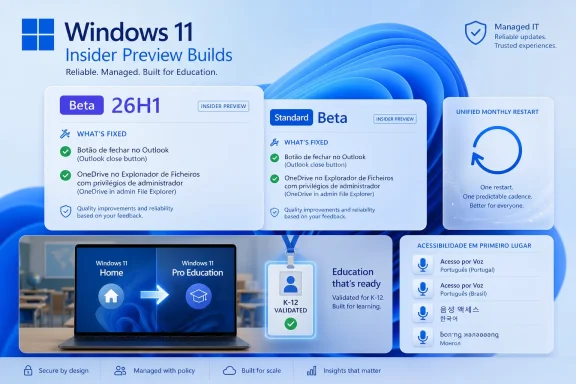
The immediate changelog is modest. Build 28020.2380, aimed at the Beta 26H1 track, gives eligible K-12 environments a free path from Windows 11 Home to Windows 11 Pro Education, fixes a OneDrive shortcut failure in File Explorer when Explorer is run as administrator, and resolves an Outlook close-button bug that irritated testers last week. Build 26220.8764, for the standard Beta Channel, starts aligning driver, .NET, and firmware updates with the monthly quality update, expands Voice Access language support, improves Mongolian Baiti rendering, and carries the same Outlook fix.
That sounds like a typical Insider housekeeping release. But the interesting part is the pattern: Microsoft is trying to collapse several long-running Windows pain points into fewer moments of user interruption. Schools get a less expensive way to buy hardware and bring it under management. Users get fewer update restarts. Accessibility gets broader language coverage. Admins get one fewer weird OneDrive-in-elevated-Explorer bug to explain.
Microsoft’s Windows Insider release notes frame these changes as “small” general improvements, and in a narrow sense they are. There is no redesigned Start menu, no Copilot marquee feature, and no dramatic shell experiment. But Windows has always been most consequential in the places where users do not want novelty: setup, licensing, updates, management, accessibility, and reliability.
That is not just a licensing footnote. Schools often buy on thin margins, and Windows 11 Home machines can be easier to source cheaply than devices preloaded with Pro Education. The problem is that Home is the wrong edition for managed institutional fleets. It lacks the expected management posture for school IT departments, which need policy control, identity integration, and a cleaner path into deployment workflows.
Microsoft’s move effectively says: buy the cheaper box if that is what procurement can get, then convert it into the edition the IT department actually needs. For districts that standardize on Intune for Education, Entra identity, and Windows management policies, the ability to bridge that gap without buying a separate upgrade license could remove a surprisingly stubborn procurement obstacle.
The catch is permanence. Microsoft’s notes say the upgrade is one-way only; reverting to Windows Home requires a clean operating system reinstall. That is sensible for schools, where edition rollback would create support and compliance ambiguity, but it also means this is not a casual experiment for spare devices. Once a device becomes Pro Education through this path, administrators should treat it as part of the institution’s managed estate.
There is also an interesting channel wrinkle. The K-12 path previously appeared in earlier Insider testing, and its arrival in the Beta 26H1 release notes suggests Microsoft is continuing to refine the mechanism across build trains rather than treating it as a one-off education announcement. In other words, this is not merely a Windows feature; it is a distribution strategy.
That choice tells us something about the target audience. This is not aimed at a parent upgrading a laptop in the kitchen. It is aimed at school IT staff, managed service providers, and deployment technicians who are comfortable touching dozens or hundreds of machines during intake. The command-line path is not elegant, but it is scriptable, documentable, and predictable.
The local-account requirement is also notable. Microsoft says the device should first be signed in with a local account, then upgraded and validated with the K-12 organization account. That sequencing may help avoid the messy collision of consumer identity setup, school tenant validation, and edition switching during first-run experience.
For WindowsForum readers who manage fleets, the practical lesson is clear: do not confuse “free” with “hands-off.” The upgrade removes a licensing barrier, not the work of inventory, eligibility validation, policy assignment, and lifecycle planning. If this graduates to general availability, districts will still need a controlled process for deciding which devices are eligible, when they are converted, and how they are documented afterward.
Windows Update has improved since the worst days of surprise restarts and multi-stage servicing confusion, but its reputation remains bruised. Users do not distinguish between a cumulative update, a firmware update, a driver package, a .NET rollup, and a servicing stack change. They experience all of it as Windows interrupting them again.
Microsoft’s stated goal is therefore politically smart: fewer reboots per month. The company is not promising fewer updates, and it should not. Drivers, firmware, platform components, and security fixes still need to move quickly. The bet is that Windows can coordinate the pain into one predictable maintenance moment instead of scattering it across the month.
This is especially relevant for laptops and hybrid workers. A firmware update that lands separately from a quality update can feel like an ambush, particularly when it adds pre-boot progress screens or temporarily changes thermal and fan behavior. Aligning more update types with the monthly restart could make Windows feel less needy, even if the underlying servicing machinery remains just as complex.
That does not mean Microsoft should avoid the model. Enterprise IT has long preferred predictable maintenance windows over random disruption. The question is whether Microsoft can provide enough telemetry, rollback behavior, and administrative visibility to make unified updates trustworthy at scale.
For managed organizations, this will come down to tooling. Admins will want to know which payload caused a failure, whether firmware can be deferred separately, how driver approvals interact with the monthly cadence, and whether Windows Update for Business policies expose enough control. A single reboot is attractive only if the servicing stack remains legible.
For consumers, the bar is simpler: the PC should restart once, finish promptly, and come back healthy. That sounds obvious, but Windows’ installed base is a museum of firmware implementations, OEM driver packages, legacy peripherals, and half-supported utilities. The unified update experience is a great idea precisely because the Windows ecosystem is messy; it is risky for the same reason.
Microsoft has been steadily developing Voice Access from a niche assistive technology into a broader hands-free interface. Earlier Insider builds added voice isolation and other recognition improvements, and the language expansion continues that trajectory. For users with mobility impairments, repetitive strain injuries, temporary injuries, or workflows where hands-free control matters, language availability is not a cosmetic detail.
The distinction between Portuguese variants matters too. Portugal and Brazil differ in pronunciation, vocabulary, and speech patterns, and treating them as separate supported targets is the kind of localization decision that separates a usable accessibility feature from a checkbox. Korean support similarly broadens the feature’s usefulness in a major Windows market.
There is also a strategic angle. As Microsoft pushes AI-inflected experiences across Windows, voice becomes a natural input layer. But accessibility features have to be reliable in boring, practical ways long before they can become futuristic. Voice Access succeeding as assistive infrastructure is more important than voice becoming a flashy Copilot demo.
Text rendering is infrastructure. When shaping fails, software does not merely look unpolished; it can misrepresent language. For minority scripts, complex scripts, and multilingual organizations, font bugs create friction that English-first users rarely see. A file name, form field, document, classroom worksheet, or government record can become less trustworthy when the operating system mishandles glyph behavior.
Windows carries a global obligation because it is still everywhere. Microsoft cannot credibly sell Windows as a universal productivity platform while treating script rendering as peripheral polish. The Mongolian Baiti improvement is small in release-note length, but it belongs to the same category as accessibility language support: Windows becomes better when it more accurately serves users outside the default assumptions of Redmond and Silicon Valley.
This is also why Insider builds matter. Font shaping bugs and localization issues often need real-world feedback from users who understand the language and context. Automated tests can catch regressions, but communities catch meaning.
Outlook is not a side app for many Windows users; it is the workday. A broken close button is not catastrophic, but it undermines confidence because it affects a basic interaction in a high-frequency application. When a user clicks the X, the application should close. There is not much room for philosophical interpretation.
The quick fix also shows the implicit bargain of the Insider Program. Testers accept rough edges so Microsoft can catch regressions before they hit broader audiences. Microsoft, in return, has to demonstrate that feedback turns into visible fixes. A one-week turnaround on a conspicuous Outlook annoyance is the kind of responsiveness that keeps that bargain intact.
Still, this incident sits uncomfortably alongside Microsoft’s broader push to update Windows more continuously. Faster iteration is valuable, but it increases the surface area for regressions across Microsoft 365, Windows shell components, WebView, identity layers, and background services. The more Windows becomes a constantly serviced platform, the more every small break feels like a test of Microsoft’s release discipline.
OneDrive integration has become part of Windows’ default file experience, especially in education and enterprise deployments where known-folder move, cloud backup, and Microsoft 365 storage policies are common. If the OneDrive shortcut breaks under elevation, it creates an awkward split between the user’s file world and the administrator’s file world.
This is the kind of bug that often gets dismissed as an edge case because it requires a particular launch mode. But edge cases in Windows tend to be where real work happens. Admins elevate tools. Developers run odd shells. Support technicians reproduce issues under different privilege boundaries. If the shell behaves differently in those modes, troubleshooting becomes harder.
The fix is also thematically connected to the education upgrade. Microsoft wants more school devices under management and more files flowing through Microsoft’s cloud-backed productivity stack. That only works if the shell remains coherent under the scenarios school IT staff actually use.
The Windows Insider Program has become a layered map of build trains, enablement packages, gradual rollouts, toggles, and feature experiments that may or may not ship. Microsoft’s release notes repeatedly remind testers that features can change, disappear, or arrive later in public builds. That is honest, but it also underscores how difficult it has become to infer Windows’ future from any single flight.
For WindowsForum’s audience, this complexity is manageable, even interesting. Build numbers carry meaning. Channels imply risk. Enablement packages tell a story about shared code bases and staged feature activation. But for less technical users, the Insider Program can look like a maze where “Beta” no longer means one thing.
Microsoft’s challenge is that Windows development now has to serve two conflicting needs. The company needs granular rings to test platform changes safely across a huge hardware ecosystem. Users need simple expectations about stability and feature arrival. These builds show Microsoft doing the former well enough, but the latter remains a communications problem.
Windows 11 Pro Education gives Microsoft a better footing in that fight than Windows 11 Home. Once a device is in the school management pipeline, Microsoft can attach the rest of its education stack: identity, policy, Microsoft 365, security controls, classroom workflows, and lifecycle management. The free edition upgrade is a gateway to that broader platform relationship.
This does not mean Windows suddenly becomes simpler than ChromeOS for schools. Windows still carries more legacy, more hardware variation, and more administrative depth. But that complexity is also why many districts and vocational programs still want Windows PCs. They need desktop applications, specialized peripherals, local development environments, and compatibility with real-world software.
The K-12 upgrade path is therefore a practical concession. Microsoft appears to be acknowledging that schools may not always buy the ideal Windows SKU upfront. Rather than punish that procurement reality, it is creating a supported way to bring those devices back into the managed fold.
For the education upgrade, Microsoft will need clear documentation, tenant eligibility rules, error handling, and deployment guidance. If a school technician runs
For unified updates, Microsoft will need to prove that fewer restarts do not mean fewer options. Some organizations deliberately separate driver and firmware deployment from quality updates because their risk profiles differ. A GPU driver, BIOS update, and monthly cumulative update do not carry the same operational blast radius. A unified experience should coordinate restarts without flattening administrative judgment.
For accessibility and language work, the test is lived usability. Portuguese and Korean Voice Access support must handle accents, noisy rooms, varied microphones, and the unglamorous commands people rely on every day. Mongolian rendering must be correct across apps, not only in a controlled test pane. Localization is not finished when a feature appears in a changelog.
That is where Microsoft should be focusing. Windows 11 is mature enough that many users do not need a new surface-level experience every month. They need the operating system to interrupt them less, manage better, respect more languages, and behave consistently under real administrative conditions.
The concrete readout from this flight is straightforward:
 Microsoft’s Small Beta Builds Are Really About Reducing Friction
The immediate changelog is modest. Build 28020.2380, aimed at the Beta 26H1 track, gives eligible K-12 environments a free path from Windows 11 Home to Windows 11 Pro Education, fixes a OneDrive shortcut failure in File Explorer when Explorer is run as administrator, and resolves an Outlook close-button bug that irritated testers last week. Build 26220.8764, for the standard Beta Channel, starts aligning driver, .NET, and firmware updates with the monthly quality update, expands Voice Access language support, improves Mongolian Baiti rendering, and carries the same Outlook fix.That sounds like a typical Insider housekeeping release. But the interesting part is the pattern: Microsoft is trying to collapse several long-running Windows pain points into fewer moments of user interruption. Schools get a less expensive way to buy hardware and bring it under management. Users get fewer update restarts. Accessibility gets broader language coverage. Admins get one fewer weird OneDrive-in-elevated-Explorer bug to explain.
Microsoft’s Windows Insider release notes frame these changes as “small” general improvements, and in a narrow sense they are. There is no redesigned Start menu, no Copilot marquee feature, and no dramatic shell experiment. But Windows has always been most consequential in the places where users do not want novelty: setup, licensing, updates, management, accessibility, and reliability.
The K-12 Upgrade Path Turns Cheap PCs Into Managed PCs
The most commercially important change is buried in the 26H1 build. Microsoft says Windows Insiders in K-12 education environments can now upgrade Windows 11 Home devices to Windows 11 Pro Education at no additional cost, provided they validate eligibility with a K-12 organization account. The upgrade is initiated from an elevated Command Prompt usingClipupgrade.exe, then completed after sign-in and restart.That is not just a licensing footnote. Schools often buy on thin margins, and Windows 11 Home machines can be easier to source cheaply than devices preloaded with Pro Education. The problem is that Home is the wrong edition for managed institutional fleets. It lacks the expected management posture for school IT departments, which need policy control, identity integration, and a cleaner path into deployment workflows.
Microsoft’s move effectively says: buy the cheaper box if that is what procurement can get, then convert it into the edition the IT department actually needs. For districts that standardize on Intune for Education, Entra identity, and Windows management policies, the ability to bridge that gap without buying a separate upgrade license could remove a surprisingly stubborn procurement obstacle.
The catch is permanence. Microsoft’s notes say the upgrade is one-way only; reverting to Windows Home requires a clean operating system reinstall. That is sensible for schools, where edition rollback would create support and compliance ambiguity, but it also means this is not a casual experiment for spare devices. Once a device becomes Pro Education through this path, administrators should treat it as part of the institution’s managed estate.
There is also an interesting channel wrinkle. The K-12 path previously appeared in earlier Insider testing, and its arrival in the Beta 26H1 release notes suggests Microsoft is continuing to refine the mechanism across build trains rather than treating it as a one-off education announcement. In other words, this is not merely a Windows feature; it is a distribution strategy.
The Command-Line Upgrade Is Old-School Windows in Service of Modern Management
The requirement to launch an elevated Command Prompt and runClipupgrade.exe may feel oddly retro in 2026. Microsoft has spent years trying to move configuration into polished Settings pages, cloud enrollment flows, and consumer-friendly onboarding screens. Yet here, the important education upgrade begins with an admin shell.That choice tells us something about the target audience. This is not aimed at a parent upgrading a laptop in the kitchen. It is aimed at school IT staff, managed service providers, and deployment technicians who are comfortable touching dozens or hundreds of machines during intake. The command-line path is not elegant, but it is scriptable, documentable, and predictable.
The local-account requirement is also notable. Microsoft says the device should first be signed in with a local account, then upgraded and validated with the K-12 organization account. That sequencing may help avoid the messy collision of consumer identity setup, school tenant validation, and edition switching during first-run experience.
For WindowsForum readers who manage fleets, the practical lesson is clear: do not confuse “free” with “hands-off.” The upgrade removes a licensing barrier, not the work of inventory, eligibility validation, policy assignment, and lifecycle planning. If this graduates to general availability, districts will still need a controlled process for deciding which devices are eligible, when they are converted, and how they are documented afterward.
The Unified Update Experience Is the Bigger Consumer Story
The standard Beta build’s unified update experience may be the more important change for everyday Windows users. Microsoft says it is beginning to coordinate driver, .NET, and firmware updates with the monthly quality update so the update process can be reduced to a single monthly restart. That is the kind of change users will notice only if it works.Windows Update has improved since the worst days of surprise restarts and multi-stage servicing confusion, but its reputation remains bruised. Users do not distinguish between a cumulative update, a firmware update, a driver package, a .NET rollup, and a servicing stack change. They experience all of it as Windows interrupting them again.
Microsoft’s stated goal is therefore politically smart: fewer reboots per month. The company is not promising fewer updates, and it should not. Drivers, firmware, platform components, and security fixes still need to move quickly. The bet is that Windows can coordinate the pain into one predictable maintenance moment instead of scattering it across the month.
This is especially relevant for laptops and hybrid workers. A firmware update that lands separately from a quality update can feel like an ambush, particularly when it adds pre-boot progress screens or temporarily changes thermal and fan behavior. Aligning more update types with the monthly restart could make Windows feel less needy, even if the underlying servicing machinery remains just as complex.
Fewer Restarts Mean More Pressure on Microsoft’s Update Quality
There is a trade-off. Bundling more update categories into a single monthly restart creates a cleaner user experience, but it also raises the stakes for that restart. If the unified event includes a driver, firmware update, .NET update, and quality update, a failure may be harder for users and administrators to isolate.That does not mean Microsoft should avoid the model. Enterprise IT has long preferred predictable maintenance windows over random disruption. The question is whether Microsoft can provide enough telemetry, rollback behavior, and administrative visibility to make unified updates trustworthy at scale.
For managed organizations, this will come down to tooling. Admins will want to know which payload caused a failure, whether firmware can be deferred separately, how driver approvals interact with the monthly cadence, and whether Windows Update for Business policies expose enough control. A single reboot is attractive only if the servicing stack remains legible.
For consumers, the bar is simpler: the PC should restart once, finish promptly, and come back healthy. That sounds obvious, but Windows’ installed base is a museum of firmware implementations, OEM driver packages, legacy peripherals, and half-supported utilities. The unified update experience is a great idea precisely because the Windows ecosystem is messy; it is risky for the same reason.
Voice Access Keeps Becoming a Real Interface, Not a Demo
Build 26220.8764 also expands Voice Access to Portuguese for Portugal, Portuguese for Brazil, and Korean for South Korea. Accessibility improvements rarely receive the same attention as shell redesigns, but this is one of the areas where incremental Windows builds can have outsized human impact. A feature is not truly available to users if it is not available in their language.Microsoft has been steadily developing Voice Access from a niche assistive technology into a broader hands-free interface. Earlier Insider builds added voice isolation and other recognition improvements, and the language expansion continues that trajectory. For users with mobility impairments, repetitive strain injuries, temporary injuries, or workflows where hands-free control matters, language availability is not a cosmetic detail.
The distinction between Portuguese variants matters too. Portugal and Brazil differ in pronunciation, vocabulary, and speech patterns, and treating them as separate supported targets is the kind of localization decision that separates a usable accessibility feature from a checkbox. Korean support similarly broadens the feature’s usefulness in a major Windows market.
There is also a strategic angle. As Microsoft pushes AI-inflected experiences across Windows, voice becomes a natural input layer. But accessibility features have to be reliable in boring, practical ways long before they can become futuristic. Voice Access succeeding as assistive infrastructure is more important than voice becoming a flashy Copilot demo.
The Mongolian Baiti Fix Is a Reminder That Fonts Are Infrastructure
The standard Beta build improves Mongolian Baiti shaping and rendering to produce more accurate and consistent Mongolian script output. That line will be invisible to most Windows users. For the people affected by it, it may be one of the most important changes in the build.Text rendering is infrastructure. When shaping fails, software does not merely look unpolished; it can misrepresent language. For minority scripts, complex scripts, and multilingual organizations, font bugs create friction that English-first users rarely see. A file name, form field, document, classroom worksheet, or government record can become less trustworthy when the operating system mishandles glyph behavior.
Windows carries a global obligation because it is still everywhere. Microsoft cannot credibly sell Windows as a universal productivity platform while treating script rendering as peripheral polish. The Mongolian Baiti improvement is small in release-note length, but it belongs to the same category as accessibility language support: Windows becomes better when it more accurately serves users outside the default assumptions of Redmond and Silicon Valley.
This is also why Insider builds matter. Font shaping bugs and localization issues often need real-world feedback from users who understand the language and context. Automated tests can catch regressions, but communities catch meaning.
The Outlook Close-Button Fix Shows How Fast Regressions Travel
Both builds fix an issue where Outlook did not respond to the close button for some testers last week. On paper, that is mundane. In practice, it is exactly the sort of bug that makes preview channels valuable and infuriating at the same time.Outlook is not a side app for many Windows users; it is the workday. A broken close button is not catastrophic, but it undermines confidence because it affects a basic interaction in a high-frequency application. When a user clicks the X, the application should close. There is not much room for philosophical interpretation.
The quick fix also shows the implicit bargain of the Insider Program. Testers accept rough edges so Microsoft can catch regressions before they hit broader audiences. Microsoft, in return, has to demonstrate that feedback turns into visible fixes. A one-week turnaround on a conspicuous Outlook annoyance is the kind of responsiveness that keeps that bargain intact.
Still, this incident sits uncomfortably alongside Microsoft’s broader push to update Windows more continuously. Faster iteration is valuable, but it increases the surface area for regressions across Microsoft 365, Windows shell components, WebView, identity layers, and background services. The more Windows becomes a constantly serviced platform, the more every small break feels like a test of Microsoft’s release discipline.
File Explorer’s OneDrive Fix Lands Where Admins Actually Live
The 26H1 build fixes a File Explorer issue where the OneDrive shortcut stopped working when File Explorer was run in administrative mode. That sounds niche until you remember how often power users and admins end up in elevated contexts. File Explorer may be a consumer shell, but it is also a daily administrative tool.OneDrive integration has become part of Windows’ default file experience, especially in education and enterprise deployments where known-folder move, cloud backup, and Microsoft 365 storage policies are common. If the OneDrive shortcut breaks under elevation, it creates an awkward split between the user’s file world and the administrator’s file world.
This is the kind of bug that often gets dismissed as an edge case because it requires a particular launch mode. But edge cases in Windows tend to be where real work happens. Admins elevate tools. Developers run odd shells. Support technicians reproduce issues under different privilege boundaries. If the shell behaves differently in those modes, troubleshooting becomes harder.
The fix is also thematically connected to the education upgrade. Microsoft wants more school devices under management and more files flowing through Microsoft’s cloud-backed productivity stack. That only works if the shell remains coherent under the scenarios school IT staff actually use.
Insider Channel Complexity Remains Its Own Product Problem
One awkward part of this release is the channel story. Microsoft is shipping a Beta 26H1 build numbered 28020.2380 and a standard Beta build numbered 26220.8764, with the latter based on Windows 11 version 25H2 via an enablement package. That sentence is comprehensible to Windows enthusiasts. It is not exactly friendly.The Windows Insider Program has become a layered map of build trains, enablement packages, gradual rollouts, toggles, and feature experiments that may or may not ship. Microsoft’s release notes repeatedly remind testers that features can change, disappear, or arrive later in public builds. That is honest, but it also underscores how difficult it has become to infer Windows’ future from any single flight.
For WindowsForum’s audience, this complexity is manageable, even interesting. Build numbers carry meaning. Channels imply risk. Enablement packages tell a story about shared code bases and staged feature activation. But for less technical users, the Insider Program can look like a maze where “Beta” no longer means one thing.
Microsoft’s challenge is that Windows development now has to serve two conflicting needs. The company needs granular rings to test platform changes safely across a huge hardware ecosystem. Users need simple expectations about stability and feature arrival. These builds show Microsoft doing the former well enough, but the latter remains a communications problem.
The Education Story Is Really About Microsoft Defending Its Endpoint
The free K-12 upgrade path should also be read competitively. Schools are not merely buying operating systems; they are choosing endpoint ecosystems. Chromebooks won years of education mindshare by being cheap, manageable, replaceable, and easy to reset. Microsoft’s strongest answer is not just Windows features, but lowering the total hassle of turning commodity hardware into managed school devices.Windows 11 Pro Education gives Microsoft a better footing in that fight than Windows 11 Home. Once a device is in the school management pipeline, Microsoft can attach the rest of its education stack: identity, policy, Microsoft 365, security controls, classroom workflows, and lifecycle management. The free edition upgrade is a gateway to that broader platform relationship.
This does not mean Windows suddenly becomes simpler than ChromeOS for schools. Windows still carries more legacy, more hardware variation, and more administrative depth. But that complexity is also why many districts and vocational programs still want Windows PCs. They need desktop applications, specialized peripherals, local development environments, and compatibility with real-world software.
The K-12 upgrade path is therefore a practical concession. Microsoft appears to be acknowledging that schools may not always buy the ideal Windows SKU upfront. Rather than punish that procurement reality, it is creating a supported way to bring those devices back into the managed fold.
The Real Test Comes After Insider Validation
The obvious question is when these features reach production, but the more important issue is how they survive contact with production diversity. Insider testers are a useful signal, but schools, OEM images, driver catalogs, firmware stacks, and managed update policies are where the real complexity lives.For the education upgrade, Microsoft will need clear documentation, tenant eligibility rules, error handling, and deployment guidance. If a school technician runs
Clipupgrade.exe and validation fails, the next steps must be obvious. If hundreds of devices are upgraded, inventory systems should reflect the edition change cleanly. If a device is later retired or repurposed, the one-way nature of the upgrade must not surprise anyone.For unified updates, Microsoft will need to prove that fewer restarts do not mean fewer options. Some organizations deliberately separate driver and firmware deployment from quality updates because their risk profiles differ. A GPU driver, BIOS update, and monthly cumulative update do not carry the same operational blast radius. A unified experience should coordinate restarts without flattening administrative judgment.
For accessibility and language work, the test is lived usability. Portuguese and Korean Voice Access support must handle accents, noisy rooms, varied microphones, and the unglamorous commands people rely on every day. Mongolian rendering must be correct across apps, not only in a controlled test pane. Localization is not finished when a feature appears in a changelog.
These Builds Matter Because They Make Windows Less Annoying
The most revealing thing about these two Beta builds is that their best features are subtractive. They remove cost from K-12 edition upgrades. They remove extra restarts from the update cycle. They remove a broken Outlook interaction, a File Explorer inconsistency, and text-rendering defects. This is Windows progress measured not in spectacle, but in reduced irritation.That is where Microsoft should be focusing. Windows 11 is mature enough that many users do not need a new surface-level experience every month. They need the operating system to interrupt them less, manage better, respect more languages, and behave consistently under real administrative conditions.
The concrete readout from this flight is straightforward:
- Microsoft released Build 28020.2380 for the Beta 26H1 channel and Build 26220.8764 for the standard Beta Channel on July 6, 2026.
- The 26H1 build adds a free, one-way Windows 11 Home to Windows 11 Pro Education upgrade path for eligible K-12 environments.
- The standard Beta build begins coordinating driver, .NET, and firmware updates with monthly quality updates to target a single monthly restart.
- Voice Access now supports Portuguese for Portugal, Portuguese for Brazil, and Korean for South Korea in the standard Beta build.
- Both builds fix the recent Outlook bug where the close button failed to respond for some testers.
- The File Explorer OneDrive shortcut fix in the 26H1 build matters most to admins and power users who work in elevated contexts.
References
- Primary source: Neowin
Published: Mon, 06 Jul 2026 21:56:00 GMT
Loading…
www.neowin.net - Official source: learn.microsoft.com
Loading…
learn.microsoft.com - Related coverage: windowsreport.com
Loading…
windowsreport.com - Related coverage: windowscentral.com
Loading…
www.windowscentral.com - Related coverage: betawiki.net
Loading…
betawiki.net - Related coverage: pcsofter.com
Loading…
www.pcsofter.com
- Related coverage: computerworld.com
Windows 11 Insider Previews: What’s in the latest build? – Computerworld
Get the latest info on new preview builds of Windows 11 as they roll out to Windows Insiders. Now updated for the June 19, 2026 releases for the Beta, Beta 26H1, Experimental, Experimental 26H1, and Experimental Future Platforms Channels. www.computerworld.com
- Related coverage: windowsforum.com
Loading…
windowsforum.com