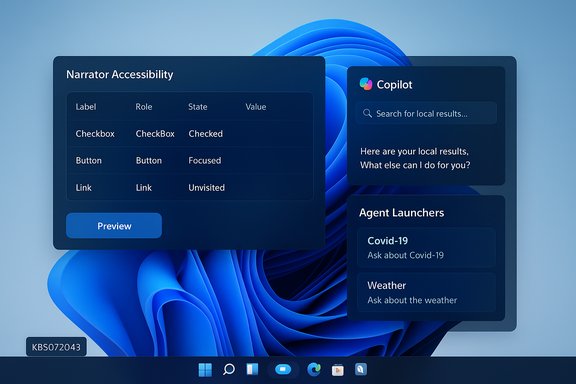
Microsoft has published a matched Insider preview update — Windows 11 Insider Preview Build 26220.7523 (KB5072043) — to the Dev and Beta channels, delivering a concentrated set of AI-first experiences (taskbar Ask Copilot, visible Agents, Agent Launchers), accessibility and input refinements, File Explorer collaboration cues, and a long list of reliability fixes and known issues as Microsoft continues to stage features for Windows 11, version 25H2.
Microsoft is shipping this release as part of the 26220.xxxx enablement-package line for Windows 11, version 25H2, and for a limited window it is offering the same build to both the Dev and Beta channels. That temporary parity creates a short opportunity for Dev-channel Insiders to switch to Beta without reinstalling while both channels remain matched; once Dev advances to a higher build, that channel-switch window closes. This parity-and-gating model means feature availability is often controlled server‑side and by device/account entitlements, so two devices on identical binaries can present different experiences.
The release continues Microsoft’s pattern of splitting updates into two buckets: (A) features rolled out gradually to Insiders who opt into “get the latest updates as they are available,” and (B) features made generally available to everyone in the channel. Expect staged visibility, hardware‑gating (for Copilot+ devices with NPUs), and region/license checks (notably some Copilot features exclude EEA/China initially).
Practical notes:
For testers and decision-makers, the right posture is cautious experimentation: evaluate Ask Copilot and agent behaviors on non‑production machines, map data flows to compliance requirements, validate audit and containment guarantees in the Agent Workspace, and plan for incremental deployment only after admin tooling and enterprise controls meet your risk thresholds. The architecture looks promising; whether it will deliver dependable, auditable agent automation at enterprise scale remains to be validated by real-world pilots and by the broader Windows ecosystem.
Acknowledgement: This article synthesizes Microsoft’s Insider release notes and documentation, along with independent reporting and community analyses, to provide a practical, critical rundown for Windows enthusiasts, IT professionals, and developers testing Build 26220.7523.
Source: Microsoft - Windows Insiders Blog Announcing Windows 11 Insider Preview Build 26220.7523 (Dev & Beta Channels)
 Background / Overview
Microsoft is shipping this release as part of the 26220.xxxx enablement-package line for Windows 11, version 25H2, and for a limited window it is offering the same build to both the Dev and Beta channels. That temporary parity creates a short opportunity for Dev-channel Insiders to switch to Beta without reinstalling while both channels remain matched; once Dev advances to a higher build, that channel-switch window closes. This parity-and-gating model means feature availability is often controlled server‑side and by device/account entitlements, so two devices on identical binaries can present different experiences.The release continues Microsoft’s pattern of splitting updates into two buckets: (A) features rolled out gradually to Insiders who opt into “get the latest updates as they are available,” and (B) features made generally available to everyone in the channel. Expect staged visibility, hardware‑gating (for Copilot+ devices with NPUs), and region/license checks (notably some Copilot features exclude EEA/China initially).
What arrived in Build 26220.7523 — quick summary
- Ask Copilot on the taskbar: an opt‑in taskbar composer that blends local search hits with Microsoft 365 Copilot chat, voice, and vision inputs; commercial rollout begins for U.S. customers with Microsoft 365 Copilot licenses.
- Agents on the taskbar: Agents (for example, Researcher) can run as visible, monitorable taskbar entities with hover previews and progress status. This is rolling out gradually to commercial Insiders in the U.S. with Copilot licenses.
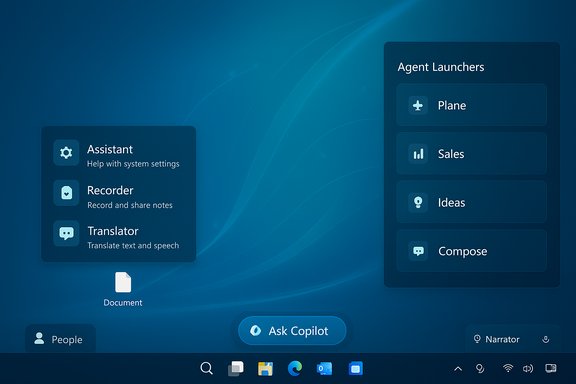
- Agent Launchers framework: a developer-facing API and registration system that lets apps register AI agents so they are discoverable across the OS — documented in Microsoft’s Agent Launchers guidance.
- Accessibility and input updates: deeper control for Narrator announcement order and properties, improved Voice Typing visuals (less intrusive animations), and Voice Access setup simplifications.
- File Explorer collaboration cues: people icons and a Windows People Card for consumer Microsoft accounts to show recent collaborators; hover/click yields quick actions like chat or call.
- Quality and reliability fixes: improvements to File Explorer search indexing, fixes for Adaptive Brightness after reboot, Windows Update error 0x800F0922 regression mitigation, and more.
- Known issues: several user‑impacting problems remain (Start menu not opening on click for some Insiders, taskbar autohide misbehavior, File Explorer context menu crashes for some users, Bluetooth battery reporting issues).
Ask Copilot on the taskbar — what it is and how it behaves
The user experience
Ask Copilot presents a compact taskbar pill that you can enable at Settings > Personalization > Taskbar > Ask Copilot. It’s designed as a hybrid surface:- Returns local search results (apps, files, settings) using existing Windows Search APIs, so basic discovery remains fast and local by default.
- Offers one‑click entry to Microsoft 365 Copilot chat and voice; you can type, speak, or attach a screen region for Vision inputs.
- Lets commercial users leverage their Work IQ context inside Copilot chats and agents when they have Microsoft 365 Copilot licenses; initial commercial rollouts are U.S.-gated.
Why Microsoft is doing this
Microsoft’s UI play is straightforward: put Copilot where users already look (the taskbar) to reduce friction for invoking AI and to make agents discoverable. The intent is to blur the line between search and conversational assistance so users can escalate from finding a file to asking Copilot to summarize or act on that content without app switching. The staged rollout approach reduces exposure while Microsoft gathers telemetry and feedback.Agents on the taskbar and the agentic OS vision
Agents as first-class taskbar citizens
This build surfaces agents (for example, Microsoft 365 Copilot’s Researcher or Analyst) as running entities on the taskbar. Key elements:- Agents show real‑time status and progress on hover cards, and notify when work completes.
- Agents can operate in the background and be monitored without taking over the user’s foreground session.
Agent Workspace and governance (high-level verification)
Microsoft’s broader agent architecture includes the Agent Workspace and agent accounts, designed to isolate agents from the primary user session, run them under low‑privilege accounts, and produce audit logs for actions. That design intent — sandboxed runtime + auditable agent accounts — is consistently represented across previews and documentation. However, full enterprise controls and policy surfaces are still maturing; admins should expect additional management tooling over time.Agent Launchers — the developer plumbing (verified)
Microsoft’s Agent Launchers framework provides a standardized way for applications to register AI agents so they are discoverable and invokable across Windows experiences (Ask Copilot, Search, Start, and other supporting contexts). The official Microsoft Learn documentation explains:- Agent Launchers are registered via an agent definition JSON and App Action declarations, and are retrievable via the On-Device Registry (ODR).
- Agents must expose an App Action accepting at least
agentNameandpromptentities; invoking the agent opens an interactive UI rather than running silently in the background.
Accessibility and input: meaningful improvements
This flight includes several accessibility-focused updates that affect daily use:- Narrator personalization: Users can now choose which properties Narrator announces for each control type and reorder or omit properties. That granular control makes screen‑reader output more relevant and efficient for power users. You can preview changes and reset to defaults.
- Voice typing: The touch keyboard’s voice typing leaves the full-screen overlay behind and shows animations directly on the dictation key, reducing visual distraction.
- Voice Access setup: A streamlined onboarding flow helps pick the correct speech model and microphone, lowering the barrier to try voice-driven control.
File Explorer and collaboration signals
For Microsoft accounts (consumer cloud), File Explorer now shows people icons in the Activity column and surfaces a lightweight Windows People Card (WPC) with context and actions (chat, call) when you hover or click. This brings consumer behavior closer to the enterprise Live Persona Card previously available for Entra ID accounts, aiming for a unified collaboration UX across personal and work profiles.Practical notes:
- This people context is visibility-only initially and surfaces quick collaboration actions through preferred apps; it’s not a file‑sharing enforcement mechanism.
- Some cloud provider integrations and recommended file surfaces are still being staged or temporarily disabled while Microsoft completes validation. Expect variability in what you see depending on controlled rollouts.
Quality fixes and notable reliability improvements
Several engineering fixes in this build address real-world pain points Insiders recently reported:- Eliminated duplicate file indexing passes to improve File Explorer search performance and reduce resource contention.
- Fixed an issue that could prevent OneDrive files from opening in RemoteApp sessions (error 0x80070057).
- Resolved instances of the login or lock screen becoming unresponsive; fixed Adaptive Brightness behavior after rebooting.
- Addressed Windows Update install failure regression (0x800F0922) that caused an uptick of update errors in recent flights.
Known issues worth flagging (practical impact)
Microsoft lists several known issues in the release notes. The most impactful:- Start menu sometimes not opening on click (works with Windows key). This can affect productivity and is under active investigation.
- Taskbar autohide may appear prematurely for some Insiders, interfering with bottom-screen interactions.
- Context menu in File Explorer may crash explorer.exe in some cases after the previous flight.
- Bluetooth device battery level reporting remains inconsistent on some machines.
Critical analysis — strengths, risks, and what to watch
Strengths and strategic intent
- Integrated discovery and action: Putting Ask Copilot in the taskbar reduces friction between search and AI‑driven actions; that could materially shorten common user workflows (summarize an email, extract a table, generate a draft) when the agent ecosystem matures.
- Developer-friendly agent model: Agent Launchers provide a single, documented integration path for third‑party agents. That standardization should reduce integration complexity for ISVs and encourage an ecosystem of action-capable assistants.
- Accessibility investments: Granular Narrator personalization and improved voice UI flows show attention to real user needs, not just marketing headlines.
Risks, unresolved questions, and operational concerns
- Privacy and data flow complexity: Even though Ask Copilot uses Windows Search APIs for local hits, any escalation to Microsoft 365 Copilot or agents that use cloud reasoning introduces complex data flows (Work IQ, tenant data, attachments). Organizations must map these flows and consider compliance, retention, and DLP implications. The blog’s high-level privacy notes are insufficient for enterprise risk modeling — treat them as an initial guide, not a full control map.
- Agent authority and actionability: Agents that can perform UI automation or take actions across apps raise new attack surfaces. The Agent Workspace and agent accounts are promising mitigations, but the security model (capability scoping, audit fidelity, admin controls) must be validated in the field before agencies, regulated enterprises, or security-conscious teams enable agentic features. Independent coverage has raised similar governance concerns.
- Controlled rollouts → fragmentation: The CFR model means inconsistent experiences across fleets, which complicates support and training. IT teams may see feature-dependent tickets they can’t reproduce because their test device didn’t get the server-side flag.
Where the feature set still needs work
- Management tooling for agents (policy controls, telemetry channels, SIEM integration) is nascent. Enterprises should expect incremental admin surfaces in later preview rings but assume early gaps when designing pilot plans.
- Usability consistency around taskbar agent grouping, grouping vs. separate icons, and hover card behavior is still experimental and may change based on Insider feedback.
Recommendations for IT teams and power users
- Limit Insider flights to test rings. Do not deploy these preview builds to production endpoints. Use a controlled test ring for functional validation and recovery testing.
- Map data flows for Copilot/agents. Before enabling Microsoft 365 Copilot or agent features, document what artifacts (files, screenshots, metadata) may leave the device or be processed in the cloud, and align with your org’s DLP and compliance policies.
- Validate agent least‑privilege behavior. Test what agents can access in the Agent Workspace and confirm that audit logs show clearly attributable actions before approving any agent for general use.
- Pilot with real workloads. Use realistic, department-specific tasks (e.g., finance report aggregation, legal redlines, marketing asset generation) to exercise agent behavior and verify outputs, error modes, and rollback semantics.
- Prepare support and training. Anticipate user questions about taskbar behavior, missing start menu clicks, and explorer quirks. Short cheat-sheets (workarounds: use WIN key to open Start; restart explorer.exe for transient issues) reduce nuisance tickets.
Quick troubleshooting tips for Insiders
- If Start doesn’t open on click, press the Windows key or use WIN + X to access menus while Microsoft issues a fix.
- If File Explorer behaves oddly after a flight, restart the explorer process or reboot; persistent problems may require restoring from a known good restore point.
- If Ask Copilot does not show expected agents or Copilot actions, confirm the Get the latest updates toggle under Settings > Windows Update and verify any Microsoft 365 Copilot license entitlements for your account.
What to expect next
Microsoft continues to expand agentic capabilities, refine the Ask Copilot and Agent Launchers experience, and iterate on governance and admin controls. The Agent Launchers documentation was updated in mid‑December and shows Microsoft is readying the developer surface for broader third‑party adoption, while independent reporting points to ongoing debates about Copilot’s readiness and adoption rates. Expect a phased enterprise rollout that will depend on regulatory reviews, admin tooling maturity, and real-world reliability data gathered from Insider telemetry.Final assessment
Build 26220.7523 is a decisive, platform-level step in Microsoft’s strategy to make Copilot and agents an integral part of the Windows experience. The core strengths are clear: tighter discovery, standardized agent integration via Agent Launchers, and meaningful accessibility improvements that improve the product for people who rely on assistive technologies. At the same time, the build amplifies the operational, privacy, and governance questions enterprises must answer before enabling agentic features broadly. The staged rollout and parity window give Insiders and IT teams a safe space to test, but they also create potential visibility gaps and support complexity that organizations should account for in pilot plans.For testers and decision-makers, the right posture is cautious experimentation: evaluate Ask Copilot and agent behaviors on non‑production machines, map data flows to compliance requirements, validate audit and containment guarantees in the Agent Workspace, and plan for incremental deployment only after admin tooling and enterprise controls meet your risk thresholds. The architecture looks promising; whether it will deliver dependable, auditable agent automation at enterprise scale remains to be validated by real-world pilots and by the broader Windows ecosystem.
Acknowledgement: This article synthesizes Microsoft’s Insider release notes and documentation, along with independent reporting and community analyses, to provide a practical, critical rundown for Windows enthusiasts, IT professionals, and developers testing Build 26220.7523.
Source: Microsoft - Windows Insiders Blog Announcing Windows 11 Insider Preview Build 26220.7523 (Dev & Beta Channels)